• Administrator
  •  
    Support Ukraine
    If you experience any problems with the forum (it is not visible, there is no way to post messages, or some functionality does not work), please let us know. If you have problems with registration or you did not receive confirmation letter, let us know and we will activate your account manually.
    If you get an "The submitted form was invalid. Try submitting again" error, delete cookies, then try again.
     

Create a QR Code and Sync to device that use zeppOS by using the Zepp app

This forum contains step by step guides, complete manuals and instructions.

Moderators: asoo, Internal error

User avatar
asoo
Posts: 2128
Joined: 03 Jan 2019, 01:48
Location: ͼͽ Thailand ͼͽ
Has thanked: 411 times
Been thanked: 2046 times

Create a QR Code and Sync to device that use zeppOS by using the Zepp app

Post by asoo »

The devices that can use this method are as follows:
- Amazfit Active
- Amazfit Active 2
- Amazfit Active 2 (Square)
- Amazfit Active Edge
- Amazfit Band 7
- Amazfit Balance
- Amazfit Balance 2
- Amazfit Bip 5
- Amazfit Bip 5 Unity
- Amazfit Bip 6
- Amazfit Cheetah
- Amazfit Cheetah Pro
- Amazfit Cheetah (Square)
- Amazfit Falcon
- Amazfit GTR 3
- Amazfit GTR 3 Pro
- Amazfit GTR 4
- Amazfit GTR mini
- Amazfit GTS 3
- Amazfit GTS 4
- Amazfit GTS 4 mini
- Amazfit T-Rex 2
- Amazfit T-Rex 3
- Amazfit T-Rex 3 Pro
- Amazfit T-Rex Ultra

And it is expected that other devices in the future will also use ZeppOS.
June 17, 2026
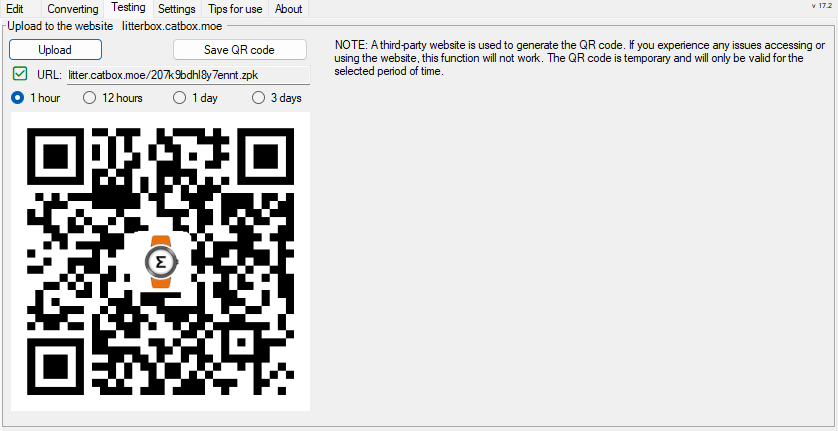
I'd like to update you on file uploading and QR code generation. In Editor Version 18.0 Final of Sasha's Watch Face Editor (for Amazfit watches on ZeppOS) now includes a feature to assist with file uploading and QR code generation for use APP Zepp to install with QR. This option greatly facilitates watch face creators who want to test their watch faces before publishing. Files are hosted on three platforms (littlebox (non-permanent), Filepost, GitHub).
For more information on how to use these features, please see in the program editor on following tabs:
Testing --> Get APIkey (FilePost.dev)
Testing --> instruction (GitHub)

Editor Version 18 also includes a feature for capture page of simulator , but I won't elaborate further here as it's not relevant to this topic. However, you can find more details in the program.
Preview
18.png
18.png (614.45 KiB) Viewed 2291 times


Method to upload your work via "amazfitwatchfaces"
I would like to inform additional news. ( 13-01-2024)
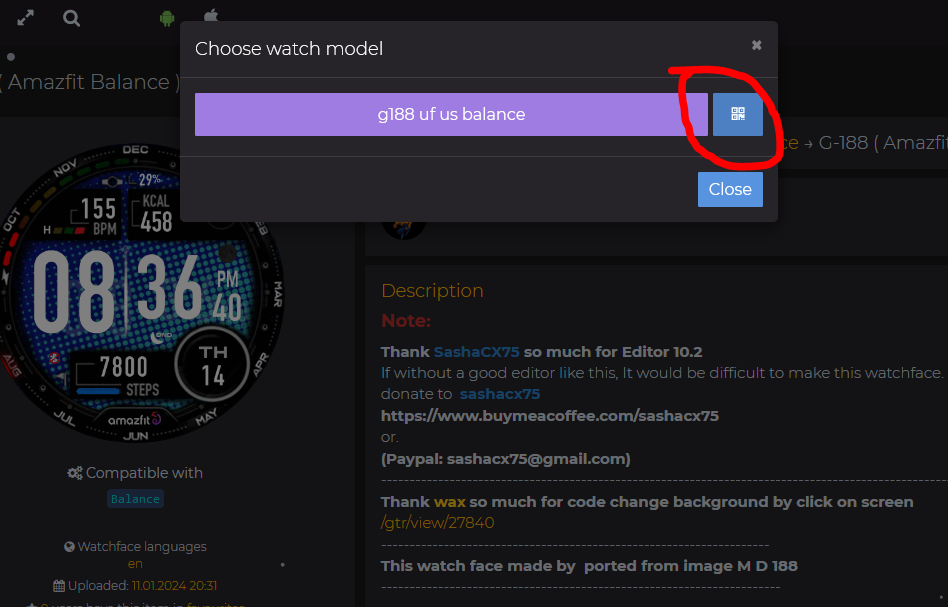
I noticed that https://amazfitwatchfaces.com Added a section for the "Amazfit Balance, GTR3 , GTR4 , GTS3/4 ..... and many more models that use ZeppOS" in the "File Download area". That add in section is a QR code that can be used with the Zepp App.

That means you just upload "watchface.zip" the watch face you want to the web and you will get a QR code ready to use with the Zepp App.
link to upload area : https://amazfitwatchfaces.com/upload
Youtube how to use zepp app
Enable Developer mode on App Zapp Version 9.12.1
devmode.png
devmode.png (221.84 KiB) Viewed 16547 times
Click on logo Zepp 7 times or more for Enable Developer mode
I have tested it and the QR code works well.
Spoiler
Image
Preview test use 9.15.2 install watchface to Bip6
PreviewAnimation2.gif
PreviewAnimation2.gif (2.56 MiB) Viewed 13620 times
Note :
Generating QR code for installation Once you generate it, the QR code will only be valid for a certain period of time and cannot be stored for long-term use. Therefore, if you have generated it for a long time, please refresh and re-generate it.
.


.
In the following section This is the step in creating a file to sync without going through the amazfitwatchfaces web. for use in personal testing There may be a number of steps that need to be understood. If you want simplicity, please use the method to upload your work via amazfitwatchfaces is the best

First of all, let me know that All these steps I have tested by myself. and actually works However, if there is any part that is incorrect, I apologize here.
Steps for creating a QR code for syncing the watch face to "Balance" or "ZeppOS Device" by using App Zepp in developer mode.

1. Take your dial.zip file and pack it in ZPK format.
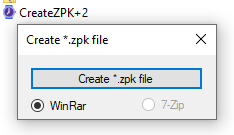
In this step you can use the program CreateZPK+2 in action
Download Program
Image
CreateZPK+2.zip
(48.39 KiB) Downloaded 1137 times
Before use Please install winrar or 7zip first
WinRAR :
https://www.rarlab.com/download.htm
7zip:
https://www.7-zip.org/download.html

ืNote :
The utility searches for WinRAR by the path "C:\Program Files/WinRAR/WinRAR.exe" and 7-Zip by the path "C:\Program Files/7-Zip/7z.exe". If you have a different path to the installed archiver, the utility will not see it.


if you do not want to install compress program please try this version
CreateZPK.zip
(90.62 KiB) Downloaded 1089 times
This program, if I remember correctly, was created by SashaCX75 thank you so much.
When opening the program, press [create .zpk] and select the dial.zip file that you want to pack as .zpk and press open.


When finished, you will get a .zpk file that is ready to be uploaded to hosting or a file hosting website that can be created or copied. Direct download url"

2. Then take the .zpk file and upload it to a file sharing or hosting website that can be done in zpkd1:// format.
In this case , I use pcloud.com to host files.
But the share link from the web will not be a "direct download url".
If you use pcloud.com, after uploading the file, you must download the file back first, and when the download is complete, copy the dowload link.
from your web browser, in this case I'm using Firefox once the download is complete. you can press ctrl+j to open the "library download" windows and right click on the desired file then select copy link.
Direct Download url obtained from pcloud.com will be valid for no more than 1 hour.
If the specified time is exceeded, repeat the process to create a new direct download.

Or you can use
permanent :
catbox.moe
storage time limit :
litterbox.catbox.moe
to upload the file
This website will generate a "Direct Download" URL for you.
The obtained URL can be used for processing. But someone say that in some regions some problems may be encountered. But from what I tested it can be used. and seems more convenient than pcloud.com

If you use hosting or another file hosting website, you may need to study and test this part yourself.

after upload take the "direct download" url and edit it to the format zpkd1://.
For example, if your "direct download" url is

Code: Select all

https://xxxx.com/watchface/xxxx.zpk
Let's edit it to

Code: Select all

zpkd1://xxxx.com/watchface/xxxx.zpk
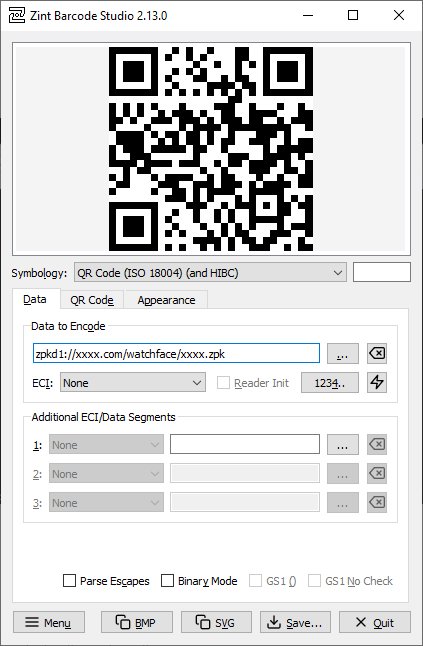
Then use this url to create a QR code to use to sync the watch face through the zepp app to your Device.
To create a QR code, you can use the program zint to do it.
You can download the program at
https://sourceforge.net/projects/zint/
Spoiler
Image
The QR code format that I use to create and tested it can use is
QR Code (ISO 18004) (and HTBC)
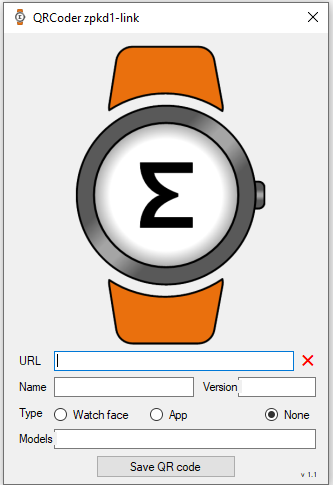
Alternatively, you can use the QR Code Generator program provided by SashaCX75 to create a QR Code for installation.
The advantage of this program is that it can instantly change the link
Http://................ to zpkd1://................ So, when you receive the link http://......, simply copy and paste it into the URL field and you'll instantly get a QR Code.
QRCode+zpkd1-link Version 1.1 by SashaCX75
Image
Note:
Some users reported that Windows Security detected the virus in QRCode+zpkd1-link Version 1.1.
But Sasha confirmed that it not a virus, and other antivirus programs didn't detect it as a virus.
I believe Windows Security might be sensitive to certain program activities. But I personally believe the program is safe.
However, if you're unsure, you can use another program to generate the QR code.
QRCoder+zpkd1-link1.1.zip
(217.3 KiB) Downloaded 334 times

A tool for uploading .zpk files to catbox and generating a QR code for installation in a single step.
( By taw_bip )
viewtopic.php?p=22191#p22191

A tool for uploading .zpk files to catbox and generating a QR code for installation in a single step with GUI.
viewtopic.php?p=22231#p22231
3. Then go to zepp and select your Device .
Then select the developer mode heading.
Developer Mode ( 24-08-2025 )
scanQRsmall.png
scanQRsmall.png (135.59 KiB) Viewed 17067 times
(If you are not found Developer mode in zepp, proceed to open it according to the url below.)
https://docs.zepp.com/docs/guides/faq/developer-mode/
or see this clip
https://www.youtube.com/shorts/68NRZxrU4AY
Enable Developer mode on App Zapp Version 9.12.1
devmode.png
devmode.png (221.84 KiB) Viewed 16547 times
Click on logo Zepp 7 times or more for Enable Developer mode

If you find Developer mode, proceed as follows.
- Press Device ( and select your Device )
- select General
- select Developer Mode
- Press the + sign in the top right corner.
- select SCAN
- Scan the QR code you created earlier.
Wait until the installation is completed. When finished, the watch face will be synced to the watch.

Sometimes the scan may not be successful, so try repeating it again, but if more than 4 times it still isn't successful, it means You may have done something wrong or the website you are using to store files may not support it. Or the QR Code you generated has expired, please try again.

Hopefully it will be useful for those who are looking for this method.

My Note :
When naming resource files, you should use normal characters. Do not use special characters when naming them because they may affect sync performance.
Last edited by asoo on 08 Jan 2026, 02:21, edited 35 times in total.
ͼͽ To request please use the interrelated forum in action ͼͽ
Please do not PM to me for requests ported watchface.
User avatar
GIK-Team
root
Posts: 1016
Joined: 22 Mar 2018, 10:00
Location: Ukraine
Has thanked: 1124 times
Been thanked: 267 times
Contact:

Post by GIK-Team »

mbmuch wrote: 04 Mar 2026, 09:57
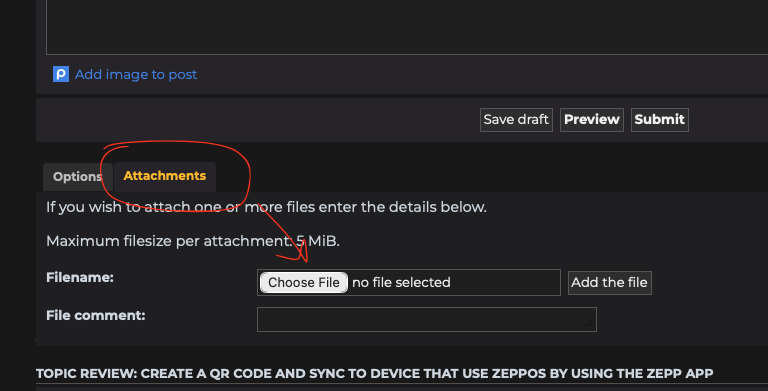
How can I attach my zip file here?
Spoiler
Image
"sometimes it's scary but it's still just you and me” — Leaving Laurel
User avatar
asoo
Posts: 2128
Joined: 03 Jan 2019, 01:48
Location: ͼͽ Thailand ͼͽ
Has thanked: 411 times
Been thanked: 2046 times

Post by asoo »

mbmuch wrote: 04 Mar 2026, 09:57
Ok, i tested it. But the QR don't work. I got the error message: "Parse mini program package failed" or "send package to device failed".
I'm lost.
What's wrong?
What can I do?
Can I test the Face before uploading?
Maybe someone can have a look.......
Cheers
Your problem is likely due to you naming your files using non-English characters.
Image
This causes an error when syncing.
Change the characters to English, and you should be able to sync normally.

This is a modified sample file.
minimalist_mbmuch_v2_t_rex_3_pro_48mm.zip
(305.42 KiB) Downloaded 122 times
This is a QR code for testing the installation.
QR Code for Synce
minim.png
minim.png (14.99 KiB) Viewed 4762 times
This QR use for proof , after rename with english charleter it can sync normally
Note:
This QR code links to Catbox. At certain times, if there are many users, the installation may be slow or may not work. Please try again later.
if you user "Watch face editor for Amazfit watch on ZeppOS" for create your watch face , I recommend you to update to Version 16.1 viewtopic.php?p=21837#p21837
Because this version when you pack watchface the program will be checks file names, and if it encounters any problems with the file name, the program will display a popup notification to you.
ͼͽ To request please use the interrelated forum in action ͼͽ
Please do not PM to me for requests ported watchface.
mbmuch
Posts: 5
Joined: 01 Feb 2026, 19:21
Location: Bonn
Has thanked: 5 times
Contact:

Post by mbmuch »

Man, you safed my day !!!
That's great, thank you very much!
Cheers mate :-)
taw_bip
WF maker
Posts: 130
Joined: 12 Apr 2018, 16:29
Has thanked: 127 times
Been thanked: 19 times
Contact:

Post by taw_bip »

On my Windows 11 laptop, I used Claude to code up an automation.
Setup (one time)
Install Python from python.org if you don't have it
Save zpk_to_qr.py and zpk_to_qr.bat to the same folder
Open a terminal in that folder and run:
pip install requests qrcode[pil]

Usage
Drag and drop any .zpk file onto zpk_to_qr.bat. It'll upload the file to catbox.moe and open a QR image you can scan directly in the Zepp app to install the watchface.
Attachments
zpk_to_qr.zip
(1.38 KiB) Downloaded 55 times
User avatar
asoo
Posts: 2128
Joined: 03 Jan 2019, 01:48
Location: ͼͽ Thailand ͼͽ
Has thanked: 411 times
Been thanked: 2046 times

Post by asoo »

taw_bip wrote: 08 May 2026, 18:00
On my Windows 11 laptop, I used Claude to code up an automation.
Setup (one time)
Install Python from python.org if you don't have it
Save zpk_to_qr.py and zpk_to_qr.bat to the same folder
Open a terminal in that folder and run:
pip install requests qrcode[pil]

Usage
Drag and drop any .zpk file onto zpk_to_qr.bat. It'll upload the file to catbox.moe and open a QR image you can scan directly in the Zepp app to install the watchface.
This is a useful tool.
However, users need to understand that the files are hosted on catbox's server, and sometimes, if there are many users, uploading and downloading may encounter issues. Therefore, when using this tool, you may need to consider the readiness of catbox as well.

I have created standalone ".exe" file from pyinstaller (zpk_to_qr.py) for those who do not want to install Python, by use original code from owner , So the code and content remain the same as the original.
zpk_to_qr.rar
(15.1 MiB) Downloaded 46 times
The usage method remains the same as the original.
You can use the command line or drag and drop the .zpk file onto the .exe file.
This file contains minor code modifications for use with litterbox,
which is catbox's non-permanent file hosting service, with file retention set for 1 hour.
zpk_to_QR_litterBox1h.rar
(15.1 MiB) Downloaded 55 times
Ideal for those who want to test dials and don't need to store them permanently.
Note:
In the future, if Catbox changes its API UPLOD, attached files may no longer work. And I will not modifications will be made if this occurs.
ͼͽ To request please use the interrelated forum in action ͼͽ
Please do not PM to me for requests ported watchface.
User avatar
SashaCX75
Posts: 820
Joined: 26 Oct 2019, 15:18
Location: Ukraine
Has thanked: 13 times
Been thanked: 1029 times
Contact:

Post by SashaCX75 »

asoo wrote: 09 May 2026, 03:05
This file contains minor code modifications for use with litterbox,
which is catbox's non-permanent file hosting service, with file retention set for 1 hour.
Thank you. For my purposes, using littlebox is a better option.
User avatar
SashaCX75
Posts: 820
Joined: 26 Oct 2019, 15:18
Location: Ukraine
Has thanked: 13 times
Been thanked: 1029 times
Contact:

Post by SashaCX75 »

asoo wrote: 09 May 2026, 03:05
This file contains minor code modifications for use with litterbox,
which is catbox's non-permanent file hosting service, with file retention set for 1 hour.
Have you tried changing the file retention period? Setting a time other than 1 hour?
User avatar
asoo
Posts: 2128
Joined: 03 Jan 2019, 01:48
Location: ͼͽ Thailand ͼͽ
Has thanked: 411 times
Been thanked: 2046 times

Post by asoo »

SashaCX75 wrote: 11 May 2026, 16:49
asoo wrote: 09 May 2026, 03:05
This file contains minor code modifications for use with litterbox,
which is catbox's non-permanent file hosting service, with file retention set for 1 hour.
Have you tried changing the file retention period? Setting a time other than 1 hour?
As far as I can check, `litter` has 4 values ​​for `time`:
"1h"
"12h"
"24h"
"72h"
I've made two for my own use, 1h and 24h.
I haven't tested the other time values ​​yet.

Litterbox 24h :
zpk_to_QR_litterBo24h.rar
(15.1 MiB) Downloaded 43 times
ͼͽ To request please use the interrelated forum in action ͼͽ
Please do not PM to me for requests ported watchface.
User avatar
asoo
Posts: 2128
Joined: 03 Jan 2019, 01:48
Location: ͼͽ Thailand ͼͽ
Has thanked: 411 times
Been thanked: 2046 times

Post by asoo »

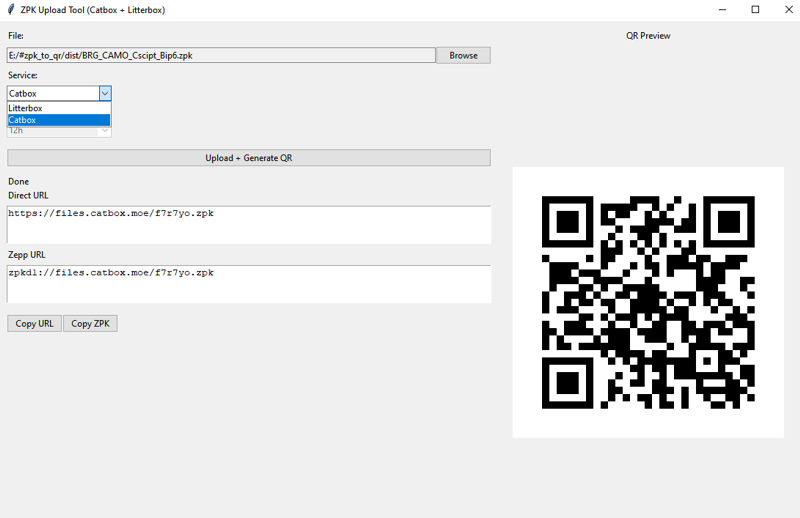
I've created a GUI to help upload to LitterBox and CatBox, and generated and displayed a QR code with a URL for user convenience.

I won't be making any further modifications. I've attached the code in Python; feel free to modify it if you wish.
This code uses the following libraries:
requests
qrcode
Pillow
Tkinter (included with most Python packages)

I've included a standalone executable (.exe) in the pack for those who don't want to install Python.

However, this program may not work immediately if CatBox changes its upload API.
If that happens, I will not take any further action.
Preview and Download
Image
gui_C_L.rar
(11.3 MiB) Downloaded 41 times

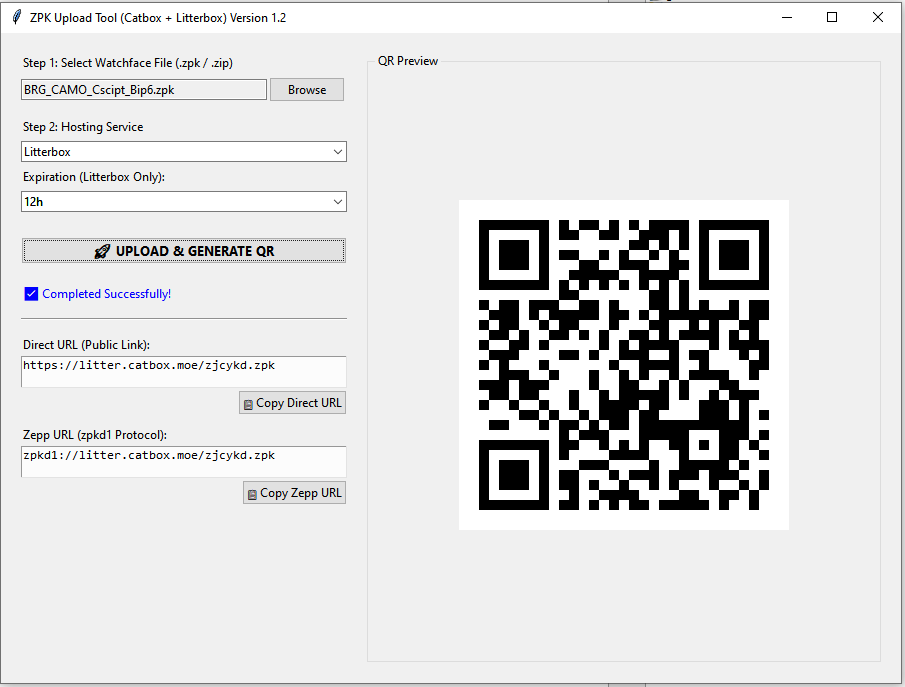
Update Version 1.2 ( Change layout and some function )
Image
gui_C_L_G_V1.2.rar
(11.3 MiB) Downloaded 46 times

The original code about upload is from taw_bip:
viewtopic.php?p=22191#p22191
ͼͽ To request please use the interrelated forum in action ͼͽ
Please do not PM to me for requests ported watchface.
User avatar
SashaCX75
Posts: 820
Joined: 26 Oct 2019, 15:18
Location: Ukraine
Has thanked: 13 times
Been thanked: 1029 times
Contact:

Post by SashaCX75 »

asoo wrote: 12 May 2026, 04:56
I've created a GUI to help upload to LitterBox and CatBox, and generated and displayed a QR code with a URL for user convenience.
I'm currently working on adding this function to the editor. I created a version of this function in C#, but it turned out to be a bit more complicated than I expected. The site's security system flagged me as a bot and returned an error regarding the link. However, I will only support LitterBox.

I can't fully test the version you posted. I have all the necessary dependencies installed, so your version should work without any issues. However, I'm not sure it will work for people who have never installed Python before. In any case, when I ran the first version of this utility on Python, it refused to work. It seems it was missing the “qrcode” library.
User avatar
asoo
Posts: 2128
Joined: 03 Jan 2019, 01:48
Location: ͼͽ Thailand ͼͽ
Has thanked: 411 times
Been thanked: 2046 times

Post by asoo »

SashaCX75 wrote: 12 May 2026, 14:08
I'm currently working on adding this function to the editor. I created a version of this function in C#, but it turned out to be a bit more complicated than I expected. The site's security system flagged me as a bot and returned an error regarding the link. However, I will only support LitterBox.

This is good news for those who are using your watchface editor.

SashaCX75 wrote: 12 May 2026, 14:08

I can't fully test the version you posted. I have all the necessary dependencies installed, so your version should work without any issues. However, I'm not sure it will work for people who have never installed Python before. In any case, when I ran the first version of this utility on Python, it refused to work. It seems it was missing the “qrcode” library.
For all the .exe files I've created to standalone, I've tested them on machines that have never had Python installed, and they work fine (I included the necessary libraries during the .exe creation process).
However, for .py files, if who want to use them via Python, you will need to install additional libraries:

Code: Select all

</> CMD
pip install requests qrcode pillow
ͼͽ To request please use the interrelated forum in action ͼͽ
Please do not PM to me for requests ported watchface.
User avatar
SashaCX75
Posts: 820
Joined: 26 Oct 2019, 15:18
Location: Ukraine
Has thanked: 13 times
Been thanked: 1029 times
Contact:

Post by SashaCX75 »

I still don't want to use Python code in my editor because the rest of the code is written in C#. Although I did manage to create a working function. But if anyone has any ideas on how to improve this, I'd appreciate the help.
taw_bip
WF maker
Posts: 130
Joined: 12 Apr 2018, 16:29
Has thanked: 127 times
Been thanked: 19 times
Contact:

Post by taw_bip »

asoo wrote: 12 May 2026, 04:56
I've created a GUI to help upload to LitterBox and CatBox, and generated and displayed a QR code with a URL for user convenience.

I won't be making any further modifications. I've attached the code in Python; feel free to modify it if you wish.
This code uses the following libraries:
requests
qrcode
Pillow
Tkinter (included with most Python packages)

I've included a standalone executable (.exe) in the pack for those who don't want to install Python.

However, this program may not work immediately if CatBox changes its upload API.
If that happens, I will not take any further action.
Preview and Download
Image
gui_C_L.rar
Update Version 1.2 ( Change layout and some function )
Image
gui_C_L_G_V1.2.rar

The original code about upload is from taw_bip:
viewtopic.php?p=22191#p22191
That's great. In the meantime, I adjusted mine to do the conversion from .zip to .zpk then perform the upload and QR code generation. I think if it gets integrated into the editor that would be amazing.
User avatar
SashaCX75
Posts: 820
Joined: 26 Oct 2019, 15:18
Location: Ukraine
Has thanked: 13 times
Been thanked: 1029 times
Contact:

Post by SashaCX75 »

Actually, this feature is already available in the editor. I’m just finishing off the styling, testing it, and creating the necessary files.
Spoiler
Image
User avatar
asoo
Posts: 2128
Joined: 03 Jan 2019, 01:48
Location: ͼͽ Thailand ͼͽ
Has thanked: 411 times
Been thanked: 2046 times

Post by asoo »

From my previous post:
viewtopic.php?p=22210#p22210
I've improved the app. You can now select catbox and littlebox, and use Filepost.dev for file uploads and to generate a QR code for installation.

I'd like to thank SashaCX75 for the information on filepost.dev.
If you want to use filepost.dev, you need to register as a member first to receive an API Key for uploading files.
The files you upload will never expire, and you can manage them through filepost.dev.
FilePost.DEV
Download and Preview
Capture.PNG
Capture.PNG (43.2 KiB) Viewed 3457 times
ZPK-Tool-Upload_V2.3.rar
(13.78 MiB) Downloaded 51 times
Update : if use filepost program will be check for the key field; a warning will appear if it's empty.
However, this program may not work immediately if CatBox and or Filepost changes its upload API.
If that happens, I will not take any further action.

Hopefully, this is another option before SashaCX75's new editor is released.
(This feature is already available in the beta version of the Watch face editor for Amazfit watches on ZeppOS.)
ͼͽ To request please use the interrelated forum in action ͼͽ
Please do not PM to me for requests ported watchface.
Post Reply

Return to “Manuals and instructions”

Who is online

Users browsing this forum: No registered users and 1 guest