Graphics editor for working with dials Amazfit
The editor supports watch faces from GTR 47, GTR 42, GTS, T-Rex, Verge Lite.
https://i.postimg.cc/PrMjngqJ/2020-09-14-19-39-23.png
Note: the path to the program should not contain spaces, it is advisable to unpack it to the root of the disk.
Not all ...
If you experience any problems with the forum (it is not visible, there is no way to post messages, or some functionality does not work), please let us know.
If you have problems with registration or you did not receive confirmation letter, let us know and we will activate your account manually.
If you get an "The submitted form was invalid. Try submitting again" error, delete cookies, then try again.
If you have problems with registration or you did not receive confirmation letter, let us know and we will activate your account manually.
If you get an "The submitted form was invalid. Try submitting again" error, delete cookies, then try again.
Search found 421 matches
- 17 Dec 2019, 17:06
- Jump to forum
- Jump to topic
- 19 Jan 2020, 09:54
- Jump to forum
- Jump to topic
Re: GTR_WatchFace editor for Windows by SashaCX75
If you want to improve the translation or add a translation into other languages, write in PM.
- 29 Jan 2020, 09:23
- Jump to forum
- Jump to topic
Re: GTR_WatchFace editor for Windows by SashaCX75
can be used for verge lite?
The editor is not designed for the verge lite screen size. The preview image may not be correct (especially for analog clock). But theoretically, he should collect dials for verge lite. To do this, on the first tab, replace "--gtr 47 --file" with "--vergelite --file".
- 30 Jan 2020, 13:34
- Jump to forum
- Jump to topic
Re: GTR_WatchFace editor for Windows by SashaCX75
Hi SashaCX75, I want ask you, which "main.exe" for decompile do you use in your program.
In the current version, the program will be used https://github.com/lolyinseo/py_amazfit_tools/commit/0570f92cc342a1887372ab079bbc0e094bd3b59d from 12.15.19 and "main.exe" made on its basis.
Future versions ...
- 02 Feb 2020, 19:55
- Jump to forum
- Jump to topic
Re: GTR_WatchFace editor for Windows by SashaCX75
It is advisable to unpack the program to the root of the disk.
If the bin file is not unpacked, then a folder with the file name should appear in the Watch_face folder. In it, you can look at the log file with errors.
If the bin file is not unpacked, then a folder with the file name should appear in the Watch_face folder. In it, you can look at the log file with errors.
- 04 Feb 2020, 19:11
- Jump to forum
- Jump to topic
Re: GTR_WatchFace editor for Windows by SashaCX75
New version of GTR/GTS WatchFace editor v6.0
List of changes (google translation)
Added support for shortcuts.
Added background image support for circular indicator.
Added display of a set of icons (segments) for the progress of steps.
Added display of a set of icons (segments) for the battery ...
List of changes (google translation)
Added support for shortcuts.
Added background image support for circular indicator.
Added display of a set of icons (segments) for the progress of steps.
Added display of a set of icons (segments) for the battery ...
- 19 Feb 2020, 16:55
- Jump to forum
- Jump to topic
Re: GTR_WatchFace editor for Windows by SashaCX75
The message "Unknown Watchface 16" appears when there are shortcuts in the project - do not pay attention.
You can reduce the project by reducing the number of pictures or out of the size in pixels. Disabling individual functions has virtually no effect on size.
You can reduce the project by reducing the number of pictures or out of the size in pixels. Disabling individual functions has virtually no effect on size.
- 19 Feb 2020, 17:59
- Jump to forum
- Jump to topic
Re: GTR_WatchFace editor for Windows by SashaCX75
Is there any other tips you suggest to reduce it?
The number of pictures to display the day of the week can be reduced to 7 (sometimes there are 21).
In addition to reducing the number of images and their size in pixels, I do not know other ways to reduce the file size. Trying to optimize PNG ...
- 24 Feb 2020, 19:07
- Jump to forum
- Jump to topic
Re: GTR_WatchFace editor for Windows by SashaCX75
1. Unpack the dial
2. In the section "Shortcuts" include the necessary
3. Save the json file
4. Pack the dial
5. In the folder with the unpacked dial you find the file name_packed_zip.bin or name_packed.bin and install it on the watch
- 27 Feb 2020, 15:06
- Jump to forum
- Jump to topic
Re: GTR_WatchFace editor for Windows by SashaCX75
[mention]rubiales41[/mention]
If I understand correctly, you need to move the clock hands from the center of the dial.
For this there is a parameter "Axis offset"
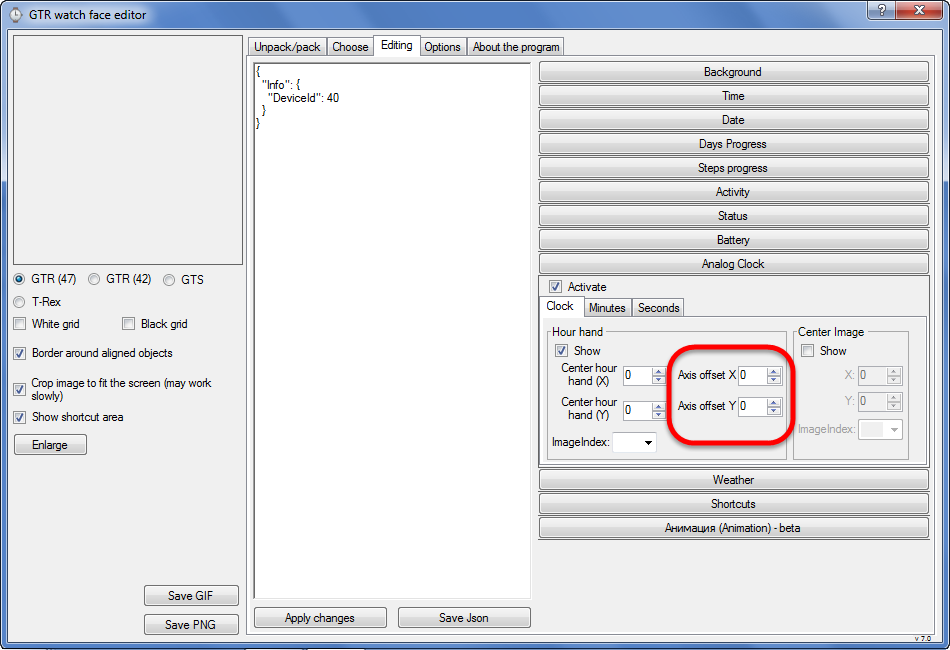
If I understand correctly, you need to move the clock hands from the center of the dial.
For this there is a parameter "Axis offset"
- 10 Mar 2020, 17:04
- Jump to forum
- Jump to topic
Re: GTR_WatchFace editor for Windows by SashaCX75
Download v6.2 here.[email protected] wrote: 10 Mar 2020, 00:05Who can provide a Chinese version download address for my Chinese friend, and can download it directly? Thank you
Or v7.0 beta with Chinese.
- 12 Mar 2020, 16:07
- Jump to forum
- Jump to topic
Re: GTR_WatchFace editor for Windows by SashaCX75
我已经翻墙下下来了,但是在表盘制作好以后不知道如何保存成手表能用的文件,谁能告诉我保存文件的步骤呢?麻烦了
I've come down the wall, but I don't know how to save the watch file after the dial is made. Who can tell me the steps to save the file? Sorry for the inconvenience
0. Unpack the existing dial or create a new one.
https://i.postimg.cc ...
- 29 Mar 2020, 08:15
- Jump to forum
- Jump to topic
Re: GTR_WatchFace editor for Windows by SashaCX75
Version 7.0
List of changes (Google Translate)
Added animation support
Verge Lite Support Added
Added the ability to quickly save the project (Ctrl + S)
Added support for languages (French, Chinese).
List of changes (Google Translate)
Added animation support
Verge Lite Support Added
Added the ability to quickly save the project (Ctrl + S)
Added support for languages (French, Chinese).
- 01 Apr 2020, 14:34
- Jump to forum
- Jump to topic
Re: GTR_WatchFace editor for Windows by SashaCX75
does the animation work for all watch (GTR,GTS,T-REX and Verge Lite)?
i tried for t-rex, it does show on the preview, but nothing on the watch after i applyed it..
GTR, GTS - animation works
T-REX - no information
Verge Lite - supposedly animation support appeared on the latest beta version of ...
- 03 Apr 2020, 15:50
- Jump to forum
- Jump to topic
Re: GTR_WatchFace editor for Windows by SashaCX75
unpack this .bin and see please, a simple wf
An interesting dial. Slightly reduced the pictures to make it work. You can reduce the image for preview and then there will probably be enough space to slightly increase the font for the date and battery.
https://i.postimg.cc/Bv0FCyj5/Preview.gif ...
- 03 Apr 2020, 18:41
- Jump to forum
- Jump to topic
Re: GTR_WatchFace editor for Windows by SashaCX75
Hi guys, is there any way to add a suffix image to the number of calories?
1. Can draw on the background
2. Before creating a bin file, manually add the parameter "CaloriesTextualIcon" to the json file.
Code example
"CaloriesTextualIcon": 46,
"Calories": {
"TopLeftX": 313,
"TopLeftY": 235 ...
- 06 Apr 2020, 12:18
- Jump to forum
- Jump to topic
- 14 Apr 2020, 14:15
- Jump to forum
- Jump to topic
Re: Complete Json Syntax Guide for GTR
[mention]taw_bip[/mention]
At the moment, the order of drawing elements cannot be changed.
At the moment, the order of drawing elements cannot be changed.
- 14 Apr 2020, 18:56
- Jump to forum
- Jump to topic
Re: GTR_WatchFace editor for Windows by SashaCX75
[mention]SnowMaker[/mention]
1. File numbers are not in order.
2. A picture with the name of the month is better divided into two blocks - the name of the month and the number of the month (this will reduce the size of the pictures and, accordingly, the file size).
3. The size of the pictures for ...
1. File numbers are not in order.
2. A picture with the name of the month is better divided into two blocks - the name of the month and the number of the month (this will reduce the size of the pictures and, accordingly, the file size).
3. The size of the pictures for ...
- 15 Apr 2020, 15:27
- Jump to forum
- Jump to topic
Re: GTR_WatchFace editor for Windows by SashaCX75
But cannot pack as "BIN" because your existing image is too large to store. If you pack , your "BIN" more than 1.5 mb, it will exceed the allowed size. ( T-Rex)
If you remove the animation and crop the unused part from the pictures, you can fit in 1.5 MB
https://drive.google.com/open?id ...
- 16 Apr 2020, 18:25
- Jump to forum
- Jump to topic
Re: GTR_WatchFace editor for Windows by SashaCX75
[mention]LoboGT[/mention]
Add day / night temperature (can be outside of the screen) and it will work.
https://drive.google.com/open?id=1g6TfF ... dtXzmBeweQ
Add day / night temperature (can be outside of the screen) and it will work.
https://drive.google.com/open?id=1g6TfF ... dtXzmBeweQ
- 21 Apr 2020, 16:32
- Jump to forum
- Jump to topic
Re: GTR_WatchFace editor for Windows by SashaCX75
Version 8.0
List of changes (Google Translate)
Added the ability to convert dials between different watch models (GTR / T-Rex / Verge Lite).
If you want to supplement the missing translation, write to the PM.
List of changes (Google Translate)
Added the ability to convert dials between different watch models (GTR / T-Rex / Verge Lite).
If you want to supplement the missing translation, write to the PM.
- 25 Apr 2020, 14:34
- Jump to forum
- Jump to topic
Re: GTR_WatchFace editor for Windows by SashaCX75
[mention]herve68[/mention]
Make sure that the path to json files does not contain spaces, the json file and png files must be in the same folder.
You could use (and select them in the editor) a fully transparent image for "0", and standard "1" and "2" images, just for the first digit in hours ...
Make sure that the path to json files does not contain spaces, the json file and png files must be in the same folder.
You could use (and select them in the editor) a fully transparent image for "0", and standard "1" and "2" images, just for the first digit in hours ...
- 30 Apr 2020, 16:01
- Jump to forum
- Jump to topic
Re: GTR_WatchFace editor for Windows by SashaCX75
For GTR and GTS, users have roughly determined the maximum possible size of their dials. For T-Rex and Verge Lite is no accurate data on what size dials can be installed. Therefore, for them I have set a limit as well as for the GTS 1,5MB. If someone has verified data on what maximum size of the ...