Here is a list of all the parameters related to training
SportAutoRecogScreen
SportCategoryListScreen
SportEditScreen
SportListScreen
SportPickerScreen
SportRecordListScreen
SportScreen
SportSettingAssistantScreen
SportSettingAutoLapScreen
SportSettingAutoPauseScreen
SportSettingBackScreen ...
If you experience any problems with the forum (it is not visible, there is no way to post messages, or some functionality does not work), please let us know.
If you have problems with registration or you did not receive confirmation letter, let us know and we will activate your account manually.
If you get an "The submitted form was invalid. Try submitting again" error, delete cookies, then try again.
If you have problems with registration or you did not receive confirmation letter, let us know and we will activate your account manually.
If you get an "The submitted form was invalid. Try submitting again" error, delete cookies, then try again.
Search found 438 matches
- 13 Feb 2024, 20:11
- Jump to forum
- Jump to topic
Re: Is image format for GTR/GTS 3/4 not Truevision_TGA (.tga) in fact?
Probably better to look at a newer version. But the general principles are the same. The format is based on TGA, but there are some differences (depending on the watch model).
https://github.com/SashaCX75/ImageToGTR3_v2
https://github.com/SashaCX75/ImageToGTR3_v2
- 04 May 2024, 11:35
- Jump to forum
- Jump to topic
Re: Where to get a unique app-id
When you create a watch face on https://watchface.zepp.com/designer, it is assigned an identifier. You can create an empty watch face and use its identifier in your projects. But I think just writing a random identifier is easier, and the probability of coincidence with an already existing one is ...
- 11 May 2024, 20:52
- Jump to forum
- Jump to topic
Re: Download Watch Faces to PC that are uploaded from the Zepp Store
Usually downloaded watch faces are saved in the folder /data/user/0/com.huami.watch.hmwatchmanager/files/watch_skin_local
You need root permission to access it. And not every programme can display files in this folder.
You need root permission to access it. And not every programme can display files in this folder.
- 04 Sep 2025, 14:00
- Jump to forum
- Jump to topic
Re: buttons don't work
In the new firmware, the World Time app is not part of the firmware but is installed as an external programme. Therefore, the path to launch it has changed. I think the same problem applies to Breathing.
I thought I had added new buttons in the latest version of the editor. But now I looked and it ...
I thought I had added new buttons in the latest version of the editor. But now I looked and it ...
- 04 Sep 2025, 14:09
- Jump to forum
- Jump to topic
Re: buttons don't work
For breathing appid: 1053484
And url can take the following values
"page/gt/home/index.page",
"page/gt/help/help.page",
"page/gt/result/result.page",
"page/gt/start/start.page",
"page/gt/select/select.page",
"page/gt/measure/measure.page",
"page/gt/setting/setting.page",
"page/gt/edit/edit ...
And url can take the following values
"page/gt/home/index.page",
"page/gt/help/help.page",
"page/gt/result/result.page",
"page/gt/start/start.page",
"page/gt/select/select.page",
"page/gt/measure/measure.page",
"page/gt/setting/setting.page",
"page/gt/edit/edit ...
- 08 Sep 2025, 18:05
- Jump to forum
- Jump to topic
Re: buttons don't work
Try the command
Code: Select all
hmApp.startApp({url: 'OfflineMapScreen', native: true });- 13 Jul 2026, 09:18
- Jump to forum
- Jump to topic
Re: Upcoming server migration and temporary service interruption
Update: The server migration has started
The migration process is now officially underway.
Please note that any data created or changed from this moment onward may not be transferred to the new server and may be lost. This includes forum posts, private messages, watch face uploads, account ...
The migration process is now officially underway.
Please note that any data created or changed from this moment onward may not be transferred to the new server and may be lost. This includes forum posts, private messages, watch face uploads, account ...
- 13 Jul 2026, 19:39
- Jump to forum
- Jump to topic
Re: Upcoming server migration and temporary service interruption
Update: The main maintenance work has been completed and the website is back online. However, we will continue working on the server and infrastructure over the next few days, so some temporary issues may still occur.
If you notice any errors, unusual behavior, or other problems with the website ...
If you notice any errors, unusual behavior, or other problems with the website ...
- 19 Jul 2026, 21:10
- Jump to forum
- Jump to topic
Re: Upcoming server migration and temporary service interruption
Update: We're still working on the migration.
The new server is running well, but as more users return, we're discovering a few unexpected issues that only appear in production. We're fixing them one by one to make sure everything is stable before we consider the migration fully complete.
Thank ...
The new server is running well, but as more users return, we're discovering a few unexpected issues that only appear in production. We're fixing them one by one to make sure everything is stable before we consider the migration fully complete.
Thank ...
- 03 Feb 2024, 22:29
- Jump to forum
- Jump to topic
Re: Edit watchface inside AmazFaces app permissions set on website?
Hey guys, in new update we have option to edit watchface (yeah in beta...) but not every author want option to edit he's work by others users... So maybe We (authors) should have option on website to enable / disable this option inside our watchfaces?
Thank you for reaching out and sharing your ...
- 11 Nov 2024, 10:14
- Jump to forum
- Jump to topic
Re: Verified watch face ✅
Guydu91 , Lattenknaller ,
Due to the ongoing war in our country, all verification processes and other site operations are significantly delayed. Many of our team members who handle these responsibilities are partially mobilized, which limits their ability to fully carry out these tasks, and there ...
Due to the ongoing war in our country, all verification processes and other site operations are significantly delayed. Many of our team members who handle these responsibilities are partially mobilized, which limits their ability to fully carry out these tasks, and there ...
- 04 Sep 2026, 23:42
- Jump to forum
- Jump to topic
Re: Unable to find WatchFace - GTR4
Hello,
It has been 3 years I have been using this watchface, my daughter reset my watch and I lost it.
https://i.postimg.cc/J7HhfcVS/Digital-Watch-Face-Amaz-Faces.jpg
I created this beautiful design for you based on your concept, I hope it will serve you well for the years to come. I used ...
- 07 Jun 2025, 05:20
- Jump to forum
- Jump to topic
Re: How do I upload my watch face made in Zepp Watchface?
When exporting from Zepp Watchface Maker, switch off all models except yours. Then there will be only one zpk file inside the resulting file. In this zpk file take device.zip, this will be your watch face. If you upload it to this site and install it on the watch using qr code, refresh the page ...
- 02 Mar 2026, 21:13
- Jump to forum
- Jump to topic
Re: i need your advice, How to remove qr code of watchface
is there any guide making "time-limited downloads or personal delivery per buyer"?
i have noticed when i create qr code with the "AW" app save it on my phone and use the zepp app to install it. and then i checked the qr code i send someone 1 month ago i rescan it and i get my new watchface i just ...
- 03 Mar 2026, 20:03
- Jump to forum
- Jump to topic
Re: i need your advice, How to remove qr code of watchface
There would be one option here, but it would probably be impractical – to index the appearance directly to the serial number of a specific user's watch, which would prevent copying of works.
It really doesn't seem practical. After all, in that case, you would have to compile a dial for each ...
- 17 Apr 2026, 22:07
- Jump to forum
- Jump to topic
Re: Add watch face to Zepp app or Watch Face in watch settings
It would be helpful to be able to add a watch face from this website to the Zepp app Watch Faces list so you don't have to scan the QR code to switch to it. The Zepp app shows the 5 watch faces I've chosen to have "on hand", but I don't see a way on the app or the watch to add one from ...
- 14 Jan 2024, 19:17
- Jump to forum
- Jump to topic
Re: Create QR Code and Sync "Balance" by use App Zepp
@SnakeAU
The utility searches for WinRAR by the path "C:\Program Files/WinRAR/WinRAR.exe" and 7-Zip by the path "C:\Program Files/7-Zip/7z.exe". If you have a different path to the installed archiver, the utility will not see it.
The utility searches for WinRAR by the path "C:\Program Files/WinRAR/WinRAR.exe" and 7-Zip by the path "C:\Program Files/7-Zip/7z.exe". If you have a different path to the installed archiver, the utility will not see it.
- 13 Dec 2024, 12:38
- Jump to forum
- Jump to topic
Re: Create a QR Code and Sync Amazfit Balance by using the Zepp app
@domenicopardo
No need to write in large font.
ZEPP V. 3.25.5.3 does not exist. The latest version is 9.2.2.
In the latest version of Zepp the developer mode is activated in the same way as in previous versions. In the application settings, click the application icon several times.
No need to write in large font.
ZEPP V. 3.25.5.3 does not exist. The latest version is 9.2.2.
In the latest version of Zepp the developer mode is activated in the same way as in previous versions. In the application settings, click the application icon several times.
- 08 May 2026, 18:00
- Jump to forum
- Jump to topic
Re: Create a QR Code and Sync to device that use zeppOS by using the Zepp app
On my Windows 11 laptop, I used Claude to code up an automation.
Setup (one time)
Install Python from python.org if you don't have it
Save zpk_to_qr.py and zpk_to_qr.bat to the same folder
Open a terminal in that folder and run:
pip install requests qrcode[pil]
Usage
Drag and drop any .zpk file ...
Setup (one time)
Install Python from python.org if you don't have it
Save zpk_to_qr.py and zpk_to_qr.bat to the same folder
Open a terminal in that folder and run:
pip install requests qrcode[pil]
Usage
Drag and drop any .zpk file ...
- 09 May 2026, 07:30
- Jump to forum
- Jump to topic
Re: Create a QR Code and Sync to device that use zeppOS by using the Zepp app
Thank you. For my purposes, using littlebox is a better option.asoo wrote: 09 May 2026, 03:05This file contains minor code modifications for use with litterbox,
which is catbox's non-permanent file hosting service, with file retention set for 1 hour.
- 12 May 2026, 14:08
- Jump to forum
- Jump to topic
Re: Create a QR Code and Sync to device that use zeppOS by using the Zepp app
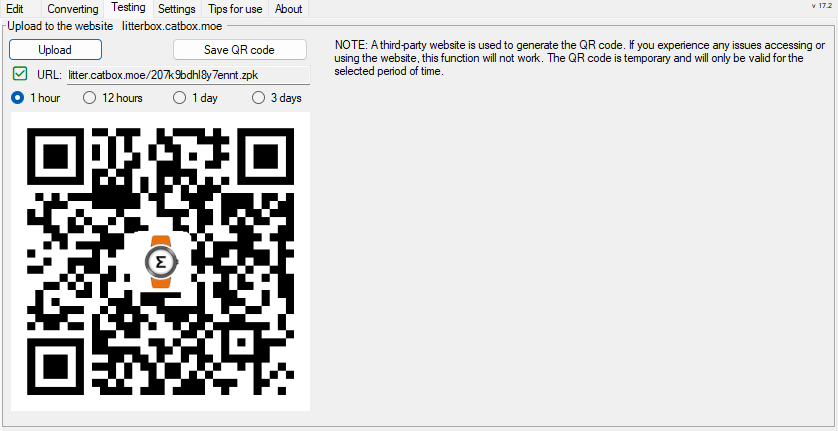
I've created a GUI to help upload to LitterBox and CatBox, and generated and displayed a QR code with a URL for user convenience.
I'm currently working on adding this function to the editor. I created a version of this function in C#, but it turned out to be a bit more complicated than I ...
- 12 May 2026, 15:42
- Jump to forum
- Jump to topic
Re: Create a QR Code and Sync to device that use zeppOS by using the Zepp app
I still don't want to use Python code in my editor because the rest of the code is written in C#. Although I did manage to create a working function. But if anyone has any ideas on how to improve this, I'd appreciate the help.
- 13 May 2026, 19:26
- Jump to forum
- Jump to topic
Re: Create a QR Code and Sync to device that use zeppOS by using the Zepp app
Actually, this feature is already available in the editor. I’m just finishing off the styling, testing it, and creating the necessary files.
Spoiler
- 31 Jul 2026, 12:28
- Jump to forum
- Jump to topic
Re: Create a QR Code and Sync to device that use zeppOS by using the Zepp app
@wjj1
You can open a ZPK file as a standard ZIP archive and view its structure.
The source code for the CreateZPK utility.
https://github.com/SashaCX75/CreateZPK_2
You can open a ZPK file as a standard ZIP archive and view its structure.
The source code for the CreateZPK utility.
https://github.com/SashaCX75/CreateZPK_2