• Administrador
  •  
    Support Ukraine
    If you experience any problems with the forum (it is not visible, there is no way to post messages, or some functionality does not work), please let us know. If you have problems with registration or you did not receive confirmation letter, let us know and we will activate your account manually.
    If you get an "The submitted form was invalid. Try submitting again" error, delete cookies, then try again.
     

Create a QR Code and Sync to device that use zeppOS by using the Zepp app

This forum contains step by step guides, complete manuals and instructions.

Moderadores: asoo, Internal error

Avatar do usuário
asoo
Mensagens: 2109
Registrado em: 03 Jan 2019, 01:48
Localização: ͼͽ Thailand ͼͽ
Has thanked: 404 times
Been thanked: 2023 times

Create a QR Code and Sync to device that use zeppOS by using the Zepp app

Mensagem por asoo »

The devices that can use this method are as follows:
- Amazfit Active
- Amazfit Active 2
- Amazfit Active 2 (Square)
- Amazfit Active Edge
- Amazfit Band 7
- Amazfit Balance
- Amazfit Balance 2
- Amazfit Bip 5
- Amazfit Bip 5 Unity
- Amazfit Bip 6
- Amazfit Cheetah
- Amazfit Cheetah Pro
- Amazfit Cheetah (Square)
- Amazfit Falcon
- Amazfit GTR 3
- Amazfit GTR 3 Pro
- Amazfit GTR 4
- Amazfit GTR mini
- Amazfit GTS 3
- Amazfit GTS 4
- Amazfit GTS 4 mini
- Amazfit T-Rex 2
- Amazfit T-Rex 3
- Amazfit T-Rex 3 Pro
- Amazfit T-Rex Ultra

And it is expected that other devices in the future will also use ZeppOS.

Method to upload your work via "amazfitwatchfaces"
I would like to inform additional news. ( 13-01-2024)
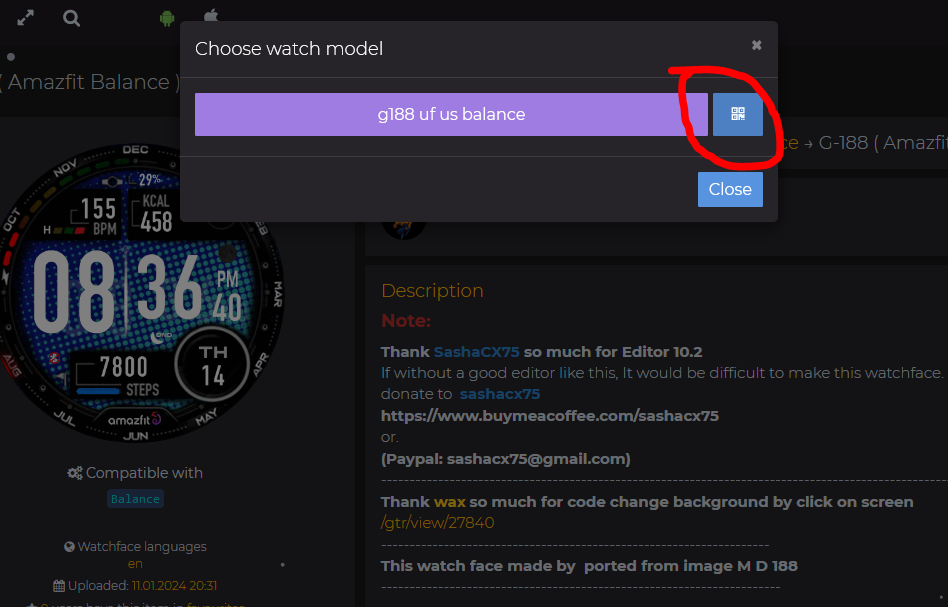
I noticed that https://amazfitwatchfaces.com Added a section for the "Amazfit Balance, GTR3 , GTR4 , GTS3/4 ..... and many more models that use ZeppOS" in the "File Download area". That add in section is a QR code that can be used with the Zepp App.

That means you just upload "watchface.zip" the watch face you want to the web and you will get a QR code ready to use with the Zepp App.
link to upload area : https://amazfitwatchfaces.com/upload
Youtube how to use zepp app
Enable Developer mode on App Zapp Version 9.12.1
devmode.png
devmode.png (221.84 KiB) Exibido 13481 vezes
Click on logo Zepp 7 times or more for Enable Developer mode
I have tested it and the QR code works well.
Spoiler
Imagem
Preview test use 9.15.2 install watchface to Bip6
PreviewAnimation2.gif
PreviewAnimation2.gif (2.56 MiB) Exibido 10554 vezes
Note :
Generating QR code for installation Once you generate it, the QR code will only be valid for a certain period of time and cannot be stored for long-term use. Therefore, if you have generated it for a long time, please refresh and re-generate it.
.


.
In the following section This is the step in creating a file to sync without going through the amazfitwatchfaces web. for use in personal testing There may be a number of steps that need to be understood. If you want simplicity, please use the method to upload your work via amazfitwatchfaces is the best

First of all, let me know that All these steps I have tested by myself. and actually works However, if there is any part that is incorrect, I apologize here.
Steps for creating a QR code for syncing the watch face to "Balance" or "ZeppOS Device" by using App Zepp in developer mode.

1. Take your dial.zip file and pack it in ZPK format.
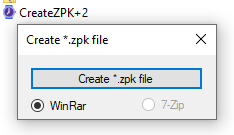
In this step you can use the program CreateZPK+2 in action
Download Program
Imagem
CreateZPK+2.zip
(48.39 KiB) Baixado 1098 vezes
Before use Please install winrar or 7zip first
WinRAR :
https://www.rarlab.com/download.htm
7zip:
https://www.7-zip.org/download.html

ืNote :
The utility searches for WinRAR by the path "C:\Program Files/WinRAR/WinRAR.exe" and 7-Zip by the path "C:\Program Files/7-Zip/7z.exe". If you have a different path to the installed archiver, the utility will not see it.


if you do not want to install compress program please try this version
CreateZPK.zip
(90.62 KiB) Baixado 1048 vezes
This program, if I remember correctly, was created by SashaCX75 thank you so much.
When opening the program, press [create .zpk] and select the dial.zip file that you want to pack as .zpk and press open.


When finished, you will get a .zpk file that is ready to be uploaded to hosting or a file hosting website that can be created or copied. Direct download url"

2. Then take the .zpk file and upload it to a file sharing or hosting website that can be done in zpkd1:// format.
In this case , I use pcloud.com to host files.
But the share link from the web will not be a "direct download url".
If you use pcloud.com, after uploading the file, you must download the file back first, and when the download is complete, copy the dowload link.
from your web browser, in this case I'm using Firefox once the download is complete. you can press ctrl+j to open the "library download" windows and right click on the desired file then select copy link.
Direct Download url obtained from pcloud.com will be valid for no more than 1 hour.
If the specified time is exceeded, repeat the process to create a new direct download.

Or you can use
permanent :
catbox.moe
storage time limit :
litterbox.catbox.moe
to upload the file
This website will generate a "Direct Download" URL for you.
The obtained URL can be used for processing. But someone say that in some regions some problems may be encountered. But from what I tested it can be used. and seems more convenient than pcloud.com

If you use hosting or another file hosting website, you may need to study and test this part yourself.

after upload take the "direct download" url and edit it to the format zpkd1://.
For example, if your "direct download" url is

Código: Selecionar todos

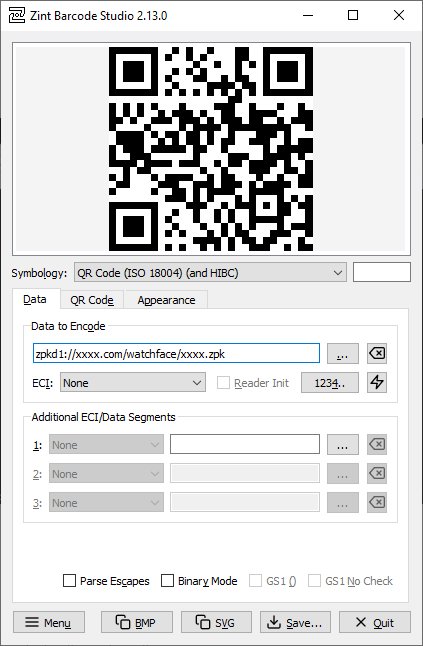
https://xxxx.com/watchface/xxxx.zpk
Let's edit it to

Código: Selecionar todos

zpkd1://xxxx.com/watchface/xxxx.zpk
Then use this url to create a QR code to use to sync the watch face through the zepp app to your Device.
To create a QR code, you can use the program zint to do it.
You can download the program at
https://sourceforge.net/projects/zint/
Spoiler
Imagem
The QR code format that I use to create and tested it can use is
QR Code (ISO 18004) (and HTBC)
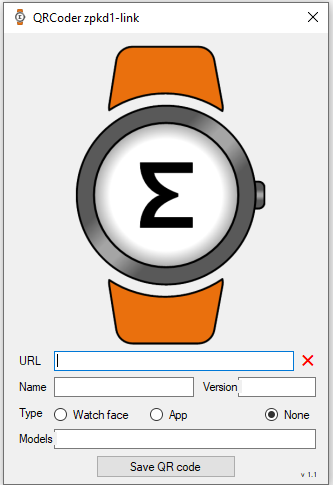
Alternatively, you can use the QR Code Generator program provided by SashaCX75 to create a QR Code for installation.
The advantage of this program is that it can instantly change the link
Http://................ to zpkd1://................ So, when you receive the link http://......, simply copy and paste it into the URL field and you'll instantly get a QR Code.
QRCode+zpkd1-link Version 1.1 by SashaCX75
Imagem
Note:
Some users reported that Windows Security detected the virus in QRCode+zpkd1-link Version 1.1.
But Sasha confirmed that it not a virus, and other antivirus programs didn't detect it as a virus.
I believe Windows Security might be sensitive to certain program activities. But I personally believe the program is safe.
However, if you're unsure, you can use another program to generate the QR code.
QRCoder+zpkd1-link1.1.zip
(217.3 KiB) Baixado 295 vezes

A tool for uploading .zpk files to catbox and generating a QR code for installation in a single step.
( By taw_bip )
viewtopic.php?p=22191#p22191

A tool for uploading .zpk files to catbox and generating a QR code for installation in a single step with GUI.
viewtopic.php?p=22231#p22231
3. Then go to zepp and select your Device .
Then select the developer mode heading.
Developer Mode ( 24-08-2025 )
scanQRsmall.png
scanQRsmall.png (135.59 KiB) Exibido 14001 vezes
(If you are not found Developer mode in zepp, proceed to open it according to the url below.)
https://docs.zepp.com/docs/guides/faq/developer-mode/
or see this clip
https://www.youtube.com/shorts/68NRZxrU4AY
Enable Developer mode on App Zapp Version 9.12.1
devmode.png
devmode.png (221.84 KiB) Exibido 13481 vezes
Click on logo Zepp 7 times or more for Enable Developer mode

If you find Developer mode, proceed as follows.
- Press Device ( and select your Device )
- select General
- select Developer Mode
- Press the + sign in the top right corner.
- select SCAN
- Scan the QR code you created earlier.
Wait until the installation is completed. When finished, the watch face will be synced to the watch.

Sometimes the scan may not be successful, so try repeating it again, but if more than 4 times it still isn't successful, it means You may have done something wrong or the website you are using to store files may not support it. Or the QR Code you generated has expired, please try again.

Hopefully it will be useful for those who are looking for this method.

My Note :
When naming resource files, you should use normal characters. Do not use special characters when naming them because they may affect sync performance.
Editado pela última vez por asoo em 08 Jan 2026, 02:21, em um total de 35 vezes.
ͼͽ To request please use the interrelated forum in action ͼͽ
Please do not PM to me for requests ported watchface.
SnakeAU
Mensagens: 2
Registrado em: 03 Jan 2024, 14:54
Localização: Perth
Has thanked: 1 time
Contato:

Mensagem por SnakeAU »

CreateZPK+2 opens but everything is greyed out, any reason this would occur?
Imagem
Avatar do usuário
BigBlind68
Mensagens: 25
Registrado em: 28 Set 2023, 09:00
Localização: Netherlands
Has thanked: 4 times
Been thanked: 4 times
Contato:

Mensagem por BigBlind68 »

SnakeAU escreveu: 12 Jan 2024, 06:24
CreateZPK+2 opens but everything is greyed out, any reason this would occur?
Imagem
You have WinRar or 7-Zip on your PC?
Amazfit Balance Sunset Grey | iPhone X iOS 16.7 | ZEPP OS 3.0 | Software 3.14.1.3
Avatar do usuário
asoo
Mensagens: 2109
Registrado em: 03 Jan 2019, 01:48
Localização: ͼͽ Thailand ͼͽ
Has thanked: 404 times
Been thanked: 2023 times

Mensagem por asoo »

SnakeAU escreveu: 12 Jan 2024, 06:24
CreateZPK+2 opens but everything is greyed out, any reason this would occur?
Imagem
Please install winrar or 7zip on your PC

WinRAR :
https://www.rarlab.com/download.htm
7zip:
https://www.7-zip.org/download.html
OR if you do not want to install compress program please try this :
Spoiler
CreateZPK.zip
(90.62 KiB) Baixado 514 vezes
ͼͽ To request please use the interrelated forum in action ͼͽ
Please do not PM to me for requests ported watchface.
Avatar do usuário
asoo
Mensagens: 2109
Registrado em: 03 Jan 2019, 01:48
Localização: ͼͽ Thailand ͼͽ
Has thanked: 404 times
Been thanked: 2023 times

Mensagem por asoo »

I would like to inform additional news.
I noticed that https://amazfitwatchfaces.com Added a section for the "Amazfit Balance" "File Download". That add in section is a QR code that can be used with the Zepp App.

That means you just upload the watch face you want to the web and you will get a QR code ready to use with the Zepp App.

I have tested it and the QR code works well.
Spoiler
Imagem
ͼͽ To request please use the interrelated forum in action ͼͽ
Please do not PM to me for requests ported watchface.
SnakeAU
Mensagens: 2
Registrado em: 03 Jan 2024, 14:54
Localização: Perth
Has thanked: 1 time
Contato:

Mensagem por SnakeAU »

BigBlind68 escreveu: 12 Jan 2024, 10:23
SnakeAU escreveu: 12 Jan 2024, 06:24
CreateZPK+2 opens but everything is greyed out, any reason this would occur?
Imagem
You have WinRar or 7-Zip on your PC?
I do have it installed, but still greyed out, I will try the other app.
Avatar do usuário
asoo
Mensagens: 2109
Registrado em: 03 Jan 2019, 01:48
Localização: ͼͽ Thailand ͼͽ
Has thanked: 404 times
Been thanked: 2023 times

Mensagem por asoo »

SnakeAU escreveu: 13 Jan 2024, 05:35
BigBlind68 escreveu: 12 Jan 2024, 10:23
SnakeAU escreveu: 12 Jan 2024, 06:24
CreateZPK+2 opens but everything is greyed out, any reason this would occur?
Imagem
You have WinRar or 7-Zip on your PC?
I do have it installed, but still greyed out, I will try the other app.
I am not sure why installed it's will not work for you
I tested, if I uninstall winrar and open program it will be gray ( can not use )
But after install winrar and open again it will be use normally
ͼͽ To request please use the interrelated forum in action ͼͽ
Please do not PM to me for requests ported watchface.
Avatar do usuário
SashaCX75
Mensagens: 812
Registrado em: 26 Out 2019, 15:18
Localização: Ukraine
Has thanked: 13 times
Been thanked: 1007 times
Contato:

Mensagem por SashaCX75 »

@SnakeAU
The utility searches for WinRAR by the path "C:\Program Files/WinRAR/WinRAR.exe" and 7-Zip by the path "C:\Program Files/7-Zip/7z.exe". If you have a different path to the installed archiver, the utility will not see it.
Max88
WF maker
Mensagens: 21
Registrado em: 30 Mai 2019, 17:54
Localização: Italia
Has thanked: 13 times
Contato:

Mensagem por Max88 »

Just as info for other users.
Although this thread mentioned only balance model, I have tried to reproduce the steps of the guide also for Amazfit Active.
It works.

I have previously downloaded a watchface for Gts 4, converted it for Active with Sasha tool and then I have followed this guide to create the QR code to use trhough Zepp app.

Thanks guys
Hispanico957
Mensagens: 0
Registrado em: 10 Fev 2023, 21:42
Localização: Rimini
Contato:

Mensagem por Hispanico957 »

YESSSSSSSSSS YOU ARE GREAT

THANK
KIRA
Vegastar
Mensagens: 2
Registrado em: 11 Fev 2024, 23:07
Localização: Italia
Contato:

Mensagem por Vegastar »

BRUH! You are awesome!
With this method I managed to add converted watchfaces on Amazfit Active!
Thank you!!
Sejra
Mensagens: 0
Registrado em: 09 Set 2024, 10:04
Localização: Copenhagen
Has thanked: 1 time
Contato:

Mensagem por Sejra »

Can some one explain the contents of the ZPK file? Or possibly share some example `dial.zip` and `dial.zpk` so that I can check myself?

I would assume ZPK stands for ZPack compression algorithm. There are other tools (GitHub...), which I could possibly use to repack ZIP to ZPK.

P.S. The utility ZPK+2.exe or ZPK.exe do not work for me. I have only Win 7 32bit. 7-Zip is installed in C:\Program Files and it seems to be recognised by ZPK+2.exe program as it offers 7-Zip bullet option in the GUI.

The error is:

Código: Selecionar todos

```
************** Exception Text **************
System.IO.FileNotFoundException: Could not load file or assembly 'System.IO.Compression, Version=4.2.0.0, Culture=neutral, PublicKeyToken=b77a5c561934e089' or one of its dependencies. The system cannot find the file specified.
File name: 'System.IO.Compression, Version=4.2.0.0, Culture=neutral, PublicKeyToken=b77a5c561934e089'
   at CreateZPK_2.Form1.CreateZPK(String fullFileName)
   at CreateZPK_2.Form1.button_Create_Zpk_Click(Object sender, EventArgs e)
   at System.Windows.Forms.Control.OnClick(EventArgs e)
   at System.Windows.Forms.Button.OnClick(EventArgs e)
   at System.Windows.Forms.Button.OnMouseUp(MouseEventArgs mevent)
   at System.Windows.Forms.Control.WmMouseUp(Message& m, MouseButtons button, Int32 clicks)
   at System.Windows.Forms.Control.WndProc(Message& m)
   at System.Windows.Forms.ButtonBase.WndProc(Message& m)
   at System.Windows.Forms.Button.WndProc(Message& m)
   at System.Windows.Forms.Control.ControlNativeWindow.OnMessage(Message& m)
   at System.Windows.Forms.Control.ControlNativeWindow.WndProc(Message& m)
   at System.Windows.Forms.NativeWindow.Callback(IntPtr hWnd, Int32 msg, IntPtr wparam, IntPtr lparam)

```
EDIT: Okay, got the ZPK.exe working - I can convert the ZIP to ZPK now - the error was due to a missing dependency of Microsoft .NET.
Editado pela última vez por Sejra em 09 Set 2024, 10:45, em um total de 1 vez.
domenicopardo
WF maker
Mensagens: 38
Registrado em: 04 Set 2021, 18:09
Localização: Bologna
Contato:

Mensagem por domenicopardo »

Amazfit Balance and Zepp on Android

ZEPP V. 3.25.5.3 for Android does not allow access to Developer Mode. How to install Watchface by scanning the QR Code ?
Avatar do usuário
SashaCX75
Mensagens: 812
Registrado em: 26 Out 2019, 15:18
Localização: Ukraine
Has thanked: 13 times
Been thanked: 1007 times
Contato:

Mensagem por SashaCX75 »

@domenicopardo
No need to write in large font.
ZEPP V. 3.25.5.3 does not exist. The latest version is 9.2.2.
In the latest version of Zepp the developer mode is activated in the same way as in previous versions. In the application settings, click the application icon several times.
domenicopardo
WF maker
Mensagens: 38
Registrado em: 04 Set 2021, 18:09
Localização: Bologna
Contato:

Mensagem por domenicopardo »

, I made a mistake. Problem solved
Dimitry
Mensagens: 1
Registrado em: 27 Dez 2024, 17:52
Localização: London
Contato:

Mensagem por Dimitry »

Hello everyone,
Amazfit Balance and zepp on Android.
I create a watchface using zepp watchface maker and i am able to download it on m'y watch using tCreateZPK+2 , PCCloud and zint .
But if i modify the code just by adding an import

Código: Selecionar todos

 import Colors from "../../utils/config/constants"; 
to another file which contain constant with color définition:

Código: Selecionar todos

 export const Colors = {
    default:0xfc6950,
    defaultTransparent:0xababab,
    white:0xffffff,
    black:0x000000,
    bgHigh:0xffa0a0,
    bgLow:0x8bbbff,
    accent:0xffbeff37
};

( i'm not even use this color in m'y index.js for now) the watchface can be donwloaded but the screen stay black without nothing display on it.
Do you have an Idea why just this import made the screen black ?
Avatar do usuário
SashaCX75
Mensagens: 812
Registrado em: 26 Out 2019, 15:18
Localização: Ukraine
Has thanked: 13 times
Been thanked: 1007 times
Contato:

Mensagem por SashaCX75 »

You are trying to go 2 levels higher in the folder structure. What folder do you think the link ../../ should point to? You should probably change it to

Código: Selecionar todos

import Colors from "./../utils/config/constants";
or

Código: Selecionar todos

import Colors from "../utils/config/constants";
Dimitry
Mensagens: 1
Registrado em: 27 Dez 2024, 17:52
Localização: London
Contato:

Mensagem por Dimitry »

Hello SashaCX75 thanks for your answer.
My index.js file is in watchface/default-target/ directory.
So for me if i go up 2 level higher. i will go here :
Spoiler
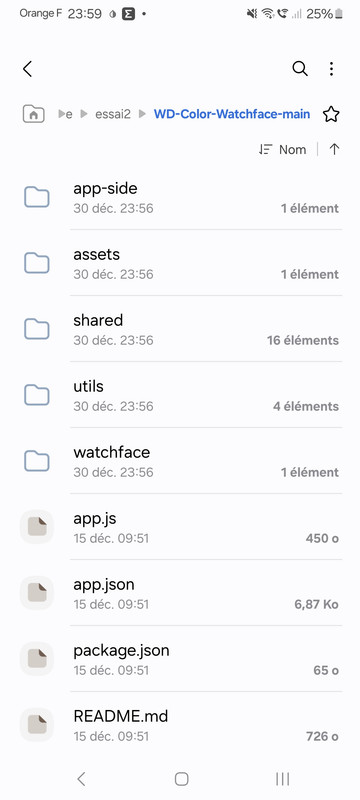
Imagem
So for me i need to go 2 level higher. I try to modify it and even to put thé file in thé same folder with :

Código: Selecionar todos

 import Colors from "./constants"; 
and i have the same issue
Avatar do usuário
SashaCX75
Mensagens: 812
Registrado em: 26 Out 2019, 15:18
Localização: Ukraine
Has thanked: 13 times
Been thanked: 1007 times
Contato:

Mensagem por SashaCX75 »

@Dimitry
1. Set the ‘mode’ parameter in the ‘packageInfo’ section of the app.json file to ‘development’. Then you will be able to look at the logs and it may become clear what the error is.

Código: Selecionar todos

"mode": "development",
2. Try to run the watch face in the ZeppPlayer simulator. There you can also look at logs and debug the code in the watch face. But not all functions work.
3. Reassemble the watch face in Zeus and debug it in the official editor.
UlliT.
Mensagens: 7
Registrado em: 05 Set 2025, 03:49
Localização: Glandorf
Contato:

Mensagem por UlliT. »

Thanks for your help to get my first watchface on my amazfit active 2.
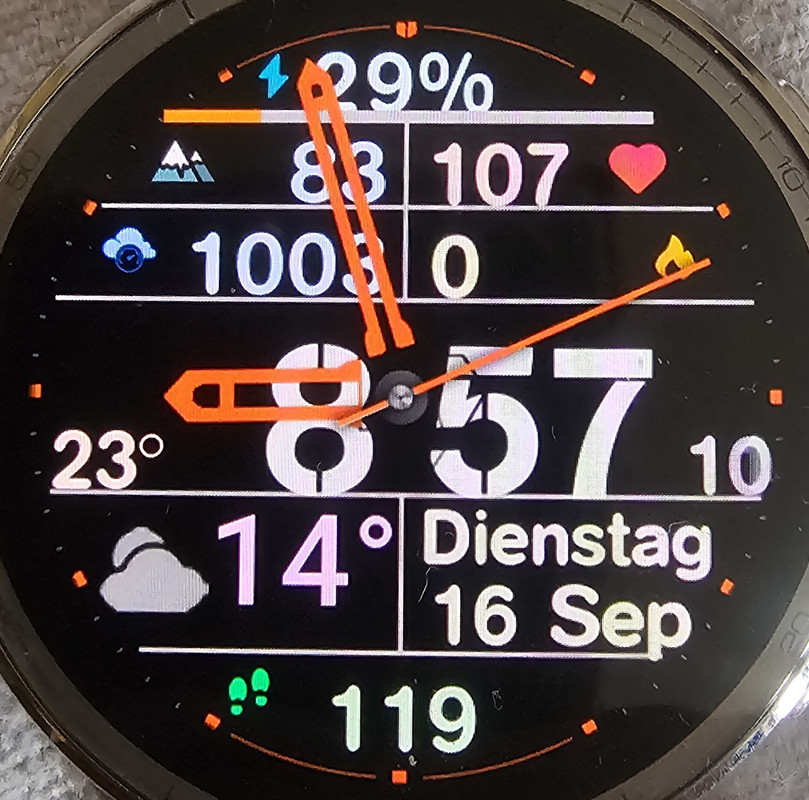
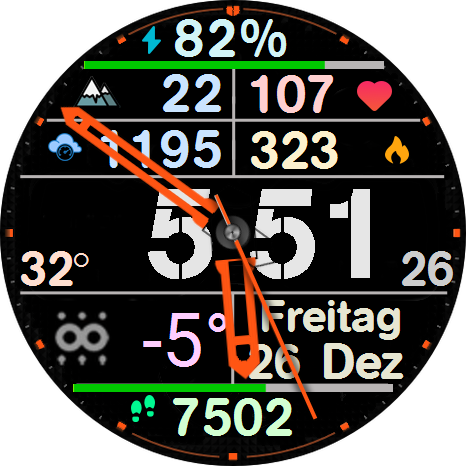
I like many information in bigger digits so i can read it without glasses..
I am happy to get the altitude and the sensor-temperature working.
The battery bar seems to be wrong - t

But there are two issues left:

- the position of all most texts is wrong (different to the editor)
- the step bar at the bottom is missing

the text positions i can easily change, but that seems to be a issue in the watchface editor.
because the missing step bar, i have no idea....

Ulli
Spoiler
Imagem

Imagem
al0o0z
Mensagens: 1
Registrado em: 20 Nov 2025, 00:23
Localização: Dhaka
Has thanked: 9 times
Contato:

Mensagem por al0o0z »

Can anyone please help on how to get the .bin file of a watch face from amazfaces that I make some edits or oort for my watch?
Thanks in advance for your help.
Avatar do usuário
asoo
Mensagens: 2109
Registrado em: 03 Jan 2019, 01:48
Localização: ͼͽ Thailand ͼͽ
Has thanked: 404 times
Been thanked: 2023 times

Mensagem por asoo »

al0o0z escreveu: 22 Nov 2025, 23:23
Can anyone please help on how to get the .bin file of a watch face from amazfaces that I make some edits or oort for my watch?
Thanks in advance for your help.
Which device model watchface are you talking about? You should specify this, otherwise it will be difficult for someone trying to help you to advise you.
Also, I don't think your question should be in this topic. I suggest you start a new topic in the appropriate area.
ͼͽ To request please use the interrelated forum in action ͼͽ
Please do not PM to me for requests ported watchface.
al0o0z
Mensagens: 1
Registrado em: 20 Nov 2025, 00:23
Localização: Dhaka
Has thanked: 9 times
Contato:

Mensagem por al0o0z »

asoo escreveu: 23 Nov 2025, 07:13
al0o0z escreveu: 22 Nov 2025, 23:23
Can anyone please help on how to get the .bin file of a watch face from amazfaces that I make some edits or oort for my watch?
Thanks in advance for your help.
Which device model watchface are you talking about? You should specify this, otherwise it will be difficult for someone trying to help you to advise you.
Also, I don't think your question should be in this topic. I suggest you start a new topic in the appropriate area.
Thanks for your kind reply. Please point me to the forum area which should be appropriate for this question.
I am using active 2 square।
Avatar do usuário
asoo
Mensagens: 2109
Registrado em: 03 Jan 2019, 01:48
Localização: ͼͽ Thailand ͼͽ
Has thanked: 404 times
Been thanked: 2023 times

Mensagem por asoo »

al0o0z escreveu: 24 Nov 2025, 04:10
asoo escreveu: 23 Nov 2025, 07:13
al0o0z escreveu: 22 Nov 2025, 23:23
Can anyone please help on how to get the .bin file of a watch face from amazfaces that I make some edits or oort for my watch?
Thanks in advance for your help.
Which device model watchface are you talking about? You should specify this, otherwise it will be difficult for someone trying to help you to advise you.
Also, I don't think your question should be in this topic. I suggest you start a new topic in the appropriate area.
Thanks for your kind reply. Please point me to the forum area which should be appropriate for this question.
I am using active 2 square।
The "Active 2 square" watchface file should be a .zip file, not a .bin file.
But if you mean index.bin in the zip, this file cannot be edited because it is encrypted by owner. The only way to edit it is to contact the watch face owner and ask him to edit what you want.
If you want to discuss "Active 2 square" watchfaces, recommend using this forum.
Amazfit watches (Global) [ Amazfit Falcon, Cheetah, Balance, Active ] < Watchfaces discussion :
viewforum.php?f=178
ͼͽ To request please use the interrelated forum in action ͼͽ
Please do not PM to me for requests ported watchface.
mbmuch
Mensagens: 5
Registrado em: 01 Fev 2026, 19:21
Localização: Bonn
Has thanked: 5 times
Contato:

Mensagem por mbmuch »

Ok, i tested it. But the QR don't work. I got the error message: "Parse mini program package failed" or "send package to device failed".
I'm lost.
What's wrong?
What can I do?
Can I test the Face before uploading?
Maybe someone can have a look.......
Cheers
Anexos
minimalist_mbmuch_v2_t_rex_3_pro_48mm.zip
(279.69 KiB) Baixado 76 vezes
Editado pela última vez por mbmuch em 04 Mar 2026, 18:10, em um total de 1 vez.
Responder

Voltar para “Manuals and instructions”

Quem está online

Usuários navegando neste fórum: Nenhum usuário registrado e 1 visitante