Hi guys.
I hope I am heading to the appropriate subforum. If not, I apologize. I have a problem with a watchface I created for my Amazfit GTS 4. I am using the SashaCX75 app version 12.2. I have created an element that is distance. But it does not match the data that my smartwatch provides me. It is a smaller amount. I think it is in miles, when I want that data to be in km. For the creation of the element I do it using "Value by source", not "Numeric values". I have looked at application settings, but I cannot modify that. Also in the "index" file, in the "watchface" folder to try to edit it. But it doesn't seem to be possible either. I have searched the forum, but I have not found anything or I have not known how to search properly.
Is there a way to have the distance information not in miles, but in km?
Thank you.
If you experience any problems with the forum (it is not visible, there is no way to post messages, or some functionality does not work), please let us know.
If you have problems with registration or you did not receive confirmation letter, let us know and we will activate your account manually.
If you get an "The submitted form was invalid. Try submitting again" error, delete cookies, then try again.
If you have problems with registration or you did not receive confirmation letter, let us know and we will activate your account manually.
If you get an "The submitted form was invalid. Try submitting again" error, delete cookies, then try again.
SashaCX75 V.12.2: mile per km
Moderators: asoo, lvpokka, Internal error, Watchmens
Forum rules
All communication in this branch should only be in English.
All communication in this branch should only be in English.
-
asoo
- Posts: 2222
- Joined: 03 Jan 2019, 01:48
- Location: ͼͽ Thailand ͼͽ
- Has thanked: 437 times
- Been thanked: 2141 times
- Contact:

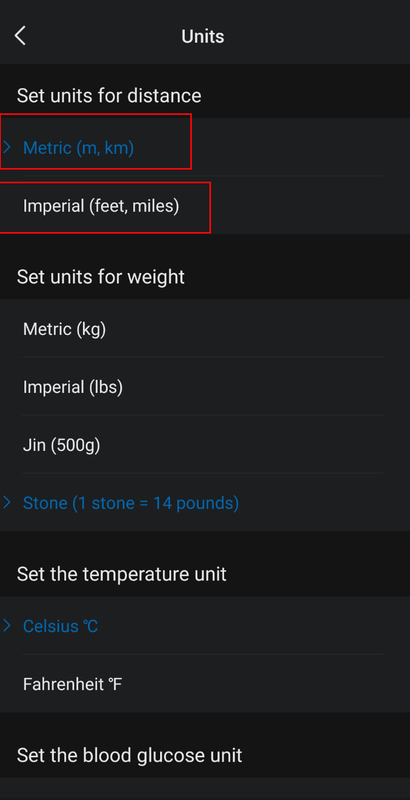
If I understand your question correctly, I think the units displayed on the watchface are based on the settings in the Zepp App.Emiliomc wrote: 04 Feb 2025, 11:07Hi guys.Spoiler
I hope I am heading to the appropriate subforum. If not, I apologize. I have a problem with a watchface I created for my Amazfit GTS 4. I am using the SashaCX75 app version 12.2. I have created an element that is distance. But it does not match the data that my smartwatch provides me. It is a smaller amount. I think it is in miles, when I want that data to be in km. For the creation of the element I do it using "Value by source", not "Numeric values". I have looked at application settings, but I cannot modify that. Also in the "index" file, in the "watchface" folder to try to edit it. But it doesn't seem to be possible either. I have searched the forum, but I have not found anything or I have not known how to search properly.
Is there a way to have the distance information not in miles, but in km?
Thank you.
It is not defined in the watchface's script.
In the script, it only defines which characters to display the numbers.
And ,If zepp is setting unit KM, which image will be used to display the units, and if it is MI, which image will be used to display the units.
If you set it to KM in app zepp, the watchface will display the distance as KM. Conversely, if you set it to Mi on the watchfce, the distance will be displayed as Mi.
Setting unit on App Zepp
ͼͽ To request please use the interrelated forum in action ͼͽ
Please do not PM to me for requests ported watchface.
Please do not PM to me for requests ported watchface.
Thank you very much for responding. In the Zepp app settings it is in Km, not Mile. I don't know why in the watchface that I created the distance traveled is less than what my smartwatch actually tells me. Once the created watchface was installed, I restarted it. But it still shows me a distance less than the real one. I think the distance shown on the created watchface is in miles.
-
asoo
- Posts: 2222
- Joined: 03 Jan 2019, 01:48
- Location: ͼͽ Thailand ͼͽ
- Has thanked: 437 times
- Been thanked: 2141 times
- Contact:
I'm not sure why you're having this problem.
I don't have a GTS4 so I can't test it properly.
I suggest you try sending the watchface you're having problems with, maybe someone with a GTS4 can help you test it.
I don't have a GTS4 so I can't test it properly.
I suggest you try sending the watchface you're having problems with, maybe someone with a GTS4 can help you test it.
ͼͽ To request please use the interrelated forum in action ͼͽ
Please do not PM to me for requests ported watchface.
Please do not PM to me for requests ported watchface.
-
taw_bip
- WF maker
- Posts: 136
- Joined: 12 Apr 2018, 16:29
- Has thanked: 133 times
- Been thanked: 21 times
- Contact:
I had an issue with a watchface that showed kilometers in the display rather than my preferred miles. I reached out to the watchface maker and he had to write code to make it work. I'll see if I can dig it out.
It's a good idea. I give you the .zip file of the sphere. It's strange, because in the Zepp app settings it is in km, not miles. The data I have both in the application and on my GTS 4 is correct. Steps, pulse and calories match. But in the watchface I created it doesn't match. I have discovered that the result it gives me is not in miles. It is simply less than in km. For example, the distance is actually 0.81 km. But it shows, in this example, 0.77 km. I don't know if anyone can help me with this.
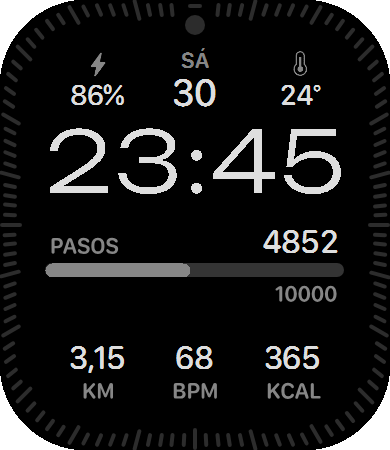
Spoiler
 Plus E4.zip
- (3.3 MiB) Downloaded 86 times
-
asoo
- Posts: 2222
- Joined: 03 Jan 2019, 01:48
- Location: ͼͽ Thailand ͼͽ
- Has thanked: 437 times
- Been thanked: 2141 times
- Contact:
I tried installing your watch face on Balance and checked the distance display, the data in system and on watchface are exactly the same. I am not sure why on GTS4 it has the problem as you mentioned.
ͼͽ To request please use the interrelated forum in action ͼͽ
Please do not PM to me for requests ported watchface.
Please do not PM to me for requests ported watchface.
The truth is that I don't understand it. I have the Zepp app updated. I have cleared app cache. The firmware of my GTS 4 is updated. I have restarted it several times. And the watchface data created in relation to distance does not correspond to reality in km. The watchface data is not mile either, because it does not match mile. It is simply not correct. I attach photographs.
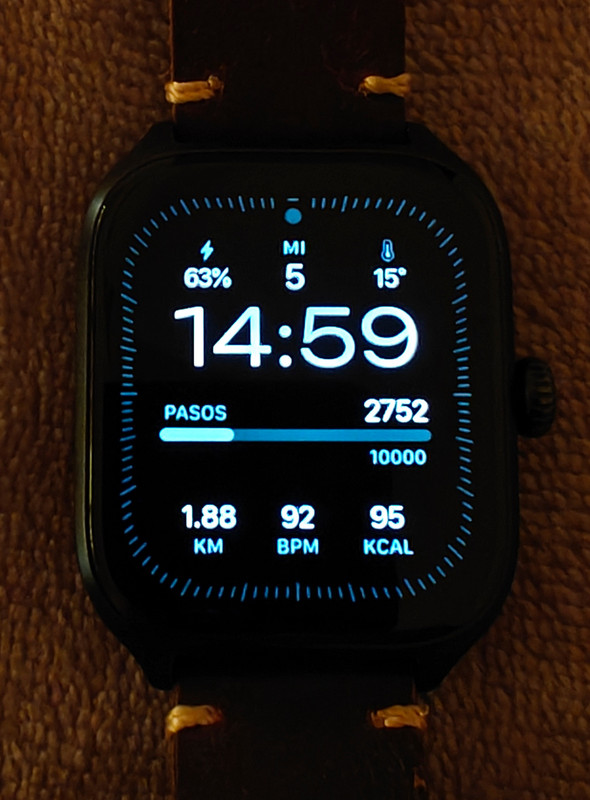
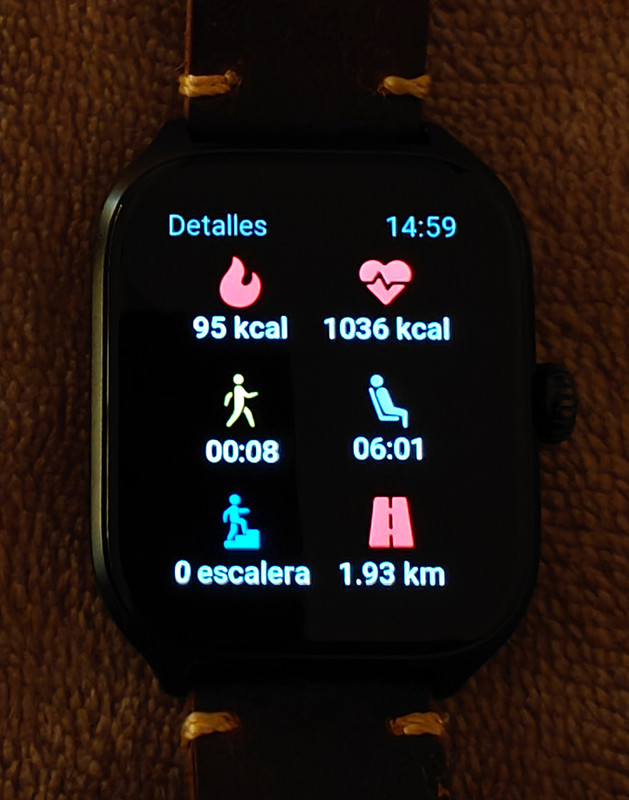
Spoiler
-
SashaCX75

- Posts: 829
- Joined: 26 Oct 2019, 15:18
- Location: Ukraine
- Has thanked: 15 times
- Been thanked: 1044 times
- Contact:
It seems to be a specific feature of this model. You can try to use ‘Numeric values’ image set instead of font. It might help.
Thank you. I'll try it that way. But I don't understand why it would cause problems only with the distance data and not with the rest of the data.
-
SashaCX75
- Posts: 829
- Joined: 26 Oct 2019, 15:18
- Location: Ukraine
- Has thanked: 15 times
- Been thanked: 1044 times
- Contact:
The TEXT_FONT widget is used to display data in font. This widget is not documented anywhere, so its normal operation is not guaranteed.
Fixed with "Numeric Values". This way it does show the correct distance information in km.
Who is online
Users browsing this forum: No registered users and 1 guest