• Administrator
  •  
    Support Ukraine
    If you experience any problems with the forum (it is not visible, there is no way to post messages, or some functionality does not work), please let us know. If you have problems with registration or you did not receive confirmation letter, let us know and we will activate your account manually.
    If you get an "The submitted form was invalid. Try submitting again" error, delete cookies, then try again.
     

AmazFit WatchFace editor 2 for Windows

This forum is designed to discuss and develop tools creating watch faces.

Moderators: asoo, lvpokka, Internal error, Watchmens

Forum rules
All communication in this branch should only be in English.
To discuss tools that are not in this section, use the “Watchfaces tools (discussion)” forum.
User avatar
SashaCX75
Posts: 820
Joined: 26 Oct 2019, 15:18
Location: Ukraine
Has thanked: 13 times
Been thanked: 1029 times
Contact:

AmazFit WatchFace editor 2 for Windows

Post by SashaCX75 »

Graphics editor for working with dials Amazfit
The editor supports watch faces from GTR 2(e), GTS 2 (GTS 2e / Zepp E Square), T-Rex Pro, Zepp E Circle.
Screenshot
Screenshot
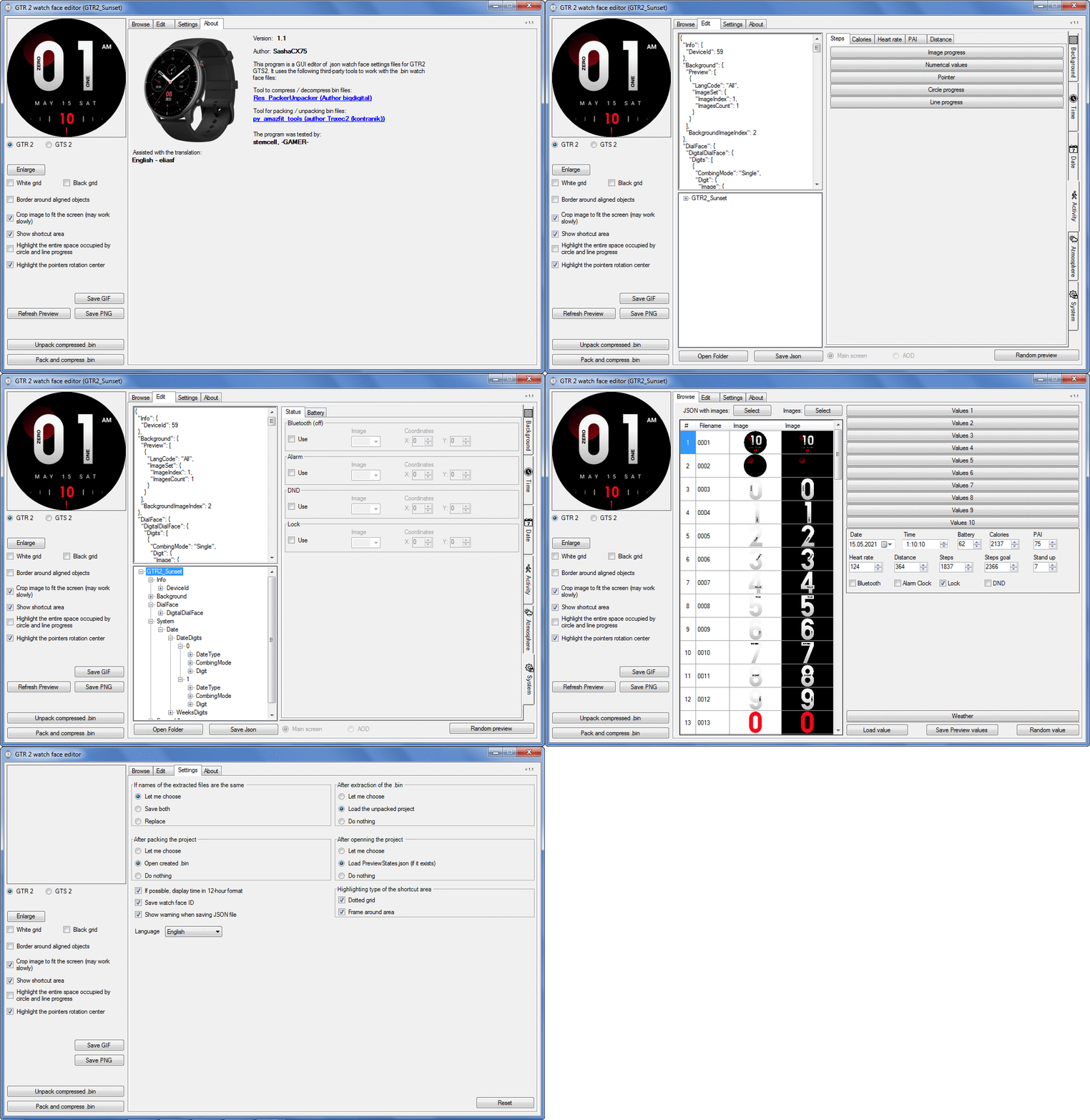
Image
Note: It is advisable to unpack the program to the root of the disk.
Not all dials can be unpacked.

The drawing order of elements cannot be changed. The only exception is if you move the second hand from the center, it will be drawn under the hour and minute hands.

If the .bin file is not created, then you need to look for errors in the .log file. Most often this happens when images have the wrong format.

Version 7.3
List of changes
Fixed known display bugs.
v 7.2
Fixed date display errors in editable zones.
Added support for the Hungarian language.
v 7.1
For distance added support for separate images for miles and kilometers.
v 7.0
Added support for independent coordinates for a set of pictures (segments).
v 6.0
Added support for Zepp E Circle
Added the ability to convert watch faces between different models (GTR 2 (e), Zepp E Circle, T-Rex Pro)
v 5.1
Added the ability to create and update preview images of editable zones.
v 5.0
Added support for editable zones.
v 4.1
Added the ability to display the time in the system font.
Added the ability to display the date in the system font.
Added the ability to change the order of layers.
Added the ability to overlay the clock image on the saved png and gif files (enabled in the settings).
v 4.0
Added support for the system font (inscription at an angle and in a circle).
Added support for the Sunrise parameter (not working correctly for all cities).
Added support for ActivityGoal parameter.
Added the ability to display the goal of steps.
Added support for the Icon parameter.
Added the ability to display circular and linear progress at the same time.
v 3.1
Fixed errors when displaying the distance.
Fixed errors when displaying temperature.
Added French.
Added Italian language.
v 3.0
Added support for T-Rex Pro.
Added support for new elements (StandUp, fat burning, UV index, humidity, wind, pressure).
Found bugs fixed.
v 2.1
Fixed bugs in display AOD.
Fixed bug when using pictures for circular progress.
v 2.0
Added support for AOD.
Added Chinese translation.
v 1
It can work with elements: time, date, statuses, weather, battery, steps, calories, heart rate, PAI, path.
Added English translation.
v 1.2 Added Spanish language
Old versions
Pictures created when unpacking and unpacking bin files are created by the parser and may differ from the images created in the editor. I have nothing to do with these files and am not responsible for their content.

When you turn on the "Follow ..." radio button, the right alignment and center alignment in the editor is displayed incorrectly.
The preview in the editor may differ from the image on the watch. I advise you to check the dial on a real device.

Editable zones do not work on the T-Rex Pro.

The editor does not work with GTS 2 mini (GTS U) watch faces and I do not know how to make such watch faces.

Until the Zepp app has an official watch face with animations or shortcuts, these features cannot be added to the editor.
Shortcuts work on dials converted from GTR (GTS) to GTR 2 (GTS 2). But with this method of creating dials, not all functions work correctly.

GTR (GTS, T-Rex) to GTR2 (GTS 2, T-Rex Pro) converter
GTR (GTS, T-Rex) to GTR2 (GTS 2, T-Rex Pro) Converter & Editor

Because I bought a GTR 3, the program will no longer be updated.

Donate to the author - PayPal: [email protected].

Last edited by SashaCX75 on 01 Jun 2022, 07:19, edited 32 times in total.
User avatar
SashaCX75
Posts: 820
Joined: 26 Oct 2019, 15:18
Location: Ukraine
Has thanked: 13 times
Been thanked: 1029 times
Contact:

Post by SashaCX75 »

Pal57
Add new png files to the project folder. Reopen the json file of the project. Before opening the project file, the editor will offer to save the changes made.
KoltesPunti
WF maker
Posts: 12
Joined: 31 Oct 2019, 06:33
Has thanked: 1 time
Contact:

Post by KoltesPunti »

SashaCX75 wrote: 08 Mar 2021, 17:47
@KoltesPunti
If by "Starimage" we mean the image that appears when the goal of the steps is reached, then it is not yet known how to show it.
Yes i meant the goal of the steps! Ok thanks!
wolfgangausw

Post by wolfgangausw »

SashaCX75 wrote: 08 Mar 2021, 17:50
wolfgangausw wrote: 08 Mar 2021, 17:06
@Naddus
Yes, I lnow. I want to show the broken connection on the idle screen.
My editor doesn't support idle screen (AOD) yet. And, as far as I know, in this mode you cannot display status icons, including bluetooth.
Thanks for the answer
User avatar
eliasf
Posts: 23
Joined: 29 Jan 2021, 18:10
Location: GR
Has thanked: 5 times
Been thanked: 5 times
Contact:

Post by eliasf »

KoltesPunti wrote: 08 Mar 2021, 16:59
Nice Job mate ;)

Is there a function for the Starimage on GTS2? (like on the gts)
If you re not using the Image Progress for displaying the Steps progress on that particular wf then you can do the following:

Specify only two images for steps image progress instead of the default 10. Your first can be a blank image or just matching the background and the second should be your star image.

That way as soon as you reach the steps goal it switches to the second image and simulates what you want to achieve.
demiurg1
WF maker
Posts: 114
Joined: 23 Feb 2020, 22:49
Location: Poland
Has thanked: 23 times
Been thanked: 17 times
Contact:

Post by demiurg1 »

SashaCX75 wrote: 08 Mar 2021, 15:36
@demiurg1
Make sure to extract all files from the archive. Go to the program settings and click the "Reset" button. Restart the program.
---------------------------
Yes, I unpacked everything properly. Nothing is missing, because all watch faces unpack correctly except this one. Shows unpacking, but does not display any files, just a LOG file with an error indication.
This is also correct: "pack_unpack_dir": "C: \\ xxxxxxxxxxx \\ Tools \\ main.exe"
Once again I am providing the link to this watch face (in Dropbox):
https://www.dropbox.com/s/gkm7um6yehifk ... e.zip?dl=0

The reset in the program did not change anything either.
mickdu59
WF maker
Posts: 3
Joined: 18 Feb 2021, 18:24
Location: France
Contact:

Post by mickdu59 »

Good work Sacha 👍😁

I wait to finish it to have the on / off on the icons bluetooth, Lock, NDP, alarm
Image
kontranik
WF maker
Posts: 5
Joined: 07 Aug 2018, 08:41
Location: Germany
Contact:

Post by kontranik »

KoltesPunti wrote: 08 Mar 2021, 16:59
Starimage on GTS2? (like on the gts)
this can be shown with help of StepsProgress as ImageProgress:
two images needed: first Image is blank and second with starimage
kontranik
WF maker
Posts: 5
Joined: 07 Aug 2018, 08:41
Location: Germany
Contact:

Post by kontranik »

demiurg1 wrote: 08 Mar 2021, 19:50
SashaCX75 wrote: 08 Mar 2021, 15:36
@demiurg1
just a LOG file with an error indication
in log is this line:
2021-03-07 22:42:11,806 - root - WARNING - Resource is not an image
2021-03-07 22:42:11,806 - root - ERROR - Image signature doesn't match.

that says it all.

not all bin files can be unpacked with this util from Sasha
demiurg1
WF maker
Posts: 114
Joined: 23 Feb 2020, 22:49
Location: Poland
Has thanked: 23 times
Been thanked: 17 times
Contact:

Post by demiurg1 »

kontranik wrote: 09 Mar 2021, 08:36
demiurg1 wrote: 08 Mar 2021, 19:50
SashaCX75 wrote: 08 Mar 2021, 15:36
@demiurg1
just a LOG file with an error indication
in log is this line:
2021-03-07 22:42:11,806 - root - WARNING - Resource is not an image
2021-03-07 22:42:11,806 - root - ERROR - Image signature doesn't match.

that says it all.

not all bin files can be unpacked with this util from Sasha
----------
Oh. I didn't know that there might be some files packed in a BIN file that couldn't be properly interpreted (recognized). Thanks for the info.
rubiales41
WF maker
Posts: 8
Joined: 08 Dec 2019, 08:03
Has thanked: 5 times
Contact:

Post by rubiales41 »

hello, how much can the sphere weigh in megabytes, at most ?, for GTR 2?
User avatar
SashaCX75
Posts: 820
Joined: 26 Oct 2019, 15:18
Location: Ukraine
Has thanked: 13 times
Been thanked: 1029 times
Contact:

Post by SashaCX75 »

demiurg1
This watch face doesn't really unpack. But in your first message there was a screenshot with an error that has nothing to do with the dial.

If it helps, here are the resources from this watch face.
Attachments
Young_And_Clear.zip
(305.02 KiB) Downloaded 402 times
Last edited by SashaCX75 on 09 Mar 2021, 16:15, edited 1 time in total.
User avatar
SashaCX75
Posts: 820
Joined: 26 Oct 2019, 15:18
Location: Ukraine
Has thanked: 13 times
Been thanked: 1029 times
Contact:

Post by SashaCX75 »

rubiales41 wrote: 09 Mar 2021, 12:43
hello, how much can the sphere weigh in megabytes, at most ?, for GTR 2?
No one has yet figured out the maximum possible size of the dial and whether there is a limit at all. But with large dials, the clock works slower.
rubiales41
WF maker
Posts: 8
Joined: 08 Dec 2019, 08:03
Has thanked: 5 times
Contact:

Post by rubiales41 »

SashaCX75 wrote: 09 Mar 2021, 15:24
rubiales41 wrote: 09 Mar 2021, 12:43
hello, how much can the sphere weigh in megabytes, at most ?, for GTR 2?
No one has yet figured out the maximum possible size of the dial and whether there is a limit at all. But with large dials, the clock works slower.
thanks, I come from an amazfit gts, where the maximum size is 1.5 megabytes, and it is a real headache.
KoltesPunti
WF maker
Posts: 12
Joined: 31 Oct 2019, 06:33
Has thanked: 1 time
Contact:

Post by KoltesPunti »

eliasf wrote: 08 Mar 2021, 19:46
KoltesPunti wrote: 08 Mar 2021, 16:59
Nice Job mate ;)

Is there a function for the Starimage on GTS2? (like on the gts)
If you re not using the Image Progress for displaying the Steps progress on that particular wf then you can do the following:

Specify only two images for steps image progress instead of the default 10. Your first can be a blank image or just matching the background and the second should be your star image.

That way as soon as you reach the steps goal it switches to the second image and simulates what you want to achieve.
kontranik

I already use the Step Progress function in this Watchface - so this is not an option for me ;)
User avatar
SashaCX75
Posts: 820
Joined: 26 Oct 2019, 15:18
Location: Ukraine
Has thanked: 13 times
Been thanked: 1029 times
Contact:

Post by SashaCX75 »

Version 1.2
List of changes
Added Spanish language.
AlterEgo
Posts: 1
Joined: 08 Mar 2021, 15:54
Location: Finland
Has thanked: 1 time
Contact:

Post by AlterEgo »

Hi,
I cannot find Shortcuts in this version (1.1). So I have to edit those directly in json?

And also this version unpacks very few GTR 2 watchfaces, but same watchfaces do unpack
using GTR/GTS/t-rex/Verge version (version 10.0).
User avatar
SashaCX75
Posts: 820
Joined: 26 Oct 2019, 15:18
Location: Ukraine
Has thanked: 13 times
Been thanked: 1029 times
Contact:

Post by SashaCX75 »

The editors for GTR and GTR2 are different and not compatible with each other.

There are no shortcuts in the editor because I have not yet seen a single watch face where they work.
Negesin
Posts: 1
Joined: 02 Mar 2021, 19:48
Location: Germany
Contact:

Post by Negesin »

thanks for your work!
NeoPhyTe-x360
WF maker
Posts: 2
Joined: 09 May 2018, 08:52
Location: Spain
Contact:

Post by NeoPhyTe-x360 »

Nice @SashaCX75 ,

Good work like ever

Regards
demiurg1
WF maker
Posts: 114
Joined: 23 Feb 2020, 22:49
Location: Poland
Has thanked: 23 times
Been thanked: 17 times
Contact:

Post by demiurg1 »

Great job as always, Sasha. Even the lack of Polish language does not bother me. It is a pity that the Chinese did not introduce other interesting functionalities, such as in the GTR 47.
demiurg1
WF maker
Posts: 114
Joined: 23 Feb 2020, 22:49
Location: Poland
Has thanked: 23 times
Been thanked: 17 times
Contact:

Post by demiurg1 »

SashaCX75 wrote: 11 Mar 2021, 18:05
The editors for GTR and GTR2 are different and not compatible with each other.

There are no shortcuts in the editor because I have not yet seen a single watch face where they work.
==================
Great job as always, Sasha. Even the lack of Polish language does not bother me. It is a pity that the Chinese did not introduce other interesting functionalities, such as in the GTR 47.

Best regards
Demiurg1
MichaRe
WF maker
Posts: 3
Joined: 10 Aug 2020, 11:39
Location: Germany
Has thanked: 6 times
Contact:

Post by MichaRe »

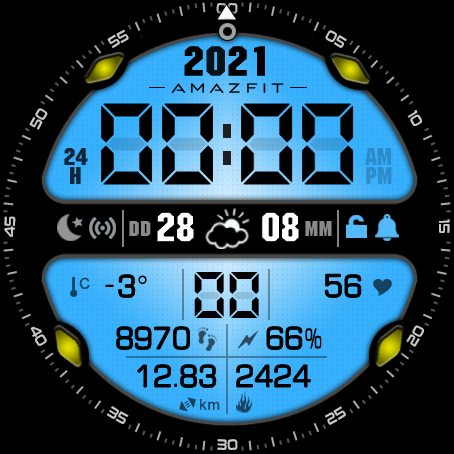
This is one of my first watch faces with the new editor from Sasha. Many Thanks :D !
It works, but this is still in beta. The final is underway.
The packed file has a size of 539 kB.

I solved the problem with Bluetooth "off" by an overlay in my background file (picture 0000). It's a workaround and a little tricky, but it works:

All status icons are initially gray on the background image. Only the active Blootooth symbol is colored. Finaly I select a gray overlay fot the Blootooth symbol in the editor.

Sorry for the static picture. This version of the editor does not yet create any animated gifs.

Ciao ...
Micha

Image
kk171189
WF maker
Posts: 6
Joined: 27 Feb 2021, 13:57
Location: India
Contact:

Post by kk171189 »

@ SashaCX75. Thank you very much for you work. i really appreciate your efforts. I tried to download the app but it seems the link is not working. If you could, please provide the another source to download the app.

Thank you once again.
demiurg1
WF maker
Posts: 114
Joined: 23 Feb 2020, 22:49
Location: Poland
Has thanked: 23 times
Been thanked: 17 times
Contact:

Post by demiurg1 »

I checked and the link works. Try again. This is the same Dropbox link: https://www.dropbox.com/s/hm22uuqp5hoy4 ... 2.zip?dl=0 .
bvannier
WF maker
Posts: 8
Joined: 12 Apr 2020, 14:48
Location: Ozoir la Ferrière
Has thanked: 10 times
Been thanked: 2 times
Contact:

Post by bvannier »

Good evening,
Does anybody knows which firmware fixes the frozen seconds-hand?
This happens sometimes on my gtr 2
V5.1.0.4
Think you
Post Reply

Return to “Watchfaces tools”

Who is online

Users browsing this forum: sp6opc and 2 guests