
• Administrator
  •  
    Support Ukraine
    If you experience any problems with the forum (it is not visible, there is no way to post messages, or some functionality does not work), please let us know. If you have problems with registration or you did not receive confirmation letter, let us know and we will activate your account manually.
    If you get an "The submitted form was invalid. Try submitting again" error, delete cookies, then try again.
     

AmazFit WatchFace editor 2 for Windows

This forum is designed to discuss and develop tools creating watch faces.

Moderators: asoo, lvpokka, Internal error, Watchmens

Forum rules
All communication in this branch should only be in English.
To discuss tools that are not in this section, use the “Watchfaces tools (discussion)” forum.
Post Reply
User avatar
SashaCX75
Posts: 812
Joined: 26 Oct 2019, 15:18
Location: Ukraine
Has thanked: 13 times
Been thanked: 1006 times
Contact:

AmazFit WatchFace editor 2 for Windows

Post by SashaCX75 »

Graphics editor for working with dials Amazfit
The editor supports watch faces from GTR 2(e), GTS 2 (GTS 2e / Zepp E Square), T-Rex Pro, Zepp E Circle.
Screenshot
Screenshot
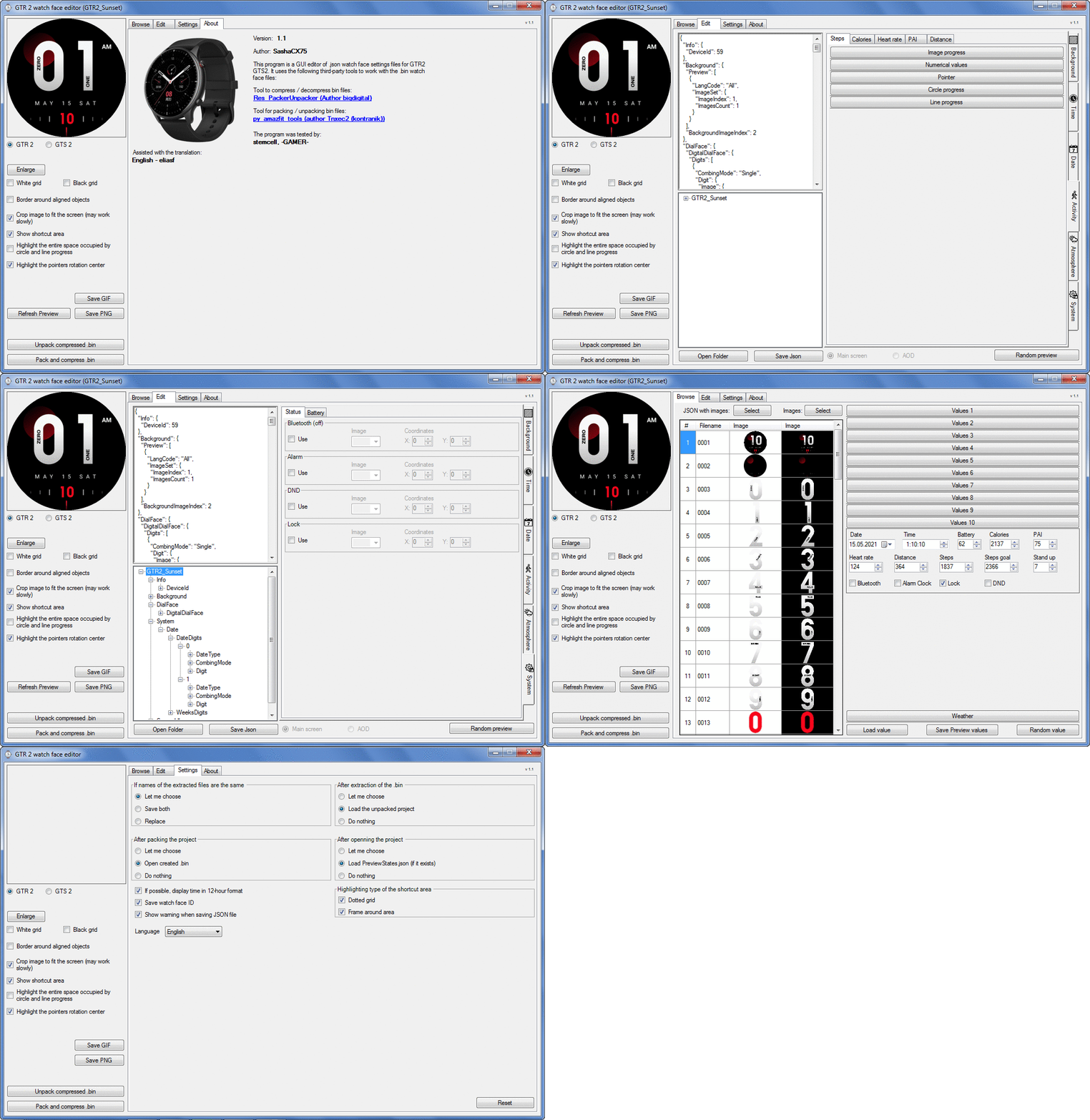
Image
Note: It is advisable to unpack the program to the root of the disk.
Not all dials can be unpacked.

The drawing order of elements cannot be changed. The only exception is if you move the second hand from the center, it will be drawn under the hour and minute hands.

If the .bin file is not created, then you need to look for errors in the .log file. Most often this happens when images have the wrong format.

Version 7.3
List of changes
Fixed known display bugs.
v 7.2
Fixed date display errors in editable zones.
Added support for the Hungarian language.
v 7.1
For distance added support for separate images for miles and kilometers.
v 7.0
Added support for independent coordinates for a set of pictures (segments).
v 6.0
Added support for Zepp E Circle
Added the ability to convert watch faces between different models (GTR 2 (e), Zepp E Circle, T-Rex Pro)
v 5.1
Added the ability to create and update preview images of editable zones.
v 5.0
Added support for editable zones.
v 4.1
Added the ability to display the time in the system font.
Added the ability to display the date in the system font.
Added the ability to change the order of layers.
Added the ability to overlay the clock image on the saved png and gif files (enabled in the settings).
v 4.0
Added support for the system font (inscription at an angle and in a circle).
Added support for the Sunrise parameter (not working correctly for all cities).
Added support for ActivityGoal parameter.
Added the ability to display the goal of steps.
Added support for the Icon parameter.
Added the ability to display circular and linear progress at the same time.
v 3.1
Fixed errors when displaying the distance.
Fixed errors when displaying temperature.
Added French.
Added Italian language.
v 3.0
Added support for T-Rex Pro.
Added support for new elements (StandUp, fat burning, UV index, humidity, wind, pressure).
Found bugs fixed.
v 2.1
Fixed bugs in display AOD.
Fixed bug when using pictures for circular progress.
v 2.0
Added support for AOD.
Added Chinese translation.
v 1
It can work with elements: time, date, statuses, weather, battery, steps, calories, heart rate, PAI, path.
Added English translation.
v 1.2 Added Spanish language
Old versions
Pictures created when unpacking and unpacking bin files are created by the parser and may differ from the images created in the editor. I have nothing to do with these files and am not responsible for their content.

When you turn on the "Follow ..." radio button, the right alignment and center alignment in the editor is displayed incorrectly.
The preview in the editor may differ from the image on the watch. I advise you to check the dial on a real device.

Editable zones do not work on the T-Rex Pro.

The editor does not work with GTS 2 mini (GTS U) watch faces and I do not know how to make such watch faces.

Until the Zepp app has an official watch face with animations or shortcuts, these features cannot be added to the editor.
Shortcuts work on dials converted from GTR (GTS) to GTR 2 (GTS 2). But with this method of creating dials, not all functions work correctly.

GTR (GTS, T-Rex) to GTR2 (GTS 2, T-Rex Pro) converter
GTR (GTS, T-Rex) to GTR2 (GTS 2, T-Rex Pro) Converter & Editor

Because I bought a GTR 3, the program will no longer be updated.

Donate to the author - PayPal: [email protected].
Last edited by SashaCX75 on 01 Jun 2022, 07:19, edited 32 times in total.
spidercrab
Posts: 24
Joined: 25 Jun 2020, 09:13
Location: UK
Has thanked: 27 times
Been thanked: 3 times
Contact:

Post by spidercrab »

Just wanted to say that I really hope that there are enough similarities between the T-Rex Pro and GTR 2(e), GTS 2 that eventually, the v2 WF Editor will have the capability to work with the T-Rex Pro.

Having used the v1 Editor with 42mm and 47mm GTR, I have total confidence in SashaCX75 to make this happen if it possible. SashaCX75 is a genius and has given so much to the Amazfit community..

I predict huge success for the T-Rex Pro.
User avatar
SashaCX75
Posts: 812
Joined: 26 Oct 2019, 15:18
Location: Ukraine
Has thanked: 13 times
Been thanked: 1006 times
Contact:

Post by SashaCX75 »

ntnntp
I sometimes have problems installing watch faces. The following actions help:
1 Remove unnecessary watch faces from the watch.
2 Restart the watch.
3 Restart your phone.

If the id replacement did not work, then the dial would be installed but replace the already installed one. Therefore, the problem is not the replacement of id.
User avatar
RufusLoacker
Posts: 1
Joined: 07 Apr 2021, 14:11
Location: Italy
Contact:

Post by RufusLoacker »

I'm looking into buying a GTR2e, and I wonder if it was possible to create a 24 hours analog watch face (where the hours hand makes one complete round in a day instead of two rounds).
Is this possible to code with this (or other) tool?

pic for reference:
Spoiler
Image
User avatar
SashaCX75
Posts: 812
Joined: 26 Oct 2019, 15:18
Location: Ukraine
Has thanked: 13 times
Been thanked: 1006 times
Contact:

Post by SashaCX75 »

No, the behavior of an analog clock cannot be changed.
synar
WF maker
Posts: 5
Joined: 28 Jul 2019, 16:50
Location: Hungary
Contact:

Post by synar »

Warning. Center and right alignment of weather data works differently on GTR 2 and GTR 2e watches. In the editor, the display is as close as possible to how it will look on the GTR 2e. Consider this when designing watch faces. Perhaps this also applies to other elements, but so far I only have information on the weather.

Dear Sasha!
Just came the fresh firmware for the GTS 2e, and unfortunetely now already the weather alignment issue is arrived to this watch too. Only the left alignment is working properly now. I just want to inform you.
User avatar
wing0826
Posts: 35
Joined: 09 Jun 2020, 14:47
Location: TW
Has thanked: 9 times
Been thanked: 4 times
Contact:

Post by wing0826 »

HI~everyone,

does it only have 12-hour clock in GTR2 watchface?
User avatar
SashaCX75
Posts: 812
Joined: 26 Oct 2019, 15:18
Location: Ukraine
Has thanked: 13 times
Been thanked: 1006 times
Contact:

Post by SashaCX75 »

synar wrote: 07 Apr 2021, 19:52
Dear Sasha!
Just came the fresh firmware for the GTS 2e, and unfortunetely now already the weather alignment issue is arrived to this watch too. Only the left alignment is working properly now. I just want to inform you.
Thanks for the info. It will be necessary to check, maybe something else has changed.
User avatar
SashaCX75
Posts: 812
Joined: 26 Oct 2019, 15:18
Location: Ukraine
Has thanked: 13 times
Been thanked: 1006 times
Contact:

Post by SashaCX75 »

GTRtoGTR2
Converter watch face from GTR47 / GTS / T-Rex in GTR2 / GTS2 / T-Rex Pro watch face format.
Not all elements work after conversion. Of the advantages of such dials, I consider only working shortcuts and the ability to set different fonts and independent coordinates for tens and units in time.

https://www.dropbox.com/s/7ouokjm8qjkag ... 2.zip?dl=0
Last edited by SashaCX75 on 08 Oct 2021, 20:58, edited 2 times in total.
User avatar
SashaCX75
Posts: 812
Joined: 26 Oct 2019, 15:18
Location: Ukraine
Has thanked: 13 times
Been thanked: 1006 times
Contact:

Post by SashaCX75 »

AmazFit_Watchface_Editor_(GTR47ToGTR2)
Editor watch face from GTR47 / GTS / T-Rex which packs watch face in GTR2 / GTS2 / T-Rex Pro format.

Not all elements work. If there were notations am / pm they must be added again to the dial.

Of the advantages of such dials, I consider only working shortcuts and the ability to set different fonts and independent coordinates for tens and units in time.
Editor can only unpack GTR2 / GTS2 / T-Rex Pro watch face made by this editor and GTR47 / GTS / T-Rex watch face.

https://www.dropbox.com/s/qprw4mg2w0l37 ... 9.zip?dl=0
Last edited by SashaCX75 on 08 Oct 2021, 20:58, edited 3 times in total.
spidercrab
Posts: 24
Joined: 25 Jun 2020, 09:13
Location: UK
Has thanked: 27 times
Been thanked: 3 times
Contact:

Post by spidercrab »

This is very exciting.

Does this convert from GTR2 to T-Rex Pro? Or can I load a GTR47mm WF and convert to T-Rex Pro?

Also there are 2 versions in the 2 posts above. Which is the best to use?
User avatar
SashaCX75
Posts: 812
Joined: 26 Oct 2019, 15:18
Location: Ukraine
Has thanked: 13 times
Been thanked: 1006 times
Contact:

Post by SashaCX75 »

Can convert T-Rex to T-Rex Pro
If you need to convert GTR47mm to T-Rex, you can do it in the editor for GTR47mm

Dials created by conversions from GTR47mm are not compatible with WatchFace editor 2. I have posted these programs here because they create dials for the same models as WatchFace editor 2. Further development of these programs is not planned and therefore I did not become a separate topic for them on the forum create.
jjkielce
Posts: 10
Joined: 20 May 2018, 10:06
Location: Poland
Has thanked: 3 times
Been thanked: 1 time
Contact:

Post by jjkielce »

Using the editor in version 2.1 I converted one of my GTS projects to GTS2 https://amazfitwatchfaces.com/gts/view/4826 and the user who downloaded the file reports a problem. It can install the watch face, the dial works fine, but if it tries to change the watch face on the clock, going back to W-Face won't work and needs to reinstall W-Face. I will be very grateful if someone checks this file on their GTS2 or if the designers check it in the editor. P.S. many thanks to SashaCX75 for creating this editor. efficient straight with great possibilities. Bravo
User avatar
SashaCX75
Posts: 812
Joined: 26 Oct 2019, 15:18
Location: Ukraine
Has thanked: 13 times
Been thanked: 1006 times
Contact:

Post by SashaCX75 »

jjkielce
You have a 1 pixel preview picture. Make it a normal size.
To do this, just click Refresh Preview in the editor. and in the dialog box, select No.
jjkielce
Posts: 10
Joined: 20 May 2018, 10:06
Location: Poland
Has thanked: 3 times
Been thanked: 1 time
Contact:

Post by jjkielce »

SashaCX75 wrote: 13 Apr 2021, 09:28
@jjkielce
You have a 1 pixel preview picture. Make it a normal size.
To do this, just click Refresh Preview in the editor. and in the dialog box, select No.
thanks for the reaction. I've already done it. I hope this will solve the problems and we will gain experience. Best regards and good health.
Rjonet
Posts: 3
Joined: 21 Mar 2021, 08:29
Location: Bologna
Contact:

Post by Rjonet »

the program does not work for me, it starts perfectly, I unzip the file.bin and nothing appears, without any errors. help me please.
User avatar
SashaCX75
Posts: 812
Joined: 26 Oct 2019, 15:18
Location: Ukraine
Has thanked: 13 times
Been thanked: 1006 times
Contact:

Post by SashaCX75 »

Rjonet
A folder with the bin file name should appear in the Watch_face folder. It should contain a log file. The bin file itself can also help figure it out.
Rjonet
Posts: 3
Joined: 21 Mar 2021, 08:29
Location: Bologna
Contact:

Post by Rjonet »

Grazie
Attachments
casio_f91w_47mm_zip.bin
(353.46 KiB) Downloaded 744 times
Rjonet
Posts: 3
Joined: 21 Mar 2021, 08:29
Location: Bologna
Contact:

Post by Rjonet »

Grazie
Attachments
fr_b_lr_gtr2-114463-e11ed767fe.bin
(5.39 MiB) Downloaded 685 times
User avatar
SashaCX75
Posts: 812
Joined: 26 Oct 2019, 15:18
Location: Ukraine
Has thanked: 13 times
Been thanked: 1006 times
Contact:

Post by SashaCX75 »

Rjonet
The casio_f91w_47mm_zip.bin file is not from GTR2 and therefore is not unpacked by the editor.

The file fr_b_lr_gtr2-114463-e11ed767fe.bin is normally unpacked by the editor. If you are not, then try to update the framework to version 4.5, move the folder with the editor to the root of the disk and try again.

Check the Watch_face folder to see if there is a folder with the watch face name and a log file in it.
yakface
WF maker
Posts: 2
Joined: 03 Apr 2021, 14:21
Location: Denver
Contact:

Post by yakface »

@SashaCX75
The tools you released have been really amazing. You mentioned that some of the elements do not work with the converter script. Some of the more complex WF with animations dont translate well but I noticed that the battery information consistently does not transfer. Is there a way to get that to work?
User avatar
SashaCX75
Posts: 812
Joined: 26 Oct 2019, 15:18
Location: Ukraine
Has thanked: 13 times
Been thanked: 1006 times
Contact:

Post by SashaCX75 »

yakface
If the battery is displayed only in text, it works.
I suppose if one display mode is set for the battery, then it will work.
jjkielce
Posts: 10
Joined: 20 May 2018, 10:06
Location: Poland
Has thanked: 3 times
Been thanked: 1 time
Contact:

Post by jjkielce »

SashaCX75 wrote: 13 Apr 2021, 09:28
@jjkielce
the user confirmed that the shield is 100% functional. thanks. I will remember this lesson (it is not worth taking shortcuts and not saving the capacity of the watch here). Best regards and good health.
gengtrex
WF maker
Posts: 18
Joined: 06 Feb 2021, 02:47
Location: nonthaburi
Has thanked: 4 times
Been thanked: 1 time
Contact:

Post by gengtrex »

SashaCX75
hi sasha.
i have tried to create T-rex Pro wf by your latest editor (GTS2 / GTR2 / Trex-pro).
everything looked perfect from beginning to packing.
but when uploaded from mobile to t-rex pro watch, it failed and just loaded the default wf.
can you give me some idea how i can fix this?

thanks a lot in advance. :)
tlausl
Posts: 3
Joined: 31 Mar 2021, 12:43
Location: Kassel
Has thanked: 3 times
Contact:

Post by tlausl »

gengtrex wrote: 21 Apr 2021, 05:45
@SashaCX75
hi sasha.
i have tried to create T-rex Pro wf by your latest editor (GTS2 / GTR2 / Trex-pro).
everything looked perfect from beginning to packing.
but when uploaded from mobile to t-rex pro watch, it failed and just loaded the default wf.
can you give me some idea how i can fix this?

thanks a lot in advance. :)
Same here.
User avatar
SashaCX75
Posts: 812
Joined: 26 Oct 2019, 15:18
Location: Ukraine
Has thanked: 13 times
Been thanked: 1006 times
Contact:

Post by SashaCX75 »

gengtrex , tlausl
I do not know which version you are talking about. The version 2.1 posted here is not designed to work with Trex-pro (but according to user reviews, the dials created in it work on Trex-pro). The last test version that I sent to several users, according to their feedback, creates watch faces for Trex-pro well and they work. Here is an example of a watch face created in it.
https://amazfitwatchfaces.com/t-rex/view/5187
Post Reply

Return to “Watchfaces tools”

Who is online

Users browsing this forum: No registered users and 1 guest