• Administrator
  •  
    Support Ukraine
    If you experience any problems with the forum (it is not visible, there is no way to post messages, or some functionality does not work), please let us know. If you have problems with registration or you did not receive confirmation letter, let us know and we will activate your account manually.
    If you get an "The submitted form was invalid. Try submitting again" error, delete cookies, then try again.
     

AmazFit WatchFace editor for Windows by SashaCX75

This forum is designed to discuss and develop tools creating watch faces.

Moderators: asoo, lvpokka, Internal error, Watchmens

Forum rules
All communication in this branch should only be in English.
To discuss tools that are not in this section, use the “Watchfaces tools (discussion)” forum.
User avatar
SashaCX75
Posts: 820
Joined: 26 Oct 2019, 15:18
Location: Ukraine
Has thanked: 13 times
Been thanked: 1029 times
Contact:

AmazFit WatchFace editor for Windows by SashaCX75

Post by SashaCX75 »

Graphics editor for working with dials Amazfit
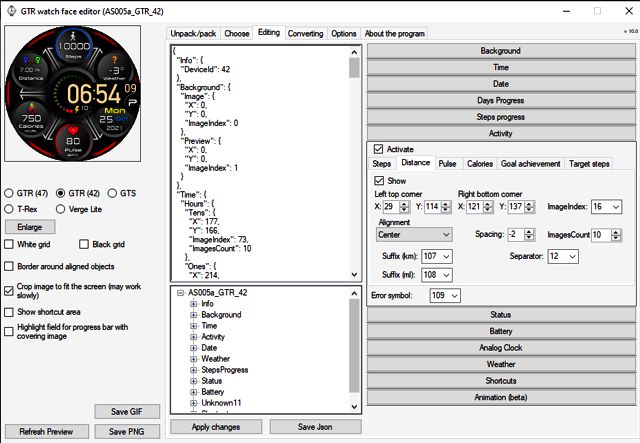
The editor supports watch faces from GTR 47, GTR 42, GTS, T-Rex, Verge Lite.
Screenshot
Image
Note: the path to the program should not contain spaces, it is advisable to unpack it to the root of the disk.
Not all dials can be unpacked.
You can reduce the size of the bin file only by reducing the size of the images (height * width) or by reducing the number of images.

The drawing order of elements cannot be changed. The only exception is if you move the second hand from the center, it will be drawn under the hour and minute hands.

If the .bin file is not created, then you need to look for errors in the .log file. Most often this happens when images have the wrong format.

If the bin file is not created, and the log file contains the entry “bad transparency mask”, this means that the format of one or more images is incorrect (most often it occurs if you save the image in Photoshop without transparent pixels). You can fix it as follows:
- in Photoshop - add at least one transparent pixel
- in GIMP exported to PNG 16 bit RGBA
- in XnView - Image -> 32 bits

Version 10.0
List of changes
Added the ability to display the distance traveled in kilometers and miles.
Updated translation.
v 9.0
Fixed display of date if pictures have different sizes (often pictures for "1" are narrower than others)
Added new warnings about possible errors.
Fixed the order of displaying items.
Added a button to refresh the preview image.
Fixed bugs when converting watch faces.
Updated Chinese and Italian translations.
v 8.5
Fixed work with Verge Lite
v 8.4
Fixed Italian translation.
Added Chinese manual.
v 8.3
Bugs fixed.
Added a manual in English.
v 8.2
Added the display of the target steps (StepsGoal)
Added preliminary calculation of the size of the .bin file.
v 8.1
Fixed work on monitors with high resolution.
Updated translation (French, Italian, Chinese, Spanish).
v 8.0
Added the ability to convert dials between different watch models (GTR / T-Rex / Verge Lite).
v 7.1
Italian language added.
Minor fixes.
v 7.0
Added animation support
Verge Lite Support Added
Added the ability to quickly save the project (Ctrl + S)
Added support for languages (French, Chinese).
v 6.1
Added support for T-Rex.
Added the ability to auto-correct image files (error "bad transparency mask").
Added a reminder to save the project when it is closed.
v 6.0
Added support for shortcuts.
Added background image support for circular indicator.
Added display of a set of icons (segments) for the progress of steps.
Added display of a set of icons (segments) for the battery.
Added display of a set of icons (segments) for the pulse.
Added display of an indicator (arrow) for a pulse.
Added display of indicator (arrows) for calories.
Added display of a circular indicator for the pulse.
Added display of a circular indicator for calories.
Added the ability to crop the image to fit the screen.
Added support for languages ​​(Portuguese, Czech, Slovak, Hungarian).
v 5.2
Added support for a set of icons (icons and a set of coordinates for them) for the progress of steps and battery.
Added the ability to crop the preview according to the shape of the screen.
Bugs fixed in the English version.
v 5.1
Fixed incorrect display of the distance traveled.
Added the ability to adjust the speed of gif animation.
Added the ability to work with compressed bin files.
Updated bin file packer.
Added display of the year.
Added display of a charge indicator (arrow).
Added display of indicator (arrow) of steps.
Added display of the indicator (arrow) of the date.
Added display of indicator (arrow) of the day of the week.
Added display of indicator (arrow) of the month.
Added the ability to paste copied coordinates into offset fields from the center (for arrows).
English support added.
Old versions
If you want to supplement the missing translation, write to the PM.

Beta version of the editor with support for Amazfit X

AmazFit WatchFace editor 2 with support for GTR 2, GTS 2, T-Rex Pro

My editor doesn't work with GTR2 (GTS2) watch faces and I have no plans to add support for these models anytime soon. I don't know any other programs that can work with these dials. I have no information if anyone is working in this direction.

Because I bought a GTR 2e, the program will no longer be updated.

Donate to the author
PayPal: [email protected].
Last edited by SashaCX75 on 01 Jun 2022, 07:20, edited 25 times in total.
macgd016
Posts: 2
Joined: 05 Jan 2021, 09:53
Location: UK
Has thanked: 3 times
Contact:

Post by macgd016 »

SashaCX75 wrote: 05 Jan 2021, 19:43
@macgd016
Reset the settings. Do not change the path to the packer.
Many thanks for that, all working again.

Is there any way to obtain the 'distance' in miles instead of km?
User avatar
SashaCX75
Posts: 820
Joined: 26 Oct 2019, 15:18
Location: Ukraine
Has thanked: 13 times
Been thanked: 1029 times
Contact:

Post by SashaCX75 »

noender
Set the Animation Time parameter equal to the Animation speed parameter or twice as much.

NikiWafa
No, there is no possibility to add an altimeter.

macgd016
No, this cannot be done in the editor.
It is possible to manually edit the json file before creating the bin file, but it is difficult.
ivasfc
WF maker
Posts: 3
Joined: 28 Jul 2018, 08:00
Contact:

Post by ivasfc »

Hi! I´m having problems to compile the archives for GTS WF. When I click to compile, and I select the modified json, nothing occure. Can you help me, please??
noender
WF maker
Posts: 4
Joined: 05 Jan 2021, 00:54
Location: Imperial
Has thanked: 4 times
Contact:

Post by noender »

Thank for your responses SashaCX75
After a LOT of testing I think I found a problem within the "Move Between Coordinates" function. If the image is numbered"0036" or over, it does not render in the watch. However, It does render correctly in the preview and the "Animation Preview", but once the watch face is installed in the watch, those images do not show. Do you think it is fixable?
Thank you!
User avatar
SashaCX75
Posts: 820
Joined: 26 Oct 2019, 15:18
Location: Ukraine
Has thanked: 13 times
Been thanked: 1029 times
Contact:

Post by SashaCX75 »

noender
Images for animation should not be the last in the list. I don't know any other dependencies on the image number.
noender
WF maker
Posts: 4
Joined: 05 Jan 2021, 00:54
Location: Imperial
Has thanked: 4 times
Contact:

Post by noender »

Correct. I did tests with different parameters and the consistency was that any images after "0035" (0036, 0037...) do not show in the installed watch face. As far as I know this is the only function with this issue. I'll let you know if I find anything else. Thank you.
NikiWafa
WF maker
Posts: 7
Joined: 21 Oct 2020, 07:19
Location: Indonesia
Has thanked: 2 times
Contact:

Post by NikiWafa »

Hello SashaCX75 I am a newbie, I really like your program

I tried to make WF with Javanese calendar, the calendar only has five cycles. I tried it on the IMAGE COUNT on DAY OF THE WEEK, I filled it: 5, but why after I tried the cycle still 7?

May You Understand in my Language :)
User avatar
SashaCX75
Posts: 820
Joined: 26 Oct 2019, 15:18
Location: Ukraine
Has thanked: 13 times
Been thanked: 1029 times
Contact:

Post by SashaCX75 »

NikiWafa
The watch only supports the Gregorian calendar.
The number of pictures for the days of the week can be set 7 or 21 (7 days for 3 languages, I did not fail myself, but in earlier versions it was possible to set only 21)
1immortal
Posts: 4
Joined: 11 Dec 2018, 16:27
Location: Israel
Has thanked: 2 times
Been thanked: 4 times
Contact:

Post by 1immortal »

Hi,

Getting this after the trial of the GTx2x unpacker from 4pda:

2021-01-18 16:47:06,699 - root - DEBUG - Opening watch face 'D:\GTR_Watch_face_(without_Python)\Watch_face\uncomp.ifellclassic-433119-a7525b1ea0.bin'
2021-01-18 16:47:06,704 - root - DEBUG - Reading parameters...
2021-01-18 16:47:06,704 - root - INFO - Reading header...
2021-01-18 16:47:06,705 - root - INFO - Header was read:
2021-01-18 16:47:06,705 - root - INFO - Signature: b'UIHH\x02\x00\xff', Unknown: 4294967295, ParametersSize: 4294967295, isValid: False, deviceId: 59
2021-01-18 16:47:06,706 - root - DEBUG - Parsing parameters...
2021-01-18 16:47:06,706 - root - CRITICAL - 'Reader' object has no attribute '_parameters'
Traceback (most recent call last):
File "program.py", line 164, in parseResources
File "watchFaceParser\reader.py", line 13, in getParameters
AttributeError: 'Reader' object has no attribute '_parameters'
User avatar
SashaCX75
Posts: 820
Joined: 26 Oct 2019, 15:18
Location: Ukraine
Has thanked: 13 times
Been thanked: 1029 times
Contact:

Post by SashaCX75 »

1immortal morta
The program does not support and will not support GTR 2
1immortal
Posts: 4
Joined: 11 Dec 2018, 16:27
Location: Israel
Has thanked: 2 times
Been thanked: 4 times
Contact:

Post by 1immortal »

SashaCX75 wrote: 19 Jan 2021, 19:30
@1immortal morta
The program does not support and will not support GTR 2
Got it, thanks for clearing that out.
Will a new app be made for GTx2x or you're dropping the entire project?
Sorry if I'm being too intrusive.

BR,
Pavel
User avatar
SashaCX75
Posts: 820
Joined: 26 Oct 2019, 15:18
Location: Ukraine
Has thanked: 13 times
Been thanked: 1029 times
Contact:

Post by SashaCX75 »

1immortal
Perhaps there will be a new application. But there is no time to do this now.
cmelcher78

Post by cmelcher78 »

jeffrey38 wrote: 22 Dec 2019, 15:30
i found out you can unpack and pack also using SashaCX75 editor
For GTR2? Compressed?
conchodaus
WF maker
Posts: 2
Joined: 19 Jun 2019, 06:07
Has thanked: 1 time
Contact:

Post by conchodaus »

Thank you SashaCX75 for the great Watchface Editor!

I´m having problem with the animation function for GTS WF. I have tried everything but not work. Before packed, i checked total size <1.5mb, don't put image's animation in the end, installed window 10...But animation don't work. I even downloaded a watch face with animation in forums, unpacked and packed it again without fixing anything, the animation still does not work...

Do I need to install additional plugin to software? eg dotnet, visual c ++, or java or anything...?
User avatar
SashaCX75
Posts: 820
Joined: 26 Oct 2019, 15:18
Location: Ukraine
Has thanked: 13 times
Been thanked: 1029 times
Contact:

Post by SashaCX75 »

conchodaus
If a bin file is created, you do not need to download anything additionally.

Does animation work on other watch faces? Not all models and not all firmwares support animation.
Pistinnaga
Posts: 1
Joined: 13 Jan 2021, 20:36
Location: Cagliari
Contact:

Post by Pistinnaga »

Hi guys, what's the difference between "pack" and "compress" bin files? Only the size?
Attachments
Immagine 2021-01-22 161013.png
Immagine 2021-01-22 161013.png (5.47 KiB) Viewed 12203 times
conchodaus
WF maker
Posts: 2
Joined: 19 Jun 2019, 06:07
Has thanked: 1 time
Contact:

Post by conchodaus »

SashaCX75 wrote: 22 Jan 2021, 15:09
@conchodaus
If a bin file is created, you do not need to download anything additionally.

Does animation work on other watch faces? Not all models and not all firmwares support animation.
I tested watchface gts in forum. Animation work well. But when i unpack file .bin have animation and pack it again. Animation don’t appear anymore.
franluciani
Posts: 43
Joined: 04 Oct 2019, 16:55
Location: Argentina
Has thanked: 9 times
Been thanked: 6 times
Contact:

Post by franluciani »

Hi, do you know if there are some tool for create watchfaces for Honor Band 6?
Joniariete
Posts: 2
Joined: 20 Nov 2020, 15:17
Location: España
Contact:

Post by Joniariete »

I pack the bin and then I get firmware error, and with just one unpacking it and only packing it gives me a firmware error
its a t-rex watch
why??
pmedina2222
WF maker
Posts: 1
Joined: 01 Jun 2020, 12:36
Location: Burjassot, Valencia
Has thanked: 5 times
Contact:

Post by pmedina2222 »

Please, does anyone know a decompressor for GTS 2 .bin files?
JPinTX
Posts: 4
Joined: 19 Jun 2020, 01:20
Location: Houston
Has thanked: 2 times
Been thanked: 2 times
Contact:

Post by JPinTX »

I just want to thank SashaCX75 for all the hard work it must take to create and support a tool like this. I have learned a LOT from reading everyone's questions/answers and spending hours learning how to use the tool and improving my image editing skills (hint: your question has probably been answered before, so search through the forum and you'll probably find answers/suggestions to try). I struggled at first, but taking the time to try, research, try again until I figure issues out has led to me creating over a dozen watch faces. I don't think I could ever live with a standard watchface again. I hope this tool lives on through firmware updates on my GTS and hope new watch versions (e.g. GTS2) get supported in the future. Thanks again!
User avatar
asoo
Posts: 2127
Joined: 03 Jan 2019, 01:48
Location: ͼͽ Thailand ͼͽ
Has thanked: 411 times
Been thanked: 2046 times

Post by asoo »

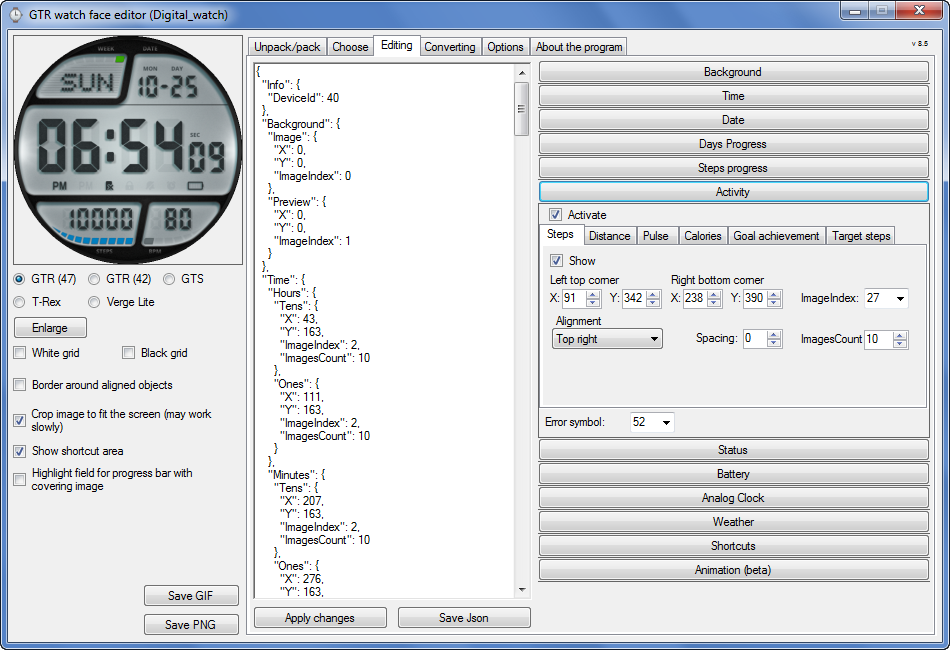
Version 10.0 Beta for "GTR , GTS , T-Rex , Verge Lite "

Image
Link :
https://github.com/SashaCX75/AmazFit_Wa ... v10.0-beta


Thank SashaCX75 for the best program
ͼͽ To request please use the interrelated forum in action ͼͽ
Please do not PM to me for requests ported watchface.
demiurg1
WF maker
Posts: 114
Joined: 23 Feb 2020, 22:49
Location: Poland
Has thanked: 23 times
Been thanked: 17 times
Contact:

Post by demiurg1 »

It's nice that you are developing this program. I just downloaded the 10.0-beta. I just hope that someday you will be able to extend the program to support GTR 2. Thank you for your work so far.
andand1
Posts: 1
Joined: 13 Jan 2021, 23:05
Location: Milano
Contact:

Post by andand1 »

Hi guys. I looked online but i cannot find an answer. It's possible to edit a ZEPP watchface? i'm very into the "fluorescence" watchface but i do not know how to "extract" this one from zepp. Any advice? thank you in advance :D
OldManGir42
Posts: 2
Joined: 31 Jan 2021, 17:14
Location: New York
Contact:

Post by OldManGir42 »

So...

I just started using this editor today for my Amazfit X and I'm finding myself having a weird problem. No matter how I save the main background image (in this case 0061.png) I can't seem to get the watch face to compile. I've tried the troubleshooting steps in the stuck post and I've even tried opening the original and overriding it with the exact same settings, but it doesn't seem to help...I'm not sure what else to do, and unless I missed something in the 20 pages of responses on this thread, I don't see anyone else posting a solution...
amazfiteditorerror.jpg
amazfiteditorerror.jpg (476.09 KiB) Viewed 19336 times
Post Reply

Return to “Watchfaces tools”

Who is online

Users browsing this forum: awrun and 2 guests