• Amministratore
  •  
    Support Ukraine
    If you experience any problems with the forum (it is not visible, there is no way to post messages, or some functionality does not work), please let us know. If you have problems with registration or you did not receive confirmation letter, let us know and we will activate your account manually.
    If you get an "The submitted form was invalid. Try submitting again" error, delete cookies, then try again.
     

AmazFit WatchFace editor for Windows by SashaCX75

This forum is designed to discuss and develop tools creating watch faces.

Moderatori: asoo, lvpokka, Internal error, Watchmens

Regole del forum
All communication in this branch should only be in English.
To discuss tools that are not in this section, use the “Watchfaces tools (discussion)” forum.
Avatar utente
SashaCX75
Messaggi: 812
Iscritto il: 26 ott 2019, 15:18
Località: Ukraine
Has thanked: 13 times
Been thanked: 1006 times
Contatta:

AmazFit WatchFace editor for Windows by SashaCX75

Messaggio da SashaCX75 »

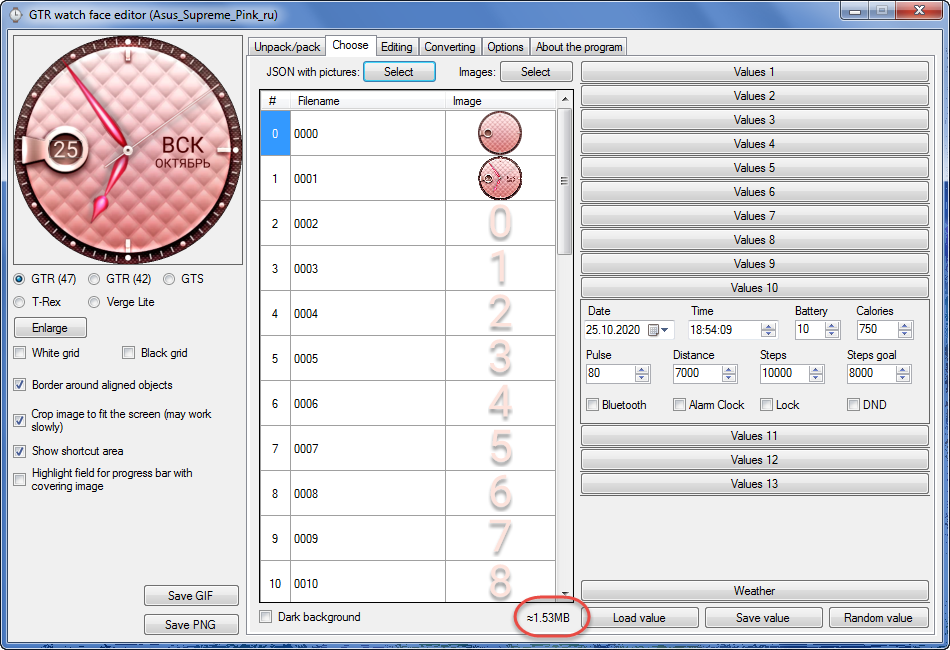
Graphics editor for working with dials Amazfit
The editor supports watch faces from GTR 47, GTR 42, GTS, T-Rex, Verge Lite.
Screenshot
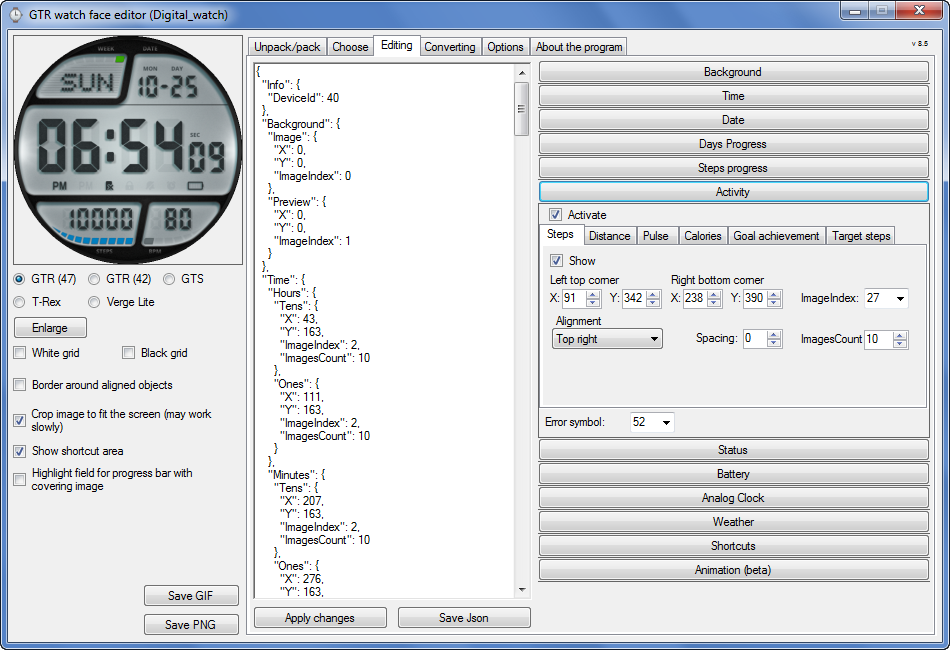
Immagine
Note: the path to the program should not contain spaces, it is advisable to unpack it to the root of the disk.
Not all dials can be unpacked.
You can reduce the size of the bin file only by reducing the size of the images (height * width) or by reducing the number of images.

The drawing order of elements cannot be changed. The only exception is if you move the second hand from the center, it will be drawn under the hour and minute hands.

If the .bin file is not created, then you need to look for errors in the .log file. Most often this happens when images have the wrong format.

If the bin file is not created, and the log file contains the entry “bad transparency mask”, this means that the format of one or more images is incorrect (most often it occurs if you save the image in Photoshop without transparent pixels). You can fix it as follows:
- in Photoshop - add at least one transparent pixel
- in GIMP exported to PNG 16 bit RGBA
- in XnView - Image -> 32 bits

Version 10.0
List of changes
Added the ability to display the distance traveled in kilometers and miles.
Updated translation.
v 9.0
Fixed display of date if pictures have different sizes (often pictures for "1" are narrower than others)
Added new warnings about possible errors.
Fixed the order of displaying items.
Added a button to refresh the preview image.
Fixed bugs when converting watch faces.
Updated Chinese and Italian translations.
v 8.5
Fixed work with Verge Lite
v 8.4
Fixed Italian translation.
Added Chinese manual.
v 8.3
Bugs fixed.
Added a manual in English.
v 8.2
Added the display of the target steps (StepsGoal)
Added preliminary calculation of the size of the .bin file.
v 8.1
Fixed work on monitors with high resolution.
Updated translation (French, Italian, Chinese, Spanish).
v 8.0
Added the ability to convert dials between different watch models (GTR / T-Rex / Verge Lite).
v 7.1
Italian language added.
Minor fixes.
v 7.0
Added animation support
Verge Lite Support Added
Added the ability to quickly save the project (Ctrl + S)
Added support for languages (French, Chinese).
v 6.1
Added support for T-Rex.
Added the ability to auto-correct image files (error "bad transparency mask").
Added a reminder to save the project when it is closed.
v 6.0
Added support for shortcuts.
Added background image support for circular indicator.
Added display of a set of icons (segments) for the progress of steps.
Added display of a set of icons (segments) for the battery.
Added display of a set of icons (segments) for the pulse.
Added display of an indicator (arrow) for a pulse.
Added display of indicator (arrows) for calories.
Added display of a circular indicator for the pulse.
Added display of a circular indicator for calories.
Added the ability to crop the image to fit the screen.
Added support for languages ​​(Portuguese, Czech, Slovak, Hungarian).
v 5.2
Added support for a set of icons (icons and a set of coordinates for them) for the progress of steps and battery.
Added the ability to crop the preview according to the shape of the screen.
Bugs fixed in the English version.
v 5.1
Fixed incorrect display of the distance traveled.
Added the ability to adjust the speed of gif animation.
Added the ability to work with compressed bin files.
Updated bin file packer.
Added display of the year.
Added display of a charge indicator (arrow).
Added display of indicator (arrow) of steps.
Added display of the indicator (arrow) of the date.
Added display of indicator (arrow) of the day of the week.
Added display of indicator (arrow) of the month.
Added the ability to paste copied coordinates into offset fields from the center (for arrows).
English support added.
Old versions
If you want to supplement the missing translation, write to the PM.

Beta version of the editor with support for Amazfit X

AmazFit WatchFace editor 2 with support for GTR 2, GTS 2, T-Rex Pro

My editor doesn't work with GTR2 (GTS2) watch faces and I have no plans to add support for these models anytime soon. I don't know any other programs that can work with these dials. I have no information if anyone is working in this direction.

Because I bought a GTR 2e, the program will no longer be updated.

Donate to the author
PayPal: [email protected].
Ultima modifica di SashaCX75 il 01 giu 2022, 07:20, modificato 25 volte in totale.
Avatar utente
SashaCX75
Messaggi: 812
Iscritto il: 26 ott 2019, 15:18
Località: Ukraine
Has thanked: 13 times
Been thanked: 1006 times
Contatta:

Messaggio da SashaCX75 »

maortrol ha scritto: 06 giu 2020, 22:26
SashaCX75 ha scritto: 05 giu 2020, 15:19
Added preliminary calculation of the size of the .bin file.
Where is that option located? Can't find it... Thanks in advance! ;)
Spoiler
Immagine

[mention]xMrPhede[/mention]
See the first post in the thread.
I am using XnView. If you work in Photoshop, it is better that there is at least one transparent pixel in the picture.
xMrPhede
Messaggi: 2
Iscritto il: 07 giu 2020, 00:41
Località: Pescara
Contatta:

Messaggio da xMrPhede »

[mention]SashaCX75[/mention]
Thanks for your answer, i added a transparent pixel and I got it working, but still the watchface doesn't work on my GTS, I think because of its weight, but I'm not sure
watch996
WF maker
Messaggi: 8
Iscritto il: 23 mag 2020, 07:09
Località: israel
Has thanked: 1 time
Contatta:

Messaggio da watch996 »

SashaCX75 ha scritto: 02 giu 2020, 14:36
@watch996
Your dial on the third link saved for GTR was set normally for me.
When using weather, I recommend that you always add weather day / night (you can use it outside the screen if it is not needed.
thank you for the answer. the weather did not work for me.
could you help with opening this ?
https://amazfitwatchfaces.com/verge-lite/view/264
Avatar utente
SashaCX75
Messaggi: 812
Iscritto il: 26 ott 2019, 15:18
Località: Ukraine
Has thanked: 13 times
Been thanked: 1006 times
Contatta:

Messaggio da SashaCX75 »

[mention]watch996[/mention]
This dial has a problem with the arrows, so normally it does not decompress. There is no weather on this dial.
https://drive.google.com/file/d/10GyaJq ... sp=sharing
Avatar utente
SashaCX75
Messaggi: 812
Iscritto il: 26 ott 2019, 15:18
Località: Ukraine
Has thanked: 13 times
Been thanked: 1006 times
Contatta:

Messaggio da SashaCX75 »

If the watchface is installed but the weather does not appear, then most likely these are Amazfit program errors. Turning GPS on the phone helps some. Some use the program "Notify & Fitness for Amazfit", it seems like you can change the weather server.
watch996
WF maker
Messaggi: 8
Iscritto il: 23 mag 2020, 07:09
Località: israel
Has thanked: 1 time
Contatta:

Messaggio da watch996 »

SashaCX75 ha scritto: 08 giu 2020, 15:56
@watch996
This dial has a problem with the arrows, so normally it does not decompress. There is no weather on this dial.
https://drive.google.com/file/d/10GyaJq ... sp=sharing
thank you
watch996
WF maker
Messaggi: 8
Iscritto il: 23 mag 2020, 07:09
Località: israel
Has thanked: 1 time
Contatta:

Messaggio da watch996 »

SashaCX75 ha scritto: 08 giu 2020, 15:56
@watch996
This dial has a problem with the arrows, so normally it does not decompress. There is no weather on this dial.
https://drive.google.com/file/d/10GyaJq ... sp=sharing
mybe this one ?
https://amazfitwatchfaces.com/verge-lite/view/255


thanks :-)
Taahz
WF maker
Messaggi: 1
Iscritto il: 10 giu 2020, 09:57
Località: France
Contatta:

Messaggio da Taahz »

Hi, I don't know if i'm in the right place, but I created a watchface with time and date and it works but if I add a battery indicator with several pic I add then I can't sync on my watch, any idea why?
Avatar utente
wing0826
Messaggi: 35
Iscritto il: 09 giu 2020, 14:47
Località: TW
Has thanked: 9 times
Been thanked: 4 times
Contatta:

Messaggio da wing0826 »

hi, i am a beginer to make watchface

when i try to compressed bin, i dont know why nothing happen...

can someone help me? thanks!
Ultima modifica di wing0826 il 25 giu 2020, 16:42, modificato 2 volte in totale.
Avatar utente
maortrol
Messaggi: 15
Iscritto il: 17 dic 2019, 22:12
Località: Spain
Has thanked: 27 times
Been thanked: 1 time
Contatta:

Messaggio da maortrol »

wing0826 ha scritto: 25 giu 2020, 13:50
hi, i am a beginer to make watchface

when i try to compressed bin, i dont know why nothing happen...

can someone help me? thanks!
Check the transparency of the 0000.PNG image, it must be enabled (I use Microsoft Paint 3D: upper menú - Canvas - Transparent Canvas : enabled).
Avatar utente
wing0826
Messaggi: 35
Iscritto il: 09 giu 2020, 14:47
Località: TW
Has thanked: 9 times
Been thanked: 4 times
Contatta:

Messaggio da wing0826 »

maortrol ha scritto: 25 giu 2020, 14:09
wing0826 ha scritto: 25 giu 2020, 13:50
hi, i am a beginer to make watchface

when i try to compressed bin, i dont know why nothing happen...

can someone help me? thanks!
Check the transparency of the 0000.PNG image, it must be enabled (I use Microsoft Paint 3D: upper menú - Canvas - Transparent Canvas : enabled).

thanks your reply!

i got it!
shlide
WF maker
Messaggi: 4
Iscritto il: 26 mag 2020, 14:12
Località: Home
Contatta:

Messaggio da shlide »

Awesome tool and thank you for releasing it for the community!

I'm having issues with the Shortcuts on watchface https://amazfitwatchfaces.com/gtr/view/6635

I couldn't get Veahcen's Marine Commander from https://amazfitwatchfaces.com/gtr/view/1483 to load so I took WakeUpich's Marine Commander from https://amazfitwatchfaces.com/gtr/view/1549 and started back filling the images. I also brightened up some images. and all of that works fine. As soon as I add a shortcut over the weather area, it fails to load on my watch. I've used other faces that have working shortcuts on my watch. Is there something special that needs to happen to get shortcuts to work on this watchface (https://amazfitwatchfaces.com/gtr/view/6635)

Just had a thought - can we have shortcuts on analog watchfaces with the hands "moving in front of" the shortcut area?
Avatar utente
SashaCX75
Messaggi: 812
Iscritto il: 26 ott 2019, 15:18
Località: Ukraine
Has thanked: 13 times
Been thanked: 1006 times
Contatta:

Messaggio da SashaCX75 »

[mention]shlide[/mention]
Try adding the day / night temperature off the screen. At GTR 47, it helped.
Avatar utente
wing0826
Messaggi: 35
Iscritto il: 09 giu 2020, 14:47
Località: TW
Has thanked: 9 times
Been thanked: 4 times
Contatta:

Messaggio da wing0826 »

I have a question...

when I want to use AM/PM

code is right

but the image of the bin file is error after I updated

it always take the number 09 &10 to AM/PM?
Ultima modifica di wing0826 il 03 lug 2020, 13:23, modificato 1 volta in totale.
shlide
WF maker
Messaggi: 4
Iscritto il: 26 mag 2020, 14:12
Località: Home
Contatta:

Messaggio da shlide »

either I added the day/night temperature wrong, or it didn't work.

I'm going to try downloading another watchface with working shortcuts and see if I can unpack and repack it to see if it works. The one I like is joebar78's Nightlights: https://amazfitwatchfaces.com/gtr/view/2660. that one lets me pack and compress and install correctly on my 42mm watch.. I'm also only uploading the Packed bin, not the Packed_zip bin. is that the correct thing to do?
Avatar utente
SashaCX75
Messaggi: 812
Iscritto il: 26 ott 2019, 15:18
Località: Ukraine
Has thanked: 13 times
Been thanked: 1006 times
Contatta:

Messaggio da SashaCX75 »

[mention]shlide[/mention]
There is no difference in the operation between the files * _packed_zip.bin and * _packed.bin. The _packed_zip.bin file is installed a little faster, this is all the difference.

I can only test on GTR 47 and the watchface works with these settings for me, check to see if it starts up with you.
https://drive.google.com/file/d/1jWrqie ... sp=sharing
Avatar utente
Evilmind_04
WF maker
Messaggi: 29
Iscritto il: 25 apr 2020, 12:50
Località: The Netherlands
Has thanked: 3 times
Been thanked: 14 times
Contatta:

Messaggio da Evilmind_04 »

I am busy editing a watchface and keep running into the same problem.
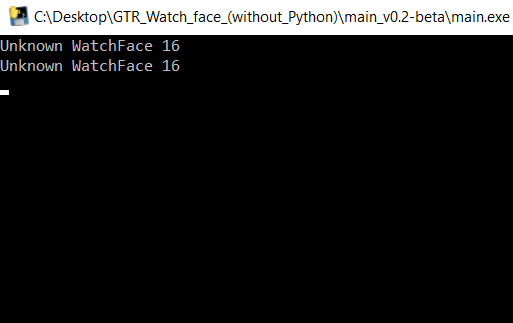
It keeps telling me "unknown whatchface 16" twice.

Immagine

Got no idea why, in Sacha's program it all looks fine but when i pack & compress bin its the first thing it says, if i do try it on my gtr it just wont load.

Does anyone have the solution?
shlide
WF maker
Messaggi: 4
Iscritto il: 26 mag 2020, 14:12
Località: Home
Contatta:

Messaggio da shlide »

[mention]Evilmind_04[/mention]

I've seen previous posts in this thread that say that message is okay to see.
Avatar utente
SashaCX75
Messaggi: 812
Iscritto il: 26 ott 2019, 15:18
Località: Ukraine
Has thanked: 13 times
Been thanked: 1006 times
Contatta:

Messaggio da SashaCX75 »

[mention]Evilmind_04[/mention]
The message "unknown whatchface 16" refers to the creation of a preview of the packaging utility for the bin file, and does not affect the operation of the watchface.
To understand what exactly does not work, it is better to apply a link to the project or at least a json file.
If the weather is used, then in 70% of cases, adding day / night temperature off the screen helps.
If you just write that the watchface does not work, then no one can tell you the reason.
Avatar utente
Evilmind_04
WF maker
Messaggi: 29
Iscritto il: 25 apr 2020, 12:50
Località: The Netherlands
Has thanked: 3 times
Been thanked: 14 times
Contatta:

Messaggio da Evilmind_04 »

[mention]SashaCX75[/mention] thanks for the reply.
i thought maybe that was the problem, i do make / edit the images in photoshop and had an idea something went wrong.

Current weather is turned on and did try to add day & night weather but for now it doesnt make any difference.
i uploaded the bin files (normal & zip) : https://drive.google.com/drive/folders/ ... sp=sharing

thanks in advance for your help :) .
Avatar utente
SashaCX75
Messaggi: 812
Iscritto il: 26 ott 2019, 15:18
Località: Ukraine
Has thanked: 13 times
Been thanked: 1006 times
Contatta:

Messaggio da SashaCX75 »

[mention]Evilmind_04[/mention]
As I wrote, the problem was in the absence of temperature day / night.
PS. It’s not enough to just turn on the temperature; you must also set the “ImageIndex” parameter.

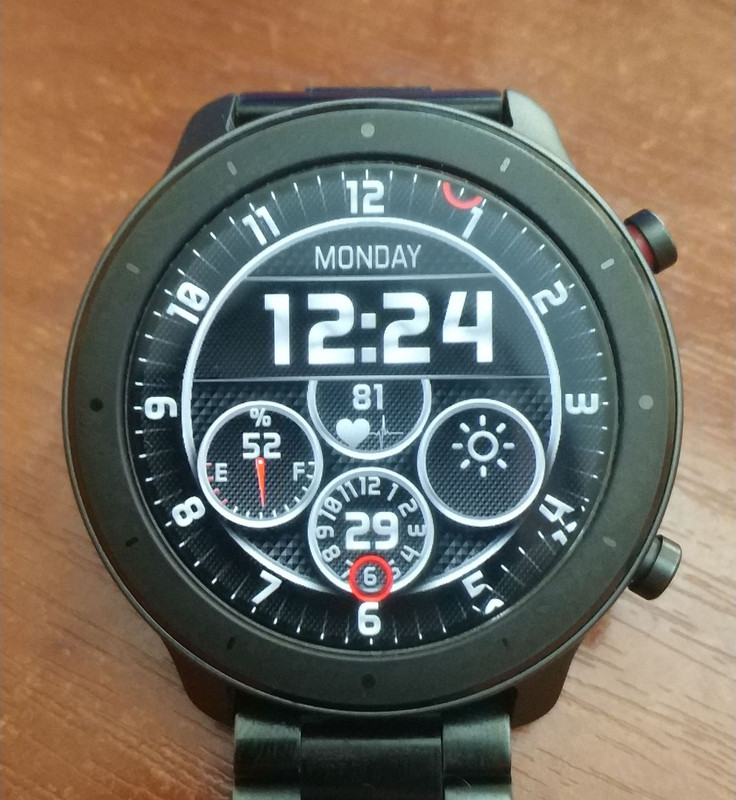
You have not yet set the parameter "Error symbol" for the weather. Because of this, the dial may not display correctly (see the photo in the bottom right corner).
https://drive.google.com/file/d/10FpUpr ... sp=sharing
Spoiler
Immagine
PS2. Files 0004.png and 0073.png (file names might have changed during unpacking) for the second hand and date are the same. Why make two identical files? The bin file size allows you to add a normal picture for preview, rather than reducing it to 1 pixel.
Avatar utente
Evilmind_04
WF maker
Messaggi: 29
Iscritto il: 25 apr 2020, 12:50
Località: The Netherlands
Has thanked: 3 times
Been thanked: 14 times
Contatta:

Messaggio da Evilmind_04 »

[mention]SashaCX75[/mention] thanks alot for your help. 👍🏻.

I send the ones without day/night because it didn't made any difference of working but didn't add the image parameter.
Do you always have to activate them to get the weather working properly? See many watchfaces without it.

I did change the images you chose for the day/night weather for blank ones and now it looks okay.

The error symbol for the weather was included in the bin file, no idea why it didn't show it for you but it's working after choosing it again 😅.

The 2 images who looks the same, before one had a different color.
About the preview image, I got it replaced because the program sayd it will surpass 1.9 mb and might gives a problem.
Many whatchfaces I unpacked have the preview image replaced so it saves size.

Still got a few small thing to fine tune but this is it working at the moment.
Immagine
Avatar utente
SashaCX75
Messaggi: 812
Iscritto il: 26 ott 2019, 15:18
Località: Ukraine
Has thanked: 13 times
Been thanked: 1006 times
Contatta:

Messaggio da SashaCX75 »

[mention]Evilmind_04[/mention]
It is not always necessary to add day / night temperature, but this is the first thing I check if the dial does not work.

"Error symbol" for the icon and for the text are different values. The second parameter is usually forgotten.

The size of the image for preview does not have to be reduced exactly to one pixel, the main thing is that the size of the bin file does not exceed the maximum. For GTR 47, it usually works normally if the size is up to 2MB, but if the size is close to the maximum then you need to check.
Avatar utente
Evilmind_04
WF maker
Messaggi: 29
Iscritto il: 25 apr 2020, 12:50
Località: The Netherlands
Has thanked: 3 times
Been thanked: 14 times
Contatta:

Messaggio da Evilmind_04 »

[mention]SashaCX75[/mention] i will keep all the options in mind so won't run into another non working watchface 😅.

Thanks again for you're help and thanks for making this program, I know me and many others do appreciate it alot 👍🏻.
shlide
WF maker
Messaggi: 4
Iscritto il: 26 mag 2020, 14:12
Località: Home
Contatta:

Messaggio da shlide »

[mention]SashaCX75[/mention]

Thanks, the weather trick worked this time. I made sure to do the day/night temperature larger than a 0,0 box for both day and night and it's working now. Thank you for the help!
Rispondi

Torna a “Watchfaces tools”

Chi c’è in linea

Visitano il forum: Google Adsense [Bot] e 1 ospite