• Administrator
  •  
    Support Ukraine
    If you experience any problems with the forum (it is not visible, there is no way to post messages, or some functionality does not work), please let us know. If you have problems with registration or you did not receive confirmation letter, let us know and we will activate your account manually.
    If you get an "The submitted form was invalid. Try submitting again" error, delete cookies, then try again.
     

Gradient problem with png images

Topics for the request of watch faces development.

Moderators: asoo, Watchmens

Forum rules
When adding a new topic, use the template: Topic title [device name]
For example: How to create watch face [Falcon]
All communication in this branch should only be in English.
Post Reply
Omaradsl
Posts: 41
Joined: 02 Oct 2023, 21:07
Location: Italia
Has thanked: 16 times
Been thanked: 8 times
Contact:

Gradient problem with png images

Post by Omaradsl »

I have a big problem with display of gradients on the Balance with png images.

I work with software of editing Affinity.
Spoiler
Image
I tried to export the gradient images in all possible ways(Wscrgb, ApplePhoto, P3, ProPhoto, applying both 8 bit and 16 bit, increasing the dpi, setting ARGB in Sasha's tool.... nothing.

Images on the watch appear grainy and low resolution

I attach a test watchfaces to show you my problem

This problem happens to me, only with images I apply a gradient to, not with the hundreds of images I created to build the watchfaces.
I ask for help. Thanks
Attachments
Project49.zip
(234.49 KiB) Downloaded 138 times
User avatar
SashaCX75
Posts: 816
Joined: 26 Oct 2019, 15:18
Location: Ukraine
Has thanked: 13 times
Been thanked: 1025 times
Contact:

Post by SashaCX75 »

Send me the original image files (before converting them to dials). I will see if there is anything I can do about it.
Omaradsl
Posts: 41
Joined: 02 Oct 2023, 21:07
Location: Italia
Has thanked: 16 times
Been thanked: 8 times
Contact:

Post by Omaradsl »

SashaCX75 wrote: 18 Jul 2024, 05:51
Send me the original image files (before converting them to dials). I will see if there is anything I can do about it.
Hi SashaCX75, thank you.
I don't think it's a problem with my files, but a problem with managing the gradients of the Balance monitor.
Have you ever created a gradient-only background in one of your works?
I attach this file to replicate the problem.

This is original gradient image create with photoshop:

Spoiler
Image
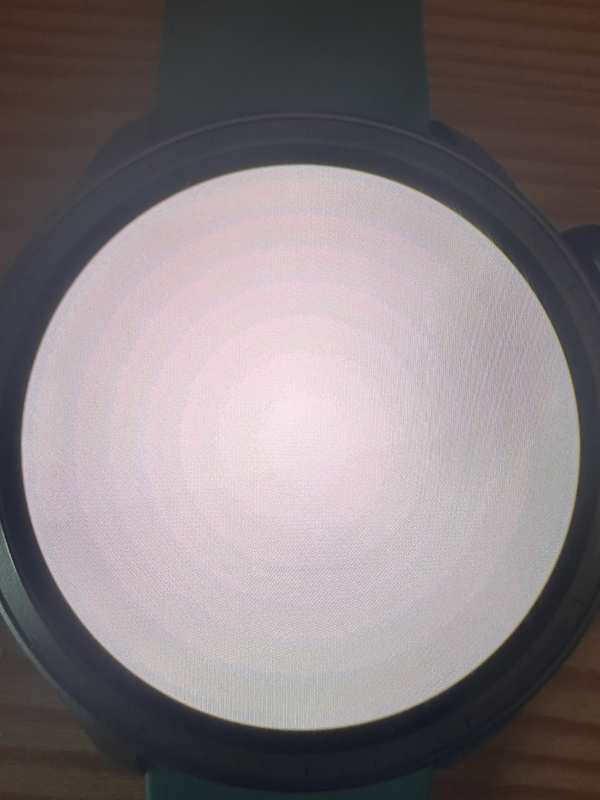
and this is visualization of image on Balance:

Spoiler
Image
as you can see, gradient shades are not managed. There are a series of concentric circles, as if the image were in 4 bit or in .gif or .tif format

I tried to generate all kinds of images with gradients, changing all possible parameters, even generating 32 bit or hdr images, 20mb images, nothing....balance only recognizes single colors and not gradients.

I don't know if it's a problem with the sacha tool, or something else.
However, I have also attached a .zip file to install on your balance if you want to see the problem with your own eyes.
Thank you

Spoiler
Original image pre convert in jpg
abstract-textured-backgound.jpg (4.6 MiB) Viewed 5473 times
Original image 480x480 for quadrant
EXAMPLE.png (77.38 KiB) Viewed 5473 times
pROVA.zip
(67.37 KiB) Downloaded 126 times
User avatar
SashaCX75
Posts: 816
Joined: 26 Oct 2019, 15:18
Location: Ukraine
Has thanked: 13 times
Been thanked: 1025 times
Contact:

Post by SashaCX75 »

The problem is that by default images are converted to a format with a palette of 256 colours. To prevent this from happening, there is an option to convert to ARGB format in the settings. But you say you turned it on. That's why I'm asking for the original files to understand why this option didn't work and what can be done about it.
Omaradsl
Posts: 41
Joined: 02 Oct 2023, 21:07
Location: Italia
Has thanked: 16 times
Been thanked: 8 times
Contact:

Post by Omaradsl »

Sasha, the original files are in my post. in spoiler.

There are also zip file to install my test in your balance, if you have.
there is an option to convert to ARGB format in the settings
all my works are in argb, the option is on for all files in your program.

I try to set also 400-500 argb color in option instead of 256, but problem is same.


what do you mean by original files? the images I attached in the previous post no good?

tell me everything you need to try to solve the problem, because not being able to apply gradients doesn't allow me to generate at least ten watchfaces drawn by me.
Thank you
Omaradsl
Posts: 41
Joined: 02 Oct 2023, 21:07
Location: Italia
Has thanked: 16 times
Been thanked: 8 times
Contact:

Post by Omaradsl »

wow...thanks Cz.... i try.

this is for indicator...but for gradient image?

like these:
Spoiler
Image

when set the image, balance show this:
Spoiler
Image
the image is 32 bit
Omaradsl
Posts: 41
Joined: 02 Oct 2023, 21:07
Location: Italia
Has thanked: 16 times
Been thanked: 8 times
Contact:

Post by Omaradsl »

Nope, bro.
I'm trying to set a background for my watchface that has a gradient
The image I attached was built with Photoshop to be displayed on the Balance as a gradient.
But it doesn't display correctly on the Balance display

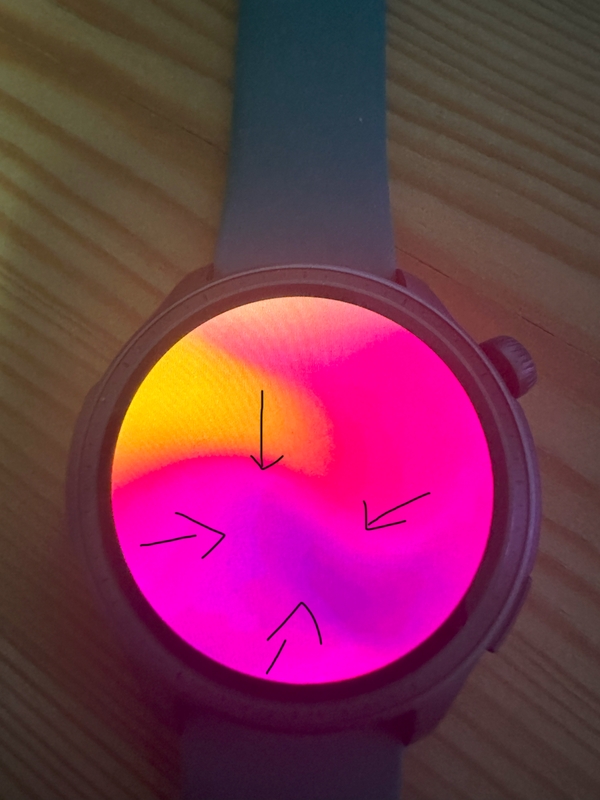
It appears like this on the watch:
Spoiler
Image
Omaradsl
Posts: 41
Joined: 02 Oct 2023, 21:07
Location: Italia
Has thanked: 16 times
Been thanked: 8 times
Contact:

Post by Omaradsl »

but why is the same image displayed correctly on the monitor of my and your PC?

if the same image that we are both looking at correctly, that is this one
Spoiler
Image

is placed with sasha tool in a zip file and then installed on the Balance, it is not displayed correctly.

anyway following your advice I created 3 levels. the first alpha, the second black, the third with gradient, and I saved in png24, but the result is this:
Spoiler
Image
Thanks brothers for help.

P.s:

to complete the discussion, and to make you understand the problem better, any png image with gradient is inserted as a background for a watchfaces is not displayed correctly, not only those created by me, but also all those present on this site for example:

https://www.freepik.com/vectors/gradient

Can you try it too, please? create a project with sasha tool and put an image (the images in site are vector or jpg, you have to convert in png to be recognized by sasha tool)with a gradient as a background and install on Balance. You will see that there is a problem
Omaradsl
Posts: 41
Joined: 02 Oct 2023, 21:07
Location: Italia
Has thanked: 16 times
Been thanked: 8 times
Contact:

Post by Omaradsl »

Image

I can't make you understand me because I use translate
Omaradsl
Posts: 41
Joined: 02 Oct 2023, 21:07
Location: Italia
Has thanked: 16 times
Been thanked: 8 times
Contact:

Post by Omaradsl »

Lo scrivo in italiano, magari traducendo voi possiate capire.

Io non sto cercando di creare una watchface con immagini trasparenti, ma con immagini con un gradiente.

La maggior parte delle nostre watchface che noi creiamo hanno come sfondo il colore nero, per cui è facile poi aggiungere elementi decorativi.
Molto più difficile è invece creare elementi sopra a sfondi che hanno gradienti di colore.

Quello che sto cercando di fare è gestire la visualizzazione dei gradienti sullo schermo del Balance.

Le immagini png che uso come sfondo, qualsiasi gradiente abbiano applicato, non vengono visualizzate correttamente sull' orologio. L'immagine visualizzata presenta artefatti, appare sgranata, come se fosse salvata in bassa risoluzione.

Il link che vi ho fatto vedere contiene varie immagini con gradienti che ho provato ad impostare come sfondo per le mie watchface. Qualsiasi di queste immagini non viene visualizzata correttamente.

Io voglio un immagine con gradiente.

Non voglio immagini trasparenti o altro.

Conosco la differenza tra immagini e sono un appassionato esperto di fotoritocco.

Scusate se ho scritto in italiano, ma non riesco a farmi capire
Magari traducendo quello che ho scritto con translate potete capirmi meglio.
p.s

se non installate il mio zip sul vostro orologio non potete capire di quello che sto parlando.
Omaradsl
Posts: 41
Joined: 02 Oct 2023, 21:07
Location: Italia
Has thanked: 16 times
Been thanked: 8 times
Contact:

Post by Omaradsl »

Create backgrounds in photoshop using the gradient overlay tool.
Spoiler
Image
you have Amazfit Balance for test?

Set your image with sasha tool as wallpaper and install it.
Omaradsl
Posts: 41
Joined: 02 Oct 2023, 21:07
Location: Italia
Has thanked: 16 times
Been thanked: 8 times
Contact:

Post by Omaradsl »

Spoiler
Image
LOOK:

installing your image on balance, it appears grainy

The balance dont manage correct gradient that you have create
Omaradsl
Posts: 41
Joined: 02 Oct 2023, 21:07
Location: Italia
Has thanked: 16 times
Been thanked: 8 times
Contact:

Post by Omaradsl »

Look this example.
Spoiler
Image
I would like to create something similar with a gradient background.
User avatar
asoo
Posts: 2117
Joined: 03 Jan 2019, 01:48
Location: ͼͽ Thailand ͼͽ
Has thanked: 409 times
Been thanked: 2035 times

Post by asoo »

Omaradsl wrote: 18 Jul 2024, 19:50
Spoiler
Image
LOOK:
installing your image on balance, it appears grainy
The balance dont manage correct gradient that you have create
This is what I understand. If there are any mistakes, I apologize.
I think the problem might be with the pack.
In the pack process, there are steps to convert images. in the form of zeppOS the quality of the color is not like the original. Therefore, it may cause the problem you mentioned. So no matter how good the quality of the image you use is After converting the image into png format of zeppos, it will follow the format specified by zeppOS.

I think the problem will be solved for the better, it will have to wait. Those who can create a program to convert images for the better or through zepp change the image display format.

There are many knowledgeable people trying to create a convert program to test converting images to be usable with ZeppOS. However, the whole thing probably depends on Zepp.

This is an example program for converting images to ZeppOS format.
Which I think is the best at the moment.
viewtopic.php?p=15457#p15457
ͼͽ To request please use the interrelated forum in action ͼͽ
Please do not PM to me for requests ported watchface.
User avatar
SashaCX75
Posts: 816
Joined: 26 Oct 2019, 15:18
Location: Ukraine
Has thanked: 13 times
Been thanked: 1025 times
Contact:

Post by SashaCX75 »

Omaradsl wrote: 18 Jul 2024, 16:08
Sasha, the original files are in my post. in spoiler.
In the original post I only see the watch face with the already converted images. The original files are not there.
User avatar
SashaCX75
Posts: 816
Joined: 26 Oct 2019, 15:18
Location: Ukraine
Has thanked: 13 times
Been thanked: 1025 times
Contact:

Post by SashaCX75 »

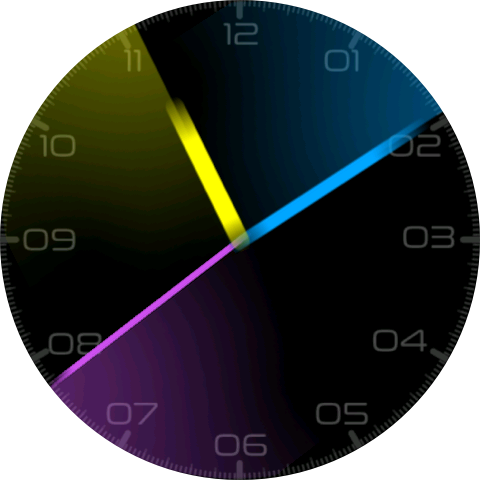
screenshot
Image
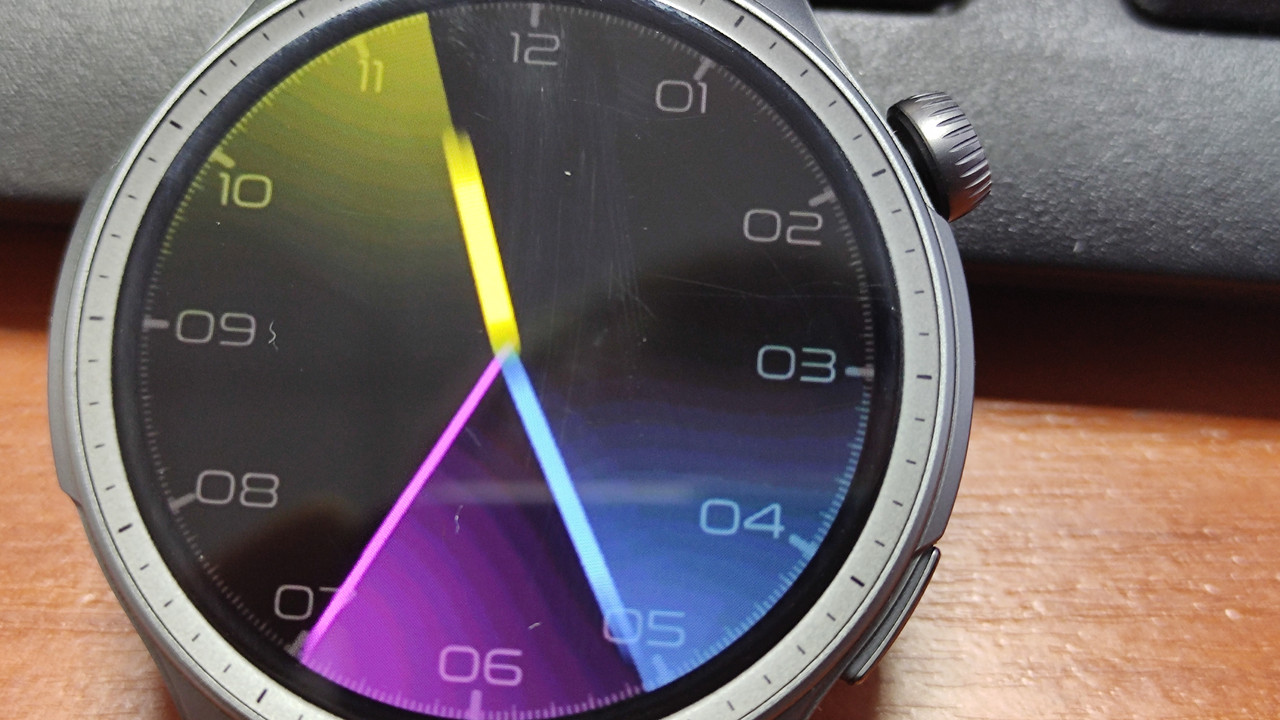
photo
Image
Here is a photo of the watch and a screenshot taken on the watch (not in the editor). The photo shows more artefacts than the screenshot. This indicates that the screen cannot display smooth gradients. However, with my eyes I don't see any problems in the display on the watch.
Omaradsl
Posts: 41
Joined: 02 Oct 2023, 21:07
Location: Italia
Has thanked: 16 times
Been thanked: 8 times
Contact:

Post by Omaradsl »

Thanks to all for answers and time for me.
You are a great comunity.
Post Reply

Return to “Watchfaces creation (order table)”

Who is online

Users browsing this forum: No registered users and 1 guest