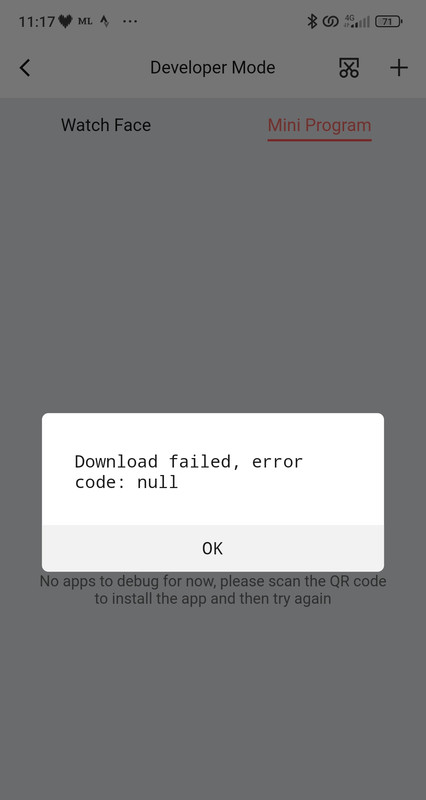
I've done everything but when I use the Zepp scan it says: Download failed, error code"
What do you use to generate a qrcode?
-
- Administrador
-
-
Support Ukraine
If you experience any problems with the forum (it is not visible, there is no way to post messages, or some functionality does not work), please let us know. If you have problems with registration or you did not receive confirmation letter, let us know and we will activate your account manually.
If you get an "The submitted form was invalid. Try submitting again" error, delete cookies, then try again.
Amazfit Balance
Moderadores: asoo, Internal error, Watchmens
-
SashaCX75

- Mensagens: 827
- Registrado em: 26 Out 2019, 15:18
- Localização: Ukraine
- Has thanked: 14 times
- Been thanked: 1043 times
- Contato:
Not all servers process requests correctly if zpkd1:// is written instead of http://.
To start with, you can try just pasting the address that starts with zpkd1:// into the address bar of your browser and see if the download starts.
To start with, you can try just pasting the address that starts with zpkd1:// into the address bar of your browser and see if the download starts.
-
Stephthouv
- Mensagens: 15
- Registrado em: 10 Jul 2022, 11:05
- Localização: Montpellier
- Has thanked: 7 times
- Contato:
Hi everyone. An idea for amazfaces team, maybe stupid idea, but...
If the method mentioned above works, why not using it for amazfaces? There could be a QR code for each face ?
Maybe it's a bad idea and if it is, sorry for amazfaces team. Many Many thanks for your work.
If the method mentioned above works, why not using it for amazfaces? There could be a QR code for each face ?
Maybe it's a bad idea and if it is, sorry for amazfaces team. Many Many thanks for your work.
-
GIK-Team

- root
- Mensagens: 1033
- Registrado em: 22 Mar 2018, 10:00
- Localização: Ukraine
- Has thanked: 1172 times
- Been thanked: 281 times
- Contato:
Hello,Stephthouv escreveu: 09 Dez 2023, 10:02Hi everyone. An idea for amazfaces team, maybe stupid idea, but...
If the method mentioned above works, why not using it for amazfaces? There could be a QR code for each face ?
Maybe it's a bad idea and if it is, sorry for amazfaces team. Many Many thanks for your work.
The concept of using QR codes for each watch face is certainly interesting and worth considering.
However, currently, we are focused on enhancing the standard installation process to ensure it works seamlessly within the app. Our goal is to provide a user-friendly and efficient experience for downloading and applying watch faces. Rest assured, we are always looking for ways to innovate and improve our service.
Your suggestions and support are very valuable to us. Please keep them coming, and thank you for your kind words about our work!
Best regards
"sometimes it's scary but it's still just you and me” — Leaving Laurel
-
Stephthouv
- Mensagens: 15
- Registrado em: 10 Jul 2022, 11:05
- Localização: Montpellier
- Has thanked: 7 times
- Contato:
Hi, need more help, if you agree and you have time.
I have opened a altervista account. What is the way to load my file in altervista ? Is it in media library ?
How do you obtain the zpk file ? By changing the file extension in file explorer ? Is it before uploading in altervista ?
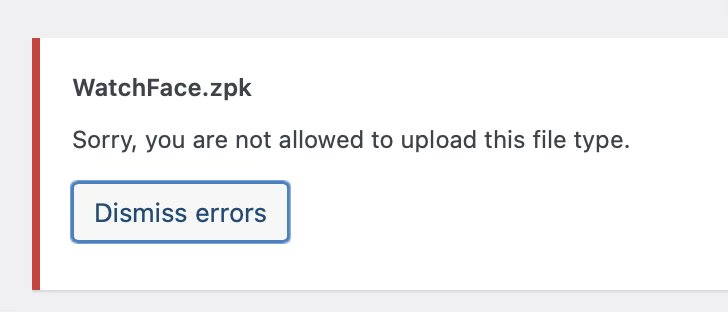
Do you need to uplaod zip file AND zpk file in altervista ? When I try with zpk file, altervista tells me I'm not allowed to load files with this extension (zpk).
To sum up, I'm lost ...
In advance many thanks for your help.
I have opened a altervista account. What is the way to load my file in altervista ? Is it in media library ?
How do you obtain the zpk file ? By changing the file extension in file explorer ? Is it before uploading in altervista ?
Do you need to uplaod zip file AND zpk file in altervista ? When I try with zpk file, altervista tells me I'm not allowed to load files with this extension (zpk).
To sum up, I'm lost ...
In advance many thanks for your help.
supersufa escreveu: 06 Dez 2023, 13:48Sure!!
Once you have built your WatchFace.zpk file you have to load it online....
In order to be sure that the procedure works fine you have to load the file in a webspace which provide you a direct link. For example you can create an account on Altervista, because i know that everything works without any issues...
Immagine for example that you chose Stephthouv as your nickname on Altervista.... Your loaded file could be for example http ://Stephthouv.altervista.org/WatchFace.zpk ok?
The last step is to generate a QR code... By performing this action however the QR code have to point to zpkd1: //Stephthouv.altervista.org/WatchFace.zpk
In this way, by using Zepp to scan the just generated QR code the watchface will be installed automatically....
-
supersufa
- Mensagens: 11
- Registrado em: 26 Out 2021, 09:48
- Localização: Biella
- Been thanked: 5 times
- Contato:
You have to create the zip file and rename it in windows yes...
Then you have to load it in altervista via Dasboard - File magement - upload file
In this way you can load every file with any extension.
Then you have to load it in altervista via Dasboard - File magement - upload file
In this way you can load every file with any extension.
-
==Francesco==
- Mensagens: 4
- Registrado em: 14 Set 2023, 08:52
- Localização: Cittanova
- Contato:
Good morning,
Unfortunately I am unable to rename the uploaded file (in zip format) on the Altervista portal.
Can you help me?
Thank you
Buongiorno,
io purtroppo non riesco a rinominare il file caricato (in formato zip) sul portale Altervista.
Riuscite ad aiutarmi?
Grazie
Unfortunately I am unable to rename the uploaded file (in zip format) on the Altervista portal.
Can you help me?
Thank you
Buongiorno,
io purtroppo non riesco a rinominare il file caricato (in formato zip) sul portale Altervista.
Riuscite ad aiutarmi?
Grazie
-
Stephthouv
- Mensagens: 15
- Registrado em: 10 Jul 2022, 11:05
- Localização: Montpellier
- Has thanked: 7 times
- Contato:
Actually there are 2 types of altervista accounts. One is a blog, the other allows theoretically to upload files, whatever the extension of the file.
But despite I used a vpn to change my country, impossible to subscribe to a "file server" profile: unavailable in my country (I tried several countries).
After several attempts, I gave up....
But despite I used a vpn to change my country, impossible to subscribe to a "file server" profile: unavailable in my country (I tried several countries).
After several attempts, I gave up....
-
Stephthouv
- Mensagens: 15
- Registrado em: 10 Jul 2022, 11:05
- Localização: Montpellier
- Has thanked: 7 times
- Contato:
Rename it in windows explorer before uploading it in altervista portal  .
.
 .
. ==Francesco== escreveu: 15 Dez 2023, 08:46Good morning,
Unfortunately I am unable to rename the uploaded file (in zip format) on the Altervista portal.
Can you help me?
Thank you
Buongiorno,
io purtroppo non riesco a rinominare il file caricato (in formato zip) sul portale Altervista.
Riuscite ad aiutarmi?
Grazie
-
==Francesco==
- Mensagens: 4
- Registrado em: 14 Set 2023, 08:52
- Localização: Cittanova
- Contato:
Grazie per la risposta, purtroppo non riesco a caricare il file, risponde che il file non è una watchface.
Thanks for the reply, unfortunately I can't upload the file, I reply that the file is not a watchface.
Thanks for the reply, unfortunately I can't upload the file, I reply that the file is not a watchface.
-
==Francesco==
- Mensagens: 4
- Registrado em: 14 Set 2023, 08:52
- Localização: Cittanova
- Contato:
Buongiorno, ho raccolto le varie informazioni sul forum per caricare le watchfaces sul Balance, purtroppo non ci sono riuscito, avrò sicuramente sbagliato in qualche passaggio. Qualcuno sarebbe così gentile da creare una guida (passo, passo) per noi ignoranti in materia? Grazie come sempre e buon lavoro a tutti!
Good morning, I collected the various information on the forum to upload the watchfaces to the Balance, unfortunately I didn't succeed, I must have made a mistake in some steps. Would someone be kind enough to create a (step by step) guide for us ignorant people on the subject? Thanks as always and good work everyone!
Good morning, I collected the various information on the forum to upload the watchfaces to the Balance, unfortunately I didn't succeed, I must have made a mistake in some steps. Would someone be kind enough to create a (step by step) guide for us ignorant people on the subject? Thanks as always and good work everyone!
-
==Francesco==
- Mensagens: 4
- Registrado em: 14 Set 2023, 08:52
- Localização: Cittanova
- Contato:
Poi pensavo un'altra cosa: ma qualcuno non potrebbe creare direttamente il qrcode funzionante su uno spazio Altervista? C'è qualcosa che non lo permette di fare?
Then I thought about something else: couldn't someone directly create the working qrcode on an Altervista space? Is there anything you can't do?
Then I thought about something else: couldn't someone directly create the working qrcode on an Altervista space? Is there anything you can't do?
-
supersufa
- Mensagens: 11
- Registrado em: 26 Out 2021, 09:48
- Localização: Biella
- Been thanked: 5 times
- Contato:
The most important step is to create the file WatchFace.zip containing:
- device.zip (your favourite watchface renamed)
- app-side.zip (support file here attached)
Then you have to renamed the file in WatchFace.zpk.
Then you have to load the renamed file on altervista.
Then you have to generare the QR code (renaming from http:// to zpkd1://)
Without these steps the intall phase is impossible!
- device.zip (your favourite watchface renamed)
- app-side.zip (support file here attached)
Then you have to renamed the file in WatchFace.zpk.
Then you have to load the renamed file on altervista.
Then you have to generare the QR code (renaming from http:// to zpkd1://)
Without these steps the intall phase is impossible!
- Anexos
-
 app-side.zip
- (644 Bytes) Baixado 540 vezes
-
Stephthouv
- Mensagens: 15
- Registrado em: 10 Jul 2022, 11:05
- Localização: Montpellier
- Has thanked: 7 times
- Contato:
Balance updated tonight to 3.16.4.3 firmware. Still no abilities to sync faces with third party app.
Editado pela última vez por Stephthouv em 19 Dez 2023, 19:47, em um total de 1 vez.
-
Stephthouv
- Mensagens: 15
- Registrado em: 10 Jul 2022, 11:05
- Localização: Montpellier
- Has thanked: 7 times
- Contato:
Thank you but... You can add two zip files in one zip file? 

supersufa escreveu: 19 Dez 2023, 11:22The most important step is to create the file WatchFace.zip containing:
- device.zip (your favourite watchface renamed)
- app-side.zip (support file here attached)
Then you have to renamed the file in WatchFace.zpk.
Then you have to load the renamed file on altervista.
Then you have to generare the QR code (renaming from http:// to zpkd1://)
Without these steps the intall phase is impossible!
-
supersufa
- Mensagens: 11
- Registrado em: 26 Out 2021, 09:48
- Localização: Biella
- Been thanked: 5 times
- Contato:
Absolutely yes!
I don't know what software you use to build a .zip file... But with winrar i.e. you can select both zip file (device.zip and app-side.zip), right mouse button then "add to archive" in order to create the WatchFace.zip file.
Test it!
I don't know what software you use to build a .zip file... But with winrar i.e. you can select both zip file (device.zip and app-side.zip), right mouse button then "add to archive" in order to create the WatchFace.zip file.
Test it!
-
pixelator99
- Mensagens: 3
- Registrado em: 28 Nov 2023, 06:44
- Localização: India
- Contato:
Just tried this on my Balance, and it works perfectly. Thank you so much for the solution, @supersufa !
-
Stephthouv
- Mensagens: 15
- Registrado em: 10 Jul 2022, 11:05
- Localização: Montpellier
- Has thanked: 7 times
- Contato:

-
Stephthouv
- Mensagens: 15
- Registrado em: 10 Jul 2022, 11:05
- Localização: Montpellier
- Has thanked: 7 times
- Contato:
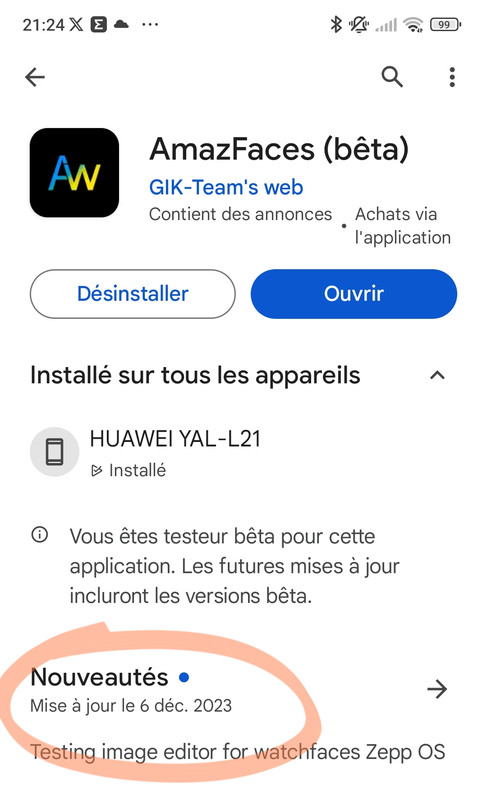
I'm afraid the app is not updated in Google play store. The last update is on 6th of December.ragdolled escreveu: 25 Dez 2023, 10:47The app is updated. Just switch your model to balance and everything should work. I just download my first watch face couple of minutes ago!
Spoiler
-
GIK-Team
- root
- Mensagens: 1033
- Registrado em: 22 Mar 2018, 10:00
- Localização: Ukraine
- Has thanked: 1172 times
- Been thanked: 281 times
- Contato:
@ragdolled is talking about the iOS versionStephthouv escreveu: 25 Dez 2023, 20:27I'm afraid the app is not updated in Google play store. The last update is on 6th of December.

"sometimes it's scary but it's still just you and me” — Leaving Laurel
-
Stephthouv
- Mensagens: 15
- Registrado em: 10 Jul 2022, 11:05
- Localização: Montpellier
- Has thanked: 7 times
- Contato:
I'm a bit curious : can someone explain why (technically) the app works on IPhone and not on android? Many thanks in advance.
GIK-Team escreveu: 25 Dez 2023, 22:58@ragdolled is talking about the iOS versionStephthouv escreveu: 25 Dez 2023, 20:27I'm afraid the app is not updated in Google play store. The last update is on 6th of December.
-
Stas

- Mensagens: 188
- Registrado em: 22 Jan 2019, 21:18
- Localização: Ukraine
- Has thanked: 4 times
- Been thanked: 34 times
- Contato:
Yes, Android and iOS for Balance are different, the iOS installation has not changed, and the Android company Zepp did it in a completely different way, we hope that in the near future we will try to adapt the Android version.
Stephthouv escreveu: 30 Dez 2023, 09:50I'm a bit curious : can someone explain why (technically) the app works on IPhone and not on android? Many thanks in advance.
-
MikeZuul
- Mensagens: 4
- Registrado em: 10 Jan 2024, 18:32
- Localização: California
- Been thanked: 1 time
- Contato:
I've followed all instructions. I get the same result as massi131: Download failed, error code: null. When I put the address that starts with zpkd1:// in the address of my browser I do not get a download (or anything). Though with the http:// I do get a download. Any ideas?SashaCX75 escreveu: 08 Dez 2023, 08:21Not all servers process requests correctly if zpkd1:// is written instead of http://.
To start with, you can try just pasting the address that starts with zpkd1:// into the address bar of your browser and see if the download starts.
Thanks for everything! Your answers and this thread are super helpful!
Quem está online
Usuários navegando neste fórum: Nenhum usuário registrado e 1 visitante