Hello,
Could someone please port the following face to the GTR 3 PRO
https://amazfitwatchfaces.com/gtr/view/12410
If possible, I would like the weather to be changed for battery % and heart beat (one on top of the other) instead.
Any help with this is greatly appreciated.
Alternatively, If someone can show me how to extract the images, I am willing to learn and recreate using huami tools
-
- Administrator
-
-
Support Ukraine
If you experience any problems with the forum (it is not visible, there is no way to post messages, or some functionality does not work), please let us know. If you have problems with registration or you did not receive confirmation letter, let us know and we will activate your account manually.
If you get an "The submitted form was invalid. Try submitting again" error, delete cookies, then try again.
MOD port [GTR 3 PRO]
Forum rules
When adding a new topic, use the template: Topic title [device name]
For example: Requesting creation of watch face [GTR 3 Pro]
All communication in this branch should only be in English.
When adding a new topic, use the template: Topic title [device name]
For example: Requesting creation of watch face [GTR 3 Pro]
All communication in this branch should only be in English.
-
asoo
- Posts: 2209
- Joined: 03 Jan 2019, 01:48
- Location: ͼͽ Thailand ͼͽ
- Has thanked: 429 times
- Been thanked: 2132 times
- Contact:

You can use "AmazFit WatchFace editor 2 for Windows" to extract this BIN file.keval.p21 wrote: 18 Nov 2021, 13:49Alternatively, If someone can show me how to extract the images, I am willing to learn and recreate using huami toolsSpoiler
Hello,
Could someone please port the following face to the GTR 3 PRO
https://amazfitwatchfaces.com/gtr/view/12410
If possible, I would like the weather to be changed for battery % and heart beat (one on top of the other) instead.
Any help with this is greatly appreciated.
viewtopic.php?p=8392#p8392
ALL file png from nwremake7
 PNG-nwremake7_gtr2.zip
- (379.34 KiB) Downloaded 171 times
ͼͽ To request please use the interrelated forum in action ͼͽ
Please do not PM to me for requests ported watchface.
Please do not PM to me for requests ported watchface.
-
keval.p21
- Posts: 3
- Joined: 16 Nov 2021, 08:17
- Location: London
- Has thanked: 2 times
- Been thanked: 1 time
- Contact:
Thank you, however I failed miserably at making this for the GTR 3 PRO. Going back to stock faces for nowasoo wrote: 18 Nov 2021, 14:17You can use "AmazFit WatchFace editor 2 for Windows" to extract this BIN file.
viewtopic.php?p=8392#p8392
ALL file png from nwremake7
PNG-nwremake7_gtr2.zip
Last edited by keval.p21 on 18 Nov 2021, 19:05, edited 1 time in total.
-
asoo
- Posts: 2209
- Joined: 03 Jan 2019, 01:48
- Location: ͼͽ Thailand ͼͽ
- Has thanked: 429 times
- Been thanked: 2132 times
- Contact:
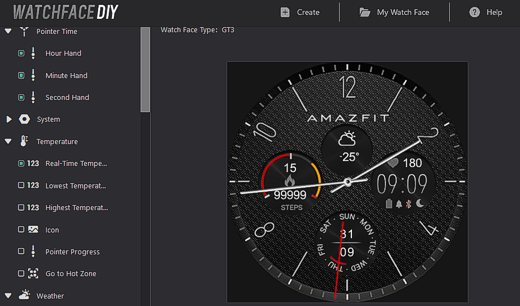
- NwRemake7-GTR3_1.zip
- (952.53 KiB) Downloaded 186 times
- NwRemake7-GTR3-PRO1.zip
- (1009.68 KiB) Downloaded 250 times
- Full AOD
Please read carefully
This watchface I do not test on real device. Because I don't have GTR3/3PRO
Anyone who wants to try it , can take it and try it for themselves.
This watchface only create and test on "dev.huami.com"
This watchface I create for test about GTR3 only. I have no plans to do watchface GTR3 right now.
If this watchface not work please tell me. I will delete it.
ͼͽ To request please use the interrelated forum in action ͼͽ
Please do not PM to me for requests ported watchface.
Please do not PM to me for requests ported watchface.
-
phoenix1988
- Posts: 3
- Joined: 19 Nov 2021, 12:44
- Location: Россия
- Contact:
-
SashaCX75

- Posts: 827
- Joined: 26 Oct 2019, 15:18
- Location: Ukraine
- Has thanked: 14 times
- Been thanked: 1044 times
- Contact:
The dial works. But almost all elements are located above the hour hands and overlap them.
-
patrickcentral
- WF maker
- Posts: 6
- Joined: 06 Mar 2019, 05:09
- Has thanked: 3 times
- Been thanked: 1 time
- Contact:
How did you go about putting the zip on your GTR3Pro? I have a couple designs I've been working on and cannot get them on my device to test.phoenix1988 wrote: 19 Nov 2021, 12:49everything works. you are well done. Thank you very much from Russia.
-
asoo
- Posts: 2209
- Joined: 03 Jan 2019, 01:48
- Location: ͼͽ Thailand ͼͽ
- Has thanked: 429 times
- Been thanked: 2132 times
- Contact:
Thank you SashaCX75 so much , Now I fixed , I change the analog time to top layer , But I don't know it work on real device or not , I can test only on "dev.huami.com"SashaCX75 wrote: 19 Nov 2021, 21:49The dial works. But almost all elements are located above the hour hands and overlap them.
viewtopic.php?p=11103#p11103
with respect
ͼͽ To request please use the interrelated forum in action ͼͽ
Please do not PM to me for requests ported watchface.
Please do not PM to me for requests ported watchface.
-
SashaCX75
- Posts: 827
- Joined: 26 Oct 2019, 15:18
- Location: Ukraine
- Has thanked: 14 times
- Been thanked: 1044 times
- Contact:
-
keval.p21
- Posts: 3
- Joined: 16 Nov 2021, 08:17
- Location: London
- Has thanked: 2 times
- Been thanked: 1 time
- Contact:
Please note this is the reply given to me by phoenix1988. I PM'd him, and this was his reply and it worked out great! (I hope he doesn't mind I shared this info)patrickcentral wrote: 20 Nov 2021, 01:11How did you go about putting the zip on your GTR3Pro? I have a couple designs I've been working on and cannot get them on my device to test.
It may take a few attempts to get it rightphoenix1988 wrote:Substitute of local files of the stock dial (this is on Android, on IOS I do not know).
Put the watch face from the Zepp store. Then find its files through the file manager (Android / data / com.huami.watch.hmwatchmanager / files / watch_skin_local). Rename the custom watch face archive to the name of the stock archive and drop it into the stock clock folder with Then you sync again in Zepp the dial that you replaced.
Who is online
Users browsing this forum: No registered users and 1 guest