• Administrador
  •  
    Support Ukraine
    If you experience any problems with the forum (it is not visible, there is no way to post messages, or some functionality does not work), please let us know. If you have problems with registration or you did not receive confirmation letter, let us know and we will activate your account manually.
    If you get an "The submitted form was invalid. Try submitting again" error, delete cookies, then try again.
     

AmazFit WatchFace editor 2 for Windows

This forum is designed to discuss and develop tools creating watch faces.

Moderadores: asoo, lvpokka, Internal error, Watchmens

Reglas del Foro
All communication in this branch should only be in English.
To discuss tools that are not in this section, use the “Watchfaces tools (discussion)” forum.
Avatar de Usuario
SashaCX75
Mensajes: 819
Registrado: 26 Oct 2019, 15:18
Ubicación: Ukraine
Has thanked: 13 times
Been thanked: 1028 times
Contactar:

AmazFit WatchFace editor 2 for Windows

Mensaje por SashaCX75 »

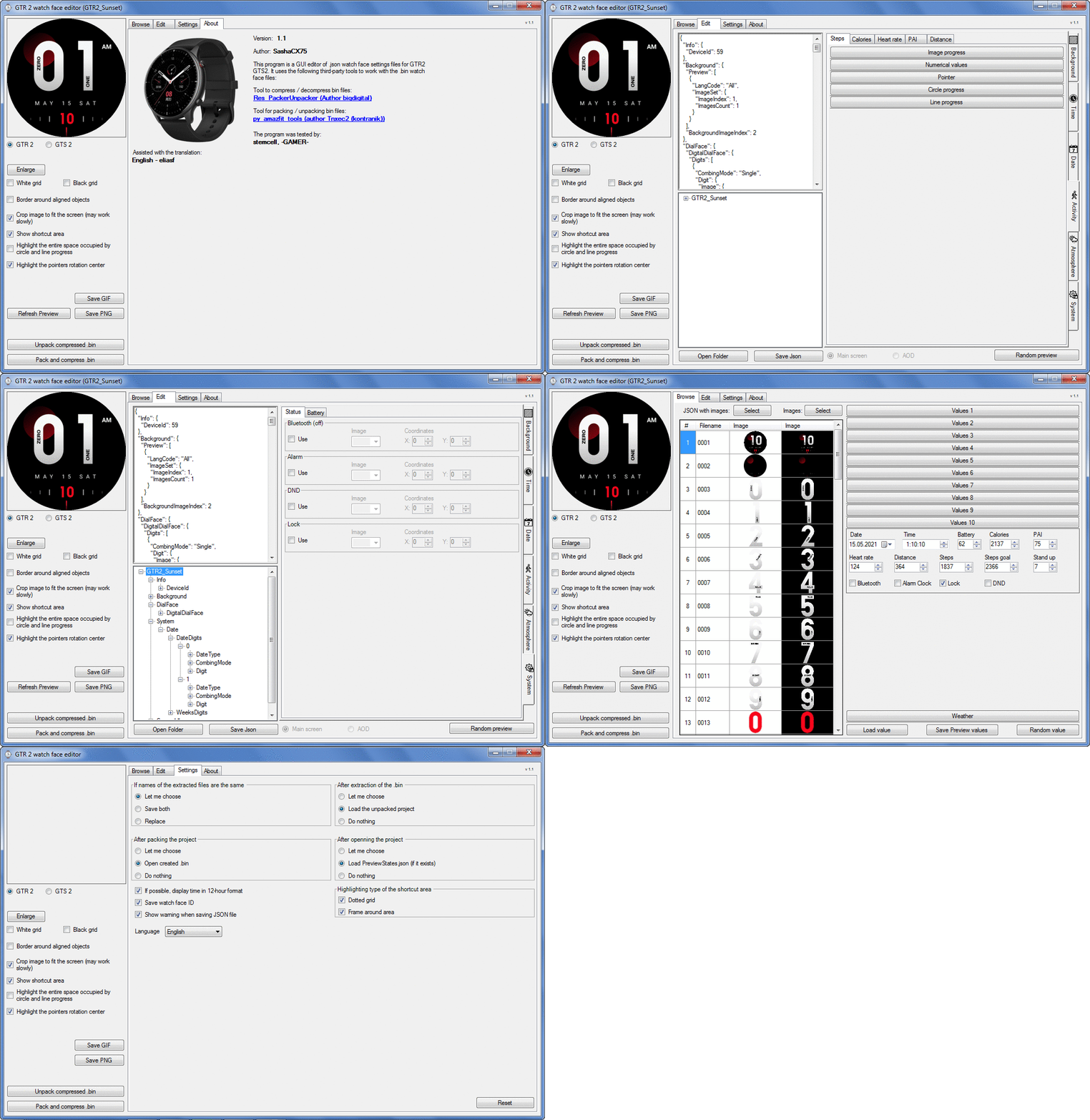
Graphics editor for working with dials Amazfit
The editor supports watch faces from GTR 2(e), GTS 2 (GTS 2e / Zepp E Square), T-Rex Pro, Zepp E Circle.
Screenshot
Screenshot
Imagen
Note: It is advisable to unpack the program to the root of the disk.
Not all dials can be unpacked.

The drawing order of elements cannot be changed. The only exception is if you move the second hand from the center, it will be drawn under the hour and minute hands.

If the .bin file is not created, then you need to look for errors in the .log file. Most often this happens when images have the wrong format.

Version 7.3
List of changes
Fixed known display bugs.
v 7.2
Fixed date display errors in editable zones.
Added support for the Hungarian language.
v 7.1
For distance added support for separate images for miles and kilometers.
v 7.0
Added support for independent coordinates for a set of pictures (segments).
v 6.0
Added support for Zepp E Circle
Added the ability to convert watch faces between different models (GTR 2 (e), Zepp E Circle, T-Rex Pro)
v 5.1
Added the ability to create and update preview images of editable zones.
v 5.0
Added support for editable zones.
v 4.1
Added the ability to display the time in the system font.
Added the ability to display the date in the system font.
Added the ability to change the order of layers.
Added the ability to overlay the clock image on the saved png and gif files (enabled in the settings).
v 4.0
Added support for the system font (inscription at an angle and in a circle).
Added support for the Sunrise parameter (not working correctly for all cities).
Added support for ActivityGoal parameter.
Added the ability to display the goal of steps.
Added support for the Icon parameter.
Added the ability to display circular and linear progress at the same time.
v 3.1
Fixed errors when displaying the distance.
Fixed errors when displaying temperature.
Added French.
Added Italian language.
v 3.0
Added support for T-Rex Pro.
Added support for new elements (StandUp, fat burning, UV index, humidity, wind, pressure).
Found bugs fixed.
v 2.1
Fixed bugs in display AOD.
Fixed bug when using pictures for circular progress.
v 2.0
Added support for AOD.
Added Chinese translation.
v 1
It can work with elements: time, date, statuses, weather, battery, steps, calories, heart rate, PAI, path.
Added English translation.
v 1.2 Added Spanish language
Old versions
Pictures created when unpacking and unpacking bin files are created by the parser and may differ from the images created in the editor. I have nothing to do with these files and am not responsible for their content.

When you turn on the "Follow ..." radio button, the right alignment and center alignment in the editor is displayed incorrectly.
The preview in the editor may differ from the image on the watch. I advise you to check the dial on a real device.

Editable zones do not work on the T-Rex Pro.

The editor does not work with GTS 2 mini (GTS U) watch faces and I do not know how to make such watch faces.

Until the Zepp app has an official watch face with animations or shortcuts, these features cannot be added to the editor.
Shortcuts work on dials converted from GTR (GTS) to GTR 2 (GTS 2). But with this method of creating dials, not all functions work correctly.

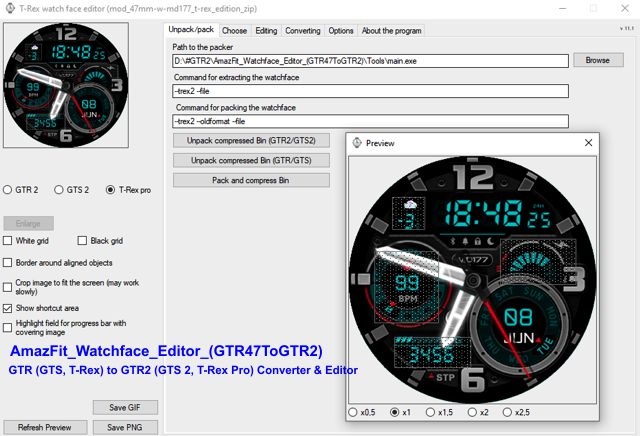
GTR (GTS, T-Rex) to GTR2 (GTS 2, T-Rex Pro) converter
GTR (GTS, T-Rex) to GTR2 (GTS 2, T-Rex Pro) Converter & Editor

Because I bought a GTR 3, the program will no longer be updated.

Donate to the author - PayPal: [email protected].
Última edición por SashaCX75 el 01 Jun 2022, 07:19, editado 32 veces en total.
murmilega
WF maker
Mensajes: 4
Registrado: 23 Abr 2021, 22:19
Ubicación: Tarragona
Has thanked: 1 time
Contactar:

Mensaje por murmilega »

Hello everyone, could someone explain the process to convert or port a watch face from t-rex to t-rex pro? Thank you so much.

EDIT:
Thank you very much sasha, I had not seen the editor and sphere converter, thank you very much for your great work.

greetings
Avatar de Usuario
SashaCX75
Mensajes: 819
Registrado: 26 Oct 2019, 15:18
Ubicación: Ukraine
Has thanked: 13 times
Been thanked: 1028 times
Contactar:

Mensaje por SashaCX75 »

Version 4.0
Added support for the system font (inscription at an angle and in a circle).
Added support for the Sunrise parameter (not working correctly for all cities).
Added support for ActivityGoal parameter.
Added the ability to display the goal of steps.
Added support for the Icon parameter.
Added the ability to display circular and linear progress at the same time.
demiurg1
WF maker
Mensajes: 114
Registrado: 23 Feb 2020, 22:49
Ubicación: Poland
Has thanked: 23 times
Been thanked: 17 times
Contactar:

Mensaje por demiurg1 »

There is already version 4.0 of the SashaCX75 editor, for which we thank you. I did my last project on version 3.1. The next one will be in the new version. This last project is my little experiment with a "cheated" animation in GTR 2. I made a pseudo-animation of a bird flying in front of a weather image. This is obviously 1 frames per second and only 10 frames. You can see this project here: https://amazfitwatchfaces.com/gtr/view/15399.
Anyone who wants to can modify it in their own way!
Fringo
WF maker
Mensajes: 3
Registrado: 22 May 2020, 01:19
Ubicación: KR
Has thanked: 6 times
Contactar:

Mensaje por Fringo »

Thank you for update! If you don't mind, I'd like to translate English into Korean(South)^-^
Jtkz
WF maker
Mensajes: 5
Registrado: 11 May 2021, 15:56
Ubicación: Malaysia
Contactar:

Mensaje por Jtkz »

Hi SashaCX75 ,

I recently made a wf for gtr2 but when I test it on the watch the second hand seems to skip every second and only moves once every 2 seconds. There also seems to be a delay in waking the watch by clicking the button when using this watch face. This wf is much simpler and also smaller compared to my other watch faces so I'm not sure why this is happening. May I know if I did anything wrong with this wf?

The wf is attached below.
Thanks!
Adjuntos
gtr2_junghans_maxbill_chrono full black_packed.bin
(221.98 KiB) Descargado 184 veces
Avatar de Usuario
SashaCX75
Mensajes: 819
Registrado: 26 Oct 2019, 15:18
Ubicación: Ukraine
Has thanked: 13 times
Been thanked: 1028 times
Contactar:

Mensaje por SashaCX75 »

Fringo
I do not plan to add translations to the editor, it is difficult to keep up to date version for many translations. And in the Korean language, as far as I know, the length of the inscriptions is very different from other languages and will need to be edited a lot. If you work with Visual Studio, you can translate the editor yourself.
Avatar de Usuario
SashaCX75
Mensajes: 819
Registrado: 26 Oct 2019, 15:18
Ubicación: Ukraine
Has thanked: 13 times
Been thanked: 1028 times
Contactar:

Mensaje por SashaCX75 »

Jtkz
You have a very large images with pointers. You need to crop empty areas on them.
Jtkz
WF maker
Mensajes: 5
Registrado: 11 May 2021, 15:56
Ubicación: Malaysia
Contactar:

Mensaje por Jtkz »

SashaCX75
Do you mean the pointer images themselves are too large?
Avatar de Usuario
SashaCX75
Mensajes: 819
Registrado: 26 Oct 2019, 15:18
Ubicación: Ukraine
Has thanked: 13 times
Been thanked: 1028 times
Contactar:

Mensaje por SashaCX75 »

Jtkz
Yes. There is a lot of empty space on them.
Avatar de Usuario
CASIONFAN2021
WF maker
Mensajes: 31
Registrado: 16 Abr 2021, 21:23
Ubicación: uk
Has thanked: 1 time
Been thanked: 4 times
Contactar:

Mensaje por CASIONFAN2021 »

Thank you sasha for the update. Its fantastic to have sunrise sunset now. There is no way to loaf any values into the sunrise sunset other than to click random values. I have noticed that when this is done the random values for the same function are random I.e if you have a circle and pointer at the same time you have to click random values a lot to get them to line up with each other making it tedious to check if the start angle of the pointer and the beginning angle of a circle and the end angle of pointer and circle are the same. Will there be an update to the values section to add start and finish time off the sunrise sunset. While it's not essential it would make life less random.

Ps the atmosphere barometer on t rex pro doesn't work with watch face after loading barometer on watch.
spidercrab
Mensajes: 24
Registrado: 25 Jun 2020, 09:13
Ubicación: UK
Has thanked: 27 times
Been thanked: 3 times
Contactar:

Mensaje por spidercrab »

@SashaCX75 Big thanks for the solid work on the new V4 editor. The new Rotated and Circle System text is a powerful new feature and well implemented.

Could I put in a furure request, to add access to more or all of the system fonts, if possible?

The current one is quite thin and there are some system fonts that look heavier and easier to read, such as the Workout Italic system font and the Timer font.

Using system fonts throughout a design could greatly simplify WF creation and also I assume, make a significant reduction in file size. (Assuming the system fonts are loaded directly from the WF firmware.)
Avatar de Usuario
SashaCX75
Mensajes: 819
Registrado: 26 Oct 2019, 15:18
Ubicación: Ukraine
Has thanked: 13 times
Been thanked: 1028 times
Contactar:

Mensaje por SashaCX75 »

CASIONFAN2021
The barometer does not work on the T-Rex Pro.
Sunrise and sunset times change every day depending on the city. Therefore, in the editor, I see no reason to customize it. In the editor, sunrise at 5:30 am and sunset at 7:30 pm. Progress is calculated based on the current time. But I do not recommend using progress. In addition to time, other display methods do not always work correctly.
Avatar de Usuario
SashaCX75
Mensajes: 819
Registrado: 26 Oct 2019, 15:18
Ubicación: Ukraine
Has thanked: 13 times
Been thanked: 1028 times
Contactar:

Mensaje por SashaCX75 »

spidercrab
The system font is in the firmware of the watch and cannot be changed using the dial.
gengtrex
WF maker
Mensajes: 18
Registrado: 06 Feb 2021, 02:47
Ubicación: nonthaburi
Has thanked: 4 times
Been thanked: 1 time
Contactar:

Mensaje por gengtrex »

SashaCX75
is it still possible to have an animation on trexpro someday, according to its system?
cos it is making me hesitate to buy a trexpro if it seems impossible for that.
(now i am happy with animation on my original trex.)

thanks. :)
Avatar de Usuario
Reysonk
Mensajes: 3
Registrado: 03 May 2021, 11:03
Ubicación: Novosibirsk
Contactar:

Mensaje por Reysonk »

@SashaCX75 look here tap zone! https://amazfitwatchfaces.com/t-rex/view/5875
Última edición por Reysonk el 07 Jun 2021, 19:53, editado 1 vez en total.
Avatar de Usuario
asoo
Mensajes: 2126
Registrado: 03 Ene 2019, 01:48
Ubicación: ͼͽ Thailand ͼͽ
Has thanked: 410 times
Been thanked: 2044 times

Mensaje por asoo »

Reysonk escribió: 07 Jun 2021, 19:52
@SashaCX75 look here tap zone! https://amazfitwatchfaces.com/t-rex/view/5875
That file BIN is not format T-rex pro. That BIN create by "AmazFit_Watchface_Editor_(GTR47ToGTR2)" or convert by "GTRtoGTR2" from T-rex , GTR , GTS
( you can see the program on the first post ) viewtopic.php?p=8392#p8392
Spoiler
if you unpack BIN and open the .json you will see the command line is a T-rex format. So BIN can use shortcuts.

You will notice that file convert by "GTRtoGTR2" or create by AmazFit_Watchface_Editor_(GTR47ToGTR2)" it doesn't have a custom AOD, and the weather icon has only 25 types + 1 icon "No data"
ͼͽ To request please use the interrelated forum in action ͼͽ
Please do not PM to me for requests ported watchface.
Avatar de Usuario
SashaCX75
Mensajes: 819
Registrado: 26 Oct 2019, 15:18
Ubicación: Ukraine
Has thanked: 13 times
Been thanked: 1028 times
Contactar:

Mensaje por SashaCX75 »

The size of the system font should not be more than 47, it can cause an infinite reboot watch.
vaibhthakur
WF maker
Mensajes: 3
Registrado: 10 Abr 2021, 09:31
Ubicación: India
Contactar:

Mensaje por vaibhthakur »

SashaCX75
Hello, is it possible to add the imagescount tab in the GTR2 software? I am trying to port a watchface from GTR 47 mm using the convertor and using the converted png image files to develop a watchface for gtr2 from scratch. Due to the unavailability of imagescount, it is taking in the values from the next pngs. Please tell me if there is a fix for this at the moment. Thanks in advance!
Avatar de Usuario
SashaCX75
Mensajes: 819
Registrado: 26 Oct 2019, 15:18
Ubicación: Ukraine
Has thanked: 13 times
Been thanked: 1028 times
Contactar:

Mensaje por SashaCX75 »

vaibhthakur
I don't understand why the "imagescount" tab is needed. All elements that allow you to change the number of images have such a parameter. In this version of the editor, it is called "Number of images"
vaibhthakur
WF maker
Mensajes: 3
Registrado: 10 Abr 2021, 09:31
Ubicación: India
Contactar:

Mensaje por vaibhthakur »

SashaCX75 escribió: 13 Jun 2021, 19:13
@vaibhthakur
I don't understand why the "imagescount" tab is needed. All elements that allow you to change the number of images have such a parameter. In this version of the editor, it is called "Number of images"
Okay got it! Thanks. The GTR2 has more weather icons so it took more values. I added them and it was good to go
AlexS85
WF maker
Mensajes: 1
Registrado: 11 Jun 2021, 21:51
Ubicación: Ukraine
Has thanked: 1 time
Contactar:

Mensaje por AlexS85 »

Возникла такая проблема: загружаю изображения в первой вкладке, но дальше во вкладке "Редактирование" программа не дает выбрать загруженные изображения :(
Avatar de Usuario
SashaCX75
Mensajes: 819
Registrado: 26 Oct 2019, 15:18
Ubicación: Ukraine
Has thanked: 13 times
Been thanked: 1028 times
Contactar:

Mensaje por SashaCX75 »

alex585
Количество загруженных изображений должно быть не менее 3.
Avatar de Usuario
SashaCX75
Mensajes: 819
Registrado: 26 Oct 2019, 15:18
Ubicación: Ukraine
Has thanked: 13 times
Been thanked: 1028 times
Contactar:

Mensaje por SashaCX75 »

Version 4.1
Added the ability to display the time in the system font.
Added the ability to display the date in the system font.
Added the ability to change the order of layers.
Added the ability to overlay the clock image on the saved png and gif files (enabled in the settings).
demiurg1
WF maker
Mensajes: 114
Registrado: 23 Feb 2020, 22:49
Ubicación: Poland
Has thanked: 23 times
Been thanked: 17 times
Contactar:

Mensaje por demiurg1 »

SUPER :)
sfreud
WF maker
Mensajes: 16
Registrado: 07 Ago 2020, 06:49
Ubicación: Jdjssg
Has thanked: 4 times
Been thanked: 1 time
Contactar:

Mensaje por sfreud »

u can make it reverse when u can...gtr2 to 47/42 ,iamiam :D
Responder

Volver a “Watchfaces tools”

¿Quién está conectado?

Usuarios navegando por este Foro: No hay usuarios registrados visitando el Foro y 1 invitado