• Адміністратор
  •  
    Support Ukraine
    If you experience any problems with the forum (it is not visible, there is no way to post messages, or some functionality does not work), please let us know. If you have problems with registration or you did not receive confirmation letter, let us know and we will activate your account manually.
    If you get an "The submitted form was invalid. Try submitting again" error, delete cookies, then try again.
     

AmazFit WatchFace editor for Windows by SashaCX75

This forum is designed to discuss and develop tools creating watch faces.

Модератори: asoo, lvpokka, Internal error, Watchmens

Правила форуму
All communication in this branch should only be in English.
To discuss tools that are not in this section, use the “Watchfaces tools (discussion)” forum.
Аватар користувача
SashaCX75
Повідомлень: 820
З нами з: 26 жовтня 2019, 15:18
Звідки: Ukraine
Has thanked: 13 times
Been thanked: 1030 times
Контактна інформація:

AmazFit WatchFace editor for Windows by SashaCX75

Повідомлення SashaCX75 »

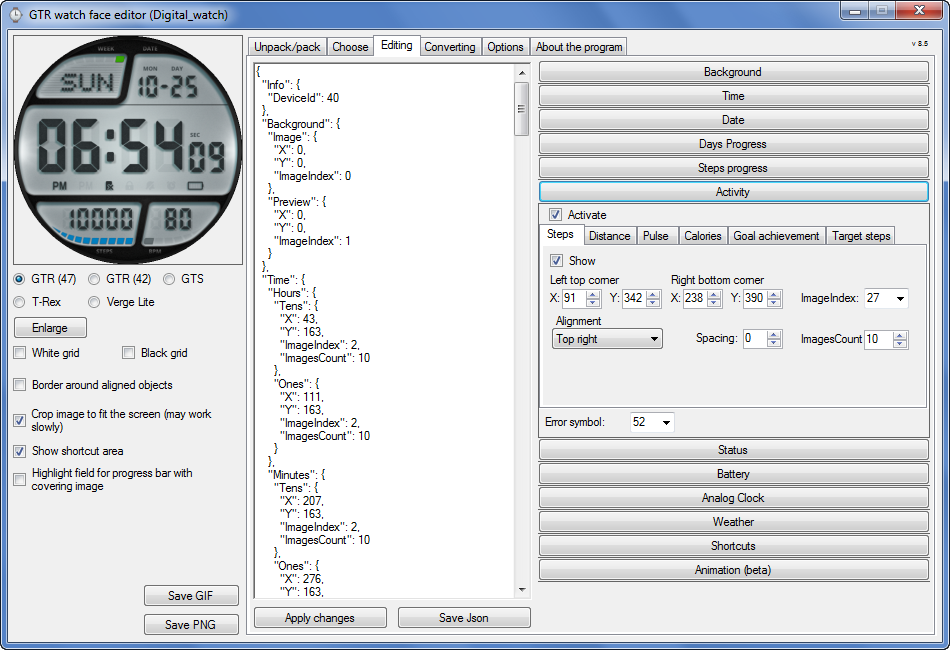
Graphics editor for working with dials Amazfit
The editor supports watch faces from GTR 47, GTR 42, GTS, T-Rex, Verge Lite.
Screenshot
Зображення
Note: the path to the program should not contain spaces, it is advisable to unpack it to the root of the disk.
Not all dials can be unpacked.
You can reduce the size of the bin file only by reducing the size of the images (height * width) or by reducing the number of images.

The drawing order of elements cannot be changed. The only exception is if you move the second hand from the center, it will be drawn under the hour and minute hands.

If the .bin file is not created, then you need to look for errors in the .log file. Most often this happens when images have the wrong format.

If the bin file is not created, and the log file contains the entry “bad transparency mask”, this means that the format of one or more images is incorrect (most often it occurs if you save the image in Photoshop without transparent pixels). You can fix it as follows:
- in Photoshop - add at least one transparent pixel
- in GIMP exported to PNG 16 bit RGBA
- in XnView - Image -> 32 bits

Version 10.0
List of changes
Added the ability to display the distance traveled in kilometers and miles.
Updated translation.
v 9.0
Fixed display of date if pictures have different sizes (often pictures for "1" are narrower than others)
Added new warnings about possible errors.
Fixed the order of displaying items.
Added a button to refresh the preview image.
Fixed bugs when converting watch faces.
Updated Chinese and Italian translations.
v 8.5
Fixed work with Verge Lite
v 8.4
Fixed Italian translation.
Added Chinese manual.
v 8.3
Bugs fixed.
Added a manual in English.
v 8.2
Added the display of the target steps (StepsGoal)
Added preliminary calculation of the size of the .bin file.
v 8.1
Fixed work on monitors with high resolution.
Updated translation (French, Italian, Chinese, Spanish).
v 8.0
Added the ability to convert dials between different watch models (GTR / T-Rex / Verge Lite).
v 7.1
Italian language added.
Minor fixes.
v 7.0
Added animation support
Verge Lite Support Added
Added the ability to quickly save the project (Ctrl + S)
Added support for languages (French, Chinese).
v 6.1
Added support for T-Rex.
Added the ability to auto-correct image files (error "bad transparency mask").
Added a reminder to save the project when it is closed.
v 6.0
Added support for shortcuts.
Added background image support for circular indicator.
Added display of a set of icons (segments) for the progress of steps.
Added display of a set of icons (segments) for the battery.
Added display of a set of icons (segments) for the pulse.
Added display of an indicator (arrow) for a pulse.
Added display of indicator (arrows) for calories.
Added display of a circular indicator for the pulse.
Added display of a circular indicator for calories.
Added the ability to crop the image to fit the screen.
Added support for languages ​​(Portuguese, Czech, Slovak, Hungarian).
v 5.2
Added support for a set of icons (icons and a set of coordinates for them) for the progress of steps and battery.
Added the ability to crop the preview according to the shape of the screen.
Bugs fixed in the English version.
v 5.1
Fixed incorrect display of the distance traveled.
Added the ability to adjust the speed of gif animation.
Added the ability to work with compressed bin files.
Updated bin file packer.
Added display of the year.
Added display of a charge indicator (arrow).
Added display of indicator (arrow) of steps.
Added display of the indicator (arrow) of the date.
Added display of indicator (arrow) of the day of the week.
Added display of indicator (arrow) of the month.
Added the ability to paste copied coordinates into offset fields from the center (for arrows).
English support added.
Old versions
If you want to supplement the missing translation, write to the PM.

Beta version of the editor with support for Amazfit X

AmazFit WatchFace editor 2 with support for GTR 2, GTS 2, T-Rex Pro

My editor doesn't work with GTR2 (GTS2) watch faces and I have no plans to add support for these models anytime soon. I don't know any other programs that can work with these dials. I have no information if anyone is working in this direction.

Because I bought a GTR 2e, the program will no longer be updated.

Donate to the author
PayPal: [email protected].
Востаннє редагувалось 01 червня 2022, 07:20 користувачем SashaCX75, всього редагувалось 25 разів.
OldManGir42
Повідомлень: 2
З нами з: 31 січня 2021, 17:14
Звідки: New York
Контактна інформація:

Повідомлення OldManGir42 »

After another hour of fiddling, I made it work...

1) Exported the image as 0061.png at 16 bit RGBA in GIMP
2) Reopened the image in GIMP
3) Re-exported the image as 0061.png at 16 bit RGBA through GIMP, overriding the one from step 1
4) Compiled the watch face again and it worked.
Аватар користувача
SashaCX75
Повідомлень: 820
З нами з: 26 жовтня 2019, 15:18
Звідки: Ukraine
Has thanked: 13 times
Been thanked: 1030 times
Контактна інформація:

Повідомлення SashaCX75 »

Version 10.0
List of changes (Google Translate)
Added the ability to display the distance traveled in kilometers and miles.
Updated translation.

Because I bought a GTR 2e, the program will no longer be updated.
taw_bip
WF maker
Повідомлень: 131
З нами з: 12 квітня 2018, 16:29
Has thanked: 128 times
Been thanked: 19 times
Контактна інформація:

Повідомлення taw_bip »

SashaCX75 писав: 05 лютого 2021, 15:21
Version 10.0
List of changes (Google Translate)
Added the ability to display the distance traveled in kilometers and miles.
Updated translation.

Because I bought a GTR 2e, the program will no longer be updated.
Thank you for all your work with the watchface tool.
obobo
WF maker
Повідомлень: 10
З нами з: 02 серпня 2020, 15:08
Звідки: France
Been thanked: 2 times
Контактна інформація:

Повідомлення obobo »

thx for the hard work
NeoPhyTe-x360
WF maker
Повідомлень: 2
З нами з: 09 травня 2018, 08:52
Звідки: Spain
Контактна інформація:

Повідомлення NeoPhyTe-x360 »

SashaCX75 писав: 05 лютого 2021, 15:21
Version 10.0
List of changes (Google Translate)
Added the ability to display the distance traveled in kilometers and miles.
Updated translation.

Because I bought a GTR 2e, the program will no longer be updated.

Thanks for your hard work
hemendex
WF maker
Повідомлень: 5
З нами з: 21 червня 2018, 06:29
Звідки: Zvolen
Контактна інформація:

Повідомлення hemendex »

Big THANK YOU for your program, Sasha, it was a pleasure to create watchfaces in it. Now we all have to buy GTR2e :)
SWCI
WF maker
Повідомлень: 9
З нами з: 26 серпня 2019, 09:55
Звідки: Roma
Has thanked: 1 time
Контактна інформація:

Повідомлення SWCI »

THANK YOU for your program.
dboro
WF maker
Повідомлень: 11
З нами з: 24 грудня 2019, 04:21
Звідки: Miami
Has thanked: 2 times
Контактна інформація:

Повідомлення dboro »

SashaCX75 писав: 05 лютого 2021, 15:21
Version 10.0
List of changes (Google Translate)
Added the ability to display the distance traveled in kilometers and miles.
Updated translation.

Because I bought a GTR 2e, the program will no longer be updated.
Hi SashaCX75, that means that there will be a new tool for the GTR2 series?
Аватар користувача
SashaCX75
Повідомлень: 820
З нами з: 26 жовтня 2019, 15:18
Звідки: Ukraine
Has thanked: 13 times
Been thanked: 1030 times
Контактна інформація:

Повідомлення SashaCX75 »

There is an official editor for GTR 2 from Huami.
I am working on an alternate editor version. But I cannot name a specific date. And in the first versions, it will probably have less functionality than the official one.
Аватар користувача
stefan_a.hirsch
WF maker
Повідомлень: 2
З нами з: 18 грудня 2019, 13:50
Звідки: Germany

Повідомлення stefan_a.hirsch »

excellent Sasha. We will wait patiently for your new tool.
bozinsky
WF maker
Повідомлень: 1
З нами з: 01 червня 2020, 12:53
Звідки: brescia
Контактна інформація:

Повідомлення bozinsky »

Thanks for this great program!
dboro
WF maker
Повідомлень: 11
З нами з: 24 грудня 2019, 04:21
Звідки: Miami
Has thanked: 2 times
Контактна інформація:

Повідомлення dboro »

Thanks Sasha, your editor is better than the official tool in many aspects.
Thanks for the great work!
I'll for it to start doing the gtr2 WF.
fkicin
Повідомлень: 1
З нами з: 16 лютого 2021, 20:54
Звідки: Poland
Контактна інформація:

Повідомлення fkicin »

It's my first post so Hi all.
Sasha what is the official (or other) soft to edit watchfaces for GTR2? i can see custom wf here but i can't find any tool to creat such custom image :(
Horatius80

Повідомлення Horatius80 »

fkicin писав: 16 лютого 2021, 21:04
It's my first post so Hi all.
Sasha what is the official (or other) soft to edit watchfaces for GTR2? i can see custom wf here but i can't find any tool to creat such custom image :(
Here is "tutorial" video how to obtain access to Huami official develop tool for watchface creation. It is only on-line tool

https://www.youtube.com/watch?v=H1Pfj-K ... =emb_title
Аватар користувача
Guydu91
Повідомлень: 59
З нами з: 06 жовтня 2019, 18:49
Звідки: Bretagne / France
Has thanked: 55 times
Been thanked: 10 times
Контактна інформація:

Повідомлення Guydu91 »

A big thank you to Sasha for his software which allowed me to make some watch faces for GTS !!
MichaRe
WF maker
Повідомлень: 3
З нами з: 10 серпня 2020, 11:39
Звідки: Germany
Has thanked: 6 times
Контактна інформація:

Повідомлення MichaRe »

Special thanks to SashaCX75 for your great work. Without you I would not have been able to create watch faces :-) !

I am a senior from Germany and own the Amazfit GTS 1, GTR 1 and the GTR 2e. I create the watch faces just for fun.
krmakmn
Повідомлень: 1
З нами з: 20 лютого 2021, 11:01
Звідки: Turkey
Has thanked: 1 time
Контактна інформація:

Повідомлення krmakmn »

thank you of the program
josekso
Повідомлень: 3
З нами з: 22 липня 2020, 22:18
Звідки: España
Has thanked: 1 time
Контактна інформація:

Повідомлення josekso »

Thanks for all!!
AlexGrGR
WF maker
Повідомлень: 1
З нами з: 16 листопада 2020, 21:38
Звідки: Athens
Контактна інформація:

Повідомлення AlexGrGR »

Question and food for revisions
Is it possible for the program to be revised to show a second timeset and analog hands (with the respective tabs in the winapp) in the same watch face, like dual time with GMT?
I think it will be an awesome new feature for all!
like i.e. from time.gmtime() strings
muhammedRtrn
WF maker
Повідомлень: 1
З нами з: 19 серпня 2020, 18:47
Звідки: TURKEY
Контактна інформація:

Повідомлення muhammedRtrn »

Hello first of all, thank you very much for the program. I've been doing verge lite themes for a long time. Now I started making GTR themes. There is a problem when switching between menus. There is slowness. What can I do. Thank you have a nice day..
jjkielce
Повідомлень: 10
З нами з: 20 травня 2018, 10:06
Звідки: Poland
Has thanked: 3 times
Been thanked: 1 time
Контактна інформація:

Повідомлення jjkielce »

many thanks for the program. Without your work, there wouldn't be that many shields. best regards and good health.
Аватар користувача
asoo
Повідомлень: 2153
З нами з: 03 січня 2019, 01:48
Звідки: ͼͽ Thailand ͼͽ
Has thanked: 415 times
Been thanked: 2075 times

Повідомлення asoo »

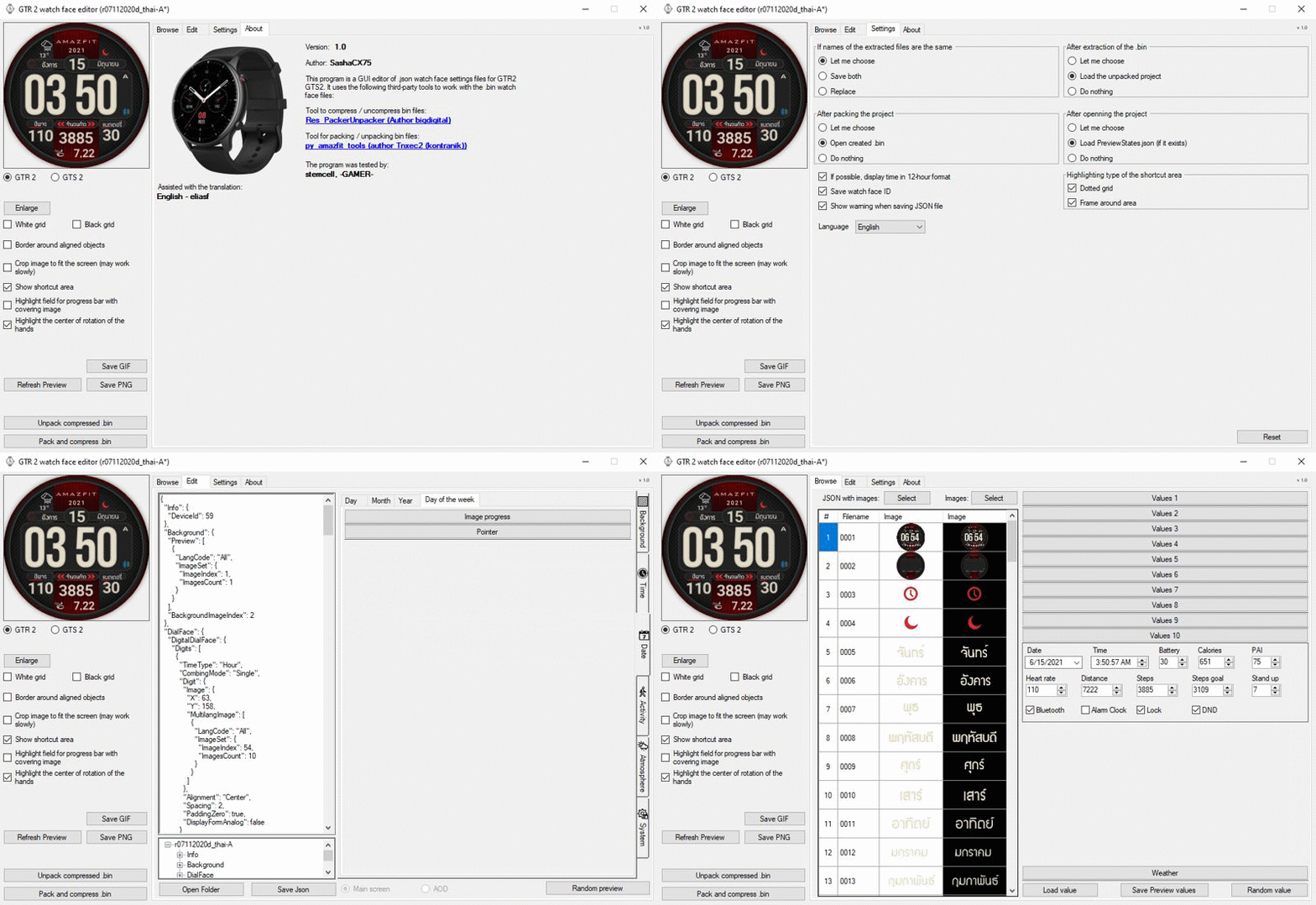
For those of you who use GTR2, GTR2e and waiting for quality GUI editor from SashaCX75, Now SashaCX75 have uploaded the version 1.0 program successfully. You can follow the link below.
https://4pda.ru/forum/index.php?showtop ... y104843325
To view 4pda you need to become a member first.
Зображення

About program :
Альтернативный редактор циферблатов GTR 2 и GTS 2 (v1.0)
Может работать с элементами: время, дата, статусы, погода, батарея, шаги, калории, пульс, PAI, путь.
AOD и виджеты еще не поддерживаются, но при редактировании циферблатов с ними они должны сохраняться.


Many thanks to SashaCX75 for the high quality
program.
ͼͽ To request please use the interrelated forum in action ͼͽ
Please do not PM to me for requests ported watchface.
Rcappa
WF maker
Повідомлень: 40
З нами з: 14 жовтня 2019, 04:57
Has thanked: 1 time
Been thanked: 4 times

Повідомлення Rcappa »

Thanks but its there any way to login into site in English. I can't decode the Catcha in Russian
Аватар користувача
asoo
Повідомлень: 2153
З нами з: 03 січня 2019, 01:48
Звідки: ͼͽ Thailand ͼͽ
Has thanked: 415 times
Been thanked: 2075 times

Повідомлення asoo »

Rcappa писав: 05 березня 2021, 02:44
Thanks but its there any way to login into site in English. I can't decode the Catcha in Russian
https://www.google.com/search?sxsrf=ALe ... CAY&uact=5
ͼͽ To request please use the interrelated forum in action ͼͽ
Please do not PM to me for requests ported watchface.
Аватар користувача
SashaCX75
Повідомлень: 820
З нами з: 26 жовтня 2019, 15:18
Звідки: Ukraine
Has thanked: 13 times
Been thanked: 1030 times
Контактна інформація:

Повідомлення SashaCX75 »

Rcappa писав: 05 березня 2021, 02:44
Thanks but its there any way to login into site in English. I can't decode the Catcha in Russian
A little later, when the translation is corrected, I post the editor on this forum.
Відповісти

Повернутись до “Watchfaces tools”

Хто зараз онлайн

Зараз переглядають цей форум: Немає зареєстрованих користувачів і 1 гість