• Administrator
  •  
    Support Ukraine
    If you experience any problems with the forum (it is not visible, there is no way to post messages, or some functionality does not work), please let us know. If you have problems with registration or you did not receive confirmation letter, let us know and we will activate your account manually.
    If you get an "The submitted form was invalid. Try submitting again" error, delete cookies, then try again.
     

AmazFit WatchFace editor for Windows by SashaCX75

This forum is designed to discuss and develop tools creating watch faces.

Moderators: asoo, lvpokka, Internal error, Watchmens

Forum rules
All communication in this branch should only be in English.
To discuss tools that are not in this section, use the “Watchfaces tools (discussion)” forum.
User avatar
SashaCX75
Posts: 820
Joined: 26 Oct 2019, 15:18
Location: Ukraine
Has thanked: 13 times
Been thanked: 1029 times
Contact:

AmazFit WatchFace editor for Windows by SashaCX75

Post by SashaCX75 »

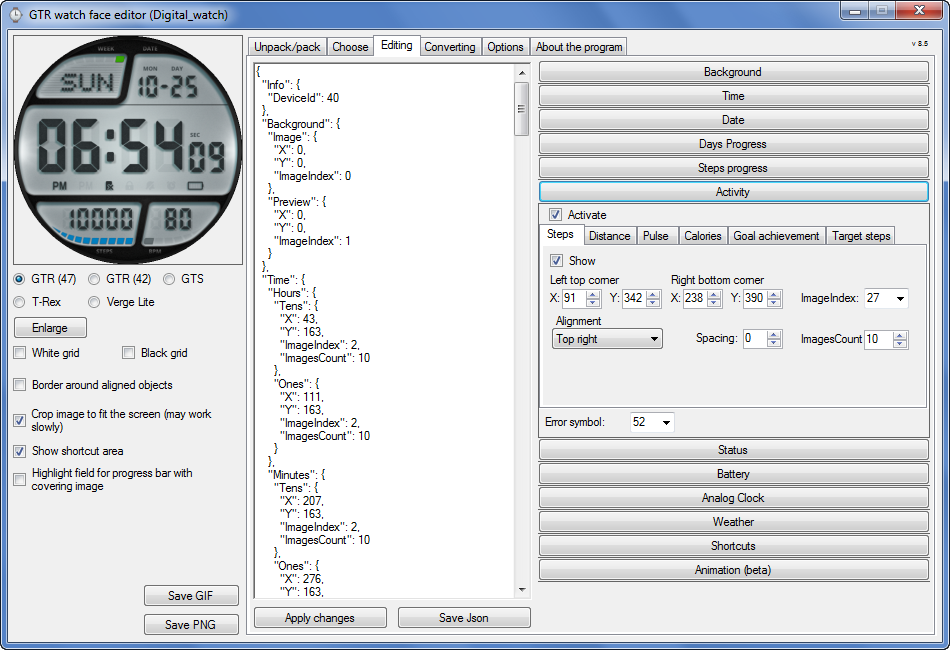
Graphics editor for working with dials Amazfit
The editor supports watch faces from GTR 47, GTR 42, GTS, T-Rex, Verge Lite.
Screenshot
Image
Note: the path to the program should not contain spaces, it is advisable to unpack it to the root of the disk.
Not all dials can be unpacked.
You can reduce the size of the bin file only by reducing the size of the images (height * width) or by reducing the number of images.

The drawing order of elements cannot be changed. The only exception is if you move the second hand from the center, it will be drawn under the hour and minute hands.

If the .bin file is not created, then you need to look for errors in the .log file. Most often this happens when images have the wrong format.

If the bin file is not created, and the log file contains the entry “bad transparency mask”, this means that the format of one or more images is incorrect (most often it occurs if you save the image in Photoshop without transparent pixels). You can fix it as follows:
- in Photoshop - add at least one transparent pixel
- in GIMP exported to PNG 16 bit RGBA
- in XnView - Image -> 32 bits

Version 10.0
List of changes
Added the ability to display the distance traveled in kilometers and miles.
Updated translation.
v 9.0
Fixed display of date if pictures have different sizes (often pictures for "1" are narrower than others)
Added new warnings about possible errors.
Fixed the order of displaying items.
Added a button to refresh the preview image.
Fixed bugs when converting watch faces.
Updated Chinese and Italian translations.
v 8.5
Fixed work with Verge Lite
v 8.4
Fixed Italian translation.
Added Chinese manual.
v 8.3
Bugs fixed.
Added a manual in English.
v 8.2
Added the display of the target steps (StepsGoal)
Added preliminary calculation of the size of the .bin file.
v 8.1
Fixed work on monitors with high resolution.
Updated translation (French, Italian, Chinese, Spanish).
v 8.0
Added the ability to convert dials between different watch models (GTR / T-Rex / Verge Lite).
v 7.1
Italian language added.
Minor fixes.
v 7.0
Added animation support
Verge Lite Support Added
Added the ability to quickly save the project (Ctrl + S)
Added support for languages (French, Chinese).
v 6.1
Added support for T-Rex.
Added the ability to auto-correct image files (error "bad transparency mask").
Added a reminder to save the project when it is closed.
v 6.0
Added support for shortcuts.
Added background image support for circular indicator.
Added display of a set of icons (segments) for the progress of steps.
Added display of a set of icons (segments) for the battery.
Added display of a set of icons (segments) for the pulse.
Added display of an indicator (arrow) for a pulse.
Added display of indicator (arrows) for calories.
Added display of a circular indicator for the pulse.
Added display of a circular indicator for calories.
Added the ability to crop the image to fit the screen.
Added support for languages ​​(Portuguese, Czech, Slovak, Hungarian).
v 5.2
Added support for a set of icons (icons and a set of coordinates for them) for the progress of steps and battery.
Added the ability to crop the preview according to the shape of the screen.
Bugs fixed in the English version.
v 5.1
Fixed incorrect display of the distance traveled.
Added the ability to adjust the speed of gif animation.
Added the ability to work with compressed bin files.
Updated bin file packer.
Added display of the year.
Added display of a charge indicator (arrow).
Added display of indicator (arrow) of steps.
Added display of the indicator (arrow) of the date.
Added display of indicator (arrow) of the day of the week.
Added display of indicator (arrow) of the month.
Added the ability to paste copied coordinates into offset fields from the center (for arrows).
English support added.
Old versions
If you want to supplement the missing translation, write to the PM.

Beta version of the editor with support for Amazfit X

AmazFit WatchFace editor 2 with support for GTR 2, GTS 2, T-Rex Pro

My editor doesn't work with GTR2 (GTS2) watch faces and I have no plans to add support for these models anytime soon. I don't know any other programs that can work with these dials. I have no information if anyone is working in this direction.

Because I bought a GTR 2e, the program will no longer be updated.

Donate to the author
PayPal: [email protected].
Last edited by SashaCX75 on 01 Jun 2022, 07:20, edited 25 times in total.
OldManGir42
Posts: 2
Joined: 31 Jan 2021, 17:14
Location: New York
Contact:

Post by OldManGir42 »

After another hour of fiddling, I made it work...

1) Exported the image as 0061.png at 16 bit RGBA in GIMP
2) Reopened the image in GIMP
3) Re-exported the image as 0061.png at 16 bit RGBA through GIMP, overriding the one from step 1
4) Compiled the watch face again and it worked.
User avatar
SashaCX75
Posts: 820
Joined: 26 Oct 2019, 15:18
Location: Ukraine
Has thanked: 13 times
Been thanked: 1029 times
Contact:

Post by SashaCX75 »

Version 10.0
List of changes (Google Translate)
Added the ability to display the distance traveled in kilometers and miles.
Updated translation.

Because I bought a GTR 2e, the program will no longer be updated.
taw_bip
WF maker
Posts: 130
Joined: 12 Apr 2018, 16:29
Has thanked: 127 times
Been thanked: 19 times
Contact:

Post by taw_bip »

SashaCX75 wrote: 05 Feb 2021, 15:21
Version 10.0
List of changes (Google Translate)
Added the ability to display the distance traveled in kilometers and miles.
Updated translation.

Because I bought a GTR 2e, the program will no longer be updated.
Thank you for all your work with the watchface tool.
obobo
WF maker
Posts: 10
Joined: 02 Aug 2020, 15:08
Location: France
Been thanked: 2 times
Contact:

Post by obobo »

thx for the hard work
NeoPhyTe-x360
WF maker
Posts: 2
Joined: 09 May 2018, 08:52
Location: Spain
Contact:

Post by NeoPhyTe-x360 »

SashaCX75 wrote: 05 Feb 2021, 15:21
Version 10.0
List of changes (Google Translate)
Added the ability to display the distance traveled in kilometers and miles.
Updated translation.

Because I bought a GTR 2e, the program will no longer be updated.

Thanks for your hard work
hemendex
WF maker
Posts: 5
Joined: 21 Jun 2018, 06:29
Location: Zvolen
Contact:

Post by hemendex »

Big THANK YOU for your program, Sasha, it was a pleasure to create watchfaces in it. Now we all have to buy GTR2e :)
SWCI
WF maker
Posts: 9
Joined: 26 Aug 2019, 09:55
Location: Roma
Has thanked: 1 time
Contact:

Post by SWCI »

THANK YOU for your program.
dboro
WF maker
Posts: 11
Joined: 24 Dec 2019, 04:21
Location: Miami
Has thanked: 2 times
Contact:

Post by dboro »

SashaCX75 wrote: 05 Feb 2021, 15:21
Version 10.0
List of changes (Google Translate)
Added the ability to display the distance traveled in kilometers and miles.
Updated translation.

Because I bought a GTR 2e, the program will no longer be updated.
Hi SashaCX75, that means that there will be a new tool for the GTR2 series?
User avatar
SashaCX75
Posts: 820
Joined: 26 Oct 2019, 15:18
Location: Ukraine
Has thanked: 13 times
Been thanked: 1029 times
Contact:

Post by SashaCX75 »

There is an official editor for GTR 2 from Huami.
I am working on an alternate editor version. But I cannot name a specific date. And in the first versions, it will probably have less functionality than the official one.
User avatar
stefan_a.hirsch
WF maker
Posts: 2
Joined: 18 Dec 2019, 13:50
Location: Germany

Post by stefan_a.hirsch »

excellent Sasha. We will wait patiently for your new tool.
bozinsky
WF maker
Posts: 1
Joined: 01 Jun 2020, 12:53
Location: brescia
Contact:

Post by bozinsky »

Thanks for this great program!
dboro
WF maker
Posts: 11
Joined: 24 Dec 2019, 04:21
Location: Miami
Has thanked: 2 times
Contact:

Post by dboro »

Thanks Sasha, your editor is better than the official tool in many aspects.
Thanks for the great work!
I'll for it to start doing the gtr2 WF.
fkicin
Posts: 1
Joined: 16 Feb 2021, 20:54
Location: Poland
Contact:

Post by fkicin »

It's my first post so Hi all.
Sasha what is the official (or other) soft to edit watchfaces for GTR2? i can see custom wf here but i can't find any tool to creat such custom image :(
Horatius80

Post by Horatius80 »

fkicin wrote: 16 Feb 2021, 21:04
It's my first post so Hi all.
Sasha what is the official (or other) soft to edit watchfaces for GTR2? i can see custom wf here but i can't find any tool to creat such custom image :(
Here is "tutorial" video how to obtain access to Huami official develop tool for watchface creation. It is only on-line tool

https://www.youtube.com/watch?v=H1Pfj-K ... =emb_title
User avatar
Guydu91
Posts: 59
Joined: 06 Oct 2019, 18:49
Location: Bretagne / France
Has thanked: 55 times
Been thanked: 10 times
Contact:

Post by Guydu91 »

A big thank you to Sasha for his software which allowed me to make some watch faces for GTS !!
MichaRe
WF maker
Posts: 3
Joined: 10 Aug 2020, 11:39
Location: Germany
Has thanked: 6 times
Contact:

Post by MichaRe »

Special thanks to SashaCX75 for your great work. Without you I would not have been able to create watch faces :-) !

I am a senior from Germany and own the Amazfit GTS 1, GTR 1 and the GTR 2e. I create the watch faces just for fun.
krmakmn
Posts: 1
Joined: 20 Feb 2021, 11:01
Location: Turkey
Has thanked: 1 time
Contact:

Post by krmakmn »

thank you of the program
josekso
Posts: 3
Joined: 22 Jul 2020, 22:18
Location: España
Has thanked: 1 time
Contact:

Post by josekso »

Thanks for all!!
AlexGrGR
WF maker
Posts: 1
Joined: 16 Nov 2020, 21:38
Location: Athens
Contact:

Post by AlexGrGR »

Question and food for revisions
Is it possible for the program to be revised to show a second timeset and analog hands (with the respective tabs in the winapp) in the same watch face, like dual time with GMT?
I think it will be an awesome new feature for all!
like i.e. from time.gmtime() strings
muhammedRtrn
WF maker
Posts: 1
Joined: 19 Aug 2020, 18:47
Location: TURKEY
Contact:

Post by muhammedRtrn »

Hello first of all, thank you very much for the program. I've been doing verge lite themes for a long time. Now I started making GTR themes. There is a problem when switching between menus. There is slowness. What can I do. Thank you have a nice day..
jjkielce
Posts: 10
Joined: 20 May 2018, 10:06
Location: Poland
Has thanked: 3 times
Been thanked: 1 time
Contact:

Post by jjkielce »

many thanks for the program. Without your work, there wouldn't be that many shields. best regards and good health.
User avatar
asoo
Posts: 2128
Joined: 03 Jan 2019, 01:48
Location: ͼͽ Thailand ͼͽ
Has thanked: 411 times
Been thanked: 2046 times

Post by asoo »

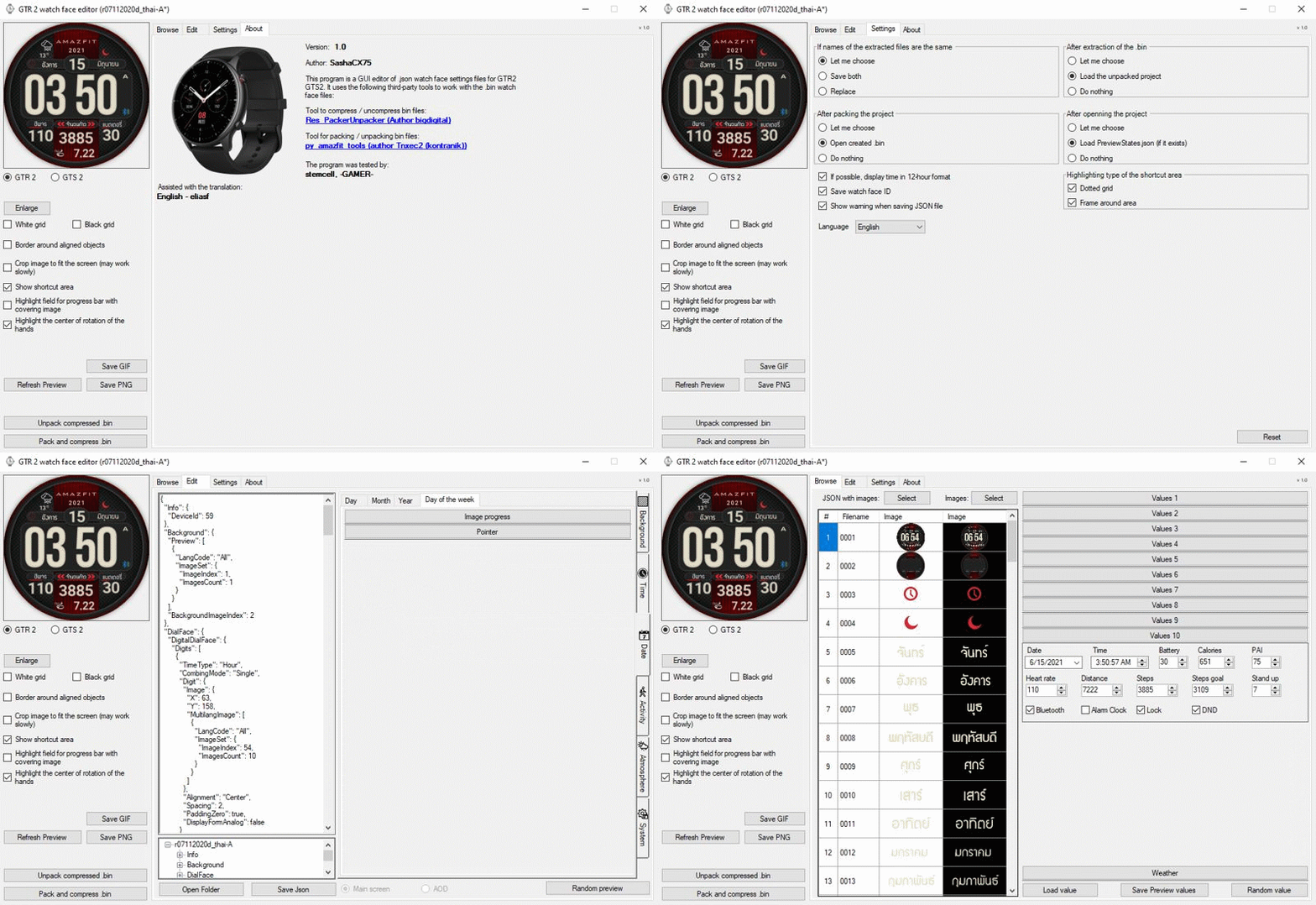
For those of you who use GTR2, GTR2e and waiting for quality GUI editor from SashaCX75, Now SashaCX75 have uploaded the version 1.0 program successfully. You can follow the link below.
https://4pda.ru/forum/index.php?showtop ... y104843325
To view 4pda you need to become a member first.
Image

About program :
Альтернативный редактор циферблатов GTR 2 и GTS 2 (v1.0)
Может работать с элементами: время, дата, статусы, погода, батарея, шаги, калории, пульс, PAI, путь.
AOD и виджеты еще не поддерживаются, но при редактировании циферблатов с ними они должны сохраняться.


Many thanks to SashaCX75 for the high quality
program.
ͼͽ To request please use the interrelated forum in action ͼͽ
Please do not PM to me for requests ported watchface.
Rcappa
WF maker
Posts: 40
Joined: 14 Oct 2019, 04:57
Has thanked: 1 time
Been thanked: 4 times

Post by Rcappa »

Thanks but its there any way to login into site in English. I can't decode the Catcha in Russian
User avatar
asoo
Posts: 2128
Joined: 03 Jan 2019, 01:48
Location: ͼͽ Thailand ͼͽ
Has thanked: 411 times
Been thanked: 2046 times

Post by asoo »

Rcappa wrote: 05 Mar 2021, 02:44
Thanks but its there any way to login into site in English. I can't decode the Catcha in Russian
https://www.google.com/search?sxsrf=ALe ... CAY&uact=5
ͼͽ To request please use the interrelated forum in action ͼͽ
Please do not PM to me for requests ported watchface.
User avatar
SashaCX75
Posts: 820
Joined: 26 Oct 2019, 15:18
Location: Ukraine
Has thanked: 13 times
Been thanked: 1029 times
Contact:

Post by SashaCX75 »

Rcappa wrote: 05 Mar 2021, 02:44
Thanks but its there any way to login into site in English. I can't decode the Catcha in Russian
A little later, when the translation is corrected, I post the editor on this forum.
Post Reply

Return to “Watchfaces tools”

Who is online

Users browsing this forum: No registered users and 1 guest