• Administrator
  •  
    Support Ukraine
    If you experience any problems with the forum (it is not visible, there is no way to post messages, or some functionality does not work), please let us know. If you have problems with registration or you did not receive confirmation letter, let us know and we will activate your account manually.
    If you get an "The submitted form was invalid. Try submitting again" error, delete cookies, then try again.
     

beta py amazfit tool for GTR2(GTS2 also should work but not tested)

This forum is designed to discuss and develop tools creating watch faces.

Moderators: asoo, lvpokka, Internal error, Watchmens

Forum rules
All communication in this branch should only be in English.
To discuss tools that are not in this section, use the “Watchfaces tools (discussion)” forum.
bigdigital.kov
Posts: 4
Joined: 03 Aug 2020, 12:55
Location: Kyiv
Has thanked: 2 times
Been thanked: 9 times
Contact:

beta py amazfit tool for GTR2(GTS2 also should work but not tested)

Post by bigdigital.kov »

The link to the project on github /bigdigital/py_amazfit_tools/tree/GTR2
Hi to all. Recenly I did some research in gtr2 watchface structure and made this tool.

Its a well known py amazfit tool but with adaptation for GTR2.
It is also has included tool which allows to compress and decompress GTR2 bin files. Before uploading bin file to your watch, you should compress it with help of this tool.

The JSON structure for GTR2 is completely different. To get the basic knowledge about the structure you can unpack any existing GTR2 dial.

How to use it.
1. Unpack existing dial with help of the GTR2_Packer.exe tool by executing

Code: Select all

GTR2_Packer.exe -unc2 WATCH_FACE_FILE.bin
2 After uncompressing, you should receive a new file with .unc extension, rename file extension back to .bin
3. Now you can parse uncompressed dial with a command

Code: Select all

python main._py --gtr2  47 --file WATCH_FACE_FILE.bin
* due to the limitation on this forum, i can't post a topic with the correct python file name, so please remove "_" char between "main." and "py" in the command above.
As a result, if everything was ok, you should receive json file.
4 Now you can modificate json file or watchface images.
5. After all the modifications are completed, you can build watchface with help of the command

Code: Select all

python main._py --gtr2 47 --file WATCH_FACE_FILE.json
* due to the limitation on this forum, i can't post a topic with the correct python file name, so please remove "_" char between "main." and "py" in the command above.
6 . Pack a new bin file with help of GTR2_Packer.exe

Code: Select all

GTR2_Packer.exe -cmp2 WATCH_FACE_FILE_packed.bin
7. Rename compressed file extension back to .bin and upload to your watch to test it

Notes .
1. The previews generation does not work for GTR2 mode.
2 .Available Commands for GTR2_Packer.exe :

Code: Select all

-cmp Compress bin (for gtr(gts) first gen)
-cmp2 Compress gtr2(gts2) bin 
-unc Decompress
-unc2 Decompress gtr2(gts2) bin
3. Image numeration on GTR2 and GTS2 starting from 0001, not from zero like it was for previous Huami devices.


Current version 0.2

Chagelog
v0.2
Added widgets.
Fixed Images loss when packing bin file
Attachments
py_amazfit_tools-GTR2_v0_2.zip
(323.58 KiB) Downloaded 2305 times
Last edited by bigdigital.kov on 31 Jan 2021, 18:53, edited 3 times in total.
User avatar
asoo
Posts: 2126
Joined: 03 Jan 2019, 01:48
Location: ͼͽ Thailand ͼͽ
Has thanked: 410 times
Been thanked: 2044 times

Post by asoo »

Test Report
Spoiler
Image
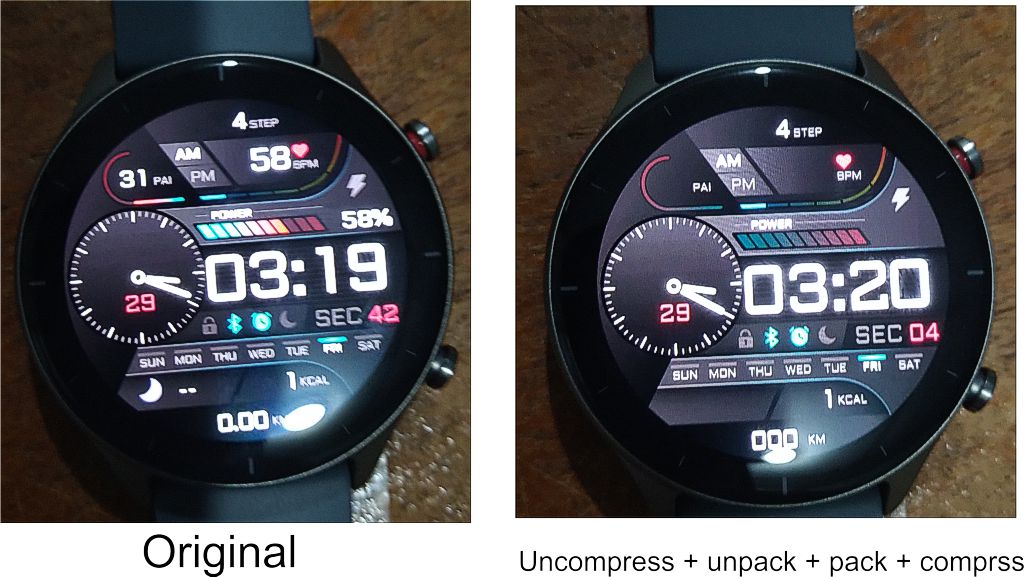
- GTR2_Packer.exe can uncomprss and compress but the file size not same Original file.
- Main can pack and unpack BIN ( uncompress ) but File BIN after pack file size not same Original file.
- File BIN after pack by "main" can link to the watch but some option is loss. it's not same Original show.

However, I think this is a good step forward for the GTR2.

Thank you for your share

PS. Test on GTR2e
ͼͽ To request please use the interrelated forum in action ͼͽ
Please do not PM to me for requests ported watchface.
dboro
WF maker
Posts: 11
Joined: 24 Dec 2019, 04:21
Location: Miami
Has thanked: 2 times
Contact:

Post by dboro »

@bigdigital.kov
This is a great news!!
Thank you!
Now just if @SashaCX75 could adapt his awesome tool to use this and generate the correct Json... :roll:
demiurg1
WF maker
Posts: 114
Joined: 23 Feb 2020, 22:49
Location: Poland
Has thanked: 23 times
Been thanked: 17 times
Contact:

Post by demiurg1 »

I'm for it too!
demiurg1
WF maker
Posts: 114
Joined: 23 Feb 2020, 22:49
Location: Poland
Has thanked: 23 times
Been thanked: 17 times
Contact:

Post by demiurg1 »

What am I doing wrong? When unpacking a BIN type file, I get a file with the extension * .bin.unc, not cmp.
bigdigital.kov
Posts: 4
Joined: 03 Aug 2020, 12:55
Location: Kyiv
Has thanked: 2 times
Been thanked: 9 times
Contact:

Post by bigdigital.kov »

demiurg1 wrote: 29 Jan 2021, 11:58
What am I doing wrong? When unpacking a BIN type file, I get a file with the extension * .bin.unc, not cmp.
It's ok. Just rename it back to bin and try to parse.
demiurg1
WF maker
Posts: 114
Joined: 23 Feb 2020, 22:49
Location: Poland
Has thanked: 23 times
Been thanked: 17 times
Contact:

Post by demiurg1 »

I did it, but I guess I'm still doing something wrong or missing something.
I have unpacked the tool in a separate directory "py_amazfit_tools-GTR2".
1. I have uploaded a watch face file to this directory, named: test.bin
2. I ran the command: GTR2_Packer.exe -unc2 test.bin
3. I have received a new file: test.bin.unc
4. I have changed its name to test.bin
5. I ran the command: python main.p --gtr2 47 --file test.bin
Previously, I installed the "python-3.9.1" program in the "Python" directory and uploaded a copy of the new file to this directory: test.bin
6. Unfortunately, this command: "python main.p --gtr2 47 --file test.bin" has no effect both when running it in the "Python" directory and in the "py_amazfit_tools-GTR2" directory.
What else am I doing wrong?
I am asking for tips - help. I don't program in Python. My programming experience is just old Borland Pascal and then a bit of Delphi. Currently I deal more with computer graphics.
joebar78
WF maker
Posts: 5
Joined: 27 Oct 2019, 16:39
Location: Paris Area
Has thanked: 1 time
Been thanked: 3 times
Contact:

Post by joebar78 »

Maybe you didn't install pillow after installing python ?

Try to execute with a command prompt:
python -m pip install --upgrade pip
python -m pip install --upgrade Pillow
From
C:\Users\your user\AppData\Local\Programs\Python\Python39 (or where is python installed)
And then try to unpack again your bin file.

Also i think you should write main.py instead of main.p
python main.py --gtr2 47 --file test.bin
demiurg1
WF maker
Posts: 114
Joined: 23 Feb 2020, 22:49
Location: Poland
Has thanked: 23 times
Been thanked: 17 times
Contact:

Post by demiurg1 »

Thank you so much for help. Your advice allowed me to translate the test face of the GTR 2 watch into Polish. I just had to make sure that instead of just indicating the file name, write the full path to this file (along with the name of the directory, which was created with the same name as the file name) .
Thanks again. If you were here in Poland, I would be happy to invite you for a beer for your effective help.
mamunabrar
Posts: 3
Joined: 22 Dec 2020, 12:45
Location: Dhaka
Contact:

Post by mamunabrar »

bro please make a video and upload in youtube
afwafwafw
Posts: 32
Joined: 21 Feb 2019, 02:55
Location: on earth
Has thanked: 6 times
Been thanked: 14 times
Contact:

Post by afwafwafw »

great job! glad to hear someone did this.
User avatar
eliasf
Posts: 23
Joined: 29 Jan 2021, 18:10
Location: GR
Has thanked: 5 times
Been thanked: 5 times
Contact:

Post by eliasf »

Worked as expected for a couple of watchfaces on my gtr2e, thank you very much for your time spent @bigdigital.kov!

Had a look at the code, it's not as easy as one might think, mainly due to the differences in gtr2's json file as I perceive it.

I agree with the need for a GUI like @SashaCX75's tool, I imagine that if there was access to the source code it wouldn't be super hard to implement the necessary adaptations for the gtr2.

Anyway, we can only hope and wait for the developers to continue their hard work for all of us and our favorite devices!
demiurg1
WF maker
Posts: 114
Joined: 23 Feb 2020, 22:49
Location: Poland
Has thanked: 23 times
Been thanked: 17 times
Contact:

Post by demiurg1 »

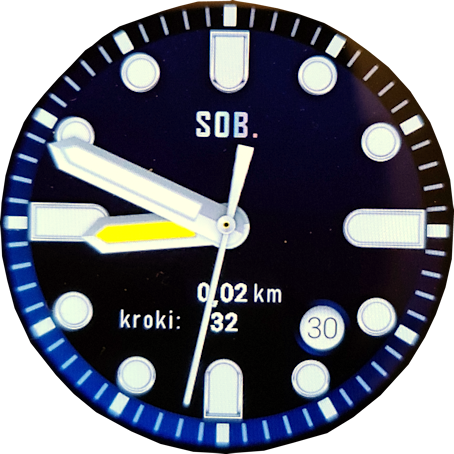
I made, or actually converted into Polish, my first watch face for the GTR 2.
I did it thanks to the information posted here by "bigdigital.kov" and also thanks to a lot of help from "joebar78".
This is a remake of the "Classic Touch Blue" dial placed here by "Do_bro" and, as he wrote, created by "Kivan".
I hope that they will not be offended when the Polish version of this shield for GTR 2 appears here. I just wanted to show that the advice published here is effective. I wrote to "Do_bro" about this but he didn't reply. If there is such a wish, I can delete this watch face.
I will publish it under the original name with the addition of PL, which is "Classic Touch Blue PL". I am enclosing a photo of the final watch face. Unfortunately, the colors are slightly different from the actual ones. In fact, this watch face is prettier (it looks better on a watch).

By the way.
I had to take a photo of the watch to send the final image.
Does anyone know of any other way besides the tedious drawing of a working watch face?
Image
demiurg1
WF maker
Posts: 114
Joined: 23 Feb 2020, 22:49
Location: Poland
Has thanked: 23 times
Been thanked: 17 times
Contact:

Post by demiurg1 »

This Polish redesigned watch face is here: https://amazfitwatchfaces.com/gtr/view/12098
demiurg1
WF maker
Posts: 114
Joined: 23 Feb 2020, 22:49
Location: Poland
Has thanked: 23 times
Been thanked: 17 times
Contact:

Post by demiurg1 »

I made a second watch face for the GTR 2. This time I really "carved" it by designing it "by hand".
Here you can see it and read about it in English and Polish, and of course download the BIN file.
Link: https://amazfitwatchfaces.com/gtr/view/12120
User avatar
asoo
Posts: 2126
Joined: 03 Jan 2019, 01:48
Location: ͼͽ Thailand ͼͽ
Has thanked: 410 times
Been thanked: 2044 times

Post by asoo »

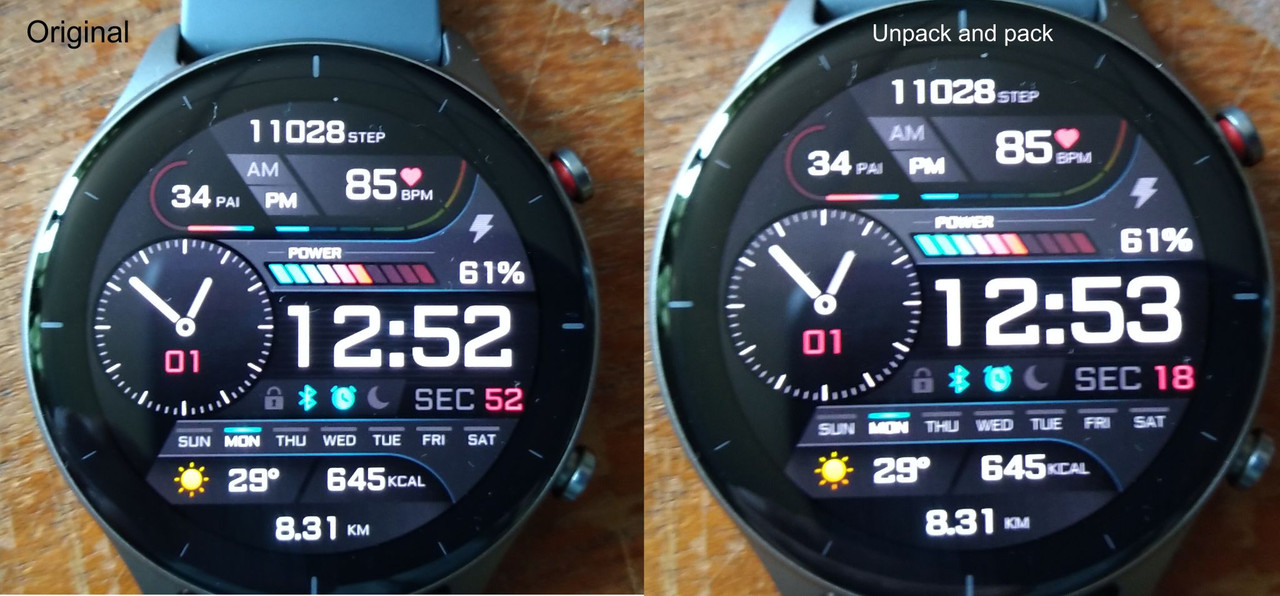
Test py_amazfit_tools-GTR2_v0_2.zip ( Fixed Images loss when packing bin file).
Now Program can pack and unpack normal .
Spoiler
Image
Thank bigdigital.kov for fixed the program.
ͼͽ To request please use the interrelated forum in action ͼͽ
Please do not PM to me for requests ported watchface.
demiurg1
WF maker
Posts: 114
Joined: 23 Feb 2020, 22:49
Location: Poland
Has thanked: 23 times
Been thanked: 17 times
Contact:

Post by demiurg1 »

I also join the thanks.
User avatar
asoo
Posts: 2126
Joined: 03 Jan 2019, 01:48
Location: ͼͽ Thailand ͼͽ
Has thanked: 410 times
Been thanked: 2044 times

Post by asoo »

Test Version 0.2
Image
- Test on GTR2e , it's work normal
----------------------------------------------------------------------------------------------------
Spoiler
Image
https://amazfitwatchfaces.com/gtr/view/12140

PS. Edit .json with notepad.
Last edited by asoo on 01 Feb 2021, 19:04, edited 2 times in total.
ͼͽ To request please use the interrelated forum in action ͼͽ
Please do not PM to me for requests ported watchface.
demiurg1
WF maker
Posts: 114
Joined: 23 Feb 2020, 22:49
Location: Poland
Has thanked: 23 times
Been thanked: 17 times
Contact:

Post by demiurg1 »

Everything is displayed in my dial where I planned. I only have a problem with the signs: bluetooth and alarm. Both icons do not want to be displayed on the watch face. Maybe you have any idea?

I set the Bluetooth and Alarm settings as it is in another watch face. These characters are displayed in the "master" dial, and unfortunately not in the new dial after merging into BIN.
demiurg1
WF maker
Posts: 114
Joined: 23 Feb 2020, 22:49
Location: Poland
Has thanked: 23 times
Been thanked: 17 times
Contact:

Post by demiurg1 »

I can see that many people are already creating watch faces for the GTR 2. I am also trying to design them and I have already made two of them public. However, I do not know, for example, how to make a GIF file for presenting the watch face, or at least a PNG file so as not to take a photo of the watch face. Please give me a hint.
User avatar
asoo
Posts: 2126
Joined: 03 Jan 2019, 01:48
Location: ͼͽ Thailand ͼͽ
Has thanked: 410 times
Been thanked: 2044 times

Post by asoo »

demiurg1 wrote: 01 Feb 2021, 18:51
Spoiler
I can see that many people are already creating watch faces for the GTR 2. I am also trying to design them and I have already made two of them public. However, I do not know, for example, how to make a GIF file for presenting the watch face, or at least a PNG file so as not to take a photo of the watch face. Please give me a hint.
The watch face I made for GTR2, I used to make it in GTR, so I used the Gif image from GTR.

As for PNG images, if you don't want to take pictures from your watch, you can use the picture 0002.PNG (Background) to decorate it with your favorite photo editor.

Actually, if you initially create a watchface by yourselfe,
You Should have a layout picture ready to use as the preview.
ͼͽ To request please use the interrelated forum in action ͼͽ
Please do not PM to me for requests ported watchface.
demiurg1
WF maker
Posts: 114
Joined: 23 Feb 2020, 22:49
Location: Poland
Has thanked: 23 times
Been thanked: 17 times
Contact:

Post by demiurg1 »

Yes, I can use my own GTR 47 designs. I have GIF files there. Worse with the dials newly designed for the GTR 2. As for the PNG of the watch face, it is a bit tedious to create the final result. My initial design differs too much from the final result.
Thank you for the advice though.
In my final project for GTR2, the sign: bluetooth and alarm are not displayed to me. Can you advise something? I can see these marks are on your watch face.

Best regards.
User avatar
asoo
Posts: 2126
Joined: 03 Jan 2019, 01:48
Location: ͼͽ Thailand ͼͽ
Has thanked: 410 times
Been thanked: 2044 times

Post by asoo »

demiurg1 wrote: 01 Feb 2021, 20:12
Spoiler
Yes, I can use my own GTR 47 designs. I have GIF files there. Worse with the dials newly designed for the GTR 2. As for the PNG of the watch face, it is a bit tedious to create the final result. My initial design differs too much from the final result.
Thank you for the advice though.
In my final project for GTR2, the sign: bluetooth and alarm are not displayed to me. Can you advise something? I can see these marks are on your watch face.

Best regards.
Bluetooth : As far as i know ,on GTR2 the default bluetooth will be ON , so icon in background must set show it ON , and in Status icon Bluetooth you must be create picture to OFF

Alarm : I am not sure why your watchface not show , May be you don't set Alarm time or have some misstake in your .json file
ͼͽ To request please use the interrelated forum in action ͼͽ
Please do not PM to me for requests ported watchface.
MatZil02
WF maker
Posts: 2
Joined: 31 Jan 2021, 22:04
Location: Italia
Contact:

Post by MatZil02 »

I can confirm that the default status for bluetooth icon is ON state.
I've made a watchface for the GTR 2, I'm going to buy it :), using the official tool from Huami (it's online, i talked about it on Reddit).
I don't know if it was possible before, but you can make icons shortcut for things like Weather, steps, PAI, Heartrate (i's called "jump hot zone" in the official editor).
demiurg1
WF maker
Posts: 114
Joined: 23 Feb 2020, 22:49
Location: Poland
Has thanked: 23 times
Been thanked: 17 times
Contact:

Post by demiurg1 »

I do not have access to the HUAMI online tool. I applied for access more than 7 days ago and to no avail. When I try to enter the website, I get the message "You registration application is under review".
As for the display of icons: alarm and bluetooth, I coped with the alarm icon. Unfortunately, the bluetooth icon is not displayed on the watch face, even though bluetooth is turned on and the smartphone and the watch "see" each other. In the applications:" Zepp" and" "Notify for Amazfit" my GTR 2 is visible. I don't know what about this bluetooth icon?
Post Reply

Return to “Watchfaces tools”

Who is online

Users browsing this forum: No registered users and 0 guests