
• Administrator
  •  
    Support Ukraine
    If you experience any problems with the forum (it is not visible, there is no way to post messages, or some functionality does not work), please let us know. If you have problems with registration or you did not receive confirmation letter, let us know and we will activate your account manually.
    If you get an "The submitted form was invalid. Try submitting again" error, delete cookies, then try again.
     

AmazFit WatchFace editor for Windows by SashaCX75

This forum is designed to discuss and develop tools creating watch faces.

Moderators: asoo, lvpokka, Internal error, Watchmens

Forum rules
All communication in this branch should only be in English.
To discuss tools that are not in this section, use the “Watchfaces tools (discussion)” forum.
User avatar
SashaCX75
Posts: 820
Joined: 26 Oct 2019, 15:18
Location: Ukraine
Has thanked: 13 times
Been thanked: 1029 times
Contact:

AmazFit WatchFace editor for Windows by SashaCX75

Post by SashaCX75 »

Graphics editor for working with dials Amazfit
The editor supports watch faces from GTR 47, GTR 42, GTS, T-Rex, Verge Lite.
Screenshot
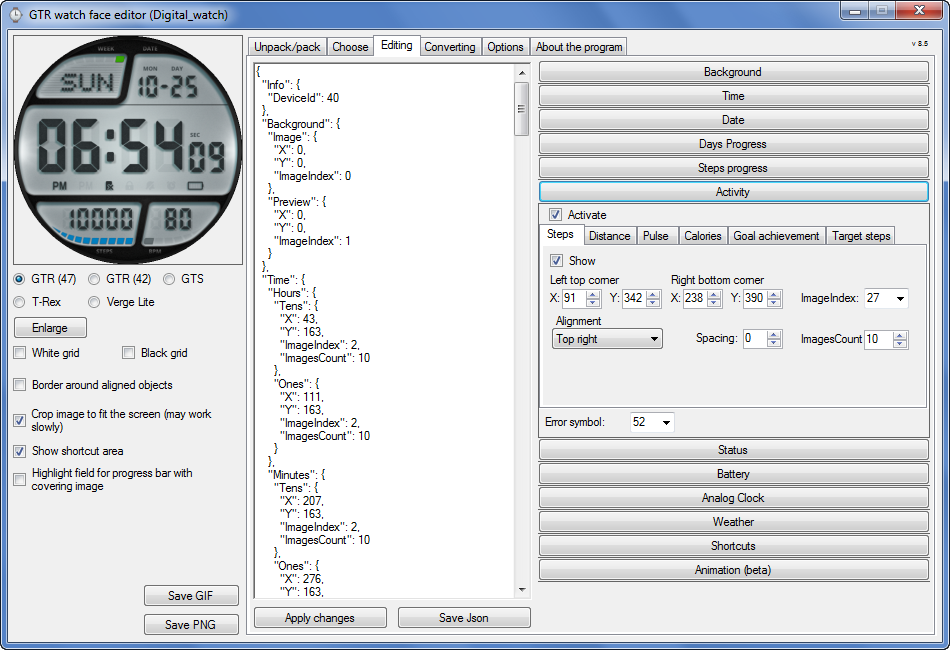
Image
Note: the path to the program should not contain spaces, it is advisable to unpack it to the root of the disk.
Not all dials can be unpacked.
You can reduce the size of the bin file only by reducing the size of the images (height * width) or by reducing the number of images.

The drawing order of elements cannot be changed. The only exception is if you move the second hand from the center, it will be drawn under the hour and minute hands.

If the .bin file is not created, then you need to look for errors in the .log file. Most often this happens when images have the wrong format.

If the bin file is not created, and the log file contains the entry “bad transparency mask”, this means that the format of one or more images is incorrect (most often it occurs if you save the image in Photoshop without transparent pixels). You can fix it as follows:
- in Photoshop - add at least one transparent pixel
- in GIMP exported to PNG 16 bit RGBA
- in XnView - Image -> 32 bits

Version 10.0
List of changes
Added the ability to display the distance traveled in kilometers and miles.
Updated translation.
v 9.0
Fixed display of date if pictures have different sizes (often pictures for "1" are narrower than others)
Added new warnings about possible errors.
Fixed the order of displaying items.
Added a button to refresh the preview image.
Fixed bugs when converting watch faces.
Updated Chinese and Italian translations.
v 8.5
Fixed work with Verge Lite
v 8.4
Fixed Italian translation.
Added Chinese manual.
v 8.3
Bugs fixed.
Added a manual in English.
v 8.2
Added the display of the target steps (StepsGoal)
Added preliminary calculation of the size of the .bin file.
v 8.1
Fixed work on monitors with high resolution.
Updated translation (French, Italian, Chinese, Spanish).
v 8.0
Added the ability to convert dials between different watch models (GTR / T-Rex / Verge Lite).
v 7.1
Italian language added.
Minor fixes.
v 7.0
Added animation support
Verge Lite Support Added
Added the ability to quickly save the project (Ctrl + S)
Added support for languages (French, Chinese).
v 6.1
Added support for T-Rex.
Added the ability to auto-correct image files (error "bad transparency mask").
Added a reminder to save the project when it is closed.
v 6.0
Added support for shortcuts.
Added background image support for circular indicator.
Added display of a set of icons (segments) for the progress of steps.
Added display of a set of icons (segments) for the battery.
Added display of a set of icons (segments) for the pulse.
Added display of an indicator (arrow) for a pulse.
Added display of indicator (arrows) for calories.
Added display of a circular indicator for the pulse.
Added display of a circular indicator for calories.
Added the ability to crop the image to fit the screen.
Added support for languages ​​(Portuguese, Czech, Slovak, Hungarian).
v 5.2
Added support for a set of icons (icons and a set of coordinates for them) for the progress of steps and battery.
Added the ability to crop the preview according to the shape of the screen.
Bugs fixed in the English version.
v 5.1
Fixed incorrect display of the distance traveled.
Added the ability to adjust the speed of gif animation.
Added the ability to work with compressed bin files.
Updated bin file packer.
Added display of the year.
Added display of a charge indicator (arrow).
Added display of indicator (arrow) of steps.
Added display of the indicator (arrow) of the date.
Added display of indicator (arrow) of the day of the week.
Added display of indicator (arrow) of the month.
Added the ability to paste copied coordinates into offset fields from the center (for arrows).
English support added.
Old versions
If you want to supplement the missing translation, write to the PM.

Beta version of the editor with support for Amazfit X

AmazFit WatchFace editor 2 with support for GTR 2, GTS 2, T-Rex Pro

My editor doesn't work with GTR2 (GTS2) watch faces and I have no plans to add support for these models anytime soon. I don't know any other programs that can work with these dials. I have no information if anyone is working in this direction.

Because I bought a GTR 2e, the program will no longer be updated.

Donate to the author
PayPal: [email protected].
Last edited by SashaCX75 on 01 Jun 2022, 07:20, edited 25 times in total.
shirumitsu
WF maker
Posts: 15
Joined: 07 Jul 2019, 01:48
Location: Brazil
Has thanked: 2 times
Been thanked: 1 time
Contact:

Post by shirumitsu »

Sasha u can make this editor to mi band 5?
is very good!
User avatar
SashaCX75
Posts: 820
Joined: 26 Oct 2019, 15:18
Location: Ukraine
Has thanked: 13 times
Been thanked: 1029 times
Contact:

Post by SashaCX75 »

shirumitsu
I have no plans to add support for other models.
I posted a link to the source code of the program. If the structure of the dials on the mi band 5 is similar, then perhaps someone will undertake to redo the program.
msz_trex
Posts: 1
Joined: 19 Dec 2020, 12:32
Location: europe
Has thanked: 2 times
Contact:

Post by msz_trex »

hi guys.
this is a great tool, im having the time of my life right now designing the faces i always wanted to see.
one maybe exotic question:
is it possible to change the order in which the layers appear, e.g. have the hands be shown BELOW the digital time output? thank you.
User avatar
SashaCX75
Posts: 820
Joined: 26 Oct 2019, 15:18
Location: Ukraine
Has thanked: 13 times
Been thanked: 1029 times
Contact:

Post by SashaCX75 »

msz_trex
The drawing order of elements cannot be changed. The only exception is if you move the second hand from the center, it will be drawn under the hour and minute hands.
jorgealmeida.rs
WF maker
Posts: 10
Joined: 16 Jul 2020, 01:28
Location: Brazil
Been thanked: 2 times
Contact:

Post by jorgealmeida.rs »

Good morning ! Are you going to make a new version including GTS 2, GTS 2e and GTS 2 MINI ?
User avatar
SashaCX75
Posts: 820
Joined: 26 Oct 2019, 15:18
Location: Ukraine
Has thanked: 13 times
Been thanked: 1029 times
Contact:

Post by SashaCX75 »

jorgealmeida.rs
It is not possible to disassemble the GTR2 dials yet, so there are no custom dials. I am not aware of any progress in this direction.
lakshanhirumal
WF maker
Posts: 1
Joined: 17 Dec 2020, 16:46
Location: Sri Lanka
Contact:

Post by lakshanhirumal »

hi...Thanks alot for this program... im enjoying making many watch faces and uploading them to amazfaces app... Two issues found.......... when converting time into 12 - hour format..at the final outcome 12am still appears as 00:xx.... for ex. 12.15 am shown as 00.15 ... only 12:xx has the issue....

Secondly, whats the ideal resolution watch needs? 72? or 300? i find many watch faces getting a warning message while compiling that the file size exceeds 1.90mb... i've tried resizing images as much as i could...still no solution.. Please Help.
User avatar
SashaCX75
Posts: 820
Joined: 26 Oct 2019, 15:18
Location: Ukraine
Has thanked: 13 times
Been thanked: 1029 times
Contact:

Post by SashaCX75 »

lakshanhirumal
These are clock software problems.
Only the size of the image in pixels is important. Pixels / inch doesn't matter.
szhabolcs
WF maker
Posts: 2
Joined: 22 Dec 2020, 18:17
Location: nah
Has thanked: 3 times
Contact:

Post by szhabolcs »

Hey there!

I am trying to make my first watch face. Everything seems fine in the application, and I checked my images, they seems alright.
I don't get any error messages nor a .log file which is strange.
Could you maybe check what could be wrong?
(GTR 42) https://we.tl/t-kyW6qF45n4

Thank you in advance!
ccolombo71
WF maker
Posts: 6
Joined: 08 Sep 2019, 18:10
Contact:

Post by ccolombo71 »

SashaCX75 do you think there will be a version for GTS2 ?
Thanks
szhabolcs
WF maker
Posts: 2
Joined: 22 Dec 2020, 18:17
Location: nah
Has thanked: 3 times
Contact:

Post by szhabolcs »

szhabolcs wrote: 23 Dec 2020, 20:54
Hey there!

I am trying to make my first watch face. Everything seems fine in the application, and I checked my images, they seems alright.
I don't get any error messages nor a .log file which is strange.
Could you maybe check what could be wrong?
(GTR 42) https://we.tl/t-kyW6qF45n4

Thank you in advance!
For everyone wondering, I made a folder inside the application under the C drive, which included a space
"C:\AmazFit_Watchface_Editor_(without_Python)_9_0\my faces\minimal_en\minimal_en.json"
changing to
"C:\AmazFit_Watchface_Editor_(without_Python)_9_0\my_faces\minimal_en\minimal_en.json"

solves the problem.
demiurg1
WF maker
Posts: 114
Joined: 23 Feb 2020, 22:49
Location: Poland
Has thanked: 23 times
Been thanked: 17 times
Contact:

Post by demiurg1 »

Maybe not exactly on the subject, but I have a pretty important question.
Does anyone know if the GTR 2 watch faces in the form of BIN files are stored on the smartphone? If so, where? I will be grateful for your help.
User avatar
SashaCX75
Posts: 820
Joined: 26 Oct 2019, 15:18
Location: Ukraine
Has thanked: 13 times
Been thanked: 1029 times
Contact:

Post by SashaCX75 »

demiurg1
As far as I know, GTR2 watch faces are stored in the same way as for GTR (First, you need to install one of the stock watch faces available in Amazfit (Zepp) /Android/data/com.huami.watch.hmwatchmanager/files/watch_skin_local /). But there are no tools yet that can work with these dials.
demiurg1
WF maker
Posts: 114
Joined: 23 Feb 2020, 22:49
Location: Poland
Has thanked: 23 times
Been thanked: 17 times
Contact:

Post by demiurg1 »

Thanks, I'll try. And has anyone tried BIN from GTR 47 to apply to GTR 2?
I have quite a lot of my own watch faces for the GTR 47 and I would like to use them or convert them to the GTR 2. Is it possible?
demiurg1
WF maker
Posts: 114
Joined: 23 Feb 2020, 22:49
Location: Poland
Has thanked: 23 times
Been thanked: 17 times
Contact:

Post by demiurg1 »

After loading the original BIN file (b3bb04012bea4e6c262b6192ca7f509a.bin) created for GTR 2 into the program "AmazFit_Watchface_Editor_ (bez_Python)" I only received the file "b3bb04012bea4e6c262b6192ca7f509a.log".
Contents of this file:
2020-12-25 12:33:51,076 - root - DEBUG - Opening watch face 'C:\programy\AmazFit_Watchface_Editor\Watch_face\b3bb04012bea4e6c262b6192ca7f509a.bin'
2020-12-25 12:33:51,076 - root - DEBUG - Reading parameters...
2020-12-25 12:33:51,076 - root - INFO - Reading header...
2020-12-25 12:33:51,076 - root - INFO - Header was read:
2020-12-25 12:33:51,091 - root - INFO - Signature: b'UIHH\x02\x00\xff', Unknown: 4294967168, ParametersSize: 16777723, isValid: False, deviceId: 64
2020-12-25 12:33:51,091 - root - DEBUG - Parsing parameters...
2020-12-25 12:33:51,091 - root - CRITICAL - 'Reader' object has no attribute '_parameters'
Traceback (most recent call last):
File "program.py", line 164, in parseResources
File "watchFaceParser\reader.py", line 13, in getParameters
AttributeError: 'Reader' object has no attribute '_parameters'

Anyone have any idea how to change this file so that I can edit or convert it?
I feel sorry for my watch faces, which I designed for the GTR 47. I would also like to have them in the GTR 2. Or maybe they can be converted in some way? If there is any other editor for GTR 2 watch faces, I would be grateful for the information.
B!GBOY
Posts: 2
Joined: 30 Nov 2020, 12:44
Location: DE
Contact:

Post by B!GBOY »

demiurg1 wrote: 25 Dec 2020, 11:24
Thanks, I'll try. And has anyone tried BIN from GTR 47 to apply to GTR 2?
I have quite a lot of my own watch faces for the GTR 47 and I would like to use them or convert them to the GTR 2. Is it possible?
Yes they don't work as GTR2 has a different structure for the bin file. Unless someone reverse engineer it there won't be any custom watch faces for GTR2.
demiurg1 wrote: 25 Dec 2020, 14:51
2020-12-25 12:33:51,076 - root - INFO - Header was read:
2020-12-25 12:33:51,091 - root - INFO - Signature: b'UIHH\x02\x00\xff', Unknown: 4294967168, ParametersSize: 16777723, isValid: False, deviceId: 64
they don't even have the "HMDIAL" header as you can see in your error log.
NikiWafa
WF maker
Posts: 7
Joined: 21 Oct 2020, 07:19
Location: Indonesia
Has thanked: 2 times
Contact:

Post by NikiWafa »

I tried to make animation on GTR42mm with version 7 .. after I installed it on my watch, my watch became hang and bootloop ... is the version above 7 still like that?
User avatar
asoo
Posts: 2131
Joined: 03 Jan 2019, 01:48
Location: ͼͽ Thailand ͼͽ
Has thanked: 411 times
Been thanked: 2052 times

Post by asoo »

NikiWafa wrote: 31 Dec 2020, 22:30
I tried to make animation on GTR42mm with version 7 .. after I installed it on my watch, my watch became hang and bootloop ... is the version above 7 still like that?

I don't think about Version is a issue. The issue is likely caused by the size of the "BIN" file you created. It is larger than 1.5 m.

That I don't think so about the version in issue , because the program "pack and Unpack" part of the program remain the same until Current version


PS.
Currently the program is version 9.0. (01/01/2021) viewtopic.php?f=29&t=1076&start=425&sid ... 35e94e0629
ͼͽ To request please use the interrelated forum in action ͼͽ
Please do not PM to me for requests ported watchface.
NikiWafa
WF maker
Posts: 7
Joined: 21 Oct 2020, 07:19
Location: Indonesia
Has thanked: 2 times
Contact:

Post by NikiWafa »

asoo wrote: 01 Jan 2021, 01:52
NikiWafa wrote: 31 Dec 2020, 22:30
I tried to make animation on GTR42mm with version 7 .. after I installed it on my watch, my watch became hang and bootloop ... is the version above 7 still like that?

I don't think about Version is a issue. The issue is likely caused by the size of the "BIN" file you created. It is larger than 1.5 m.

That I don't think so about the version in issue , because the program "pack and Unpack" part of the program remain the same until Current version


PS.
Currently the program is version 9.0. (01/01/2021)
thank you for the information, sorry if my language is messed up ... because I use google translate ;)
noender
WF maker
Posts: 4
Joined: 05 Jan 2021, 00:54
Location: Imperial
Has thanked: 4 times
Contact:

Post by noender »

Thanks for sharing this awesome application SashaCX75!

I wanted to ask a couple of questions:

-My main question is if its possible to reduce the file size by packing and compressing manually? Some people said this and I have the feeling that the auto-generated GIF file is taking way too much space.

-Is it possible to add function to specify width/height (scale) to images?

-If I add more PNG's to move (in another line) it doesn't work. But if I use the same PNG in more lines it does work. Meaning that I can animate one object multiple times, but not different objects.

Thank you!
macgd016
Posts: 2
Joined: 05 Jan 2021, 09:53
Location: UK
Has thanked: 3 times
Contact:

Post by macgd016 »

Hi I'm new here so please treat me gently, particularly as I'm sure I am doing something stupid!

Having downloaded the editor and a simple watch face everything went well, the downloaded file unpacked and the editor showed all the elements, however, every attempts since fails.

I can see that the download file unpacks into the Watch_face folder but nothing appears in the editor. The exact sequence of events is;

download watchface file from amazfitwatchfaces DOT com/gtr/view/11299

set Path to the packer as

C:\AmazFit_Watchface_Editor_(without_Python)_9_0\Watch_face\project_53_packed_zip-294441-416547e75b.bin

Press Unpack compress bin

a windows File Manager pop up screen appears asking for the location of the bin file

select C:\AmazFit_Watchface_Editor_(without_Python)_9_0\Watch_face\project_53_packed_zip-294441-416547e75b.bin

file unpacks into Watch_face folder but noting further happens.

I've tried all sorts of things but I can't get past this point, I'm sure its something stupid I'm doing but need some help please
User avatar
SashaCX75
Posts: 820
Joined: 26 Oct 2019, 15:18
Location: Ukraine
Has thanked: 13 times
Been thanked: 1029 times
Contact:

Post by SashaCX75 »

noender
1 No. Read the first post in this thread.
2 No, the size of the image depends on its size in pixels, there is no scale.
3 For animation of movement, you can add different images on different lines. There are dials where this animation works.
User avatar
SashaCX75
Posts: 820
Joined: 26 Oct 2019, 15:18
Location: Ukraine
Has thanked: 13 times
Been thanked: 1029 times
Contact:

Post by SashaCX75 »

macgd016
Reset the settings. Do not change the path to the packer.
noender
WF maker
Posts: 4
Joined: 05 Jan 2021, 00:54
Location: Imperial
Has thanked: 4 times
Contact:

Post by noender »

Thanks SashaCX75. I'll do some more testing.

Regarding the use of "Movement between coordinates"- is it possible to animate without looping? Meaning, is it possible to stop the animation after running once?

Thanks!

PD
I just finished my first watch face with your program, it's already in the catalog named "KoF Kyo - Classic Arcade Collection I". Thanks!
NikiWafa
WF maker
Posts: 7
Joined: 21 Oct 2020, 07:19
Location: Indonesia
Has thanked: 2 times
Contact:

Post by NikiWafa »

HI SashaCX75

is it possible or can it ?, if the WatcFace Editor added an altimeter?

thank you
Post Reply

Return to “Watchfaces tools”

Who is online

Users browsing this forum: No registered users and 2 guests