• Amministratore
  •  
    Support Ukraine
    If you experience any problems with the forum (it is not visible, there is no way to post messages, or some functionality does not work), please let us know. If you have problems with registration or you did not receive confirmation letter, let us know and we will activate your account manually.
    If you get an "The submitted form was invalid. Try submitting again" error, delete cookies, then try again.
     

Running the AmazFit Watch Face Editor (ZeppOS) on Linux via Wine – Full Guide

This forum is designed to discuss and develop tools creating watch faces.

Moderatori: asoo, lvpokka, Internal error, Watchmens

Regole del forum
All communication in this branch should only be in English.
To discuss tools that are not in this section, use the “Watchfaces tools (discussion)” forum.
Rispondi
citizenserious
Messaggi: 12
Iscritto il: 19 apr 2025, 17:56
Località: μπ
Has thanked: 1 time
Been thanked: 2 times
Contatta:

Running the AmazFit Watch Face Editor (ZeppOS) on Linux via Wine – Full Guide

Messaggio da citizenserious »

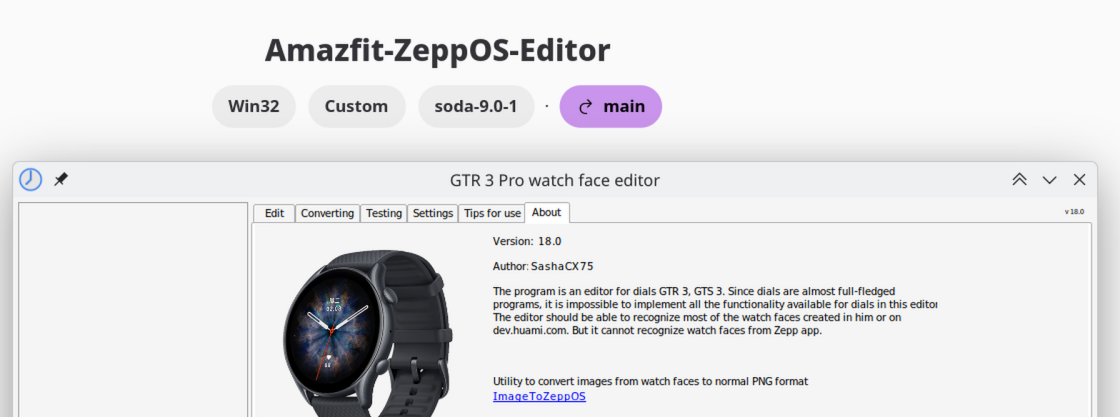
First of all, thanks to @SashaCX75 again for this great tool. I’m a Linux-only user and wanted to share my experience getting the Watch Face Editor (ZeppOS) viewtopic.php?t=2743 running successfully under Fedora 42 using Wine. This should work similarly on other distributions.

Old Version:
Spoiler

🧰 Step-by-step setup process

1. Install Wine and Winetricks (via package manager)

On Fedora:

Codice: Seleziona tutto

sudo dnf install wine winetricks
This will install the latest native Wine (in my case: wine-10.4 (Staging)).

2. Create a clean Wine prefix

Codice: Seleziona tutto

export WINEPREFIX=~/wine-amazfit-editor
export WINEARCH=win32
winecfg
- Set Windows version to Windows 7 in the winecfg dialog.

3. Install .NET Framework 4.8

Codice: Seleziona tutto

winetricks dotnet48
⚠️ You’ll need to go through several Microsoft .NET installers (4.0 through 4.8). Accept all licenses and click “Finish” each time. Do not install optional extras.

📦 Installing the Watch Face Editor

Extract the ZIP file (Watch_Face_Editor_(ZeppOS)_v13.1.zip) to a clean folder without spaces or special characters:

Codice: Seleziona tutto

mkdir -p ~/WineApps/WatchFaceEditor
unzip "~/Downloads//Watch_Face_Editor_(ZeppOS)_v13.1.zip" -d ~/WineApps/WatchFaceEditor

▶️ How to start the editor

You can start the editor with:

Codice: Seleziona tutto

WINEPREFIX=~/wine-amazfit-editor wine "home/YOURUSER/WineApps/WatchFaceEditor/Watch_Face_Editor_(ZeppOS).exe"
⚠️ If the filename contains spaces or parentheses, always quote it properly.
Replace YOURUSER with your username.
🖼 Desktop integration (optional)

If you want to launch it from your app menu, create a small shell script like this:

Codice: Seleziona tutto

#!/bin/bash
export WINEPREFIX="$HOME/wine-amazfit-editor"
wine "$WINEPREFIX/drive_c/Program Files/WatchFaceEditor/Watch_Face_Editor_(ZeppOS).exe"
Then create a .desktop file pointing to this script, and place it in ~/.local/share/applications/.

🧩 Summary
ComponentStatus
Wine Compatibility✅ Good
.NET 4.8 support✅ Working via Winetricks
Watch Face Editor GUI✅ Launches and works
Desktop launcher✅ Works
Hope this guide helps other Linux users to run the Amazfit Watch Face Editor smoothly under Wine! 🐧
Updated easier version:
https://amazfitwatchfaces.com/forum/vi ... 438#p22438
Ultima modifica di citizenserious il 30 giu 2026, 14:33, modificato 7 volte in totale.
Avatar utente
SashaCX75
Messaggi: 820
Iscritto il: 26 ott 2019, 15:18
Località: Ukraine
Has thanked: 13 times
Been thanked: 1029 times
Contatta:

Messaggio da SashaCX75 »

The editor uses standard file selection dialogs, so it is strange that they cause problems.
Is this problem only with the *.zip file selection dialog or with all dialogs?
If you open files not through a dialog but in the context menu of the file choose to open it with the editor (I don't know how it looks like in Linux) does it work?
citizenserious
Messaggi: 12
Iscritto il: 19 apr 2025, 17:56
Località: μπ
Has thanked: 1 time
Been thanked: 2 times
Contatta:

Messaggio da citizenserious »

I think it could be related to the preset file filter. .json files are shown when opening a project.
1.png
1.png (50.86 KiB) Visto 2613 volte
Avatar utente
SashaCX75
Messaggi: 820
Iscritto il: 26 ott 2019, 15:18
Località: Ukraine
Has thanked: 13 times
Been thanked: 1029 times
Contatta:

Messaggio da SashaCX75 »

If you are interested in this, I can try to see what the difference in filters is and make a test version. At least add all files to the selection. But it will be necessary for you to check whether this variant works or not.
citizenserious
Messaggi: 12
Iscritto il: 19 apr 2025, 17:56
Località: μπ
Has thanked: 1 time
Been thanked: 2 times
Contatta:

Messaggio da citizenserious »

Of course. That would be great. I am willing to test it. Thank you!
Avatar utente
SashaCX75
Messaggi: 820
Iscritto il: 26 ott 2019, 15:18
Località: Ukraine
Has thanked: 13 times
Been thanked: 1029 times
Contatta:

Messaggio da SashaCX75 »

Are you using the editor in English?
citizenserious
Messaggi: 12
Iscritto il: 19 apr 2025, 17:56
Località: μπ
Has thanked: 1 time
Been thanked: 2 times
Contatta:

Messaggio da citizenserious »

Yes, I use it in English.
One request though. Could you please make a reproducible build with the code visible on GitHub or similar in the future? I have trust issues.

I will test your version in a virtual machine for now.
Avatar utente
SashaCX75
Messaggi: 820
Iscritto il: 26 ott 2019, 15:18
Località: Ukraine
Has thanked: 13 times
Been thanked: 1029 times
Contatta:

Messaggio da SashaCX75 »

https://github.com/SashaCX75/AmazFit-Wa ... /tree/test
The source code for the editor is available on GitHub
citizenserious
Messaggi: 12
Iscritto il: 19 apr 2025, 17:56
Località: μπ
Has thanked: 1 time
Been thanked: 2 times
Contatta:

Messaggio da citizenserious »

Yes I know, and I thank you for that, but I downloaded the editor from Google Drive or Dropbox, which could be anything else, than the code on GitHub.
No one can be sure that it is the same code. There is just no way of verifying.
Don't get me wrong, but in most cases if you download a .exe from Dropbox, its malware, especially if the language is set to Russian.
citizenserious
Messaggi: 12
Iscritto il: 19 apr 2025, 17:56
Località: μπ
Has thanked: 1 time
Been thanked: 2 times
Contatta:

Messaggio da citizenserious »

@SashaCX75
The new version works (: and shows the zip files correctly now.
Thank you!
Avatar utente
SashaCX75
Messaggi: 820
Iscritto il: 26 ott 2019, 15:18
Località: Ukraine
Has thanked: 13 times
Been thanked: 1029 times
Contatta:

Messaggio da SashaCX75 »

Okay. I'll fix it in the next version.
The problem was caused by extra spaces in the filter. On Windows it works but Linux seems to be more sensitive to the format of the caption in the filter.
Emans
Messaggi: 3
Iscritto il: 24 ott 2024, 18:45
Località: Italia
Contatta:

Messaggio da Emans »

Good morning and thank you for your work.
I'm working on Fedora 44 KDE Plasma and can't launch or use the application. Can anyone help me?
Thanks.
citizenserious
Messaggi: 12
Iscritto il: 19 apr 2025, 17:56
Località: μπ
Has thanked: 1 time
Been thanked: 2 times
Contatta:

Messaggio da citizenserious »

I am also using Fedora 44 KDE 6.7.
The guide here is somewhat dated:
The easiest way is to use bottles. Installed as flatpak. https://flathub.org/en/apps/com.usebottles.bottles
Spoiler
Immagine
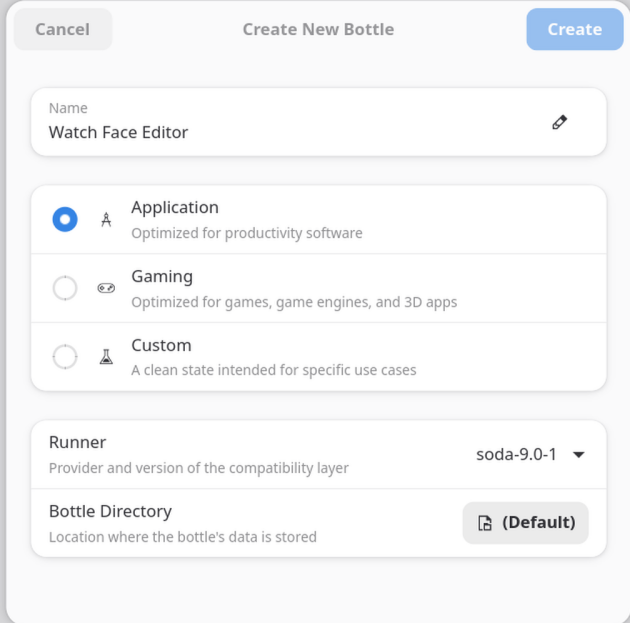
Just set it up as an application:
Immagine
then add the .exe as a shortcut or use the "Eagle"
Immagine
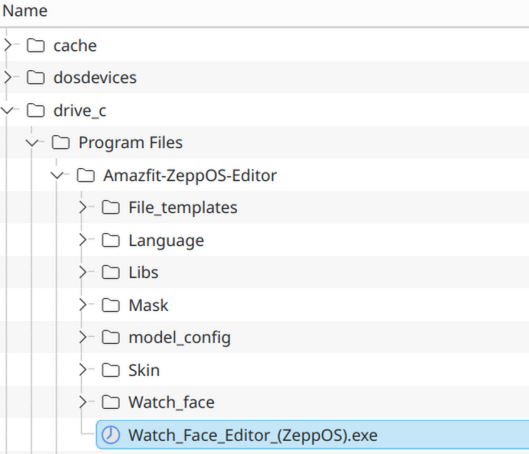
I placed it under Program Files
Immagine
Ultima modifica di citizenserious il 30 giu 2026, 13:36, modificato 1 volta in totale.
Emans
Messaggi: 3
Iscritto il: 24 ott 2024, 18:45
Località: Italia
Contatta:

Messaggio da Emans »

Hi, thanks for the reply, but it still doesn't work. What can I do? Is it too much if I ask for a step-by-step guide from the beginning? Thanks.
citizenserious
Messaggi: 12
Iscritto il: 19 apr 2025, 17:56
Località: μπ
Has thanked: 1 time
Been thanked: 2 times
Contatta:

Messaggio da citizenserious »

I kinda did a step-by-step above, which should include all relevant steps.
Which issue do you encounter?
citizenserious
Messaggi: 12
Iscritto il: 19 apr 2025, 17:56
Località: μπ
Has thanked: 1 time
Been thanked: 2 times
Contatta:

Messaggio da citizenserious »

Oh, I might have overlooked something, I set up bottles a while ago.
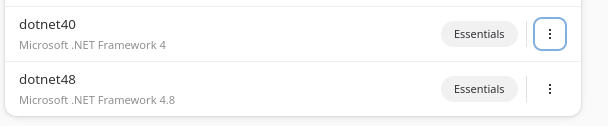
The Watch face editor use ".NET Framework".

So try again after installing these dependencies:
Spoiler
Immagine
Immagine
citizenserious
Messaggi: 12
Iscritto il: 19 apr 2025, 17:56
Località: μπ
Has thanked: 1 time
Been thanked: 2 times
Contatta:

Messaggio da citizenserious »

Step-by-step guide: Running the Amazfit Watch Face Editor (ZeppOS) on Fedora / Linux with Bottles

I am currently using Fedora 44 KDE Plasma. The older Wine / winetricks guide still works in principle, but for me the easiest current method is using Bottles as a Flatpak.

This is the setup that worked for me.

Tested bottle configuration
  • Bottles package: Flatpak
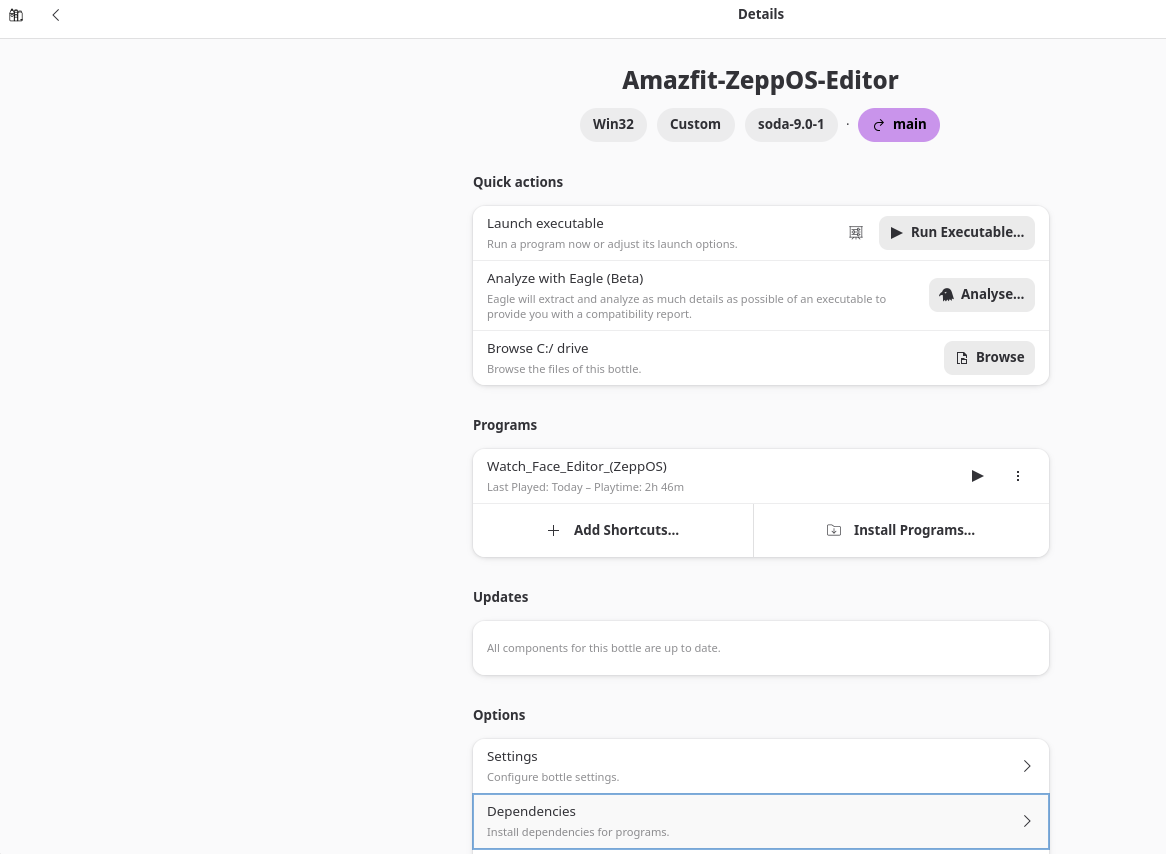
  • Bottle name: Amazfit-ZeppOS-Editor
  • Environment tested: Application
  • Architecture: win32 / 32-bit
  • Windows version: win11
  • Runner: soda-9.0-1
  • Installed dependencies: dotnet40, dotnet48
Important note about the architecture

I tested the editor with the Application environment and it worked for me.

My working bottle is win32 / 32-bit. I am not sure whether Bottles always creates Application bottles as 32-bit by default, so if Bottles gives you an architecture option, choose win32 / 32-bit.

1. Install Bottles

Install Bottles from Flathub:

https://flathub.org/apps/com.usebottles.bottles

You can also find the official Bottles documentation here:

https://usebottles.com/docs

After installation, start Bottles once and let it finish its initial setup / component downloads.

2. Create a new bottle

Create a new bottle.

Recommended settings:
  • Environment: Application
  • Architecture: win32 / 32-bit, if Bottles asks for the architecture
  • Runner: The default Soda runner should be fine. My working bottle uses soda-9.0-1.
Spoiler
Immagine
I would recommend using a fresh separate bottle only for the Amazfit / ZeppOS editor.

3. Install the required .NET dependencies

Open the bottle and go to:

Codice: Seleziona tutto

Dependencies
Spoiler
Immagine
Search for and install:

Codice: Seleziona tutto

dotnet40
dotnet48
Spoiler
Immagine
I installed dotnet40 first and then dotnet48.

Wait until both dependency installations are finished. Do not interrupt the installers.

Important: The Watch Face Editor uses Microsoft .NET Framework. Without these dependencies, the program may not launch.

4. Extract the Watch Face Editor

Download the Watch Face Editor ZIP from the original editor thread.

Extract the complete ZIP file. Do not run the program directly from inside the ZIP archive.

Keep the complete folder structure. The extracted folder should contain files/folders such as:

Codice: Seleziona tutto

File_templates
Language
Libs
Mask
model_config
Skin
Watch_Face_Editor_(ZeppOS).exe
5. Put the editor inside the bottle

In Bottles, open the bottle and choose:

Codice: Seleziona tutto

Browse C:/ drive
Then copy the complete extracted editor folder into the bottle's C: drive.

For example, I used:

Codice: Seleziona tutto

C:\Program Files\Amazfit-ZeppOS-Editor
The executable should then be located at something like:

Codice: Seleziona tutto

C:\Program Files\Amazfit-ZeppOS-Editor\Watch_Face_Editor_(ZeppOS).exe
Spoiler
Immagine
This is not necessarily the only possible location, but it worked for me and keeps all program files together.

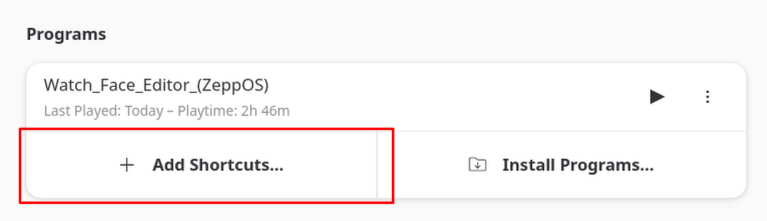
6. Add the executable as a shortcut

In the bottle, go to the Programs section.

Click:

Codice: Seleziona tutto

Add Shortcuts...
Select the editor executable. In my setup it is here:

Codice: Seleziona tutto

C:\Program Files\Amazfit-ZeppOS-Editor\Watch_Face_Editor_(ZeppOS).exe
Spoiler
Immagine
After that, the editor should appear in the Programs list.

7. Start the editor

Launch it from the Programs list inside Bottles.

If it starts correctly, you can also create a desktop/menu shortcut from Bottles later.

Troubleshooting

If the program does not start:
  • Make sure the bottle is win32 / 32-bit.
  • Make sure dotnet40 and dotnet48 are installed in the same bottle.
  • Make sure you copied the complete extracted editor folder, not only the .exe file.
  • Make sure the complete editor folder is inside the bottle's C: drive. In my setup I used:

    Codice: Seleziona tutto

    C:\Program Files\Amazfit-ZeppOS-Editor
  • If a .NET installation failed, it is usually better to delete the bottle and create a fresh one instead of trying to repair a broken one.
  • If it still crashes or closes immediately, use Bottles' logging / analysis option or provide the exact error message/log. "It does not work" is unfortunately not enough to diagnose the issue.

AI assistance note

This guide was written by me based on my own testing. I used an AI assistant to help structure, clarify and format the instructions. The actual setup was tested manually on my system.
Emans
Messaggi: 3
Iscritto il: 24 ott 2024, 18:45
Località: Italia
Contatta:

Messaggio da Emans »

It works. Thank you so much.
Rispondi

Torna a “Watchfaces tools”

Chi c’è in linea

Visitano il forum: Nessuno e 1 ospite