• Administrador
  •  
    Support Ukraine
    If you experience any problems with the forum (it is not visible, there is no way to post messages, or some functionality does not work), please let us know. If you have problems with registration or you did not receive confirmation letter, let us know and we will activate your account manually.
    If you get an "The submitted form was invalid. Try submitting again" error, delete cookies, then try again.
     

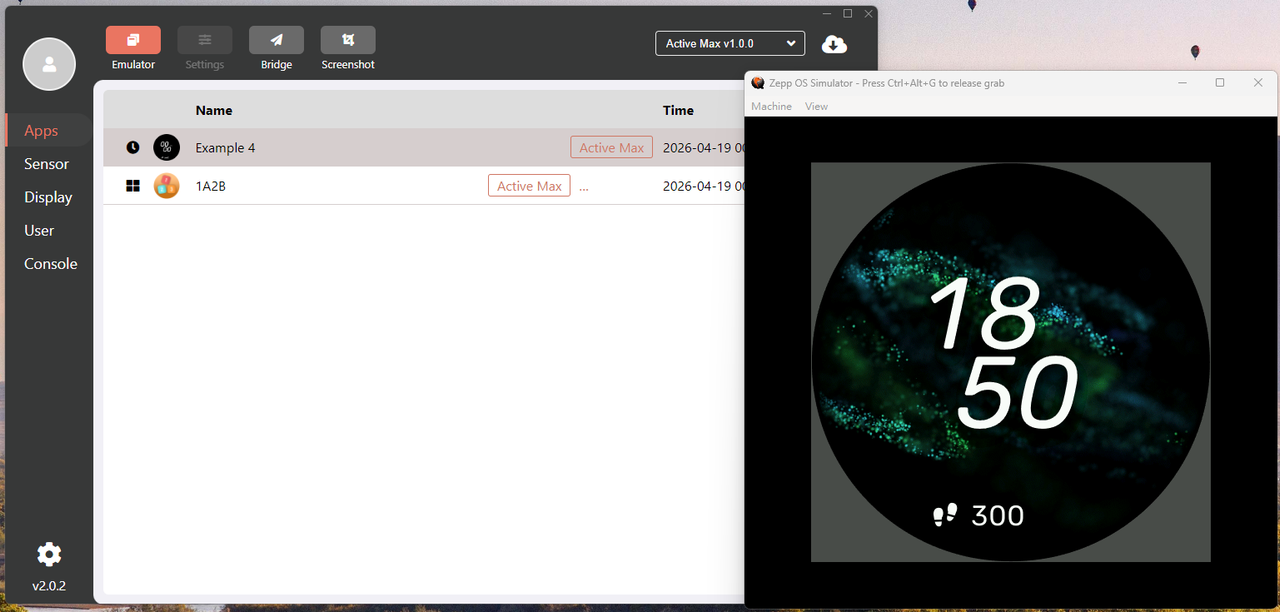
I make a tool to push the zpk format watchface into official simulator, but have little problems(Fixed)

This forum is designed to discuss existing tools for creating watch faces.

Moderadores: asoo, lvpokka, Internal error, Watchmens

Regras do fórum
All communication in this branch should only be in English.
YsPan
WF maker
Mensagens: 7
Registrado em: 29 Mar 2021, 14:30
Localização: Taiwan
Has thanked: 2 times
Been thanked: 7 times
Contato:

I make a tool to push the zpk format watchface into official simulator, but have little problems(Fixed)

Mensagem por YsPan »

After observes the complied code of the zeus-cli, and analyzes the code by the AI, I make a tool that can push the zpk file into the official watch simulator directly:

https://github.com/Bob-YsPan/zepp-os-push-to-simulator

And I tested it, it can push the zpk files that are built by the official CLI that includes watchfaces into the simulator, but if I try to push the watchfaces that are built by the Watchface tool, it just unzips into the simulator's data folder (%appdata%\simulator\apps), and not to do anything.

I looked this discussion, seems like it probably cause by the API problem so the simulator cannot recognizes it?

viewtopic.php?p=19837#p19837

I tries renames the watchface's zip to the device.zip and packs into another zip file, but seems still not work :cry:
Editado pela última vez por YsPan em 19 Abr 2026, 10:24, em um total de 2 vezes.
YsPan
WF maker
Mensagens: 7
Registrado em: 29 Mar 2021, 14:30
Localização: Taiwan
Has thanked: 2 times
Been thanked: 7 times
Contato:

Mensagem por YsPan »

I find out the way to make the pictures and image assets that I said at the github repo work:
Spoiler
Imagem
We need the tool made by SashaCX75 ( memberlist.php?mode=viewprofile&u=113690 ) :
https://www.dropbox.com/s/ugmfqg0xdv8qb ... S.zip?dl=0

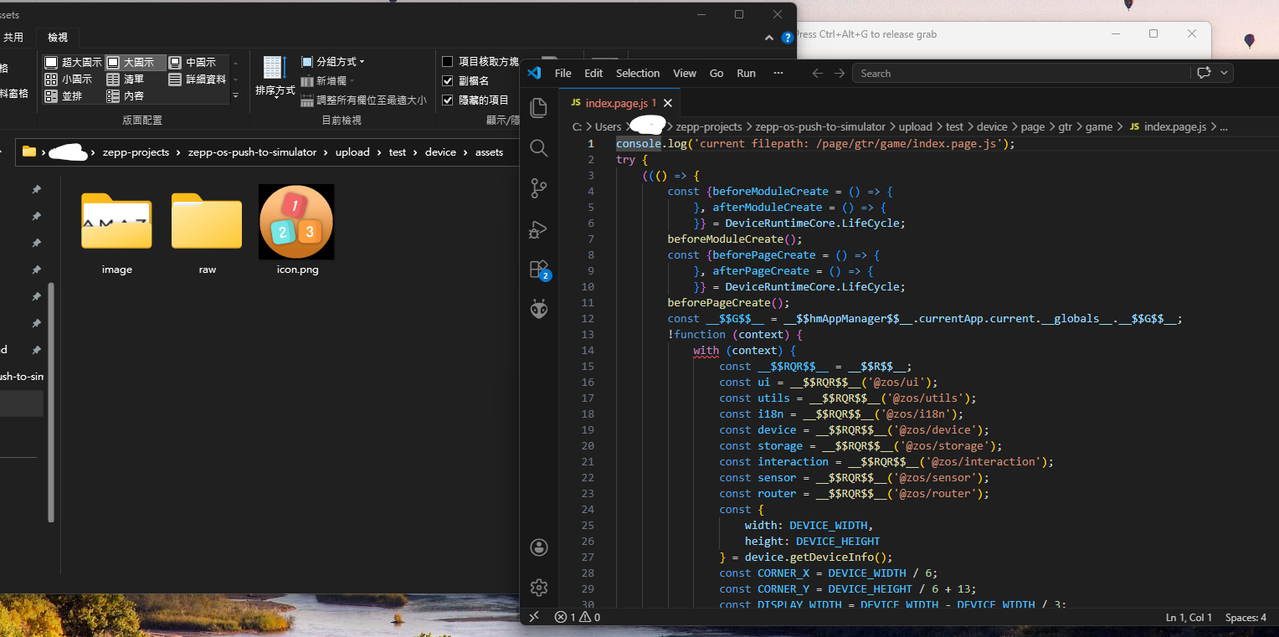
And convert all assets from encoded format back to the normal png, and repack back to the zip(includes app-side.zip and device.zip, like the original zpk format), then send it to the simulator by my tool, and the picture will display normally

I find out the interesting facts:
The JS file that pushed into the simulator is not complied version, it still readable format, but not same as the source code, but the simulator accepts the complied version that will be installed into the device:
Spoiler
Imagem
But this site's watchface still not working, although I download the package by the QR code that provide the zpk format zip.

That watchface I uploaded to the simulator is the template watchface that exported by the official watchface editor.
YsPan
WF maker
Mensagens: 7
Registrado em: 29 Mar 2021, 14:30
Localização: Taiwan
Has thanked: 2 times
Been thanked: 7 times
Contato:

Mensagem por YsPan »

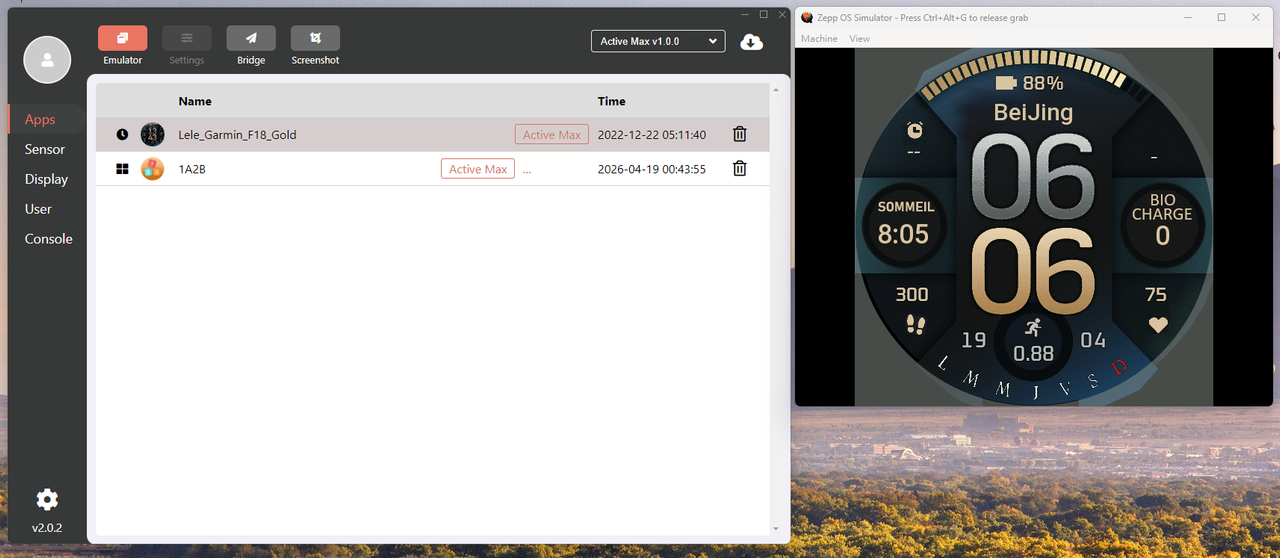
I find the issue caused by, and I can push some watchfaces to the official simulator :D
(Example watchface: Marc F18 Golf FR V1 (https://amazfitwatchfaces.com/active/view/1737) made by markillers (https://amazfitwatchfaces.com/ucp/871122))
Spoiler
Imagem
Complete step to upload the watchface updated in my repo:
https://github.com/Bob-YsPan/zepp-os-push-to-simulator
Editado pela última vez por YsPan em 19 Abr 2026, 07:08, em um total de 2 vezes.
Avatar do usuário
asoo
Mensagens: 2106
Registrado em: 03 Jan 2019, 01:48
Localização: ͼͽ Thailand ͼͽ
Has thanked: 404 times
Been thanked: 2022 times

Mensagem por asoo »

YsPan escreveu: 19 Abr 2026, 07:06
Complete step to upload the watchface updated in my repo:
https://github.com/Bob-YsPan/zepp-os-push-to-simulator
For those who have already installed Zeus and the simulator, I personally think it's useful. Push.js saves time in submitting the watchface on official's simulator .
Download.js and push_qr.js are very interesting concepts, However, I’m not planning to use it, as I already use alternative approaches for this part of the process.
ͼͽ To request please use the interrelated forum in action ͼͽ
Please do not PM to me for requests ported watchface.
Avatar do usuário
SashaCX75
Mensagens: 812
Registrado em: 26 Out 2019, 15:18
Localização: Ukraine
Has thanked: 13 times
Been thanked: 1007 times
Contato:

Mensagem por SashaCX75 »

A useful utility.
If you’re interested, we could discuss the possibility of integrating it into the editor. That way, you wouldn’t need to go through the process of unpacking the dial; you could simply work with the pre-prepared files.
YsPan
WF maker
Mensagens: 7
Registrado em: 29 Mar 2021, 14:30
Localização: Taiwan
Has thanked: 2 times
Been thanked: 7 times
Contato:

Mensagem por YsPan »

SashaCX75 escreveu: 19 Abr 2026, 17:20
A useful utility.
If you’re interested, we could discuss the possibility of integrating it into the editor. That way, you wouldn’t need to go through the process of unpacking the dial; you could simply work with the pre-prepared files.
Thanks to SashaCX75 noticing this project :D

I've been considering using another language like C# to implement the communication logic with the simulator. This would removes the dependency on Node.js and CLI and allow for better integration into watchface development tools.
YsPan
WF maker
Mensagens: 7
Registrado em: 29 Mar 2021, 14:30
Localização: Taiwan
Has thanked: 2 times
Been thanked: 7 times
Contato:

Mensagem por YsPan »

After dive in the JSON file, I discovered that the simulator uses socket.io to communication with the CLI.

Fortunately, NuGet has the package uses the same protocol, is available for C#.

https://github.com/doghappy/socket.io-client-csharp

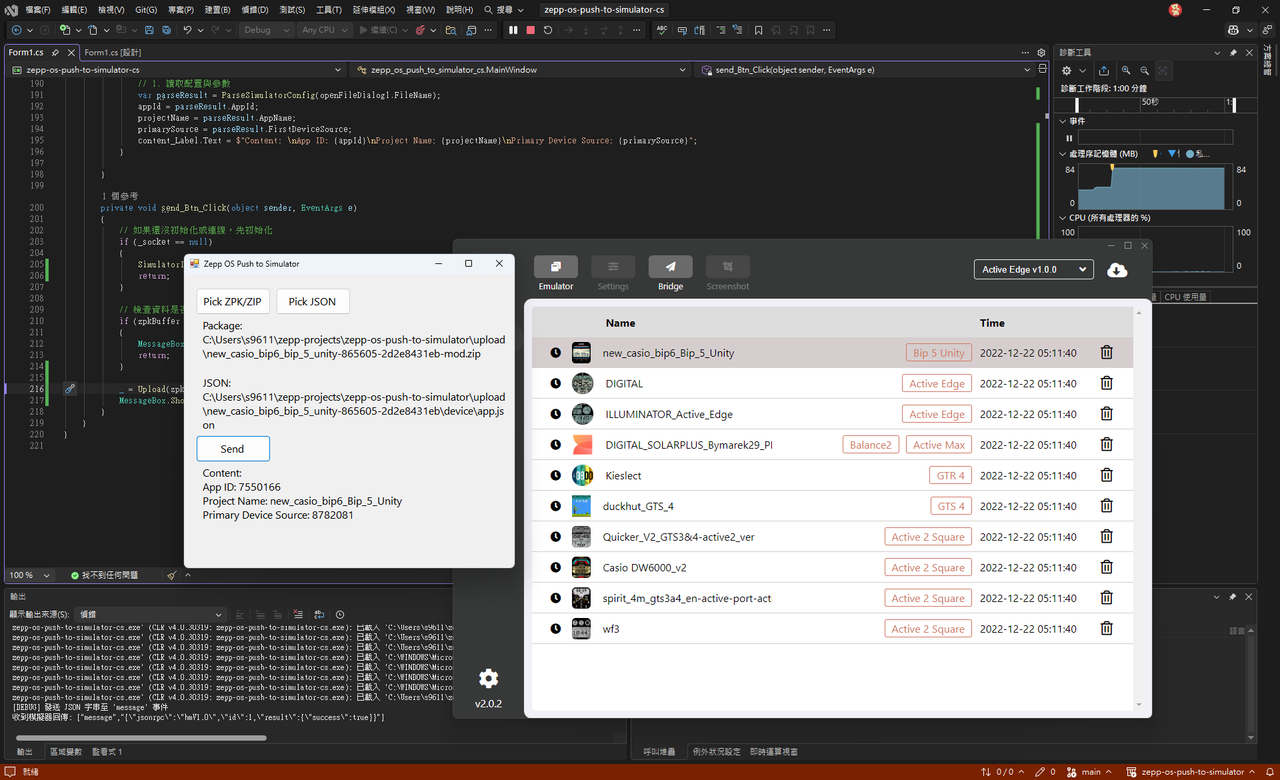
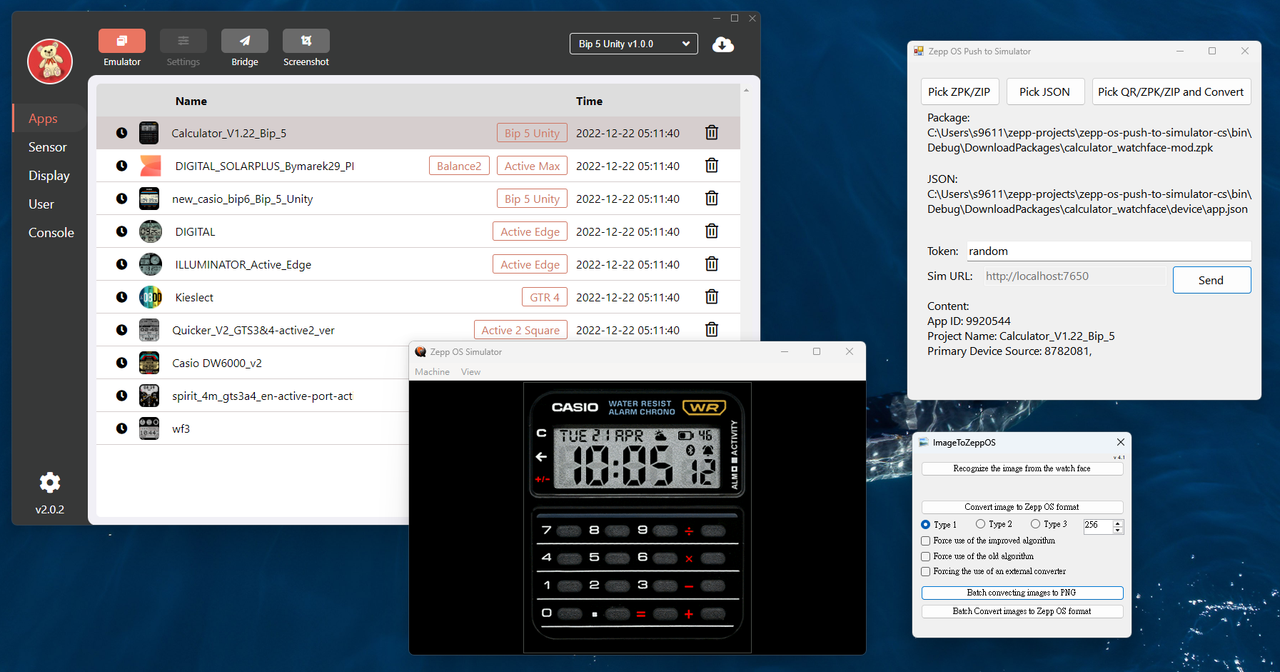
Using that NuGet package, along with my limited C# skills and some code generated by Gemini, I successfully pushed ZPK into the simulator using C#.

However, I plan to spend some time polishing it before uploading it to the same repository.
Spoiler
Imagem
YsPan
WF maker
Mensagens: 7
Registrado em: 29 Mar 2021, 14:30
Localização: Taiwan
Has thanked: 2 times
Been thanked: 7 times
Contato:

Mensagem por YsPan »

I uploaded the polished version here:
https://github.com/Bob-YsPan/zepp-os-pu ... mulator-cs
Spoiler
Imagem
Maybe this version is easier to merge into the Editor, it eliminates the dependency on Node.js.
YsPan
WF maker
Mensagens: 7
Registrado em: 29 Mar 2021, 14:30
Localização: Taiwan
Has thanked: 2 times
Been thanked: 7 times
Contato:

Mensagem por YsPan »

I find out the package exported by the SashaCX75's WatchFace editor, can push into the simulator with little modification:

Edit: I added the flow into the C#'s version of the program, just open the exported watchface package like the zpk!

(Steps 1~2 can see the instruction in this README https://github.com/Bob-YsPan/zepp-os-push-to-simulator)
1. Converts all images back to the png
2. Trim extra 3 bytes at the front (UTF-8 BOM)
3. Packs the app.json only to app-side.zip
4. Packs remaining files includes app.json into the device.zip
5. Packs device.zip and app-side.zip into another zip, you can rename it to the .zpk extension, or keep the zip extension
6. Push zpk use my tool!
Avatar do usuário
asoo
Mensagens: 2106
Registrado em: 03 Jan 2019, 01:48
Localização: ͼͽ Thailand ͼͽ
Has thanked: 404 times
Been thanked: 2022 times

Mensagem por asoo »

YsPan escreveu: 21 Abr 2026, 10:33
I uploaded the polished version here:
https://github.com/Bob-YsPan/zepp-os-pu ... mulator-cs
Spoiler
Imagem
Maybe this version is easier to merge into the Editor, it eliminates the dependency on Node.js.
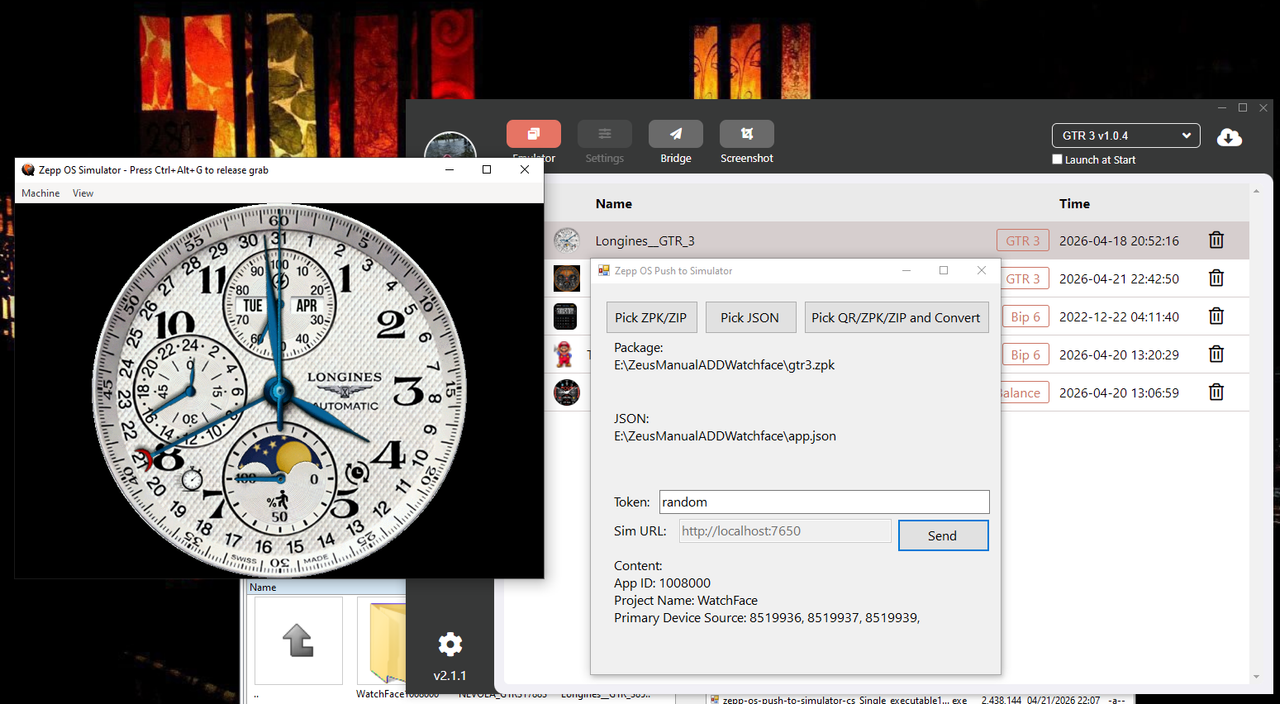
Thank you so much for this excellent program!
It makes sending files to simulator so much easier.
I've tested it and it works really well.

My Tested V 1.1.1
Imagem
ͼͽ To request please use the interrelated forum in action ͼͽ
Please do not PM to me for requests ported watchface.
Avatar do usuário
SashaCX75
Mensagens: 812
Registrado em: 26 Out 2019, 15:18
Localização: Ukraine
Has thanked: 13 times
Been thanked: 1007 times
Contato:

Mensagem por SashaCX75 »

I successfully imported the dial I created in the editor into the simulator.
I honestly didn't understand the point of step 2 in your instructions. I just replaced the images in the dial file with standard PNG files and everything worked.

Since you’ve rewritten the code in C#, I should probably be able to import it into my editor. But I think it would be better not to import the code, but to integrate your project as a separate utility and simply use a button in the editor to launch that utility with the required parameters. That way, your utility will remain a standalone project and you’ll be able to modify the code within it. Ideally, I’ll just prepare a zip file of the dial (but leave the images in the standard PNG format) and pass a link to it to your utility.

If you want to keep your utility as a standalone app, I have a few suggestions.
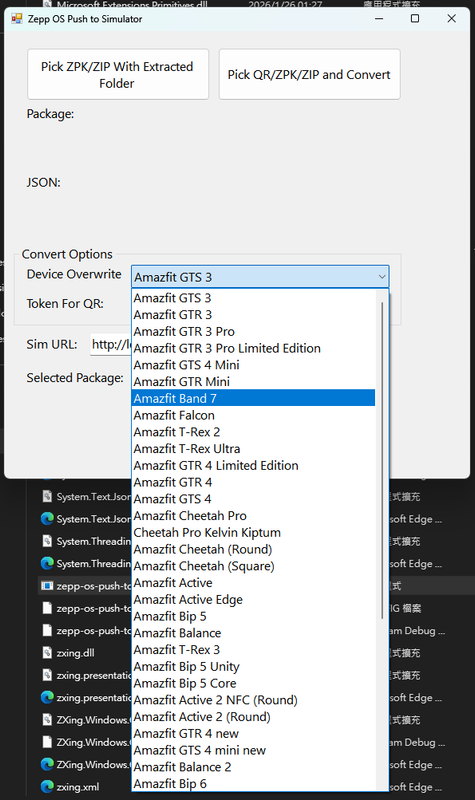
Take the app.json file from the watch face archive rather than selecting it as a separate file. Instead of using the DeviceSource code, specify the exact model; this makes it clearer. If possible, allow users to select the model. For example, if the watch face is designed for the T-Rex 3 but you only have the Balance simulator installed, simply select the required model when sending it to the simulator.
Of course, there are still some suggestions regarding the interface. But I imagine this is just a test version and the interface will continue to evolve.
YsPan
WF maker
Mensagens: 7
Registrado em: 29 Mar 2021, 14:30
Localização: Taiwan
Has thanked: 2 times
Been thanked: 7 times
Contato:

Mensagem por YsPan »

SashaCX75 escreveu: 21 Abr 2026, 16:51
If you want to keep your utility as a standalone app, I have a few suggestions.
Take the app.json file from the watch face archive rather than selecting it as a separate file. Instead of using the DeviceSource code, specify the exact model; this makes it clearer. If possible, allow users to select the model. For example, if the watch face is designed for the T-Rex 3 but you only have the Balance simulator installed, simply select the required model when sending it to the simulator.
Of course, there are still some suggestions regarding the interface. But I imagine this is just a test version and the interface will continue to evolve.
Thanks for SashaCX75's suggestion! Adding a menu to choose the watch model seems very useful for helping users push their packages to the simulator more easily. However, I need to find a simpler way to retrieve the device source table from the official documentation to generate that menu more efficiently.

The purpose of step 2 in the C# port's README is to have the user fill in the token sent when the official Zepp app scans the developer QR code. This allows users to download the output package generated and uploaded by the official CLI workflow (such as the "zeus preview" command). I will update the guide in the future to make it easier to follow.

Complete usage instructions can be found in the JavaScript version's README; I've included a note directing users there for the conversion process. Regarding image conversion, my solution uses your converter to turn the processed images back into viewable PNGs. I believe providing an exported package that includes the original PNG assets is more convenient for users trying to push their watchfaces to the simulator.
Avatar do usuário
SashaCX75
Mensagens: 812
Registrado em: 26 Out 2019, 15:18
Localização: Ukraine
Has thanked: 13 times
Been thanked: 1007 times
Contato:

Mensagem por SashaCX75 »

If I use ready-made watch face files, then of course the images need to be converted to standard PNG format. But if I integrate the utility with the editor, I can simply leave the original PNG files as they are without altering them in any way. And for your utility, I can prepare this as a separate archive or simply as a folder containing all the necessary files. And then I can send a link to this archive or folder to the utility.
Avatar do usuário
SashaCX75
Mensagens: 812
Registrado em: 26 Out 2019, 15:18
Localização: Ukraine
Has thanked: 13 times
Been thanked: 1007 times
Contato:

Mensagem por SashaCX75 »

@YsPan Could you explain what the third button in the utility is supposed to do? It opens a file selection dialogue. But you can select files in different formats. I’m not sure which files to select or what the result should be.
Responder

Voltar para “Watchfaces tools (discussion)”

Quem está online

Usuários navegando neste fórum: Nenhum usuário registrado e 1 visitante