-
- Administrador
-
-
Support Ukraine
If you experience any problems with the forum (it is not visible, there is no way to post messages, or some functionality does not work), please let us know. If you have problems with registration or you did not receive confirmation letter, let us know and we will activate your account manually.
If you get an "The submitted form was invalid. Try submitting again" error, delete cookies, then try again.
Watchface image generator (web app tool)
Moderadores: asoo, lvpokka, Internal error, Watchmens
Regras do fórum
All communication in this branch should only be in English.
To discuss tools that are not in this section, use the “Watchfaces tools (discussion)” forum.
All communication in this branch should only be in English.
To discuss tools that are not in this section, use the “Watchfaces tools (discussion)” forum.
-
gingerbeardman
- Mensagens: 17
- Registrado em: 23 Mar 2025, 21:16
- Localização: Liverpool, United Kingdom
- Has thanked: 2 times
- Been thanked: 11 times
- Contato:
Watchface image generator (web app tool)
I wanted to create my own watch face mostly consisting of text, but I didn't want to spend time exporting or regenerating lots of images over and over. I want the computer to do the hard work!
So I made an image generator web app. I have a Band 7, so it's mostly focused on that but you can generate images for any size watch face if you know the sizes.
https://www.gingerbeardman.com/amazfit/
Hopefully this little website is useful for other people!
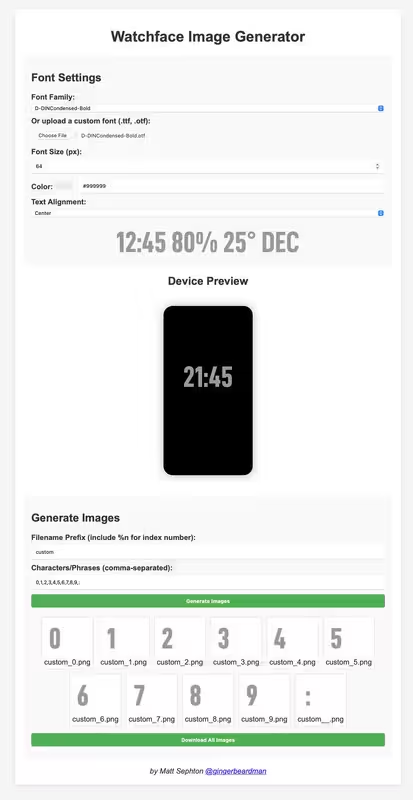
You can create digits and icons by specifying font, size, colour
And which text/digits/symbols to render.
Once you are happy you can decide on filename and export all images at once.
I used it to generate the following sets of images:
- #FFFFFF white @ 128px: 0,1,2,3,4,5,6,7,8,9,:
- #222222 grey @ 64px: 0,1,2,3,4,5,6,7,8,9,JAN,FEB,MAR,APR,MAY,JUN,JUL,AUG,SEP,OCT,NOV,DEC
- #222222 grey @ 32px: %,♥
Sometimes I crop the images afterwards, but mostly I just use them as they come out of the tool.
I use the exported images with SashaCX75 watch face editor for Windows viewtopic.php?t=2743
And finally I tested the face using this method viewtopic.php?t=3873
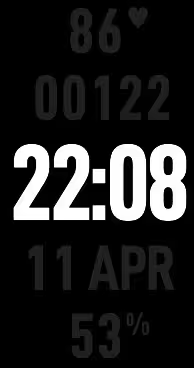
Here's a watch face I made using images from the tool
Here's what the tool looks like
So I made an image generator web app. I have a Band 7, so it's mostly focused on that but you can generate images for any size watch face if you know the sizes.
https://www.gingerbeardman.com/amazfit/
Hopefully this little website is useful for other people!
You can create digits and icons by specifying font, size, colour
And which text/digits/symbols to render.
Once you are happy you can decide on filename and export all images at once.
I used it to generate the following sets of images:
- #FFFFFF white @ 128px: 0,1,2,3,4,5,6,7,8,9,:
- #222222 grey @ 64px: 0,1,2,3,4,5,6,7,8,9,JAN,FEB,MAR,APR,MAY,JUN,JUL,AUG,SEP,OCT,NOV,DEC
- #222222 grey @ 32px: %,♥
Sometimes I crop the images afterwards, but mostly I just use them as they come out of the tool.
I use the exported images with SashaCX75 watch face editor for Windows viewtopic.php?t=2743
And finally I tested the face using this method viewtopic.php?t=3873
Here's a watch face I made using images from the tool
Here's what the tool looks like
- SashaCX75
- Mensagens: 812
- Registrado em: 26 Out 2019, 15:18
- Localização: Ukraine
- Has thanked: 13 times
- Been thanked: 1007 times
- Contato:
Great tool.
Small wishes.
Is it possible to make the preview always be at the bottom of the screen? Because now after changing the settings you have to scroll down the page to see the result and then go back to the settings?
Add full spelling for the names of months and days of the week in the presets ( Mon > Monday).
Is it possible to add an option to make the text in a circle? I think it will be relevant for the full names of months and days of the week.
In the preview, in addition to the image size, write the file name. Just in the form as it is now I thought that files will be called JAN, FEB, MAR.... But when I downloaded it I saw that the file names are convenient for further use in the editor.
Small wishes.
Is it possible to make the preview always be at the bottom of the screen? Because now after changing the settings you have to scroll down the page to see the result and then go back to the settings?
Add full spelling for the names of months and days of the week in the presets ( Mon > Monday).
Is it possible to add an option to make the text in a circle? I think it will be relevant for the full names of months and days of the week.
In the preview, in addition to the image size, write the file name. Just in the form as it is now I thought that files will be called JAN, FEB, MAR.... But when I downloaded it I saw that the file names are convenient for further use in the editor.
- SashaCX75
- Mensagens: 812
- Registrado em: 26 Out 2019, 15:18
- Localização: Ukraine
- Has thanked: 13 times
- Been thanked: 1007 times
- Contato:
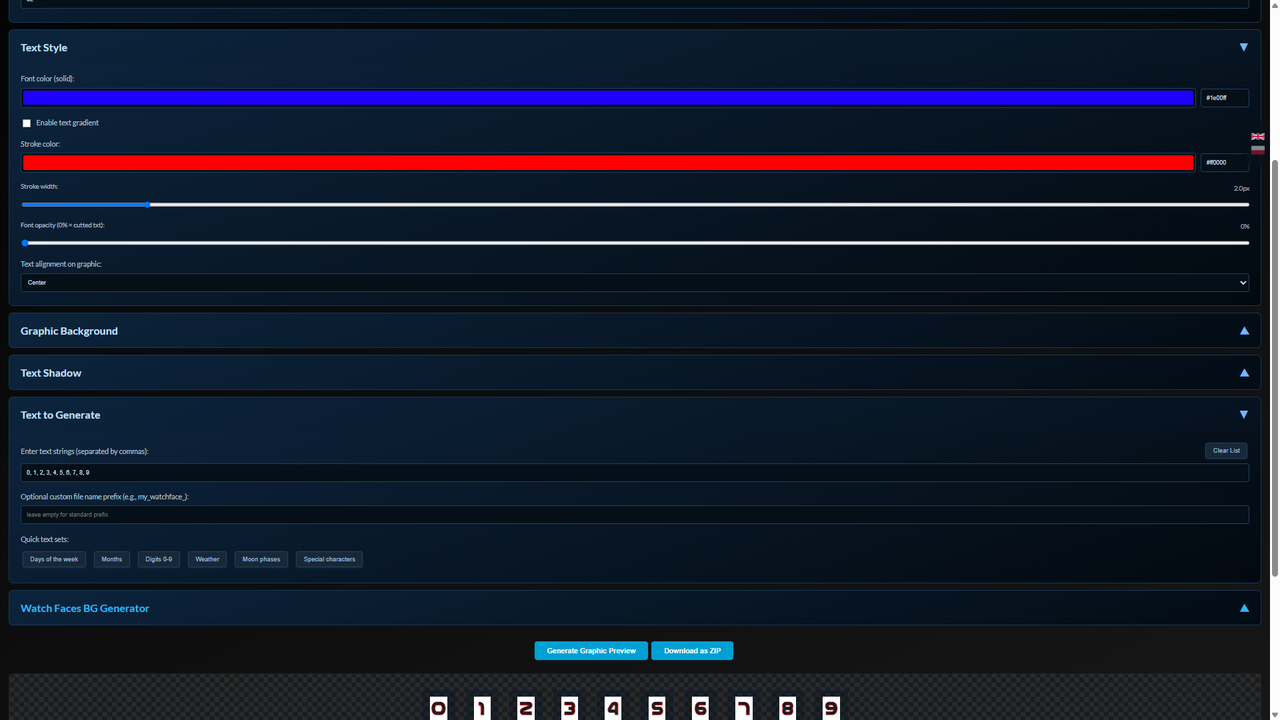
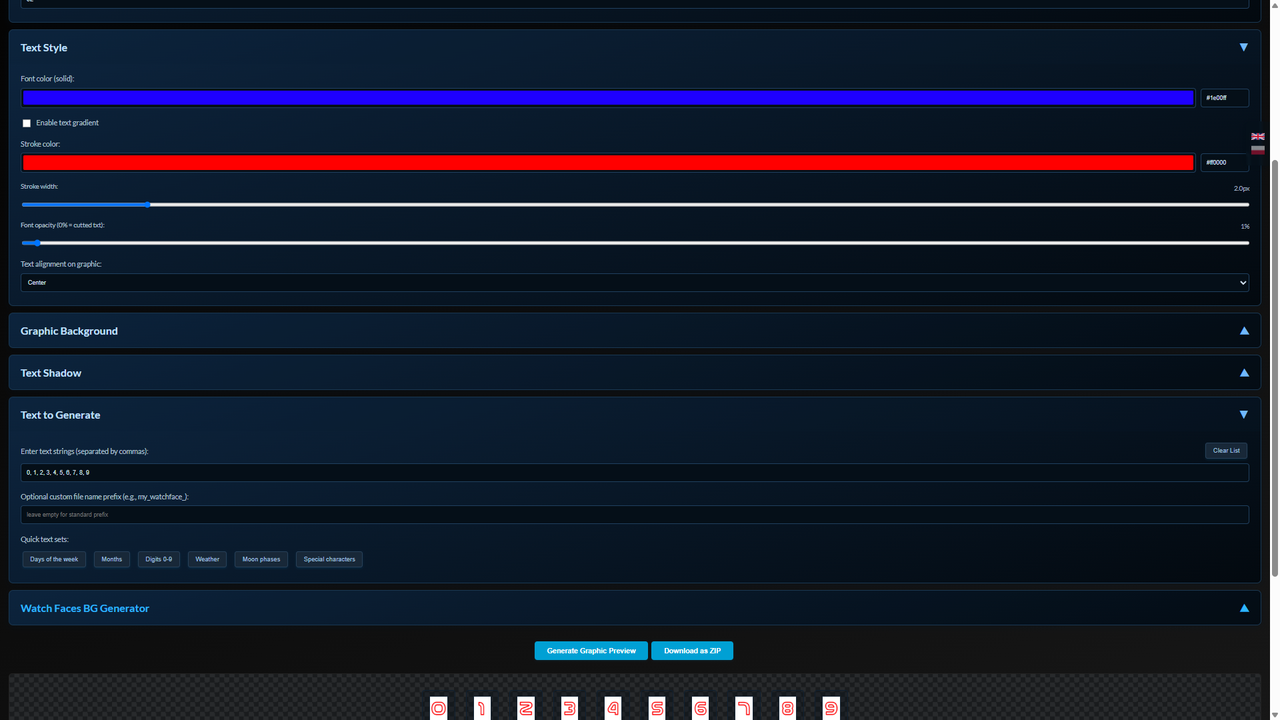
I don't know if this is a bug or intended. The transparency of the text affects the text and the shadow, but it does not affect the stroke. The stroke is always not transparent.
If you set transparency to 0, the preview does not match the uploaded files. Both the preview and the uploaded files are wrong.
- TRK88PL
- Mensagens: 116
- Registrado em: 17 Jan 2023, 08:23
- Localização: Poland
- Has thanked: 67 times
- Been thanked: 40 times
- Contato:
Hi, thanks for the feedback. Let me explain everything…SashaCX75 escreveu: 14 Mai 2025, 16:24Great tool.
Small wishes.
Is it possible to make the preview always be at the bottom of the screen? Because now after changing the settings you have to scroll down the page to see the result and then go back to the settings?
Add full spelling for the names of months and days of the week in the presets ( Mon > Monday).
Is it possible to add an option to make the text in a circle? I think it will be relevant for the full names of months and days of the week.
In the preview, in addition to the image size, write the file name. Just in the form as it is now I thought that files will be called JAN, FEB, MAR.... But when I downloaded it I saw that the file names are convenient for further use in the editor.
I tested generating a preview in a floating window, but unfortunately it doesn’t work well—especially on small screens. Plus, it's hard to download files that way; something in the canvas doesn’t load properly and I haven’t been able to fix it.
Adding full month and day names isn’t a problem—I can do it if someone really wants it. However, shortened versions are the ones most commonly used. Besides, in this generator you can create your own words without any issue, so if someone wants to, they can easily add their own version of days and months.
Adding text along a circle is possible, but based on my tests, it doesn’t work very well. Maybe someday I’ll manage to get it working properly.
As for saving files, I specifically had your editor in mind so the files could be easily uploaded and read. It works the same way with the weather graphics.
All the best, and sorry if my answers are a bit disappointing—maybe someday I’ll revisit this and manage to add the features you suggested.
- TRK88PL
- Mensagens: 116
- Registrado em: 17 Jan 2023, 08:23
- Localização: Poland
- Has thanked: 67 times
- Been thanked: 40 times
- Contato:
Interesting... Can You show me screenshot of what do You mean? For me it's working as should, but maybe I'm thinking in different way and don't see something.SashaCX75 escreveu: 14 Mai 2025, 18:15I don't know if this is a bug or intended. The transparency of the text affects the text and the shadow, but it does not affect the stroke. The stroke is always not transparent.
If you set transparency to 0, the preview does not match the uploaded files. Both the preview and the uploaded files are wrong.
- asoo
- Mensagens: 2106
- Registrado em: 03 Jan 2019, 01:48
- Localização: ͼͽ Thailand ͼͽ
- Has thanked: 404 times
- Been thanked: 2022 times
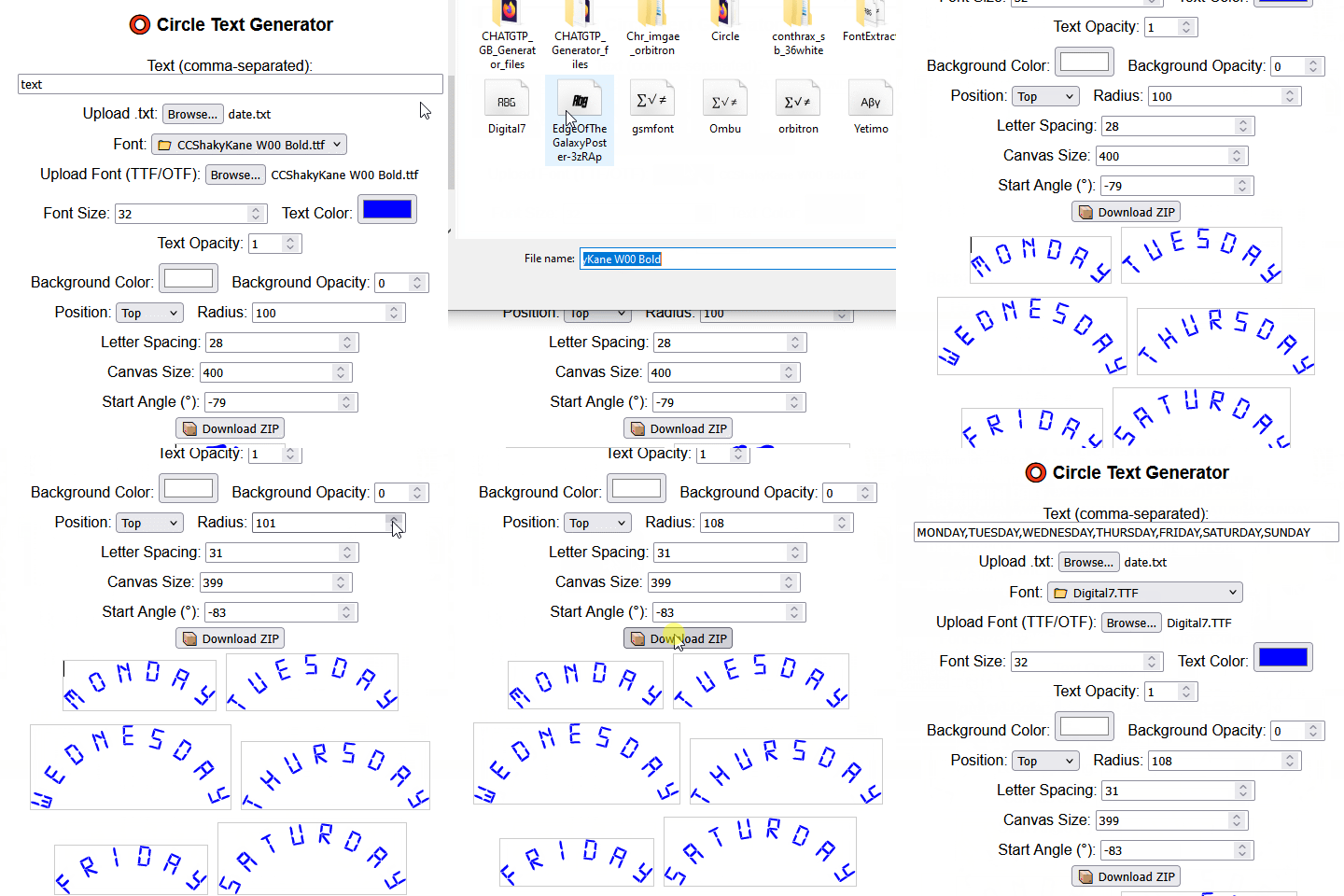
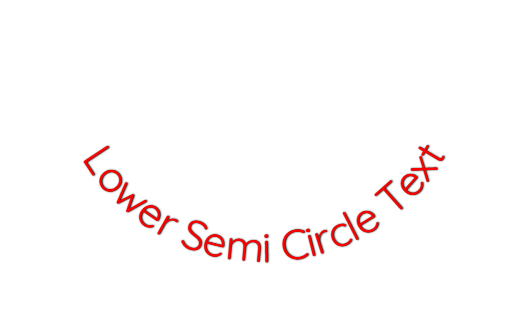
In the section of displaying characters in circle lines, I m
ade it for my own use, and I have attached an example for those who are interested to try it out or modify it further. I hope it will be useful for those who are interested.
ͼͽ To request please use the interrelated forum in action ͼͽ
Please do not PM to me for requests ported watchface.
- SashaCX75
- Mensagens: 812
- Registrado em: 26 Out 2019, 15:18
- Localização: Ukraine
- Has thanked: 13 times
- Been thanked: 1007 times
- Contato:
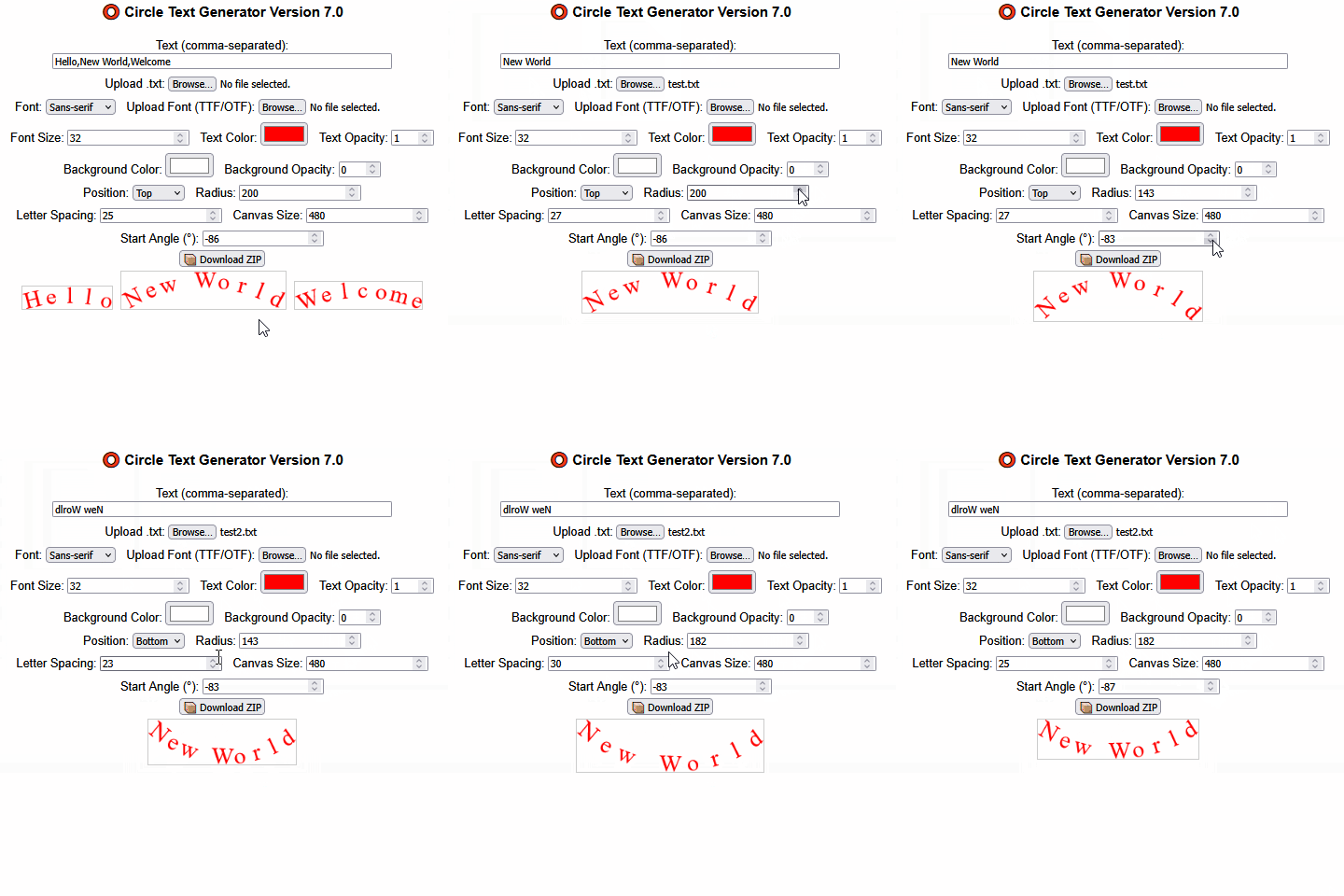
This error probably occurs when the background colour is enabled. Here are 2 screenshots where transparency is set to 0 and 1. If transparency is 1, everything is correct on preview and in files. If transparency is 0, the text is black on preview and completely transparent in files, although it should be background colour.
- SashaCX75
- Mensagens: 812
- Registrado em: 26 Out 2019, 15:18
- Localização: Ukraine
- Has thanked: 13 times
- Been thanked: 1007 times
- Contato:
On a small screen you probably won't be able to fix the preview properly. But on a computer screen there is a lot of unused space on the sides. It would be possible to make the preview on the left or right side. Since the buttons to switch the language, so it would always be in the same place.
- TRK88PL
- Mensagens: 116
- Registrado em: 17 Jan 2023, 08:23
- Localização: Poland
- Has thanked: 67 times
- Been thanked: 40 times
- Contato:
Hey!
Well... I was planning to take a break, but your ideas sounded pretty cool, so I ended up seriously upgrading the generator
I added a live preview on the left, the ability to create angled text, and even text along a circle. It all took quite a bit of time, but I hope everything works just as smoothly for you as it does for me!
For anyone who prefers the older version, I left a link to it in the footer.
At this point, I’m not planning any more updates – there’s already so much code and so many features that I think it’s enough
Just a reminder: this is a text generator – you can create whatever you want. Let your imagination (and the templates) be your only limit!
https://amazfitwatchfaces.com/gen/
P.S. If you appreciate all the hours I’ve poured into tweaking the code, feel free to buy me a coffee – there’s a link to the page on my profile.
Best regards,
Robert.
Well... I was planning to take a break, but your ideas sounded pretty cool, so I ended up seriously upgrading the generator
I added a live preview on the left, the ability to create angled text, and even text along a circle. It all took quite a bit of time, but I hope everything works just as smoothly for you as it does for me!
For anyone who prefers the older version, I left a link to it in the footer.
At this point, I’m not planning any more updates – there’s already so much code and so many features that I think it’s enough
Just a reminder: this is a text generator – you can create whatever you want. Let your imagination (and the templates) be your only limit!
https://amazfitwatchfaces.com/gen/
P.S. If you appreciate all the hours I’ve poured into tweaking the code, feel free to buy me a coffee – there’s a link to the page on my profile.
Best regards,
Robert.
- SashaCX75
- Mensagens: 812
- Registrado em: 26 Out 2019, 15:18
- Localização: Ukraine
- Has thanked: 13 times
- Been thanked: 1007 times
- Contato:
@TRK88PL
The preview from the side became much more convenient.
The problem with transparency equal to 0 remains. Maybe just do not allow to reduce transparency less than 1?
The text display at an angle seems to me to work incorrectly. When the knob is located at the bottom, it says that the angle is 0 degrees and the text is directed upwards. I think it is more logical that the direction of the knob coincides with the direction of the text.
In the text on the circle, I could not place it properly at the bottom of the circle. I tried switching the direction of the text. It changed. But the letters themselves remained upside down.
The preview from the side became much more convenient.
The problem with transparency equal to 0 remains. Maybe just do not allow to reduce transparency less than 1?
The text display at an angle seems to me to work incorrectly. When the knob is located at the bottom, it says that the angle is 0 degrees and the text is directed upwards. I think it is more logical that the direction of the knob coincides with the direction of the text.
In the text on the circle, I could not place it properly at the bottom of the circle. I tried switching the direction of the text. It changed. But the letters themselves remained upside down.
- TRK88PL
- Mensagens: 116
- Registrado em: 17 Jan 2023, 08:23
- Localização: Poland
- Has thanked: 67 times
- Been thanked: 40 times
- Contato:
Hey Sasha – if the value is 0%, then the background is cut out, as described when adjusting the color transparency. That's how it's supposed to work, and I don't want to change it, because for me it's a great solution, especially in scripts with different colors – there I use transparent text over a black or other background. So, sorry, but I’m not planning to change anything here.
As for the angle – that’s how it works in Canva, and I don’t really intend to adjust it. It’s just meant to be like that, it’s about the final position.
Also... For text on circle for me everything works fine, just adjust the settings correctly
That's my final version of this generator for now.
As for the angle – that’s how it works in Canva, and I don’t really intend to adjust it. It’s just meant to be like that, it’s about the final position.
Also... For text on circle for me everything works fine, just adjust the settings correctly
That's my final version of this generator for now.
- SashaCX75
- Mensagens: 812
- Registrado em: 26 Out 2019, 15:18
- Localização: Ukraine
- Has thanked: 13 times
- Been thanked: 1007 times
- Contato:
It turns out that if transparency is 0, the image is created with a text mask. This is good, it adds features to the editor. But I would add a warning about this, because it's not the action you expect if you set the transparency to 0.
Maybe I haven't figured out the circle text settings. If that's the case, can you show an example of how to make such a text. About the angled text. I would change the direction of its rotation to the opposite. But of course you are the author and you decide.
- TRK88PL
- Mensagens: 116
- Registrado em: 17 Jan 2023, 08:23
- Localização: Poland
- Has thanked: 67 times
- Been thanked: 40 times
- Contato:
Hi @SashaCX75, alright… you convinced me to make some changes, but this time it’s seriously my last update to the generator for a while.
I’ve significantly expanded the code – now there are two methods for generating angles. One is used for text shadow, gradient, and pattern, and a different one for generating angled text. The circular text has also been greatly improved – if you want the text to appear at the top, I recommend setting the letter movement to clockwise; however, if it's at the bottom, then set it to counter-clockwise.
I’ve also mentioned this in the generator in the circular text generation section. I also added information about text cutouts when opacity is set to 0%.
I hope everything now aligns with your suggestions. The new version of the generator is already live on the AmazfitWatchFaces servers
Best regards.
Robert.
I’ve significantly expanded the code – now there are two methods for generating angles. One is used for text shadow, gradient, and pattern, and a different one for generating angled text. The circular text has also been greatly improved – if you want the text to appear at the top, I recommend setting the letter movement to clockwise; however, if it's at the bottom, then set it to counter-clockwise.
I’ve also mentioned this in the generator in the circular text generation section. I also added information about text cutouts when opacity is set to 0%.
I hope everything now aligns with your suggestions. The new version of the generator is already live on the AmazfitWatchFaces servers
Best regards.
Robert.
- SashaCX75
- Mensagens: 812
- Registrado em: 26 Out 2019, 15:18
- Localização: Ukraine
- Has thanked: 13 times
- Been thanked: 1007 times
- Contato:
@TRK88PL What I wrote were only wishes, by no means demands.
I think you've implemented everything I wrote.
I noticed one peculiarity. When you set the angle of the text at the initial moment the control knob is outside the circle. But if you move it, everything works correctly. There is no such peculiarity for the shadow angle.
The link from the first post is no longer relevant and the latest version of the utility is on this site?
I think you've implemented everything I wrote.
I noticed one peculiarity. When you set the angle of the text at the initial moment the control knob is outside the circle. But if you move it, everything works correctly. There is no such peculiarity for the shadow angle.
The link from the first post is no longer relevant and the latest version of the utility is on this site?
- TRK88PL
- Mensagens: 116
- Registrado em: 17 Jan 2023, 08:23
- Localização: Poland
- Has thanked: 67 times
- Been thanked: 40 times
- Contato:
@SashaCX75 new version it's available on https://amazfitwatchfaces.com/gen/
On my website I published old versions.
Edit: v3 it's available on website, more info and changelog here:
viewtopic.php?t=4699
On my website I published old versions.
Edit: v3 it's available on website, more info and changelog here:
viewtopic.php?t=4699
-
ativirs
- WF maker
- Mensagens: 13
- Registrado em: 26 Mai 2025, 05:35
- Localização: India
- Has thanked: 9 times
- Been thanked: 2 times
- Contato:
@TRK88PL
Can I request some new Features to be added to the image Generator?
1. Ability to create vertical weekdays.
Mon
Tue
Wed...
2. Change color of only one day in the above?
Can I request some new Features to be added to the image Generator?
1. Ability to create vertical weekdays.
Mon
Tue
Wed...
2. Change color of only one day in the above?
Quem está online
Usuários navegando neste fórum: Nenhum usuário registrado e 1 visitante