If you experience any problems with the forum (it is not visible, there is no way to post messages, or some functionality does not work), please let us know.
If you have problems with registration or you did not receive confirmation letter, let us know and we will activate your account manually.
If you get an "The submitted form was invalid. Try submitting again" error, delete cookies, then try again.

Running the AmazFit Watch Face Editor (ZeppOS) on Linux via Wine – Full Guide

This forum is designed to discuss and develop tools creating watch faces.

Moderadores: asoo, lvpokka, Internal error, Watchmens

Reglas del Foro
All communication in this branch should only be in English.
To discuss tools that are not in this section, use the “Watchfaces tools (discussion)” forum.
Responder
citizenserious
Mensajes: 12
Registrado: 19 Abr 2025, 17:56
Ubicación: μπ
Has thanked: 1 time
Been thanked: 2 times
Contactar:

Running the AmazFit Watch Face Editor (ZeppOS) on Linux via Wine – Full Guide

Mensaje por citizenserious »

First of all, thanks to @SashaCX75 again for this great tool. I’m a Linux-only user and wanted to share my experience getting the Watch Face Editor (ZeppOS) viewtopic.php?t=2743 running successfully under Fedora 42 using Wine. This should work similarly on other distributions.

Old Version:
Spoiler

🧰 Step-by-step setup process

1. Install Wine and Winetricks (via package manager)

On Fedora:

Código: Seleccionar todo

sudo dnf install wine winetricks
This will install the latest native Wine (in my case: wine-10.4 (Staging)).

2. Create a clean Wine prefix

Código: Seleccionar todo

export WINEPREFIX=~/wine-amazfit-editor
export WINEARCH=win32
winecfg
- Set Windows version to Windows 7 in the winecfg dialog.

3. Install .NET Framework 4.8

Código: Seleccionar todo

winetricks dotnet48
⚠️ You’ll need to go through several Microsoft .NET installers (4.0 through 4.8). Accept all licenses and click “Finish” each time. Do not install optional extras.

📦 Installing the Watch Face Editor

Extract the ZIP file (Watch_Face_Editor_(ZeppOS)_v13.1.zip) to a clean folder without spaces or special characters:

Código: Seleccionar todo

mkdir -p ~/WineApps/WatchFaceEditor
unzip "~/Downloads//Watch_Face_Editor_(ZeppOS)_v13.1.zip" -d ~/WineApps/WatchFaceEditor

▶️ How to start the editor

You can start the editor with:

Código: Seleccionar todo

WINEPREFIX=~/wine-amazfit-editor wine "home/YOURUSER/WineApps/WatchFaceEditor/Watch_Face_Editor_(ZeppOS).exe"
⚠️ If the filename contains spaces or parentheses, always quote it properly.
Replace YOURUSER with your username.
🖼 Desktop integration (optional)

If you want to launch it from your app menu, create a small shell script like this:

Código: Seleccionar todo

#!/bin/bash
export WINEPREFIX="$HOME/wine-amazfit-editor"
wine "$WINEPREFIX/drive_c/Program Files/WatchFaceEditor/Watch_Face_Editor_(ZeppOS).exe"
Then create a .desktop file pointing to this script, and place it in ~/.local/share/applications/.

🧩 Summary
ComponentStatus
Wine Compatibility✅ Good
.NET 4.8 support✅ Working via Winetricks
Watch Face Editor GUI✅ Launches and works
Desktop launcher✅ Works
Hope this guide helps other Linux users to run the Amazfit Watch Face Editor smoothly under Wine! 🐧
Updated easier version:
https://amazfitwatchfaces.com/forum/vi ... 438#p22438
Última edición por citizenserious el 30 Jun 2026, 14:33, editado 7 veces en total.
Avatar de Usuario
SashaCX75
Mensajes: 829
Registrado: 26 Oct 2019, 15:18
Ubicación: Ukraine
Has thanked: 15 times
Been thanked: 1044 times
Contactar:

Mensaje por SashaCX75 »

The editor uses standard file selection dialogs, so it is strange that they cause problems.
Is this problem only with the *.zip file selection dialog or with all dialogs?
If you open files not through a dialog but in the context menu of the file choose to open it with the editor (I don't know how it looks like in Linux) does it work?
citizenserious
Mensajes: 12
Registrado: 19 Abr 2025, 17:56
Ubicación: μπ
Has thanked: 1 time
Been thanked: 2 times
Contactar:

Mensaje por citizenserious »

I think it could be related to the preset file filter. .json files are shown when opening a project.
1.png
1.png (50.86 KiB) Visto 3964 veces
Avatar de Usuario
SashaCX75
Mensajes: 829
Registrado: 26 Oct 2019, 15:18
Ubicación: Ukraine
Has thanked: 15 times
Been thanked: 1044 times
Contactar:

Mensaje por SashaCX75 »

If you are interested in this, I can try to see what the difference in filters is and make a test version. At least add all files to the selection. But it will be necessary for you to check whether this variant works or not.
citizenserious
Mensajes: 12
Registrado: 19 Abr 2025, 17:56
Ubicación: μπ
Has thanked: 1 time
Been thanked: 2 times
Contactar:

Mensaje por citizenserious »

Of course. That would be great. I am willing to test it. Thank you!
Avatar de Usuario
SashaCX75
Mensajes: 829
Registrado: 26 Oct 2019, 15:18
Ubicación: Ukraine
Has thanked: 15 times
Been thanked: 1044 times
Contactar:

Mensaje por SashaCX75 »

Are you using the editor in English?
citizenserious
Mensajes: 12
Registrado: 19 Abr 2025, 17:56
Ubicación: μπ
Has thanked: 1 time
Been thanked: 2 times
Contactar:

Mensaje por citizenserious »

Yes, I use it in English.
One request though. Could you please make a reproducible build with the code visible on GitHub or similar in the future? I have trust issues.

I will test your version in a virtual machine for now.
Avatar de Usuario
SashaCX75
Mensajes: 829
Registrado: 26 Oct 2019, 15:18
Ubicación: Ukraine
Has thanked: 15 times
Been thanked: 1044 times
Contactar:

Mensaje por SashaCX75 »

https://github.com/SashaCX75/AmazFit-Wa ... /tree/test
The source code for the editor is available on GitHub
citizenserious
Mensajes: 12
Registrado: 19 Abr 2025, 17:56
Ubicación: μπ
Has thanked: 1 time
Been thanked: 2 times
Contactar:

Mensaje por citizenserious »

Yes I know, and I thank you for that, but I downloaded the editor from Google Drive or Dropbox, which could be anything else, than the code on GitHub.
No one can be sure that it is the same code. There is just no way of verifying.
Don't get me wrong, but in most cases if you download a .exe from Dropbox, its malware, especially if the language is set to Russian.
citizenserious
Mensajes: 12
Registrado: 19 Abr 2025, 17:56
Ubicación: μπ
Has thanked: 1 time
Been thanked: 2 times
Contactar:

Mensaje por citizenserious »

@SashaCX75
The new version works (: and shows the zip files correctly now.
Thank you!
Avatar de Usuario
SashaCX75
Mensajes: 829
Registrado: 26 Oct 2019, 15:18
Ubicación: Ukraine
Has thanked: 15 times
Been thanked: 1044 times
Contactar:

Mensaje por SashaCX75 »

Okay. I'll fix it in the next version.
The problem was caused by extra spaces in the filter. On Windows it works but Linux seems to be more sensitive to the format of the caption in the filter.
Emans
WF maker
Mensajes: 5
Registrado: 24 Oct 2024, 18:45
Ubicación: Roma
Contactar:

Mensaje por Emans »

Good morning and thank you for your work.
I'm working on Fedora 44 KDE Plasma and can't launch or use the application. Can anyone help me?
Thanks.
citizenserious
Mensajes: 12
Registrado: 19 Abr 2025, 17:56
Ubicación: μπ
Has thanked: 1 time
Been thanked: 2 times
Contactar:

Mensaje por citizenserious »

I am also using Fedora 44 KDE 6.7.
The guide here is somewhat dated:
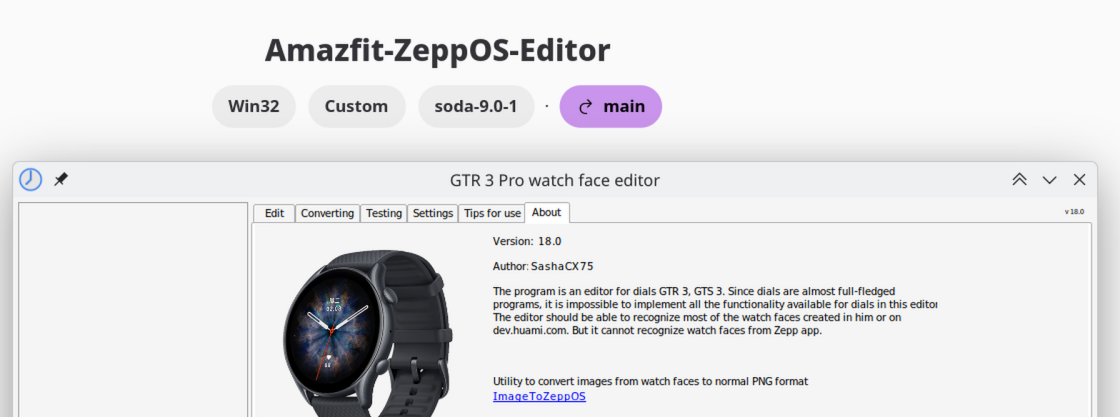
The easiest way is to use bottles. Installed as flatpak. https://flathub.org/en/apps/com.usebottles.bottles
Spoiler
Imagen
Just set it up as an application:
Imagen
then add the .exe as a shortcut or use the "Eagle"
Imagen
I placed it under Program Files
Imagen
Última edición por citizenserious el 30 Jun 2026, 13:36, editado 1 vez en total.
Emans
WF maker
Mensajes: 5
Registrado: 24 Oct 2024, 18:45
Ubicación: Roma
Contactar:

Mensaje por Emans »

Hi, thanks for the reply, but it still doesn't work. What can I do? Is it too much if I ask for a step-by-step guide from the beginning? Thanks.
citizenserious
Mensajes: 12
Registrado: 19 Abr 2025, 17:56
Ubicación: μπ
Has thanked: 1 time
Been thanked: 2 times
Contactar:

Mensaje por citizenserious »

I kinda did a step-by-step above, which should include all relevant steps.
Which issue do you encounter?
citizenserious
Mensajes: 12
Registrado: 19 Abr 2025, 17:56
Ubicación: μπ
Has thanked: 1 time
Been thanked: 2 times
Contactar:

Mensaje por citizenserious »

Oh, I might have overlooked something, I set up bottles a while ago.
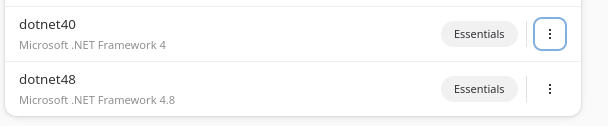
The Watch face editor use ".NET Framework".

So try again after installing these dependencies:
Spoiler
Imagen
Imagen
citizenserious
Mensajes: 12
Registrado: 19 Abr 2025, 17:56
Ubicación: μπ
Has thanked: 1 time
Been thanked: 2 times
Contactar:

Mensaje por citizenserious »

Step-by-step guide: Running the Amazfit Watch Face Editor (ZeppOS) on Fedora / Linux with Bottles

I am currently using Fedora 44 KDE Plasma. The older Wine / winetricks guide still works in principle, but for me the easiest current method is using Bottles as a Flatpak.

This is the setup that worked for me.

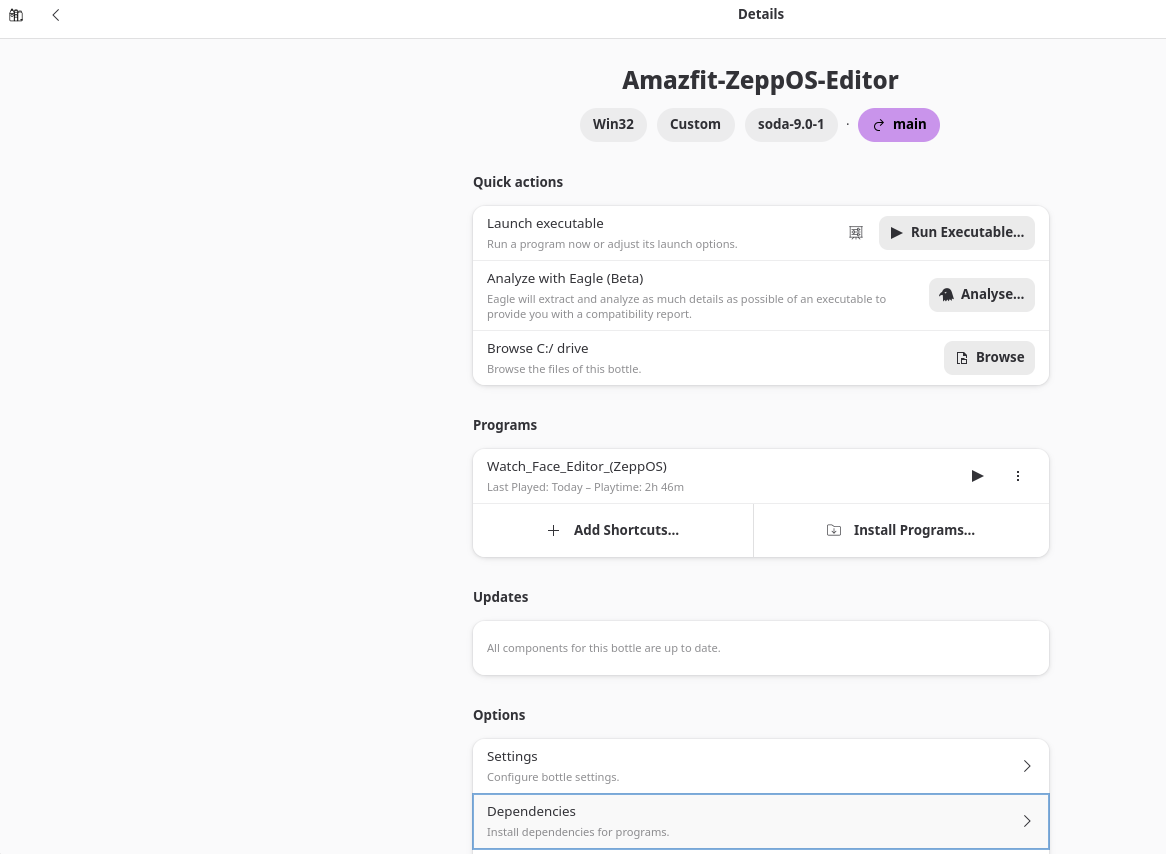
Tested bottle configuration
  • Bottles package: Flatpak
  • Bottle name: Amazfit-ZeppOS-Editor
  • Environment tested: Application
  • Architecture: win32 / 32-bit
  • Windows version: win11
  • Runner: soda-9.0-1
  • Installed dependencies: dotnet40, dotnet48
Important note about the architecture

I tested the editor with the Application environment and it worked for me.

My working bottle is win32 / 32-bit. I am not sure whether Bottles always creates Application bottles as 32-bit by default, so if Bottles gives you an architecture option, choose win32 / 32-bit.

1. Install Bottles

Install Bottles from Flathub:

https://flathub.org/apps/com.usebottles.bottles

You can also find the official Bottles documentation here:

https://usebottles.com/docs

After installation, start Bottles once and let it finish its initial setup / component downloads.

2. Create a new bottle

Create a new bottle.

Recommended settings:
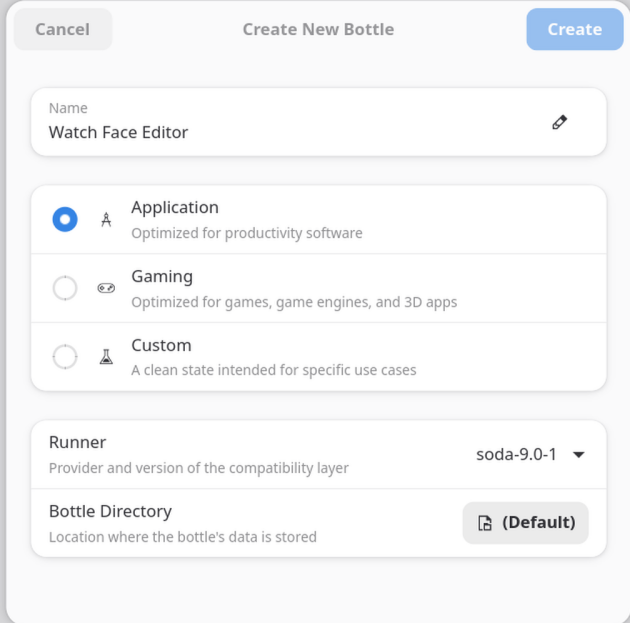
  • Environment: Application
  • Architecture: win32 / 32-bit, if Bottles asks for the architecture
  • Runner: The default Soda runner should be fine. My working bottle uses soda-9.0-1.
Spoiler
Imagen
I would recommend using a fresh separate bottle only for the Amazfit / ZeppOS editor.

3. Install the required .NET dependencies

Open the bottle and go to:

Código: Seleccionar todo

Dependencies
Spoiler
Imagen
Search for and install:

Código: Seleccionar todo

dotnet40
dotnet48
Spoiler
Imagen
I installed dotnet40 first and then dotnet48.

Wait until both dependency installations are finished. Do not interrupt the installers.

Important: The Watch Face Editor uses Microsoft .NET Framework. Without these dependencies, the program may not launch.

4. Extract the Watch Face Editor

Download the Watch Face Editor ZIP from the original editor thread.

Extract the complete ZIP file. Do not run the program directly from inside the ZIP archive.

Keep the complete folder structure. The extracted folder should contain files/folders such as:

Código: Seleccionar todo

File_templates
Language
Libs
Mask
model_config
Skin
Watch_Face_Editor_(ZeppOS).exe
5. Put the editor inside the bottle

In Bottles, open the bottle and choose:

Código: Seleccionar todo

Browse C:/ drive
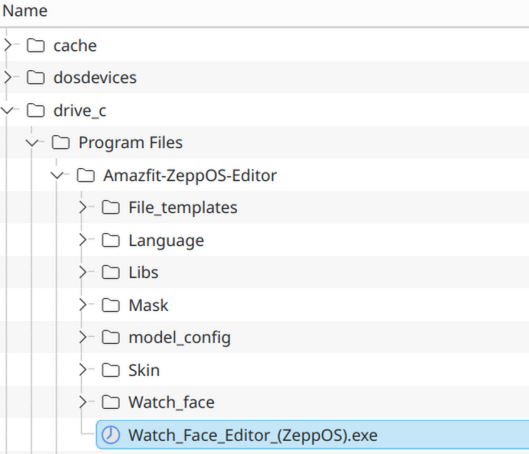
Then copy the complete extracted editor folder into the bottle's C: drive.

For example, I used:

Código: Seleccionar todo

C:\Program Files\Amazfit-ZeppOS-Editor
The executable should then be located at something like:

Código: Seleccionar todo

C:\Program Files\Amazfit-ZeppOS-Editor\Watch_Face_Editor_(ZeppOS).exe
Spoiler
Imagen
This is not necessarily the only possible location, but it worked for me and keeps all program files together.

6. Add the executable as a shortcut

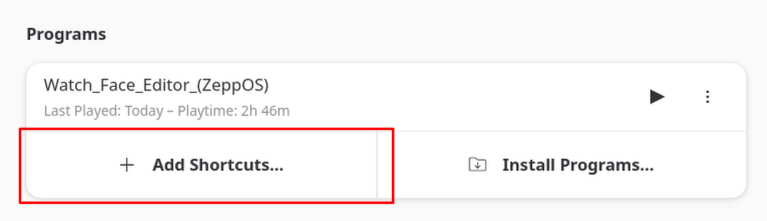
In the bottle, go to the Programs section.

Click:

Código: Seleccionar todo

Add Shortcuts...
Select the editor executable. In my setup it is here:

Código: Seleccionar todo

C:\Program Files\Amazfit-ZeppOS-Editor\Watch_Face_Editor_(ZeppOS).exe
Spoiler
Imagen
After that, the editor should appear in the Programs list.

7. Start the editor

Launch it from the Programs list inside Bottles.

If it starts correctly, you can also create a desktop/menu shortcut from Bottles later.

Troubleshooting

If the program does not start:
  • Make sure the bottle is win32 / 32-bit.
  • Make sure dotnet40 and dotnet48 are installed in the same bottle.
  • Make sure you copied the complete extracted editor folder, not only the .exe file.
  • Make sure the complete editor folder is inside the bottle's C: drive. In my setup I used:

    Código: Seleccionar todo

    C:\Program Files\Amazfit-ZeppOS-Editor
  • If a .NET installation failed, it is usually better to delete the bottle and create a fresh one instead of trying to repair a broken one.
  • If it still crashes or closes immediately, use Bottles' logging / analysis option or provide the exact error message/log. "It does not work" is unfortunately not enough to diagnose the issue.

AI assistance note

This guide was written by me based on my own testing. I used an AI assistant to help structure, clarify and format the instructions. The actual setup was tested manually on my system.
Emans
WF maker
Mensajes: 5
Registrado: 24 Oct 2024, 18:45
Ubicación: Roma
Contactar:

Mensaje por Emans »

It works. Thank you so much.
Responder

Volver a “Watchfaces tools”

¿Quién está conectado?

Usuarios navegando por este Foro: Bing [Bot] y 8 invitados