• Amministratore
  •  
    Support Ukraine
    If you experience any problems with the forum (it is not visible, there is no way to post messages, or some functionality does not work), please let us know. If you have problems with registration or you did not receive confirmation letter, let us know and we will activate your account manually.
    If you get an "The submitted form was invalid. Try submitting again" error, delete cookies, then try again.
     

Help with color change on tap script

Topics for the request of watch faces development.

Moderatori: asoo, Watchmens

Regole del forum
When adding a new topic, use the template: Topic title [device name]
For example: How to create watch face [Falcon]
All communication in this branch should only be in English.
Rispondi
piotarock
WF maker
Messaggi: 40
Iscritto il: 22 ago 2024, 07:53
Località: Kenya
Has thanked: 15 times
Been thanked: 1 time
Contatta:

Help with color change on tap script

Messaggio da piotarock »

Hello Devs,

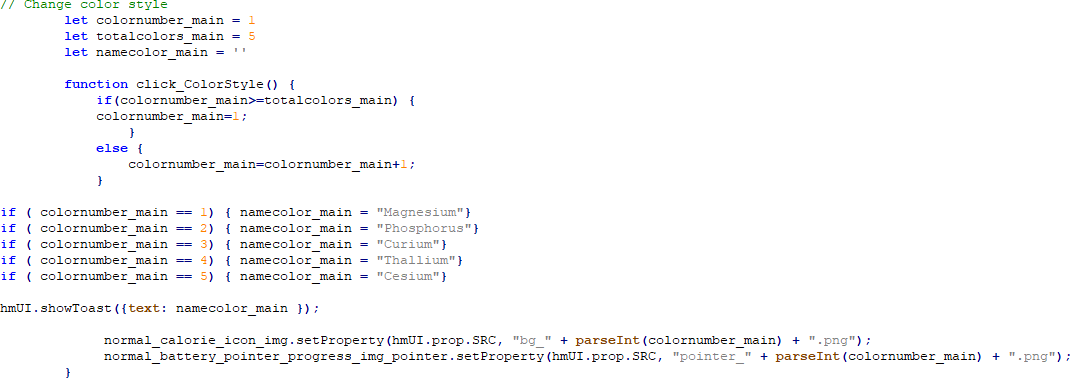
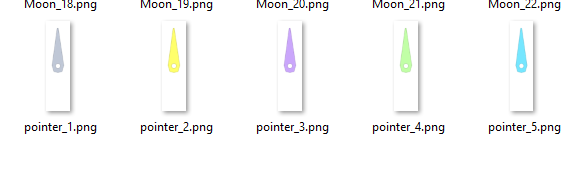
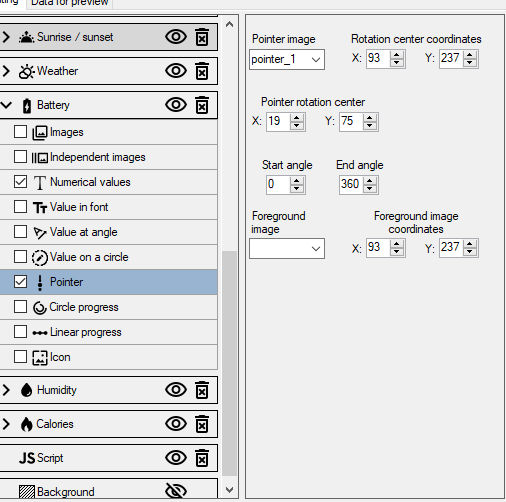
I am trying to make a watchface with color change on tap option. Everything is working well apart from the pointer. I want the pointer to change color together with the background (bg_) as shown in the attached images. However, while background is changing, the pointer is not changing. It seems I am missing something. Any help or guidance is appreciated. Thank you.
Spoiler
Immagine

Immagine

Immagine
Lattenknaller
Messaggi: 163
Iscritto il: 09 ago 2022, 08:43
Località: Hamburg
Has thanked: 60 times
Been thanked: 146 times
Contatta:

Messaggio da Lattenknaller »

Try this
pointer is not an img in the code, it must be treated differently

Codice: Seleziona tutto

	let colornumber_main = 1
        let totalcolors_main = 5
        let namecolor_main = ''
	let pointerstring = 'pointer_1.png'

        function click_ColorStyle() {
            if(colornumber_main>=totalcolors_main) {
            colornumber_main=1;
                }
            else {
                colornumber_main=colornumber_main+1;
            }

			if ( colornumber_main == 1) { namecolor_main = "Magnesium"
				pointerstring = "pointer_" + parseInt(colornumber_main) + ".png"
			}
			if ( colornumber_main == 2) { namecolor_main = "Phosphorus"
				pointerstring = "pointer_" + parseInt(colornumber_main) + ".png"
			}
			if ( colornumber_main == 3) { namecolor_main = "Curium"
				pointerstring = "pointer_" + parseInt(colornumber_main) + ".png"
			}
			if ( colornumber_main == 4) { namecolor_main = "Thallium"
				pointerstring = "pointer_" + parseInt(colornumber_main) + ".png"
			}
			if ( colornumber_main == 5) { namecolor_main = "Cesium"
				pointerstring = "pointer_" + parseInt(colornumber_main) + ".png"
			}
			if ( colornumber_main <= 5) { 
		
	    normal_battery_pointer_progress_img_pointer.setProperty(hmUI.prop.MORE, {
              src: pointerstring,
              center_x: 93,
              center_y: 237,
              x: 19,
              y: 75,
              start_angle: 0,
              end_angle: 360,
              type: hmUI.data_type.BATTERY,
              show_level: hmUI.show_level.ONLY_NORMAL,
            });

			}

			hmUI.showToast({text: namecolor_main });
            		normal_calorie_icon_img.setProperty(hmUI.prop.SRC, "bg_" + parseInt(colornumber_main) + ".png");
        }
Ultima modifica di Lattenknaller il 14 feb 2025, 10:47, modificato 1 volta in totale.
piotarock
WF maker
Messaggi: 40
Iscritto il: 22 ago 2024, 07:53
Località: Kenya
Has thanked: 15 times
Been thanked: 1 time
Contatta:

Messaggio da piotarock »

Thank you very much for the kind response. I will try it.
piotarock
WF maker
Messaggi: 40
Iscritto il: 22 ago 2024, 07:53
Località: Kenya
Has thanked: 15 times
Been thanked: 1 time
Contatta:

Messaggio da piotarock »

It worked like a charm. Thank you very much sir.
Avatar utente
SashaCX75
Messaggi: 827
Iscritto il: 26 ott 2019, 15:18
Località: Ukraine
Has thanked: 14 times
Been thanked: 1043 times
Contatta:

Messaggio da SashaCX75 »

Lattenknaller ha scritto: 14 feb 2025, 07:47
Try this
pointer is not an img in the code, it must be treated differently
Changing properties with hmUI.prop.MORE is correct in this case. But I don't understand why to add an additional variable ‘pointerstring’? I would change the function like this

Codice: Seleziona tutto

let colornumber_main = 1
let totalcolors_main = 5
let namecolor_main = ''

function click_ColorStyle() {
    if (colornumber_main>=totalcolors_main) colornumber_main=1;
    else colornumber_main=colornumber_main + 1;

    if ( colornumber_main == 1) namecolor_main = "Magnesium";
    if ( colornumber_main == 2) namecolor_main = "Phosphorus";
    if ( colornumber_main == 3) namecolor_main = "Curium";
    if ( colornumber_main == 4) namecolor_main = "Thallium";
    if ( colornumber_main == 5) namecolor_main = "Cesium";

    hmUI.showToast({text: namecolor_main });

    normal_battery_pointer_progress_img_pointer.setProperty(hmUI.prop.MORE, {
      src: "pointer_" + parseInt(colornumber_main) + ".png",
      center_x: 93,
      center_y: 237,
      x: 19,
      y: 75,
      start_angle: 0,
      end_angle: 360,
      type: hmUI.data_type.BATTERY,
      show_level: hmUI.show_level.ONLY_NORMAL,
    });

    normal_calorie_icon_img.setProperty(hmUI.prop.SRC, "bg_" + parseInt(colornumber_main) + ".png");
}
piotarock
WF maker
Messaggi: 40
Iscritto il: 22 ago 2024, 07:53
Località: Kenya
Has thanked: 15 times
Been thanked: 1 time
Contatta:

Messaggio da piotarock »

Thank you SashaCX75. I tried your function and it also worked like a charm. Now I have two ways to do this...
Rispondi

Torna a “Watchfaces creation (order table)”

Chi c’è in linea

Visitano il forum: Nessuno e 1 ospite