• Administrator
  •  
    Support Ukraine
    If you experience any problems with the forum (it is not visible, there is no way to post messages, or some functionality does not work), please let us know. If you have problems with registration or you did not receive confirmation letter, let us know and we will activate your account manually.
    If you get an "The submitted form was invalid. Try submitting again" error, delete cookies, then try again.
     

Help with color change on tap script

Topics for the request of watch faces development.

Moderators: asoo, Watchmens

Forum rules
When adding a new topic, use the template: Topic title [device name]
For example: How to create watch face [Falcon]
All communication in this branch should only be in English.
Post Reply
piotarock
WF maker
Posts: 40
Joined: 22 Aug 2024, 07:53
Location: Kenya
Has thanked: 15 times
Been thanked: 1 time
Contact:

Help with color change on tap script

Post by piotarock »

Hello Devs,

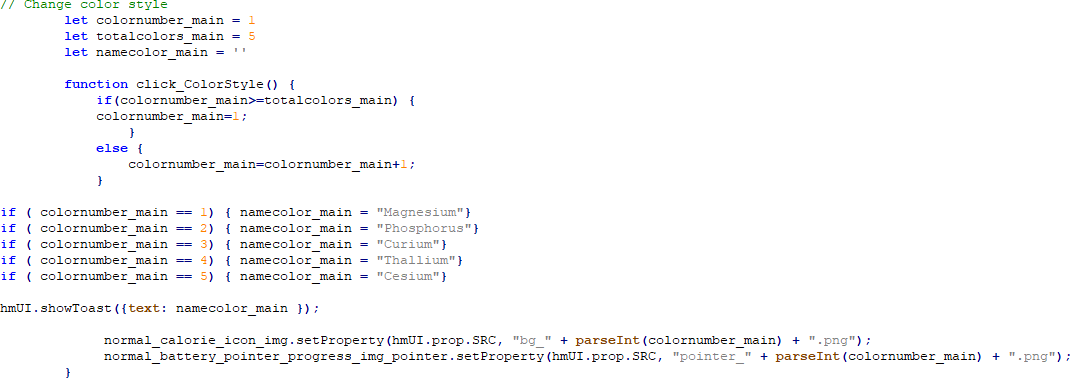
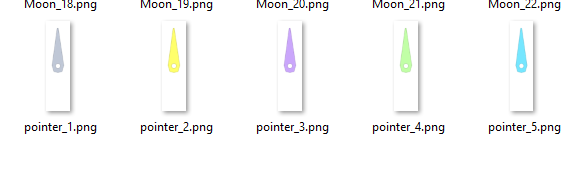
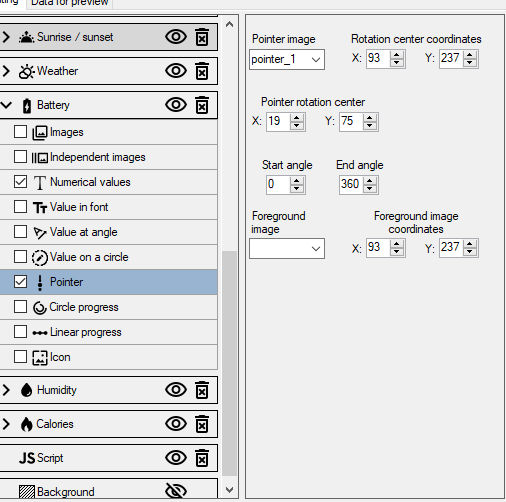
I am trying to make a watchface with color change on tap option. Everything is working well apart from the pointer. I want the pointer to change color together with the background (bg_) as shown in the attached images. However, while background is changing, the pointer is not changing. It seems I am missing something. Any help or guidance is appreciated. Thank you.
Spoiler
Image

Image

Image
Lattenknaller
Posts: 153
Joined: 09 Aug 2022, 08:43
Location: Hamburg
Has thanked: 57 times
Been thanked: 128 times
Contact:

Post by Lattenknaller »

Try this
pointer is not an img in the code, it must be treated differently

Code: Select all

	let colornumber_main = 1
        let totalcolors_main = 5
        let namecolor_main = ''
	let pointerstring = 'pointer_1.png'

        function click_ColorStyle() {
            if(colornumber_main>=totalcolors_main) {
            colornumber_main=1;
                }
            else {
                colornumber_main=colornumber_main+1;
            }

			if ( colornumber_main == 1) { namecolor_main = "Magnesium"
				pointerstring = "pointer_" + parseInt(colornumber_main) + ".png"
			}
			if ( colornumber_main == 2) { namecolor_main = "Phosphorus"
				pointerstring = "pointer_" + parseInt(colornumber_main) + ".png"
			}
			if ( colornumber_main == 3) { namecolor_main = "Curium"
				pointerstring = "pointer_" + parseInt(colornumber_main) + ".png"
			}
			if ( colornumber_main == 4) { namecolor_main = "Thallium"
				pointerstring = "pointer_" + parseInt(colornumber_main) + ".png"
			}
			if ( colornumber_main == 5) { namecolor_main = "Cesium"
				pointerstring = "pointer_" + parseInt(colornumber_main) + ".png"
			}
			if ( colornumber_main <= 5) { 
		
	    normal_battery_pointer_progress_img_pointer.setProperty(hmUI.prop.MORE, {
              src: pointerstring,
              center_x: 93,
              center_y: 237,
              x: 19,
              y: 75,
              start_angle: 0,
              end_angle: 360,
              type: hmUI.data_type.BATTERY,
              show_level: hmUI.show_level.ONLY_NORMAL,
            });

			}

			hmUI.showToast({text: namecolor_main });
            		normal_calorie_icon_img.setProperty(hmUI.prop.SRC, "bg_" + parseInt(colornumber_main) + ".png");
        }
Last edited by Lattenknaller on 14 Feb 2025, 10:47, edited 1 time in total.
piotarock
WF maker
Posts: 40
Joined: 22 Aug 2024, 07:53
Location: Kenya
Has thanked: 15 times
Been thanked: 1 time
Contact:

Post by piotarock »

Thank you very much for the kind response. I will try it.
piotarock
WF maker
Posts: 40
Joined: 22 Aug 2024, 07:53
Location: Kenya
Has thanked: 15 times
Been thanked: 1 time
Contact:

Post by piotarock »

It worked like a charm. Thank you very much sir.
User avatar
SashaCX75
Posts: 812
Joined: 26 Oct 2019, 15:18
Location: Ukraine
Has thanked: 13 times
Been thanked: 1007 times
Contact:

Post by SashaCX75 »

Lattenknaller wrote: 14 Feb 2025, 07:47
Try this
pointer is not an img in the code, it must be treated differently
Changing properties with hmUI.prop.MORE is correct in this case. But I don't understand why to add an additional variable ‘pointerstring’? I would change the function like this

Code: Select all

let colornumber_main = 1
let totalcolors_main = 5
let namecolor_main = ''

function click_ColorStyle() {
    if (colornumber_main>=totalcolors_main) colornumber_main=1;
    else colornumber_main=colornumber_main + 1;

    if ( colornumber_main == 1) namecolor_main = "Magnesium";
    if ( colornumber_main == 2) namecolor_main = "Phosphorus";
    if ( colornumber_main == 3) namecolor_main = "Curium";
    if ( colornumber_main == 4) namecolor_main = "Thallium";
    if ( colornumber_main == 5) namecolor_main = "Cesium";

    hmUI.showToast({text: namecolor_main });

    normal_battery_pointer_progress_img_pointer.setProperty(hmUI.prop.MORE, {
      src: "pointer_" + parseInt(colornumber_main) + ".png",
      center_x: 93,
      center_y: 237,
      x: 19,
      y: 75,
      start_angle: 0,
      end_angle: 360,
      type: hmUI.data_type.BATTERY,
      show_level: hmUI.show_level.ONLY_NORMAL,
    });

    normal_calorie_icon_img.setProperty(hmUI.prop.SRC, "bg_" + parseInt(colornumber_main) + ".png");
}
piotarock
WF maker
Posts: 40
Joined: 22 Aug 2024, 07:53
Location: Kenya
Has thanked: 15 times
Been thanked: 1 time
Contact:

Post by piotarock »

Thank you SashaCX75. I tried your function and it also worked like a charm. Now I have two ways to do this...
Post Reply

Return to “Watchfaces creation (order table)”

Who is online

Users browsing this forum: No registered users and 1 guest