• Administrador
  •  
    Support Ukraine
    If you experience any problems with the forum (it is not visible, there is no way to post messages, or some functionality does not work), please let us know. If you have problems with registration or you did not receive confirmation letter, let us know and we will activate your account manually.
    If you get an "The submitted form was invalid. Try submitting again" error, delete cookies, then try again.
     

Weather render problem in AmazfitBipTools-1.0.3.1

Archive closed topics

Moderadores: Internal error, Watchmens

Cerrado
Avatar de Usuario
netoper
WF maker
Mensajes: 17
Registrado: 18 Abr 2019, 15:46
Has thanked: 3 times
Been thanked: 8 times
Contactar:

Weather render problem in AmazfitBipTools-1.0.3.1

Mensaje por netoper »

hello.
i have this code for weather text temperature:

Código: Seleccionar todo

       "Temperature": {
            "Current": {
                "Number": {
                    "TopLeftX": 138,
                    "TopLeftY": 136,
                    "BottomRightX": 171,
                    "BottomRightY": 145,
                    "Alignment": "TopRight",
                    "Spacing": 2,
                    "ImageIndex": 50,
                    "ImagesCount": 10
                },
                "MinusImageIndex": 102,
                "DegreesImageIndex": 103
            }
        }
    }
in editor looks fine and the text is aligned to the right side. but when create bin file with AmazfitBipTools-1.0.3.1, text is aligned from left. amazfitbiptools ignore my settings ("Alignment": "TopRight",), or i missed something? thank.
Avatar de Usuario
asoo
Mensajes: 2126
Registrado: 03 Ene 2019, 01:48
Ubicación: ͼͽ Thailand ͼͽ
Has thanked: 410 times
Been thanked: 2044 times

Mensaje por asoo »

I would like to help you to solve this issue.
But, Could you please send your "file.BIN" to me ?
ͼͽ To request please use the interrelated forum in action ͼͽ
Please do not PM to me for requests ported watchface.
Avatar de Usuario
netoper
WF maker
Mensajes: 17
Registrado: 18 Abr 2019, 15:46
Has thanked: 3 times
Been thanked: 8 times
Contactar:

Mensaje por netoper »

thank you for reply. i re-created watchface again, and now is ok ;) i don't know where the problem was.
Avatar de Usuario
TXK
Mensajes: 299
Registrado: 10 Abr 2018, 05:15
Ubicación: china
Has thanked: 149 times
Been thanked: 97 times
Contactar:

Mensaje por TXK »

The way to solve the problem is:

1. https://v1ack.github.io/watchfaceEditor/

2.[DESIGN]-[FIX COORDINATES]

3.Re layout,Export JSON
Avatar de Usuario
netoper
WF maker
Mensajes: 17
Registrado: 18 Abr 2019, 15:46
Has thanked: 3 times
Been thanked: 8 times
Contactar:

Mensaje por netoper »

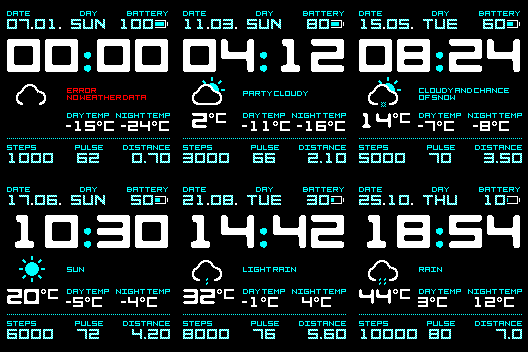
OK, the problem is still here. This watch face https://amazfitwatchfaces.com/bip/view/23630 on preview show battery number, night temp wrong. I use "TopRight" align. For current temp (below of weather icon) i use "TopCenter". In editor is all ok and is positioned correctly, but when i create .bin file, generated preview is with wrong aligment.
Avatar de Usuario
Kensupen
WF maker
Mensajes: 10
Registrado: 28 Mar 2019, 00:52
Ubicación: OHIO
Been thanked: 6 times
Contactar:

Mensaje por Kensupen »

You have to go to the "Edit" tab and make sure the settings
"TopLeftX": 0,
"TopLeftY": 0,
"BottomRightX": xx,
"BottomRightY": xx,
Are at least as large as your fonts added together plus spacing. If the box is too small on the "Design" tab, it'll look right in the editor, but not when made into a bin file.
Avatar de Usuario
asoo
Mensajes: 2126
Registrado: 03 Ene 2019, 01:48
Ubicación: ͼͽ Thailand ͼͽ
Has thanked: 410 times
Been thanked: 2044 times

Mensaje por asoo »

netoper escribió: 29 Abr 2019, 17:58
OK, the problem is still here. This watch face https://amazfitwatchfaces.com/bip/view/23630 on preview show battery number, night temp wrong. I use "TopRight" align. For current temp (below of weather icon) i use "TopCenter". In editor is all ok and is positioned correctly, but when i create .bin file, generated preview is with wrong aligment.
Imagen
Please see this repack BIN
Imagen
duotone cyan_packed.bin
(45.77 KiB) Descargado 297 veces
ͼͽ To request please use the interrelated forum in action ͼͽ
Please do not PM to me for requests ported watchface.
Avatar de Usuario
netoper
WF maker
Mensajes: 17
Registrado: 18 Abr 2019, 15:46
Has thanked: 3 times
Been thanked: 8 times
Contactar:

Mensaje por netoper »

thank you guys ;) i understand how now.
Cerrado

Volver a “Closed topics”

¿Quién está conectado?

Usuarios navegando por este Foro: No hay usuarios registrados visitando el Foro y 1 invitado