If you experience any problems with the forum (it is not visible, there is no way to post messages, or some functionality does not work), please let us know.
If you have problems with registration or you did not receive confirmation letter, let us know and we will activate your account manually.
If you get an "The submitted form was invalid. Try submitting again" error, delete cookies, then try again.

Weather render problem in AmazfitBipTools-1.0.3.1

Archive closed topics

版主: Internal errorWatchmens

主题已锁定
头像
netoper
WF maker
帖子: 17
注册时间: 18 4月 2019, 15:46
Has thanked: 3 time
Been thanked: 8 time
联系:

Weather render problem in AmazfitBipTools-1.0.3.1

帖子 netoper »

hello.
i have this code for weather text temperature:

代码: 全选

       "Temperature": {
            "Current": {
                "Number": {
                    "TopLeftX": 138,
                    "TopLeftY": 136,
                    "BottomRightX": 171,
                    "BottomRightY": 145,
                    "Alignment": "TopRight",
                    "Spacing": 2,
                    "ImageIndex": 50,
                    "ImagesCount": 10
                },
                "MinusImageIndex": 102,
                "DegreesImageIndex": 103
            }
        }
    }
in editor looks fine and the text is aligned to the right side. but when create bin file with AmazfitBipTools-1.0.3.1, text is aligned from left. amazfitbiptools ignore my settings ("Alignment": "TopRight",), or i missed something? thank.
头像
asoo
帖子: 2222
注册时间: 03 1月 2019, 01:48
来自: ͼͽ Thailand ͼͽ
Has thanked: 437 time
Been thanked: 2141 time
联系:

帖子 asoo »

I would like to help you to solve this issue.
But, Could you please send your "file.BIN" to me ?
ͼͽ To request please use the interrelated forum in action ͼͽ
Please do not PM to me for requests ported watchface.
头像
netoper
WF maker
帖子: 17
注册时间: 18 4月 2019, 15:46
Has thanked: 3 time
Been thanked: 8 time
联系:

帖子 netoper »

thank you for reply. i re-created watchface again, and now is ok ;) i don't know where the problem was.
头像
TXK
帖子: 302
注册时间: 10 4月 2018, 05:15
来自: china
Has thanked: 150 time
Been thanked: 99 time
联系:

帖子 TXK »

The way to solve the problem is:

1. https://v1ack.github.io/watchfaceEditor/

2.[DESIGN]-[FIX COORDINATES]

3.Re layout,Export JSON
头像
netoper
WF maker
帖子: 17
注册时间: 18 4月 2019, 15:46
Has thanked: 3 time
Been thanked: 8 time
联系:

帖子 netoper »

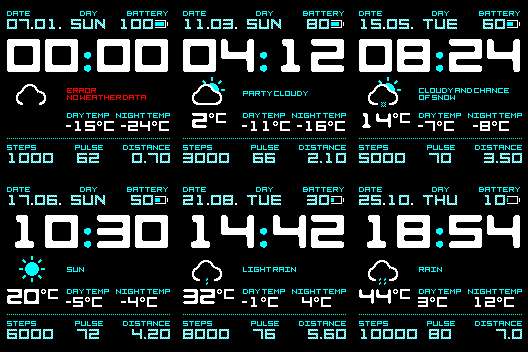
OK, the problem is still here. This watch face https://amazfitwatchfaces.com/bip/view/23630 on preview show battery number, night temp wrong. I use "TopRight" align. For current temp (below of weather icon) i use "TopCenter". In editor is all ok and is positioned correctly, but when i create .bin file, generated preview is with wrong aligment.
头像
Kensupen
WF maker
帖子: 10
注册时间: 28 3月 2019, 00:52
来自: OHIO
Been thanked: 6 time
联系:

帖子 Kensupen »

You have to go to the "Edit" tab and make sure the settings
"TopLeftX": 0,
"TopLeftY": 0,
"BottomRightX": xx,
"BottomRightY": xx,
Are at least as large as your fonts added together plus spacing. If the box is too small on the "Design" tab, it'll look right in the editor, but not when made into a bin file.
头像
asoo
帖子: 2222
注册时间: 03 1月 2019, 01:48
来自: ͼͽ Thailand ͼͽ
Has thanked: 437 time
Been thanked: 2141 time
联系:

帖子 asoo »

netoper 写了: 29 4月 2019, 17:58
OK, the problem is still here. This watch face https://amazfitwatchfaces.com/bip/view/23630 on preview show battery number, night temp wrong. I use "TopRight" align. For current temp (below of weather icon) i use "TopCenter". In editor is all ok and is positioned correctly, but when i create .bin file, generated preview is with wrong aligment.
图片
Please see this repack BIN
图片
duotone cyan_packed.bin
(45.77 KiB) 已下载 302 次
ͼͽ To request please use the interrelated forum in action ͼͽ
Please do not PM to me for requests ported watchface.
头像
netoper
WF maker
帖子: 17
注册时间: 18 4月 2019, 15:46
Has thanked: 3 time
Been thanked: 8 time
联系:

帖子 netoper »

thank you guys ;) i understand how now.
主题已锁定

回到 “Closed topics”

在线用户

正浏览此版面之用户: Google Adsense [Bot] 和 1 访客