You have to go to the "Edit" tab and make sure the settings
"TopLeftX": 0,
"TopLeftY": 0,
"BottomRightX": xx,
"BottomRightY": xx,
Are at least as large as your fonts added together plus spacing. If the box is too small on the "Design" tab, it'll look right in the editor, but not when made into a ...
If you experience any problems with the forum (it is not visible, there is no way to post messages, or some functionality does not work), please let us know.
If you have problems with registration or you did not receive confirmation letter, let us know and we will activate your account manually.
If you get an "The submitted form was invalid. Try submitting again" error, delete cookies, then try again.
If you have problems with registration or you did not receive confirmation letter, let us know and we will activate your account manually.
If you get an "The submitted form was invalid. Try submitting again" error, delete cookies, then try again.
Se encontraron 3 coincidencias
- 30 Abr 2019, 09:52
- Jump to forum
- Jump to topic
Re: Weather render problem in AmazfitBipTools-1.0.3.1
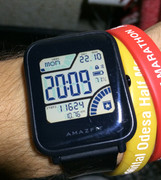
OK, the problem is still here. This watch face https://amazfitwatchfaces.com/bip/view/23630 on preview show battery number, night temp wrong. I use "TopRight" align. For current temp (below of weather icon) i use "TopCenter". In editor is all ok and is positioned correctly, but when i create .bin ...
- 08 Jun 2019, 17:22
- Jump to forum
- Jump to topic