• Адміністратор
  •  
    Support Ukraine
    If you experience any problems with the forum (it is not visible, there is no way to post messages, or some functionality does not work), please let us know. If you have problems with registration or you did not receive confirmation letter, let us know and we will activate your account manually.
    If you get an "The submitted form was invalid. Try submitting again" error, delete cookies, then try again.
     

AmazFit WatchFace editor 2 for Windows

This forum is designed to discuss and develop tools creating watch faces.

Модератори: asoo, lvpokka, Internal error, Watchmens

Правила форуму
All communication in this branch should only be in English.
To discuss tools that are not in this section, use the “Watchfaces tools (discussion)” forum.
Аватар користувача
SashaCX75
Повідомлень: 823
З нами з: 26 жовтня 2019, 15:18
Звідки: Ukraine
Has thanked: 13 times
Been thanked: 1036 times
Контактна інформація:

AmazFit WatchFace editor 2 for Windows

Повідомлення SashaCX75 »

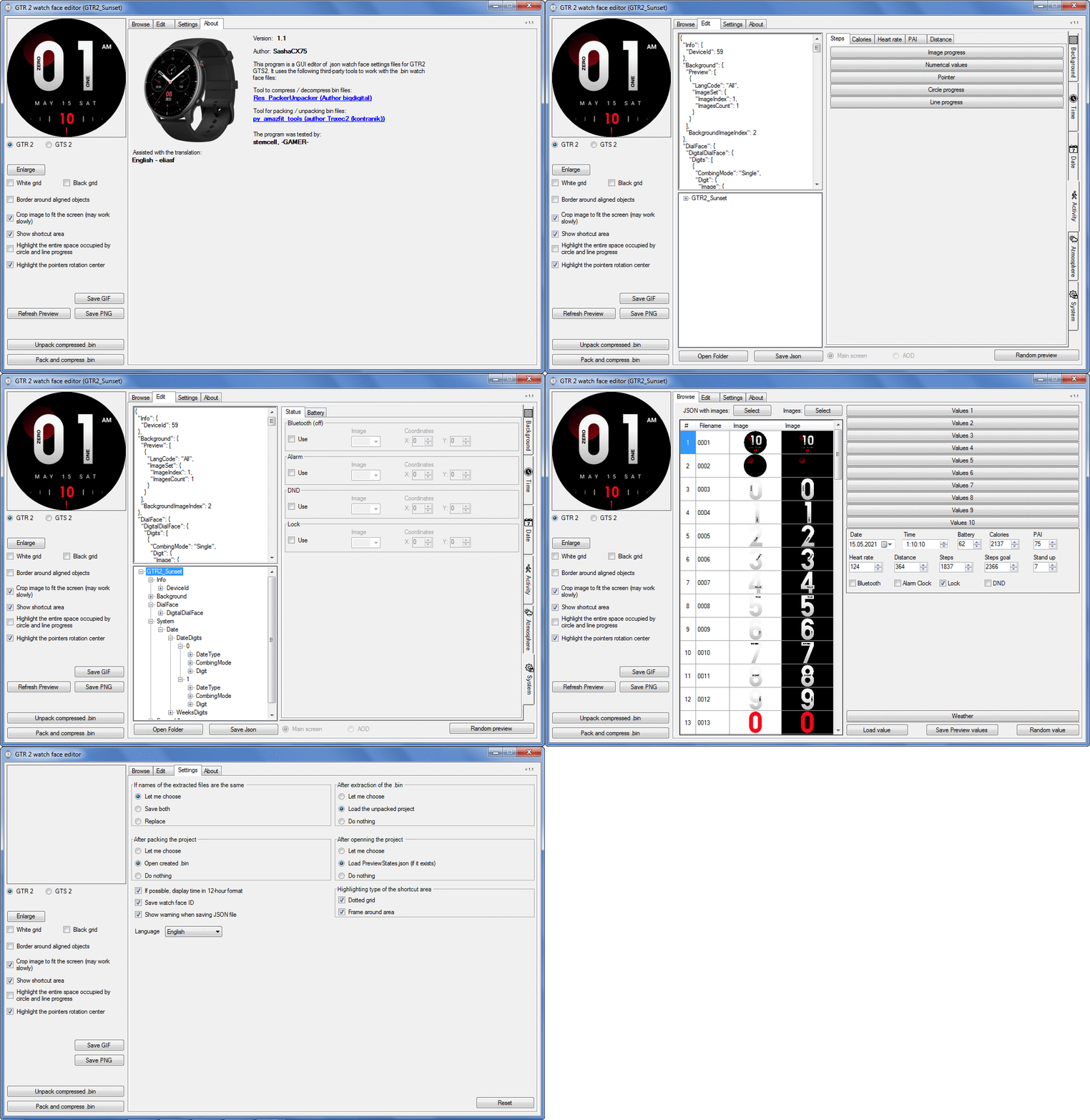
Graphics editor for working with dials Amazfit
The editor supports watch faces from GTR 2(e), GTS 2 (GTS 2e / Zepp E Square), T-Rex Pro, Zepp E Circle.
Screenshot
Screenshot
Зображення
Note: It is advisable to unpack the program to the root of the disk.
Not all dials can be unpacked.

The drawing order of elements cannot be changed. The only exception is if you move the second hand from the center, it will be drawn under the hour and minute hands.

If the .bin file is not created, then you need to look for errors in the .log file. Most often this happens when images have the wrong format.

Version 7.3
List of changes
Fixed known display bugs.
v 7.2
Fixed date display errors in editable zones.
Added support for the Hungarian language.
v 7.1
For distance added support for separate images for miles and kilometers.
v 7.0
Added support for independent coordinates for a set of pictures (segments).
v 6.0
Added support for Zepp E Circle
Added the ability to convert watch faces between different models (GTR 2 (e), Zepp E Circle, T-Rex Pro)
v 5.1
Added the ability to create and update preview images of editable zones.
v 5.0
Added support for editable zones.
v 4.1
Added the ability to display the time in the system font.
Added the ability to display the date in the system font.
Added the ability to change the order of layers.
Added the ability to overlay the clock image on the saved png and gif files (enabled in the settings).
v 4.0
Added support for the system font (inscription at an angle and in a circle).
Added support for the Sunrise parameter (not working correctly for all cities).
Added support for ActivityGoal parameter.
Added the ability to display the goal of steps.
Added support for the Icon parameter.
Added the ability to display circular and linear progress at the same time.
v 3.1
Fixed errors when displaying the distance.
Fixed errors when displaying temperature.
Added French.
Added Italian language.
v 3.0
Added support for T-Rex Pro.
Added support for new elements (StandUp, fat burning, UV index, humidity, wind, pressure).
Found bugs fixed.
v 2.1
Fixed bugs in display AOD.
Fixed bug when using pictures for circular progress.
v 2.0
Added support for AOD.
Added Chinese translation.
v 1
It can work with elements: time, date, statuses, weather, battery, steps, calories, heart rate, PAI, path.
Added English translation.
v 1.2 Added Spanish language
Old versions
Pictures created when unpacking and unpacking bin files are created by the parser and may differ from the images created in the editor. I have nothing to do with these files and am not responsible for their content.

When you turn on the "Follow ..." radio button, the right alignment and center alignment in the editor is displayed incorrectly.
The preview in the editor may differ from the image on the watch. I advise you to check the dial on a real device.

Editable zones do not work on the T-Rex Pro.

The editor does not work with GTS 2 mini (GTS U) watch faces and I do not know how to make such watch faces.

Until the Zepp app has an official watch face with animations or shortcuts, these features cannot be added to the editor.
Shortcuts work on dials converted from GTR (GTS) to GTR 2 (GTS 2). But with this method of creating dials, not all functions work correctly.

GTR (GTS, T-Rex) to GTR2 (GTS 2, T-Rex Pro) converter
GTR (GTS, T-Rex) to GTR2 (GTS 2, T-Rex Pro) Converter & Editor

Because I bought a GTR 3, the program will no longer be updated.

Donate to the author - PayPal: [email protected].
Востаннє редагувалось 01 червня 2022, 07:19 користувачем SashaCX75, всього редагувалось 32 разів.
seethebridges
Повідомлень: 6
З нами з: 11 січня 2022, 23:13
Звідки: USA
Has thanked: 1 time
Been thanked: 1 time
Контактна інформація:

Повідомлення seethebridges »

Hi there! Been trying to read through this thread in its entirety and understand getting started making a watchface for my GTS2. I've been poking around in the editor, but i just wanted to clarify the Z height issue. There is no way to specify Z order for elements other than those that are pre-populated there already right? Like for example, Im working on porting a watchface over from Pebbly/Fitbit, but to get the effects across correctly, I need the Date and time layers to both come above the weather image progression layer.

I cant find any way to adjust those elements, and it doesnt appear that its as simple as editing the json to have the weather section physically sooner in that config. Any advice as for where I should even begin poking around to get that kind of config option?

Or would I be better off attempting to get access to the official Zepp watchface editor since it looks like that tool has actual layer configurability. By the look of it, it only has support for the GTS3 now though? Im just feeling kinda lost at this point.
Аватар користувача
SashaCX75
Повідомлень: 823
З нами з: 26 жовтня 2019, 15:18
Звідки: Ukraine
Has thanked: 13 times
Been thanked: 1036 times
Контактна інформація:

Повідомлення SashaCX75 »

seethebridges
In the editor, you can change the order of the activity and atmosphere elements. The date is always displayed below these items. Time is always displayed above these elements.
sirantoninyc
Повідомлень: 7
З нами з: 05 січня 2022, 06:13
Звідки: US
Has thanked: 1 time
Контактна інформація:

Повідомлення sirantoninyc »

Hi,

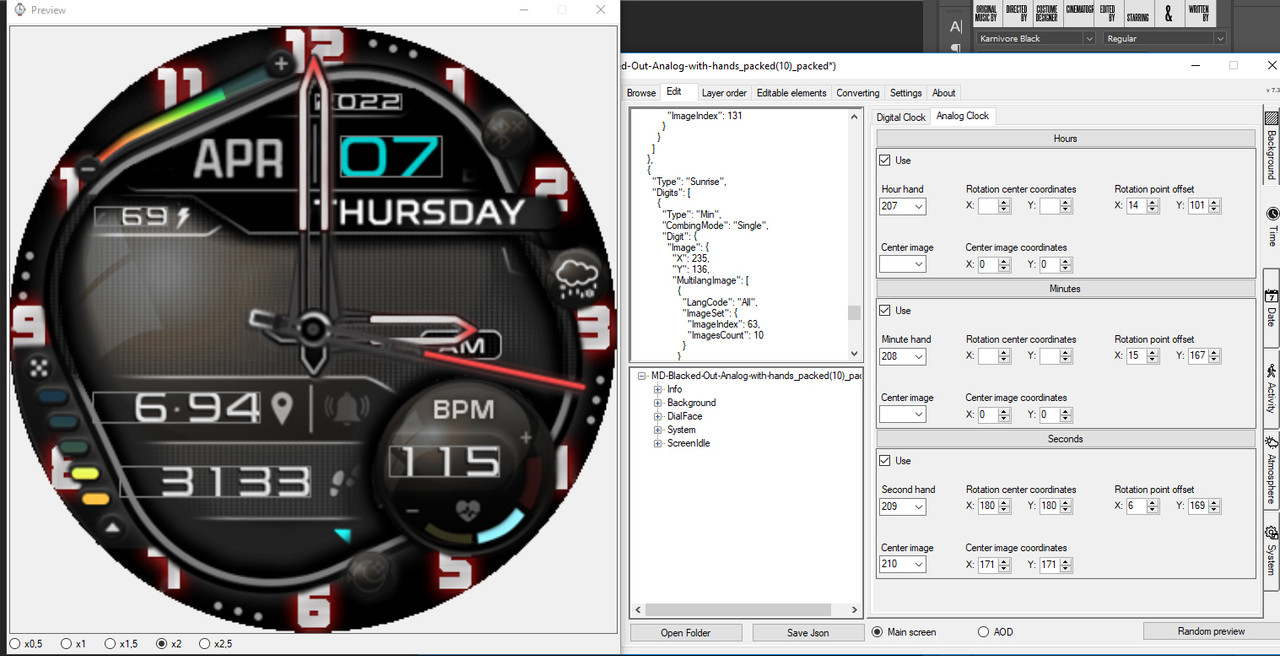
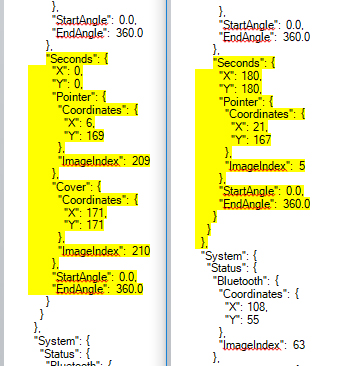
I customized an analog watch face but I cannot get the second hand to move during normal display. I searched the forum but I didn't find a solution, I also looked at the code of another watch where the second hand does move, my settings seem identical.

Зображення

Зображення

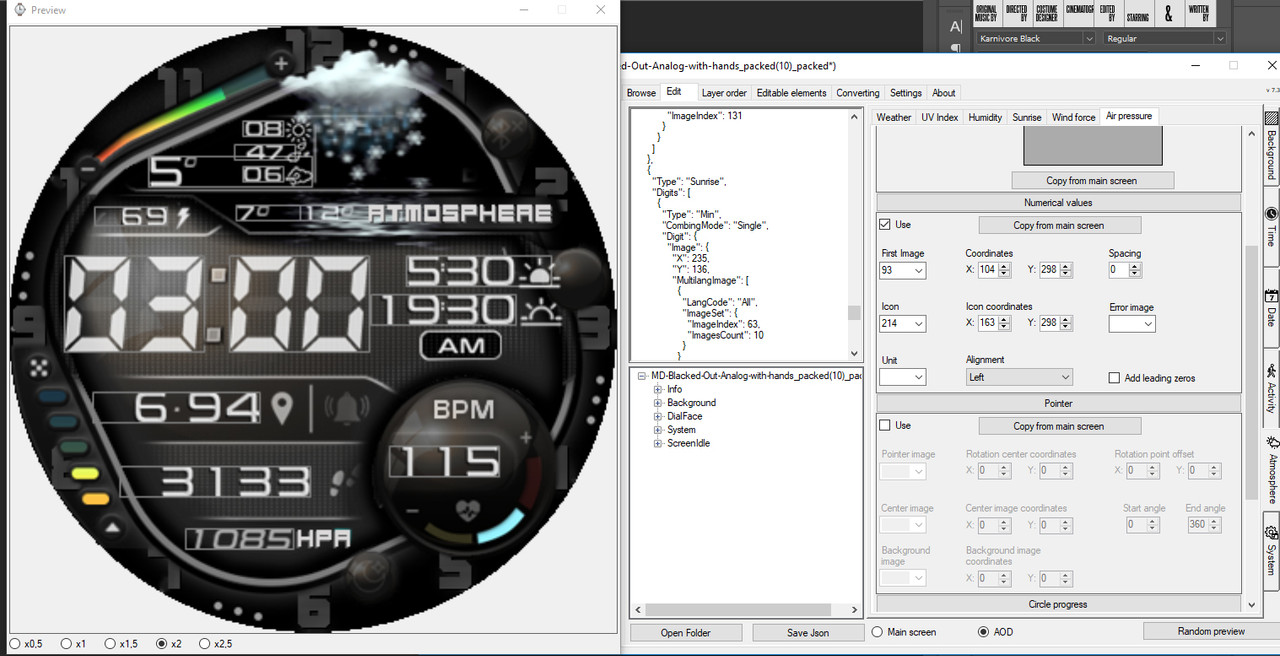
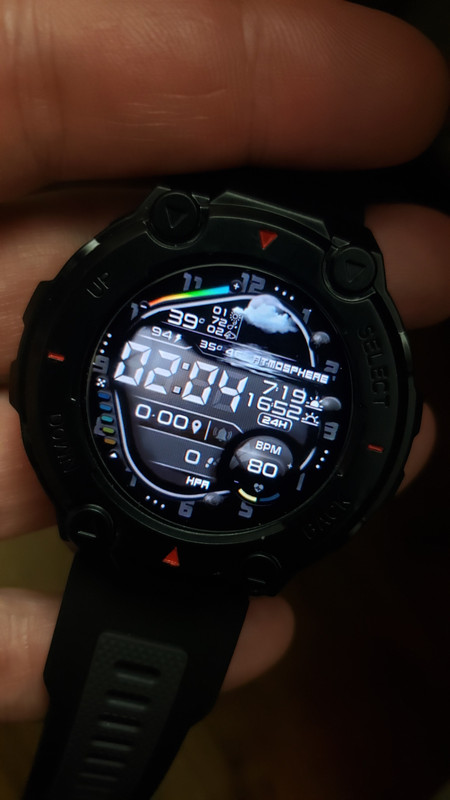
Secondly, I see the air pressure (barometer) in the preview of the editor, which I added in AOD above the 6 of the watch face, however the numbers do not display on my watch after installing the bin file. I see the hPa image I made and I can see the barometer under barometer when I swipe left but, the numbers do not display on my watch face.


Зображення

Зображення

Lastly, I cannot find where, under weather, those multiple weather images are being entered or where to adjust the coordinates.

Thanks,
Anthony
seethebridges
Повідомлень: 6
З нами з: 11 січня 2022, 23:13
Звідки: USA
Has thanked: 1 time
Been thanked: 1 time
Контактна інформація:

Повідомлення seethebridges »

SashaCX75 писав: 12 січня 2022, 16:58
@seethebridges
In the editor, you can change the order of the activity and atmosphere elements. The date is always displayed below these items. Time is always displayed above these elements.
Is this a hardcoded limitation of the watch OS? Or is that possible for me to go in and change somewhere and just a limitation on your software's interface?
Farsighted
Повідомлень: 1
З нами з: 13 січня 2022, 20:02
Звідки: Brussels
Контактна інформація:

Повідомлення Farsighted »

When I run AmazFit WatchFace editor 2, half of the window is outside of my screen. The maximize button is missing. The window has a fixed size and can not be resized.

I'm using Windows 10, resolution 1920x1080 with 175 dpi on a 52 inch screen.

Can you add a maximize button and make the window resizable ?
Can you make AmazFit WatchFace editor 2 compatible with different screen resolutions and DPIs ?

What configuration are you using ? What are the system requirements ?
murmilega
WF maker
Повідомлень: 4
З нами з: 23 квітня 2021, 22:19
Звідки: Tarragona
Has thanked: 1 time
Контактна інформація:

Повідомлення murmilega »

Hello, thank you very much for your great work, I would like to make a sphere with a moon phase but I can't find how to do it, would you know how to guide me on how to do it? Thank you very much
Аватар користувача
SashaCX75
Повідомлень: 823
З нами з: 26 жовтня 2019, 15:18
Звідки: Ukraine
Has thanked: 13 times
Been thanked: 1036 times
Контактна інформація:

Повідомлення SashaCX75 »

sirantoninyc писав: 13 січня 2022, 06:54
I customized an analog watch face but I cannot get the second hand to move during normal display. I searched the forum but I didn't find a solution, I also looked at the code of another watch where the second hand does move, my settings seem identical.
In the screenshots, all settings for the second hand look normal.

On the GTR 2, the atmospheric pressure starts to be displayed on the dial only after the compass is entered in the widgets (if I remember correctly). But you have something like a T-Rex Pro and I'm not sure if the barometric pressure display works on this watch.

Weather icons are edited in Atmosphere > Weather > Image Set.
Аватар користувача
SashaCX75
Повідомлень: 823
З нами з: 26 жовтня 2019, 15:18
Звідки: Ukraine
Has thanked: 13 times
Been thanked: 1036 times
Контактна інформація:

Повідомлення SashaCX75 »

seethebridges писав: 14 січня 2022, 08:54
Is this a hardcoded limitation of the watch OS? Or is that possible for me to go in and change somewhere and just a limitation on your software's interface?
I don't know if this is a limitation of the watch firmware or the utility used in the editor to build bin files. As far as I know, the position of these elements could not be changed even in the Huami editor, maybe something has changed now.
Аватар користувача
SashaCX75
Повідомлень: 823
З нами з: 26 жовтня 2019, 15:18
Звідки: Ukraine
Has thanked: 13 times
Been thanked: 1036 times
Контактна інформація:

Повідомлення SashaCX75 »

murmilega писав: 14 січня 2022, 14:15
Hello, thank you very much for your great work, I would like to make a sphere with a moon phase but I can't find how to do it, would you know how to guide me on how to do it? Thank you very much
There is no such possibility. Such functions seem to be in some built-in watch faces, but this cannot be done in third-party watch faces.
sirantoninyc
Повідомлень: 7
З нами з: 05 січня 2022, 06:13
Звідки: US
Has thanked: 1 time
Контактна інформація:

Повідомлення sirantoninyc »

SashaCX75 писав: 14 січня 2022, 15:49
sirantoninyc писав: 13 січня 2022, 06:54
I customized an analog watch face but I cannot get the second hand to move during normal display. I searched the forum but I didn't find a solution, I also looked at the code of another watch where the second hand does move, my settings seem identical.
In the screenshots, all settings for the second hand look normal.

On the GTR 2, the atmospheric pressure starts to be displayed on the dial only after the compass is entered in the widgets (if I remember correctly). But you have something like a T-Rex Pro and I'm not sure if the barometric pressure display works on this watch.

Weather icons are edited in Atmosphere > Weather > Image Set.
Thanks Sasha for your quick reply! Also, thanks for this amazing editor! I'm having a lot of fun editing my favorite watch face with it!

I'm not sure why the second hand does not move either, but I'm glad the settings look correct.

I do have a T Rex Pro. I noticed the barometer displays pressure but is searching for GPS and height. That could possibly be the issue.

THANKS for the weather image location, in English it's Atmosphere - Weather - Image Process, I wanted to adjust the location a little bit so that the high and low temperature isn't as obscured.

Thanks again!!!
Anthony
caglargoru
Повідомлень: 1
З нами з: 19 квітня 2020, 09:07
Звідки: Zizur Mayor
Контактна інформація:

Повідомлення caglargoru »

Is there anything like a guide or sth about the program? (AmazFit WatchFace editor 2 for Windows)
MaPo80
Повідомлень: 1
З нами з: 06 лютого 2022, 08:57
Звідки: CZE
Контактна інформація:

Повідомлення MaPo80 »

Hi,

there is the same issue with the latest version (11.1). Version 6.1 is working but it is a little bit old version.
Would it be possible to fix it in next update?

Thanks.


theleon писав: 10 липня 2021, 15:41
Downloaded the latest version, and when trying to open any GTR 2 watchface, I get the following errors:

- "PNG files go out of order or some of the files are missing"

and right after:

- "Invalid JSON file. ... Cannot deserialize current JSON arary into type 'GTR_Watch_face.ImageW'"

While the errors can be clicked away, the preview stays blank. Any idea what I'm doing wrong?
It's my first time using this editor.

EDIT: Nevermind, got it to work. Had downloaded the "GTR (GTS, T-Rex) to GTR2 (GTS 2, T-Rex Pro) Converter & Editor" instead of the Version 5.0... Didn't realize you could click on the Version 5.0, woops.
Superwitschi
Повідомлень: 17
З нами з: 30 червня 2020, 03:11
Звідки: Germany
Has thanked: 8 times
Been thanked: 1 time
Контактна інформація:

Повідомлення Superwitschi »

Can we add in GTR 2 also smooth second movement? If yes what codes i have to take and where i have to change codes?
Аватар користувача
SashaCX75
Повідомлень: 823
З нами з: 26 жовтня 2019, 15:18
Звідки: Ukraine
Has thanked: 13 times
Been thanked: 1036 times
Контактна інформація:

Повідомлення SashaCX75 »

I don't think this is possible on the GTR 2.
Andrei_Richea
Повідомлень: 5
З нами з: 30 вересня 2021, 06:21
Звідки: Lérida
Has thanked: 1 time
Контактна інформація:

Повідомлення Andrei_Richea »

@ SashaCX75 . Hello .Is there any possibility of being able to add fonts to the program Amazfit Watchface editor 2 through a tab or something similar. So you can play with the numbers in the circle system font. I would appreciate it if you could do this. Or tell us how we can do it. Greetings and thanks for the great work.
don1yoor
WF maker
Повідомлень: 12
З нами з: 02 лютого 2022, 13:57
Звідки: mail.ru
Has thanked: 1 time
Been thanked: 1 time
Контактна інформація:

Повідомлення don1yoor »

Hello guys. How to unpack .bin file. I cant unpack. When i click unpack, there opening site www.java/download please help me. I used last version Watchface tools
Darkstalix
Повідомлень: 7
З нами з: 28 березня 2021, 20:16
Звідки: Cyprus
Has thanked: 4 times
Контактна інформація:

Повідомлення Darkstalix »

Is this supposed to convert gts to gts2 guys? i know sasha stopped developing this and i was wondering if anyone is up to date?
I unpacked a GTS WF and then packed it to GTS2 WF and it actually somehow worked almost, just out of curiosity i tried.
So far only the battery numbers are missing and the percentage icon it had. Looks like everything else works?
However whenever i try to unpack a GTS 2 WF (i tried like 6 different from this site)i always get an error of png files missing or order being wrong, i did that just in case i could find the battery code and paste then edit on the WF i want to pack.
Anyone got any clues?
IL_DEMONICO
Повідомлень: 1
З нами з: 19 лютого 2021, 10:26
Звідки: Catania
Контактна інформація:

Повідомлення IL_DEMONICO »

Hello to everyone, is there a way to apply image sequence to hours?
i designed a watchface in which i'd like to put a different image for every hour, from 1 to 12. Is there a way to set image sequence with the same behavior of months, or battery for example?

thanks in advance
Steve2fit
Повідомлень: 3
З нами з: 25 вересня 2020, 11:41
Звідки: Usa
Контактна інформація:

Повідомлення Steve2fit »

I am running Version 7.3. I am not sure why I am getting double images when I do a Refresh Preview. I have no idea how to clean this up and it does get carried over to the watch.
This only appears when I do the Refresh Preview, no other time.

Any help would be appreciated.
Thanks

Зображення
Аватар користувача
asoo
Повідомлень: 2201
З нами з: 03 січня 2019, 01:48
Звідки: ͼͽ Thailand ͼͽ
Has thanked: 420 times
Been thanked: 2122 times

Повідомлення asoo »

Steve2fit писав: 23 травня 2022, 19:32
I am running Version 7.3. I am not sure why I am getting double images when I do a Refresh Preview. I have no idea how to clean this up and it does get carried over to the watch.
This only appears when I do the Refresh Preview, no other time.

Any help would be appreciated.
Thanks
Spoiler
Зображення
If you need help fixing the issue . I recommen you to attach the watchface you are having problems with, or at least .json of that work.
Just the picture that you show, it's hard to predict what that issue.
ͼͽ To request please use the interrelated forum in action ͼͽ
Please do not PM to me for requests ported watchface.
Steve2fit
Повідомлень: 3
З нами з: 25 вересня 2020, 11:41
Звідки: Usa
Контактна інформація:

Повідомлення Steve2fit »

Hi,
I have attached the file for you to review.
Thanks
Вкладення
orange_packed-516597-e18cd6d1af_packed_packed.zip
(1.3 Кіб) Завантажено 401 раз
Аватар користувача
asoo
Повідомлень: 2201
З нами з: 03 січня 2019, 01:48
Звідки: ͼͽ Thailand ͼͽ
Has thanked: 420 times
Been thanked: 2122 times

Повідомлення asoo »

Steve2fit писав: 24 травня 2022, 12:43
Hi,
I have attached the file for you to review.
Thanks
Spoiler
Зображення
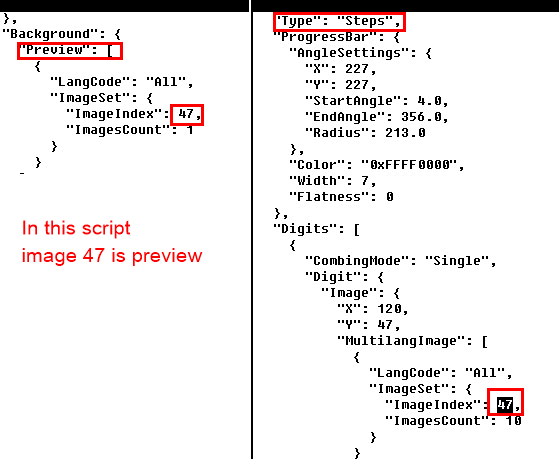
Your issue is steps image index start at 0047.png . I think that file is preview picture.
if steps show number 0 it will be show preview picture. so I think that's the problem.
ͼͽ To request please use the interrelated forum in action ͼͽ
Please do not PM to me for requests ported watchface.
Mayfly
Повідомлень: 1
З нами з: 08 червня 2022, 08:29
Звідки: Granada
Контактна інформація:

Повідомлення Mayfly »

IT CONTAINS MALAWARE VIRUS!!!
Аватар користувача
GIK-Team
root
Повідомлень: 1030
З нами з: 22 березня 2018, 10:00
Звідки: Ukraine
Has thanked: 1162 times
Been thanked: 278 times
Контактна інформація:

Повідомлення GIK-Team »

Mayfly писав: 08 червня 2022, 16:50
IT CONTAINS MALAWARE VIRUS!!!
There are no viruses
"sometimes it's scary but it's still just you and me” — Leaving Laurel
Відповісти

Повернутись до “Watchfaces tools”

Хто зараз онлайн

Зараз переглядають цей форум: Немає зареєстрованих користувачів і 1 гість