• Administrator
  •  
    Support Ukraine
    If you experience any problems with the forum (it is not visible, there is no way to post messages, or some functionality does not work), please let us know. If you have problems with registration or you did not receive confirmation letter, let us know and we will activate your account manually.
    If you get an "The submitted form was invalid. Try submitting again" error, delete cookies, then try again.
     

AmazFit WatchFace editor 2 for Windows

This forum is designed to discuss and develop tools creating watch faces.

Moderators: asoo, lvpokka, Internal error, Watchmens

Forum rules
All communication in this branch should only be in English.
To discuss tools that are not in this section, use the “Watchfaces tools (discussion)” forum.
User avatar
SashaCX75
Posts: 820
Joined: 26 Oct 2019, 15:18
Location: Ukraine
Has thanked: 13 times
Been thanked: 1029 times
Contact:

AmazFit WatchFace editor 2 for Windows

Post by SashaCX75 »

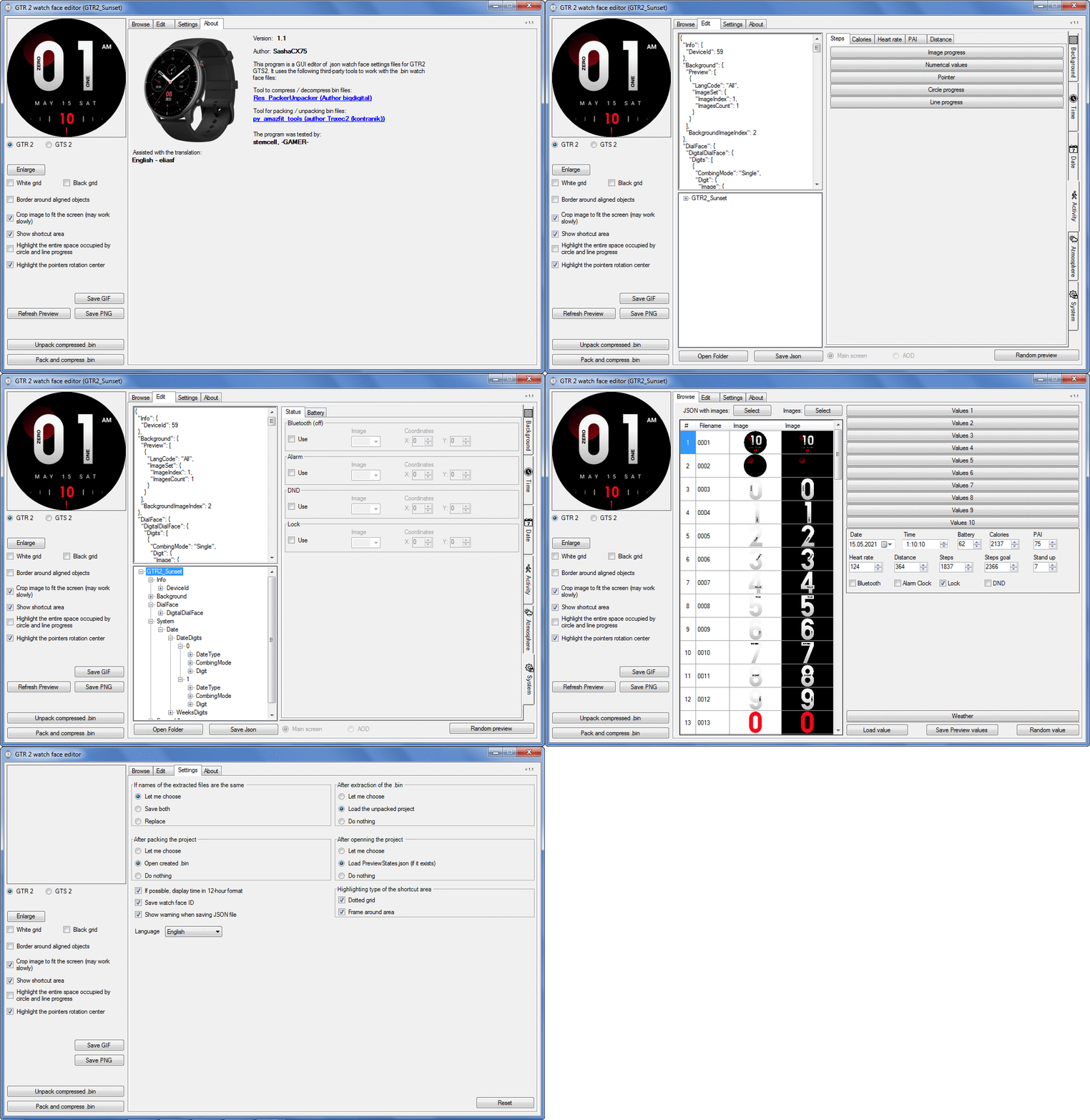
Graphics editor for working with dials Amazfit
The editor supports watch faces from GTR 2(e), GTS 2 (GTS 2e / Zepp E Square), T-Rex Pro, Zepp E Circle.
Screenshot
Screenshot
Image
Note: It is advisable to unpack the program to the root of the disk.
Not all dials can be unpacked.

The drawing order of elements cannot be changed. The only exception is if you move the second hand from the center, it will be drawn under the hour and minute hands.

If the .bin file is not created, then you need to look for errors in the .log file. Most often this happens when images have the wrong format.

Version 7.3
List of changes
Fixed known display bugs.
v 7.2
Fixed date display errors in editable zones.
Added support for the Hungarian language.
v 7.1
For distance added support for separate images for miles and kilometers.
v 7.0
Added support for independent coordinates for a set of pictures (segments).
v 6.0
Added support for Zepp E Circle
Added the ability to convert watch faces between different models (GTR 2 (e), Zepp E Circle, T-Rex Pro)
v 5.1
Added the ability to create and update preview images of editable zones.
v 5.0
Added support for editable zones.
v 4.1
Added the ability to display the time in the system font.
Added the ability to display the date in the system font.
Added the ability to change the order of layers.
Added the ability to overlay the clock image on the saved png and gif files (enabled in the settings).
v 4.0
Added support for the system font (inscription at an angle and in a circle).
Added support for the Sunrise parameter (not working correctly for all cities).
Added support for ActivityGoal parameter.
Added the ability to display the goal of steps.
Added support for the Icon parameter.
Added the ability to display circular and linear progress at the same time.
v 3.1
Fixed errors when displaying the distance.
Fixed errors when displaying temperature.
Added French.
Added Italian language.
v 3.0
Added support for T-Rex Pro.
Added support for new elements (StandUp, fat burning, UV index, humidity, wind, pressure).
Found bugs fixed.
v 2.1
Fixed bugs in display AOD.
Fixed bug when using pictures for circular progress.
v 2.0
Added support for AOD.
Added Chinese translation.
v 1
It can work with elements: time, date, statuses, weather, battery, steps, calories, heart rate, PAI, path.
Added English translation.
v 1.2 Added Spanish language
Old versions
Pictures created when unpacking and unpacking bin files are created by the parser and may differ from the images created in the editor. I have nothing to do with these files and am not responsible for their content.

When you turn on the "Follow ..." radio button, the right alignment and center alignment in the editor is displayed incorrectly.
The preview in the editor may differ from the image on the watch. I advise you to check the dial on a real device.

Editable zones do not work on the T-Rex Pro.

The editor does not work with GTS 2 mini (GTS U) watch faces and I do not know how to make such watch faces.

Until the Zepp app has an official watch face with animations or shortcuts, these features cannot be added to the editor.
Shortcuts work on dials converted from GTR (GTS) to GTR 2 (GTS 2). But with this method of creating dials, not all functions work correctly.

GTR (GTS, T-Rex) to GTR2 (GTS 2, T-Rex Pro) converter
GTR (GTS, T-Rex) to GTR2 (GTS 2, T-Rex Pro) Converter & Editor

Because I bought a GTR 3, the program will no longer be updated.

Donate to the author - PayPal: [email protected].
Last edited by SashaCX75 on 01 Jun 2022, 07:19, edited 32 times in total.
cjlin
Posts: 8
Joined: 09 Jun 2021, 12:02
Location: Taiwan
Has thanked: 2 times
Contact:

Post by cjlin »

where can i get the AmazFit WatchFace editor 2 help or tutorial ?
thank you.
dimi_tris
Posts: 1
Joined: 30 Aug 2021, 14:43
Location: Athens / Greece
Contact:

Post by dimi_tris »

cjlin wrote: 07 Sep 2021, 04:57
where can i get the AmazFit WatchFace editor 2 help or tutorial ?
thank you.
+1
HakunaMatmata
WF maker
Posts: 3
Joined: 07 Sep 2021, 23:22
Location: Paris
Contact:

Post by HakunaMatmata »

Hello,

Thanks for your work SashaCX75 !
Really appreciate.

One question :
I was trying to make a custom watchface and wanted to have a vertical progress bar for seconds.
Is it possible?

I first tried to have any progress bar vertical but did not find the trick.
It seems only proposed horizontal and when I tried to edit json directly it gets revert when compiled in BIN.

How to manually edit json?

Then I wanted to try to add an object progress bar to digital seconds but same problem with json being replaced before compilation.
Thanks in advance,
regards
User avatar
SashaCX75
Posts: 820
Joined: 26 Oct 2019, 15:18
Location: Ukraine
Has thanked: 13 times
Been thanked: 1029 times
Contact:

Post by SashaCX75 »

HakunaMatmata
The vertical progress bar can only be implemented using a set of pictures for this.

cjlin
Here you can see the instructions for the GTR Watch Faces Editor. This editor is different, but the way it works is very similar.
Julien
Posts: 20
Joined: 27 Aug 2021, 16:50
Location: FR
Has thanked: 1 time
Contact:

Post by Julien »

Dear SashaCX75 I've been working on porting the .bin unpacker for the GTS 2 Mini. It's not done yet, and I've contacted bigdigital who seems to have worked on this too.
I was wondering if you can guide me through the required step to enable compatibility with your app, right now I'm working on https://github.com/Tnxec2/py_amazfit_tools/
User avatar
SashaCX75
Posts: 820
Joined: 26 Oct 2019, 15:18
Location: Ukraine
Has thanked: 13 times
Been thanked: 1029 times
Contact:

Post by SashaCX75 »

neFAST
I have not seen a working utility for unpacking the GTS 2 Mini dials, so it's hard for me to say anything definite. If @bigdigital adds such a functional to his utility, then there will probably be a separate argument for packing it into the GTS 2 Mini format. My editor does not have the ability to change the unpacking utility startup arguments, but you can do this by editing the Settings.json file.

As far as I know, the structure and capabilities of the GTS 2 Mini dials differ from the GTS 2, so if my editor can work with such dials, then only with some of them.
HakunaMatmata
WF maker
Posts: 3
Joined: 07 Sep 2021, 23:22
Location: Paris
Contact:

Post by HakunaMatmata »

thanks you for your quick answer.
It will be difficult to get what I was trying then (vertically fill minutes figures with a 50% transparency progressbar)

i'll redesign differently then.
milanior
WF maker
Posts: 1
Joined: 24 Jul 2019, 09:53
Location: Germany
Contact:

Post by milanior »

great app Sasha, thank you
Julien
Posts: 20
Joined: 27 Aug 2021, 16:50
Location: FR
Has thanked: 1 time
Contact:

Post by Julien »

SashaCX75 wrote: 08 Sep 2021, 18:34
@neFAST
I have not seen a working utility for unpacking the GTS 2 Mini dials, so it's hard for me to say anything definite. If @bigdigital adds such a functional to his utility, then there will probably be a separate argument for packing it into the GTS 2 Mini format. My editor does not have the ability to change the unpacking utility startup arguments, but you can do this by editing the Settings.json file.

As far as I know, the structure and capabilities of the GTS 2 Mini dials differ from the GTS 2, so if my editor can work with such dials, then only with some of them.
I've pushed the sum of bigdigital and my work here: https://github.com/JulienMaille/py_amaz ... /tree/GTS2
This fork is able to parse bin files from GTS 2 mini, read images and partially match the parameters to their definition. Anyone who can help will be welcome. I'll post updates here if you want.
User avatar
SashaCX75
Posts: 820
Joined: 26 Oct 2019, 15:18
Location: Ukraine
Has thanked: 13 times
Been thanked: 1029 times
Contact:

Post by SashaCX75 »

Version 7.2
Fixed date display errors in editable zones.
Added support for the Hungarian language.
shinai
Posts: 3
Joined: 16 Sep 2021, 08:50
Location: Budapest
Has thanked: 2 times
Contact:

Post by shinai »

Hello!
At first: Thank you SashaCX75 for the editor!
It is a really great and intuitive app!!! But I need some help with it.
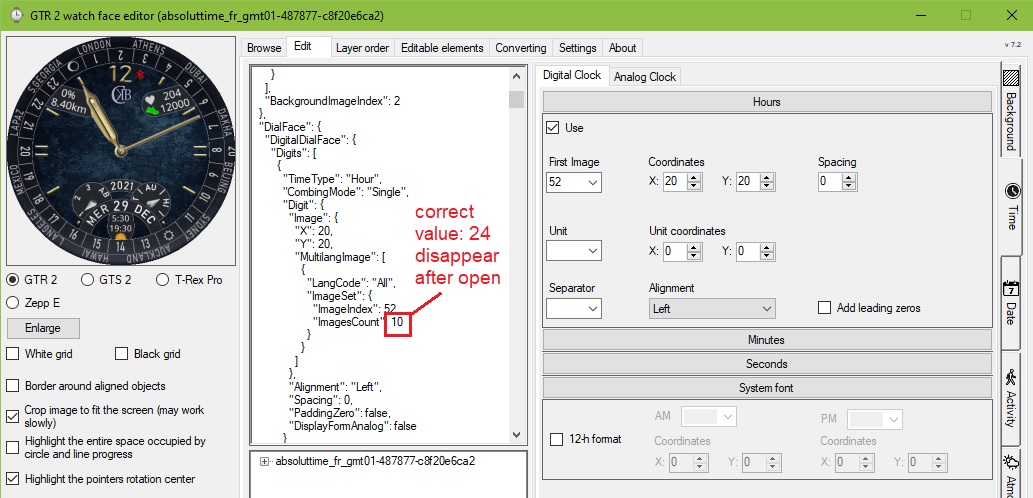
After unpacking some GMT-style watchface the initial values of "ImagesCount" of DigitalClock Hours has been reduced to 10.
I tried to change some values, manually edit this value or whatever, this value allways changed to 10.
It remains after packing to .bin too. The preview shows this immediately - the 24hour circle of GMT circle rotates only in 10 positions instead of needed correct 24.
Please help me to solve this bug of GTR2 faces.
Thank you very much!!!

Image
User avatar
SashaCX75
Posts: 820
Joined: 26 Oct 2019, 15:18
Location: Ukraine
Has thanked: 13 times
Been thanked: 1029 times
Contact:

Post by SashaCX75 »

Sinai
This cannot be done in the editor.
You can edit the json file in a text editor, then create a bin file in the editor. Not sure exactly what you want, but I think you need to still change the parameter "DisplayFormAnalog": true
shinai
Posts: 3
Joined: 16 Sep 2021, 08:50
Location: Budapest
Has thanked: 2 times
Contact:

Post by shinai »

Only want to change background and add other picture files to watchface.
The other values I don´t want exactly to change, but they are not remain as origin.
I try this, maybe it will solve the problem.
Thank for your support!
HakunaMatmata
WF maker
Posts: 3
Joined: 07 Sep 2021, 23:22
Location: Paris
Contact:

Post by HakunaMatmata »

Hello,
Thanks again for the tool and the answers here, I still have a few questions please :
- I saw in the manual you send the ability to create shortcut but did not find it in the program, is it scheduled or is it incompatible with GTR2?
- I could not find a way to display on idle screen the editable widgets, there is a native watchface that seems to do so thought (but I am not able to find the bin so I can see how it is written), is there a setting or a method I'm missing here?
- Finally, is there a way to have a progression line/picture for seconds (i'd like to create something graphical)

Thanks in advance,
almost done with my first watchface and will soon release it on the site !
Spoiler
Image
User avatar
SashaCX75
Posts: 820
Joined: 26 Oct 2019, 15:18
Location: Ukraine
Has thanked: 13 times
Been thanked: 1029 times
Contact:

Post by SashaCX75 »

HakunaMatmata
Shortcuts on GTR2 don't work.
AOD does not support editable zones.
For time, you can add circular progress, but it does not work correctly, so I did not add it to the editor. I have not tested the linear progress for time, but I think it does not work either.
shinai
Posts: 3
Joined: 16 Sep 2021, 08:50
Location: Budapest
Has thanked: 2 times
Contact:

Post by shinai »

I have to say a BIG THANK YOU to SashaCX75! Your advice was great! Simple and clever!
I was totally dumb, I tried to upload the same old bins on GTR2 instead of the correct new one :P
So Your solution already worked! I´m so happy!
So THX again & have a nice day!
Julien
Posts: 20
Joined: 27 Aug 2021, 16:50
Location: FR
Has thanked: 1 time
Contact:

Post by Julien »

SashaCX75 I'm looking at what's possible in Huami editor and what can be found in Zepp watchfaces.
Looking at the .bin file, it seems they are able to set different coordinates for units, ten, hundred, thousands digits. However I can't find how to do this in the official editor (the only one available for the Mini)
So my question is: is it the same case for GTS/GTS2? independent coordinates position is possible in your editor but not in the official one?
Thanks in advance
User avatar
SashaCX75
Posts: 820
Joined: 26 Oct 2019, 15:18
Location: Ukraine
Has thanked: 13 times
Been thanked: 1029 times
Contact:

Post by SashaCX75 »

On the GTS, you can set independent coordinates for units and tens, but only for time. This is not possible on the GTS2.
On the GTS2 mini, I think there is no such possibility. To display data, there is such a parameter as "alignment", so only the coordinates of the rectangle where the data should be placed are set and there are no separate coordinates for units and tens.
User avatar
FeRu
Posts: 39
Joined: 06 May 2021, 11:46
Location: Poland
Has thanked: 14 times
Been thanked: 8 times
Contact:

Post by FeRu »

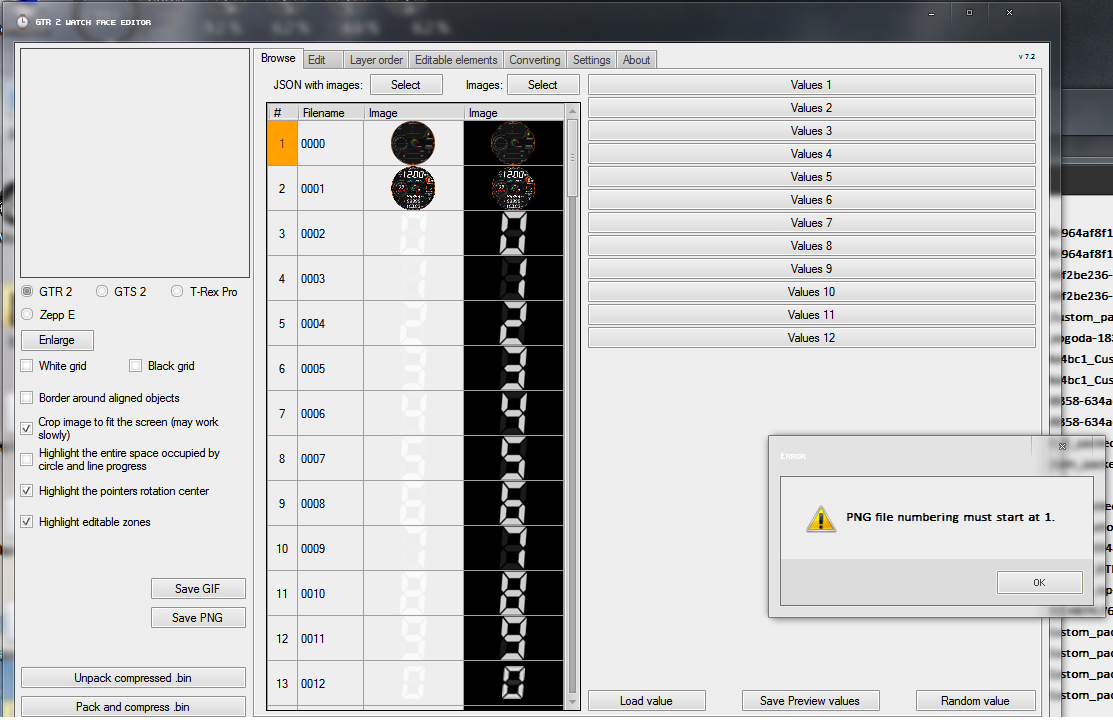
Hello guys....I'm learning to edit and convert watchfaces with this awesome software, but I have problem... After porting and editing RZ223 mod by asoo watchface from GTR47 to GTR2 with Amazfit Watchface Editor GTR to GTR2 I want edit and add more features with Amazfit Watchface Editor 2 7.2 but I cant uncompress bin file and it give me error with invalid json file and inf that png files must start with 0001, but older faces starts from 0000 :roll:
I'll try fix this problem with edit json, remove 0000 file but nothing works....
Spoiler
Image
How can I fix this problem without remade watchface from scratch??
This is watchface that I want add AOD and few other things with newest Edtior 7.2
I will be really gratefull if someone with more experience can help me 8-)

https://amazfitwatchfaces.com/gtr/view/17964

Cheers.
Attachments
rz223_zip-15485-a959407a31_PL_Custom_packed.bin
(474.79 KiB) Downloaded 181 times
rz223_zip-15485-a959407a31_2_Custom_packed.bin
(520.59 KiB) Downloaded 168 times
User avatar
asoo
Posts: 2130
Joined: 03 Jan 2019, 01:48
Location: ͼͽ Thailand ͼͽ
Has thanked: 411 times
Been thanked: 2050 times

Post by asoo »

FeRu wrote: 24 Sep 2021, 11:36
Spoiler
Hello guys....I'm learning to edit and convert watchfaces with this awesome software, but I have problem... After porting and editing RZ223 mod by @asoo watchface from GTR47 to GTR2 with Amazfit Watchface Editor GTR to GTR2 I want edit and add more features with Amazfit Watchface Editor 2 7.2 but I cant uncompress bin file and it give me error with invalid json file and inf that png files must start with 0001, but older faces starts from 0000 :roll:
I'll try fix this problem with edit json, remove 0000 file but nothing works....
Spoiler
Image
How can I fix this problem without remade watchface from scratch??
This is watchface that I want add AOD and few other things with newest Edtior 7.2
I will be really gratefull if someone with more experience can help me 8-)

https://amazfitwatchfaces.com/gtr/view/17964

Cheers.
If you're going to create it in real GTR2 format, you can't use .json derived from the conversion. You must rebuild it by use program "Amazfit Watchface Editor 2", using the resources obtained by extracting the files converted.
What you need to solve before use resources
- rename the file to start from 0001
- Added weather icon to have 29 icons as standard of GTR2.
( The weather icon obtained by converting files from GTR will only have 26 icons )
ͼͽ To request please use the interrelated forum in action ͼͽ
Please do not PM to me for requests ported watchface.
User avatar
FeRu
Posts: 39
Joined: 06 May 2021, 11:46
Location: Poland
Has thanked: 14 times
Been thanked: 8 times
Contact:

Post by FeRu »

Ohhhh ok I get it... Thanks asoo... So there is no simple and fast solution and I need to rebuild skin in Amazfit WF Editor 2 anyway....
User avatar
asoo
Posts: 2130
Joined: 03 Jan 2019, 01:48
Location: ͼͽ Thailand ͼͽ
Has thanked: 411 times
Been thanked: 2050 times

Post by asoo »

FeRu wrote: 24 Sep 2021, 13:22
Ohhhh ok I get it... Thanks @asoo... So there is no simple and fast solution and I need to rebuild skin in Amazfit WF Editor 2 anyway....
I made it for real format GTR2 ready , you can modify from this
https://amazfitwatchfaces.com/gtr/view/17999
ͼͽ To request please use the interrelated forum in action ͼͽ
Please do not PM to me for requests ported watchface.
Julien
Posts: 20
Joined: 27 Aug 2021, 16:50
Location: FR
Has thanked: 1 time
Contact:

Post by Julien »

SashaCX75 wrote: 24 Sep 2021, 06:18
On the GTS, you can set independent coordinates for units and tens, but only for time. This is not possible on the GTS2.
On the GTS2 mini, I think there is no such possibility. To display data, there is such a parameter as "alignment", so only the coordinates of the rectangle where the data should be placed are set and there are no separate coordinates for units and tens.
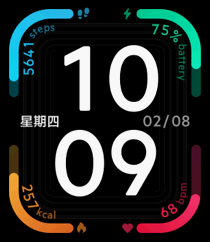
This is not possible in the official editor, but there are official Zepp watchfaces that do use independent coordinates like this one:
Image
This is confirmed when dissassembling
Image
And the json for steps looks like 5 times the digit with a different Y offset:

Code: Select all

- 3 (1A): 57 bytes
-     1 ( 8): 103 67
-     2 (12): 9 bytes
-         1 ( 8): 29 1D
-         2 (10): 59 3B
-         3 (18): 134 86
-         4 (20): 10  A
-     3 (1A): 9 bytes
-         1 ( 8): 29 1D
-         2 (10): 72 48
-         3 (18): 134 86
-         4 (20): 10  A
-     4 (22): 9 bytes
-         1 ( 8): 29 1D
-         2 (10): 85 55
-         3 (18): 134 86
-         4 (20): 10  A
-     5 (2A): 9 bytes
-         1 ( 8): 29 1D
-         2 (10): 98 62
-         3 (18): 134 86
-         4 (20): 10  A
-     6 (32): 9 bytes
-         1 ( 8): 29 1D
-         2 (10): 111 6F
-         3 (18): 134 86
-         4 (20): 10  A
User avatar
SashaCX75
Posts: 820
Joined: 26 Oct 2019, 15:18
Location: Ukraine
Has thanked: 13 times
Been thanked: 1029 times
Contact:

Post by SashaCX75 »

neFAST
It is difficult to judge from the screenshot, but you seem to be right, for GTS 2 Mini you can set independent coordinates for units, tens and hundreds. This makes it possible to display labels at an angle or in a circle with your own font.

GTS 2 has the ability to display dials from GTS, for this one byte is changed in the bin file header. If you come across a dial with a non-standard structure in the GTS 2 Mini, then pay attention to this, perhaps this is what the case.

Interesting dial, you can send the source bin file and what happened after unpacking. Curious to look at him.
Julien
Posts: 20
Joined: 27 Aug 2021, 16:50
Location: FR
Has thanked: 1 time
Contact:

Post by Julien »

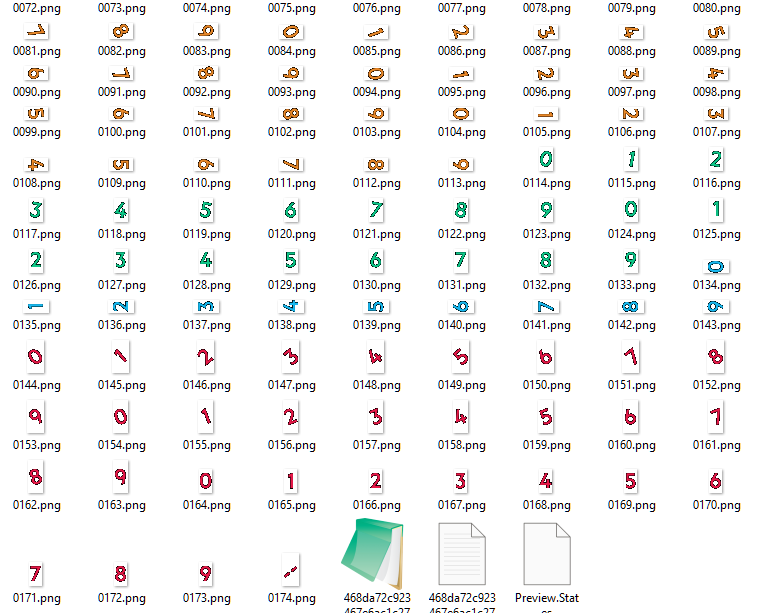
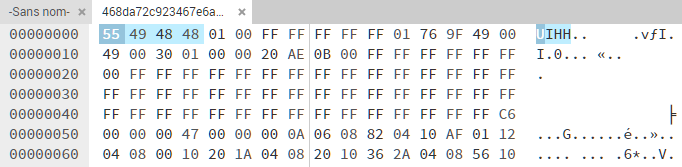
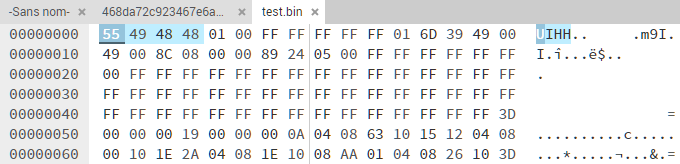
I have attached the .bin file (original file name from Zepp cache folder)
I believe the GTS 2 Mini is rebranded Bip U++ and closer to Bip series than GTS/R series
You will see it has independent offset at least for steps, bpm, battery and kcal.
Header is similar to watchface created with the editor

Image

Image
Attachments
468da72c923467e6ac1c2752a238a4b3.bin
(747.53 KiB) Downloaded 204 times
Post Reply

Return to “Watchfaces tools”

Who is online

Users browsing this forum: No registered users and 1 guest