• Amministratore
  •  
    Support Ukraine
    If you experience any problems with the forum (it is not visible, there is no way to post messages, or some functionality does not work), please let us know. If you have problems with registration or you did not receive confirmation letter, let us know and we will activate your account manually.
    If you get an "The submitted form was invalid. Try submitting again" error, delete cookies, then try again.
     

AmazFit WatchFace editor 2 for Windows

This forum is designed to discuss and develop tools creating watch faces.

Moderatori: asoo, lvpokka, Internal error, Watchmens

Regole del forum
All communication in this branch should only be in English.
To discuss tools that are not in this section, use the “Watchfaces tools (discussion)” forum.
Avatar utente
SashaCX75
Messaggi: 820
Iscritto il: 26 ott 2019, 15:18
Località: Ukraine
Has thanked: 13 times
Been thanked: 1029 times
Contatta:

AmazFit WatchFace editor 2 for Windows

Messaggio da SashaCX75 »

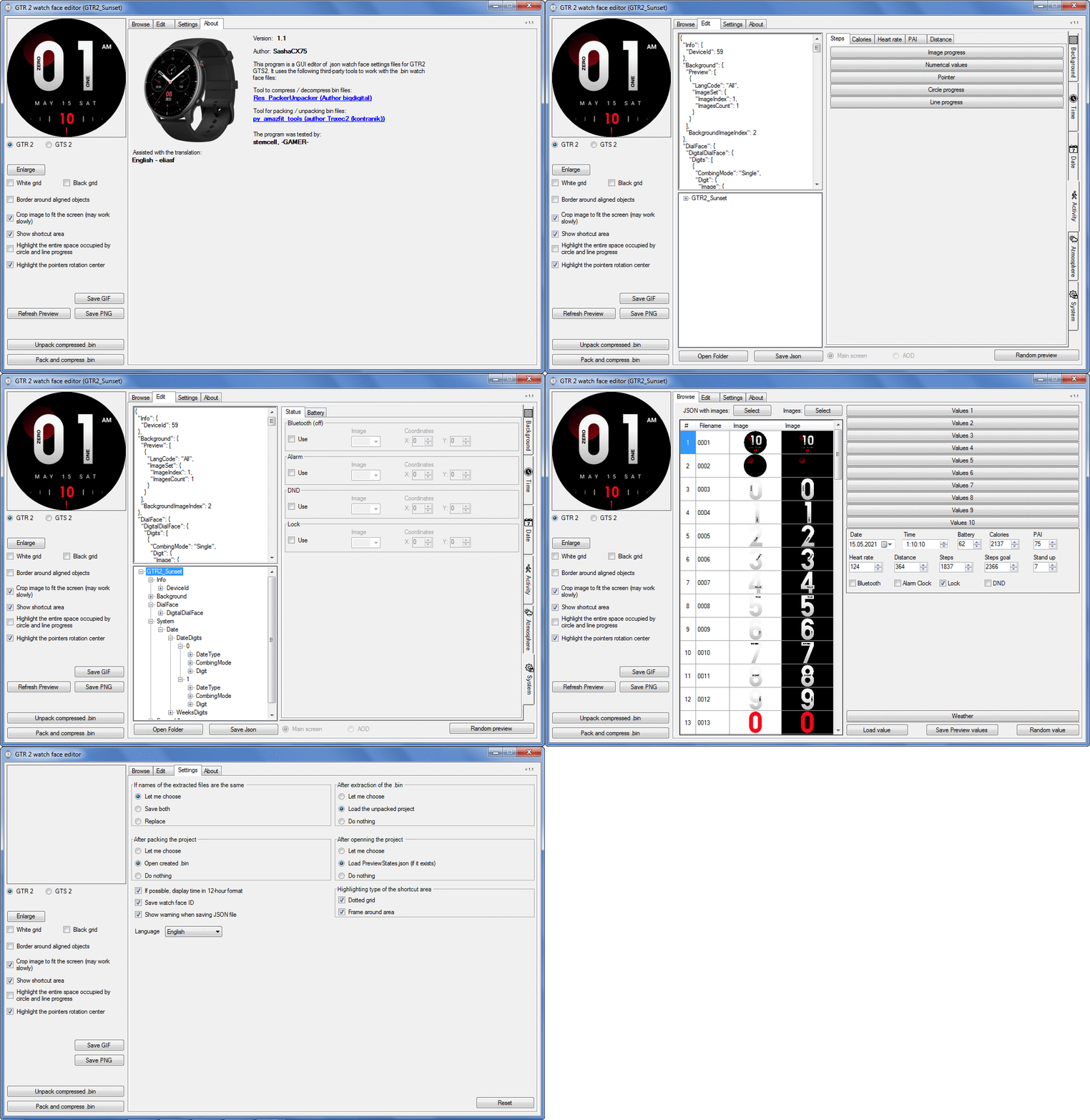
Graphics editor for working with dials Amazfit
The editor supports watch faces from GTR 2(e), GTS 2 (GTS 2e / Zepp E Square), T-Rex Pro, Zepp E Circle.
Screenshot
Screenshot
Immagine
Note: It is advisable to unpack the program to the root of the disk.
Not all dials can be unpacked.

The drawing order of elements cannot be changed. The only exception is if you move the second hand from the center, it will be drawn under the hour and minute hands.

If the .bin file is not created, then you need to look for errors in the .log file. Most often this happens when images have the wrong format.

Version 7.3
List of changes
Fixed known display bugs.
v 7.2
Fixed date display errors in editable zones.
Added support for the Hungarian language.
v 7.1
For distance added support for separate images for miles and kilometers.
v 7.0
Added support for independent coordinates for a set of pictures (segments).
v 6.0
Added support for Zepp E Circle
Added the ability to convert watch faces between different models (GTR 2 (e), Zepp E Circle, T-Rex Pro)
v 5.1
Added the ability to create and update preview images of editable zones.
v 5.0
Added support for editable zones.
v 4.1
Added the ability to display the time in the system font.
Added the ability to display the date in the system font.
Added the ability to change the order of layers.
Added the ability to overlay the clock image on the saved png and gif files (enabled in the settings).
v 4.0
Added support for the system font (inscription at an angle and in a circle).
Added support for the Sunrise parameter (not working correctly for all cities).
Added support for ActivityGoal parameter.
Added the ability to display the goal of steps.
Added support for the Icon parameter.
Added the ability to display circular and linear progress at the same time.
v 3.1
Fixed errors when displaying the distance.
Fixed errors when displaying temperature.
Added French.
Added Italian language.
v 3.0
Added support for T-Rex Pro.
Added support for new elements (StandUp, fat burning, UV index, humidity, wind, pressure).
Found bugs fixed.
v 2.1
Fixed bugs in display AOD.
Fixed bug when using pictures for circular progress.
v 2.0
Added support for AOD.
Added Chinese translation.
v 1
It can work with elements: time, date, statuses, weather, battery, steps, calories, heart rate, PAI, path.
Added English translation.
v 1.2 Added Spanish language
Old versions
Pictures created when unpacking and unpacking bin files are created by the parser and may differ from the images created in the editor. I have nothing to do with these files and am not responsible for their content.

When you turn on the "Follow ..." radio button, the right alignment and center alignment in the editor is displayed incorrectly.
The preview in the editor may differ from the image on the watch. I advise you to check the dial on a real device.

Editable zones do not work on the T-Rex Pro.

The editor does not work with GTS 2 mini (GTS U) watch faces and I do not know how to make such watch faces.

Until the Zepp app has an official watch face with animations or shortcuts, these features cannot be added to the editor.
Shortcuts work on dials converted from GTR (GTS) to GTR 2 (GTS 2). But with this method of creating dials, not all functions work correctly.

GTR (GTS, T-Rex) to GTR2 (GTS 2, T-Rex Pro) converter
GTR (GTS, T-Rex) to GTR2 (GTS 2, T-Rex Pro) Converter & Editor

Because I bought a GTR 3, the program will no longer be updated.

Donate to the author - PayPal: [email protected].
Ultima modifica di SashaCX75 il 01 giu 2022, 07:19, modificato 32 volte in totale.
[email protected]
WF maker
Messaggi: 7
Iscritto il: 15 set 2019, 14:38
Località: Poland
Has thanked: 3 times
Contatta:

Messaggio da [email protected] »

SashaCX75 ha scritto: 12 apr 2021, 07:58
AmazFit_Watchface_Editor_(GTR47ToGTR2)
Editor watch face from GTR47 / GTS / T-Rex which packs watch face in GTR2 / GTS2 / T-Rex Pro format.
Is it possible to swap the watchface from GTR2 to GTR47mm?
Avatar utente
SashaCX75
Messaggi: 820
Iscritto il: 26 ott 2019, 15:18
Località: Ukraine
Has thanked: 13 times
Been thanked: 1029 times
Contatta:

Messaggio da SashaCX75 »

[email protected] ha scritto: 09 lug 2021, 08:57
Is it possible to swap the watchface from GTR2 to GTR47mm?
Not. You can only extract resources from the GTR2 dial and use them to make a dial for the GTR47.
theleon
Messaggi: 1
Iscritto il: 08 lug 2021, 23:33
Località: Netherlands
Contatta:

Messaggio da theleon »

Downloaded the latest version, and when trying to open any GTR 2 watchface, I get the following errors:

- "PNG files go out of order or some of the files are missing"

and right after:

- "Invalid JSON file. ... Cannot deserialize current JSON arary into type 'GTR_Watch_face.ImageW'"

While the errors can be clicked away, the preview stays blank. Any idea what I'm doing wrong?
It's my first time using this editor.

EDIT: Nevermind, got it to work. Had downloaded the "GTR (GTS, T-Rex) to GTR2 (GTS 2, T-Rex Pro) Converter & Editor" instead of the Version 5.0... Didn't realize you could click on the Version 5.0, woops.
EXS
WF maker
Messaggi: 11
Iscritto il: 25 giu 2021, 18:51
Località: Rio de Janeiro, Brazil
Has thanked: 3 times
Contatta:

Messaggio da EXS »

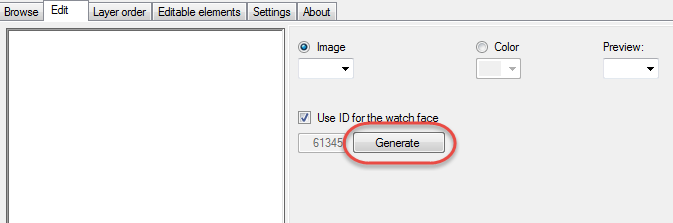
Hi everyone, I have a question, Im translating a watchface from czech to english, it's my first time trying the app. What do I do about the "Watchface.ID" file? Do I change the id to something else? How do I know what ID to use?

And there's anything else I need to do before packing it and sending to the website?
Avatar utente
SashaCX75
Messaggi: 820
Iscritto il: 26 ott 2019, 15:18
Località: Ukraine
Has thanked: 13 times
Been thanked: 1029 times
Contatta:

Messaggio da SashaCX75 »

EXS
The "Watchface.ID" file can be changed or deleted. But, in order to avoid mistakes, I advise you to use the appropriate button in the editor for this.
Immagine
EXS
WF maker
Messaggi: 11
Iscritto il: 25 giu 2021, 18:51
Località: Rio de Janeiro, Brazil
Has thanked: 3 times
Contatta:

Messaggio da EXS »

Thanks for the quick response, SashaCX75 .

I have another question: How do I add different pictures for different languages on a Watchface?

Example:
https://amazfitwatchfaces.com/t-rex/view/6396
I have this watchface in english but I would like to support other languages on it. How do I do it?
Avatar utente
SashaCX75
Messaggi: 820
Iscritto il: 26 ott 2019, 15:18
Località: Ukraine
Has thanked: 13 times
Been thanked: 1029 times
Contatta:

Messaggio da SashaCX75 »

EXS
No way. Just make a separate dial for each language.
Pal57
WF maker
Messaggi: 4
Iscritto il: 09 feb 2021, 21:10
Località: San Marino
Contatta:

Messaggio da Pal57 »

Hi,
I just downloaded Ver. 5 for my GTR 2 but there are 2 labels on top near the "edit" label that are written in russian and even all functions inside of them are in russian.
I think they are the "Layer Order" and the "Editable Elements".
I would like to have them in italian.
Thanks
Pal57
gg00
Messaggi: 8
Iscritto il: 07 mar 2020, 15:20
Località: Jesenice
Contatta:

Messaggio da gg00 »

I cant open instructions from the app. Where can I find instructions?
Avatar utente
SashaCX75
Messaggi: 820
Iscritto il: 26 ott 2019, 15:18
Località: Ukraine
Has thanked: 13 times
Been thanked: 1029 times
Contatta:

Messaggio da SashaCX75 »

Pal07
I do not translate the program and only use the translations provided to me. If someone makes a translation, I will add it to the program.

gg00
Here is a link to instructions from the previous version of the program. But a lot will work for this version too.
viewtopic.php?f=14&t=1571
gg00
Messaggi: 8
Iscritto il: 07 mar 2020, 15:20
Località: Jesenice
Contatta:

Messaggio da gg00 »

Thanks.

I have the following issue. After I uncheck analog clock from gtr 47 I then convert watch face to gtr 2 but dials are still there, they are not removed. What is the problem?
Avatar utente
CASIONFAN2021
WF maker
Messaggi: 31
Iscritto il: 16 apr 2021, 21:23
Località: uk
Has thanked: 1 time
Been thanked: 4 times
Contatta:

Messaggio da CASIONFAN2021 »

How do you use the editable zones.. im a bit stumped as to how to use them and what they are for..
LUCASREIS
WF maker
Messaggi: 3
Iscritto il: 02 apr 2021, 00:07
Località: Goiânia
Has thanked: 3 times
Contatta:

Messaggio da LUCASREIS »

Hi Sasha, unfortunately I couldn't do the values ​​related to the barometer in any attempt, I've done it in several ways.
Avatar utente
SashaCX75
Messaggi: 820
Iscritto il: 26 ott 2019, 15:18
Località: Ukraine
Has thanked: 13 times
Been thanked: 1029 times
Contatta:

Messaggio da SashaCX75 »

LUCASREIS
Doesn't work on T-Rex Pro. On GTR 2 (e), to update the barometer readings, you need to go to the clock on the widgets > altimeter. I have no information about how this parameter works on GTS 2.
gg00
Messaggi: 8
Iscritto il: 07 mar 2020, 15:20
Località: Jesenice
Contatta:

Messaggio da gg00 »

All of sudden when I press to unpack bin nothing happens.
Avatar utente
SashaCX75
Messaggi: 820
Iscritto il: 26 ott 2019, 15:18
Località: Ukraine
Has thanked: 13 times
Been thanked: 1029 times
Contatta:

Messaggio da SashaCX75 »

Version 5.1
Added the ability to create and update preview images of editable zones.
demiurg1
WF maker
Messaggi: 114
Iscritto il: 23 feb 2020, 22:49
Località: Poland
Has thanked: 23 times
Been thanked: 17 times
Contatta:

Messaggio da demiurg1 »

SashaCX75,
Thanks for the 5.1 version of the program, thanks to which I made my first project with "Editable Zones"
These are just two zones that I described at the link to my project: https://amazfitwatchfaces.com/gtr/view/16696.
In my next designs of watch faces, "Zones" will probably also appear.
LUCASREIS
WF maker
Messaggi: 3
Iscritto il: 02 apr 2021, 00:07
Località: Goiânia
Has thanked: 3 times
Contatta:

Messaggio da LUCASREIS »

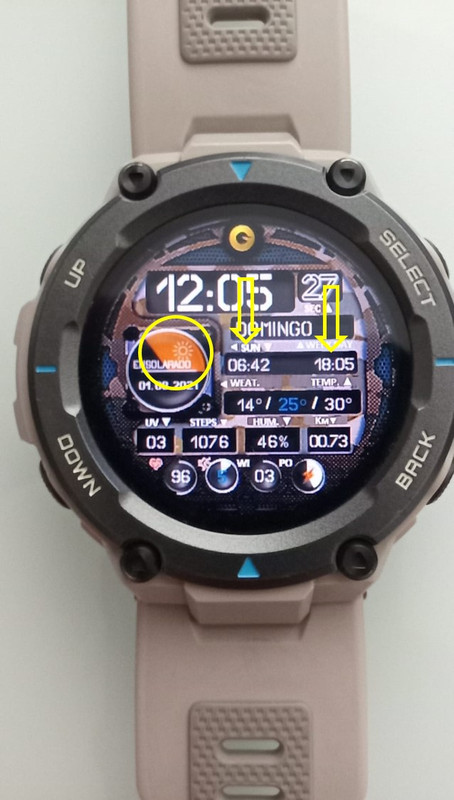
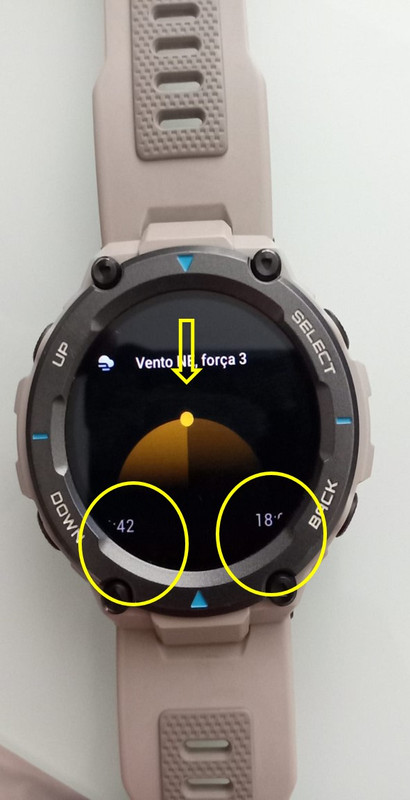
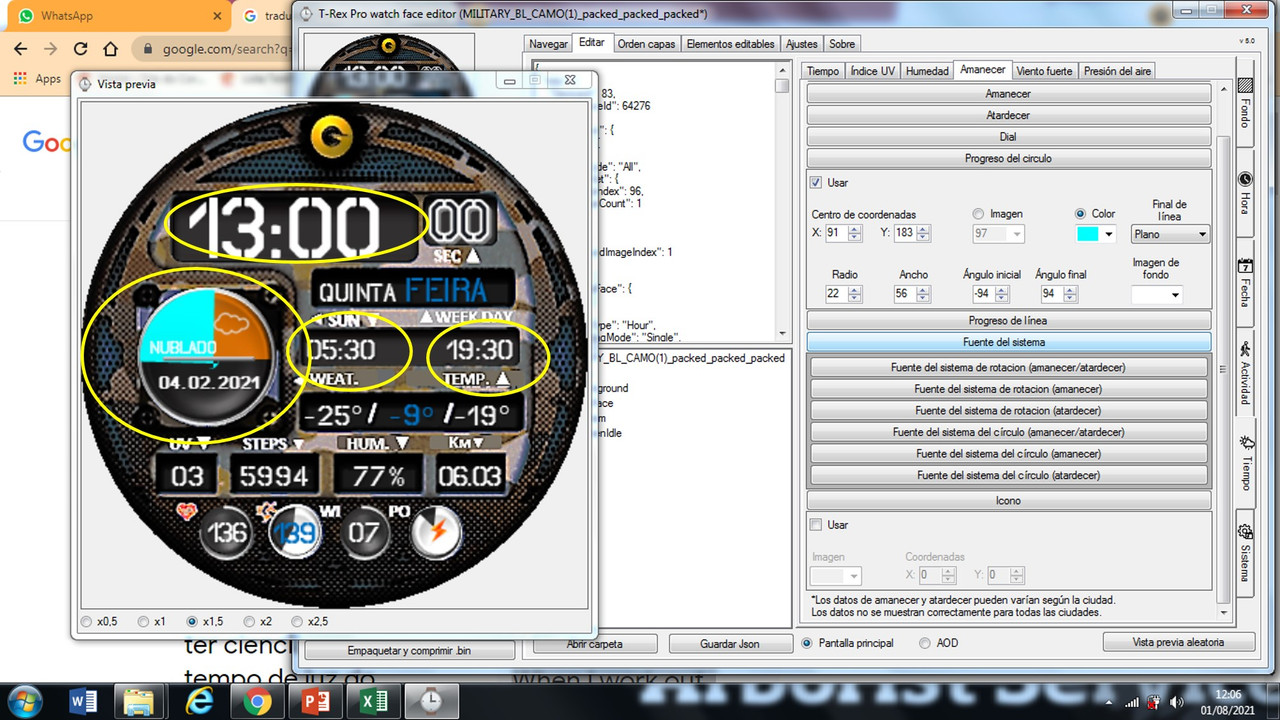
Hi Sasha, I have the T-rex pro, and have been working on creating a "circle progress" related to dawn, to be aware of the time of daylight I have left to give instructions.

When I work out whatch against the parameters, sunrise and sunset look correct in the program, but when I install it on the watch the reference parameters of "circle progress" do not match the clock markings and the graph loses confidence.

All data has been checked and corrected including the angles but the problem persists.

Follow the photos to try to demonstrate.

Grateful for the attention.
Spoiler
Immagine

Immagine

Immagine
Avatar utente
SashaCX75
Messaggi: 820
Iscritto il: 26 ott 2019, 15:18
Località: Ukraine
Has thanked: 13 times
Been thanked: 1029 times
Contatta:

Messaggio da SashaCX75 »

LUCASREIS
The sunrise time is 5:30 and the sunset time is 19:30 in the editor is selected conditionally. In reality, this time on the clock is constantly changing and depends on the selected city and season.
The "circle progress" indicator, in theory, should match the picture on the clock, which is in your message. But in reality, in the dial, he always lagged behind this image on the clock.

I got the impression that the dials for these paramaters do not take into account the time zone. But I can't do anything about it because the dials made in the official editor behave exactly the same. Perhaps for some cities these parameters are displayed correctly, so I did not remove them from the editor.

For me, only the sunrise and sunset times are correctly displayed, the other parameters do not work correctly.
nothing.tn
WF maker
Messaggi: 4
Iscritto il: 20 mar 2020, 07:38
Località: Viet Nam
Contatta:

Messaggio da nothing.tn »

SashaCX75 Can you make tool to unpack file .bin for gts 2 mini. Thanks!!!
LUCASREIS
WF maker
Messaggi: 3
Iscritto il: 02 apr 2021, 00:07
Località: Goiânia
Has thanked: 3 times
Contatta:

Messaggio da LUCASREIS »

Hello @SashaCX75, I noticed that by the movement of the sun still dealing with the “circle progress” indicator it seems to keep the conditioned times in the editor not capturing the daily updated values ​​on the clock.


The “circle progress” indicator, in theory, should coincide with the clock image, which is in its message, but in reality, on the dial, it always lags behind that image on the clock.

I don't think it's related to the time zone, but rather to where the information is being collected. Because it seems to keep the data of (dawn = 05:30 and sunset = 19:30)


SashaCX75 ha scritto: 01 ago 2021, 16:13
@LUCASREIS
The sunrise time is 5:30 and the sunset time is 19:30 in the editor is selected conditionally. In reality, this time on the clock is constantly changing and depends on the selected city and season.
The "circle progress" indicator, in theory, should match the picture on the clock, which is in your message. But in reality, in the dial, he always lagged behind this image on the clock.

I got the impression that the dials for these paramaters do not take into account the time zone. But I can't do anything about it because the dials made in the official editor behave exactly the same. Perhaps for some cities these parameters are displayed correctly, so I did not remove them from the editor.

For me, only the sunrise and sunset times are correctly displayed, the other parameters do not work correctly.
Avatar utente
SashaCX75
Messaggi: 820
Iscritto il: 26 ott 2019, 15:18
Località: Ukraine
Has thanked: 13 times
Been thanked: 1029 times
Contatta:

Messaggio da SashaCX75 »

LUCASREIS
I wrote in my message that the “circle progress” for sunrise and sunset in the dial lags behind a similar indicator in the clock itself. I assume that this is due to the incorrect work of time zones. Since there are the same errors in the dials created in the official editor from the watch manufacturer, these are errors in the watch firmware.

nothing.tn
I'm not going to make a utility for unpacking .bin files for gts 2 mini. May editor uses a third-party utility to unpack .bin files/
nothing.tn
WF maker
Messaggi: 4
Iscritto il: 20 mar 2020, 07:38
Località: Viet Nam
Contatta:

Messaggio da nothing.tn »

SashaCX75 what is that tool? Can you give me name, or link download. Many thanks!!
ScaredyCat
WF maker
Messaggi: 2
Iscritto il: 03 ago 2021, 22:52
Località: a dark cave
Has thanked: 1 time
Contatta:

Messaggio da ScaredyCat »

Is this the best place to report bugs?

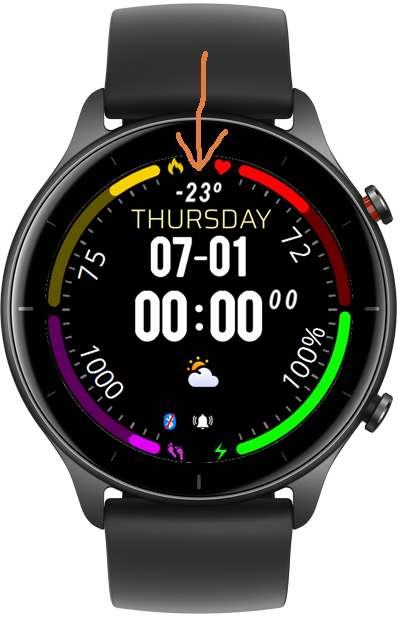
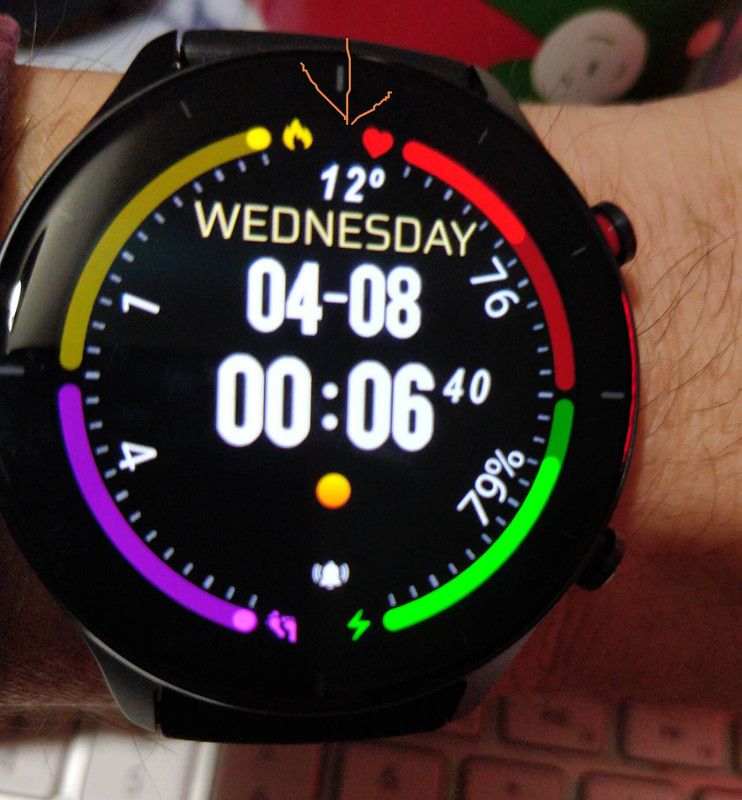
GTR2e, latest firmware. All looks fine in the editor (version 5.1) but in the generated face the x coordinate seems to stick so that it's offset. I can change the Y with no issues. I tried moving I down to the right of the weather cloud just to see if I was doing somehitng dumb. It just lined up with the sam x corordinate - the y changed as expected.

In the editor I can position it where I want with no problems, the issue arises in the face after generation/installation.

Image attached, orange arrow point to the problem item.
Spoiler
Immagine

Immagine
Avatar utente
SashaCX75
Messaggi: 820
Iscritto il: 26 ott 2019, 15:18
Località: Ukraine
Has thanked: 13 times
Been thanked: 1029 times
Contatta:

Messaggio da SashaCX75 »

ScaredyCat
This is a bug in the watch firmware. If there is a weather icon and the temperature is aligned to the center, the inscription is aligned to the center of the icon. I cannot fix this, but I will try to take into account in the next update of the editor, so that the image in the editor matches the image in the clock.
Rispondi

Torna a “Watchfaces tools”

Chi c’è in linea

Visitano il forum: Nessuno e 1 ospite