• Administrator
  •  
    Support Ukraine
    If you experience any problems with the forum (it is not visible, there is no way to post messages, or some functionality does not work), please let us know. If you have problems with registration or you did not receive confirmation letter, let us know and we will activate your account manually.
    If you get an "The submitted form was invalid. Try submitting again" error, delete cookies, then try again.
     

AmazFit WatchFace editor 2 for Windows

This forum is designed to discuss and develop tools creating watch faces.

Moderators: asoo, lvpokka, Internal error, Watchmens

Forum rules
All communication in this branch should only be in English.
To discuss tools that are not in this section, use the “Watchfaces tools (discussion)” forum.
Post Reply
User avatar
SashaCX75
Posts: 820
Joined: 26 Oct 2019, 15:18
Location: Ukraine
Has thanked: 13 times
Been thanked: 1029 times
Contact:

AmazFit WatchFace editor 2 for Windows

Post by SashaCX75 »

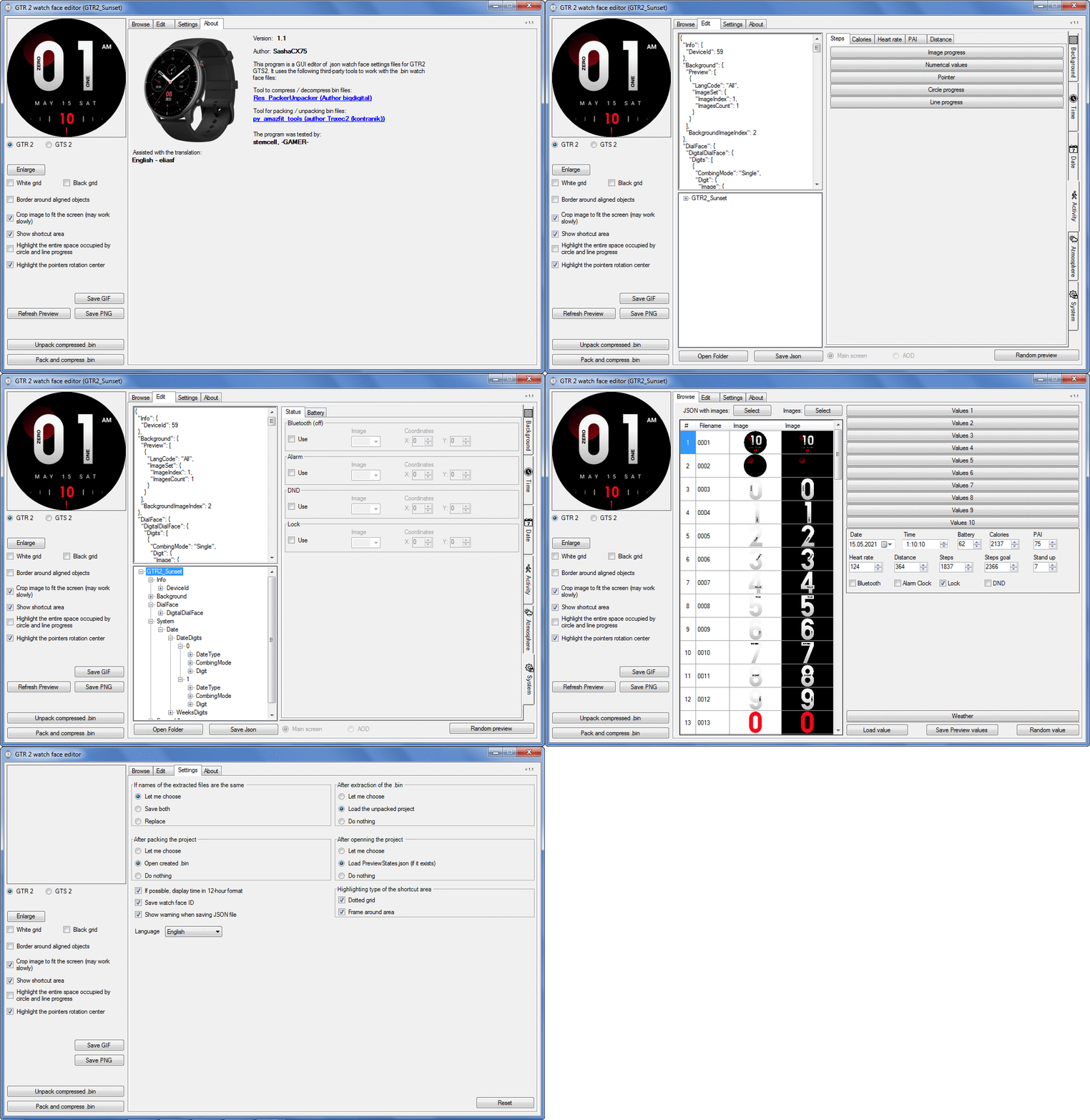
Graphics editor for working with dials Amazfit
The editor supports watch faces from GTR 2(e), GTS 2 (GTS 2e / Zepp E Square), T-Rex Pro, Zepp E Circle.
Screenshot
Screenshot
Image
Note: It is advisable to unpack the program to the root of the disk.
Not all dials can be unpacked.

The drawing order of elements cannot be changed. The only exception is if you move the second hand from the center, it will be drawn under the hour and minute hands.

If the .bin file is not created, then you need to look for errors in the .log file. Most often this happens when images have the wrong format.

Version 7.3
List of changes
Fixed known display bugs.
v 7.2
Fixed date display errors in editable zones.
Added support for the Hungarian language.
v 7.1
For distance added support for separate images for miles and kilometers.
v 7.0
Added support for independent coordinates for a set of pictures (segments).
v 6.0
Added support for Zepp E Circle
Added the ability to convert watch faces between different models (GTR 2 (e), Zepp E Circle, T-Rex Pro)
v 5.1
Added the ability to create and update preview images of editable zones.
v 5.0
Added support for editable zones.
v 4.1
Added the ability to display the time in the system font.
Added the ability to display the date in the system font.
Added the ability to change the order of layers.
Added the ability to overlay the clock image on the saved png and gif files (enabled in the settings).
v 4.0
Added support for the system font (inscription at an angle and in a circle).
Added support for the Sunrise parameter (not working correctly for all cities).
Added support for ActivityGoal parameter.
Added the ability to display the goal of steps.
Added support for the Icon parameter.
Added the ability to display circular and linear progress at the same time.
v 3.1
Fixed errors when displaying the distance.
Fixed errors when displaying temperature.
Added French.
Added Italian language.
v 3.0
Added support for T-Rex Pro.
Added support for new elements (StandUp, fat burning, UV index, humidity, wind, pressure).
Found bugs fixed.
v 2.1
Fixed bugs in display AOD.
Fixed bug when using pictures for circular progress.
v 2.0
Added support for AOD.
Added Chinese translation.
v 1
It can work with elements: time, date, statuses, weather, battery, steps, calories, heart rate, PAI, path.
Added English translation.
v 1.2 Added Spanish language
Old versions
Pictures created when unpacking and unpacking bin files are created by the parser and may differ from the images created in the editor. I have nothing to do with these files and am not responsible for their content.

When you turn on the "Follow ..." radio button, the right alignment and center alignment in the editor is displayed incorrectly.
The preview in the editor may differ from the image on the watch. I advise you to check the dial on a real device.

Editable zones do not work on the T-Rex Pro.

The editor does not work with GTS 2 mini (GTS U) watch faces and I do not know how to make such watch faces.

Until the Zepp app has an official watch face with animations or shortcuts, these features cannot be added to the editor.
Shortcuts work on dials converted from GTR (GTS) to GTR 2 (GTS 2). But with this method of creating dials, not all functions work correctly.

GTR (GTS, T-Rex) to GTR2 (GTS 2, T-Rex Pro) converter
GTR (GTS, T-Rex) to GTR2 (GTS 2, T-Rex Pro) Converter & Editor

Because I bought a GTR 3, the program will no longer be updated.

Donate to the author - PayPal: [email protected].
Last edited by SashaCX75 on 01 Jun 2022, 07:19, edited 32 times in total.
y.ertanc65
Posts: 1
Joined: 21 Apr 2021, 10:15
Location: Istanbul
Has thanked: 1 time
Contact:

Post by y.ertanc65 »

Hello Sasha,
I have downloaded an interface from AndiL ( https://amazfitwatchfaces.com/gtr/view/13165 ) and if I use as it is, works perfectly and shows humidity on the watch (GTR 2e) screen. But if I import it to editor V2.1 it breaks "humidity" feature and I can't find a way to bring it back in JSON settings.

Do you have any solution for this problem?
Thanks in advance.
gengtrex
WF maker
Posts: 18
Joined: 06 Feb 2021, 02:47
Location: nonthaburi
Has thanked: 4 times
Been thanked: 1 time
Contact:

Post by gengtrex »

SashaCX75 wrote: 21 Apr 2021, 16:15
@gengtrex , @tlausl
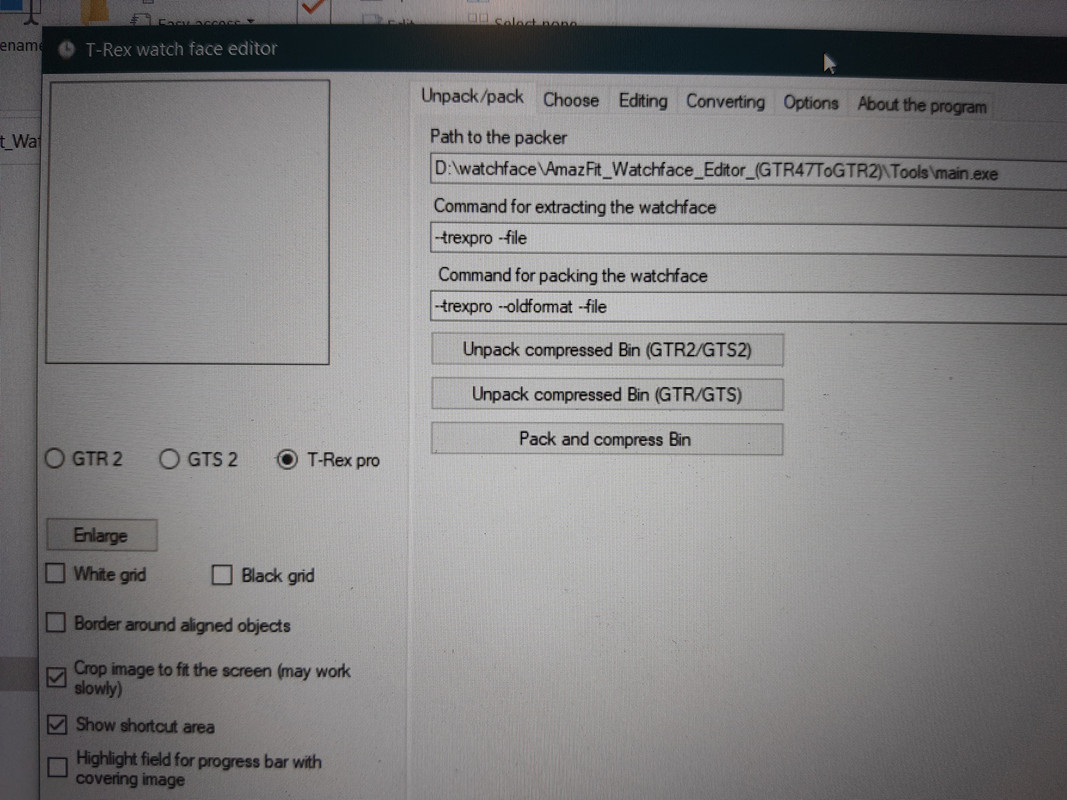
I do not know which version you are talking about. The version 2.1 posted here is not designed to work with Trex-pro (but according to user reviews, the dials created in it work on Trex-pro). The last test version that I sent to several users, according to their feedback, creates watch faces for Trex-pro well and they work. Here is an example of a watch face created in it.
https://amazfitwatchfaces.com/t-rex/view/5187

Image

i used this one, sasha.
is it a wrong one for t-rex pro?
User avatar
SashaCX75
Posts: 820
Joined: 26 Oct 2019, 15:18
Location: Ukraine
Has thanked: 13 times
Been thanked: 1029 times
Contact:

Post by SashaCX75 »

gengtrex
Updated the file. Check now, I can't check on Trex-pro

If this does not help, then you can configure the watch face in Trex-pro mode and switch to GTR 2 before creating the bin file.

Dials created in this program do not work very well. I advise you to wait for the release of WatchFace editor 2 v.3 and make watch faces in this editor in the future.
gengtrex
WF maker
Posts: 18
Joined: 06 Feb 2021, 02:47
Location: nonthaburi
Has thanked: 4 times
Been thanked: 1 time
Contact:

Post by gengtrex »

SashaCX75 wrote: 22 Apr 2021, 14:36
@gengtrex
Updated the file. Check now, I can't check on Trex-pro

If this does not help, then you can configure the watch face in Trex-pro mode and switch to GTR 2 before creating the bin file.

Dials created in this program do not work very well. I advise you to wait for the release of WatchFace editor 2 v.3 and make watch faces in this editor in the future.
thnx a miliion, sasha. i'll try it immediately.
Fulvio_61
WF maker
Posts: 9
Joined: 21 Mar 2021, 13:59
Location: Novara
Has thanked: 1 time
Been thanked: 1 time
Contact:

Post by Fulvio_61 »

SashaCX75

Hi Sasha, maybe you know a way to open / view PPNG (Protected PNG) files? I have searched and tried different programs, but it seems impossible!
tangerinedream
Posts: 1
Joined: 21 Apr 2021, 21:03
Location: World
Contact:

Post by tangerinedream »

SashaCX75

Hi.

Thanks for the great program.

I'm having the exact same issue with a commenter just above (first comment on this page). Watch faces with 'Humidity' feature gets broken if you import it into the editor and this issue is somehow related with PAI feature aswell.

I'd like to know if you're aware of this issue or not.

Cheers.
gengtrex
WF maker
Posts: 18
Joined: 06 Feb 2021, 02:47
Location: nonthaburi
Has thanked: 4 times
Been thanked: 1 time
Contact:

Post by gengtrex »

latest, i use the converter (gtr-gtr2) to convert my t-rex file into t-rex pro.
it worked! but year was gone.
how can i fix it, SashaCX75 ?

thanks.
msmolinski
WF maker
Posts: 2
Joined: 21 Apr 2021, 21:20
Location: Poland
Has thanked: 1 time
Contact:

Post by msmolinski »

I used this app to edit one of the watchfaces for GTR 2e. (gtr/view/14442)
I've got a problem. When I've installed it, it works fine but I can't access watchface settings and can't change widgets. When I access watchface changing screen and press edit button it all just freeze and nothing happens. In original watchface everything worked fine and I've changed only images and their positions in JSON file.

Also I don't understand why I don't see widgets on preview of my watchface in this editor, is there something wrong with them?

Please help.
Attachments
classic-aod-widget_pl.zip
Project files
(410.24 KiB) Downloaded 169 times
User avatar
SashaCX75
Posts: 820
Joined: 26 Oct 2019, 15:18
Location: Ukraine
Has thanked: 13 times
Been thanked: 1029 times
Contact:

Post by SashaCX75 »

Fulvio_61
I have not come across PPNG files
User avatar
SashaCX75
Posts: 820
Joined: 26 Oct 2019, 15:18
Location: Ukraine
Has thanked: 13 times
Been thanked: 1029 times
Contact:

Post by SashaCX75 »

y.ertanc65 , tangerinedream
Version 2.1 does not support the Humidity parameter. This is why the dials created in this version do not have this element.

PAI should work. If this is not the case, then send the dial where it does not work, I will check.
User avatar
SashaCX75
Posts: 820
Joined: 26 Oct 2019, 15:18
Location: Ukraine
Has thanked: 13 times
Been thanked: 1029 times
Contact:

Post by SashaCX75 »

gengtrex
When converting, not all elements work. The animation does not work exactly, year. There should only be one kind of display for the battery, otherwise it won't work. If the dial had the am / pm designations, then they must be added again.

Therefore, I did not recommend using this program.
User avatar
SashaCX75
Posts: 820
Joined: 26 Oct 2019, 15:18
Location: Ukraine
Has thanked: 13 times
Been thanked: 1029 times
Contact:

Post by SashaCX75 »

msmolinski
The current version of the editor does not support widgets. But it should save them if you add them to json manually.
Perhaps the current version has some problems with this. Check this file.
Attachments
classic-aod-widget_pl_packed.zip
(164.12 KiB) Downloaded 155 times
msmolinski
WF maker
Posts: 2
Joined: 21 Apr 2021, 21:20
Location: Poland
Has thanked: 1 time
Contact:

Post by msmolinski »

SashaCX75 Thanks for the info. It seems that there may be some problem with it in current version. I've checked it with another watchface and there was the same problem.

File you attached works well. Thanks for help.
User avatar
SashaCX75
Posts: 820
Joined: 26 Oct 2019, 15:18
Location: Ukraine
Has thanked: 13 times
Been thanked: 1029 times
Contact:

Post by SashaCX75 »

Version 3.0
Added support for T-Rex Pro.
Added support for new elements (StandUp, fat burning, UV index, humidity, wind, pressure).
Found bugs fixed.
tlausl
Posts: 3
Joined: 31 Mar 2021, 12:43
Location: Kassel
Has thanked: 3 times
Contact:

Post by tlausl »

Thanks for your new Version, works perfekt for me. Thanks a lot.
arlemm
WF maker
Posts: 3
Joined: 28 Mar 2021, 06:00
Location: Italia
Contact:

Post by arlemm »

Thank you SashaCX75 for your great work.
I wont report you that in version 2.3 (Version 3.0) when used "Random value" button in Edit mode, the current temperature data are always in "error"; in Browse mode it works properly.
User avatar
SashaCX75
Posts: 820
Joined: 26 Oct 2019, 15:18
Location: Ukraine
Has thanked: 13 times
Been thanked: 1029 times
Contact:

Post by SashaCX75 »

arlemm
I will fix it in the next update.
An error occurs if the symbol is not specified for a weather data error. If the error occurs in some other cases, then send the dial, I will check.
arlemm
WF maker
Posts: 3
Joined: 28 Mar 2021, 06:00
Location: Italia
Contact:

Post by arlemm »

SashaCX75 wrote: 25 Apr 2021, 05:35
@arlemm
I will fix it in the next update.
An error occurs if the symbol is not specified for a weather data error. If the error occurs in some other cases, then send the dial, I will check.
Thank you for your answer.... I have checked and it happens with any watch face even when the symbol is specified
Attachments
big_num_IT.bin
(1.63 MiB) Downloaded 181 times
arlemm
WF maker
Posts: 3
Joined: 28 Mar 2021, 06:00
Location: Italia
Contact:

Post by arlemm »

@SashaCX75
If you want, I could translate your program's UI into Italian (from English ;) :D).
Titchy2005
WF maker
Posts: 1
Joined: 03 Feb 2020, 20:40
Location: Norwich

Post by Titchy2005 »

Are shortcuts like on the GTS available for GTS2 watchfaces?
spidercrab
Posts: 24
Joined: 25 Jun 2020, 09:13
Location: UK
Has thanked: 27 times
Been thanked: 3 times
Contact:

Post by spidercrab »

SashaCX75 In the Digital time settings, what does the "Unit" refer to? Also does this need to be set?

I am debugging a V3 face and I have not set the Unit Index image, but I notice that in the ...packed.log that the value of 28 has been used for the Unit:

This is what I see:
"MultilangImageUnit": [
{
"LangCode": "All",
"ImageSet": {
"ImageIndex": 28,
"ImagesCount": 1
}
}

My last image is 0028.png.
Last edited by spidercrab on 25 Apr 2021, 14:37, edited 1 time in total.
User avatar
SashaCX75
Posts: 820
Joined: 26 Oct 2019, 15:18
Location: Ukraine
Has thanked: 13 times
Been thanked: 1029 times
Contact:

Post by SashaCX75 »

Titchy2005
Not. Officially, they are there, but they don't work.

spidercrab
The names in the editor and inside the json file are not always the same. In this case, in the editor, this parameter is called "Separator"
Kifrawi

Post by Kifrawi »

SashaCX75
Weather > Current Temperature > Error
spidercrab
Posts: 24
Joined: 25 Jun 2020, 09:13
Location: UK
Has thanked: 27 times
Been thanked: 3 times
Contact:

Post by spidercrab »

SashaCX75 I just wanted to say a huge thank you for the V3 Editor that now supports the T-Rex Pro. It works perfectly for me and there are a lot of cool new features compared to using the original GTR Editor.

To my surprise, you can add several custom WF's to the T-Rex Pro and choose them from the watch, which I was not expecting.
NuttyS
WF maker
Posts: 1
Joined: 15 Nov 2019, 14:36
Has thanked: 2 times

Post by NuttyS »

SashaCX75 wrote: 12 Apr 2021, 07:55
Converter watch face from GTR47 / GTS / T-Rex in GTR2 / GTS2 / T-Rex Pro watch face format.
Not all elements work after conversion. Of the advantages of such dials, I consider only working labels and the ability to set different fonts and independent coordinates for tens and units in time.

https://www.dropbox.com/s/7ouokjm8qjkag ... 2.zip?dl=0

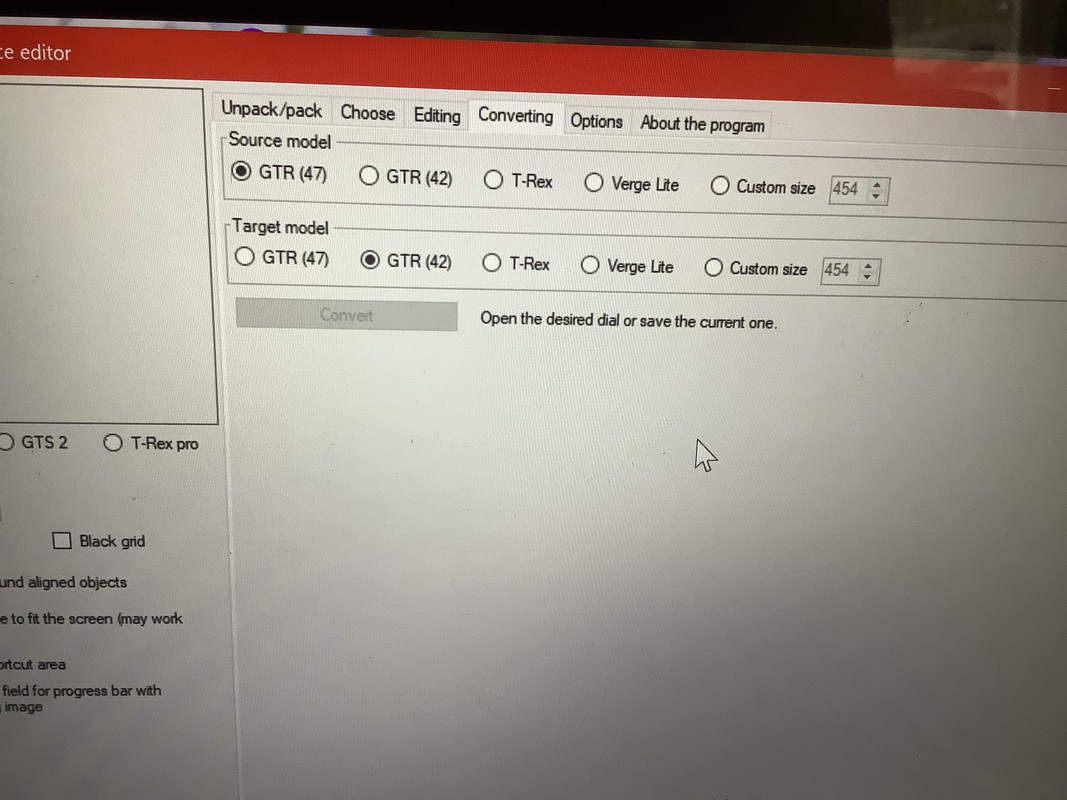
I’m so sorry to be a pest, but I’m new to this bit, I can’t work out how to convert a gtr face to work on a gtr 2e. That’s what this is for right? But I can’t figure it out.

I assumed it would be the convert bit, but there’s no gtr 2e.
Image
Last edited by NuttyS on 28 Apr 2021, 12:30, edited 2 times in total.
Post Reply

Return to “Watchfaces tools”

Who is online

Users browsing this forum: Mawel and 3 guests