• Administrator
  •  
    Support Ukraine
    If you experience any problems with the forum (it is not visible, there is no way to post messages, or some functionality does not work), please let us know. If you have problems with registration or you did not receive confirmation letter, let us know and we will activate your account manually.
    If you get an "The submitted form was invalid. Try submitting again" error, delete cookies, then try again.
     

AmazFit WatchFace editor 2 for Windows

This forum is designed to discuss and develop tools creating watch faces.

Moderators: asoo, lvpokka, Internal error, Watchmens

Forum rules
All communication in this branch should only be in English.
To discuss tools that are not in this section, use the “Watchfaces tools (discussion)” forum.
User avatar
SashaCX75
Posts: 812
Joined: 26 Oct 2019, 15:18
Location: Ukraine
Has thanked: 13 times
Been thanked: 1007 times
Contact:

AmazFit WatchFace editor 2 for Windows

Post by SashaCX75 »

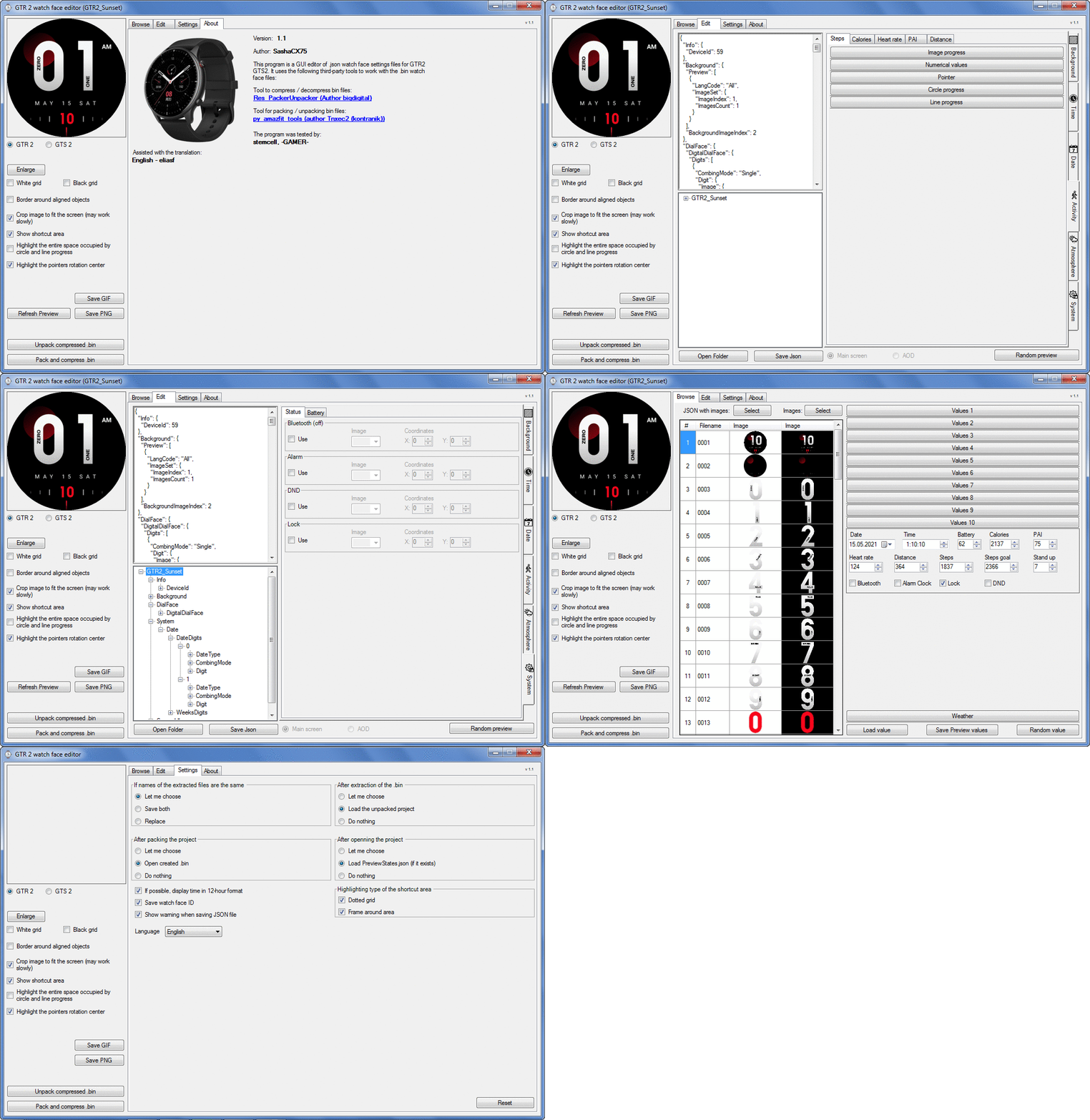
Graphics editor for working with dials Amazfit
The editor supports watch faces from GTR 2(e), GTS 2 (GTS 2e / Zepp E Square), T-Rex Pro, Zepp E Circle.
Screenshot
Screenshot
Image
Note: It is advisable to unpack the program to the root of the disk.
Not all dials can be unpacked.

The drawing order of elements cannot be changed. The only exception is if you move the second hand from the center, it will be drawn under the hour and minute hands.

If the .bin file is not created, then you need to look for errors in the .log file. Most often this happens when images have the wrong format.

Version 7.3
List of changes
Fixed known display bugs.
v 7.2
Fixed date display errors in editable zones.
Added support for the Hungarian language.
v 7.1
For distance added support for separate images for miles and kilometers.
v 7.0
Added support for independent coordinates for a set of pictures (segments).
v 6.0
Added support for Zepp E Circle
Added the ability to convert watch faces between different models (GTR 2 (e), Zepp E Circle, T-Rex Pro)
v 5.1
Added the ability to create and update preview images of editable zones.
v 5.0
Added support for editable zones.
v 4.1
Added the ability to display the time in the system font.
Added the ability to display the date in the system font.
Added the ability to change the order of layers.
Added the ability to overlay the clock image on the saved png and gif files (enabled in the settings).
v 4.0
Added support for the system font (inscription at an angle and in a circle).
Added support for the Sunrise parameter (not working correctly for all cities).
Added support for ActivityGoal parameter.
Added the ability to display the goal of steps.
Added support for the Icon parameter.
Added the ability to display circular and linear progress at the same time.
v 3.1
Fixed errors when displaying the distance.
Fixed errors when displaying temperature.
Added French.
Added Italian language.
v 3.0
Added support for T-Rex Pro.
Added support for new elements (StandUp, fat burning, UV index, humidity, wind, pressure).
Found bugs fixed.
v 2.1
Fixed bugs in display AOD.
Fixed bug when using pictures for circular progress.
v 2.0
Added support for AOD.
Added Chinese translation.
v 1
It can work with elements: time, date, statuses, weather, battery, steps, calories, heart rate, PAI, path.
Added English translation.
v 1.2 Added Spanish language
Old versions
Pictures created when unpacking and unpacking bin files are created by the parser and may differ from the images created in the editor. I have nothing to do with these files and am not responsible for their content.

When you turn on the "Follow ..." radio button, the right alignment and center alignment in the editor is displayed incorrectly.
The preview in the editor may differ from the image on the watch. I advise you to check the dial on a real device.

Editable zones do not work on the T-Rex Pro.

The editor does not work with GTS 2 mini (GTS U) watch faces and I do not know how to make such watch faces.

Until the Zepp app has an official watch face with animations or shortcuts, these features cannot be added to the editor.
Shortcuts work on dials converted from GTR (GTS) to GTR 2 (GTS 2). But with this method of creating dials, not all functions work correctly.

GTR (GTS, T-Rex) to GTR2 (GTS 2, T-Rex Pro) converter
GTR (GTS, T-Rex) to GTR2 (GTS 2, T-Rex Pro) Converter & Editor

Because I bought a GTR 3, the program will no longer be updated.

Donate to the author - PayPal: [email protected].
Last edited by SashaCX75 on 01 Jun 2022, 07:19, edited 32 times in total.
mplayer
Posts: 1
Joined: 24 Dec 2020, 22:00
Location: Fortaleza
Contact:

Post by mplayer »

It works to design GTR Faces yet?
Or does it only supports GTR2?
User avatar
SashaCX75
Posts: 812
Joined: 26 Oct 2019, 15:18
Location: Ukraine
Has thanked: 13 times
Been thanked: 1007 times
Contact:

Post by SashaCX75 »

Version 2.1

List of changes
Fixed bugs in display AOD.
Fixed bug when using pictures for circular progress.

Updated the file.
Fixed bug when saving weather in AOD.
demiurg1
WF maker
Posts: 114
Joined: 23 Feb 2020, 22:49
Location: Poland
Has thanked: 23 times
Been thanked: 17 times
Contact:

Post by demiurg1 »

demiurg1 wrote: 25 Mar 2021, 17:36
SashaCX75 wrote: 25 Mar 2021, 12:00
Version 2.0

List of changes
Added support for AOD.
Added Chinese translation.
=====================
Hi SashaCX75,
It's great that there is a new version and it's already numbered as 2.0.
Thanks for your work.
=========================
SashCX75 - in the "VeeValdi HWY" watch face I used the AOD function implemented in your program.
demiurg1
WF maker
Posts: 114
Joined: 23 Feb 2020, 22:49
Location: Poland
Has thanked: 23 times
Been thanked: 17 times
Contact:

Post by demiurg1 »

In this watch face I used the AOD function implemented in Version 2.1 of SashaCX75: https://amazfitwatchfaces.com/gtr/view/13505 .
demiurg1
WF maker
Posts: 114
Joined: 23 Feb 2020, 22:49
Location: Poland
Has thanked: 23 times
Been thanked: 17 times
Contact:

Post by demiurg1 »

In this watch face I used the AOD function implemented in Version 2.1 of SashaCX75: https://amazfitwatchfaces.com/gtr/view/13505 .
demiurg1
WF maker
Posts: 114
Joined: 23 Feb 2020, 22:49
Location: Poland
Has thanked: 23 times
Been thanked: 17 times
Contact:

Post by demiurg1 »

SashaCX75 wrote: 27 Mar 2021, 18:50
Version 2.1

List of changes
Fixed bugs in display AOD.
Fixed bug when using pictures for circular progress.

Updated the file.
Fixed bug when saving weather in AOD.
==============================
Thanks for the next changes updating the program.
demiurg1
WF maker
Posts: 114
Joined: 23 Feb 2020, 22:49
Location: Poland
Has thanked: 23 times
Been thanked: 17 times
Contact:

Post by demiurg1 »

But still a big thank you for updating the program.
Darkstalix
Posts: 7
Joined: 28 Mar 2021, 20:16
Location: Cyprus
Has thanked: 4 times
Contact:

Post by Darkstalix »

Thank you for updating this magic!
however i cant seem to download 2.1 :/
Darkstalix
Posts: 7
Joined: 28 Mar 2021, 20:16
Location: Cyprus
Has thanked: 4 times
Contact:

Post by Darkstalix »

Can anyone upload the 2.1 version? 2 days now the link it says that is down, i would really appreciate this
skippy_skippy_9
WF maker
Posts: 2
Joined: 09 Mar 2021, 21:24
Location: france
Has thanked: 2 times
Contact:

Post by skippy_skippy_9 »

Darkstalix

the link is ok
retry it
Darkstalix
Posts: 7
Joined: 28 Mar 2021, 20:16
Location: Cyprus
Has thanked: 4 times
Contact:

Post by Darkstalix »

i try it and it say unable to connect :/
i tried with edge too

"Firefox can’t establish a connection to the server at www.dropbox.com."
User avatar
JuniorPassos
WF maker
Posts: 2
Joined: 11 Jul 2019, 22:21
Location: Brasil
Has thanked: 5 times
Contact:

Post by JuniorPassos »

yishuyan1105
Posts: 2
Joined: 24 Mar 2021, 15:32
Location: 中国
Contact:

Post by yishuyan1105 »

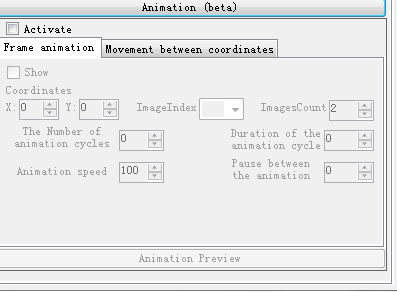
Hello, when will amazfit watchface Editor 2 be able to update the "animation" function? Without this function, gts2 and other models will have great difficulties and lack of many effects in making dial. Thank you very much!


Image
sfreud
WF maker
Posts: 16
Joined: 07 Aug 2020, 06:49
Location: Jdjssg
Has thanked: 4 times
Been thanked: 1 time
Contact:

Post by sfreud »

will be added option for convert to another smartw ?
User avatar
SashaCX75
Posts: 812
Joined: 26 Oct 2019, 15:18
Location: Ukraine
Has thanked: 13 times
Been thanked: 1007 times
Contact:

Post by SashaCX75 »

sfreud There are no plans to add conversion capabilities in the near future.
demiurg1
WF maker
Posts: 114
Joined: 23 Feb 2020, 22:49
Location: Poland
Has thanked: 23 times
Been thanked: 17 times
Contact:

Post by demiurg1 »

SashaCX75 wrote: 27 Mar 2021, 18:50
Version 2.1

List of changes
Fixed bugs in display AOD.
Fixed bug when using pictures for circular progress.

Updated the file.
Fixed bug when saving weather in AOD.
================= Error ==============
I think I found an error in "AmazFit_Watchface_Editor_2".
The error is in: "Activity" -> "Heart rate" -> "Pointer". It is based on incorrect display of the "Heart rate" value with the pointer. This value agrees with the "Numerical values" given in the program, but it does not match after uploading the BIN file to the watch.
The error is that the maximum "Heart rate" given in the "Pointer" function is 200 beats per minute, and in the "Numerical values" function there is no this limitation and this value is not related to the circumference of the circle.
In order for the pulse to be displayed correctly, the following assignment must be entered into the program:
"End angle" - "Start angle" / 200 = angular value for 1 heart rate "Heart rate".
When we use the entire circumference of the circle to indicate "Pointer", it will be:
360-0 / 200 = 1.8 ° / 1 heartbeat.
When we use a part of the circumference of a circle, e.g. from 0 to 200 °, but rotate the indications by some angle, it can be, for example:
500-220 / 200 = 1.4 ° / 1 heartbeat.
I found an example of an error trying to make a Polish version of the dial from the project https://amazfitwatchfaces.com/gtr/view/13522.
relax
Posts: 1
Joined: 30 Mar 2021, 06:57
Location: CHN
Contact:

Post by relax »

Hey.sasha,nihao,why gts2 not "animation" function.i like astronaut dial
User avatar
SashaCX75
Posts: 812
Joined: 26 Oct 2019, 15:18
Location: Ukraine
Has thanked: 13 times
Been thanked: 1007 times
Contact:

Post by SashaCX75 »

demiurg1
There are problems with the correct display of the heart rate. The fact is that the scale does not change from 0 to 200, but from about 20 to 160. More precisely, it can be calculated only empirically. I plan to fix this in future versions.
User avatar
SashaCX75
Posts: 812
Joined: 26 Oct 2019, 15:18
Location: Ukraine
Has thanked: 13 times
Been thanked: 1007 times
Contact:

Post by SashaCX75 »

GTR2 (GTS2) do not support animation. If you have any other information, please provide the clock face with the animation working. And then, by analogy with him, there is a chance to add animation to the editor.
yishuyan1105
Posts: 2
Joined: 24 Mar 2021, 15:32
Location: 中国
Contact:

Post by yishuyan1105 »

That's too bad Hearing this answer, I am very depressed
demiurg1
WF maker
Posts: 114
Joined: 23 Feb 2020, 22:49
Location: Poland
Has thanked: 23 times
Been thanked: 17 times
Contact:

Post by demiurg1 »

SashaCX75 wrote: 01 Apr 2021, 14:41
@demiurg1
There are problems with the correct display of the heart rate. The fact is that the scale does not change from 0 to 200, but from about 20 to 160. More precisely, it can be calculated only empirically. I plan to fix this in future versions.
=========
OK.
I guess from 0 to 20 and from 160 to 200 the clock hand of the pulse was also moving and showing something. Only when it reached the value of 200 (displayed numerically for comparison) did the pointer stop.
su8044
Posts: 2
Joined: 24 Feb 2021, 06:45
Location: Colombia
Has thanked: 1 time
Contact:

Post by su8044 »

Amazing editor. Will there be an option to add hot zones (link to app)? That would be the cherry on top
demiurg1
WF maker
Posts: 114
Joined: 23 Feb 2020, 22:49
Location: Poland
Has thanked: 23 times
Been thanked: 17 times
Contact:

Post by demiurg1 »

The SashCX75 editor is great. Besides, Sasha knows what he is doing, which I could see in my discussion with him.
Darkstalix
Posts: 7
Joined: 28 Mar 2021, 20:16
Location: Cyprus
Has thanked: 4 times
Contact:

Post by Darkstalix »

Any chance ever to add conversion from GTS 1 to GTS 2?
ntnntp
WF maker
Posts: 1
Joined: 04 Oct 2020, 04:45
Location: Bangkok
Contact:

Post by ntnntp »

I’m not sure if I did anything wrong, but it seems like the watch won’t accept more than two watchfaces generated by the editor.

It goes like this:
Synced first wf successfully. Try syncing the second one, the watch says “failed to sync watch face” after enabling wf.

What I tried (but failed):
- Generated new watchface id
- Checked and unchecked watchface id (in background tab)
- Checked and unchecked Save watchface id
- Tried different design
- Delete and regenerate bin file
- Checked log file

What I suspect:
It looks like the watchface id feature isn’t working and the application is not writing wf id to the bin file as I found no lines in the log file indicating the watchface id. The wf id might conflict in the watch and produce the error.
Post Reply

Return to “Watchfaces tools”

Who is online

Users browsing this forum: No registered users and 1 guest