• Administrador
  •  
    Support Ukraine
    If you experience any problems with the forum (it is not visible, there is no way to post messages, or some functionality does not work), please let us know. If you have problems with registration or you did not receive confirmation letter, let us know and we will activate your account manually.
    If you get an "The submitted form was invalid. Try submitting again" error, delete cookies, then try again.
     

AmazFit WatchFace editor 2 for Windows

This forum is designed to discuss and develop tools creating watch faces.

Moderadores: asoo, lvpokka, Internal error, Watchmens

Reglas del Foro
All communication in this branch should only be in English.
To discuss tools that are not in this section, use the “Watchfaces tools (discussion)” forum.
Avatar de Usuario
SashaCX75
Mensajes: 819
Registrado: 26 Oct 2019, 15:18
Ubicación: Ukraine
Has thanked: 13 times
Been thanked: 1028 times
Contactar:

AmazFit WatchFace editor 2 for Windows

Mensaje por SashaCX75 »

Graphics editor for working with dials Amazfit
The editor supports watch faces from GTR 2(e), GTS 2 (GTS 2e / Zepp E Square), T-Rex Pro, Zepp E Circle.
Screenshot
Screenshot
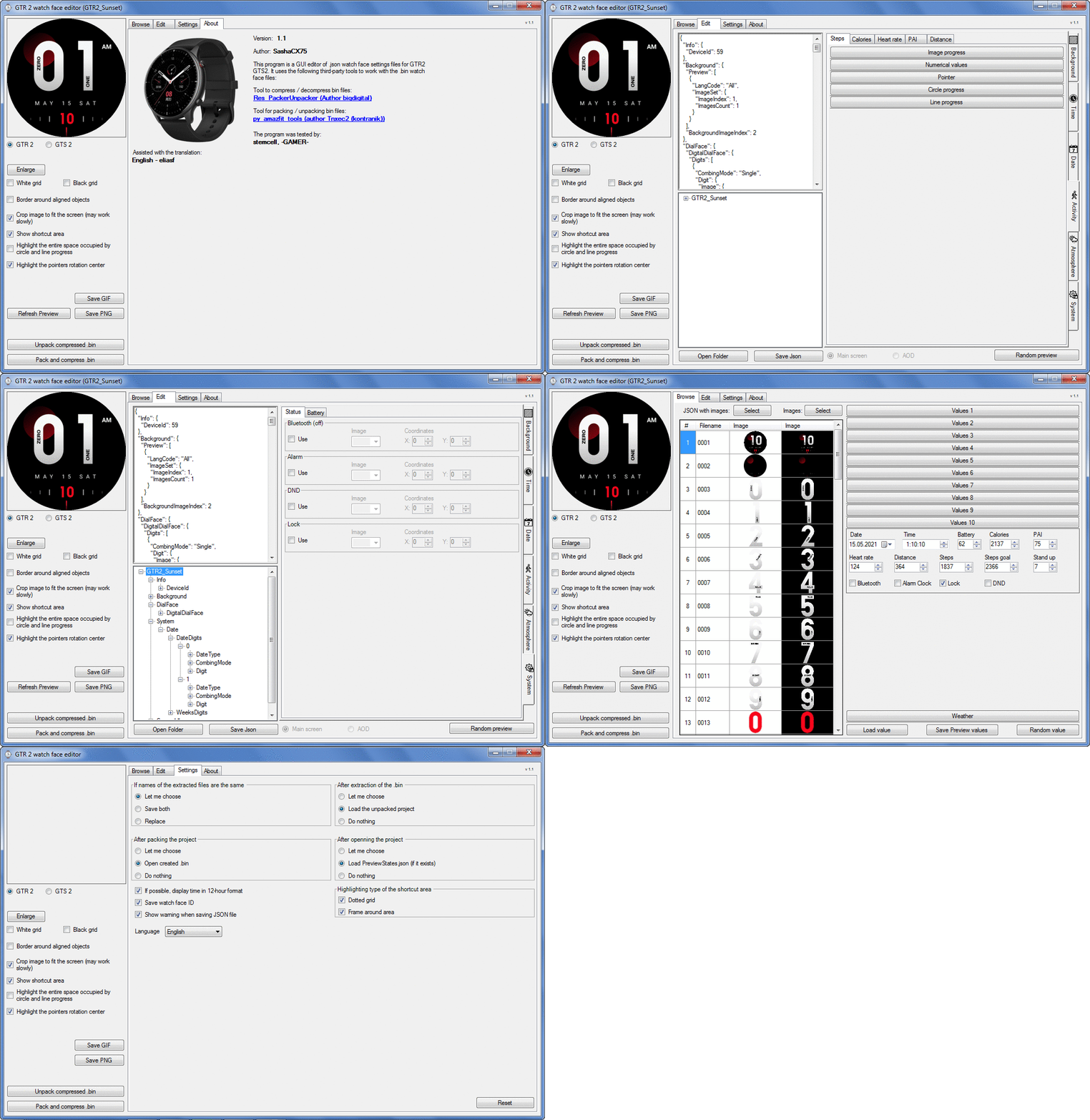
Imagen
Note: It is advisable to unpack the program to the root of the disk.
Not all dials can be unpacked.

The drawing order of elements cannot be changed. The only exception is if you move the second hand from the center, it will be drawn under the hour and minute hands.

If the .bin file is not created, then you need to look for errors in the .log file. Most often this happens when images have the wrong format.

Version 7.3
List of changes
Fixed known display bugs.
v 7.2
Fixed date display errors in editable zones.
Added support for the Hungarian language.
v 7.1
For distance added support for separate images for miles and kilometers.
v 7.0
Added support for independent coordinates for a set of pictures (segments).
v 6.0
Added support for Zepp E Circle
Added the ability to convert watch faces between different models (GTR 2 (e), Zepp E Circle, T-Rex Pro)
v 5.1
Added the ability to create and update preview images of editable zones.
v 5.0
Added support for editable zones.
v 4.1
Added the ability to display the time in the system font.
Added the ability to display the date in the system font.
Added the ability to change the order of layers.
Added the ability to overlay the clock image on the saved png and gif files (enabled in the settings).
v 4.0
Added support for the system font (inscription at an angle and in a circle).
Added support for the Sunrise parameter (not working correctly for all cities).
Added support for ActivityGoal parameter.
Added the ability to display the goal of steps.
Added support for the Icon parameter.
Added the ability to display circular and linear progress at the same time.
v 3.1
Fixed errors when displaying the distance.
Fixed errors when displaying temperature.
Added French.
Added Italian language.
v 3.0
Added support for T-Rex Pro.
Added support for new elements (StandUp, fat burning, UV index, humidity, wind, pressure).
Found bugs fixed.
v 2.1
Fixed bugs in display AOD.
Fixed bug when using pictures for circular progress.
v 2.0
Added support for AOD.
Added Chinese translation.
v 1
It can work with elements: time, date, statuses, weather, battery, steps, calories, heart rate, PAI, path.
Added English translation.
v 1.2 Added Spanish language
Old versions
Pictures created when unpacking and unpacking bin files are created by the parser and may differ from the images created in the editor. I have nothing to do with these files and am not responsible for their content.

When you turn on the "Follow ..." radio button, the right alignment and center alignment in the editor is displayed incorrectly.
The preview in the editor may differ from the image on the watch. I advise you to check the dial on a real device.

Editable zones do not work on the T-Rex Pro.

The editor does not work with GTS 2 mini (GTS U) watch faces and I do not know how to make such watch faces.

Until the Zepp app has an official watch face with animations or shortcuts, these features cannot be added to the editor.
Shortcuts work on dials converted from GTR (GTS) to GTR 2 (GTS 2). But with this method of creating dials, not all functions work correctly.

GTR (GTS, T-Rex) to GTR2 (GTS 2, T-Rex Pro) converter
GTR (GTS, T-Rex) to GTR2 (GTS 2, T-Rex Pro) Converter & Editor

Because I bought a GTR 3, the program will no longer be updated.

Donate to the author - PayPal: [email protected].
Última edición por SashaCX75 el 01 Jun 2022, 07:19, editado 32 veces en total.
jorgealmeida.rs
WF maker
Mensajes: 10
Registrado: 16 Jul 2020, 01:28
Ubicación: Brazil
Been thanked: 2 times
Contactar:

Mensaje por jorgealmeida.rs »

I hope you change your mind and make some solution to GTS2 Mini, in the future. Because this is one of the best Amazfit smartwatch. I had a GTS and now I have a GTS2 Mini. It´s much better, but I miss to make my own watchfaces.
Congratulations for you job. And Thank you very much for all.
Jorge.rs
demiurg1
WF maker
Mensajes: 114
Registrado: 23 Feb 2020, 22:49
Ubicación: Poland
Has thanked: 23 times
Been thanked: 17 times
Contactar:

Mensaje por demiurg1 »

I just guess. In fact, it happens that the seconds hand "freezes" for a while in some watch faces. The GTR 2 stores all loaded watch faces and may run out of memory. It may also be caused by an overly large BIN file (with some applied graphics) which has to be processed by the watch firmware. It can help to delete some of the less used watch faces from the smartwatch memory. Generally, it is rather a hardware or firmware problem and you can hope that the Chinese will fix it with the next update.
demiurg1
WF maker
Mensajes: 114
Registrado: 23 Feb 2020, 22:49
Ubicación: Poland
Has thanked: 23 times
Been thanked: 17 times
Contactar:

Mensaje por demiurg1 »

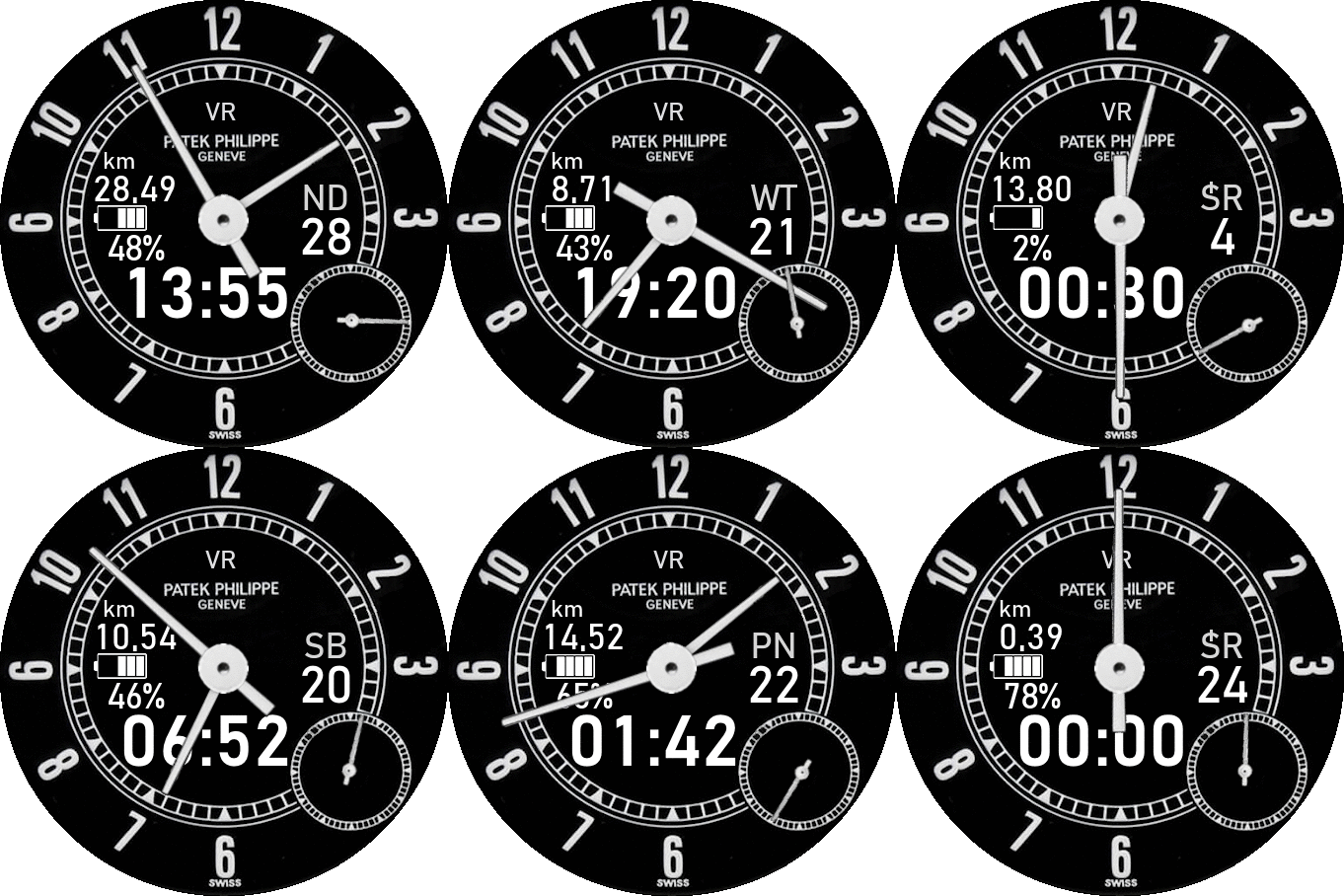
SashaCX75, this watch face "VR Patek Philippe future-proof" for GTR 2 (https://amazfitwatchfaces.com/gtr/view/13121) is already made with your program. Thanks again.
Imagen
Pal57
WF maker
Mensajes: 4
Registrado: 09 Feb 2021, 21:10
Ubicación: San Marino
Contactar:

Mensaje por Pal57 »

Hi Sasha,
I unpaked a .bin file with your prg, of a watchface that I uselly use for my GTR2 and I took a look at it's json text file and found out many other functions for GTR2, like the "ScreenIdle".
Do you think to update the prg to sue these functions?
Thanks.
Pal57
Avatar de Usuario
SashaCX75
Mensajes: 819
Registrado: 26 Oct 2019, 15:18
Ubicación: Ukraine
Has thanked: 13 times
Been thanked: 1028 times
Contactar:

Mensaje por SashaCX75 »

Of course the editor will be updated and new features will be added. But it takes time.
skippy_skippy_9
WF maker
Mensajes: 2
Registrado: 09 Mar 2021, 21:24
Ubicación: france
Has thanked: 2 times
Contactar:

Mensaje por skippy_skippy_9 »

thanks Sasha for this great tool
Denis56
Mensajes: 2
Registrado: 26 Dic 2020, 07:32
Ubicación: Brest
Contactar:

Mensaje por Denis56 »

Hi Sasha,
Congratulations for the tool. I am a total newbie in this game and I am trying to edit a watchface and replace the english date labels (Monday, Tuesday etc.) by the French ones (Lundi, Mardi...), as a first exercise. I can't find the way to do it... Also, is there a tutorial explaining the process of building a face, I have a couple of ideas I would like to try. But no clue what json is. Thank you so much. Denis
joebar78
WF maker
Mensajes: 5
Registrado: 27 Oct 2019, 16:39
Ubicación: Paris Area
Has thanked: 1 time
Been thanked: 3 times
Contactar:

Mensaje por joebar78 »

Salut,

1) Use "unpack compressed .bin " button and choose the bin file you would like to modify
2) This will create a new folder in "Watch_face" folder with png and json files
3) Replace english png files by french ones and adjust positions if needed (this will modifiy json file)
4) Save json file
5) Rebuild the bin file with "Pack and compress .bin" button by selecting json file.
We can discuss about this in french by private messages.
Denis56
Mensajes: 2
Registrado: 26 Dic 2020, 07:32
Ubicación: Brest
Contactar:

Mensaje por Denis56 »

Thanks Joebar, will try and come back to you. I did not find how to replace the pngs ...

Denis
demiurg1
WF maker
Mensajes: 114
Registrado: 23 Feb 2020, 22:49
Ubicación: Poland
Has thanked: 23 times
Been thanked: 17 times
Contactar:

Mensaje por demiurg1 »

SashaCX75 escribió: 07 Mar 2021, 10:37
Graphics editor for working with dials Amazfit
The editor supports watch faces from GTR 2(e), GTS 2.
Screenshot
Screenshot
Imagen
Note: It is advisable to unpack the program to the root of the disk.
Not all dials can be unpacked.

The drawing order of elements cannot be changed. The only exception is if you move the second hand from the center, it will be drawn under the hour and minute hands.

If the .bin file is not created, then you need to look for errors in the .log file. Most often this happens when images have the wrong format.

If the bin file is not created, and the log file contains the entry “bad transparency mask”, this means that the format of one or more images is incorrect (most often it occurs if you save the image in Photoshop without transparent pixels). You can fix it as follows:
- in Photoshop - add at least one transparent pixel
- in GIMP exported to PNG 16 bit RGBA
- in XnView - Image -> 32 bits

Version 1.2
List of changes
It can work with elements: time, date, statuses, weather, battery, steps, calories, heart rate, PAI, path.
AOD and widgets are not yet supported, but when editing watch faces with them, they should be preserved.
Added English translation.
v1.2 Added Spanish language
Warning. Center and right alignment of weather data works differently on GTR 2 and GTR 2e watches. In the editor, the display is as close as possible to how it will look on the GTR 2e. Consider this when designing watch faces. Perhaps this also applies to other elements, but so far I only have information on the weather.
============================
I do not know if it is very important, but you have to be careful that the loaded graphics, entered in the "named watch face" .json file, cannot be too large, because then this file resets and all work goes to the trash if we do not have a copy. There is no error message while saving the * .json file.
Greetings.
Avatar de Usuario
SashaCX75
Mensajes: 819
Registrado: 26 Oct 2019, 15:18
Ubicación: Ukraine
Has thanked: 13 times
Been thanked: 1028 times
Contactar:

Mensaje por SashaCX75 »

demiurg1 escribió: 21 Mar 2021, 20:38
I do not know if it is very important, but you have to be careful that the loaded graphics, entered in the "named watch face" .json file, cannot be too large, because then this file resets and all work goes to the trash if we do not have a copy. There is no error message while saving the * .json file.
Greetings.
Send the project in which the json file does not want to be saved and describe in detail the actions leading to this. I'll try to check.
demiurg1
WF maker
Mensajes: 114
Registrado: 23 Feb 2020, 22:49
Ubicación: Poland
Has thanked: 23 times
Been thanked: 17 times
Contactar:

Mensaje por demiurg1 »

SashaCX75
Unfortunately, I do not have it anymore, because I have improved the PNG files by limiting their size ("thinning" them).
While doing my next project, I can try to simulate something.
Generally, the problem appeared when saving * .json from "AmazFit_Watchface_Editor_2". Suddenly, this edited file, after saving it, had the same content as the "PreviewStates.json" file, ie without the program line.
Avatar de Usuario
SashaCX75
Mensajes: 819
Registrado: 26 Oct 2019, 15:18
Ubicación: Ukraine
Has thanked: 13 times
Been thanked: 1028 times
Contactar:

Mensaje por SashaCX75 »

demiurg1
There is an error in the current version of the editor. If you save the "named watch face" .json file immediately after saving the PreviewStates.json file, then PreviewStates.json will be saved in its place. This is similar to the case you described.
Also, in the next version, in order not to confuse files, PreviewStates.json will be renamed to Preview.States.
skidoo38
Mensajes: 1
Registrado: 24 Mar 2021, 09:59
Ubicación: Bourgoin-Jallieu
Contactar:

Mensaje por skidoo38 »

Hello, sry for my question but that's make few days I search a tool for create watch face for the gts 2 mini, I know your editor doesn't work with mini but do you now a tool who do that plz ?
Thx a lot
Avatar de Usuario
SashaCX75
Mensajes: 819
Registrado: 26 Oct 2019, 15:18
Ubicación: Ukraine
Has thanked: 13 times
Been thanked: 1028 times
Contactar:

Mensaje por SashaCX75 »

Version 2.0

List of changes
Added support for AOD.
Added Chinese translation.
zyfish
WF maker
Mensajes: 11
Registrado: 24 Ago 2020, 10:55
Ubicación: china
Has thanked: 1 time
Contactar:

Mensaje por zyfish »

thanks
Djulze
WF maker
Mensajes: 1
Registrado: 12 Ene 2021, 16:55
Ubicación: 92190
Has thanked: 1 time
Contactar:

Mensaje por Djulze »

Hi Sasha,
Thank you so much for this excellent work! Your editor is great and user friendly for a newbie like me!
One question: Is there a trick to reversing the progression of a circle ("Activity -> Circle progress") ?
demiurg1
WF maker
Mensajes: 114
Registrado: 23 Feb 2020, 22:49
Ubicación: Poland
Has thanked: 23 times
Been thanked: 17 times
Contactar:

Mensaje por demiurg1 »

SashaCX75 escribió: 25 Mar 2021, 12:00
Version 2.0

List of changes
Added support for AOD.
Added Chinese translation.
=====================
Hi SashaCX75,
It's great that there is a new version and it's already numbered as 2.0.
Thanks for your work.
Avatar de Usuario
Guydu91
Mensajes: 59
Registrado: 06 Oct 2019, 18:49
Ubicación: Bretagne / France
Has thanked: 55 times
Been thanked: 10 times
Contactar:

Mensaje por Guydu91 »

Well done Sascha for this remarkable work.
Congratulations on the quick release of version 2.0 which incorporates AOD support.
This is a real plus that will allow better achievements.
Thanks again for what you did!
demiurg1
WF maker
Mensajes: 114
Registrado: 23 Feb 2020, 22:49
Ubicación: Poland
Has thanked: 23 times
Been thanked: 17 times
Contactar:

Mensaje por demiurg1 »

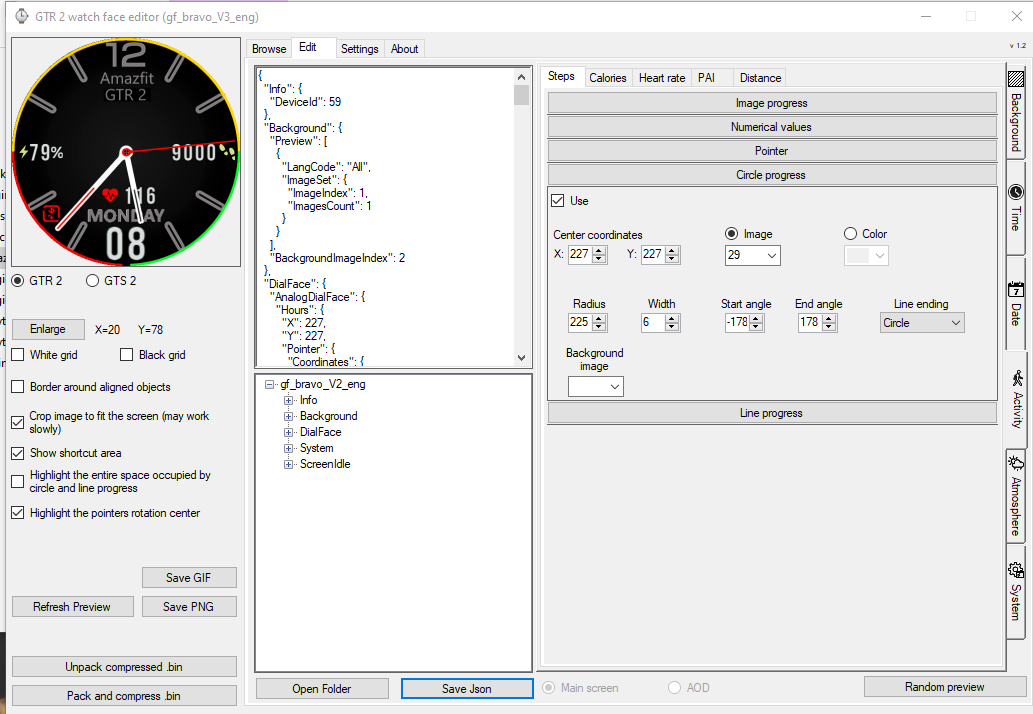
It would be nice if the changes in the energy circle were simulated when we changed the percentage of energy.
The same is true for e.g. steps.
Screenshot attached.
Imagen
Avatar de Usuario
SashaCX75
Mensajes: 819
Registrado: 26 Oct 2019, 15:18
Ubicación: Ukraine
Has thanked: 13 times
Been thanked: 1028 times
Contactar:

Mensaje por SashaCX75 »

Djulze escribió: 25 Mar 2021, 15:30
Hi Sasha,
Thank you so much for this excellent work! Your editor is great and user friendly for a newbie like me!
One question: Is there a trick to reversing the progression of a circle ("Activity -> Circle progress") ?
The start angle needs to be less than the end angle.
For example, the starting angle is 90, the ending angle is 0. For angles, it is better not to use negative values.
Avatar de Usuario
SashaCX75
Mensajes: 819
Registrado: 26 Oct 2019, 15:18
Ubicación: Ukraine
Has thanked: 13 times
Been thanked: 1028 times
Contactar:

Mensaje por SashaCX75 »

demiurg1 escribió: 25 Mar 2021, 22:44
It would be nice if the changes in the energy circle were simulated when we changed the percentage of energy.
The same is true for e.g. steps.
Screenshot attached.
In the latest version, when using a picture for circular progress, the display does not work correctly.
This will be fixed soon.
bird81309
WF maker
Mensajes: 3
Registrado: 27 Abr 2018, 01:46
Ubicación: Taipei , taiwan
Contactar:

Mensaje por bird81309 »

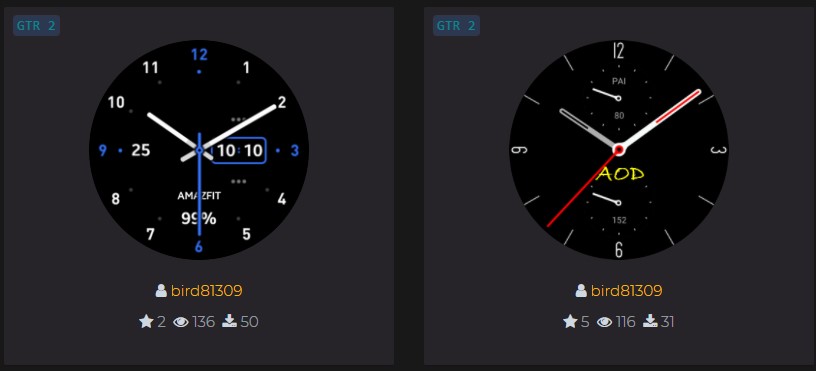
Thank you for the tool you designed. I used this to make some watch faces.
I also tried to move GTR to GTR2, and it succeeded.
This tool is really awesome
Imagen
demiurg1
WF maker
Mensajes: 114
Registrado: 23 Feb 2020, 22:49
Ubicación: Poland
Has thanked: 23 times
Been thanked: 17 times
Contactar:

Mensaje por demiurg1 »

SashaCX75 escribió: 26 Mar 2021, 12:23
demiurg1 escribió: 25 Mar 2021, 22:44
It would be nice if the changes in the energy circle were simulated when we changed the percentage of energy.
The same is true for e.g. steps.
Screenshot attached.
In the latest version, when using a picture for circular progress, the display does not work correctly.
This will be fixed soon.
=================
OK, Super ! :)
BravoCharlie
Mensajes: 2
Registrado: 24 Mar 2019, 01:28
Has thanked: 3 times
Contactar:

Mensaje por BravoCharlie »

Thanks for the fantastic update to support AOD :D

I notice a small bug in version 2 with the circle progress. In version 1.2 you could preview a coloured image for the circle progress but in version 2 it's only showing as a black circle so when you have a black background you won't see it.
Imagen

Imagen
Responder

Volver a “Watchfaces tools”

¿Quién está conectado?

Usuarios navegando por este Foro: No hay usuarios registrados visitando el Foro y 1 invitado