• Administrator
  •  
    Support Ukraine
    If you experience any problems with the forum (it is not visible, there is no way to post messages, or some functionality does not work), please let us know. If you have problems with registration or you did not receive confirmation letter, let us know and we will activate your account manually.
    If you get an "The submitted form was invalid. Try submitting again" error, delete cookies, then try again.
     

AmazFit WatchFace editor for Windows by SashaCX75

This forum is designed to discuss and develop tools creating watch faces.

Moderators: asoo, lvpokka, Internal error, Watchmens

Forum rules
All communication in this branch should only be in English.
To discuss tools that are not in this section, use the “Watchfaces tools (discussion)” forum.
User avatar
SashaCX75
Posts: 812
Joined: 26 Oct 2019, 15:18
Location: Ukraine
Has thanked: 13 times
Been thanked: 1007 times
Contact:

AmazFit WatchFace editor for Windows by SashaCX75

Post by SashaCX75 »

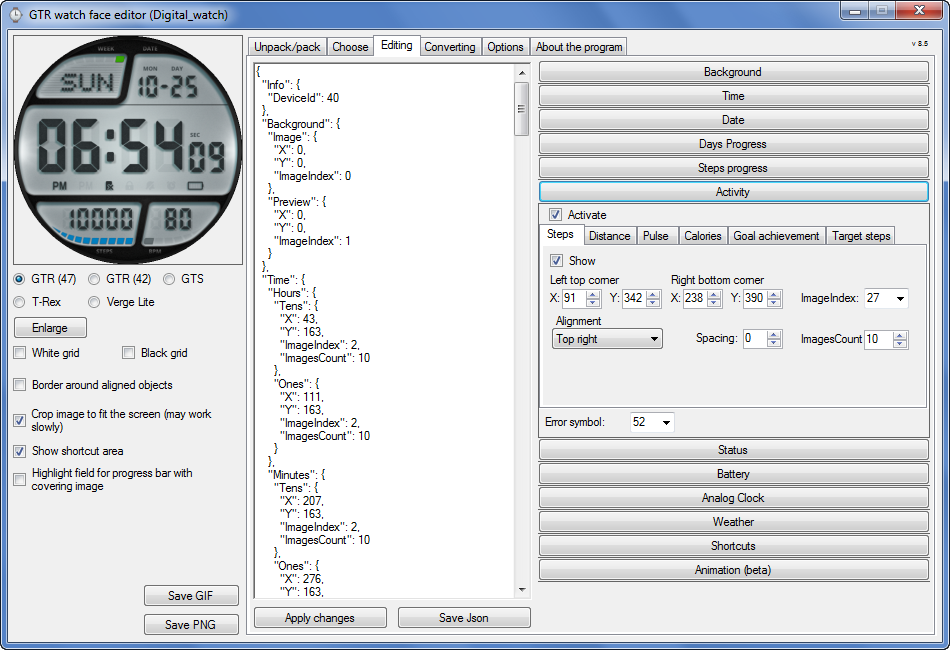
Graphics editor for working with dials Amazfit
The editor supports watch faces from GTR 47, GTR 42, GTS, T-Rex, Verge Lite.
Screenshot
Image
Note: the path to the program should not contain spaces, it is advisable to unpack it to the root of the disk.
Not all dials can be unpacked.
You can reduce the size of the bin file only by reducing the size of the images (height * width) or by reducing the number of images.

The drawing order of elements cannot be changed. The only exception is if you move the second hand from the center, it will be drawn under the hour and minute hands.

If the .bin file is not created, then you need to look for errors in the .log file. Most often this happens when images have the wrong format.

If the bin file is not created, and the log file contains the entry “bad transparency mask”, this means that the format of one or more images is incorrect (most often it occurs if you save the image in Photoshop without transparent pixels). You can fix it as follows:
- in Photoshop - add at least one transparent pixel
- in GIMP exported to PNG 16 bit RGBA
- in XnView - Image -> 32 bits

Version 10.0
List of changes
Added the ability to display the distance traveled in kilometers and miles.
Updated translation.
v 9.0
Fixed display of date if pictures have different sizes (often pictures for "1" are narrower than others)
Added new warnings about possible errors.
Fixed the order of displaying items.
Added a button to refresh the preview image.
Fixed bugs when converting watch faces.
Updated Chinese and Italian translations.
v 8.5
Fixed work with Verge Lite
v 8.4
Fixed Italian translation.
Added Chinese manual.
v 8.3
Bugs fixed.
Added a manual in English.
v 8.2
Added the display of the target steps (StepsGoal)
Added preliminary calculation of the size of the .bin file.
v 8.1
Fixed work on monitors with high resolution.
Updated translation (French, Italian, Chinese, Spanish).
v 8.0
Added the ability to convert dials between different watch models (GTR / T-Rex / Verge Lite).
v 7.1
Italian language added.
Minor fixes.
v 7.0
Added animation support
Verge Lite Support Added
Added the ability to quickly save the project (Ctrl + S)
Added support for languages (French, Chinese).
v 6.1
Added support for T-Rex.
Added the ability to auto-correct image files (error "bad transparency mask").
Added a reminder to save the project when it is closed.
v 6.0
Added support for shortcuts.
Added background image support for circular indicator.
Added display of a set of icons (segments) for the progress of steps.
Added display of a set of icons (segments) for the battery.
Added display of a set of icons (segments) for the pulse.
Added display of an indicator (arrow) for a pulse.
Added display of indicator (arrows) for calories.
Added display of a circular indicator for the pulse.
Added display of a circular indicator for calories.
Added the ability to crop the image to fit the screen.
Added support for languages ​​(Portuguese, Czech, Slovak, Hungarian).
v 5.2
Added support for a set of icons (icons and a set of coordinates for them) for the progress of steps and battery.
Added the ability to crop the preview according to the shape of the screen.
Bugs fixed in the English version.
v 5.1
Fixed incorrect display of the distance traveled.
Added the ability to adjust the speed of gif animation.
Added the ability to work with compressed bin files.
Updated bin file packer.
Added display of the year.
Added display of a charge indicator (arrow).
Added display of indicator (arrow) of steps.
Added display of the indicator (arrow) of the date.
Added display of indicator (arrow) of the day of the week.
Added display of indicator (arrow) of the month.
Added the ability to paste copied coordinates into offset fields from the center (for arrows).
English support added.
Old versions
If you want to supplement the missing translation, write to the PM.

Beta version of the editor with support for Amazfit X

AmazFit WatchFace editor 2 with support for GTR 2, GTS 2, T-Rex Pro

My editor doesn't work with GTR2 (GTS2) watch faces and I have no plans to add support for these models anytime soon. I don't know any other programs that can work with these dials. I have no information if anyone is working in this direction.

Because I bought a GTR 2e, the program will no longer be updated.

Donate to the author
PayPal: [email protected].
Last edited by SashaCX75 on 01 Jun 2022, 07:20, edited 25 times in total.
Fringo
WF maker
Posts: 3
Joined: 22 May 2020, 01:19
Location: KR
Has thanked: 6 times
Contact:

Post by Fringo »

SashaCX75 wrote: 05 Mar 2021, 16:35
Rcappa wrote: 05 Mar 2021, 02:44
Thanks but its there any way to login into site in English. I can't decode the Catcha in Russian
A little later, when the translation is corrected, I post the editor on this forum.
It works on ZEPP E Circle too! Thank you very much! I look forward to improved version :)
(I'd got resized images and coordinates from tool for GTR47, using converting function)
ajeto
Posts: 29
Joined: 28 May 2020, 13:15
Location: serbia
Has thanked: 13 times
Contact:

Post by ajeto »

I'm getting errors with main.py when decompiling
https://amazfitwatchfaces.com/gtr/view/12898
after decompressing

Code: Select all

raise IndexError(f"Parameter {parameterId} isn't supported for {currentType}")
IndexError: Parameter 2 isn't supported for <class 'watchFaceParser.elements.gtr2.basicElements.circleProgress.CircleProgress'>
.
User avatar
asoo
Posts: 2109
Joined: 03 Jan 2019, 01:48
Location: ͼͽ Thailand ͼͽ
Has thanked: 404 times
Been thanked: 2023 times

Post by asoo »

ajeto wrote: 07 Mar 2021, 08:46
I'm getting errors with main.py when decompiling
https://amazfitwatchfaces.com/gtr/view/12898
after decompressing

Code: Select all

raise IndexError(f"Parameter {parameterId} isn't supported for {currentType}")
IndexError: Parameter 2 isn't supported for <class 'watchFaceParser.elements.gtr2.basicElements.circleProgress.CircleProgress'>
.
viewtopic.php?p=8393#p8393
Last edited by asoo on 07 Mar 2021, 11:37, edited 2 times in total.
ͼͽ To request please use the interrelated forum in action ͼͽ
Please do not PM to me for requests ported watchface.
rubiales41
WF maker
Posts: 8
Joined: 08 Dec 2019, 08:03
Has thanked: 5 times
Contact:

Post by rubiales41 »

hello, how much can the sphere weigh in megabytes, at most ?, for GTR 2?
mehrdadrahimian
Posts: 2
Joined: 02 Mar 2021, 22:11
Location: iran
Contact:

Post by mehrdadrahimian »

SashaCX75 wrote: 07 Mar 2021, 10:41
AmazFit WatchFace editor 2 with support for GTR 2, GTS 2[/color][/size]
Hi. Please also support the Bip u & Bip U Pro models. They are not supported in any of the Amazfit software. And it is not possible for them to be unpacked BIN file. Thank you for your efforts
lucaslee
Posts: 1
Joined: 11 Mar 2021, 22:20
Location: Poland
Contact:

Post by lucaslee »

whether there will be a Polish version for this application?
r33ck
Posts: 1
Joined: 18 Feb 2021, 00:11
Location: Vancouver
Contact:

Post by r33ck »

Horatius80 wrote: 17 Feb 2021, 13:57
fkicin wrote: 16 Feb 2021, 21:04
It's my first post so Hi all.
Sasha what is the official (or other) soft to edit watchfaces for GTR2? i can see custom wf here but i can't find any tool to creat such custom image :(
Here is "tutorial" video how to obtain access to Huami official develop tool for watchface creation. It is only on-line tool
---------

(I see a similar question but I haven't found an answer, please and thank-you)


Hi All,

Many thanks to dimas for the youtube video on Huami registration. I'm in process.

Question: How to download an internal watchface? To start I'd like to add DND and bluetooth icons to the Multifunction WF in Zepp but can only find it in Zepp. GTR2, Pixel 5 phone and it isn't in any folder I can access.

Rick
gengtrex
WF maker
Posts: 18
Joined: 06 Feb 2021, 02:47
Location: nonthaburi
Has thanked: 4 times
Been thanked: 1 time
Contact:

Post by gengtrex »

SashaCX75
Your T-rex editor is so awesome.
Is watchface editor for T-rex Pro now available.
Thanks a lot in advance.
User avatar
SashaCX75
Posts: 812
Joined: 26 Oct 2019, 15:18
Location: Ukraine
Has thanked: 13 times
Been thanked: 1007 times
Contact:

Post by SashaCX75 »

gengtrex
My editor is not designed to work with T-Rex Pro watch faces. The site has one dial made for this model. Ask its author what tools he made it with.
gengtrex
WF maker
Posts: 18
Joined: 06 Feb 2021, 02:47
Location: nonthaburi
Has thanked: 4 times
Been thanked: 1 time
Contact:

Post by gengtrex »

SashaCX75 wrote: 27 Mar 2021, 18:41
@gengtrex
My editor is not designed to work with T-Rex Pro watch faces. The site has one dial made for this model. Ask its author what tools he made it with.
I see. Anyway, thank you again for the editor and lots of advices. :)
yakface
WF maker
Posts: 2
Joined: 03 Apr 2021, 14:21
Location: Denver
Contact:

Post by yakface »

Im also very interested in what application was used to create the TREX PRO watch faces and if there is a way to convert existing TREX watch faces to be TREX PRO compatible.
Horatius80

Post by Horatius80 »

SashaCX75 in my humble opinion, the principle of watchfaces for T-REX PRO will be the same as for GTR2 (support for widgets etc.), only it will be necessary to adjust the resolution to 360x360.
So Your Watchface editor 2 will be applicable. Correct me if I'm wrong
User avatar
SashaCX75
Posts: 812
Joined: 26 Oct 2019, 15:18
Location: Ukraine
Has thanked: 13 times
Been thanked: 1007 times
Contact:

Post by SashaCX75 »

Horatius80 wrote: 04 Apr 2021, 18:16
@SashaCX75 in my humble opinion, the principle of watchfaces for T-REX PRO will be the same as for GTR2 (support for widgets etc.), only it will be necessary to adjust the resolution to 360x360.
So Your Watchface editor 2 will be applicable. Correct me if I'm wrong
Yes, the principle is the same. Probably the next version of the editor will support T-REX PRO.
We need T-REX PRO owners ready to test this update.
spidercrab
Posts: 24
Joined: 25 Jun 2020, 09:13
Location: UK
Has thanked: 27 times
Been thanked: 3 times
Contact:

Post by spidercrab »

SashaCX75 wrote: 05 Apr 2021, 16:09
Probably the next version of the editor will support T-REX PRO.
We need T-REX PRO owners ready to test this update.
Excellent. I will certainly be testing. Standing by.
Last edited by spidercrab on 08 Apr 2021, 15:39, edited 1 time in total.
Thinkpad
WF maker
Posts: 2
Joined: 24 Nov 2020, 16:12
Location: Slovakia
Contact:

Post by Thinkpad »

I'm ready to test this update.
andijbellinger
Posts: 1
Joined: 11 Apr 2021, 11:10
Location: Paignton
Contact:

Post by andijbellinger »

I've just got a t-rex pro and would be happy to test.
Turtl3sh3ll
Posts: 1
Joined: 18 Apr 2021, 04:39
Location: Texas
Has thanked: 1 time
Contact:

Post by Turtl3sh3ll »

T Rex Pro User Here, ready to test & Learn watchface creation.
Is the executable hosted on a stable platform yet? Suurceforge / etc?
pory
WF maker
Posts: 5
Joined: 18 Apr 2021, 15:48
Location: Italy
Contact:

Post by pory »

Rady to test!
User avatar
CASIONFAN2021
WF maker
Posts: 31
Joined: 16 Apr 2021, 21:23
Location: uk
Has thanked: 1 time
Been thanked: 4 times
Contact:

Post by CASIONFAN2021 »

Thanks to sasha for this amazing product. I would ask that there be an update to the watch face editor 2 for the t rex pro that allows the entries for moon phase and the sunrise sunset that is present on the stock watch faces. Is that possible?
User avatar
maortrol
Posts: 15
Joined: 17 Dec 2019, 22:12
Location: Spain
Has thanked: 27 times
Been thanked: 1 time
Contact:

Post by maortrol »

CASIONFAN2021 wrote: 17 May 2021, 07:30
Thanks to sasha for this amazing product. I would ask that there be an update to the watch face editor 2 for the t rex pro that allows the entries for moon phase and the sunrise sunset that is present on the stock watch faces. Is that possible?
Why don't you ask that in the WatchFace editor 2 thread?

viewtopic.php?f=29&t=1888
gengtrex
WF maker
Posts: 18
Joined: 06 Feb 2021, 02:47
Location: nonthaburi
Has thanked: 4 times
Been thanked: 1 time
Contact:

Post by gengtrex »

SashaCX75
with the t-rex editor.
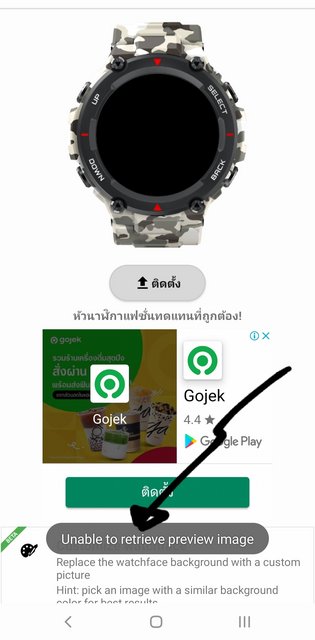
when i load .bin to notify app, it always shows 'unable to retrieve preview image'.
how can i fix this and make it show?

thanks in advance.
User avatar
CASIONFAN2021
WF maker
Posts: 31
Joined: 16 Apr 2021, 21:23
Location: uk
Has thanked: 1 time
Been thanked: 4 times
Contact:

Post by CASIONFAN2021 »

Not sure. I've had a few faces that show a preview and others that don't
User avatar
SashaCX75
Posts: 812
Joined: 26 Oct 2019, 15:18
Location: Ukraine
Has thanked: 13 times
Been thanked: 1007 times
Contact:

Post by SashaCX75 »

gengtrex
I didn't quite understand what kind of error occurs. Send a window with an error and describe in detail the actions in which the error occurs.
gengtrex
WF maker
Posts: 18
Joined: 06 Feb 2021, 02:47
Location: nonthaburi
Has thanked: 4 times
Been thanked: 1 time
Contact:

Post by gengtrex »

SashaCX75 wrote: 24 May 2021, 15:31
@gengtrex
I didn't quite understand what kind of error occurs. Send a window with an error and describe in detail the actions in which the error occurs.
it shows as the pic below, after i choose the .bin in notify app. anyway the uploading is successful everytime.

Image
Post Reply

Return to “Watchfaces tools”

Who is online

Users browsing this forum: Amazon [Bot] and 1 guest