
• Administrador
  •  
    Support Ukraine
    If you experience any problems with the forum (it is not visible, there is no way to post messages, or some functionality does not work), please let us know. If you have problems with registration or you did not receive confirmation letter, let us know and we will activate your account manually.
    If you get an "The submitted form was invalid. Try submitting again" error, delete cookies, then try again.
     

AmazFit WatchFace editor for Windows by SashaCX75

This forum is designed to discuss and develop tools creating watch faces.

Moderadores: asoo, lvpokka, Internal error, Watchmens

Reglas del Foro
All communication in this branch should only be in English.
To discuss tools that are not in this section, use the “Watchfaces tools (discussion)” forum.
Avatar de Usuario
SashaCX75
Mensajes: 820
Registrado: 26 Oct 2019, 15:18
Ubicación: Ukraine
Has thanked: 13 times
Been thanked: 1028 times
Contactar:

AmazFit WatchFace editor for Windows by SashaCX75

Mensaje por SashaCX75 »

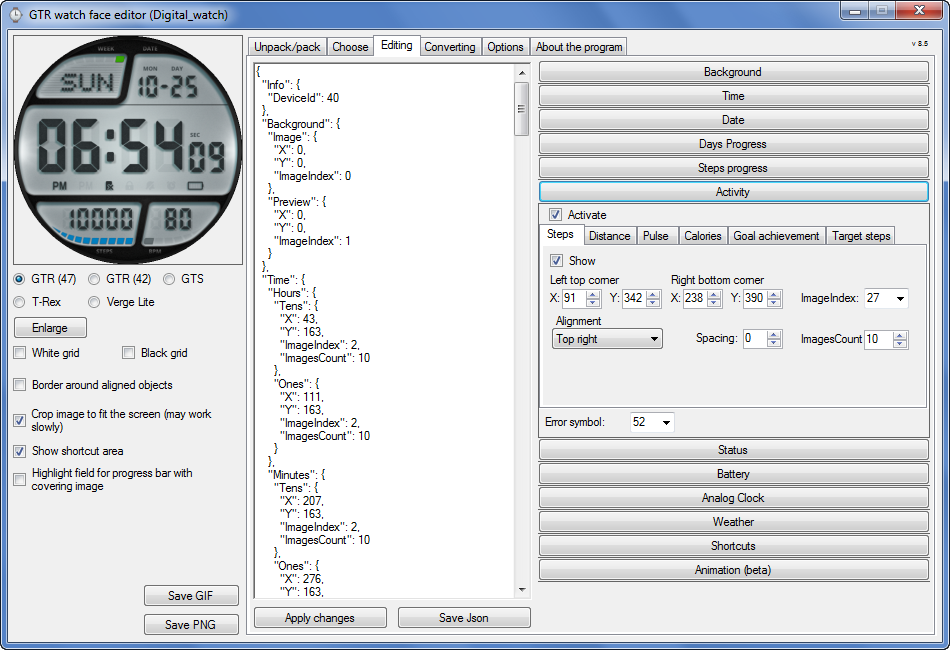
Graphics editor for working with dials Amazfit
The editor supports watch faces from GTR 47, GTR 42, GTS, T-Rex, Verge Lite.
Screenshot
Imagen
Note: the path to the program should not contain spaces, it is advisable to unpack it to the root of the disk.
Not all dials can be unpacked.
You can reduce the size of the bin file only by reducing the size of the images (height * width) or by reducing the number of images.

The drawing order of elements cannot be changed. The only exception is if you move the second hand from the center, it will be drawn under the hour and minute hands.

If the .bin file is not created, then you need to look for errors in the .log file. Most often this happens when images have the wrong format.

If the bin file is not created, and the log file contains the entry “bad transparency mask”, this means that the format of one or more images is incorrect (most often it occurs if you save the image in Photoshop without transparent pixels). You can fix it as follows:
- in Photoshop - add at least one transparent pixel
- in GIMP exported to PNG 16 bit RGBA
- in XnView - Image -> 32 bits

Version 10.0
List of changes
Added the ability to display the distance traveled in kilometers and miles.
Updated translation.
v 9.0
Fixed display of date if pictures have different sizes (often pictures for "1" are narrower than others)
Added new warnings about possible errors.
Fixed the order of displaying items.
Added a button to refresh the preview image.
Fixed bugs when converting watch faces.
Updated Chinese and Italian translations.
v 8.5
Fixed work with Verge Lite
v 8.4
Fixed Italian translation.
Added Chinese manual.
v 8.3
Bugs fixed.
Added a manual in English.
v 8.2
Added the display of the target steps (StepsGoal)
Added preliminary calculation of the size of the .bin file.
v 8.1
Fixed work on monitors with high resolution.
Updated translation (French, Italian, Chinese, Spanish).
v 8.0
Added the ability to convert dials between different watch models (GTR / T-Rex / Verge Lite).
v 7.1
Italian language added.
Minor fixes.
v 7.0
Added animation support
Verge Lite Support Added
Added the ability to quickly save the project (Ctrl + S)
Added support for languages (French, Chinese).
v 6.1
Added support for T-Rex.
Added the ability to auto-correct image files (error "bad transparency mask").
Added a reminder to save the project when it is closed.
v 6.0
Added support for shortcuts.
Added background image support for circular indicator.
Added display of a set of icons (segments) for the progress of steps.
Added display of a set of icons (segments) for the battery.
Added display of a set of icons (segments) for the pulse.
Added display of an indicator (arrow) for a pulse.
Added display of indicator (arrows) for calories.
Added display of a circular indicator for the pulse.
Added display of a circular indicator for calories.
Added the ability to crop the image to fit the screen.
Added support for languages ​​(Portuguese, Czech, Slovak, Hungarian).
v 5.2
Added support for a set of icons (icons and a set of coordinates for them) for the progress of steps and battery.
Added the ability to crop the preview according to the shape of the screen.
Bugs fixed in the English version.
v 5.1
Fixed incorrect display of the distance traveled.
Added the ability to adjust the speed of gif animation.
Added the ability to work with compressed bin files.
Updated bin file packer.
Added display of the year.
Added display of a charge indicator (arrow).
Added display of indicator (arrow) of steps.
Added display of the indicator (arrow) of the date.
Added display of indicator (arrow) of the day of the week.
Added display of indicator (arrow) of the month.
Added the ability to paste copied coordinates into offset fields from the center (for arrows).
English support added.
Old versions
If you want to supplement the missing translation, write to the PM.

Beta version of the editor with support for Amazfit X

AmazFit WatchFace editor 2 with support for GTR 2, GTS 2, T-Rex Pro

My editor doesn't work with GTR2 (GTS2) watch faces and I have no plans to add support for these models anytime soon. I don't know any other programs that can work with these dials. I have no information if anyone is working in this direction.

Because I bought a GTR 2e, the program will no longer be updated.

Donate to the author
PayPal: [email protected].
Última edición por SashaCX75 el 01 Jun 2022, 07:20, editado 25 veces en total.
Avatar de Usuario
SashaCX75
Mensajes: 820
Registrado: 26 Oct 2019, 15:18
Ubicación: Ukraine
Has thanked: 13 times
Been thanked: 1028 times
Contactar:

Mensaje por SashaCX75 »

Only the drawing order of the analog clock hands is changed.
If at least one hand is offset from the center, then the second hand is drawn below the other hands. In other cases, the second hand is drawn from above.

The drawing order of arrows for other indicators does not change.

If there is any other information, please let me know so that I can correct the editor (preferably with specific examples).
jjkielce
Mensajes: 10
Registrado: 20 May 2018, 10:06
Ubicación: Poland
Has thanked: 3 times
Been thanked: 1 time
Contactar:

Mensaje por jjkielce »

OKAY. IN MY AVAILABLE MOMENT, I WILL TRY TO CHECK ALL THE OPTIONS AND I WILL DESCRIBE YOU. GREETINGS
Avatar de Usuario
Wizballs
WF maker
Mensajes: 1
Registrado: 24 Jul 2020, 07:04
Ubicación: Australia
Has thanked: 1 time
Contactar:

Mensaje por Wizballs »

Great app! Was wondering if there is anyway to change the order of analogue hand drawing so that if falls below all other output on watchface? Eg draw hands under digital time, heart rate, step counter etc. This way all of this other data would remain visible at all times...
SashaCX75 escribió: 17 Oct 2020, 16:52
Only the drawing order of the analog clock hands is changed.
If at least one hand is offset from the center, then the second hand is drawn below the other hands. In other cases, the second hand is drawn from above.

The drawing order of arrows for other indicators does not change.

If there is any other information, please let me know so that I can correct the editor (preferably with specific examples).
Avatar de Usuario
SashaCX75
Mensajes: 820
Registrado: 26 Oct 2019, 15:18
Ubicación: Ukraine
Has thanked: 13 times
Been thanked: 1028 times
Contactar:

Mensaje por SashaCX75 »

Wizballs
The analog clock hands are always drawn above the rest of the data. They can only be overridden by a static image.
Avatar de Usuario
Biggie
WF maker
Mensajes: 13
Registrado: 25 Sep 2019, 13:13
Has thanked: 3 times
Been thanked: 2 times
Contactar:

Mensaje por Biggie »

SashaCX75 - What is the meaning of the "Device-Id" in JSON section "Info" for your editor? ZEPP and Notify&Fitness are stating for my GTS: "41 - GTS Global", you're using the "46" for the GTS.
Avatar de Usuario
SashaCX75
Mensajes: 820
Registrado: 26 Oct 2019, 15:18
Ubicación: Ukraine
Has thanked: 13 times
Been thanked: 1028 times
Contactar:

Mensaje por SashaCX75 »

Biggie
This parameter is needed to automatically detect the model when opening a json file. This is inserted into the bin file.
Avatar de Usuario
Biggie
WF maker
Mensajes: 13
Registrado: 25 Sep 2019, 13:13
Has thanked: 3 times
Been thanked: 2 times
Contactar:

Mensaje por Biggie »

SashaCX75 - Yes, it make sense, but why not the "official" ID (GTS: 46 instead 41)? I'm assuming, it's only an internal code for you, to decompile the right version of bin files?
Notify&Fitness and the GTS watch are accepting both of them... By the way - your editor too...
Thanks for your fine prog! This is the reason why my new Amazfit X is lying on a rack and the GTS is still my favorite ;-)
Remark: The X has the ID 71 (at least the X from IndiGoGo...)
Avatar de Usuario
SashaCX75
Mensajes: 820
Registrado: 26 Oct 2019, 15:18
Ubicación: Ukraine
Has thanked: 13 times
Been thanked: 1028 times
Contactar:

Mensaje por SashaCX75 »

Biggie
I do not know which ID in Notify & Fitness you are talking about. This ID is issued by the bin file decompilation program (by dpeddi) and this ID is stitched into the bin file when it is created.
Avatar de Usuario
Biggie
WF maker
Mensajes: 13
Registrado: 25 Sep 2019, 13:13
Has thanked: 3 times
Been thanked: 2 times
Contactar:

Mensaje por Biggie »

Amazfit delievers different ROM version depending on region (e.g. the primal CN/EN and the Global version) . Probably the "Amazfit-ID" which Notify&Fitness reads out is different therefore. For reading a watchface bin file this is seemingly quite irrelevant... Sorry for my wasted question.
Kivan

Mensaje por Kivan »

Hi Sasha, I already get the zepp e square smartwatch. I have the WF bin files but your amazing tool do not open. I detected my device ID is 82. I tried to install a GTS bin changing the device ID to 82 but with no luck. Have you tried something with gts2 bin files or zepp e square ones (they work are the same).

Thanks!
Avatar de Usuario
SashaCX75
Mensajes: 820
Registrado: 26 Oct 2019, 15:18
Ubicación: Ukraine
Has thanked: 13 times
Been thanked: 1028 times
Contactar:

Mensaje por SashaCX75 »

The editor supports watch faces from GTR 47, GTR 42, GTS, T-Rex, Verge Lite.
Kivan

Mensaje por Kivan »

And are you planning on extend it to gts2/zepp square watchfaces (they use the same)? 😊
Avatar de Usuario
SashaCX75
Mensajes: 820
Registrado: 26 Oct 2019, 15:18
Ubicación: Ukraine
Has thanked: 13 times
Been thanked: 1028 times
Contactar:

Mensaje por SashaCX75 »

I have no information about the ability to disassemble the GTR2 / GTS2 watchfaces. Until there is a utility that can do this, then there is nothing to edit.
Kivan

Mensaje por Kivan »

Allright. Actual decompiler try to unpack the bin, but the log file says it fails after a few lines. I hope it will be an easy task to solve!

Thanks for your answer!
Avatar de Usuario
Biggie
WF maker
Mensajes: 13
Registrado: 25 Sep 2019, 13:13
Has thanked: 3 times
Been thanked: 2 times
Contactar:

Mensaje por Biggie »

On my GTS it was today a firmware update to 0.1.1.17. This makes the watch useless for me. No userdefined watchface can be loaded anymore, not any of my own and nothing from this forum's watchface site. "Ungültige Firmware gefunden" is the message (probably "Invalid firmware found" in English), if pressing the Update button to upload this to the watch...
sharizal78
Mensajes: 1
Registrado: 09 Sep 2020, 16:35
Ubicación: sungai petani
Contactar:

Mensaje por sharizal78 »

SashaCX75 do you have update for AmazFit_Watchface_Editor to solve problem with amazfit GTR new firmware 3.7.18?. This firmware encounter error "wrong firmware file found" when sync using notify & fitness for amazfit.
Avatar de Usuario
SashaCX75
Mensajes: 820
Registrado: 26 Oct 2019, 15:18
Ubicación: Ukraine
Has thanked: 13 times
Been thanked: 1028 times
Contactar:

Mensaje por SashaCX75 »

I have firmware 1.3.7.17 on GTR and there are no such errors on it, so I cannot check.

My editor only edits the json file of the project. A third-party utility is used to build the bin file, and if the author does not update it, then I’ll hardly be able to fix something.

The worst thing will be if the signature of the watchfaces is added to the new firmware. Then nothing can be fixed.
Horatius80

Mensaje por Horatius80 »

It was a Notify & Fitness issue, new updated N&F corrected this watchface upload issue read here:
Notify for Mi Band & Amazfit
Official Notify & Fitness for Mi Band and Amazfit/Zepp apps channel. News, suggestions, updates and much more!
https://t.me/notifyfitness
juanl
WF maker
Mensajes: 5
Registrado: 04 Abr 2019, 15:56
Has thanked: 1 time
Contactar:

Mensaje por juanl »

Good Morning,

I do not know if it is technically possible because of hardware, etc.

Could the sphere editing program be modified so that 2 or more animations can be put?

I mean animations that are not animations between coordinates.

Thanks a lot
Avatar de Usuario
SashaCX75
Mensajes: 820
Registrado: 26 Oct 2019, 15:18
Ubicación: Ukraine
Has thanked: 13 times
Been thanked: 1028 times
Contactar:

Mensaje por SashaCX75 »

Until such official dials appear in the Zepp program, I think it will be impossible.
Lori T
WF maker
Mensajes: 2
Registrado: 16 Oct 2020, 11:25
Ubicación: Granada
Contactar:

Mensaje por Lori T »

Hi, I'm having a problem installing a watchface. If I put the date, even though the program generates the bin, the watchface is not displayed in the watch. If I remove the date, everything is displayed without problem. The images I use for the date numbers are the same as for the battery.

Where is the problem?
Thanks

This is the code of the date right now:

"Date": {
"MonthAndDay": {
"Separate": {
"Day": {
"TopLeftX": 236,
"TopLeftY": 30,
"BottomRightX": 265,
"BottomRightY": 0,
"Alignment": "TopCenter",
"Spacing": -5,
"ImageIndex": 11,
"ImagesCount": 10
}
},
"TwoDigitsMonth": true,
"TwoDigitsDay": false
}
},
Avatar de Usuario
Biggie
WF maker
Mensajes: 13
Registrado: 25 Sep 2019, 13:13
Has thanked: 3 times
Been thanked: 2 times
Contactar:

Mensaje por Biggie »

Don't know if this the reason for your problem, but BottomRightY can't be null.
It is always TopLeftY + the pixel height of a digit image.
Avatar de Usuario
asoo
Mensajes: 2126
Registrado: 03 Ene 2019, 01:48
Ubicación: ͼͽ Thailand ͼͽ
Has thanked: 410 times
Been thanked: 2044 times

Mensaje por asoo »

Lori T escribió: 11 Nov 2020, 08:34
Hi, I'm having a problem installing a watchface. If I put the date, even though the program generates the bin, the watchface is not displayed in the watch. If I remove the date, everything is displayed without problem. The images I use for the date numbers are the same as for the battery.

Where is the problem?
Thanks

This is the code of the date right now:
Spoiler
"Date": {
"MonthAndDay": {
"Separate": {
"Day": {
"TopLeftX": 236,
"TopLeftY": 30,
"BottomRightX": 265,
"BottomRightY": 0,
"Alignment": "TopCenter",
"Spacing": -5,
"ImageIndex": 11,
"ImagesCount": 10
}
},
"TwoDigitsMonth": true,
"TwoDigitsDay": false
}
},


Can you send or post link download the "BIN" that have issue ?
ͼͽ To request please use the interrelated forum in action ͼͽ
Please do not PM to me for requests ported watchface.
Lori T
WF maker
Mensajes: 2
Registrado: 16 Oct 2020, 11:25
Ubicación: Granada
Contactar:

Mensaje por Lori T »

Thank you both for the replies. I have been working on it and the problem was not in the date, it is that I can't
use more than 6 different elements in the same watchface. (battery, clock, date, steps number, step progress and bluetooth status). When I disable one of this the watchface loads.
electronikos
WF maker
Mensajes: 2
Registrado: 26 Dic 2018, 14:20
Contactar:

Mensaje por electronikos »

I have the same problem with Lori T. In the past I am sure that I was able to load more than 6 elements in one watch face without problem. I found this problem 7 days ago . Do you know what is the problem. (I install the watch face and it is not available) this problem has nothing to do with bin size just with the elements of the Wf
Responder

Volver a “Watchfaces tools”

¿Quién está conectado?

Usuarios navegando por este Foro: No hay usuarios registrados visitando el Foro y 1 invitado