• Amministratore
  •  
    Support Ukraine
    If you experience any problems with the forum (it is not visible, there is no way to post messages, or some functionality does not work), please let us know. If you have problems with registration or you did not receive confirmation letter, let us know and we will activate your account manually.
    If you get an "The submitted form was invalid. Try submitting again" error, delete cookies, then try again.
     

AmazFit WatchFace editor for Windows by SashaCX75

This forum is designed to discuss and develop tools creating watch faces.

Moderatori: asoo, lvpokka, Internal error, Watchmens

Regole del forum
All communication in this branch should only be in English.
To discuss tools that are not in this section, use the “Watchfaces tools (discussion)” forum.
Avatar utente
SashaCX75
Messaggi: 820
Iscritto il: 26 ott 2019, 15:18
Località: Ukraine
Has thanked: 13 times
Been thanked: 1029 times
Contatta:

AmazFit WatchFace editor for Windows by SashaCX75

Messaggio da SashaCX75 »

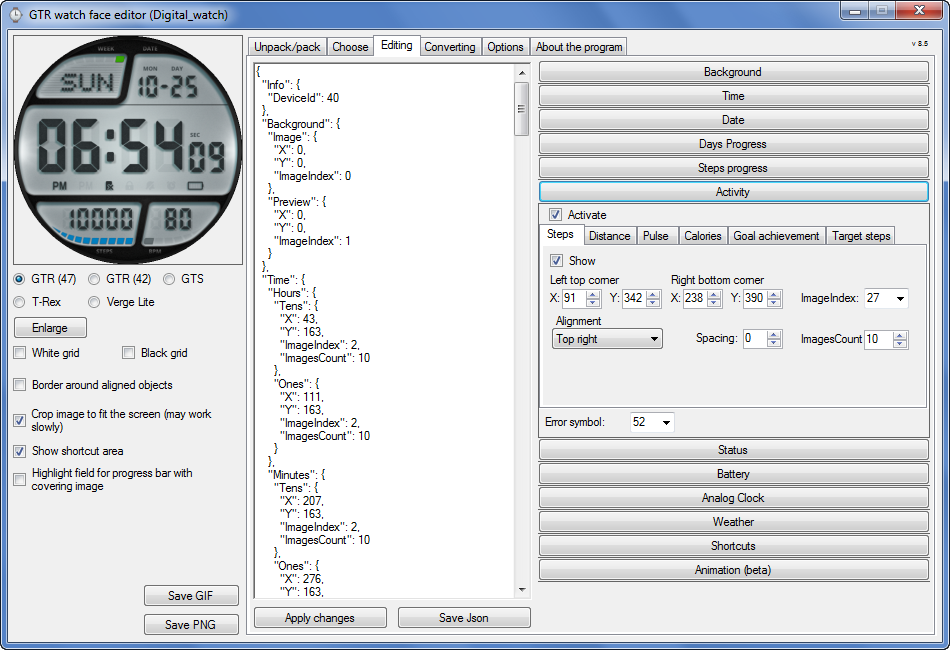
Graphics editor for working with dials Amazfit
The editor supports watch faces from GTR 47, GTR 42, GTS, T-Rex, Verge Lite.
Screenshot
Immagine
Note: the path to the program should not contain spaces, it is advisable to unpack it to the root of the disk.
Not all dials can be unpacked.
You can reduce the size of the bin file only by reducing the size of the images (height * width) or by reducing the number of images.

The drawing order of elements cannot be changed. The only exception is if you move the second hand from the center, it will be drawn under the hour and minute hands.

If the .bin file is not created, then you need to look for errors in the .log file. Most often this happens when images have the wrong format.

If the bin file is not created, and the log file contains the entry “bad transparency mask”, this means that the format of one or more images is incorrect (most often it occurs if you save the image in Photoshop without transparent pixels). You can fix it as follows:
- in Photoshop - add at least one transparent pixel
- in GIMP exported to PNG 16 bit RGBA
- in XnView - Image -> 32 bits

Version 10.0
List of changes
Added the ability to display the distance traveled in kilometers and miles.
Updated translation.
v 9.0
Fixed display of date if pictures have different sizes (often pictures for "1" are narrower than others)
Added new warnings about possible errors.
Fixed the order of displaying items.
Added a button to refresh the preview image.
Fixed bugs when converting watch faces.
Updated Chinese and Italian translations.
v 8.5
Fixed work with Verge Lite
v 8.4
Fixed Italian translation.
Added Chinese manual.
v 8.3
Bugs fixed.
Added a manual in English.
v 8.2
Added the display of the target steps (StepsGoal)
Added preliminary calculation of the size of the .bin file.
v 8.1
Fixed work on monitors with high resolution.
Updated translation (French, Italian, Chinese, Spanish).
v 8.0
Added the ability to convert dials between different watch models (GTR / T-Rex / Verge Lite).
v 7.1
Italian language added.
Minor fixes.
v 7.0
Added animation support
Verge Lite Support Added
Added the ability to quickly save the project (Ctrl + S)
Added support for languages (French, Chinese).
v 6.1
Added support for T-Rex.
Added the ability to auto-correct image files (error "bad transparency mask").
Added a reminder to save the project when it is closed.
v 6.0
Added support for shortcuts.
Added background image support for circular indicator.
Added display of a set of icons (segments) for the progress of steps.
Added display of a set of icons (segments) for the battery.
Added display of a set of icons (segments) for the pulse.
Added display of an indicator (arrow) for a pulse.
Added display of indicator (arrows) for calories.
Added display of a circular indicator for the pulse.
Added display of a circular indicator for calories.
Added the ability to crop the image to fit the screen.
Added support for languages ​​(Portuguese, Czech, Slovak, Hungarian).
v 5.2
Added support for a set of icons (icons and a set of coordinates for them) for the progress of steps and battery.
Added the ability to crop the preview according to the shape of the screen.
Bugs fixed in the English version.
v 5.1
Fixed incorrect display of the distance traveled.
Added the ability to adjust the speed of gif animation.
Added the ability to work with compressed bin files.
Updated bin file packer.
Added display of the year.
Added display of a charge indicator (arrow).
Added display of indicator (arrow) of steps.
Added display of the indicator (arrow) of the date.
Added display of indicator (arrow) of the day of the week.
Added display of indicator (arrow) of the month.
Added the ability to paste copied coordinates into offset fields from the center (for arrows).
English support added.
Old versions
If you want to supplement the missing translation, write to the PM.

Beta version of the editor with support for Amazfit X

AmazFit WatchFace editor 2 with support for GTR 2, GTS 2, T-Rex Pro

My editor doesn't work with GTR2 (GTS2) watch faces and I have no plans to add support for these models anytime soon. I don't know any other programs that can work with these dials. I have no information if anyone is working in this direction.

Because I bought a GTR 2e, the program will no longer be updated.

Donate to the author
PayPal: [email protected].
Ultima modifica di SashaCX75 il 01 giu 2022, 07:20, modificato 25 volte in totale.
blauer
WF maker
Messaggi: 3
Iscritto il: 04 set 2018, 12:09
Has thanked: 1 time
Contatta:

Messaggio da blauer »

hello,
nice tool.
can you translate in german
and a manual in german?
i have win10 32bit, GTR 42.
many thanks

blauer
Avatar utente
SashaCX75
Messaggi: 820
Iscritto il: 26 ott 2019, 15:18
Località: Ukraine
Has thanked: 13 times
Been thanked: 1029 times
Contatta:

Messaggio da SashaCX75 »

lawrence-dol
I do not notice such problems in myself. I tried to fix something. Try whether it helped or not.
AmazFit_Watchface_Editor_(without_Python)_8_5_beta

blauer
I do not translate. If someone translates, then I can add the finished translation to the program.
blauer
WF maker
Messaggi: 3
Iscritto il: 04 set 2018, 12:09
Has thanked: 1 time
Contatta:

Messaggio da blauer »

okay is good.
but the most of faces can't open with this tool
urbanrattrap
Messaggi: 1
Iscritto il: 07 ago 2020, 09:35
Località: kota kinabalu
Contatta:

Messaggio da urbanrattrap »

I'm new here..
is there any guide to use the tools for GTR Watch Face(version 7.1)?
such a written manual or video?
i tried to read all the forum but did not find any guide.
please help
nqh2412
WF maker
Messaggi: 2
Iscritto il: 19 ago 2020, 10:38
Località: Korea
Has thanked: 1 time
Contatta:

Messaggio da nqh2412 »

Great tool!

I have problem when I try to pack the json file to .bin the log file show this what can I do to fix this. Thanks

"2020-08-20 18:14:06,008 - root - CRITICAL - 'NoneType' object has no attribute 'getMinusImageIndex'
Traceback (most recent call last):
File "program .py", line 71, in writeWatchFace
File "program .py", line 181, in generatePreviews
File "watchFaceParser\previewGenerator. py", line 16, in createImage
File "watchFaceParser\previewGenerator. py", line 25, in createFrame
File "watchFaceParser\models\elements\basic\containerElement. py", line 12, in draw3
File "watchFaceParser\models\elements\weather\temperatureElement. py", line 39, in draw3
AttributeError: 'NoneType' object has no attribute 'getMinusImageIndex'
Avatar utente
SashaCX75
Messaggi: 820
Iscritto il: 26 ott 2019, 15:18
Località: Ukraine
Has thanked: 13 times
Been thanked: 1029 times
Contatta:

Messaggio da SashaCX75 »

nqh2412
It looks like the picture for the "-" symbol for the weather is not set.
nqh2412
WF maker
Messaggi: 2
Iscritto il: 19 ago 2020, 10:38
Località: Korea
Has thanked: 1 time
Contatta:

Messaggio da nqh2412 »

SashaCX75 You are right.
Thank you very much!
Thank you again for your amazing work!
HARRINGT0N
Messaggi: 2
Iscritto il: 08 giu 2020, 17:25
Località: MA
Contatta:

Messaggio da HARRINGT0N »

is there a way to get rid of the leading 0 in the time for 12 hour version. (ex. 2:42 rather than 02:42)
Avatar utente
romstemp
WF maker
Messaggi: 55
Iscritto il: 19 lug 2018, 10:02
Has thanked: 9 times
Been thanked: 41 times

Messaggio da romstemp »

HARRINGT0N ha scritto: 24 ago 2020, 21:49
is there a way to get rid of the leading 0 in the time for 12 hour version. (ex. 2:42 rather than 02:42)
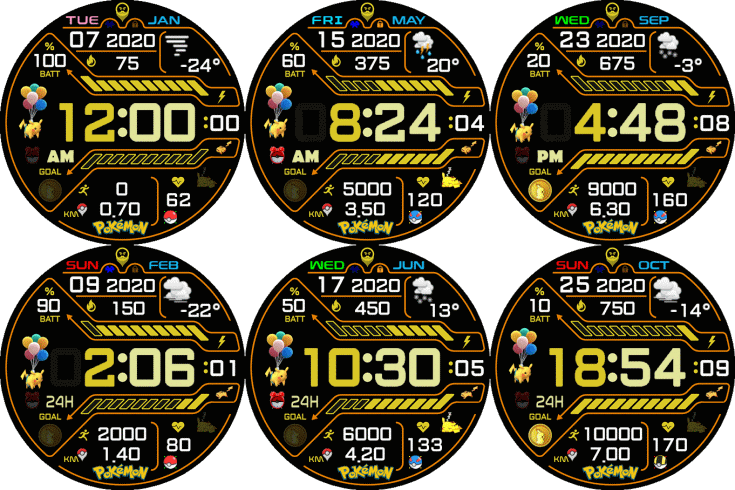
An example watchface for a question you have asked

Immagine

Watchface by ASoo : https://amazfitwatchfaces.com/gtr/view/6893
Quangvm3
WF maker
Messaggi: 2
Iscritto il: 01 lug 2020, 14:32
Località: Vietnam
Contatta:

Messaggio da Quangvm3 »

Tool will work for T-Rex also, right?
Matt-One
WF maker
Messaggi: 3
Iscritto il: 21 ago 2020, 11:17
Località: Italy
Has thanked: 1 time
Contatta:

Messaggio da Matt-One »

Hello, and thank you for this great tool, can i know the difference between Current Weather and Icon under the Weather options? They seem to do the same thing... Thank you :)
Avatar utente
SashaCX75
Messaggi: 820
Iscritto il: 26 ott 2019, 15:18
Località: Ukraine
Has thanked: 13 times
Been thanked: 1029 times
Contatta:

Messaggio da SashaCX75 »

Quangvm3 ha scritto: 25 ago 2020, 13:36
Tool will work for T-Rex also, right?
Yes, the program works with T-Rex. But in T-Rex, not all functions may work.

Matt-One
Current weather displays the temperature, the weather icon shows the type of weather (cloudy, sunny, rainy, etc.). These values are the same as those in the watch weather menu.
Matt-One
WF maker
Messaggi: 3
Iscritto il: 21 ago 2020, 11:17
Località: Italy
Has thanked: 1 time
Contatta:

Messaggio da Matt-One »

SashaCX75 ha scritto: 25 ago 2020, 14:28
Quangvm3 ha scritto: 25 ago 2020, 13:36
Tool will work for T-Rex also, right?
Yes, the program works with T-Rex. But in T-Rex, not all functions may work.

@Matt-One
Current weather displays the temperature, the weather icon shows the type of weather (cloudy, sunny, rainy, etc.). These values are the same as those in the watch weather menu.
Thank you for your answer, I think you have to translate it in Current Temperature? :) :P Just jocking...
I would like to ask you if it is possible in the Animation tab, to show for example an animated icon only when the watch measure the heart rate, otherwise the icon is stopped. Thank you again for your time :)
Avatar utente
SashaCX75
Messaggi: 820
Iscritto il: 26 ott 2019, 15:18
Località: Ukraine
Has thanked: 13 times
Been thanked: 1029 times
Contatta:

Messaggio da SashaCX75 »

Matt-One
I am not engaged in translation, but other people. In the next version I will probably correct it.

Not. The animation is displayed regardless of other conditions.
HARRINGT0N
Messaggi: 2
Iscritto il: 08 giu 2020, 17:25
Località: MA
Contatta:

Messaggio da HARRINGT0N »

romstemp ha scritto: 25 ago 2020, 13:20
HARRINGT0N ha scritto: 24 ago 2020, 21:49
is there a way to get rid of the leading 0 in the time for 12 hour version. (ex. 2:42 rather than 02:42)
An example watchface for a question you have asked

Watchface by ASoo : https://amazfitwatchfaces.com/gtr/view/6893
OK so how do I change a face to get rid of the leading 0?
Avatar utente
hohenheimz11
WF maker
Messaggi: 10
Iscritto il: 24 mag 2020, 17:41
Località: Malaysia
Has thanked: 12 times
Been thanked: 1 time
Contatta:

Messaggio da hohenheimz11 »

Hello, I have a question regarding WF conversion from gtr47 to vergelite. Why there's always WF error (revert to default WF) when converting to verge lite from gtr47? thank you.
Avatar utente
asoo
Messaggi: 2130
Iscritto il: 03 gen 2019, 01:48
Località: ͼͽ Thailand ͼͽ
Has thanked: 411 times
Been thanked: 2050 times

Messaggio da asoo »

HARRINGT0N ha scritto: 27 ago 2020, 00:52
romstemp ha scritto: 25 ago 2020, 13:20
HARRINGT0N ha scritto: 24 ago 2020, 21:49
is there a way to get rid of the leading 0 in the time for 12 hour version. (ex. 2:42 rather than 02:42)
An example watchface for a question you have asked

Watchface by ASoo : https://amazfitwatchfaces.com/gtr/view/6893
OK so how do I change a face to get rid of the leading 0?
Immagine
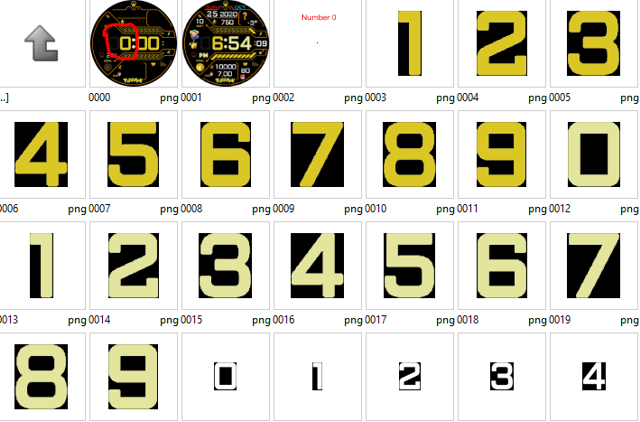
The rough process
1. Make a main screen (0000.png) with the hour section with _0:00
2. Make a set of numbers for hours as usual, but in part number 0, make a transparent blank image, other numbers have background according to the main screen color.
3. Place the hour numbers as usual.

If following this, you will be shown the numbers in the hour portion as you expected.


PS. You can learn more by extracting "BIN" files for use as an example.
ͼͽ To request please use the interrelated forum in action ͼͽ
Please do not PM to me for requests ported watchface.
Avatar utente
SashaCX75
Messaggi: 820
Iscritto il: 26 ott 2019, 15:18
Località: Ukraine
Has thanked: 13 times
Been thanked: 1029 times
Contatta:

Messaggio da SashaCX75 »

hohenheimz11 ha scritto: 27 ago 2020, 08:41
Hello, I have a question regarding WF conversion from gtr47 to vergelite. Why there's always WF error (revert to default WF) when converting to verge lite from gtr47? thank you.
Perhaps not all of the features that WF has are supported in verge lite. First, try converting some simple WF.
Avatar utente
hohenheimz11
WF maker
Messaggi: 10
Iscritto il: 24 mag 2020, 17:41
Località: Malaysia
Has thanked: 12 times
Been thanked: 1 time
Contatta:

Messaggio da hohenheimz11 »

SashaCX75 ha scritto: 27 ago 2020, 14:06
hohenheimz11 ha scritto: 27 ago 2020, 08:41
Hello, I have a question regarding WF conversion from gtr47 to vergelite. Why there's always WF error (revert to default WF) when converting to verge lite from gtr47? thank you.
Perhaps not all of the features that WF has are supported in verge lite. First, try converting some simple WF.

Thank you for the reply. I'd try so many times to convert all WF that I'd been created to verge lite...even excluded weather files to do so but still error. I hope there's a solution to this and update regarding this matter in your WF program tools in the future.

Best regards.
Avatar utente
SashaCX75
Messaggi: 820
Iscritto il: 26 ott 2019, 15:18
Località: Ukraine
Has thanked: 13 times
Been thanked: 1029 times
Contatta:

Messaggio da SashaCX75 »

hohenheimz11
Try before creating the bin file, switch to another model and then turn on Verge Lite again. If it helps, I will fix it in the next version.
Avatar utente
hohenheimz11
WF maker
Messaggi: 10
Iscritto il: 24 mag 2020, 17:41
Località: Malaysia
Has thanked: 12 times
Been thanked: 1 time
Contatta:

Messaggio da hohenheimz11 »

SashaCX75 ha scritto: 30 ago 2020, 13:10
@hohenheimz11
Try before creating the bin file, switch to another model and then turn on Verge Lite again. If it helps, I will fix it in the next version.
Thank you! Will try that :)
Matt-One
WF maker
Messaggi: 3
Iscritto il: 21 ago 2020, 11:17
Località: Italy
Has thanked: 1 time
Contatta:

Messaggio da Matt-One »

Why the editor don't accept 8bit PNG images?
MJW
Messaggi: 1
Iscritto il: 05 ago 2019, 21:35
Has thanked: 1 time
Contatta:

Messaggio da MJW »

Hello guys! I am new here. Amazing work Sasha!
I used an Amazfit Bip and now I have an GTR. Seeing the py_amazfit_tools I found these code:
class ClockHand:
definitions = {
1: { 'Name': 'OnlyBorder', 'Type': 'bool'},
2: { 'Name': 'Color', 'Type': Color},
3: { 'Name': 'CenterOffset', 'Type': Coordinates},
4: { 'Name': 'Shape', 'Type': Coordinates}, #must be array [] fix it!
5: { 'Name': 'Image', 'Type': Image},
6: { 'Name': 'Sector', 'Type': Sector},
}
Can the property "Sector" be used in class ClockHand? It will be and big upgrade in watchface design.
Thanks again for your editor!
Avatar utente
SashaCX75
Messaggi: 820
Iscritto il: 26 ott 2019, 15:18
Località: Ukraine
Has thanked: 13 times
Been thanked: 1029 times
Contatta:

Messaggio da SashaCX75 »

MJW
The "Sector" property works for the battery, step progress, date, etc. For hour, minute, second hands, the "Sector" property does not work.
Avatar utente
SashaCX75
Messaggi: 820
Iscritto il: 26 ott 2019, 15:18
Località: Ukraine
Has thanked: 13 times
Been thanked: 1029 times
Contatta:

Messaggio da SashaCX75 »

Version 8.5
List of changes (Google Translate)
Fixed work with Verge Lite.
Rispondi

Torna a “Watchfaces tools”

Chi c’è in linea

Visitano il forum: Nessuno e 2 ospiti