• Адміністратор
  •  
    Support Ukraine
    If you experience any problems with the forum (it is not visible, there is no way to post messages, or some functionality does not work), please let us know. If you have problems with registration or you did not receive confirmation letter, let us know and we will activate your account manually.
    If you get an "The submitted form was invalid. Try submitting again" error, delete cookies, then try again.
     

AmazFit WatchFace editor for Windows by SashaCX75

This forum is designed to discuss and develop tools creating watch faces.

Модератори: asoo, lvpokka, Internal error, Watchmens

Правила форуму
All communication in this branch should only be in English.
To discuss tools that are not in this section, use the “Watchfaces tools (discussion)” forum.
Аватар користувача
SashaCX75
Повідомлень: 814
З нами з: 26 жовтня 2019, 15:18
Звідки: Ukraine
Has thanked: 13 times
Been thanked: 1009 times
Контактна інформація:

AmazFit WatchFace editor for Windows by SashaCX75

Повідомлення SashaCX75 »

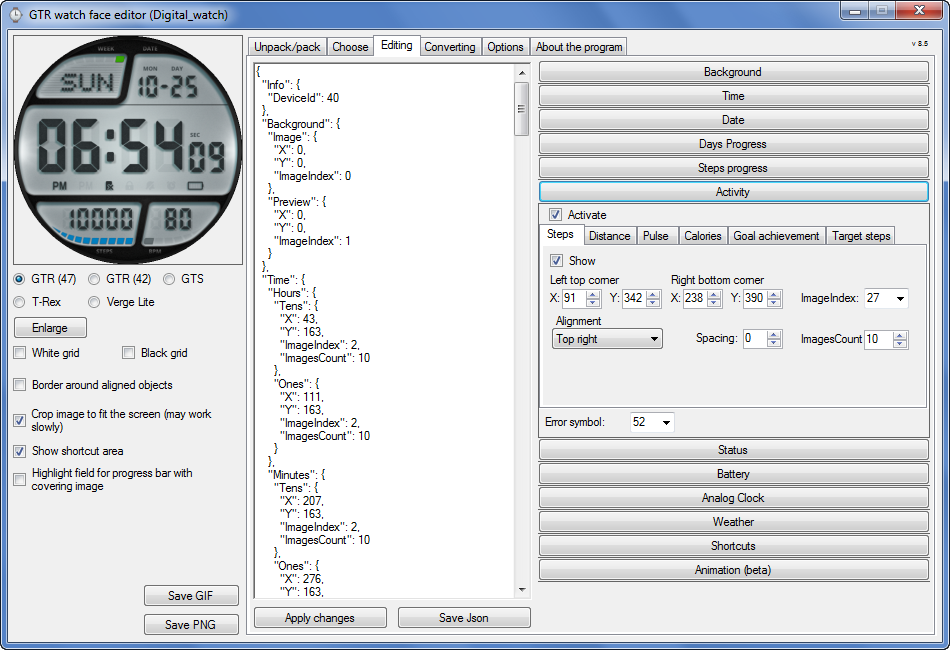
Graphics editor for working with dials Amazfit
The editor supports watch faces from GTR 47, GTR 42, GTS, T-Rex, Verge Lite.
Screenshot
Зображення
Note: the path to the program should not contain spaces, it is advisable to unpack it to the root of the disk.
Not all dials can be unpacked.
You can reduce the size of the bin file only by reducing the size of the images (height * width) or by reducing the number of images.

The drawing order of elements cannot be changed. The only exception is if you move the second hand from the center, it will be drawn under the hour and minute hands.

If the .bin file is not created, then you need to look for errors in the .log file. Most often this happens when images have the wrong format.

If the bin file is not created, and the log file contains the entry “bad transparency mask”, this means that the format of one or more images is incorrect (most often it occurs if you save the image in Photoshop without transparent pixels). You can fix it as follows:
- in Photoshop - add at least one transparent pixel
- in GIMP exported to PNG 16 bit RGBA
- in XnView - Image -> 32 bits

Version 10.0
List of changes
Added the ability to display the distance traveled in kilometers and miles.
Updated translation.
v 9.0
Fixed display of date if pictures have different sizes (often pictures for "1" are narrower than others)
Added new warnings about possible errors.
Fixed the order of displaying items.
Added a button to refresh the preview image.
Fixed bugs when converting watch faces.
Updated Chinese and Italian translations.
v 8.5
Fixed work with Verge Lite
v 8.4
Fixed Italian translation.
Added Chinese manual.
v 8.3
Bugs fixed.
Added a manual in English.
v 8.2
Added the display of the target steps (StepsGoal)
Added preliminary calculation of the size of the .bin file.
v 8.1
Fixed work on monitors with high resolution.
Updated translation (French, Italian, Chinese, Spanish).
v 8.0
Added the ability to convert dials between different watch models (GTR / T-Rex / Verge Lite).
v 7.1
Italian language added.
Minor fixes.
v 7.0
Added animation support
Verge Lite Support Added
Added the ability to quickly save the project (Ctrl + S)
Added support for languages (French, Chinese).
v 6.1
Added support for T-Rex.
Added the ability to auto-correct image files (error "bad transparency mask").
Added a reminder to save the project when it is closed.
v 6.0
Added support for shortcuts.
Added background image support for circular indicator.
Added display of a set of icons (segments) for the progress of steps.
Added display of a set of icons (segments) for the battery.
Added display of a set of icons (segments) for the pulse.
Added display of an indicator (arrow) for a pulse.
Added display of indicator (arrows) for calories.
Added display of a circular indicator for the pulse.
Added display of a circular indicator for calories.
Added the ability to crop the image to fit the screen.
Added support for languages ​​(Portuguese, Czech, Slovak, Hungarian).
v 5.2
Added support for a set of icons (icons and a set of coordinates for them) for the progress of steps and battery.
Added the ability to crop the preview according to the shape of the screen.
Bugs fixed in the English version.
v 5.1
Fixed incorrect display of the distance traveled.
Added the ability to adjust the speed of gif animation.
Added the ability to work with compressed bin files.
Updated bin file packer.
Added display of the year.
Added display of a charge indicator (arrow).
Added display of indicator (arrow) of steps.
Added display of the indicator (arrow) of the date.
Added display of indicator (arrow) of the day of the week.
Added display of indicator (arrow) of the month.
Added the ability to paste copied coordinates into offset fields from the center (for arrows).
English support added.
Old versions
If you want to supplement the missing translation, write to the PM.

Beta version of the editor with support for Amazfit X

AmazFit WatchFace editor 2 with support for GTR 2, GTS 2, T-Rex Pro

My editor doesn't work with GTR2 (GTS2) watch faces and I have no plans to add support for these models anytime soon. I don't know any other programs that can work with these dials. I have no information if anyone is working in this direction.

Because I bought a GTR 2e, the program will no longer be updated.

Donate to the author
PayPal: [email protected].

Востаннє редагувалось 01 червня 2022, 07:20 користувачем SashaCX75, всього редагувалось 25 разів.
spidercrab
Повідомлень: 24
З нами з: 25 червня 2020, 09:13
Звідки: UK
Has thanked: 27 times
Been thanked: 3 times
Контактна інформація:

Повідомлення spidercrab »

[mention]SashaCX75[/mention] I was wondering if you could consider adding the following feature to the GTR_editor, if this is possible.

The Pulse Segment feature works really well and allows a display of your heart rate exercise zone and can be useful thing for anyone using their GTR for exercise. The 5 zones should be 50%-60%, 60%-70%, 70%-80%, 80%-90% and 90%-100% of your max heart rate. As the max heart rate decreases with age, the calculations need to be based on a max heart rate form then to work correctly. The max heart rate is calculated using 220 minus your age. Currently as far as I know, the max heart rate is fixed.

So, I was hoping that you can add a new max heart rate function, similar to the Steps Goal that is then used for the daily step progress.

Being able to enter your max heart rate would be idea or to enter your age would also work.

Thanks
Аватар користувача
SashaCX75
Повідомлень: 814
З нами з: 26 жовтня 2019, 15:18
Звідки: Ukraine
Has thanked: 13 times
Been thanked: 1009 times
Контактна інформація:

Повідомлення SashaCX75 »

[mention]muskatim[/mention]
The instruction is in the program.

[mention]spidercrab[/mention]
Setting the maximum heart rate is not provided by the watch firmware. Therefore, it is not possible to add such a function to the dial.
Even if new functions are added in future firmware, I will not be able to add them to the editor until their support is added to the utility that unpacks bin files.
Magik933
Повідомлень: 2
З нами з: 09 липня 2020, 19:19
Звідки: UK
Контактна інформація:

Повідомлення Magik933 »

Hi, How can I edit color on the watch face (hour, minute,s, or seconds hands)?
Rafi87
WF maker
Повідомлень: 53
З нами з: 25 липня 2020, 09:15
Звідки: Slovakia
Has thanked: 1 time
Been thanked: 1 time
Контактна інформація:

Повідомлення Rafi87 »

Hi
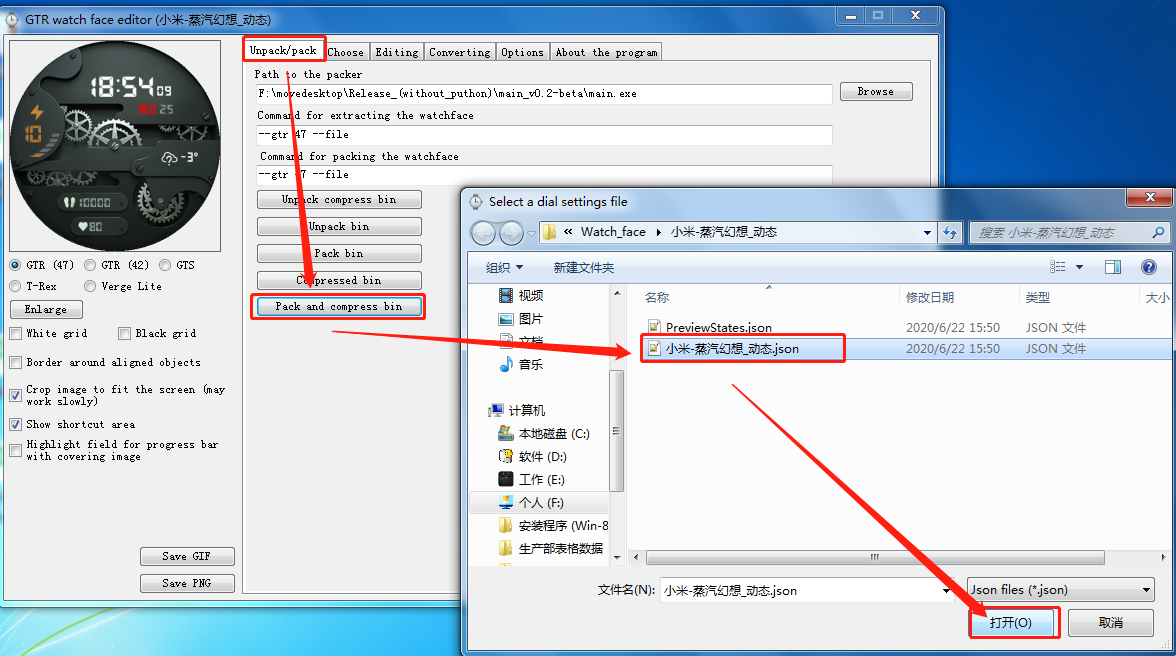
I modified the existing dial and when I want to pack and compress the BIN it will open a window for me and instead of SAVE it is there that open a JSON file
how do I save the modified dial to a BIN file?
Вкладення
Ashampoo_Snap_sobota 25. júla 2020_20h38m13s_001_.png
Ashampoo_Snap_sobota 25. júla 2020_20h38m13s_001_.png (374.15 Кіб) Переглянуто 23080 разів
This is me www.kristianhulala.sk/en
Аватар користувача
kyle
Повідомлень: 23
З нами з: 22 квітня 2018, 14:32
Звідки: CHINA
Has thanked: 3 times
Been thanked: 5 times
Контактна інформація:

Повідомлення kyle »

Rafi87 писав: 25 липня 2020, 18:42
Hi
I modified the existing dial and when I want to pack and compress the BIN it will open a window for me and instead of SAVE it is there that open a JSON file
how do I save the modified dial to a BIN file?
In the pop-up window, select the json file you want to pack, and then pack it
Contact please email:[email protected]
如有需要可联系!
Аватар користувача
kyle
Повідомлень: 23
З нами з: 22 квітня 2018, 14:32
Звідки: CHINA
Has thanked: 3 times
Been thanked: 5 times
Контактна інформація:

Повідомлення kyle »

Magik933 писав: 25 липня 2020, 11:11
Hi, How can I edit color on the watch face (hour, minute,s, or seconds hands)?
Use photo editing software such as PS to modify the picture you want to change
Contact please email:[email protected]
如有需要可联系!
Rafi87
WF maker
Повідомлень: 53
З нами з: 25 липня 2020, 09:15
Звідки: Slovakia
Has thanked: 1 time
Been thanked: 1 time
Контактна інформація:

Повідомлення Rafi87 »

kyle писав: 26 липня 2020, 01:07
Rafi87 писав: 25 липня 2020, 18:42
Hi
I modified the existing dial and when I want to pack and compress the BIN it will open a window for me and instead of SAVE it is there that open a JSON file
how do I save the modified dial to a BIN file?
In the pop-up window, select the json file you want to pack, and then pack it
JSON file how to pack in BIN file?
This is me www.kristianhulala.sk/en
Аватар користувача
kyle
Повідомлень: 23
З нами з: 22 квітня 2018, 14:32
Звідки: CHINA
Has thanked: 3 times
Been thanked: 5 times
Контактна інформація:

Повідомлення kyle »

Rafi87 писав: 26 липня 2020, 05:25
kyle писав: 26 липня 2020, 01:07
Rafi87 писав: 25 липня 2020, 18:42
Hi
I modified the existing dial and when I want to pack and compress the BIN it will open a window for me and instead of SAVE it is there that open a JSON file
how do I save the modified dial to a BIN file?
In the pop-up window, select the json file you want to pack, and then pack it
JSON file how to pack in BIN file?
Just pack as shown in the figure
Зображення
Contact please email:[email protected]
如有需要可联系!
Rafi87
WF maker
Повідомлень: 53
З нами з: 25 липня 2020, 09:15
Звідки: Slovakia
Has thanked: 1 time
Been thanked: 1 time
Контактна інформація:

Повідомлення Rafi87 »

kyle писав: 26 липня 2020, 01:07

yes, I did
so, can i put that JSON file in my phone and set the dial?
don't need to convert to a BIN file?
This is me www.kristianhulala.sk/en
Аватар користувача
kyle
Повідомлень: 23
З нами з: 22 квітня 2018, 14:32
Звідки: CHINA
Has thanked: 3 times
Been thanked: 5 times
Контактна інформація:

Повідомлення kyle »

Rafi87 писав: 26 липня 2020, 06:40
kyle писав: 26 липня 2020, 01:07

yes, I did
so, can i put that JSON file in my phone and set the dial?
don't need to convert to a BIN file?
Can only be converted into a bin file and flashed to the watch
Contact please email:[email protected]
如有需要可联系!
dinhlam91
WF maker
Повідомлень: 8
З нами з: 11 липня 2020, 15:48
Звідки: Ha Noi
Контактна інформація:

Повідомлення dinhlam91 »

Hello,

First, Thank you SashaCX75 for this tool.

I've the issue with this tool. I'm using it from version 8.1 up to date is 8.3. I can't preview and Edit the WF.
I'm using windows 10 Pro
Error:
error.png
error.png (58.47 Кіб) Переглянуто 22861 раз

Код: Виділити все

See the end of this message for details on invoking 
just-in-time (JIT) debugging instead of this dialog box.

************** Exception Text **************
System.TypeInitializationException: The type initializer for 'NativeMagickSettings' threw an exception. ---> System.TypeInitializationException: The type initializer for 'X86' threw an exception. ---> System.DllNotFoundException: Unable to load DLL 'Magick.Native-Q16-x86.dll': The specified module could not be found. (Exception from HRESULT: 0x8007007E)
   at ImageMagick.Environment.NativeMethods.X86.Environment_SetEnv(IntPtr name, IntPtr value)
   at ImageMagick.Environment.NativeEnvironment.SetEnv(String name, String value)
   at ImageMagick.MagickNET.InitializePrivate(ConfigurationFiles configFiles, String newPath)
   at ImageMagick.MagickNET.Initialize(ConfigurationFiles configFiles, String path)
   at ImageMagick.NativeLibraryLoader.ExtractLibrary()
   at ImageMagick.NativeLibraryLoader.Load()
   at ImageMagick.Environment.NativeMethods.X86..cctor()
   --- End of inner exception stack trace ---
   at ImageMagick.Environment.NativeMethods.X86.Environment_Initialize()
   at ImageMagick.Environment.NativeEnvironment.Initialize()
   at ImageMagick.Environment.Initialize()
   at ImageMagick.MagickSettings.NativeMagickSettings..cctor()
   --- End of inner exception stack trace ---
   at ImageMagick.MagickSettings.NativeMagickSettings..ctor()
   at ImageMagick.MagickSettings..ctor()
   at ImageMagick.MagickImage..ctor()
   at GTR_Watch_face.Form1.FormColor(Bitmap bitmap)
   at GTR_Watch_face.Form1.PreviewToBitmap(Graphics gPanel, Single scale, Boolean crop, Boolean WMesh, Boolean BMesh, Boolean BBorder, Boolean showShortcuts, Boolean showShortcutsArea, Boolean showShortcutsBorder, Boolean showAnimation, Boolean showCircleScaleArea, Int32 link)
   at GTR_Watch_face.Form1.<pictureBox_Preview_DoubleClick>b__195_0(Object senderResize, EventArgs eResize)
   at System.Windows.Forms.Control.OnResize(EventArgs e)
   at System.Windows.Forms.PictureBox.OnResize(EventArgs e)
   at System.Windows.Forms.Control.OnSizeChanged(EventArgs e)
   at System.Windows.Forms.Control.UpdateBounds(Int32 x, Int32 y, Int32 width, Int32 height, Int32 clientWidth, Int32 clientHeight)
   at System.Windows.Forms.Control.UpdateBounds()
   at System.Windows.Forms.Control.WmWindowPosChanged(Message& m)
   at System.Windows.Forms.Control.WndProc(Message& m)
   at System.Windows.Forms.Control.ControlNativeWindow.OnMessage(Message& m)
   at System.Windows.Forms.Control.ControlNativeWindow.WndProc(Message& m)
   at System.Windows.Forms.NativeWindow.Callback(IntPtr hWnd, Int32 msg, IntPtr wparam, IntPtr lparam)


************** Loaded Assemblies **************
mscorlib
    Assembly Version: 4.0.0.0
    Win32 Version: 4.8.4150.0 built by: NET48REL1LAST_C
    CodeBase: file:///C:/Windows/Microsoft_NET/Framework/v4.0.30319/mscorlib.dll
----------------------------------------
GTR_Watch_face
    Assembly Version: 8.3.0.0
    Win32 Version: 8.3.0.0
    CodeBase: file:///D:/LamPD/Amazfit/GTR_Watch_face_(without_Python)/GTR_Watch_face.exe
----------------------------------------
System.Windows.Forms
    Assembly Version: 4.0.0.0
    Win32 Version: 4.8.4150.0 built by: NET48REL1LAST_C
    CodeBase: file:///C:/WINDOWS/Microsoft_NET/assembly/GAC_MSIL/System.Windows.Forms/v4.0_4.0.0.0__b77a5c561934e089/System.Windows.Forms.dll
----------------------------------------
System
    Assembly Version: 4.0.0.0
    Win32 Version: 4.8.4001.0 built by: NET48REL1LAST_C
    CodeBase: file:///C:/WINDOWS/Microsoft_NET/assembly/GAC_MSIL/System/v4.0_4.0.0.0__b77a5c561934e089/System.dll
----------------------------------------
System.Drawing
    Assembly Version: 4.0.0.0
    Win32 Version: 4.8.3752.0 built by: NET48REL1
    CodeBase: file:///C:/WINDOWS/Microsoft_NET/assembly/GAC_MSIL/System.Drawing/v4.0_4.0.0.0__b03f5f7f11d50a3a/System.Drawing.dll
----------------------------------------
Newtonsoft.Json
    Assembly Version: 12.0.0.0
    Win32 Version: 12.0.3.23909
    CodeBase: file:///D:/LamPD/Amazfit/GTR_Watch_face_(without_Python)/Newtonsoft.Json.DLL
----------------------------------------
System.Configuration
    Assembly Version: 4.0.0.0
    Win32 Version: 4.8.3752.0 built by: NET48REL1
    CodeBase: file:///C:/WINDOWS/Microsoft_NET/assembly/GAC_MSIL/System.Configuration/v4.0_4.0.0.0__b03f5f7f11d50a3a/System.Configuration.dll
----------------------------------------
System.Core
    Assembly Version: 4.0.0.0
    Win32 Version: 4.8.4121.0 built by: NET48REL1LAST_C
    CodeBase: file:///C:/WINDOWS/Microsoft_NET/assembly/GAC_MSIL/System.Core/v4.0_4.0.0.0__b77a5c561934e089/System.Core.dll
----------------------------------------
System.Xml
    Assembly Version: 4.0.0.0
    Win32 Version: 4.8.3752.0 built by: NET48REL1
    CodeBase: file:///C:/WINDOWS/Microsoft_NET/assembly/GAC_MSIL/System.Xml/v4.0_4.0.0.0__b77a5c561934e089/System.Xml.dll
----------------------------------------
System.Numerics
    Assembly Version: 4.0.0.0
    Win32 Version: 4.8.3752.0 built by: NET48REL1
    CodeBase: file:///C:/WINDOWS/Microsoft_NET/assembly/GAC_MSIL/System.Numerics/v4.0_4.0.0.0__b77a5c561934e089/System.Numerics.dll
----------------------------------------
System.Runtime.Serialization
    Assembly Version: 4.0.0.0
    Win32 Version: 4.8.4150.0 built by: NET48REL1LAST_C
    CodeBase: file:///C:/WINDOWS/Microsoft_NET/assembly/GAC_MSIL/System.Runtime.Serialization/v4.0_4.0.0.0__b77a5c561934e089/System.Runtime.Serialization.dll
----------------------------------------
System.Data
    Assembly Version: 4.0.0.0
    Win32 Version: 4.8.4121.0 built by: NET48REL1LAST_C
    CodeBase: file:///C:/WINDOWS/Microsoft_NET/assembly/GAC_32/System.Data/v4.0_4.0.0.0__b77a5c561934e089/System.Data.dll
----------------------------------------
GTR_Watch_face.resources
    Assembly Version: 8.3.0.0
    Win32 Version: 8.3.0.0
    CodeBase: file:///D:/LamPD/Amazfit/GTR_Watch_face_(without_Python)/en/GTR_Watch_face.resources.DLL
----------------------------------------
Accessibility
    Assembly Version: 4.0.0.0
    Win32 Version: 4.8.3752.0 built by: NET48REL1
    CodeBase: file:///C:/WINDOWS/Microsoft_NET/assembly/GAC_MSIL/Accessibility/v4.0_4.0.0.0__b03f5f7f11d50a3a/Accessibility.dll
----------------------------------------
Magick_NET-Q16-AnyCPU
    Assembly Version: 7.14.5.0
    Win32 Version: 7.14.5.0
    CodeBase: file:///D:/LamPD/Amazfit/GTR_Watch_face_(without_Python)/Magick_NET-Q16-AnyCPU.DLL
----------------------------------------

************** JIT Debugging **************
To enable just-in-time (JIT) debugging, the .config file for this
application or computer (machine.config) must have the
jitDebugging value set in the system.windows.forms section.
The application must also be compiled with debugging
enabled.

For example:

<configuration>
    <system.windows.forms jitDebugging="true" />
</configuration>

When JIT debugging is enabled, any unhandled exception
will be sent to the JIT debugger registered on the computer
rather than be handled by this dialog box.
Anyone can help me?

Thanks
Joker73
WF maker
Повідомлень: 2
З нами з: 14 серпня 2019, 09:31
Контактна інформація:

Повідомлення Joker73 »

I made a watch face whose compressed .bin file weighs 427Kbs. I installed it on my GTR through the Notify & Fitness app and the watch entered on a bootloop which I could solve by charging the watch. Why this happened if other watch faces weigh way more?
Аватар користувача
SashaCX75
Повідомлень: 814
З нами з: 26 жовтня 2019, 15:18
Звідки: Ukraine
Has thanked: 13 times
Been thanked: 1009 times
Контактна інформація:

Повідомлення SashaCX75 »

[mention]Joker73[/mention]
The size of the uncompressed file is important.
Possible errors in the watch face.
Joker73
WF maker
Повідомлень: 2
З нами з: 14 серпня 2019, 09:31
Контактна інформація:

Повідомлення Joker73 »

SashaCX75 писав: 08 серпня 2020, 13:38
@Joker73
The size of the uncompressed file is important.
Possible errors in the watch face.
Uncompressed file weighs 4.16MB.

EDIT: Solved. The problem was related to the big size of the hour hand.
ThierryC
Повідомлень: 1
З нами з: 25 червня 2020, 07:38
Звідки: London
Контактна інформація:

Повідомлення ThierryC »

Great program Sasha, thanks for your work.
In future versions, Is it feasible to add more Shortcuts on the list of the existing ones: Steps, Pulse, Weather and Energy saving?
Such like Alarm, Countdown, Screen lock, Auto brightness, etc...
Аватар користувача
SashaCX75
Повідомлень: 814
З нами з: 26 жовтня 2019, 15:18
Звідки: Ukraine
Has thanked: 13 times
Been thanked: 1009 times
Контактна інформація:

Повідомлення SashaCX75 »

Now the watch supports only 4 types of labels. If something changes in future firmware, I will add new types of shortcuts to the program.
dinhlam91
WF maker
Повідомлень: 8
З нами з: 11 липня 2020, 15:48
Звідки: Ha Noi
Контактна інформація:

Повідомлення dinhlam91 »

SashaCX75 писав: 09 серпня 2020, 11:34
Now the watch supports only 4 types of labels. If something changes in future firmware, I will add new types of shortcuts to the program.
Hi Sasha, can you check and help me with this issue: viewtopic.php?p=6029#p6029
Аватар користувача
SashaCX75
Повідомлень: 814
З нами з: 26 жовтня 2019, 15:18
Звідки: Ukraine
Has thanked: 13 times
Been thanked: 1009 times
Контактна інформація:

Повідомлення SashaCX75 »

dinhlam91
I've tested on windows 7 and windows 10 x64. I didn't have such problems, what could be the reason, I don't know.
Аватар користувача
SashaCX75
Повідомлень: 814
З нами з: 26 жовтня 2019, 15:18
Звідки: Ukraine
Has thanked: 13 times
Been thanked: 1009 times
Контактна інформація:

Повідомлення SashaCX75 »

Version 8.4
List of changes (Google Translate)
Fixed Italian translation.
Added Chinese manual.
Аватар користувача
lawrence-dol
WF maker
Повідомлень: 4
З нами з: 05 листопада 2019, 04:11
Звідки: USA
Has thanked: 1 time

Повідомлення lawrence-dol »

When working on a watch face, I frequently get an error in GIMP that some or another image cannot be saved and I have to close the WatchFace Editor in order to save. Can this be fixed by ensuring that images are always closed after being read, please?
--
Lawrence Dol
SWCI
WF maker
Повідомлень: 9
З нами з: 26 серпня 2019, 09:55
Звідки: Roma
Has thanked: 1 time
Контактна інформація:

Повідомлення SWCI »

SashaCX75 писав: 10 серпня 2020, 13:48
Version 8.4
List of changes (Google Translate)
Fixed Italian translation.
Added Chinese manual.
GRAZIE.
Аватар користувача
SashaCX75
Повідомлень: 814
З нами з: 26 жовтня 2019, 15:18
Звідки: Ukraine
Has thanked: 13 times
Been thanked: 1009 times
Контактна інформація:

Повідомлення SashaCX75 »

lawrence-dol
Give me your project and tell me which image and under what conditions it is impossible to edit. I'll see what the problem is and try to fix it.
Аватар користувача
lawrence-dol
WF maker
Повідомлень: 4
З нами з: 05 листопада 2019, 04:11
Звідки: USA
Has thanked: 1 time

Повідомлення lawrence-dol »

SashaCX75 : It happens randomly to all images in all projects from time to time. All I have to do is be editing some of the images used by the project and pretty soon GIMP will be unable to write one of them when I try to export it. I've had it happen often, probably because I am often editing and refining the images in GIMP and using the watch designer to see the end result as I tweak the image.

You can just open a project and just generate random values while using Process Hacker each time to search for file handles containing the folder name of your project; pretty soon you'll see assorted images held open. The exact files vary for each redisplay, and it seems to happen most commonly with images used for digits, though it's definitely not exclusively these.

It's easy enough to replicate in my workflow -- open, say, the 9 digits used for time display in GIMP, export each once to get through the initial prompts for exporting, then randomly generate display values in the watch designer and each time use CTRL-E to re-export each of the images. Before very long, one will fail to export. In Windows its describes a permission error, but that's normal for Windows when a file is in use. Exit the watch designer and you'll immediately be able to export that image.
--
Lawrence Dol
grigosback
Повідомлень: 1
З нами з: 30 липня 2020, 20:56
Звідки: Fuentes, Santa Fe, Argentina
Контактна інформація:

Повідомлення grigosback »

Hello SashaCX75, the link is down. Can you reupload it? Thanks!
Аватар користувача
GIK-Team
root
Повідомлень: 1014
З нами з: 22 березня 2018, 10:00
Звідки: Ukraine
Has thanked: 1112 times
Been thanked: 267 times
Контактна інформація:

Повідомлення GIK-Team »

grigosback писав: 15 серпня 2020, 03:48
Hello @SashaCX75, the link is down. Can you reupload it? Thanks!
The link is available.
"sometimes it's scary but it's still just you and me” — Leaving Laurel
Відповісти

Повернутись до “Watchfaces tools”

Хто зараз онлайн

Зараз переглядають цей форум: Немає зареєстрованих користувачів і 1 гість