• Administrator
  •  
    Support Ukraine
    If you experience any problems with the forum (it is not visible, there is no way to post messages, or some functionality does not work), please let us know. If you have problems with registration or you did not receive confirmation letter, let us know and we will activate your account manually.
    If you get an "The submitted form was invalid. Try submitting again" error, delete cookies, then try again.
     

AmazFit WatchFace editor for Windows by SashaCX75

This forum is designed to discuss and develop tools creating watch faces.

Moderators: asoo, lvpokka, Internal error, Watchmens

Forum rules
All communication in this branch should only be in English.
To discuss tools that are not in this section, use the “Watchfaces tools (discussion)” forum.
User avatar
SashaCX75
Posts: 820
Joined: 26 Oct 2019, 15:18
Location: Ukraine
Has thanked: 13 times
Been thanked: 1029 times
Contact:

AmazFit WatchFace editor for Windows by SashaCX75

Post by SashaCX75 »

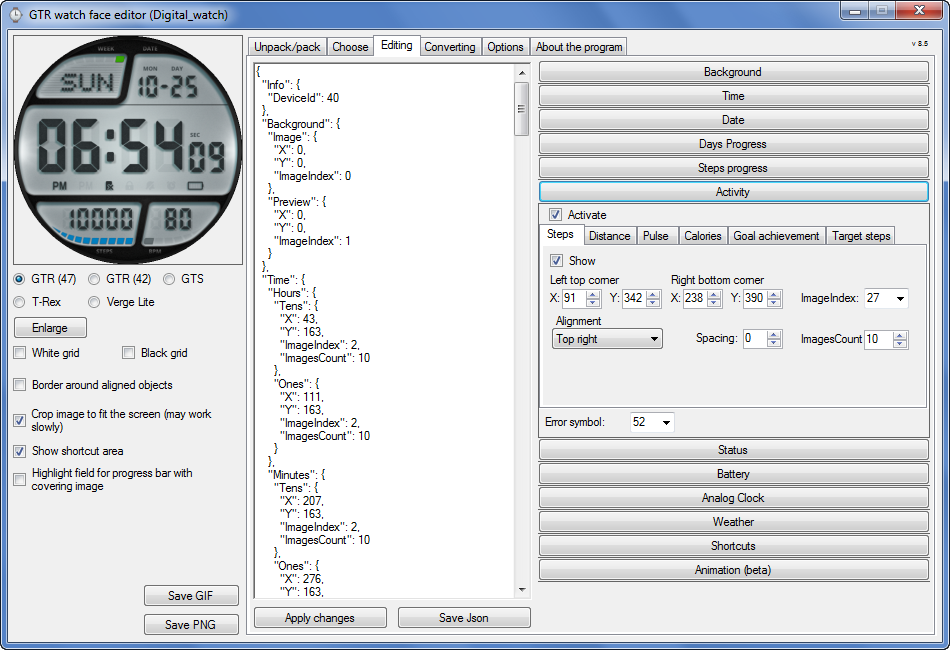
Graphics editor for working with dials Amazfit
The editor supports watch faces from GTR 47, GTR 42, GTS, T-Rex, Verge Lite.
Screenshot
Image
Note: the path to the program should not contain spaces, it is advisable to unpack it to the root of the disk.
Not all dials can be unpacked.
You can reduce the size of the bin file only by reducing the size of the images (height * width) or by reducing the number of images.

The drawing order of elements cannot be changed. The only exception is if you move the second hand from the center, it will be drawn under the hour and minute hands.

If the .bin file is not created, then you need to look for errors in the .log file. Most often this happens when images have the wrong format.

If the bin file is not created, and the log file contains the entry “bad transparency mask”, this means that the format of one or more images is incorrect (most often it occurs if you save the image in Photoshop without transparent pixels). You can fix it as follows:
- in Photoshop - add at least one transparent pixel
- in GIMP exported to PNG 16 bit RGBA
- in XnView - Image -> 32 bits

Version 10.0
List of changes
Added the ability to display the distance traveled in kilometers and miles.
Updated translation.
v 9.0
Fixed display of date if pictures have different sizes (often pictures for "1" are narrower than others)
Added new warnings about possible errors.
Fixed the order of displaying items.
Added a button to refresh the preview image.
Fixed bugs when converting watch faces.
Updated Chinese and Italian translations.
v 8.5
Fixed work with Verge Lite
v 8.4
Fixed Italian translation.
Added Chinese manual.
v 8.3
Bugs fixed.
Added a manual in English.
v 8.2
Added the display of the target steps (StepsGoal)
Added preliminary calculation of the size of the .bin file.
v 8.1
Fixed work on monitors with high resolution.
Updated translation (French, Italian, Chinese, Spanish).
v 8.0
Added the ability to convert dials between different watch models (GTR / T-Rex / Verge Lite).
v 7.1
Italian language added.
Minor fixes.
v 7.0
Added animation support
Verge Lite Support Added
Added the ability to quickly save the project (Ctrl + S)
Added support for languages (French, Chinese).
v 6.1
Added support for T-Rex.
Added the ability to auto-correct image files (error "bad transparency mask").
Added a reminder to save the project when it is closed.
v 6.0
Added support for shortcuts.
Added background image support for circular indicator.
Added display of a set of icons (segments) for the progress of steps.
Added display of a set of icons (segments) for the battery.
Added display of a set of icons (segments) for the pulse.
Added display of an indicator (arrow) for a pulse.
Added display of indicator (arrows) for calories.
Added display of a circular indicator for the pulse.
Added display of a circular indicator for calories.
Added the ability to crop the image to fit the screen.
Added support for languages ​​(Portuguese, Czech, Slovak, Hungarian).
v 5.2
Added support for a set of icons (icons and a set of coordinates for them) for the progress of steps and battery.
Added the ability to crop the preview according to the shape of the screen.
Bugs fixed in the English version.
v 5.1
Fixed incorrect display of the distance traveled.
Added the ability to adjust the speed of gif animation.
Added the ability to work with compressed bin files.
Updated bin file packer.
Added display of the year.
Added display of a charge indicator (arrow).
Added display of indicator (arrow) of steps.
Added display of the indicator (arrow) of the date.
Added display of indicator (arrow) of the day of the week.
Added display of indicator (arrow) of the month.
Added the ability to paste copied coordinates into offset fields from the center (for arrows).
English support added.
Old versions
If you want to supplement the missing translation, write to the PM.

Beta version of the editor with support for Amazfit X

AmazFit WatchFace editor 2 with support for GTR 2, GTS 2, T-Rex Pro

My editor doesn't work with GTR2 (GTS2) watch faces and I have no plans to add support for these models anytime soon. I don't know any other programs that can work with these dials. I have no information if anyone is working in this direction.

Because I bought a GTR 2e, the program will no longer be updated.

Donate to the author
PayPal: [email protected].
Last edited by SashaCX75 on 01 Jun 2022, 07:20, edited 25 times in total.
User avatar
maortrol
Posts: 15
Joined: 17 Dec 2019, 22:12
Location: Spain
Has thanked: 27 times
Been thanked: 1 time
Contact:

Post by maortrol »

tippo wrote: 10 May 2020, 21:49
How did you get the seconds hand to display under the other two? On the GTS it seems the seconds hand is always on top? (With hours hand on the bottom)
I have no idea how it happened, and that's what I want to fix... :lol:

I'd like to know if there is any way to choose where to put every hand... :roll:
Mithrel
WF maker
Posts: 5
Joined: 07 Jun 2018, 01:26
Has thanked: 2 times
Contact:

Post by Mithrel »

hello, I'm using GTR_WatchFace version 8, when i packed my bin files they are over 1.95mb.
So i did a test, I downloaded a 1.6mb wachface, unpacked and did not modify it, packed again but it was 2.17mb.
Is something malfunctioning or do I have a bad application configuration?
User avatar
SashaCX75
Posts: 820
Joined: 26 Oct 2019, 15:18
Location: Ukraine
Has thanked: 13 times
Been thanked: 1029 times
Contact:

Post by SashaCX75 »

maortrol wrote: 10 May 2020, 10:37
I have a watch face in which Seconds hand is shown under Hours and Minutes hands (it passes below them, so when time is 0:00:00 you can't see Seconds hand, it always passes below the other two hands). Is there any way to set Minutes hand to be shown at the bottom, Hours hand at the middle, and Seconds hand at the top?
The hands are usually drawn in this order - hour hand, minute hand, second hand. If you move the second hand from the center, it will be drawn below the rest of the hands.

[mention]Mithrel[/mention]
Maybe 1.6mb is a zipped wachface. And in an unzipped state it is 2.17mb. But then it is not clear how it works. What kind of wachface did you download?
Mithrel
WF maker
Posts: 5
Joined: 07 Jun 2018, 01:26
Has thanked: 2 times
Contact:

Post by Mithrel »

It's not ziped file. I compared the bin files without compression.
I did other test, packed with main.exe and the file is also smaller. I guess is the preview file that makes the difference, is it possible to pack bin without preview? And compressed also?
tippo
WF maker
Posts: 11
Joined: 17 Apr 2020, 19:45
Location: Bolivia
Has thanked: 5 times
Been thanked: 2 times
Contact:

Post by tippo »

Mithrel wrote: 11 May 2020, 14:32
It's not ziped file. I compared the bin files without compression.
I did other test, packed with main.exe and the file is also smaller. I guess is the preview file that makes the difference, is it possible to pack bin without preview? And compressed also?
I think you can pack without a preview but I haven't tried it. I have packed with a blank preview image to try and cut down on file size and it was fine.
Mithrel
WF maker
Posts: 5
Joined: 07 Jun 2018, 01:26
Has thanked: 2 times
Contact:

Post by Mithrel »

Animated.gif is almost 0.5mb and is always generated when packed the bin.
Then some parts of imagens dont work like day and weather
https://amazfitwatchfaces.com/gtr/view/5603
User avatar
SashaCX75
Posts: 820
Joined: 26 Oct 2019, 15:18
Location: Ukraine
Has thanked: 13 times
Been thanked: 1029 times
Contact:

Post by SashaCX75 »

[mention]Mithrel[/mention]
According to your link, an unzipped file initially has a size of 2.17mb (English version). Where did you see the size 1.6mb I do not know. Some elements do not work because the size is more than 2mb. The recommended preview file size is 266x266 pixels. If you reduce the size of the preview file, then the size of the bin file should fit into the 2mb limit.
All .png files names that consist of numbers are packed into a bin file, other files are not packed into a bin.
Mithrel
WF maker
Posts: 5
Joined: 07 Jun 2018, 01:26
Has thanked: 2 times
Contact:

Post by Mithrel »

Thanks. Is there a option to reduce the preview?
User avatar
SashaCX75
Posts: 820
Joined: 26 Oct 2019, 15:18
Location: Ukraine
Has thanked: 13 times
Been thanked: 1029 times
Contact:

Post by SashaCX75 »

Version 8.1
List of changes (Google Translate)
Fixed work on monitors with high resolution.
Updated translation (French, Italian, Chinese, Spanish).
Last edited by SashaCX75 on 12 May 2020, 21:29, edited 1 time in total.
Mithrel
WF maker
Posts: 5
Joined: 07 Jun 2018, 01:26
Has thanked: 2 times
Contact:

Post by Mithrel »

Thaks for the update
User avatar
ManuTdi
WF maker
Posts: 9
Joined: 23 Aug 2019, 02:51
Has thanked: 2 times
Been thanked: 2 times
Contact:

Post by ManuTdi »

SashaCX75 wrote: 12 May 2020, 17:38
Version 8.1
List of changes (Google Translate)
Fixed work on monitors with high resolution.
Updated translation (French, Italian, Chinese).
Did you include part of my Spanish translation?
tippo
WF maker
Posts: 11
Joined: 17 Apr 2020, 19:45
Location: Bolivia
Has thanked: 5 times
Been thanked: 2 times
Contact:

Post by tippo »

Thanks for all your great work [mention]SashaCX75[/mention] !
User avatar
SashaCX75
Posts: 820
Joined: 26 Oct 2019, 15:18
Location: Ukraine
Has thanked: 13 times
Been thanked: 1029 times
Contact:

Post by SashaCX75 »

[mention]ManuTdi[/mention]
Yes, Included.
SWCI
WF maker
Posts: 9
Joined: 26 Aug 2019, 09:55
Location: Roma
Has thanked: 1 time
Contact:

Post by SWCI »

SashaCX75 wrote: 08 May 2020, 14:07
6. ... and DND mode
Could you please explain to me what DND mode is? thanks.

Endless congratulations for the tool. Thanks
User avatar
SashaCX75
Posts: 820
Joined: 26 Oct 2019, 15:18
Location: Ukraine
Has thanked: 13 times
Been thanked: 1029 times
Contact:

Post by SashaCX75 »

[mention]SWCI[/mention]
DND (do not disturb) - on the watch in the blind, a crescent-shaped icon.
User avatar
kyle
Posts: 23
Joined: 22 Apr 2018, 14:32
Location: CHINA
Has thanked: 3 times
Been thanked: 5 times
Contact:

Post by kyle »

没别的意思,就是来纯支持。
No other meaning, just to come to pure support.
Contact please email:[email protected]
如有需要可联系!
gurnoorsi366
Posts: 3
Joined: 26 Oct 2019, 07:50
Has thanked: 3 times
Contact:

Post by gurnoorsi366 »

Hi can someone make a tutorial video for it
taw_bip
WF maker
Posts: 130
Joined: 12 Apr 2018, 16:29
Has thanked: 127 times
Been thanked: 19 times
Contact:

Post by taw_bip »

gurnoorsi366 wrote: 20 May 2020, 17:56
Hi can someone make a tutorial video for it
Jackall Digital has a few tutorials on YouTube for the Mi Band but the general concepts are the same. The GTR watchface tool just makes it much easier and faster to put the watchface together.
https://www.youtube.com/watch?v=_j21tufMU-8
dasogoster
WF maker
Posts: 2
Joined: 24 May 2020, 20:58
Location: España
Has thanked: 1 time
Contact:

Post by dasogoster »

Hello, in the preview gif it looks correct and shows me all the digits, when creating the .bin and testing it in the amazfit GTS, there are some missing steps, calories and time, what could be the fault ?, thanks ...
User avatar
maortrol
Posts: 15
Joined: 17 Dec 2019, 22:12
Location: Spain
Has thanked: 27 times
Been thanked: 1 time
Contact:

Post by maortrol »

dasogoster wrote: 24 May 2020, 21:02
Hello, in the preview gif it looks correct and shows me all the digits, when creating the .bin and testing it in the amazfit GTS, there are some missing steps, calories and time, what could be the fault ?, thanks ...
Check the uncompressed packed.bin file generated: it must be lesser than 1.5 MB; else, it could work wrongly in the watch.
juanl
WF maker
Posts: 5
Joined: 04 Apr 2019, 15:56
Has thanked: 1 time
Contact:

Post by juanl »

Reviewing an old my sphere I observed that had defined the step target (8000). When I want to modify it with your program I notice that it does not support that field. The definition of this field is:
"Activity":
"StepsGoal":
"TopLeftX": 60,
"TopLeftY": 293,
"BottomRightX": 60,
"BottomRightY": 40,
"Alignment": "Default",
"Spacing": 1,
"ImageIndex": 12,
"ImagesCount": 10

Do you plan to include it in the next release?

Greetings.
User avatar
SashaCX75
Posts: 820
Joined: 26 Oct 2019, 15:18
Location: Ukraine
Has thanked: 13 times
Been thanked: 1029 times
Contact:

Post by SashaCX75 »

[mention]juanl[/mention]
If there is a need, I can add. For example, give only a working watchface where this parameter is.
juanl
WF maker
Posts: 5
Joined: 04 Apr 2019, 15:56
Has thanked: 1 time
Contact:

Post by juanl »

I've put the Bumblebee sphere on the page. The dial is fully functional. You can only see the Stepsgoal statement in json if you unpack it with the old tools.
dasogoster
WF maker
Posts: 2
Joined: 24 May 2020, 20:58
Location: España
Has thanked: 1 time
Contact:

Post by dasogoster »

Hello, as much as I simplify it, I have removed enough images of the weather, it always keeps coming out that it occupies more than 1.5, I see more complex spheres and they work well, I do not understand it, thanks ...
User avatar
Lordalpine
WF maker
Posts: 62
Joined: 09 Oct 2019, 22:09
Location: Santo Tirso
Has thanked: 6 times
Been thanked: 35 times
Contact:

Post by Lordalpine »

Mithrel wrote: 12 May 2020, 03:30
Thanks. Is there a option to reduce the preview?
Preview normally is 266x266 for GTR47mm if you use the 0001.PNG [Background section -> Preview ]
You can resize it to what size you want, do a square with only the name on it... it's as you wish.
But if you want you can use a 1X1 pixel - transparent PNG for the preview if you still want to use the preview feature
or simply don't use it... you leave a blank field [ It means no picture used ] [Background section -> Preview ]

Honnestly now, I don't use it :
You can only have one custom face, I'm always on my custom face.... So^^ it save me time when I sync face to my GTR [ smaller size transfer faster ] and space on my HDD.

Open the spoiler to see an illustrated example, you can zoom on it by simply clicking it :
Spoiler
Image
Post Reply

Return to “Watchfaces tools”

Who is online

Users browsing this forum: No registered users and 0 guests