• Адміністратор
  •  
    Support Ukraine
    If you experience any problems with the forum (it is not visible, there is no way to post messages, or some functionality does not work), please let us know. If you have problems with registration or you did not receive confirmation letter, let us know and we will activate your account manually.
    If you get an "The submitted form was invalid. Try submitting again" error, delete cookies, then try again.
     

AmazFit WatchFace editor for Windows by SashaCX75

This forum is designed to discuss and develop tools creating watch faces.

Модератори: asoo, lvpokka, Internal error, Watchmens

Правила форуму
All communication in this branch should only be in English.
To discuss tools that are not in this section, use the “Watchfaces tools (discussion)” forum.
Аватар користувача
SashaCX75
Повідомлень: 820
З нами з: 26 жовтня 2019, 15:18
Звідки: Ukraine
Has thanked: 13 times
Been thanked: 1029 times
Контактна інформація:

AmazFit WatchFace editor for Windows by SashaCX75

Повідомлення SashaCX75 »

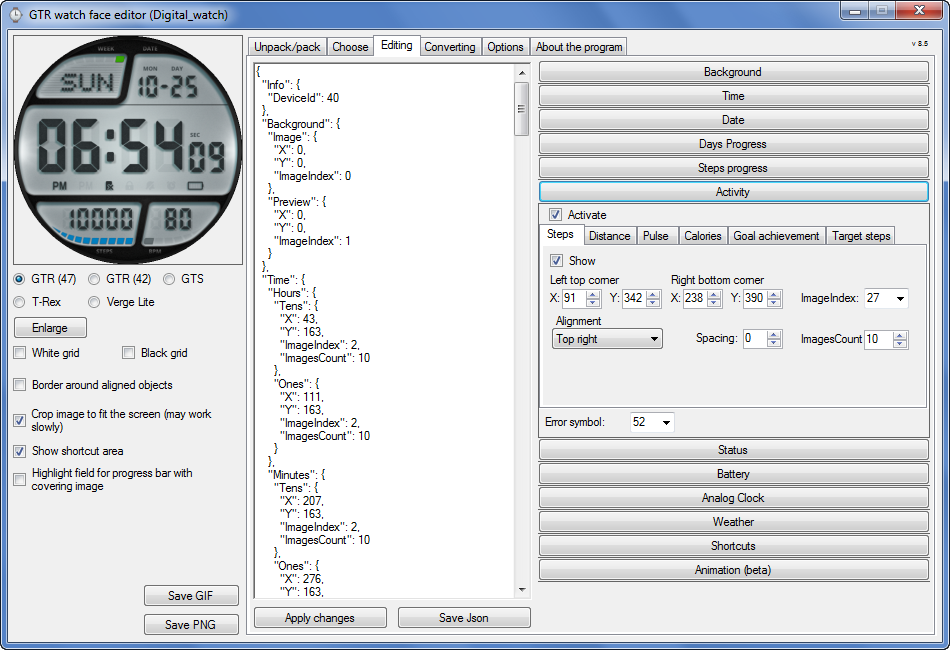
Graphics editor for working with dials Amazfit
The editor supports watch faces from GTR 47, GTR 42, GTS, T-Rex, Verge Lite.
Screenshot
Зображення
Note: the path to the program should not contain spaces, it is advisable to unpack it to the root of the disk.
Not all dials can be unpacked.
You can reduce the size of the bin file only by reducing the size of the images (height * width) or by reducing the number of images.

The drawing order of elements cannot be changed. The only exception is if you move the second hand from the center, it will be drawn under the hour and minute hands.

If the .bin file is not created, then you need to look for errors in the .log file. Most often this happens when images have the wrong format.

If the bin file is not created, and the log file contains the entry “bad transparency mask”, this means that the format of one or more images is incorrect (most often it occurs if you save the image in Photoshop without transparent pixels). You can fix it as follows:
- in Photoshop - add at least one transparent pixel
- in GIMP exported to PNG 16 bit RGBA
- in XnView - Image -> 32 bits

Version 10.0
List of changes
Added the ability to display the distance traveled in kilometers and miles.
Updated translation.
v 9.0
Fixed display of date if pictures have different sizes (often pictures for "1" are narrower than others)
Added new warnings about possible errors.
Fixed the order of displaying items.
Added a button to refresh the preview image.
Fixed bugs when converting watch faces.
Updated Chinese and Italian translations.
v 8.5
Fixed work with Verge Lite
v 8.4
Fixed Italian translation.
Added Chinese manual.
v 8.3
Bugs fixed.
Added a manual in English.
v 8.2
Added the display of the target steps (StepsGoal)
Added preliminary calculation of the size of the .bin file.
v 8.1
Fixed work on monitors with high resolution.
Updated translation (French, Italian, Chinese, Spanish).
v 8.0
Added the ability to convert dials between different watch models (GTR / T-Rex / Verge Lite).
v 7.1
Italian language added.
Minor fixes.
v 7.0
Added animation support
Verge Lite Support Added
Added the ability to quickly save the project (Ctrl + S)
Added support for languages (French, Chinese).
v 6.1
Added support for T-Rex.
Added the ability to auto-correct image files (error "bad transparency mask").
Added a reminder to save the project when it is closed.
v 6.0
Added support for shortcuts.
Added background image support for circular indicator.
Added display of a set of icons (segments) for the progress of steps.
Added display of a set of icons (segments) for the battery.
Added display of a set of icons (segments) for the pulse.
Added display of an indicator (arrow) for a pulse.
Added display of indicator (arrows) for calories.
Added display of a circular indicator for the pulse.
Added display of a circular indicator for calories.
Added the ability to crop the image to fit the screen.
Added support for languages ​​(Portuguese, Czech, Slovak, Hungarian).
v 5.2
Added support for a set of icons (icons and a set of coordinates for them) for the progress of steps and battery.
Added the ability to crop the preview according to the shape of the screen.
Bugs fixed in the English version.
v 5.1
Fixed incorrect display of the distance traveled.
Added the ability to adjust the speed of gif animation.
Added the ability to work with compressed bin files.
Updated bin file packer.
Added display of the year.
Added display of a charge indicator (arrow).
Added display of indicator (arrow) of steps.
Added display of the indicator (arrow) of the date.
Added display of indicator (arrow) of the day of the week.
Added display of indicator (arrow) of the month.
Added the ability to paste copied coordinates into offset fields from the center (for arrows).
English support added.
Old versions
If you want to supplement the missing translation, write to the PM.

Beta version of the editor with support for Amazfit X

AmazFit WatchFace editor 2 with support for GTR 2, GTS 2, T-Rex Pro

My editor doesn't work with GTR2 (GTS2) watch faces and I have no plans to add support for these models anytime soon. I don't know any other programs that can work with these dials. I have no information if anyone is working in this direction.

Because I bought a GTR 2e, the program will no longer be updated.

Donate to the author
PayPal: [email protected].
Востаннє редагувалось 01 червня 2022, 07:20 користувачем SashaCX75, всього редагувалось 25 разів.
Аватар користувача
SashaCX75
Повідомлень: 820
З нами з: 26 жовтня 2019, 15:18
Звідки: Ukraine
Has thanked: 13 times
Been thanked: 1029 times
Контактна інформація:

Повідомлення SashaCX75 »

[mention]LoboGT[/mention]
Add day / night temperature (can be outside of the screen) and it will work.

https://drive.google.com/open?id=1g6TfF ... dtXzmBeweQ
Аватар користувача
SashaCX75
Повідомлень: 820
З нами з: 26 жовтня 2019, 15:18
Звідки: Ukraine
Has thanked: 13 times
Been thanked: 1029 times
Контактна інформація:

Повідомлення SashaCX75 »

Version 8.0
List of changes (Google Translate)
Added the ability to convert dials between different watch models (GTR / T-Rex / Verge Lite).

If you want to supplement the missing translation, write to the PM.
Landuh
WF maker
Повідомлень: 4
З нами з: 12 квітня 2020, 16:52
Звідки: Portugal
Been thanked: 1 time
Контактна інформація:

Повідомлення Landuh »

SashaCX75 писав: 21 квітня 2020, 16:32
List of changes (Google Translate)
Added the ability to convert dials between different watch models (GTR / T-Rex / Verge Lite).

If you want to supplement the missing translation, write to the PM.
You are the real deal.

Thank u so much for your work.

Stay safe
taw_bip
WF maker
Повідомлень: 130
З нами з: 12 квітня 2018, 16:29
Has thanked: 127 times
Been thanked: 19 times
Контактна інформація:

Повідомлення taw_bip »

SashaCX75 писав: 21 квітня 2020, 16:32
Version 8.0
List of changes (Google Translate)
Added the ability to convert dials between different watch models (GTR / T-Rex / Verge Lite).

If you want to supplement the missing translation, write to the PM.
Amazing! Great work! Thanks!
tippo
WF maker
Повідомлень: 11
З нами з: 17 квітня 2020, 19:45
Звідки: Bolivia
Has thanked: 5 times
Been thanked: 2 times
Контактна інформація:

Повідомлення tippo »

Hi all, I'm just getting into designing watch faces and have a quick question...

Is it possible to have a 12hr digital watch face without the '0' at the front for times less than 10:00? So, '2:36' instead of '02:36'?

Thanks for your time.
tippo
WF maker
Повідомлень: 11
З нами з: 17 квітня 2020, 19:45
Звідки: Bolivia
Has thanked: 5 times
Been thanked: 2 times
Контактна інформація:

Повідомлення tippo »

[deleted]
Востаннє редагувалось 24 квітня 2020, 16:37 користувачем tippo, всього редагувалось 2 разів.
tippo
WF maker
Повідомлень: 11
З нами з: 17 квітня 2020, 19:45
Звідки: Bolivia
Has thanked: 5 times
Been thanked: 2 times
Контактна інформація:

Повідомлення tippo »

tippo писав: 22 квітня 2020, 20:48
Hi all, I'm just getting into designing watch faces and have a quick question...

Is it possible to have a 12hr digital watch face without the '0' at the front for times less than 10:00? So, '2:36' instead of '02:36'?

Thanks for your time.
Hmmm... doesn't seem like it is possible. Bit of a shame but I'm working on a half fix
herve68
WF maker
Повідомлень: 1
З нами з: 17 квітня 2020, 19:04
Звідки: Colmar
Контактна інформація:

Повідомлення herve68 »

Hello everybody,

i'm a real newbie, this is my first project started from a blank project. I have made all the PNG's, the json. In the software all seems good, but when i want to pack the .bin file nothing is happening, no log, no bin file. There is just a black window who appears for a second. I would be delighted if someone could help me.

Thank you
Аватар користувача
LoboGT
WF maker
Повідомлень: 2
З нами з: 17 червня 2018, 01:57
Has thanked: 2 times
Контактна інформація:

Повідомлення LoboGT »

[mention]SashaCX75[/mention]
ThankU very much for help with my first project for GTR. Now it's working well.
Аватар користувача
maortrol
Повідомлень: 15
З нами з: 17 грудня 2019, 22:12
Звідки: Spain
Has thanked: 27 times
Been thanked: 1 time
Контактна інформація:

Повідомлення maortrol »

tippo писав: 22 квітня 2020, 20:48
Hi all, I'm just getting into designing watch faces and have a quick question...

Is it possible to have a 12hr digital watch face without the '0' at the front for times less than 10:00? So, '2:36' instead of '02:36'?

Thanks for your time.
You could use (and select them in the editor) a fully transparent image for "0", and standard "1" and "2" images, just for the first digit in hours (tens).

For the rest of the digits (the second hour digit, and both minutes digits), use standard images from "0" to "9" (and select them in the editor), and that's it.

I think it should work, try it and tell us... ;-)
Аватар користувача
SashaCX75
Повідомлень: 820
З нами з: 26 жовтня 2019, 15:18
Звідки: Ukraine
Has thanked: 13 times
Been thanked: 1029 times
Контактна інформація:

Повідомлення SashaCX75 »

[mention]herve68[/mention]
Make sure that the path to json files does not contain spaces, the json file and png files must be in the same folder.
maortrol писав: 25 квітня 2020, 13:48
You could use (and select them in the editor) a fully transparent image for "0", and standard "1" and "2" images, just for the first digit in hours (tens).

For the rest of the digits (the second hour digit, and both minutes digits), use standard images from "0" to "9" (and select them in the editor), and that's it.

I think it should work, try it and tell us... ;-)
This will not work. Everything will be displayed normally in the editor. On the watch, a different set of pictures for the first digit (tens) and for the second digit (ones) does not work.
On previous firmware it was like that. Maybe on the next firmware this defect will be fixed.
tippo
WF maker
Повідомлень: 11
З нами з: 17 квітня 2020, 19:45
Звідки: Bolivia
Has thanked: 5 times
Been thanked: 2 times
Контактна інформація:

Повідомлення tippo »

maortrol писав: 25 квітня 2020, 13:48
tippo писав: 22 квітня 2020, 20:48
Hi all, I'm just getting into designing watch faces and have a quick question...

Is it possible to have a 12hr digital watch face without the '0' at the front for times less than 10:00? So, '2:36' instead of '02:36'?

Thanks for your time.
You could use (and select them in the editor) a fully transparent image for "0", and standard "1" and "2" images, just for the first digit in hours (tens).

For the rest of the digits (the second hour digit, and both minutes digits), use standard images from "0" to "9" (and select them in the editor), and that's it.

I think it should work, try it and tell us... ;-)
Yeah I tried that but it doesn't work unfortunately. Still racking my brain for a solution. Thanks anyway!
xuanthuydhtn
Повідомлень: 2
З нами з: 28 квітня 2020, 06:25
Звідки: Viet Nam
Has thanked: 1 time
Контактна інформація:

Повідомлення xuanthuydhtn »

" Uncompressed file size exceeds 1.5 MB" Help me pls!
tippo
WF maker
Повідомлень: 11
З нами з: 17 квітня 2020, 19:45
Звідки: Bolivia
Has thanked: 5 times
Been thanked: 2 times
Контактна інформація:

Повідомлення tippo »

xuanthuydhtn писав: 30 квітня 2020, 07:18
" Uncompressed file size exceeds 1.5 MB" Help me pls!
Generally you have to reduce the size of the pngs as much as possible. Cut out any unneeded pixels from around the elements. I believe you can also not include the preview png or add one that's blank to save space.
taw_bip
WF maker
Повідомлень: 130
З нами з: 12 квітня 2018, 16:29
Has thanked: 127 times
Been thanked: 19 times
Контактна інформація:

Повідомлення taw_bip »

xuanthuydhtn писав: 30 квітня 2020, 07:18
" Uncompressed file size exceeds 1.5 MB" Help me pls!
I've gotten similar messages but the program usually continues if you click to proceed. Larger watchfaces have installed fine on my Verge Lite.
xuanthuydhtn
Повідомлень: 2
З нами з: 28 квітня 2020, 06:25
Звідки: Viet Nam
Has thanked: 1 time
Контактна інформація:

Повідомлення xuanthuydhtn »

tippo писав: 30 квітня 2020, 12:55
xuanthuydhtn писав: 30 квітня 2020, 07:18
" Uncompressed file size exceeds 1.5 MB" Help me pls!
Generally you have to reduce the size of the pngs as much as possible. Cut out any unneeded pixels from around the elements. I believe you can also not include the preview png or add one that's blank to save space.
I download a file on this web. I unpack and pack again that time. But it still error on file source
Аватар користувача
SashaCX75
Повідомлень: 820
З нами з: 26 жовтня 2019, 15:18
Звідки: Ukraine
Has thanked: 13 times
Been thanked: 1029 times
Контактна інформація:

Повідомлення SashaCX75 »

For GTR and GTS, users have roughly determined the maximum possible size of their dials. For T-Rex and Verge Lite is no accurate data on what size dials can be installed. Therefore, for them I have set a limit as well as for the GTS 1,5MB. If someone has verified data on what maximum size of the dials can be installed on these models, then let me know and in future versions I will fix it.
Mercutio
WF maker
Повідомлень: 1
З нами з: 29 січня 2019, 16:01
Звідки: Europe
Been thanked: 2 times
Контактна інформація:

Повідомлення Mercutio »

I love this soft. Thank you!
Alitface
WF maker
Повідомлень: 3
З нами з: 07 квітня 2020, 15:58
Звідки: Malaysia
Контактна інформація:

Повідомлення Alitface »

Dear Sasha, I am unable to decipher the program. Can help build a WF as per image provided?

Зображення
Зображення
Alithir
Malaysia
Аватар користувача
SashaCX75
Повідомлень: 820
З нами з: 26 жовтня 2019, 15:18
Звідки: Ukraine
Has thanked: 13 times
Been thanked: 1029 times
Контактна інформація:

Повідомлення SashaCX75 »

[mention]Alitface[/mention]
To create such a dial you need the following images:
1. background (size depends on the watch model)
2. Three hands for an analog clock
3. seven pictures to display the day of the week
4. at least ten pictures to display numbers (if the data will be displayed in different fonts, then the number of pictures must be increased)
5. Five to ten pictures to display the battery level (preferably ten)
6. Images to display bluetooth status and DND mode
Alitface
WF maker
Повідомлень: 3
З нами з: 07 квітня 2020, 15:58
Звідки: Malaysia
Контактна інформація:

Повідомлення Alitface »

OK thanks. I still can figure our the difference between .wfz, .json and .bin of how to play with them. Thanks for your advice.
Alithir
Malaysia
Аватар користувача
maortrol
Повідомлень: 15
З нами з: 17 грудня 2019, 22:12
Звідки: Spain
Has thanked: 27 times
Been thanked: 1 time
Контактна інформація:

Повідомлення maortrol »

I have a watch face in which Seconds hand is shown under Hours and Minutes hands (it passes below them, so when time is 0:00:00 you can't see Seconds hand, it always passes below the other two hands). Is there any way to set Minutes hand to be shown at the bottom, Hours hand at the middle, and Seconds hand at the top?

Thanks in advance.
Аватар користувача
yinas
WF maker
Повідомлень: 13
З нами з: 19 жовтня 2018, 13:40
Звідки: Austria
Has thanked: 6 times
Контактна інформація:

Повідомлення yinas »

Hello community!
Looking for an update on the filesize limit issue, particularly for Amazfit GTS
Especially, how to use most of the screen, for example with a large font for time plus several complications?

I believe there was some python packaging tool mentioned somewhere in the past, that allowed for smaller packed file size which does not break the watchface on upload to the watch?
Cant seem to find that post/comment anymore...
Or maybe I am mistaken.

Anyhow, help on the issue is appreciated!
tippo
WF maker
Повідомлень: 11
З нами з: 17 квітня 2020, 19:45
Звідки: Bolivia
Has thanked: 5 times
Been thanked: 2 times
Контактна інформація:

Повідомлення tippo »

yinas писав: 10 травня 2020, 18:54
Hello community!
Looking for an update on the filesize limit issue, particularly for Amazfit GTS
Especially, how to use most of the screen, for example with a large font for time plus several complications?

I believe there was some python packaging tool mentioned somewhere in the past, that allowed for smaller packed file size which does not break the watchface on upload to the watch?
Cant seem to find that post/comment anymore...
Or maybe I am mistaken.

Anyhow, help on the issue is appreciated!
In my usage (I'm pretty new to this) the tool (currently on version 8 and linked in this thread) spits out a packaged watch face and a zipped and packaged watch face. Either can be uploaded to the watch, but the zipped version is much smaller to transfer but once loaded to the watch it unzips to the full size. So it's not a way to get around the file size limit, just a bit faster to download.

For example, this face I just designed for the GTS https://amazfitwatchfaces.com/gts/view/1894 had to be redesigned multiple times to get it under 1.5MB and it's currently 1.41MB packaged but only 0.217MB zipped and packaged. So it uploads fast but barely scrapes into the size limit.

In my testing, the pixel size of the images included are what blows the file size budget. A complex image ends up eating into the file size budget roughly the same as a one colour highly optimised image of the same pixel dimensions. So basically you just have to keep the number of large images to a minimum.
tippo
WF maker
Повідомлень: 11
З нами з: 17 квітня 2020, 19:45
Звідки: Bolivia
Has thanked: 5 times
Been thanked: 2 times
Контактна інформація:

Повідомлення tippo »

maortrol писав: 10 травня 2020, 10:37
I have a watch face in which Seconds hand is shown under Hours and Minutes hands (it passes below them, so when time is 0:00:00 you can't see Seconds hand, it always passes below the other two hands). Is there any way to set Minutes hand to be shown at the bottom, Hours hand at the middle, and Seconds hand at the top?

Thanks in advance.
How did you get the seconds hand to display under the other two? On the GTS it seems the seconds hand is always on top? (With hours hand on the bottom)
Відповісти

Повернутись до “Watchfaces tools”

Хто зараз онлайн

Зараз переглядають цей форум: Немає зареєстрованих користувачів і 2 гостей