• Administrator
  •  
    Support Ukraine
    If you experience any problems with the forum (it is not visible, there is no way to post messages, or some functionality does not work), please let us know. If you have problems with registration or you did not receive confirmation letter, let us know and we will activate your account manually.
    If you get an "The submitted form was invalid. Try submitting again" error, delete cookies, then try again.
     

lock off image is below others

Archive closed topics

Moderators: Internal error, Watchmens

Locked
nishu
WF maker
Posts: 11
Joined: 28 Oct 2018, 07:00
Location: Dhaka, Bangladesh
Has thanked: 6 times
Contact:

lock off image is below others

Post by nishu »

Hi,

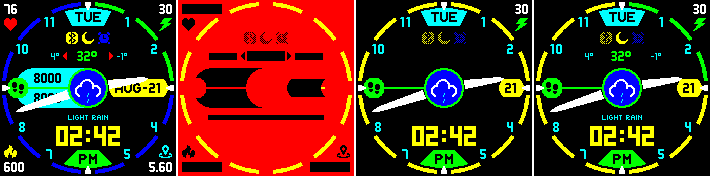
I've tried to make a watchface with "display off" option (https://amazfitwatchfaces.com/bip/view/28539), but seems the order of lock off image is behind everything (almost?).

Here's a preview to demonstrate what i'm talking about:
Image

1: regular preview of the WF
2: off image (red color denoting actual transparent area)
3: supposed view of WF when locked (bip tool v1.0.3.1 showing same result)
but
4: Actual state in my device

At first, i noticed that BT and alarm icons are as expected but DND is not, so i thought maybe that was given a priority so i was kinda ok with that, but then i noticed almost any text that is not in black (don't have black in black effect, thus aligning with the black background when locked) is actually showing (except activities) when locked.

Plus the battery icon images too above lock image (in outer circle, where green is showing above yellow, i wanted full yellow when locked, blue/green to denote battery status when on).

Is this because of any firmware version issue on the device, or bip tools preview not aligned with actual devices characteristics?

It'd be really cool to hide those if possible, so any suggestions? Thanks!
nishu
WF maker
Posts: 11
Joined: 28 Oct 2018, 07:00
Location: Dhaka, Bangladesh
Has thanked: 6 times
Contact:

Post by nishu »

bump!

no one has solution for the issue? :?: :( :cry:
User avatar
TXK
Posts: 299
Joined: 10 Apr 2018, 05:15
Location: china
Has thanked: 149 times
Been thanked: 97 times
Contact:

Post by TXK »

Some numbers can't be blocked. This is the system setting. You can't change it.
Locked

Return to “Closed topics”

Who is online

Users browsing this forum: No registered users and 0 guests
