I've tried to make a watchface with "display off" option (https://amazfitwatchfaces.com/bip/view/28539), but seems the order of lock off image is behind everything (almost?).
Here's a preview to demonstrate what i'm talking about:
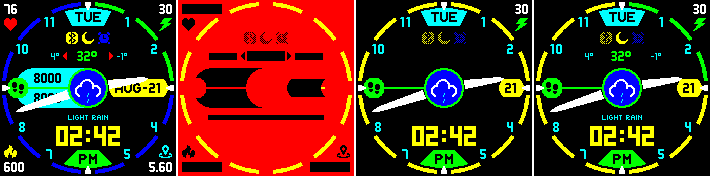
1: regular preview of the WF
2: off image (red color denoting actual transparent area)
3: supposed view of WF when locked (bip tool v1.0.3.1 showing same result)
but
4: Actual state in my device
At first, i noticed that BT and alarm icons are as expected but DND is not, so i thought maybe that was given a priority so i was kinda ok with that, but then i noticed almost any text that is not in black (don't have black in black effect, thus aligning with the black background when locked) is actually showing (except activities) when locked.
Plus the battery icon images too above lock image (in outer circle, where green is showing above yellow, i wanted full yellow when locked, blue/green to denote battery status when on).
Is this because of any firmware version issue on the device, or bip tools preview not aligned with actual devices characteristics?
It'd be really cool to hide those if possible, so any suggestions? Thanks!


