• Administrador
  •  
    Support Ukraine
    If you experience any problems with the forum (it is not visible, there is no way to post messages, or some functionality does not work), please let us know. If you have problems with registration or you did not receive confirmation letter, let us know and we will activate your account manually.
    If you get an "The submitted form was invalid. Try submitting again" error, delete cookies, then try again.
     

MiBandWFTool

This forum is designed to discuss and develop tools creating watch faces.

Moderadores: asoo, lvpokka, Internal error, Watchmens

Reglas del Foro
All communication in this branch should only be in English.
To discuss tools that are not in this section, use the “Watchfaces tools (discussion)” forum.
lvpokka
Mensajes: 178
Registrado: 07 Jul 2019, 20:22
Ubicación: L1
Has thanked: 19 times
Been thanked: 152 times
Contactar:

MiBandWFTool

Mensaje por lvpokka »

Author
lvpokka

Tool Description
1. The tool is based on a modified version of AmazfitBipTools, thanks to the original open source .
2. The tool supports unpacking, packing of the official watch face bin file.
3. Mi band 4 supports 16,581,375 colors.
4. Mi band 5 supports 15,499,008 colors.

How to
1. Unzip MiBandWFTool_X.X.zip.
2. Download .bin file from catalog or get standard watchface file.
3. Drag the .bin file to WatchFace.exe (in step 1. , get the decompressed file)
(if there is only one log file, the decompression failed).

4. There are two ways to modify the dial.
  • is to modify the corresponding image file and replace it with what we want.
  • is to modify the corresponding json file and modify the position of the image.
5. After all the modifications are completed, drag the modified json into WatchFace.exe in step 1 to get the corresponding bin file
(the file name depends on the name of the bin. If the .bin file is not generated, the package is wrong)

6. Copy the newly generated bin file to the corresponding directory of the mobile phone, and the synchronization will be completed. (This step is not very clear, you can refer to the original tutorial) above, you're done!
History log
What's new
  • added animation support
  • fixed pulse and weather
  • removed color restrictions for images
  • analog clock support
ver1.2
- Added compatibility for Pulse progress bar

ver1.3
- added full support for transparent images
- drawing 20 frames for preview GIF

ver1.3.2
- bug fixes
- added 2 versions, both with transparency but Palette version uses less memory if images are simple.

ver1.3.3
- Added circular/linear step progress on preview

Stable v1.3.6
- locked transparency for palette mode, support only (0 and 255) values
- palette mode fix

Stable v1.3.7
v1.3.7 (cosmetic changes, you can use 1.3.6 if everything suits)
- Fixed GIF preview (Pulse rendering, Step segments, Kilometer drawing, Calories)
- Added the ability to choose which Set of images to use for WeekDays. (Config file WatchFace.exe.config)
- STRONGLY fixed json examples in README.
(to avoid problems, pack 1.3.6 and unpack 1.3.7 for a smooth transition)

Stable v1.3.8
- Removed image order dependency for json (sorting images no longer required)
- Fixed display bugs
Important: the order of the images should be from 0000 to XXXX without gaps.

v1.3.9
- Removed dependence on images order 0000->XXXX
- Calories rendering fixed
- Added ability to change Preview Speed (available from 50ms - 1000ms)
- TimeElement DrawingOrder hardcoded to 1234 (not used by MiBand4)

v1.4.1
- Other bugfixes
- New WF support
- Added new elements (time delimiter / step icon / linear progress )

v2.1.4
- Added support Mi Band 5 wfaces
- Pandafix (new unknown element)
- BugFixes

v2.1.5
- Preview bugfixes
- [WFPreview] Added Copy/Paste/Save ability
- [WFPreview] Added ability to replace watchface header
Mi Band 4 WF Tool
v1.4.2
- Added miles image support
NOTE:
- if your using image for MilesSuffixImageIndex, then KmSuffixImageIndex is required! you can use the same image for it

Mi Band 5 WF Tool
v2.1.6
- Preview bugfixes
- Watchfaces generating with random header identifier
- Fixed problem with Windows scaling, DPI is tied to 96
- [WFPreview] Removed ability to clone watchface header

Mi Band 6 WF Tool
v4.1.0
- Added Lunar calendar
- Bug fixes
- New preview generator, should be pixel perfect (big thx to Johnson070)

MiBandWFTool_4.1.0.zip

MiBandWFTool_2.1.6.zip [alt url] [alt url 2]

MiBandWFTool_1.4.2.zip [alt url] [alt url 2]
Última edición por lvpokka el 02 Ago 2020, 19:41, editado 24 veces en total.
Avatar de Usuario
Maikeldevil
Mensajes: 64
Registrado: 17 Ago 2019, 12:05
Ubicación: unknown
Has thanked: 3 times
Been thanked: 44 times
Contactar:

Mensaje por Maikeldevil »

Oh btw im not using latest palletmode of MiBandWDTool but v3 or so because this is the only one that not makes the images ugly but only has a color limiter. SRRY!
mysiak
WF maker
Mensajes: 34
Registrado: 18 Jul 2019, 06:56
Has thanked: 11 times
Been thanked: 5 times
Contactar:

Mensaje por mysiak »

Maikeldevil escribió: 03 Oct 2019, 07:11
Please give me a version that is unable to downsize, i'll fix it my way. It just needs some tricks that are hard to explain. You need to put all images in 1 pgn and run it in pngquant. (Drag file on .exe) then all images are reduced without quality loss with max 256 colors and you can separate them in 0001 0002 etc. PNGQUANT does not make the image ugly so its not the same as pallette mode!
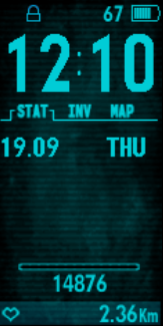
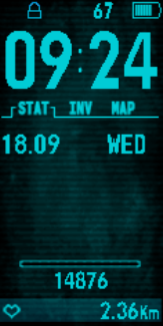
Try it on that PIPboy WF mentioned before. Images are already with less than 256 colors (in fact small numbers have only 2 colors). Pure RAW mode won't be generated because it's bigger than the limit, pure palette mode generates jagged images (it's not visible in the gif preview, you need to load the bin file in N&F or upload to the band to see it). Mixed palette mode creates nice WF with ~120kb file size.

Left mixed mode, right palette. Look at the numbers (battery, steps, distance), this is how it looks on the band.
Imagen Imagen
Avatar de Usuario
Maikeldevil
Mensajes: 64
Registrado: 17 Ago 2019, 12:05
Ubicación: unknown
Has thanked: 3 times
Been thanked: 44 times
Contactar:

Mensaje por Maikeldevil »

mysiak escribió: 03 Oct 2019, 07:36
Maikeldevil escribió: 03 Oct 2019, 07:11
Please give me a version that is unable to downsize, i'll fix it my way. It just needs some tricks that are hard to explain. You need to put all images in 1 pgn and run it in pngquant. (Drag file on .exe) then all images are reduced without quality loss with max 256 colors and you can separate them in 0001 0002 etc. PNGQUANT does not make the image ugly so its not the same as pallette mode!
Try it on that PIPboy WF mentioned before. Images are already with less than 256 colors (in fact small numbers have only 2 colors). Pure RAW mode won't be generated because it's bigger than the limit, pure palette mode generates jagged images (it's not visible in the gif preview, you need to load the bin file in N&F or upload to the band to see it). Mixed palette mode creates nice WF with ~120kb file size.

Left mixed mode, right palette. Look at the numbers (battery, steps, distance), this is how it looks on the band.
Imagen Imagen
Ok, give me some time with this one, ll make all HD even the time numbers, np.
Avatar de Usuario
Maikeldevil
Mensajes: 64
Registrado: 17 Ago 2019, 12:05
Ubicación: unknown
Has thanked: 3 times
Been thanked: 44 times
Contactar:

Mensaje por Maikeldevil »

mysiak escribió: 03 Oct 2019, 07:36
Maikeldevil escribió: 03 Oct 2019, 07:11
Please give me a version that is unable to downsize, i'll fix it my way. It just needs some tricks that are hard to explain. You need to put all images in 1 pgn and run it in pngquant. (Drag file on .exe) then all images are reduced without quality loss with max 256 colors and you can separate them in 0001 0002 etc. PNGQUANT does not make the image ugly so its not the same as pallette mode!
Try it on that PIPboy WF mentioned before. Images are already with less than 256 colors (in fact small numbers have only 2 colors). Pure RAW mode won't be generated because it's bigger than the limit, pure palette mode generates jagged images (it's not visible in the gif preview, you need to load the bin file in N&F or upload to the band to see it). Mixed palette mode creates nice WF with ~120kb file size.

Left mixed mode, right palette. Look at the numbers (battery, steps, distance), this is how it looks on the band.
Imagen Imagen

HD is possible:

https://amazfitwatchfaces.com/mi-band-4/view/4380 Download > fallout

(its hidden under download under that redbull thing (old face a made a while ago) beceause its not my own creation)

extraxt with RAW mode, i think your pallette mode is broken, havent make the numbers transperant (no time) but the original version is unlike the preview not that hd as it should be, dont know why, even if u unpack it with RAW. So i changed the numbers to show you difference, i packed it with my own pallete mode btw.
Avatar de Usuario
Maikeldevil
Mensajes: 64
Registrado: 17 Ago 2019, 12:05
Ubicación: unknown
Has thanked: 3 times
Been thanked: 44 times
Contactar:

Mensaje por Maikeldevil »

I see what you meen btw. About heart rate and km. But i could fix it same way like time date and weekday. But not today.. no time!
Avatar de Usuario
Maikeldevil
Mensajes: 64
Registrado: 17 Ago 2019, 12:05
Ubicación: unknown
Has thanked: 3 times
Been thanked: 44 times
Contactar:

Mensaje por Maikeldevil »

I have looked in to it and it seems like an issue that occurs beceause:

- creator used a different miband tool or version
- the png items are compiled a way that triggers this error. You know there are lots of ways that png files can be compiled right? As example my corel photo shop is acting wierd to so i use a combo of paint and photoshop.
- manually change png can fix this problem. Its just the way how they are saved and what tool was used to make em transparant.

Do you want a hd version of that face? I can complete it this week?
mysiak
WF maker
Mensajes: 34
Registrado: 18 Jul 2019, 06:56
Has thanked: 11 times
Been thanked: 5 times
Contactar:

Mensaje por mysiak »

Interesting.. Your "HD" version really looks better. Couldn't the transparency be the problem for those small PNGs?

HD PIP boy would be nice to have for sure (also these colored versions which I did https://amazfitwatchfaces.com/mi-band-4/view/7167 :) ). If you'll share the "how-to" secret or just HD images, I could update the WFs myself.

Btw. I believe that raw.exe and palette.exe create identical images from bin files. At least that was the case when I tried to compare them.
Avatar de Usuario
Maikeldevil
Mensajes: 64
Registrado: 17 Ago 2019, 12:05
Ubicación: unknown
Has thanked: 3 times
Been thanked: 44 times
Contactar:

Mensaje por Maikeldevil »

mysiak escribió: 02 Oct 2019, 05:10
I guess you're using RAW mode. Try to pack the WF with palette exe again. Quality of some WFs suffer with pure palette mode, in such case make a "raw.cfg" file in the same folder as the WF.json and put numbers of small images in there (small letters/numbers) - e.g. "11,12,13,14" and pack it with palette.exe. Explicitly defined images will use raw mode, the rest of them palette. You can achieve much smaller bin file size with almost the same quality.
I still wonder, how can you mix both modes? Your explanations is still a bit complicated. Can you explain the steps of making a raw.cfg? Cant find the file!
mysiak
WF maker
Mensajes: 34
Registrado: 18 Jul 2019, 06:56
Has thanked: 11 times
Been thanked: 5 times
Contactar:

Mensaje por mysiak »

Once you have your WF ready (json + images 0000, 0001, ... , 0070), create an empty file named raw.cfg in the same folder. Then edit it and put images numbers for which you want to use RAW mode and pack the json with palette exe. For example "0,11,12,13,14,60,61,62" - images with these indexes will be packed as RAW, the rest of them as palette.
Avatar de Usuario
Maikeldevil
Mensajes: 64
Registrado: 17 Ago 2019, 12:05
Ubicación: unknown
Has thanked: 3 times
Been thanked: 44 times
Contactar:

Mensaje por Maikeldevil »

mysiak escribió: 04 Oct 2019, 05:11
Once you have your WF ready (json + images 0000, 0001, ... , 0070), create an empty file named raw.cfg in the same folder. Then edit it and put images numbers for which you want to use RAW mode and pack the json with palette exe. For example "0,11,12,13,14,60,61,62" - images with these indexes will be packed as RAW, the rest of them as palette.
Ok then, when i have time i'll test it so i'll make a RAW.cfg file and put in:

0,11,12,13,45

Or

"0,11,12,13,45"

Or

0000,0011,0012,0013,0045
?

I'll test all XD but if you have a straight answer its apriciated!
mysiak
WF maker
Mensajes: 34
Registrado: 18 Jul 2019, 06:56
Has thanked: 11 times
Been thanked: 5 times
Contactar:

Mensaje por mysiak »

The first option, just numbers without quotes works fine.
cowborgs

Mensaje por cowborgs »

mysiak escribió: 02 Oct 2019, 05:10
I guess you're using RAW mode. Try to pack the WF with palette exe again. Quality of some WFs suffer with pure palette mode, in such case make a "raw.cfg" file in the same folder as the WF.json and put numbers of small images in there (small letters/numbers) - e.g. "11,12,13,14" and pack it with palette.exe. Explicitly defined images will use raw mode, the rest of them palette. You can achieve much smaller bin file size with almost the same quality.


thank you very much, you are absolutely right, thank you again.
Avatar de Usuario
Maikeldevil
Mensajes: 64
Registrado: 17 Ago 2019, 12:05
Ubicación: unknown
Has thanked: 3 times
Been thanked: 44 times
Contactar:

Mensaje por Maikeldevil »

mysiak escribió: 04 Oct 2019, 11:56
The first option, just numbers without quotes works fine.
Ok, i used your method and mine and created

https://amazfitwatchfaces.com/mi-band-4/view/4380

Ps: download the falloutpiptest file XD. HD enough? I think you can easy recolor these the way i edited it! Hope you like it!

:-D
Avatar de Usuario
Maikeldevil
Mensajes: 64
Registrado: 17 Ago 2019, 12:05
Ubicación: unknown
Has thanked: 3 times
Been thanked: 44 times
Contactar:

Mensaje por Maikeldevil »

Only pipboy is walking slower now-_- no idea why:-(
mysiak
WF maker
Mensajes: 34
Registrado: 18 Jul 2019, 06:56
Has thanked: 11 times
Been thanked: 5 times
Contactar:

Mensaje por mysiak »

Maikeldevil escribió: 04 Oct 2019, 16:04
mysiak escribió: 04 Oct 2019, 11:56
The first option, just numbers without quotes works fine.
Ok, i used your method and mine and created

https://amazfitwatchfaces.com/mi-band-4/view/4380

Ps: download the falloutpiptest file XD. HD enough? I think you can easy recolor these the way i edited it! Hope you like it!

:-D
Thanks a lot, it really looks better. I'll reuse the source images and give you the credit :) I noticed the slower animation too, but interestingly when I rebuilt your WF with pure palette mode, it was going in normal speed - have you used RAW mode for animation images?

But, if we return back to the initial question which started this discussion, it doesn't really matter how you generate/pack/optimize source PNG pictures, some of them require RAW mode and won't work correctly with palette mode (especially small transparent images). :)
Avatar de Usuario
Maikeldevil
Mensajes: 64
Registrado: 17 Ago 2019, 12:05
Ubicación: unknown
Has thanked: 3 times
Been thanked: 44 times
Contactar:

Mensaje por Maikeldevil »

mysiak escribió: 04 Oct 2019, 17:00
Maikeldevil escribió: 04 Oct 2019, 16:04
mysiak escribió: 04 Oct 2019, 11:56
The first option, just numbers without quotes works fine.
Ok, i used your method and mine and created

https://amazfitwatchfaces.com/mi-band-4/view/4380

Ps: download the falloutpiptest file XD. HD enough? I think you can easy recolor these the way i edited it! Hope you like it!

:-D
Thanks a lot, it really looks better. I'll reuse the source images and give you the credit :) I noticed the slower animation too, but interestingly when I rebuilt your WF with pure palette mode, it was going in normal speed - have you used RAW mode for animation images?

But, if we return back to the initial question which started this discussion, it doesn't really matter how you generate/pack/optimize source PNG pictures, some of them require RAW mode and won't work correctly with palette mode (especially small transparent images). :)
No i made a mistake to include image 0000 in raw, that made all slower (replaced last item now it works :-) ) Well thanks for your tips! Perhaps it will come to use sometimes! My faces doesnt need this method because i make my images costum for palette without quality loss. So you see, everyone has an own way of designin XD. I hope you enjoyed our combined strenght of making faces more beautifull :D
mysiak
WF maker
Mensajes: 34
Registrado: 18 Jul 2019, 06:56
Has thanked: 11 times
Been thanked: 5 times
Contactar:

Mensaje por mysiak »

Maikeldevil escribió: 04 Oct 2019, 17:23
I hope you enjoyed our combined strenght of making faces more beautifull :D
Definitely yes, I'm always happy when I learn something new :) And thanks for the explanation, RAW mode for 0000.png might be useful to make the animation slower without the need to have double amount of frames (I think that WFtool creator mentioned it already, but I didn't understand it before).
mysiak
WF maker
Mensajes: 34
Registrado: 18 Jul 2019, 06:56
Has thanked: 11 times
Been thanked: 5 times
Contactar:

Mensaje por mysiak »

@lvpokka - is it possible to have distance in miles instead of kilometres? If yes, how to define it please? Thanks!
Avatar de Usuario
lumenvindex
Mensajes: 114
Registrado: 08 Sep 2019, 19:01
Has thanked: 2 times
Been thanked: 49 times
Contactar:

Mensaje por lumenvindex »

mysiak escribió: 06 Oct 2019, 06:00
is it possible to have distance in miles instead of kilometres?
There is no way to switch the units on a watchface level - there is only one Distance subsection with only one SuffixImageIndex. But there is a Unit section in MiFit app. Maybe you should try switching it.
MESS WITH THE BEST
DIE LIKE THE REST
mysiak
WF maker
Mensajes: 34
Registrado: 18 Jul 2019, 06:56
Has thanked: 11 times
Been thanked: 5 times
Contactar:

Mensaje por mysiak »

Switching the units in Mi Fit changes them in Mi Fit and band/status section, but not on the WF - they are still in KM. I was hoping that it's possible to hard-code the imperial units (something like DD-MM vs MM-DD date format).
lvpokka
Mensajes: 178
Registrado: 07 Jul 2019, 20:22
Ubicación: L1
Has thanked: 19 times
Been thanked: 152 times
Contactar:

Mensaje por lvpokka »

Tested inherited property for miles and it's not working) available only km for preview.
Are you sure that switching in MiFit km to miles not recalculating numbers on MiBand4? check that one more time, also switch language to UK or another parameters of you phone) we have lack of testing in this area
mysiak
WF maker
Mensajes: 34
Registrado: 18 Jul 2019, 06:56
Has thanked: 11 times
Been thanked: 5 times
Contactar:

Mensaje por mysiak »

Phone language UK or US, Mi Fit metric:
Band: WF 2.31km, status 2.31km
Mi Fit: 2.31km

Phone lanugage UK or US, Mi Fit imperial:
Band: WF 2.31 (km), status 1.43mi
Mi Fit: 1.43mi

Not sure what else to test, WF does not recalculate the value. Date format was changed on the default WF between DD-MM and MM-DD when I switched UK-US phone language, so I'm sure that it synced with the band.

Btw. it's not a big issue, I am a strong believer in metric units. :D Just saw this question somewhere and it kept me wondering..
Avatar de Usuario
filipemcalmeida
WF maker
Mensajes: 3
Registrado: 08 Ago 2019, 17:39
Ubicación: unknown
Has thanked: 1 time
Contactar:

Mensaje por filipemcalmeida »

Hello. Is it possible to provide a .json file with all the options we have to make a Watchface (for last version)?

I have been using version 1.3.7 on my watchfaces, but I wanted to update and wanted to know all the possibilities I have to do something different ...
Última edición por filipemcalmeida el 09 Oct 2019, 08:33, editado 1 vez en total.
Avatar de Usuario
lumenvindex
Mensajes: 114
Registrado: 08 Sep 2019, 19:01
Has thanked: 2 times
Been thanked: 49 times
Contactar:

Mensaje por lumenvindex »

filipemcalmeida escribió: 08 Oct 2019, 19:29
a .json file with all the options we have
Here is my "all sections" json. It should be up to date. I think.
right_order.zip
(1.34 KiB) Descargado 202 veces
MESS WITH THE BEST
DIE LIKE THE REST
Avatar de Usuario
filipemcalmeida
WF maker
Mensajes: 3
Registrado: 08 Ago 2019, 17:39
Ubicación: unknown
Has thanked: 1 time
Contactar:

Mensaje por filipemcalmeida »

lumenvindex escribió: 09 Oct 2019, 02:33
filipemcalmeida escribió: 08 Oct 2019, 19:29
a .json file with all the options we have
Here is my "all sections" json. It should be up to date. I think.right_order.zip
Thanks.
Responder

Volver a “Watchfaces tools”

¿Quién está conectado?

Usuarios navegando por este Foro: No hay usuarios registrados visitando el Foro y 21 invitados