-
- Administrator
-
-
Support Ukraine
If you experience any problems with the forum (it is not visible, there is no way to post messages, or some functionality does not work), please let us know. If you have problems with registration or you did not receive confirmation letter, let us know and we will activate your account manually.
If you get an "The submitted form was invalid. Try submitting again" error, delete cookies, then try again.
About Request Watchface for Bip Max
Forum rules
When adding a new topic, use the template: Topic title [device name]
For example: Requesting creation of watch face [Bip U]
All communication in this branch should only be in English.
When adding a new topic, use the template: Topic title [device name]
For example: Requesting creation of watch face [Bip U]
All communication in this branch should only be in English.
- asoo
- Posts: 2104
- Joined: 03 Jan 2019, 01:48
- Location: ͼͽ Thailand ͼͽ
- Has thanked: 404 times
- Been thanked: 2019 times
About Request Watchface for Bip Max
@Xphyle1971
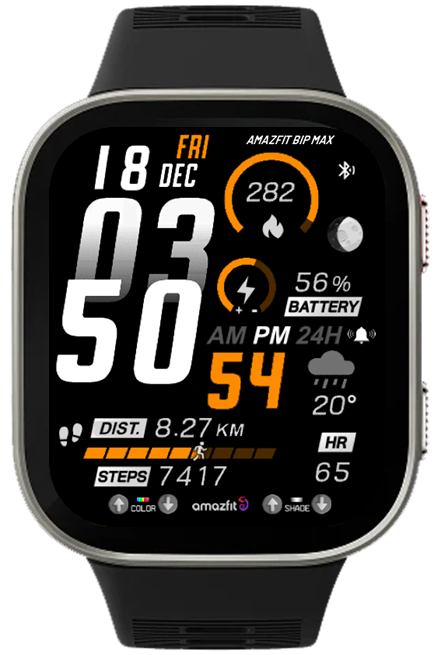
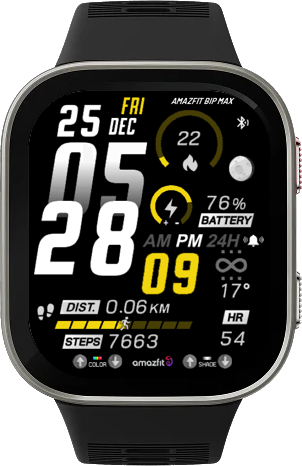
Since Xphyle1971 requested a conversion of the watch face https://amazfitwatchfaces.com/bip/view/44659 to Bip MAX,
I tried to find information about Bip Max PNG images, but I couldn't find any. What I know for sure is that it only supports a screen resolution of 432x514. Therefore, this watch face will use the same PNG format as Bip6.
So, if anyone uses this watchface with Bip Max and encounters incorrect image display, I cannot fix it at this time until I know for sure what PNG format Bip Max uses.
But if it works, please let me know.
Since Xphyle1971 requested a conversion of the watch face https://amazfitwatchfaces.com/bip/view/44659 to Bip MAX,
I tried to find information about Bip Max PNG images, but I couldn't find any. What I know for sure is that it only supports a screen resolution of 432x514. Therefore, this watch face will use the same PNG format as Bip6.
So, if anyone uses this watchface with Bip Max and encounters incorrect image display, I cannot fix it at this time until I know for sure what PNG format Bip Max uses.
But if it works, please let me know.
ͼͽ To request please use the interrelated forum in action ͼͽ
Please do not PM to me for requests ported watchface.
- SashaCX75
- Posts: 812
- Joined: 26 Oct 2019, 15:18
- Location: Ukraine
- Has thanked: 13 times
- Been thanked: 1007 times
- Contact:
If anyone owns a Bip Max, please let us know the watch’s “Device Source”. You can find this in Zepp under developer mode. We need this information to add this model to the watch face editor.
- GIK-Team
- root
- Posts: 1014
- Joined: 22 Mar 2018, 10:00
- Location: Ukraine
- Has thanked: 1107 times
- Been thanked: 267 times
- Contact:
By the way, while you’re discussing the Bip MAX — do you think it’s already worth adding support for it on the site?
At the moment we still don’t see any official information about this model in the Zepp developer documentation, so we’re not sure how “official” or technically finalized it is yet. That’s why we’ve been a bit cautious about creating a separate filter for it.
Would be interesting to hear your thoughts and experiences with it
At the moment we still don’t see any official information about this model in the Zepp developer documentation, so we’re not sure how “official” or technically finalized it is yet. That’s why we’ve been a bit cautious about creating a separate filter for it.
Would be interesting to hear your thoughts and experiences with it
"sometimes it's scary but it's still just you and me” — Leaving Laurel
- asoo
- Posts: 2104
- Joined: 03 Jan 2019, 01:48
- Location: ͼͽ Thailand ͼͽ
- Has thanked: 404 times
- Been thanked: 2019 times
As for me, I'm still not sure, because even now, the official editing program doesn't have this model yet.GIK-Team wrote: 21 May 2026, 21:50By the way, while you’re discussing the Bip MAX — do you think it’s already worth adding support for it on the site?
At the moment we still don’t see any official information about this model in the Zepp developer documentation, so we’re not sure how “official” or technically finalized it is yet. That’s why we’ve been a bit cautious about creating a separate filter for it.
Would be interesting to hear your thoughts and experiences with it
But what's certain is that the device will already on sale. In my region, it will officially went on sale on May 25th, 2026.
In this case, increasing the 'bip max' area seems like a good idea, but to be absolutely sure, I think , it would be best to wait for an official editor's approval, or at least wait until we know more about the watch face components.
ͼͽ To request please use the interrelated forum in action ͼͽ
Please do not PM to me for requests ported watchface.
- asoo
- Posts: 2104
- Joined: 03 Jan 2019, 01:48
- Location: ͼͽ Thailand ͼͽ
- Has thanked: 404 times
- Been thanked: 2019 times
GIK-Team wrote: 21 May 2026, 21:50By the way, while you’re discussing the Bip MAX — do you think it’s already worth adding support for it on the site?
At the moment we still don’t see any official information about this model in the Zepp developer documentation, so we’re not sure how “official” or technically finalized it is yet. That’s why we’ve been a bit cautious about creating a separate filter for it.
Would be interesting to hear your thoughts and experiences with it
SashaCX75 wrote: 21 May 2026, 19:16If anyone owns a Bip Max, please let us know the watch’s “Device Source”. You can find this in Zepp under developer mode. We need this information to add this model to the watch face editor.
Code: Select all
{
"configVersion": "v2",
"app": {
"appId": 10013,
"appName": "Empty",
"appType": "watchface",
"version": {
"code": 1,
"name": "1.0"
},
"vender": "zepp",
"description": "Empty watchface",
"icon": "icon.png"
},
"permissions": [],
"runtime": {
"apiVersion": {
"compatible": "1.0.0",
"target": "1.0.1",
"minVersion": "1.0.0"
}
},
"targets": {
"432x514-amazfit-bip-max": {
"module": {
"watchface": {
"path": "watchface/index",
"main": 1,
"editable": 0,
"lockscreen": 1
}
},
"platforms": [
{
"name": "PikeW",
"deviceSource": 11206915
}
],
"designWidth": 432
}
},
"i18n": {
"en-US": {
"appName": "Empty"
}
},
"defaultLanguage": "en-US",
"debug": false
}This is a file created by Zeus.
In terms of PNG, it appears to use the same encoding as Bip6.
ͼͽ To request please use the interrelated forum in action ͼͽ
Please do not PM to me for requests ported watchface.
- SashaCX75
- Posts: 812
- Joined: 26 Oct 2019, 15:18
- Location: Ukraine
- Has thanked: 13 times
- Been thanked: 1007 times
- Contact:
That’s good news. I checked a couple of days ago and it wasn’t supported yet.
The official editor doesn’t support the Bip Max because no other model has the same screen resolution as this one. That’s why the developers need time to add support for this model. That was their response.
Since this model is already available in official stores, I think it’s worth adding support for it.
-
awrun
- WF maker
- Posts: 9
- Joined: 10 Oct 2019, 14:35
- Has thanked: 2 times
- Been thanked: 1 time
- Contact:
I'm really looking forward to the Bip Max having a watchface editor. As soon as it arrives, I'll start creating my own custom watchface. I hope many people will like it. Thank you for making the editor.
-
Xphyle1971
- Posts: 23
- Joined: 15 Oct 2021, 15:56
- Location: USA
- Has thanked: 4 times
- Been thanked: 7 times
- Contact:
My Bip Max device source is 11206915. Please let me know if I can give you any more information. I'm also happy to test any watch faces you create or convert to test for compatibility.SashaCX75 wrote: 21 May 2026, 19:16If anyone owns a Bip Max, please let us know the watch’s “Device Source”. You can find this in Zepp under developer mode. We need this information to add this model to the watch face editor.
Last edited by Xphyle1971 on 22 May 2026, 11:18, edited 1 time in total.
-
Xphyle1971
- Posts: 23
- Joined: 15 Oct 2021, 15:56
- Location: USA
- Has thanked: 4 times
- Been thanked: 7 times
- Contact:
Thank you! The converted watch face seems to look and render correctly!asoo wrote: 21 May 2026, 18:39@Xphyle1971
Since Xphyle1971 requested a conversion of the watch face https://amazfitwatchfaces.com/bip/view/44659 to Bip MAX,
I tried to find information about Bip Max PNG images, but I couldn't find any. What I know for sure is that it only supports a screen resolution of 432x514. Therefore, this watch face will use the same PNG format as Bip6.
So, if anyone uses this watchface with Bip Max and encounters incorrect image display, I cannot fix it at this time until I know for sure what PNG format Bip Max uses.
But if it works, please let me know.QR Code for install
QR code can user only 1 week ( 22-05-2026 )
QRCode_File_v1.0.0.png
Sasha's editor cannot open this file correctly.
This is because BipMax is not present in the model_config, and this zip file uses the bip6 configuration for packing. Therefore, when unpacked, the editor will see it as Bip6.
multiple_data_BipMax.zip
-
Xphyle1971
- Posts: 23
- Joined: 15 Oct 2021, 15:56
- Location: USA
- Has thanked: 4 times
- Been thanked: 7 times
- Contact:
Whatever @asoo did above to convert his Bip 6 watch face to Max format... it worked perfectly. I was able to add it to my Bip Max without issue and it works perfectly.SashaCX75 wrote: 22 May 2026, 04:56That’s good news. I checked a couple of days ago and it wasn’t supported yet.
The official editor doesn’t support the Bip Max because no other model has the same screen resolution as this one. That’s why the developers need time to add support for this model. That was their response.
Since this model is already available in official stores, I think it’s worth adding support for it.
-
Xphyle1971
- Posts: 23
- Joined: 15 Oct 2021, 15:56
- Location: USA
- Has thanked: 4 times
- Been thanked: 7 times
- Contact:
Yes, please add support for the Bip Max. The model is freely for sale everywhere now and mine arrived yesterday. Many on the Amazfit reddit have also received theirs as well.GIK-Team wrote: 21 May 2026, 21:50By the way, while you’re discussing the Bip MAX — do you think it’s already worth adding support for it on the site?
At the moment we still don’t see any official information about this model in the Zepp developer documentation, so we’re not sure how “official” or technically finalized it is yet. That’s why we’ve been a bit cautious about creating a separate filter for it.
Would be interesting to hear your thoughts and experiences with it
- SashaCX75
- Posts: 812
- Joined: 26 Oct 2019, 15:18
- Location: Ukraine
- Has thanked: 13 times
- Been thanked: 1007 times
- Contact:
Here is a watch face to check that the images are being converted correctly Test watch face for determining corner rounding. Use the buttons to set the minimum corner rounding at which the frame does not extend beyond the screen. Please take a photo of the result so that we can see how the watch face will look on the watch and what the frame looks like.Xphyle1971 wrote: 22 May 2026, 10:44My Bip Max device source is 11206915. Please let me know if I can give you any more information. I'm also happy to test any watch faces you create or convert to test for compatibility.
-
Xphyle1971
- Posts: 23
- Joined: 15 Oct 2021, 15:56
- Location: USA
- Has thanked: 4 times
- Been thanked: 7 times
- Contact:
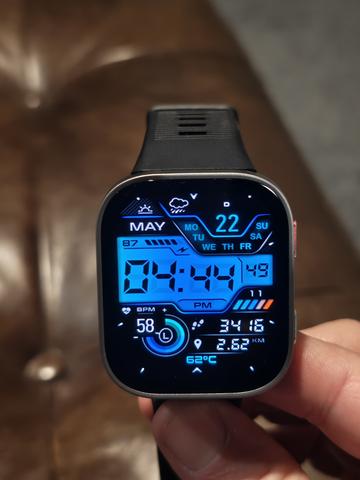
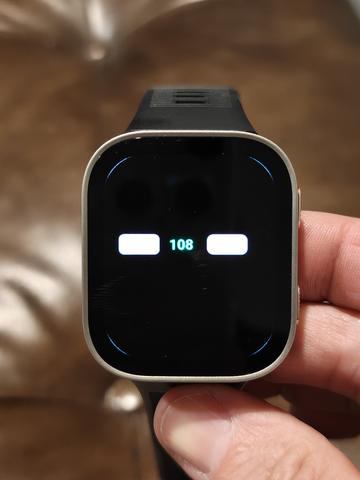
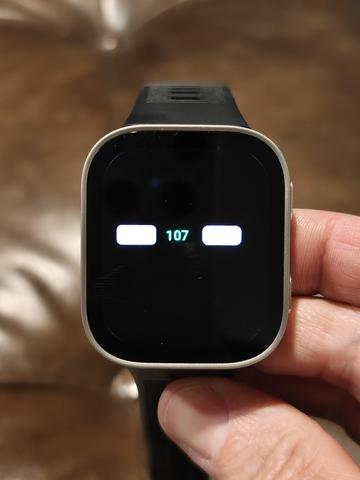
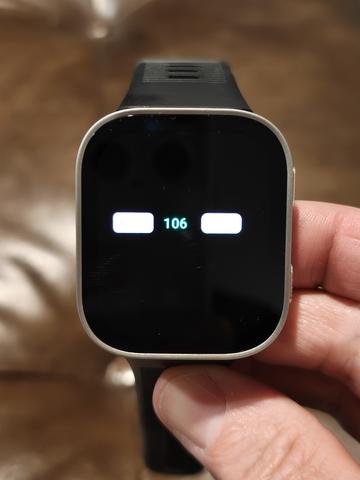
Here you go! Sorry for the delay! Borders are visible at 108. Less visible at 107. And they completely disappear at 106, as seen in the photos. The watch face example you uploaded looks fine to me.SashaCX75 wrote: 22 May 2026, 15:06Here is a watch face to check that the images are being converted correctly Test watch face for determining corner rounding. Use the buttons to set the minimum corner rounding at which the frame does not extend beyond the screen. Please take a photo of the result so that we can see how the watch face will look on the watch and what the frame looks like.Xphyle1971 wrote: 22 May 2026, 10:44My Bip Max device source is 11206915. Please let me know if I can give you any more information. I'm also happy to test any watch faces you create or convert to test for compatibility.
- SashaCX75
- Posts: 812
- Joined: 26 Oct 2019, 15:18
- Location: Ukraine
- Has thanked: 13 times
- Been thanked: 1007 times
- Contact:
@Xphyle1971
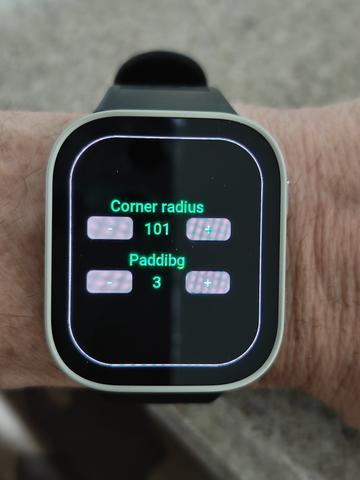
Thank you. That’s exactly what I needed. It’s odd, though, that the border isn’t visible around the edges of the screen on the test dial. I’ve tweaked the test dial a little. You need to use the ‘Padding’ setting to make the border visible around the screen, and then adjust the corner rounding.
-
Xphyle1971
- Posts: 23
- Joined: 15 Oct 2021, 15:56
- Location: USA
- Has thanked: 4 times
- Been thanked: 7 times
- Contact:
I'm sorry. I think I misunderstood what you were looking for. I thought you wanted to know the number when the border was no longer visible. I'll give it another go and report back with what I see and images.SashaCX75 wrote: 24 May 2026, 11:46@Xphyle1971
Thank you. That’s exactly what I needed. It’s odd, though, that the border isn’t visible around the edges of the screen on the test dial. I’ve tweaked the test dial a little. You need to use the ‘Padding’ setting to make the border visible around the screen, and then adjust the corner rounding.
-
Xphyle1971
- Posts: 23
- Joined: 15 Oct 2021, 15:56
- Location: USA
- Has thanked: 4 times
- Been thanked: 7 times
- Contact:
Here you go!SashaCX75 wrote: 24 May 2026, 11:46@Xphyle1971
Thank you. That’s exactly what I needed. It’s odd, though, that the border isn’t visible around the edges of the screen on the test dial. I’ve tweaked the test dial a little. You need to use the ‘Padding’ setting to make the border visible around the screen, and then adjust the corner rounding.
-
awrun
- WF maker
- Posts: 9
- Joined: 10 Oct 2019, 14:35
- Has thanked: 2 times
- Been thanked: 1 time
- Contact:
Hello.
I saw in the downloads that asoo wrote that there is already "Editor version 17.2 final".
Where can I download it?
On the site under "Main menu->Tools->Watch Face Editor" there is only 17.1, which does not support the Bip Max.
Thank you.
I saw in the downloads that asoo wrote that there is already "Editor version 17.2 final".
Where can I download it?
On the site under "Main menu->Tools->Watch Face Editor" there is only 17.1, which does not support the Bip Max.
Thank you.
- asoo
- Posts: 2104
- Joined: 03 Jan 2019, 01:48
- Location: ͼͽ Thailand ͼͽ
- Has thanked: 404 times
- Been thanked: 2019 times
I apologize for make you misunderstanding. The Bip Max watch face I created is still using Editor 17.2 Beta, but there may be typos in the description section because I copied from Bip 6. Some parts used 17.1 final, and I forgot to change "final" to "beta." I only changed 17.1 to 17.2. My apologies are due.awrun wrote: 26 May 2026, 11:51Hello.
I saw in the downloads that asoo wrote that there is already "Editor version 17.2 final".
Where can I download it?
On the site under "Main menu->Tools->Watch Face Editor" there is only 17.1, which does not support the Bip Max.
Thank you.
17.2 beta is still under testing and, as far as I know, has not yet been released to the public.
For more information, please see the thread "Watch face editor for Amazfit watch on ZeppOS" by SashaCX75:
viewtopic.php?p=11643#p11643
PS. Based on my testing of the 17.2 beta, in my personal opinion, it works well and has many new options added. For example, the sample images I used were created by capturing using an option added in the 17.2 beta, and many other things.
As for the release final version, we'll have to wait for SahasCX75 to decide.
ͼͽ To request please use the interrelated forum in action ͼͽ
Please do not PM to me for requests ported watchface.
-
awrun
- WF maker
- Posts: 9
- Joined: 10 Oct 2019, 14:35
- Has thanked: 2 times
- Been thanked: 1 time
- Contact:
Thanks for the answer.
I last made a watch face for my mom for the GTS 4 Mini. Now we are waiting for the new Bip Max (it is only available for pre-order here) and I am very excited to see what the watch will be able to do and what the editing program will be able to do.
- asoo
- Posts: 2104
- Joined: 03 Jan 2019, 01:48
- Location: ͼͽ Thailand ͼͽ
- Has thanked: 404 times
- Been thanked: 2019 times
In my country, the Bip Max was just launched on the 25/05/26awrun wrote: 26 May 2026, 14:50Thanks for the answer.
I last made a watch face for my mom for the GTS 4 Mini. Now we are waiting for the new Bip Max (it is only available for pre-order here) and I am very excited to see what the watch will be able to do and what the editing program will be able to do.
I ordered it and received it the same day.
So I started creating a watch face to test it on a real device. As you can see on the web, I've tested all the watch faces that I made on my BipMax and haven't found any issues with the functions and widgets in the watchface section.
ͼͽ To request please use the interrelated forum in action ͼͽ
Please do not PM to me for requests ported watchface.
Who is online
Users browsing this forum: No registered users and 1 guest