If you experience any problems with the forum (it is not visible, there is no way to post messages, or some functionality does not work), please let us know.
If you have problems with registration or you did not receive confirmation letter, let us know and we will activate your account manually.
If you get an "The submitted form was invalid. Try submitting again" error, delete cookies, then try again.

Change minute and hour color

Topics for the request of watch faces development.

Модератори: asoo, Watchmens

Правила форуму
When adding a new topic, use the template: Topic title [device name]
For example: How to create watch face [Falcon]
All communication in this branch should only be in English.
Відповісти
piotarock
WF maker
Повідомлень: 40
З нами з: 22 серпня 2024, 07:53
Звідки: Kenya
Has thanked: 15 times
Been thanked: 1 time
Контактна інформація:

Change minute and hour color

Повідомлення piotarock »

Hello Devs,

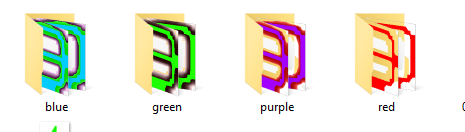
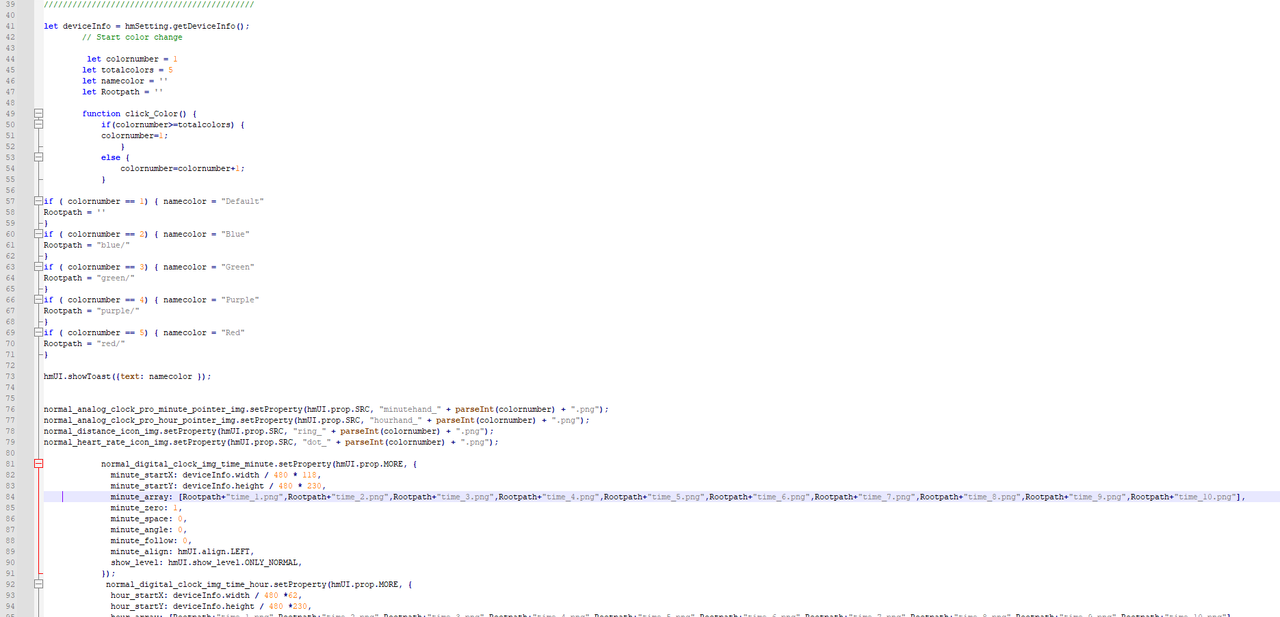
How are you? I am trying to create a watchface where the digits on minute and hour hand change. I have followed the code implemented by @asoo but it seems I am missing a point. I have attached the screenshots of my folder and code. Please assist me on this.
Spoiler
Зображення

Зображення

Зображення
Аватар користувача
asoo
Повідомлень: 2223
З нами з: 03 січня 2019, 01:48
Звідки: ͼͽ Thailand ͼͽ
Has thanked: 438 times
Been thanked: 2141 time
Контактна інформація:

Повідомлення asoo »

piotarock писав: 14 березня 2025, 05:48
Hello Devs,

How are you? I am trying to create a watchface where the digits on minute and hour hand change. I have followed the code implemented by @asoo but it seems I am missing a point. I have attached the screenshots of my folder and code. Please assist me on this.
Spoiler
Зображення

Зображення

Зображення
I suggest you to also inform me how it is incorrect and what you want the script done.
And if possible, please attach the entire project. It will help to analyze the problem quickly.

From the image you attached, it seems that the display setting according to the specified folder should be fine. However, I don't have the entire project, so I can't analyze it correctly.
ͼͽ To request please use the interrelated forum in action ͼͽ
Please do not PM to me for requests ported watchface.
piotarock
WF maker
Повідомлень: 40
З нами з: 22 серпня 2024, 07:53
Звідки: Kenya
Has thanked: 15 times
Been thanked: 1 time
Контактна інформація:

Повідомлення piotarock »

Thank you very much @asoo. I will attach the entire project once I leave my office. Should I PM you or its okay if I attach it here.
piotarock
WF maker
Повідомлень: 40
З нами з: 22 серпня 2024, 07:53
Звідки: Kenya
Has thanked: 15 times
Been thanked: 1 time
Контактна інформація:

Повідомлення piotarock »

Plus, does the entire project include assets and JS files? If so, I think I will have to zip the files.
piotarock
WF maker
Повідомлень: 40
З нами з: 22 серпня 2024, 07:53
Звідки: Kenya
Has thanked: 15 times
Been thanked: 1 time
Контактна інформація:

Повідомлення piotarock »

The incorrect part is that the colors of minutes and hour digits are not changing on click. All the other items are changing apart from the digital time.
Аватар користувача
asoo
Повідомлень: 2223
З нами з: 03 січня 2019, 01:48
Звідки: ͼͽ Thailand ͼͽ
Has thanked: 438 times
Been thanked: 2141 time
Контактна інформація:

Повідомлення asoo »

piotarock писав: 14 березня 2025, 07:11
The incorrect part is that the colors of minutes and hour digits are not changing on click. All the other items are changing apart from the digital time.
If your script is correct, when you change the color of some elements, it does not change color. You try to turn off the screen and turn it on again to refresh the color change.

In the Digital time section, if I guess right, you did not use seconds, right?
If so, when you change the color of the Digital time, you have to refresh the screen to change the color or wait for the element to change. In this case, you have to wait for the minute to change the color, or turn off the screen and turn it on again, which will also work. Or you can put a script to turn off the screen every time the color changes.

Код: Виділити все

const result = hmSetting.setScreenOff()
And when you turn on the screen again, the color will be refreshed.

Or you put seconds in. When you press to change the color, the digital time data will change every second, causing the color to change as well.

I'm not sure if this is the best way, but this is how I do it. It works for me.
ͼͽ To request please use the interrelated forum in action ͼͽ
Please do not PM to me for requests ported watchface.
Аватар користувача
asoo
Повідомлень: 2223
З нами з: 03 січня 2019, 01:48
Звідки: ͼͽ Thailand ͼͽ
Has thanked: 438 times
Been thanked: 2141 time
Контактна інформація:

Повідомлення asoo »

piotarock писав: 14 березня 2025, 07:02
Thank you very much @asoo. I will attach the entire project once I leave my office. Should I PM you or its okay if I attach it here.
If you don't want to publish the project yet, PM me.

Or if you want others to help you fix it, you can attach it in the post.

PS. Others may have different and better solutions than mine.
ͼͽ To request please use the interrelated forum in action ͼͽ
Please do not PM to me for requests ported watchface.
piotarock
WF maker
Повідомлень: 40
З нами з: 22 серпня 2024, 07:53
Звідки: Kenya
Has thanked: 15 times
Been thanked: 1 time
Контактна інформація:

Повідомлення piotarock »

asoo писав: 14 березня 2025, 10:56
piotarock писав: 14 березня 2025, 07:02
Thank you very much @asoo. I will attach the entire project once I leave my office. Should I PM you or its okay if I attach it here.
If you don't want to publish the project yet, PM me.

Or if you want others to help you fix it, you can attach it in the post.

PS. Others may have different and better solutions than mine.
Thank you very much for your response. I will try your way. If it works, I will stick to it. Thank you very much once again.
Аватар користувача
SashaCX75
Повідомлень: 829
З нами з: 26 жовтня 2019, 15:18
Звідки: Ukraine
Has thanked: 15 times
Been thanked: 1044 times
Контактна інформація:

Повідомлення SashaCX75 »

If there are no seconds on the watch face, the image may change with a delay. For example, when the minutes and minutes change when the screen is switched on and off.

To set coordinates you use a variable related to the screen size. If you have not defined this variable earlier in the code, it may cause a problem.
piotarock
WF maker
Повідомлень: 40
З нами з: 22 серпня 2024, 07:53
Звідки: Kenya
Has thanked: 15 times
Been thanked: 1 time
Контактна інформація:

Повідомлення piotarock »

Thank you @SashaCX75. Asoo assisted me on this matter.
Відповісти

Повернутись до “Watchfaces creation (order table)”

Хто зараз онлайн

Зараз переглядають цей форум: Немає зареєстрованих користувачів і 2 гостей