SupportUkraine
If you experience any problems with the forum (it is not visible, there is no way to post messages, or some functionality does not work), please let us know. If you have problems with registration or you did not receive confirmation letter, let us know and we will activate your account manually.
If you get an "The submitted form was invalid. Try submitting again" error, delete cookies, then try again.
Ad blocker detected: Our website is made possible by displaying online advertisements to our visitors. Please consider supporting us by disabling your ad blocker on our website.
Forum rules
When adding a new topic, use the template: Topic title [device name]
For example: How to create watch face [GTR 3 Pro]
All communication in this branch should only be in English.
Hey,
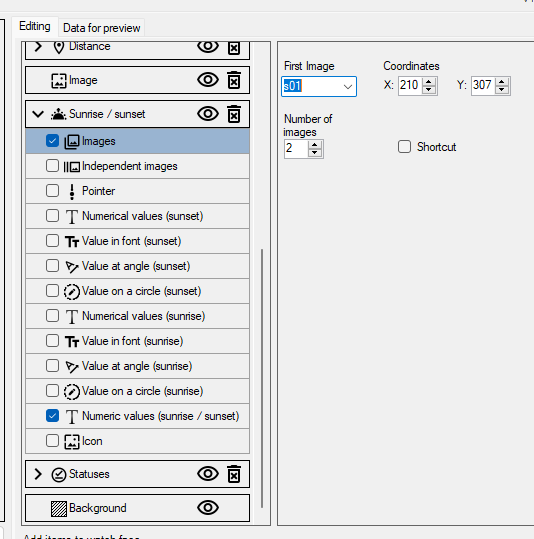
I wanted to make sunrise sunset icons changing according to "numeric values (sunrise / sunset) in watchface editor, but I don't understand how these icons are supposed to work.
I used images element in sunrise/sunset and put two images, first one for sunrise, second one for sunset.
But when applying watchface on watch icon is always for sunset, even when value is showing sunrise
Spoiler
You should at least specify the model of the watch.
For sunrise/sunset images you need 2 files, but only one (daytime) is displayed. Usually if you want the image to change and not just appear, the second image is drawn on the background.
Sometimes the image change is delayed. This is a feature of the standard widget. If you are not satisfied with it, you need to write your own code instead of the standard widget, which will check the time and change the image.
You should at least specify the model of the watch.
For sunrise/sunset images you need 2 files, but only one (daytime) is displayed. Usually if you want the image to change and not just appear, the second image is drawn on the background.
Sometimes the image change is delayed. This is a feature of the standard widget. If you are not satisfied with it, you need to write your own code instead of the standard widget, which will check the time and change the image.
Sorry, watch model is GTR3.
I tried putting one on background as permanent one but it works really weird, currently its showing sunset icon and 06:56 value which indicates sunrise, not the sunset.
I also tried puting 2 images but still acts very weird
Attachments
2024-11-19 11_01_44-assets — Eksplorator plików.png (1.77 KiB) Viewed 5557 times
If you use 2 images to display sunrise/sunset, the first image will be displayed during the day. So you need to put the second image on the background.
I don't know what your watch face should look like in the end, but according to the images they should be swapped.
If you use 2 images to display sunrise/sunset, the first image will be displayed during the day. So you need to put the second image on the background.
I don't know what your watch face should look like in the end, but according to the images they should be swapped.
I tried what you said, but still it's messed up,
What I want achieve is that whenever value is at morning, for e.g. 6:45 to show icon which indicates sunrise, (one with arrow pointing up) and when value under icon shows e.g. 16:10 which indicates sunset to show icon for sunset (one with arrow pointing down)
here is preview of watchface, you might understand it better
Attachments
2024-11-21 14_14_55-Preview.png (35.61 KiB) Viewed 5516 times
Unfortunately, this option didn't work. I tried for a very long time and in the end i always figured it out with a still icon. The icon will not change depending on the time change.
What icon for both sunrise and sunset did you use then? Could you give me any idea?
I have 2 test dials installed right now. One has only a set of images on it. And it displays the sunrise image. The second one has sunrise and sunset times as well. And this one is not working correctly. It still shows sunrise time (although it should have switched to sunset time 2 hours ago) and does not show the sunrise image, only the background image.
I have 2 test dials installed right now. One has only a set of images on it. And it displays the sunrise image. The second one has sunrise and sunset times as well. And this one is not working correctly. It still shows sunrise time (although it should have switched to sunset time 2 hours ago) and does not show the sunrise image, only the background image.
Thats how its showing for me right now, sunrise icon and time of sunset
I'll observe more this weekend. But in any case it's not a good solution. Switching sunrise / sunset often works with a delay. The most reliable way is to write the code yourself. Check the sunrise and sunset times and change the image depending on the current time.
Users browsing this forum: No registered users and 8 guests
Cookie Consent
This website uses cookie or similar technologies, to enhance your browsing experience and provide personalised recommendations. By continuing to use our website, you agree to our Privacy Policy