• Administrador
  •  
    Support Ukraine
    If you experience any problems with the forum (it is not visible, there is no way to post messages, or some functionality does not work), please let us know. If you have problems with registration or you did not receive confirmation letter, let us know and we will activate your account manually.
    If you get an "The submitted form was invalid. Try submitting again" error, delete cookies, then try again.
     

Doubts about the "sunrise and sunset" option [GTS 2]

Topics for the request of watch faces development.

Moderadores: asoo, Watchmens

Reglas del Foro
When adding a new topic, use the template: Topic title [device name]
For example: Requesting creation of watch face [GTR 3 Pro]
All communication in this branch should only be in English.
Responder
Seb ú
Mensajes: 2
Registrado: 16 Ago 2024, 04:14
Ubicación: Peru
Has thanked: 2 times
Contactar:

Doubts about the "sunrise and sunset" option [GTS 2]

Mensaje por Seb ú »

Hello, first of all, I'm not a native English speaker, but I hope it can be understood
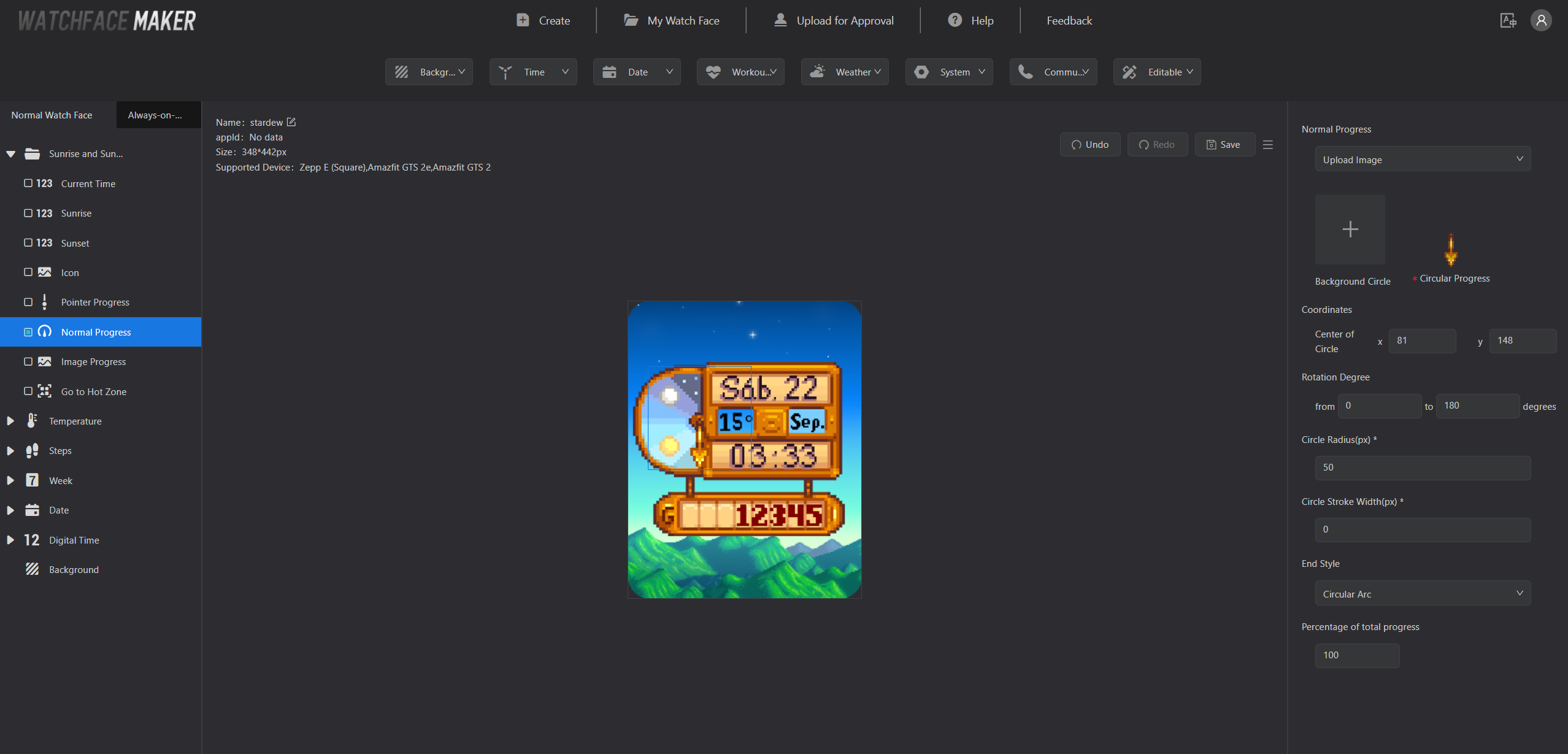
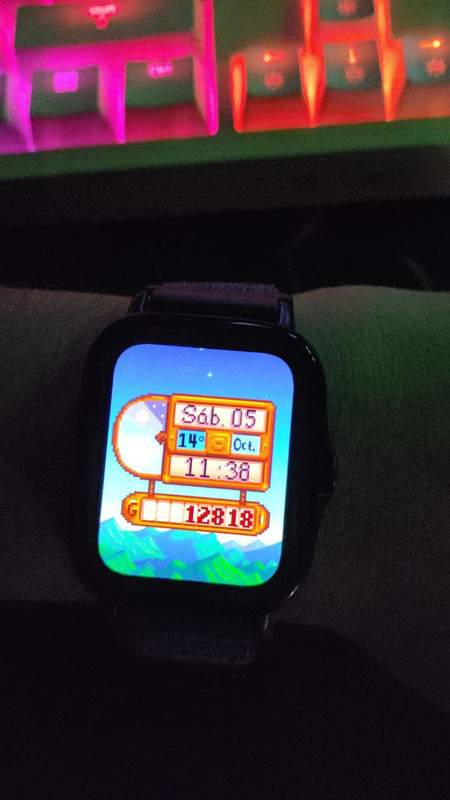
I was about to finish my Stardew Valley watchface for my GTS 2, everything works great regarding the time and date, but I can't quite understand how the "sunrise and sunset" option works, I see that other watchfaces work with that option but I can't find any tutorial or documentation about how that option works, so the last thing I can do is check here, I hope you can guide me to finish this watchface as it should be and publish it in the community :)
Spoiler
Imagen

Imagen
Avatar de Usuario
SashaCX75
Mensajes: 820
Registrado: 26 Oct 2019, 15:18
Ubicación: Ukraine
Has thanked: 13 times
Been thanked: 1029 times
Contactar:

Mensaje por SashaCX75 »

Normal Progress - A circular scale that fills in over time. Set the line width and you will see it in the preview.
Pointer Progress - Arrow Pointer. The arrow will move from the start angle during sunrise to the end angle during sunset. Judging by the screenshot this looks more like what you need.
Avatar de Usuario
SashaCX75
Mensajes: 820
Registrado: 26 Oct 2019, 15:18
Ubicación: Ukraine
Has thanked: 13 times
Been thanked: 1029 times
Contactar:

Mensaje por SashaCX75 »

I didn't notice that the watch face here is for the GTS 2 and not the GTS 3. I haven't dealt with those models in a long time and don't remember how the circular progression works there.
I think the pointers are usually drawn pointing upwards. Maybe there are some other image constraints for circular progress. I don't see that the centre of rotation of the image is specified in the settings, so maybe it should be square, the same size as the circular progress bar?
Seb ú
Mensajes: 2
Registrado: 16 Ago 2024, 04:14
Ubicación: Peru
Has thanked: 2 times
Contactar:

Mensaje por Seb ú »

SashaCX75 escribió: 09 Oct 2024, 19:21
I didn't notice that the watch face here is for the GTS 2 and not the GTS 3. I haven't dealt with those models in a long time and don't remember how the circular progression works there.
I think the pointers are usually drawn pointing upwards. Maybe there are some other image constraints for circular progress. I don't see that the centre of rotation of the image is specified in the settings, so maybe it should be square, the same size as the circular progress bar?
I understand, so there is no documentation or example to guide me? I really want to finish this watchface and upload it :(
taw_bip
WF maker
Mensajes: 130
Registrado: 12 Abr 2018, 16:29
Has thanked: 127 times
Been thanked: 19 times
Contactar:

Mensaje por taw_bip »

You will get quicker responses by using the Zepp discord where you can ask the developers directly.
https://discord.com/invite/ze2KK8UBNF
Responder

Volver a “Watchfaces creation (order table)”

¿Quién está conectado?

Usuarios navegando por este Foro: No hay usuarios registrados visitando el Foro y 1 invitado