Hello guys, I need help about gts 2 mini.
It has passed a lot of time since when I did some wf for this watch, and now I totally forgot which tools to use and where to find them.
To start I'd need a tool to unpack wf, but I'm not able to find anything I could use on windows.
Thanks
If you experience any problems with the forum (it is not visible, there is no way to post messages, or some functionality does not work), please let us know.
If you have problems with registration or you did not receive confirmation letter, let us know and we will activate your account manually.
If you get an "The submitted form was invalid. Try submitting again" error, delete cookies, then try again.
If you have problems with registration or you did not receive confirmation letter, let us know and we will activate your account manually.
If you get an "The submitted form was invalid. Try submitting again" error, delete cookies, then try again.
Tool to unpack gts 2 mini
Модератори: asoo, lvpokka, Internal error, Watchmens
Правила форуму
All communication in this branch should only be in English.
All communication in this branch should only be in English.
-
asoo
- Повідомлень: 2224
- З нами з: 03 січня 2019, 01:48
- Звідки: ͼͽ Thailand ͼͽ
- Has thanked: 438 times
- Been thanked: 2142 times
- Контактна інформація:

viewtopic.php?p=12537#p12537Max88 писав: 23 січня 2024, 14:15Hello guys, I need help about gts 2 mini.
It has passed a lot of time since when I did some wf for this watch, and now I totally forgot which tools to use and where to find them.
To start I'd need a tool to unpack wf, but I'm not able to find anything I could use on windows.
Thanks
ͼͽ To request please use the interrelated forum in action ͼͽ
Please do not PM to me for requests ported watchface.
Please do not PM to me for requests ported watchface.
-
Max88
- WF maker
- Повідомлень: 21
- З нами з: 30 травня 2019, 17:54
- Звідки: Italia
- Has thanked: 13 times
- Контактна інформація:
Thank you. I had already seen that post, but that main.exe file doesn't work for me.
It doesn't unpack wf I have downloaded from this site.
Moreover, to be honest I haven't understood exactly how to use it.
I have imagined it was sufficient to download just the main.exe file and drag the bin I'm interested in on top of that exe.
-
asoo
- Повідомлень: 2224
- З нами з: 03 січня 2019, 01:48
- Звідки: ͼͽ Thailand ͼͽ
- Has thanked: 438 times
- Been thanked: 2142 times
- Контактна інформація:
You can view the command line byMax88 писав: 23 січня 2024, 21:11Thank you. I had already seen that post, but that main.exe file doesn't work for me.
It doesn't unpack wf I have downloaded from this site.
Moreover, to be honest I haven't understood exactly how to use it.
I have imagined it was sufficient to download just the main.exe file and drag the bin I'm interested in on top of that exe.
Open "CMD" (Dos mode) and type main --help
Код: Виділити все
usage: main [-h] [--vergelite] [--gtr {42,47}] [--gtr2 {42,47}] [--gts] [--gts2] [--trexpro] [--oldformat]
            [--gts2mini] [--bipu] [--bip3] [--trex] [--x] [--file FILE [FILE ...]] [--to_raw] [--from_raw]
            [--border_alignment]

options:
  -h, --help            show this help message and exit
  --vergelite           force VergeLite watchface
  --gtr {42,47}         force GTR watchface
  --gtr2 {42,47}        force GTR2 watchface
  --gts                 force GTS watchface
  --gts2                force GTS2 watchface
  --trexpro             force TRexPro watchface
  --oldformat           force old json format for GTS2 or GTR2
  --gts2mini            force GTS2 Mini watchface
  --bipu                force Bip U watchface
  --bip3                force Bip 3 watchface
  --trex                force T-REX watchface
  --x                   force AmazfitX watchface
  --file FILE [FILE ...]
                        watchface.bin - unpacks watchface images and config watchface.json - packs config and
                        referenced images to bin file
  --to_raw              save raw header and resources
  --from_raw            generate bin from raw folder
--border_alignment draw border around aligned objects in preview( in the topic "usage" )
https://github.com/Tnxec2/py_amazfit_to ... e/GTS2mini
ͼͽ To request please use the interrelated forum in action ͼͽ
Please do not PM to me for requests ported watchface.
Please do not PM to me for requests ported watchface.
-
Max88
- WF maker
- Повідомлень: 21
- З нами з: 30 травня 2019, 17:54
- Звідки: Italia
- Has thanked: 13 times
- Контактна інформація:
Thank you again for help, but where do I have to open CMD and how?asoo писав: 24 січня 2024, 02:02You can view the command line by
Open "CMD" (Dos mode) and type main --help
or you can see how to use main.exe in this link.Код: Виділити все
usage: main [-h] [--vergelite] [--gtr {42,47}] [--gtr2 {42,47}] [--gts] [--gts2] [--trexpro] [--oldformat]
            [--gts2mini] [--bipu] [--bip3] [--trex] [--x] [--file FILE [FILE ...]] [--to_raw] [--from_raw]
            [--border_alignment]

options:
  -h, --help            show this help message and exit
  --vergelite           force VergeLite watchface
  --gtr {42,47}         force GTR watchface
  --gtr2 {42,47}        force GTR2 watchface
  --gts                 force GTS watchface
  --gts2                force GTS2 watchface
  --trexpro             force TRexPro watchface
  --oldformat           force old json format for GTS2 or GTR2
  --gts2mini            force GTS2 Mini watchface
  --bipu                force Bip U watchface
  --bip3                force Bip 3 watchface
  --trex                force T-REX watchface
  --x                   force AmazfitX watchface
  --file FILE [FILE ...]
                        watchface.bin - unpacks watchface images and config watchface.json - packs config and
                        referenced images to bin file
  --to_raw              save raw header and resources
  --from_raw            generate bin from raw folder
  --border_alignment    draw border around aligned objects in preview
( in the topic "usage" )
https://github.com/Tnxec2/py_amazfit_to ... e/GTS2mini
Because if I write cmd in windows task and then I write main --help nothing happens
Edit: oh and I haven't understood how to use that main.exe, sorry.
-
asoo
- Повідомлень: 2224
- З нами з: 03 січня 2019, 01:48
- Звідки: ͼͽ Thailand ͼͽ
- Has thanked: 438 times
- Been thanked: 2142 times
- Контактна інформація:
Open CMD :Max88 писав: 24 січня 2024, 08:39
Thank you again for help, but where do I have to open CMD and how?
Because if I write cmd in windows task and then I write main --help nothing happens
Edit: oh and I haven't understood how to use that main.exe, sorry.
Spoiler
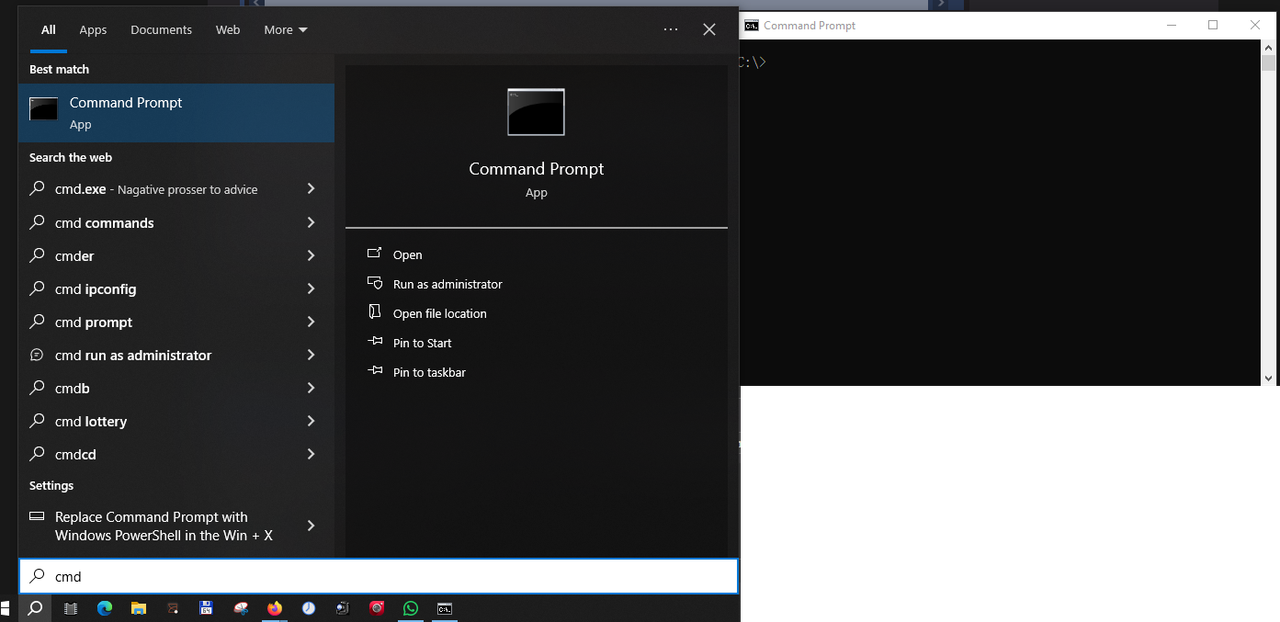
main --gts2mini --file yourwatchface.bin
command line for pack
main --gts2mini --file yourwatchface.json
ͼͽ To request please use the interrelated forum in action ͼͽ
Please do not PM to me for requests ported watchface.
Please do not PM to me for requests ported watchface.
-
Max88
- WF maker
- Повідомлень: 21
- З нами з: 30 травня 2019, 17:54
- Звідки: Italia
- Has thanked: 13 times
- Контактна інформація:
asoo писав: 24 січня 2024, 09:05Open CMD :command line for unpackSpoiler
main --gts2mini --file yourwatchface.bin
command line for pack
main --gts2mini --file yourwatchface.json
- Вкладення
-
- Screenshot 2024-01-24 101725.png (23.24 Кіб) Переглянуто 3678 разів
-
asoo
- Повідомлень: 2224
- З нами з: 03 січня 2019, 01:48
- Звідки: ͼͽ Thailand ͼͽ
- Has thanked: 438 times
- Been thanked: 2142 times
- Контактна інформація:
if you want to use main.exe , main.exe must be in the same folder as file.bin that you want to unpack.
Or, if you don't want to copy main.exe into the same folder as file.bin, you can copy main.exe into the folder c:\windows or the folder where Windows is installed. Doing this, you can run main.exe anywhere.
Or, if you don't want to copy main.exe into the same folder as file.bin, you can copy main.exe into the folder c:\windows or the folder where Windows is installed. Doing this, you can run main.exe anywhere.
ͼͽ To request please use the interrelated forum in action ͼͽ
Please do not PM to me for requests ported watchface.
Please do not PM to me for requests ported watchface.
-
Max88
- WF maker
- Повідомлень: 21
- З нами з: 30 травня 2019, 17:54
- Звідки: Italia
- Has thanked: 13 times
- Контактна інформація:
Ok, i got it. I have changed the working directory of cmd to the one where main and bin are.asoo писав: 24 січня 2024, 09:59if you want to use main.exe , main.exe must be in the same folder as file.bin that you want to unpack.
Or, if you don't want to copy main.exe into the same folder as file.bin, you can copy main.exe into the folder c:\windows or the folder where Windows is installed. Doing this, you can run main.exe anywhere.
I have given the command you wrote and unpack has worked.
Thank you a million for your kindness and patience
Хто зараз онлайн
Зараз переглядають цей форум: Немає зареєстрованих користувачів і 2 гостей