Hello guys, I need help about gts 2 mini.
It has passed a lot of time since when I did some wf for this watch, and now I totally forgot which tools to use and where to find them.
To start I'd need a tool to unpack wf, but I'm not able to find anything I could use on windows.
Thanks
-
- Administrator
-
-
Support Ukraine
If you experience any problems with the forum (it is not visible, there is no way to post messages, or some functionality does not work), please let us know. If you have problems with registration or you did not receive confirmation letter, let us know and we will activate your account manually.
If you get an "The submitted form was invalid. Try submitting again" error, delete cookies, then try again.
Tool to unpack gts 2 mini
Moderators: asoo, lvpokka, Internal error, Watchmens
Forum rules
All communication in this branch should only be in English.
All communication in this branch should only be in English.
-
asoo
- Posts: 2208
- Joined: 03 Jan 2019, 01:48
- Location: ͼͽ Thailand ͼͽ
- Has thanked: 425 times
- Been thanked: 2131 times
- Contact:

viewtopic.php?p=12537#p12537Max88 wrote: 23 Jan 2024, 14:15Hello guys, I need help about gts 2 mini.
It has passed a lot of time since when I did some wf for this watch, and now I totally forgot which tools to use and where to find them.
To start I'd need a tool to unpack wf, but I'm not able to find anything I could use on windows.
Thanks
ͼͽ To request please use the interrelated forum in action ͼͽ
Please do not PM to me for requests ported watchface.
Please do not PM to me for requests ported watchface.
Thank you. I had already seen that post, but that main.exe file doesn't work for me.
It doesn't unpack wf I have downloaded from this site.
Moreover, to be honest I haven't understood exactly how to use it.
I have imagined it was sufficient to download just the main.exe file and drag the bin I'm interested in on top of that exe.
-
asoo
- Posts: 2208
- Joined: 03 Jan 2019, 01:48
- Location: ͼͽ Thailand ͼͽ
- Has thanked: 425 times
- Been thanked: 2131 times
- Contact:
You can view the command line byMax88 wrote: 23 Jan 2024, 21:11Thank you. I had already seen that post, but that main.exe file doesn't work for me.
It doesn't unpack wf I have downloaded from this site.
Moreover, to be honest I haven't understood exactly how to use it.
I have imagined it was sufficient to download just the main.exe file and drag the bin I'm interested in on top of that exe.
Open "CMD" (Dos mode) and type main --help
Code: Select all
usage: main [-h] [--vergelite] [--gtr {42,47}] [--gtr2 {42,47}] [--gts] [--gts2] [--trexpro] [--oldformat]
            [--gts2mini] [--bipu] [--bip3] [--trex] [--x] [--file FILE [FILE ...]] [--to_raw] [--from_raw]
            [--border_alignment]

options:
  -h, --help            show this help message and exit
  --vergelite           force VergeLite watchface
  --gtr {42,47}         force GTR watchface
  --gtr2 {42,47}        force GTR2 watchface
  --gts                 force GTS watchface
  --gts2                force GTS2 watchface
  --trexpro             force TRexPro watchface
  --oldformat           force old json format for GTS2 or GTR2
  --gts2mini            force GTS2 Mini watchface
  --bipu                force Bip U watchface
  --bip3                force Bip 3 watchface
  --trex                force T-REX watchface
  --x                   force AmazfitX watchface
  --file FILE [FILE ...]
                        watchface.bin - unpacks watchface images and config watchface.json - packs config and
                        referenced images to bin file
  --to_raw              save raw header and resources
  --from_raw            generate bin from raw folder
--border_alignment draw border around aligned objects in preview( in the topic "usage" )
https://github.com/Tnxec2/py_amazfit_to ... e/GTS2mini
ͼͽ To request please use the interrelated forum in action ͼͽ
Please do not PM to me for requests ported watchface.
Please do not PM to me for requests ported watchface.
Thank you again for help, but where do I have to open CMD and how?asoo wrote: 24 Jan 2024, 02:02You can view the command line by
Open "CMD" (Dos mode) and type main --help
or you can see how to use main.exe in this link.Code: Select all
usage: main [-h] [--vergelite] [--gtr {42,47}] [--gtr2 {42,47}] [--gts] [--gts2] [--trexpro] [--oldformat]
            [--gts2mini] [--bipu] [--bip3] [--trex] [--x] [--file FILE [FILE ...]] [--to_raw] [--from_raw]
            [--border_alignment]

options:
  -h, --help            show this help message and exit
  --vergelite           force VergeLite watchface
  --gtr {42,47}         force GTR watchface
  --gtr2 {42,47}        force GTR2 watchface
  --gts                 force GTS watchface
  --gts2                force GTS2 watchface
  --trexpro             force TRexPro watchface
  --oldformat           force old json format for GTS2 or GTR2
  --gts2mini            force GTS2 Mini watchface
  --bipu                force Bip U watchface
  --bip3                force Bip 3 watchface
  --trex                force T-REX watchface
  --x                   force AmazfitX watchface
  --file FILE [FILE ...]
                        watchface.bin - unpacks watchface images and config watchface.json - packs config and
                        referenced images to bin file
  --to_raw              save raw header and resources
  --from_raw            generate bin from raw folder
  --border_alignment    draw border around aligned objects in preview
( in the topic "usage" )
https://github.com/Tnxec2/py_amazfit_to ... e/GTS2mini
Because if I write cmd in windows task and then I write main --help nothing happens
Edit: oh and I haven't understood how to use that main.exe, sorry.
-
asoo
- Posts: 2208
- Joined: 03 Jan 2019, 01:48
- Location: ͼͽ Thailand ͼͽ
- Has thanked: 425 times
- Been thanked: 2131 times
- Contact:
Open CMD :Max88 wrote: 24 Jan 2024, 08:39
Thank you again for help, but where do I have to open CMD and how?
Because if I write cmd in windows task and then I write main --help nothing happens
Edit: oh and I haven't understood how to use that main.exe, sorry.
Spoiler
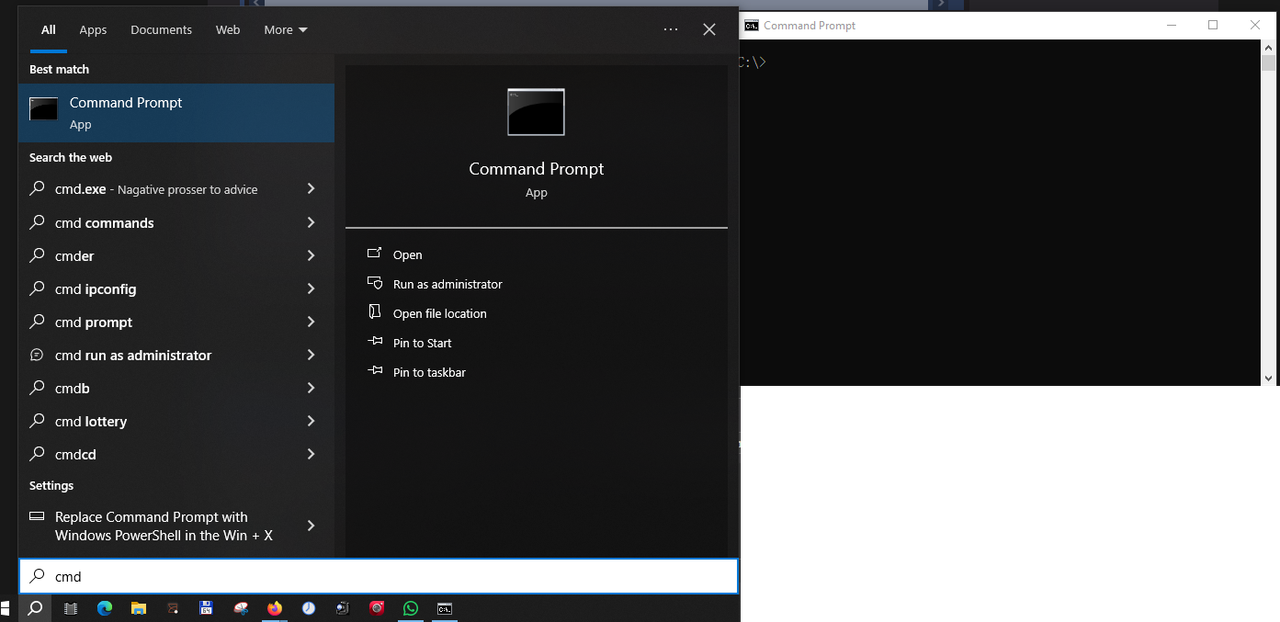
main --gts2mini --file yourwatchface.bin
command line for pack
main --gts2mini --file yourwatchface.json
ͼͽ To request please use the interrelated forum in action ͼͽ
Please do not PM to me for requests ported watchface.
Please do not PM to me for requests ported watchface.
asoo wrote: 24 Jan 2024, 09:05Open CMD :command line for unpackSpoiler
main --gts2mini --file yourwatchface.bin
command line for pack
main --gts2mini --file yourwatchface.json
- Attachments
-
- Screenshot 2024-01-24 101725.png (23.24 KiB) Viewed 3498 times
-
asoo
- Posts: 2208
- Joined: 03 Jan 2019, 01:48
- Location: ͼͽ Thailand ͼͽ
- Has thanked: 425 times
- Been thanked: 2131 times
- Contact:
if you want to use main.exe , main.exe must be in the same folder as file.bin that you want to unpack.
Or, if you don't want to copy main.exe into the same folder as file.bin, you can copy main.exe into the folder c:\windows or the folder where Windows is installed. Doing this, you can run main.exe anywhere.
Or, if you don't want to copy main.exe into the same folder as file.bin, you can copy main.exe into the folder c:\windows or the folder where Windows is installed. Doing this, you can run main.exe anywhere.
ͼͽ To request please use the interrelated forum in action ͼͽ
Please do not PM to me for requests ported watchface.
Please do not PM to me for requests ported watchface.
Ok, i got it. I have changed the working directory of cmd to the one where main and bin are.asoo wrote: 24 Jan 2024, 09:59if you want to use main.exe , main.exe must be in the same folder as file.bin that you want to unpack.
Or, if you don't want to copy main.exe into the same folder as file.bin, you can copy main.exe into the folder c:\windows or the folder where Windows is installed. Doing this, you can run main.exe anywhere.
I have given the command you wrote and unpack has worked.
Thank you a million for your kindness and patience
Who is online
Users browsing this forum: No registered users and 0 guests