SupportUkraine
If you experience any problems with the forum (it is not visible, there is no way to post messages, or some functionality does not work), please let us know. If you have problems with registration or you did not receive confirmation letter, let us know and we will activate your account manually.
If you get an "The submitted form was invalid. Try submitting again" error, delete cookies, then try again.
Ad blocker detected: Our website is made possible by displaying online advertisements to our visitors. Please consider supporting us by disabling your ad blocker on our website.
App version: 2.0.111 Stable
Watch model: GTR
Phone model: Samsung S10
OS version: Android 10

Not able to sync watch faces to zepp
Messages that does not meet these requirements will not be considered.
All information is transmitted to the developer, even if you do not receive a response in this thread.
"sometimes it's scary but it's still just you and me” — Leaving Laurel
I am using a GTS3 on Samsung phone running Adroid 13. Everything is latest verison. I cannot see how to install my own zip file? I go to the Downloads screen. There is an "Add File" button in lower right but it does not do anything.
I am using a GTS3 on Samsung phone running Adroid 13. Everything is latest verison. I cannot see how to install my own zip file? I go to the Downloads screen. There is an "Add File" button in lower right but it does not do anything.
App version (Stable or Beta) ?
"sometimes it's scary but it's still just you and me” — Leaving Laurel
Hi, I'm trying to install watch faces on my Amazfit Balance watch. The Amazfitwatchfaces app does NOT detect my Balance. I own the GTR 3 Pro, T-Rex 2, and the Zepp Z watches and the app works with ALL of them, but the app does NOT see my Balance so I am unable to install any GTR 3 Pro (compatible w Balance) watch faces onto it. Any suggestions? I've tried adding the MAC address into the app manually and it still doesn't see the watch even tho it is connected just fine to my phone via bluetooth. Thoughts? Does the app need to be updated to add Balance watch support?
App version: 4.3
Watch Model: Balance
Phone Model: Samsung Galaxy Z Flip 5
OS Version: Android 13
Have you tried connecting the Amazfit Balance smartwatch with other apps, can other phones detect the smartwatch , and is there any blocking of other apps in the Zepp app ?
Hi, I'm trying to install watch faces on my Amazfit Balance watch. The Amazfitwatchfaces app does NOT detect my Balance. I own the GTR 3 Pro, T-Rex 2, and the Zepp Z watches and the app works with ALL of them, but the app does NOT see my Balance so I am unable to install any GTR 3 Pro (compatible w Balance) watch faces onto it. Any suggestions? I've tried adding the MAC address into the app manually and it still doesn't see the watch even tho it is connected just fine to my phone via bluetooth. Thoughts? Does the app need to be updated to add Balance watch support?
App version: 4.3
Watch Model: Balance
Phone Model: Samsung Galaxy Z Flip 5
OS Version: Android 13
Have you tried connecting the Amazfit Balance smartwatch with other apps, can other phones detect the smartwatch , and is there any blocking of other apps in the Zepp app ?
I have a number of different phones that I alternate between and the AMAZFACES app does not see the Balance watch on any of them, even though the watch is paired and working fine with the ZEPP app on all my phones. I think the AMAZFACES app needs to be updated to work with/support the Balance watch? For now it seems impossible to load custom watch faces onto my new Balance watch.
I have a number of different phones that I alternate between and the AMAZFACES app does not see the Balance watch on any of them, even though the watch is paired and working fine with the ZEPP app on all my phones. I think the AMAZFACES app needs to be updated to work with/support the Balance watch? For now it seems impossible to load custom watch faces onto my new Balance watch.
Thank you for providing the additional information. It's very helpful for resolving the issue at hand. We appreciate your time and cooperation. We will do our best to resolve the problem as quickly as possible.
App version: 4.5.353
Watch model: Active
Phone model: OnePlus 9
OS version: 13
Hello there, I just can't select any other model than my old GTS3.
The app don't find any connected device,eventho i select 'Zepp App'.
Active seems to be 'unsupported' in the Android App, whereas it's OK on the web site...
(NB: is it possible to upload a WF to the watch from the Web page? Any apk to do that with a downloaded zip?)
Thanks in advance.
App version: 4.5.353
Watch model: Active
Phone model: OnePlus 9
OS version: 13
Hello there, I just can't select any other model than my old GTS3.
The app don't find any connected device,eventho i select 'Zepp App'.
Active seems to be 'unsupported' in the Android App, whereas it's OK on the web site...
(NB: is it possible to upload a WF to the watch from the Web page? Any apk to do that with a downloaded zip?)
Thanks in advance.
Currently downloading from the site where the QR code is already available. The QR code will be available in the app shortly. If I understood you correctly.
I've succesfully changed my WF using the Dev Mode and QR code on web site
It's not straightforward tho... It was easier when using the Android App only...
Anyway, it works.
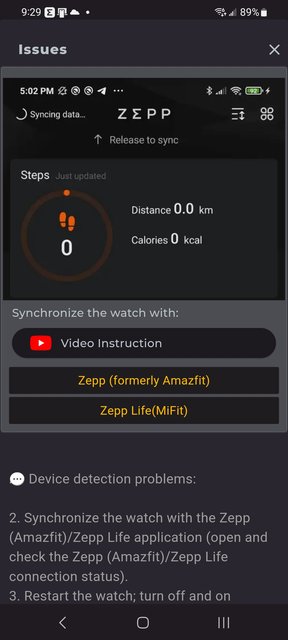
Unable to install any watch face, using any of the 4 methods. Zepp app syncs quickly always. My watch is discoverable. Always get this screen: Spoiler
My watch is brand new and I've been unable to upgrade watchfaces, other than those provided by the Zepp app. What am I doing wrong? Is this a Zepp OS 3.0 lockout issue?
Unable to install any watch face, using any of the 4 methods. Zepp app syncs quickly always. My watch is discoverable. Always get this screen: Spoiler
My watch is brand new and I've been unable to upgrade watchfaces, other than those provided by the Zepp app. What am I doing wrong? Is this a Zepp OS 3.0 lockout issue?
@Stas, sorry to be so slow - I've been traveling on a business trip.
The GTR-4 is running System Version 6.3.2.3, according to the Zepp app on Android. I really need to find out if I can install 3rd party watchfaces (AKA Amazfitwatchfaces.com watchfaces) on my watch. Since it has been "upgraded" to ZeppOS 3.0, will I need to use similar techniques as for the Balance (whatever they are)?
Hey, only for me preview isn't correctly displayed when I try to import my watchface? I mean displayed preview it's from different watchface... Also, can We get preview in app cutted like we have on website? I mean when author's of wf's upload image with watch frame (bigger resolution) then on app (on website they are cropped on center and they are looking good) they are much smaller compared to "normal image" with just preview without frame / skin.
Anyone's here to help? After last update from Google Play - v4.5... I still see everything mentioned before and sometimes app just crashes when I try to upload new wf to my watch... @GIK-Team or @Stas can You guys check this? Thx.
Anyone's here to help? After last update from Google Play - v4.5... I still see everything mentioned before and sometimes app just crashes when I try to upload new wf to my watch... @GIK-Team or @Stas can You guys check this? Thx.
v4.5.358? 359? 360?
"sometimes it's scary but it's still just you and me” — Leaving Laurel
Users browsing this forum: No registered users and 1 guest
Cookie Consent
This website uses cookie or similar technologies, to enhance your browsing experience and provide personalised recommendations. By continuing to use our website, you agree to our Privacy Policy