SupportUkraine
If you experience any problems with the forum (it is not visible, there is no way to post messages, or some functionality does not work), please let us know. If you have problems with registration or you did not receive confirmation letter, let us know and we will activate your account manually.
If you get an "The submitted form was invalid. Try submitting again" error, delete cookies, then try again.
Ad blocker detected: Our website is made possible by displaying online advertisements to our visitors. Please consider supporting us by disabling your ad blocker on our website.
App version: 2.0.111 Stable
Watch model: GTR
Phone model: Samsung S10
OS version: Android 10

Not able to sync watch faces to zepp
Messages that does not meet these requirements will not be considered.
All information is transmitted to the developer, even if you do not receive a response in this thread.
"sometimes it's scary but it's still just you and me” — Leaving Laurel
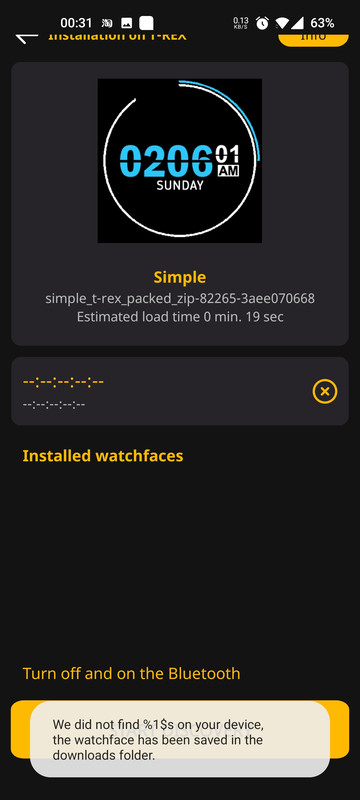
Not able to sync watch faces to zepp. When I press sycn, I appear an error message "we did not found %1$s on your device". Please refer to photo attachments.
Not able to sync watch faces to zepp. When I press sycn, I appear an error message "we did not found %1$s on your device". Please refer to photo attachments.
Last edited by Stas on 18 Nov 2020, 19:37, edited 2 times in total.
App Version 2.0.111
Watch Model GTR 47 mm
Phone Model - Oukitel WP5 Pro
OS Android 10
Choose "Direct Installation"
Press "Download"
ZEPP-APP is open and syncronised, but askes me to sync
Do another sync
go back to AW
Press "set on watch" (Watch is shown above with adress)
no reaction on Watch
askes me to sync in zepp
Button "reconnect"
"nothing found on your request"
and so on......
App Version 2.0.111
Watch Model GTR 47 mm
Phone Model - Oukitel WP5 Pro
OS Android 10
Choose "Direct Installation"
Press "Download"
ZEPP-APP is open and syncronised, but askes me to sync
Do another sync
go back to AW
Press "set on watch" (Watch is shown above with adress)
no reaction on Watch
askes me to sync in zepp
Button "reconnect"
"nothing found on your request"
and so on......
Choose "Direct Installation"
Press "Download"
ZEPP-APP is open and syncronised, but askes me to sync
Do another sync
go back to AW
Press "set on watch" (Watch is shown above with adress)
no reaction on Watch
askes me to sync in zepp
Button "reconnect"
I tried it a lot of times ,but alltime the installation does not starts .Only show me sync with zepp
Choose "Direct Installation"
Press "Download"
ZEPP-APP is open and syncronised, but askes me to sync
Do another sync
go back to AW
Press "set on watch" (Watch is shown above with adress)
no reaction on Watch
askes me to sync in zepp
Button "reconnect"
I tried it a lot of times ,but alltime the installation does not starts .Only show me sync with zepp
App version: 2.1.120 (Joined Beta Group)
Watch model: Amazfit X
Phone model: OnePlus 7T
OS version: Android 10
1- I had a GTS previously :
- all favorites lost or disappeared
- GTS not recognised
- unable to change device in Settings : nothing happens
2- X not in left menu ?
Hello,
I have: Amazfit GTS 2, ZEPP App, AmazFaces App.
I want: install a GTS 2 watch face from the Amazfaces App via ZEPP App.
Problem: I doesn’t install / appear in ZEPP app or on the GTS 2 watch.
What do I make wrong?
Thank you!!
Best, Andy
Version de l'application: 2.1.120
Modèle de montre stable : Gts 2e
Modèle de téléphone: Redmi Note 9 Pro
Version du système d'exploitation: Android 10
Impossible de synchroniser les cadrans de montre avec zepp:
- message: nothing found on this request
-me demande de synchroniser avec zepp constamment.
App version: 2.2.128
Watch model: GTR 1
Phone model: Pocophone F1
OS version: Android 10
Sync doesn't work, favorites lost. Sync moving bar just keep loading non-stop, didn't start syncing at all
Previous version worked perfectly. Where can I download the previous version?
App version: 2.2.128
Watch model: GTR 1
Phone model: Pocophone F1
OS version: Android 10
Sync doesn't work, favorites lost. Sync moving bar just keep loading non-stop, didn't start syncing at all
Previous version worked perfectly. Where can I download the previous version?
Instalation method "Replacing the standard dial" but then ZAPP opens with standard dials from my previous GTR47 watch. I deleted cadh and data, logged in again, same thing. When I go to settings it says GTR42 and I can't change it, but I see dials from GTR2(!?!)
Users browsing this forum: No registered users and 1 guest
Cookie Consent
This website uses cookie or similar technologies, to enhance your browsing experience and provide personalised recommendations. By continuing to use our website, you agree to our Privacy Policy