• Administrador
  •  
    Support Ukraine
    If you experience any problems with the forum (it is not visible, there is no way to post messages, or some functionality does not work), please let us know. If you have problems with registration or you did not receive confirmation letter, let us know and we will activate your account manually.
    If you get an "The submitted form was invalid. Try submitting again" error, delete cookies, then try again.
     

AmazFit WatchFace editor 2 for Windows

This forum is designed to discuss and develop tools creating watch faces.

Moderadores: asoo, lvpokka, Internal error, Watchmens

Regras do fórum
All communication in this branch should only be in English.
To discuss tools that are not in this section, use the “Watchfaces tools (discussion)” forum.
Avatar do usuário
SashaCX75
Mensagens: 812
Registrado em: 26 Out 2019, 15:18
Localização: Ukraine
Has thanked: 13 times
Been thanked: 1007 times
Contato:

AmazFit WatchFace editor 2 for Windows

Mensagem por SashaCX75 »

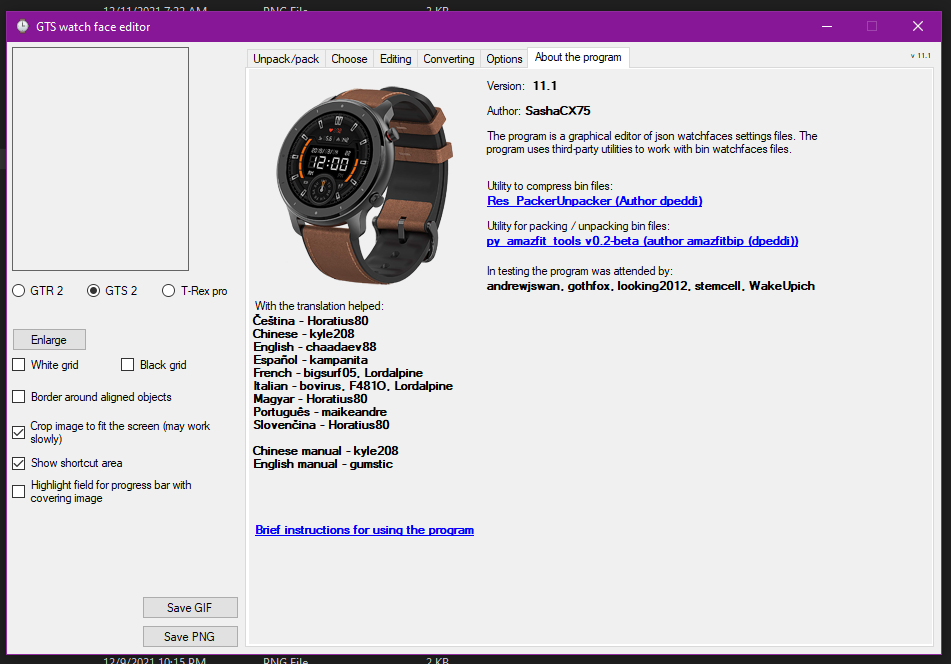
Graphics editor for working with dials Amazfit
The editor supports watch faces from GTR 2(e), GTS 2 (GTS 2e / Zepp E Square), T-Rex Pro, Zepp E Circle.
Screenshot
Screenshot
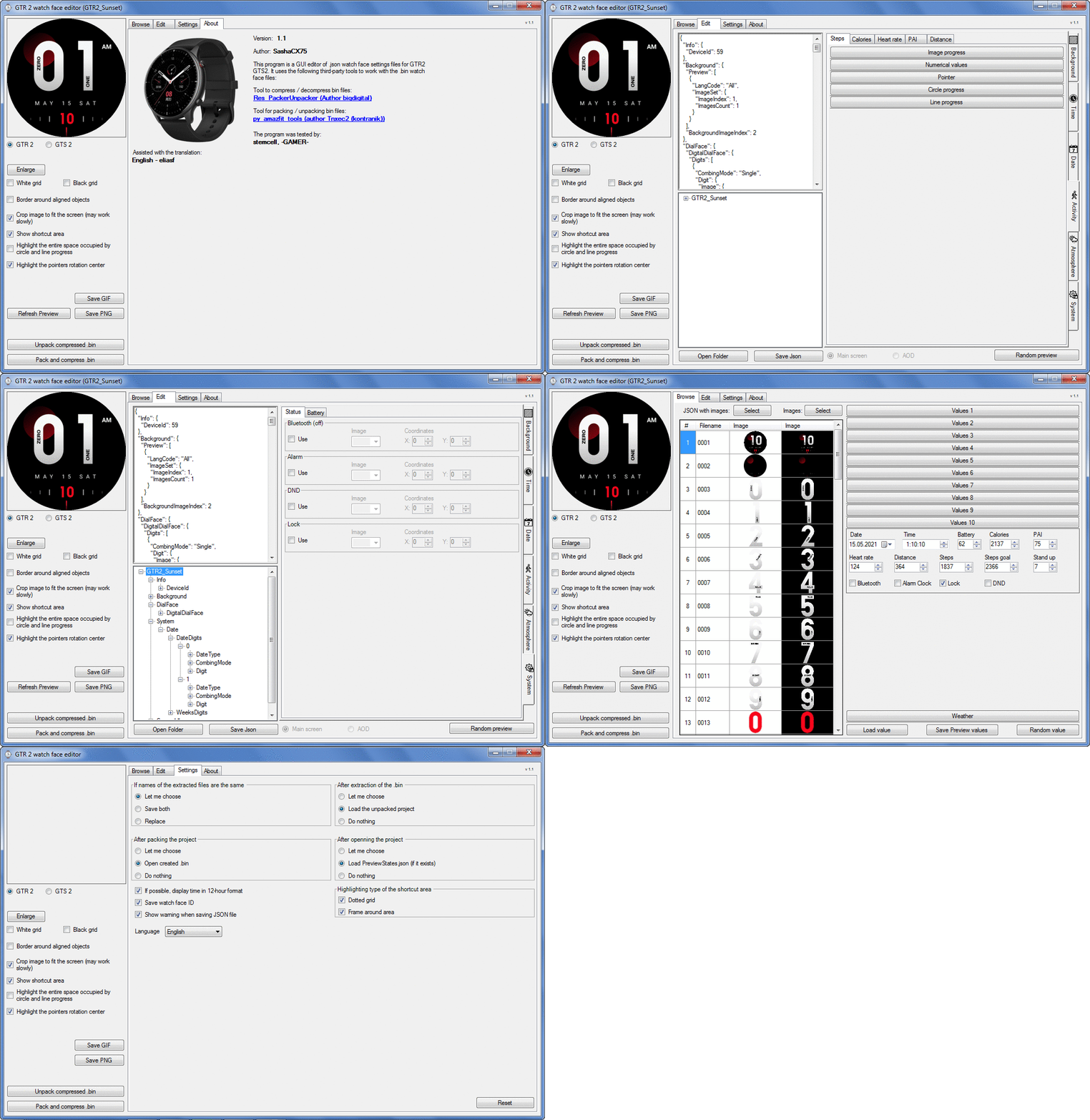
Imagem
Note: It is advisable to unpack the program to the root of the disk.
Not all dials can be unpacked.

The drawing order of elements cannot be changed. The only exception is if you move the second hand from the center, it will be drawn under the hour and minute hands.

If the .bin file is not created, then you need to look for errors in the .log file. Most often this happens when images have the wrong format.

Version 7.3
List of changes
Fixed known display bugs.
v 7.2
Fixed date display errors in editable zones.
Added support for the Hungarian language.
v 7.1
For distance added support for separate images for miles and kilometers.
v 7.0
Added support for independent coordinates for a set of pictures (segments).
v 6.0
Added support for Zepp E Circle
Added the ability to convert watch faces between different models (GTR 2 (e), Zepp E Circle, T-Rex Pro)
v 5.1
Added the ability to create and update preview images of editable zones.
v 5.0
Added support for editable zones.
v 4.1
Added the ability to display the time in the system font.
Added the ability to display the date in the system font.
Added the ability to change the order of layers.
Added the ability to overlay the clock image on the saved png and gif files (enabled in the settings).
v 4.0
Added support for the system font (inscription at an angle and in a circle).
Added support for the Sunrise parameter (not working correctly for all cities).
Added support for ActivityGoal parameter.
Added the ability to display the goal of steps.
Added support for the Icon parameter.
Added the ability to display circular and linear progress at the same time.
v 3.1
Fixed errors when displaying the distance.
Fixed errors when displaying temperature.
Added French.
Added Italian language.
v 3.0
Added support for T-Rex Pro.
Added support for new elements (StandUp, fat burning, UV index, humidity, wind, pressure).
Found bugs fixed.
v 2.1
Fixed bugs in display AOD.
Fixed bug when using pictures for circular progress.
v 2.0
Added support for AOD.
Added Chinese translation.
v 1
It can work with elements: time, date, statuses, weather, battery, steps, calories, heart rate, PAI, path.
Added English translation.
v 1.2 Added Spanish language
Old versions
Pictures created when unpacking and unpacking bin files are created by the parser and may differ from the images created in the editor. I have nothing to do with these files and am not responsible for their content.

When you turn on the "Follow ..." radio button, the right alignment and center alignment in the editor is displayed incorrectly.
The preview in the editor may differ from the image on the watch. I advise you to check the dial on a real device.

Editable zones do not work on the T-Rex Pro.

The editor does not work with GTS 2 mini (GTS U) watch faces and I do not know how to make such watch faces.

Until the Zepp app has an official watch face with animations or shortcuts, these features cannot be added to the editor.
Shortcuts work on dials converted from GTR (GTS) to GTR 2 (GTS 2). But with this method of creating dials, not all functions work correctly.

GTR (GTS, T-Rex) to GTR2 (GTS 2, T-Rex Pro) converter
GTR (GTS, T-Rex) to GTR2 (GTS 2, T-Rex Pro) Converter & Editor

Because I bought a GTR 3, the program will no longer be updated.

Donate to the author - PayPal: [email protected].
Editado pela última vez por SashaCX75 em 01 Jun 2022, 07:19, em um total de 32 vezes.
amazneo
Mensagens: 13
Registrado em: 04 Dez 2021, 00:18
Localização: US
Has thanked: 12 times
Contato:

Mensagem por amazneo »

SashaCX75 escreveu: 12 Abr 2021, 07:58
AmazFit_Watchface_Editor_(GTR47ToGTR2)
Editor watch face from GTR47 / GTS / T-Rex which packs watch face in GTR2 / GTS2 / T-Rex Pro format.

Not all elements work. If there were notations am / pm they must be added again to the dial.

Of the advantages of such dials, I consider only working shortcuts and the ability to set different fonts and independent coordinates for tens and units in time.
Editor can only unpack GTR2 / GTS2 / T-Rex Pro watch face made by this editor and GTR47 / GTS / T-Rex watch face.

https://www.dropbox.com/s/qprw4mg2w0l37 ... 9.zip?dl=0
Amazing work you've done SashaCX75!!! This is by far the most comprehensive editor outside of Zepp's own software!!

I have some questions about the work flow for the app.

How does the JSON image index # know which image file to load? I don't see any filename references in the JSON?

Is this the order how we start building new watch face bin files?

1. Select the UNPACK/PACK tab.

2. Select "Unpack compressed Bin (GTR/GTS) > Find a bin similar to your design and unpack

3. Copy our own files over the newly extracted files. Is this when we replace the png files?

Question 1: Do the images have to be in a specific order? For example, does index 0002 - 0011 have to be Hours > Tens images, etc?

Question 2: Is there a maximum limit of 108 images (Index 1 to 107)?

Question 3: When I select index # and click "Images: SELECT" - The result is all of the index # reset to 0? How do we add more index #?

4. Select EDITING tab.

5. Edit each image set (Background, Time, Date, etc) and adjust position.

6. Select UNPACK/PACK tab.

7. Click PACK AND COMPRESS BIN.

Is this exactly how we create new watch faces for the GTS model watch?

And, is this the command we use to extract and compress for the GTS model watchface?
Imagem

Thank you!
Editado pela última vez por amazneo em 11 Dez 2021, 05:59, em um total de 2 vezes.
Rubens.vailati
Mensagens: 1
Registrado em: 11 Dez 2021, 05:35
Localização: Italia
Contato:

Mensagem por Rubens.vailati »

Hi I wanted to know if it is available or possible to convert the whatchface created for Huawei Watch GT3 in the format suitable for the amazfit gtr3 pro thanks
naikviraj128
WF maker
Mensagens: 1
Registrado em: 06 Jan 2021, 04:14
Localização: India
Has thanked: 1 time
Contato:

Mensagem por naikviraj128 »

Hello Developer,
Is there an Option to Convert Watch faces from GTR 2 to Verge Lite or GTR 47mm in this Watch Face Editor.
Avatar do usuário
SashaCX75
Mensagens: 812
Registrado em: 26 Out 2019, 15:18
Localização: Ukraine
Has thanked: 13 times
Been thanked: 1007 times
Contato:

Mensagem por SashaCX75 »

amazneo
1. Judging by your questions, you are using the GTR47 / GTS watch face editor or the GTR47 / GTS to GTR2 / GTS2 dial converter (I do not recommend using it). The program for GTR2 / GTS2 is being discussed here.

2. If you are editing an existing watch face, then the procedure is correct. If you want to create a new watch face then you need to:
- create a new folder,
- put the necessary images into it,
- on the "Select" tab, select all files in the folder,
- on the "Editing" tab, click the "Save Json" button and save it in the folder with images.

3. The json file contains the "ImageIndex" parameter that sets the serial number of the image. Therefore, after creating a project, it is better not to change the order of files, but add new image files to the end of the list.

4. Image files should start with a background image and go in order. The rest of the pictures can go in any order. I don't know about the limit on the number of files, but with a large number of them, the size of the watch face may be larger than the allowable one.

5. Question 3 I did not understand. If you want to add new images to the project, the easiest way is to copy the new images to the project folder and reopen it.

6. Yes, these are commands for extracting files and you do not need to change them.
Avatar do usuário
SashaCX75
Mensagens: 812
Registrado em: 26 Out 2019, 15:18
Localização: Ukraine
Has thanked: 13 times
Been thanked: 1007 times
Contato:

Mensagem por SashaCX75 »

Rubens.vailati , naikviraj128
This editor allows you to convert watch faces between GTR 2 / Zeep E / T-Rex Pro
amazneo
Mensagens: 13
Registrado em: 04 Dez 2021, 00:18
Localização: US
Has thanked: 12 times
Contato:

Mensagem por amazneo »

Pal57 escreveu: 10 Out 2021, 16:25
Hi,
where can I find new Wf for GTR 2 with "Layer Order" and the "Editable Elements".

Thanks
Pal57
Did anyone figure out if there is a way to specify layer order?
amazneo
Mensagens: 13
Registrado em: 04 Dez 2021, 00:18
Localização: US
Has thanked: 12 times
Contato:

Mensagem por amazneo »

SashaCX75 escreveu: 11 Dez 2021, 09:05
@amazneo
1. Judging by your questions, you are using the GTR47 / GTS watch face editor or the GTR47 / GTS to GTR2 / GTS2 dial converter (I do not recommend using it). The program for GTR2 / GTS2 is being discussed here.

2. If you are editing an existing watch face, then the procedure is correct. If you want to create a new watch face then you need to:
- create a new folder,
- put the necessary images into it,
- on the "Select" tab, select all files in the folder,
- on the "Editing" tab, click the "Save Json" button and save it in the folder with images.

3. The json file contains the "ImageIndex" parameter that sets the serial number of the image. Therefore, after creating a project, it is better not to change the order of files, but add new image files to the end of the list.

4. Image files should start with a background image and go in order. The rest of the pictures can go in any order. I don't know about the limit on the number of files, but with a large number of them, the size of the watch face may be larger than the allowable one.

5. Question 3 I did not understand. If you want to add new images to the project, the easiest way is to copy the new images to the project folder and reopen it.

6. Yes, these are commands for extracting files and you do not need to change them.
Geeze, I thought I posted a reply to this last night but I don't see it on here?

@SashaCX75

Thank you sooooo much for your AMAZing app and sharing your hobby with us!

I love this app more and more as I learn how to use it!

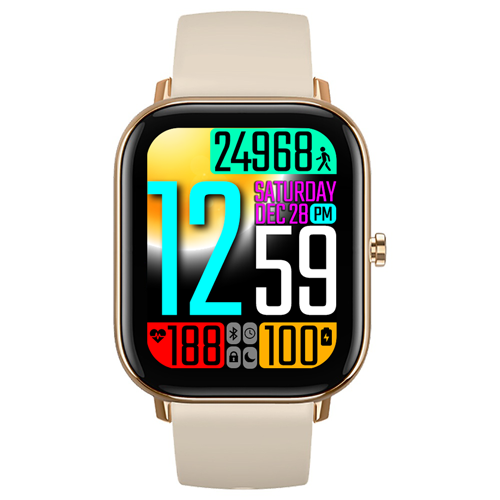
This is the version that I am using to create a watch face for the GTS - it is a gift for my mom and I could not find any watch faces with really large fonts - so I set out to create one myself. I have to try to get this done before Christmas:
Spoiler
Imagem
This is the design that I'm working on (going to add temperature to the top left corner - still a work in progress):
Spoiler
Imagem
QUESTION 1:
Is there a way to specify z-order for the elements? I would like to specify the z-order of the WEATHER ICON element. If this is not possible then I will have to tweak my design.

QUESTION 2:
In 12H time mode - I notice on most of the watch faces on this site that the time is displayed like this:

Código: Selecionar todos

08:24 PM
Instead of how the OEM Amazfit watchfaces which display 12H mode time like this:

Código: Selecionar todos

8:24 PM
Is there a way to disable the "leading zero"?

Thank you again!!!!
Avatar do usuário
SashaCX75
Mensagens: 812
Registrado em: 26 Out 2019, 15:18
Localização: Ukraine
Has thanked: 13 times
Been thanked: 1007 times
Contato:

Mensagem por SashaCX75 »

amazneo
You are using a converter. There are no such possibilities in it.
Use AmazFit WatchFace editor 2 v7.3. In it, you can change the order of some elements and turn off the display of leading zeros for hours.
amazneo
Mensagens: 13
Registrado em: 04 Dez 2021, 00:18
Localização: US
Has thanked: 12 times
Contato:

Mensagem por amazneo »

SashaCX75 escreveu: 12 Dez 2021, 18:06
@amazneo
You are using a converter. There are no such possibilities in it.
Use AmazFit WatchFace editor 2 v7.3. In it, you can change the order of some elements and turn off the display of leading zeros for hours.
@SashaCX75

Thank you!!

Do you mean this?

https://www.dropbox.com/s/qp0ii7dspf91x ... 3.zip?dl=0
amazneo
Mensagens: 13
Registrado em: 04 Dez 2021, 00:18
Localização: US
Has thanked: 12 times
Contato:

Mensagem por amazneo »

Does anyone know the file size limit for bin watch faces for the GTS?
Cooperphile

Mensagem por Cooperphile »

SashaCX75

What font is used for the system font, or can you say what font your app uses to simulate the system font? I'm specifically interested in the T-Rex Pro, in case it matters.

Thank you.
Avatar do usuário
SashaCX75
Mensagens: 812
Registrado em: 26 Out 2019, 15:18
Localização: Ukraine
Has thanked: 13 times
Been thanked: 1007 times
Contato:

Mensagem por SashaCX75 »

Cooperphile
The editor uses the "OpenSans_Regular" font. What font is used in the watch, I do not know.
amazneo
Mensagens: 13
Registrado em: 04 Dez 2021, 00:18
Localização: US
Has thanked: 12 times
Contato:

Mensagem por amazneo »

Hello, I am a bit confused about which tool to use to create watch faces for the GTS?

I started out using this tool:
GTR (GTS, T-Rex) to GTR2 (GTS 2, T-Rex Pro) Converter & Editor
viewtopic.php?p=8844#p8844

But, then was told that I should be using this tool:
AmazFit_Watchface_Editor_2 7.3
https://www.dropbox.com/s/qp0ii7dspf91x ... 3.zip?dl=0

But the AmazFit_Watchface_Editor_2 7.3 does not create bin files compatible with GTS model?

Can someone please offer some help?
Avatar do usuário
Guydu91
Mensagens: 58
Registrado em: 06 Out 2019, 18:49
Localização: Bretagne / France
Has thanked: 53 times
Been thanked: 9 times
Contato:

Mensagem por Guydu91 »

amazneo escreveu: 18 Dez 2021, 04:42
Hello, I am a bit confused about which tool to use to create watch faces for the GTS?

I started out using this tool:
GTR (GTS, T-Rex) to GTR2 (GTS 2, T-Rex Pro) Converter & Editor
viewtopic.php?p=8844#p8844

But, then was told that I should be using this tool:
AmazFit_Watchface_Editor_2 7.3
https://www.dropbox.com/s/qp0ii7dspf91x ... 3.zip?dl=0

But the AmazFit_Watchface_Editor_2 7.3 does not create bin files compatible with GTS model?

Can someone please offer some help?
Hello Amazneo,
If you're searching a software for GTS1 watchface, it's here :
viewtopic.php?t=1076
The maximum size of the bin will be 1,5 Mo for GTS1.
Best regards.
Caria_L
Mensagens: 1
Registrado em: 19 Nov 2021, 14:58
Localização: Vietnam
Contato:

Mensagem por Caria_L »

Hi, how can I use Chiness Lunar Calendar for GTR model?
tibiszabo
Mensagens: 1
Registrado em: 24 Jan 2020, 18:19
Localização: uk
Contato:

Mensagem por tibiszabo »

Hi!
Gtr 3 gtr3 pro editor where can it be found?
BennyH93
Mensagens: 2
Registrado em: 01 Jan 2022, 15:51
Localização: Germany
Contato:

Mensagem por BennyH93 »

Hey

sorry first of all for the Google translator....

I come here unfortunately not quite with the solution for the GTS 2 mini...

apparently some have managed to create the Watchfaces.

a "How to" or a ready variant of a Builder would be here really very nice.

ps.
you can also send me a PM

thanks a lot
tZap
Mensagens: 1
Registrado em: 02 Jan 2022, 02:56
Localização: here
Has thanked: 3 times

Mensagem por tZap »

tibiszabo escreveu: 02 Jan 2022, 16:13
Hi!
Gtr 3 gtr3 pro editor where can it be found?
Looks like SashaCX75 is still working on it?
https://github.com/SashaCX75/AmazFit-Wa ... r-Type-GT3
dinhlam91
WF maker
Mensagens: 8
Registrado em: 11 Jul 2020, 15:48
Localização: Ha Noi
Contato:

Mensagem por dinhlam91 »

Thanks, @SashaCX75.
I'm waiting for a version for GTR3 & GTR3 PRO.
BennyH93
Mensagens: 2
Registrado em: 01 Jan 2022, 15:51
Localização: Germany
Contato:

Mensagem por BennyH93 »

neFAST

Hey you build some very nice WF's but I want to modify some of them or create some new...

you are one of those how made it ;)

I whish u could show us a HOW TO please :)
Julien
Mensagens: 20
Registrado em: 27 Ago 2021, 16:50
Localização: FR
Has thanked: 1 time
Contato:

Mensagem por Julien »

I'm doing everything manually with https://github.com/Tnxec2/py_amazfit_tools
sirantoninyc
Mensagens: 7
Registrado em: 05 Jan 2022, 06:13
Localização: US
Has thanked: 1 time
Contato:

Mensagem por sirantoninyc »

Hello,

Firstly, thanks for this editor! I have had success with altering images to change the appearance of the watch faces.

My question is... is there a way to refresh the editor to see the changes take affect in real time and then undo them if a mistake was made?

I have been changing the images, adding them to the folder, then saving the json file, creating a new bin, and unpacking it to see the changes. I've been trying to make changes to the code but I don't see the changes in real time or I cannot find a refresh option.

Thanks!
Anthony
Avatar do usuário
SashaCX75
Mensagens: 812
Registrado em: 26 Out 2019, 15:18
Localização: Ukraine
Has thanked: 13 times
Been thanked: 1007 times
Contato:

Mensagem por SashaCX75 »

sirantoninyc
There is no undo function in the editor.
If you have changed the image file, then in order to see these changes in the editor, you need to change any parameter or data for preview on the Browse tab. After that, the preview image will be updated. You do not need to manually change the code.
sirantoninyc
Mensagens: 7
Registrado em: 05 Jan 2022, 06:13
Localização: US
Has thanked: 1 time
Contato:

Mensagem por sirantoninyc »

Thank you for the quick reply.

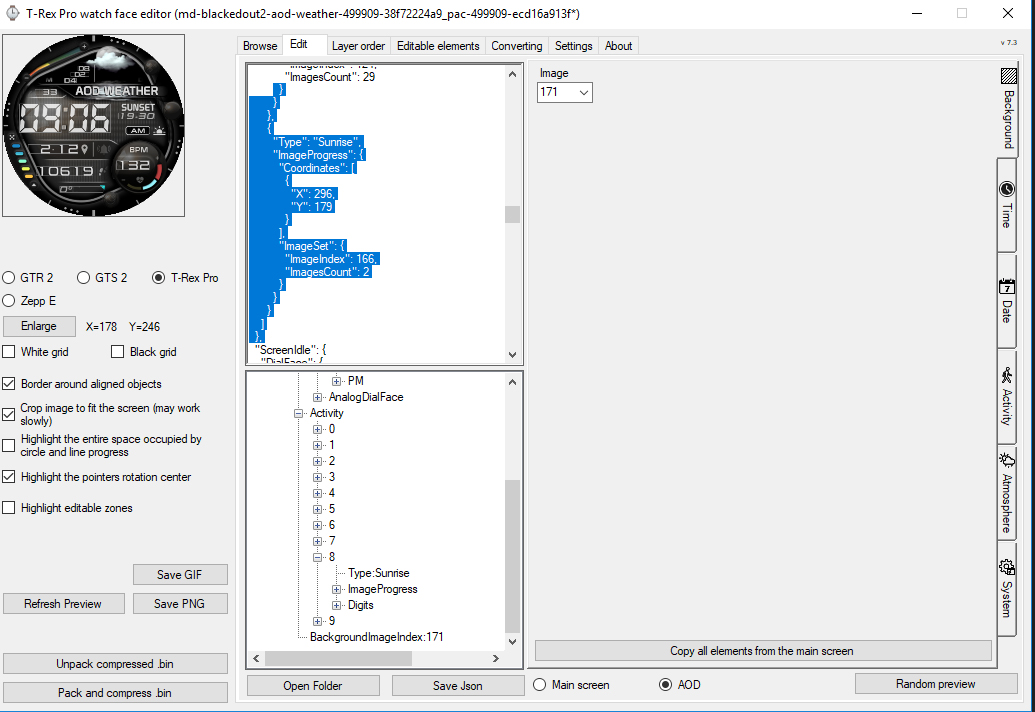
The reason I was trying to edit the code is to remove the distance measure in the AOD (always on display). Then where the distance was located add the sunrise. The goal was to see the sunrise and sunset when the watch goes into the AOD.

The watch face I am looking to edit already has the sunset appear, where the seconds were displayed, when the watch goes into AOD. (It also shows the weather during AOD, where the date appears during normal live operation.)

I would like to see both sunrise and sunset during AOD. I see in the code, under screen idle, that the seconds are not listed there but the hours and minutes are in the code. I was attempting to remove the distance code, under screen idle, then add the sunrise to that X and Y position.

I was trying to do this from the atmosphere tab, but I was getting a little confused.

Imagem
sirantoninyc
Mensagens: 7
Registrado em: 05 Jan 2022, 06:13
Localização: US
Has thanked: 1 time
Contato:

Mensagem por sirantoninyc »

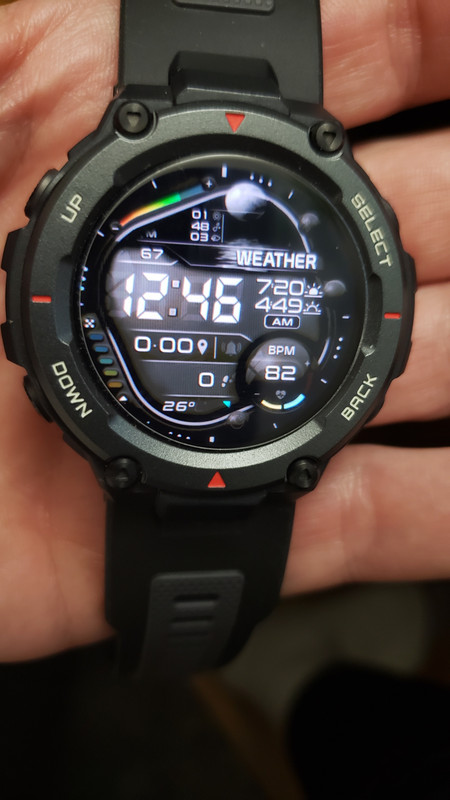
I was able to add both the sunrise and sunset times during the AOD (always on display) and tweaked the UV, Humidity, and Wind display.


Imagem
Responder

Voltar para “Watchfaces tools”

Quem está online

Usuários navegando neste fórum: Nenhum usuário registrado e 1 visitante